Page 82 of 494

Defroster
Check operation by selecting the defrost mode and place
the blower control on high speed. You should be able to
feel the air directed against the windshield.
NOTE:If the defrost feature is not functioning, the
cause should be located and corrected immediately by an
authorized service center. The windshield could fog up
while driving and obscure your visibility.
Periodic Safety Checks You Should Make Outside
The Vehicle
Tires
Examine tires for excessive tread wear or uneven wear
patterns. Check for stones, nails, glass, or other objects
lodged in the tread. Inspect tread and sidewall for cuts or
cracks. Check wheel nuts for tightness, and tires (includ-
ing spare) for proper pressure.
Lights
Have someone observe the operation of exterior lights
while you work the controls. Check turn signal and high
beam indicator lights on the instrument panel.
Fluid Leaks
Check area under vehicle after overnight parking for fuel,
engine coolant, oil, or other fluid leaks. In addition, if
gasoline fumes are detected or fuel, power steering fluid,
transmission fluid, or brake fluid leaks are suspected, the
cause should be located and corrected immediately.
80 THINGS TO KNOW BEFORE STARTING YOUR VEHICLE
Page 84 of 494

▫VoiceTraining........................120
�Seats................................121
▫Manual Front Seat Adjustments...........121
▫Power Seats — If Equipped..............124
▫Adjustable Head Restraints..............125
▫Heated Seats — If Equipped.............126
▫Fold Flat Front Passenger Seat............127
▫Folding Rear Seat.....................128
▫Folding Rear Seat Center Armrest..........129
�To Open And Close The Hood.............130
�Lights...............................131
▫Map/Reading/Interior Lights............131▫Headlights, Parking Lights, Instrument Panel
Lights .............................132
▫Automatic Headlight System — If Equipped . . 133
▫Headlight Time Delay..................133
▫Passing Light / Flash To Pass.............134
▫Daytime Running Lights (DRL) —
If Equipped.........................134
▫Lights On Reminder...................134
▫Fog Lights — If Equipped...............134
▫Turn Signals.........................135
▫Highbeam/Lowbeam Select Switch.........136
�Windshield Wipers And Washers............136
▫Intermittent Wiper System...............138
▫Mist Feature.........................139
82 UNDERSTANDING THE FEATURES OF YOUR VEHICLE
Page 85 of 494
▫Headlights With Wipers (Available With Auto
Headlights Only).....................139
▫Windshield Washers...................140
▫Adding Washer Fluid..................140
�Tilt/Telescoping Steering Column...........140
�Electronic Speed Control — If Equipped......141
▫Electronic Speed Control Operation........142
▫To Activate..........................142
▫To Set At The Desired Speed.............143
▫To Deactivate........................143
▫To Resume Speed.....................143
▫To Vary The Speed Setting...............143
▫To Accelerate For Passing...............144�Garage Door Opener — If Equipped.........144
▫Programming HomeLink�...............146
▫Gate Operator/Canadian Programming.....148
▫Using HomeLink�.....................149
▫Reprogramming A Single HomeLink�
Button.............................149
▫Security............................150
▫Troubleshooting Tips...................150
▫General Information...................150
�Power Sunroof — If Equipped.............151
▫Opening Sunroof - Manual..............152
▫Opening Sunroof - Express..............152
▫Closing Sunroof - Manual...............152
UNDERSTANDING THE FEATURES OF YOUR VEHICLE 83
3
Page 91 of 494

ILLUMINATED VANITY MIRRORS — IF EQUIPPED
An illuminated vanity mirror is on each sun visor. To use
the mirror, rotate the sun visor down and swing the
mirror cover upward. The lights will turn on automati-
cally. Closing the mirror cover turns off the lights.
HANDS-FREE COMMUNICATION (UConnect�)—
IF EQUIPPED
NOTE: The sales code RER radio contains an inte-
grated Hands-Free Communication (UConnect�) sys-
tem. Refer to your “Navigation User’s Manual” for
UConnect�system operating instructions for this radio.
UConnect�is a voice-activated, hands-free, in-vehicle
communications system. UConnect�allows you to dial a
phone number with your cellular phone using simple
voice commands (e.g.,�Call”�“Mike”�”Work�or�Dial”
�“248-555-1212�). Your cellular phone’s audio is trans-
mitted through your vehicle’s audio system; the system
will automatically mute your radio when using the
UConnect�system.
NOTE:The UConnect�system requires a cellular phone
equipped with the Bluetooth��Hands-Free Profile,�Ve r -
sion 0.96 or higher. See the UConnect�website for
supported phones.
Illuminated Vanity Mirror
UNDERSTANDING THE FEATURES OF YOUR VEHICLE 89
3
Page 128 of 494
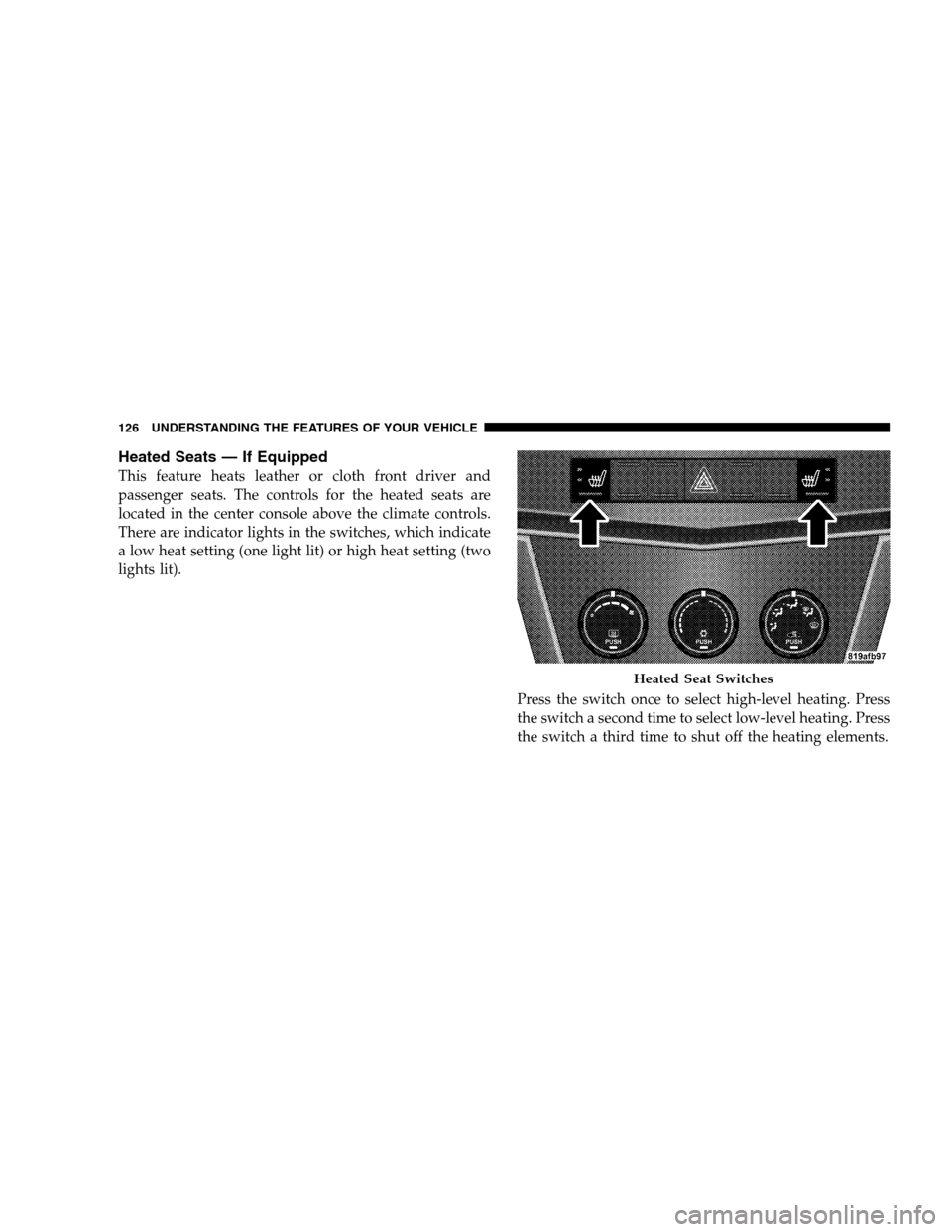
Heated Seats — If Equipped
This feature heats leather or cloth front driver and
passenger seats. The controls for the heated seats are
located in the center console above the climate controls.
There are indicator lights in the switches, which indicate
a low heat setting (one light lit) or high heat setting (two
lights lit).
Press the switch once to select high-level heating. Press
the switch a second time to select low-level heating. Press
the switch a third time to shut off the heating elements.
Heated Seat Switches
126 UNDERSTANDING THE FEATURES OF YOUR VEHICLE
Page 133 of 494
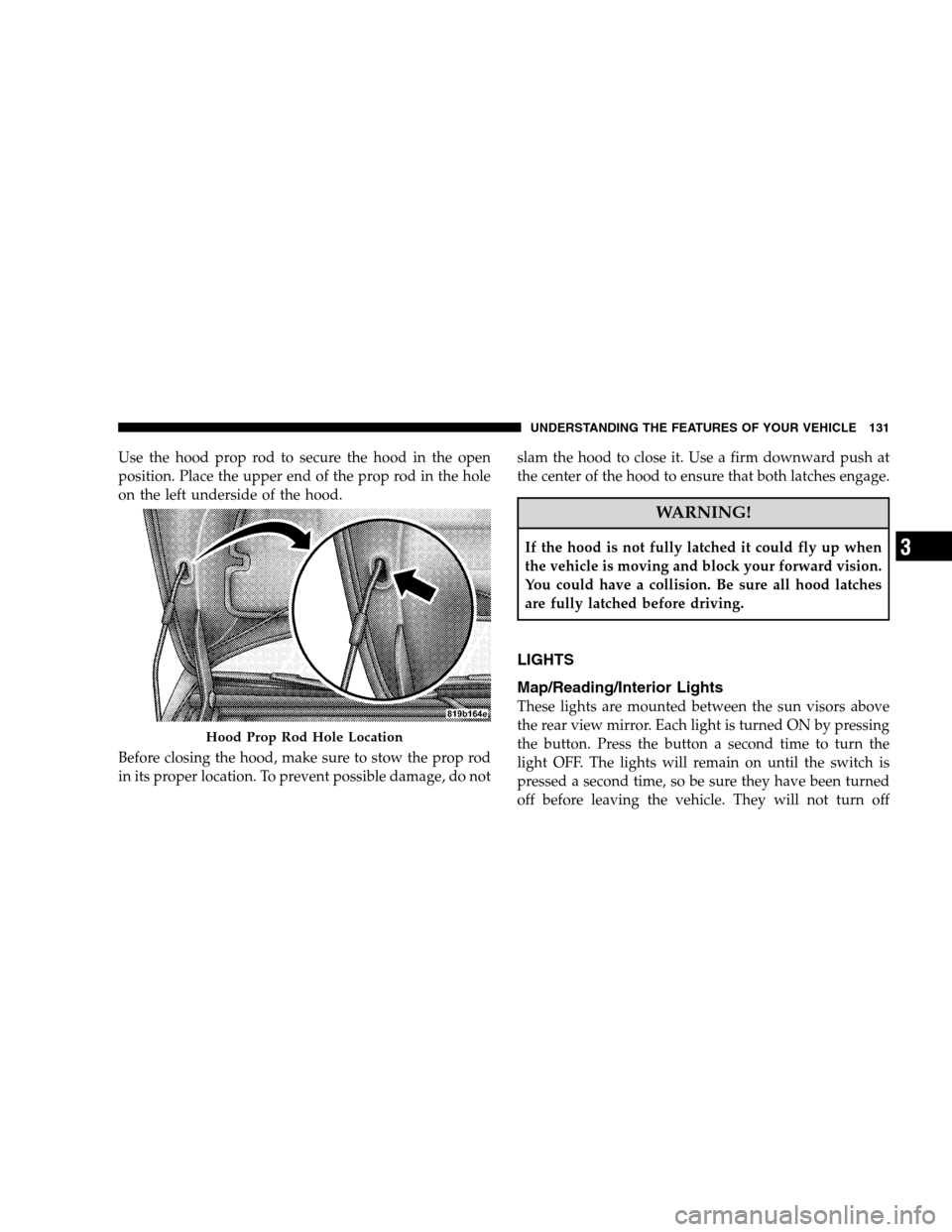
Use the hood prop rod to secure the hood in the open
position. Place the upper end of the prop rod in the hole
on the left underside of the hood.
Before closing the hood, make sure to stow the prop rod
in its proper location. To prevent possible damage, do notslam the hood to close it. Use a firm downward push at
the center of the hood to ensure that both latches engage.
WARNING!
If the hood is not fully latched it could fly up when
the vehicle is moving and block your forward vision.
You could have a collision. Be sure all hood latches
are fully latched before driving.
LIGHTS
Map/Reading/Interior Lights
These lights are mounted between the sun visors above
the rear view mirror. Each light is turned ON by pressing
the button. Press the button a second time to turn the
light OFF. The lights will remain on until the switch is
pressed a second time, so be sure they have been turned
off before leaving the vehicle. They will not turn off
Hood Prop Rod Hole Location
UNDERSTANDING THE FEATURES OF YOUR VEHICLE 131
3
Page 134 of 494
automatically. Interior lighting also comes on when a
door is opened or the dimmer control is turned fully
upward, past the second detent.
There is a second light located midway back in the
headliner.
To protect the battery, the interior lights will turn off
automatically 10 minutes after the ignition switch is
moved to the LOCK position. This will occur if the
interior lights were switched on manually or are on
because a door is open. This includes the glove box light,
but not the trunk light. To restore interior light operation,
either turn the ignition switch ON or cycle the light
switch.Headlights, Parking Lights, Instrument Panel
Lights
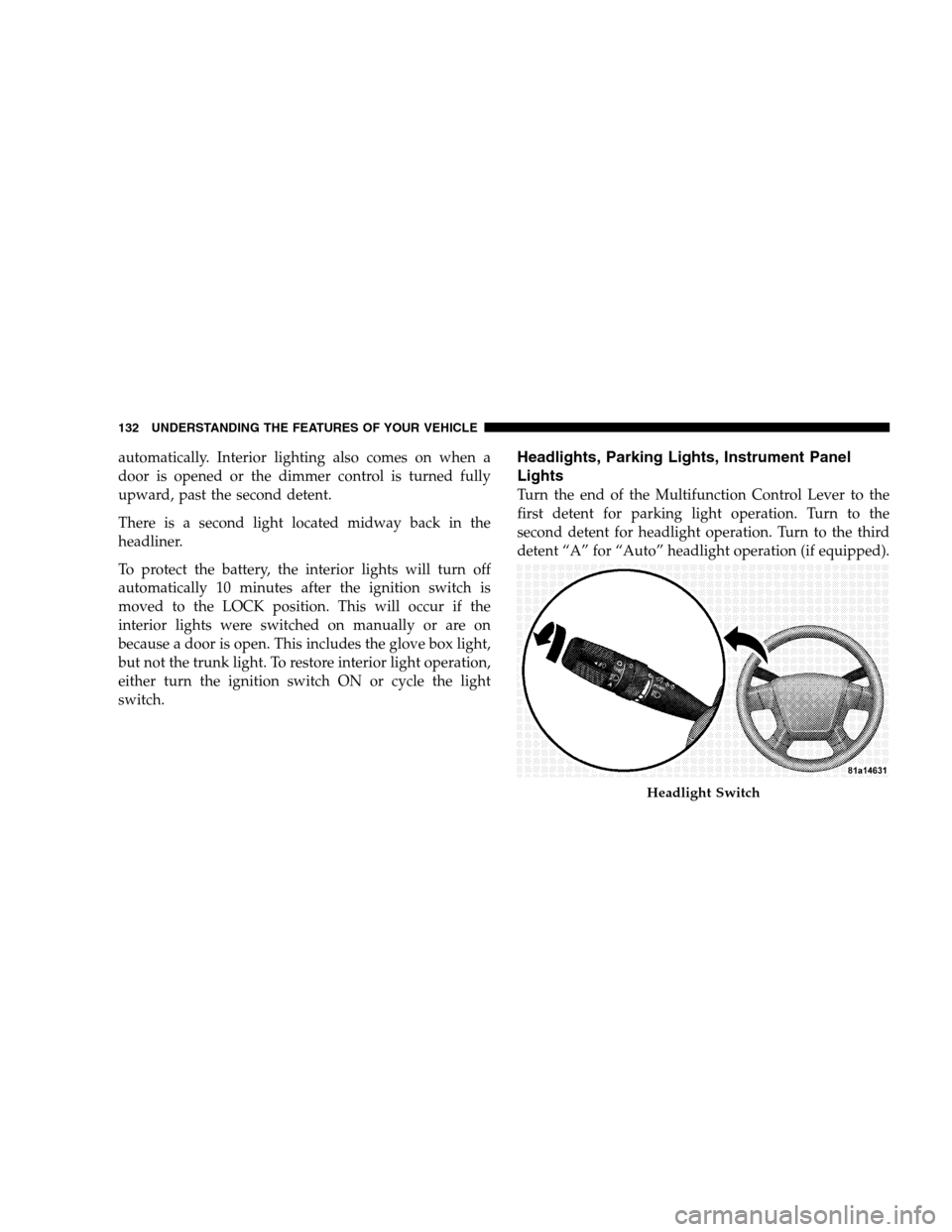
Turn the end of the Multifunction Control Lever to the
first detent for parking light operation. Turn to the
second detent for headlight operation. Turn to the third
detent “A” for “Auto” headlight operation (if equipped).
Headlight Switch
132 UNDERSTANDING THE FEATURES OF YOUR VEHICLE
Page 135 of 494
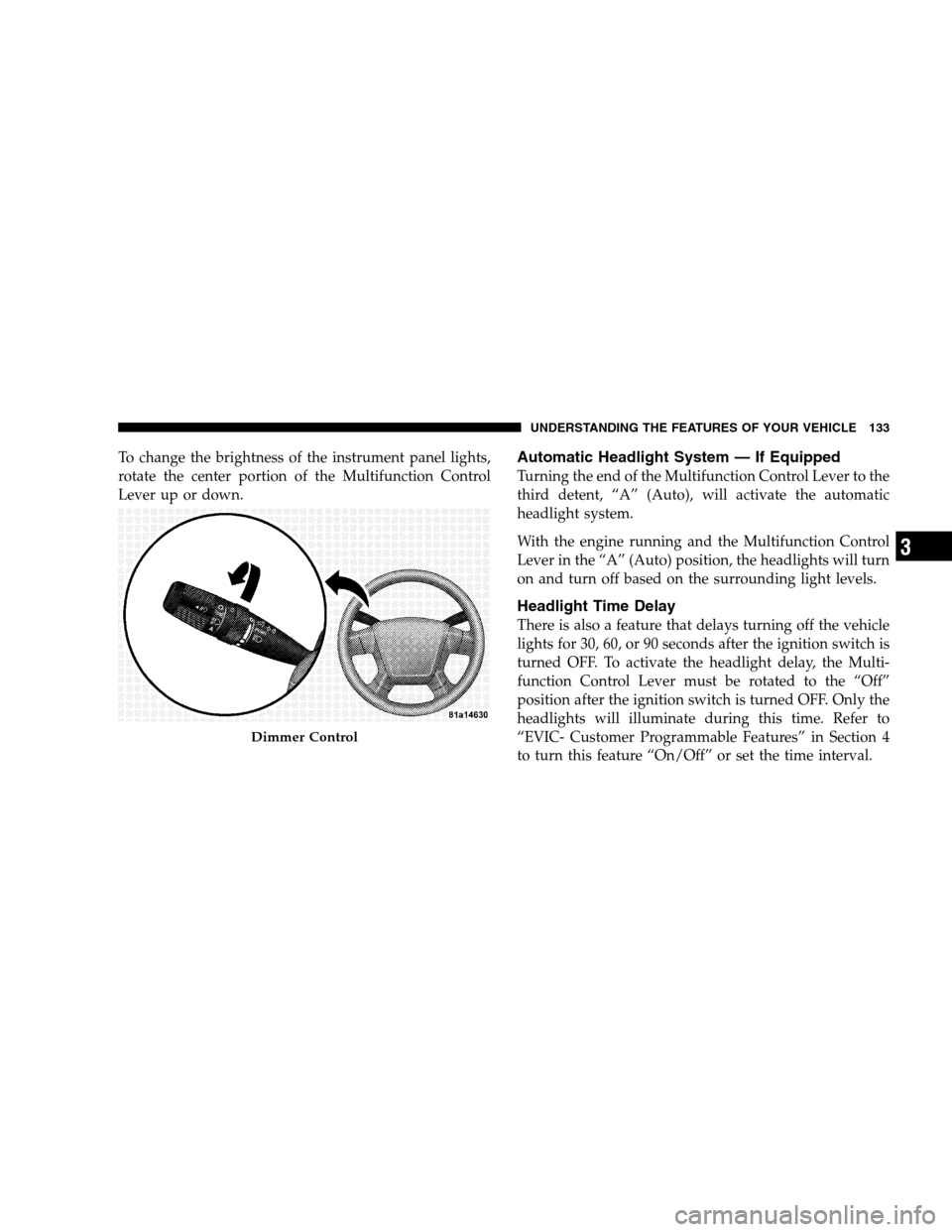
To change the brightness of the instrument panel lights,
rotate the center portion of the Multifunction Control
Lever up or down.Automatic Headlight System — If Equipped
Turning the end of the Multifunction Control Lever to the
third detent, “A” (Auto), will activate the automatic
headlight system.
With the engine running and the Multifunction Control
Lever in the “A” (Auto) position, the headlights will turn
on and turn off based on the surrounding light levels.
Headlight Time Delay
There is also a feature that delays turning off the vehicle
lights for 30, 60, or 90 seconds after the ignition switch is
turned OFF. To activate the headlight delay, the Multi-
function Control Lever must be rotated to the “Off”
position after the ignition switch is turned OFF. Only the
headlights will illuminate during this time. Refer to
“EVIC- Customer Programmable Features” in Section 4
to turn this feature “On/Off” or set the time interval.
Dimmer Control
UNDERSTANDING THE FEATURES OF YOUR VEHICLE 133
3