Page 102 of 457

emergency situations when the cell phone has network
coverage and stays paired to the UConnectŸ system.
Towing Assistance
If you need towing assistance,
²Press the 'Phone' button to begin.
²After the9Ready9prompt and the following beep, say
9Towing Assistance.9
NOTE:The Towing Assistance number dialed is based
on the Country where the vehicle is purchased (1-800-
528-2069 for USA, 1-877-213-4525 for Canada, 55-14-3454
for Mexico city and 1-800-712-3040 for outside Mexico
city in Mexico).
Please refer to the 24-Hour ªTowing Assistanceº cover-
age details in the Warranty information booklet and on
the 24±Hour Towing Assistance Card.
Paging
To learn how to page, refer to9Working with Automated
Systems.9Paging works properly except for pagers of
certain companies which time-out a little too soon to
work properly with the UConnectŸ system.
Voice Mail Calling
To learn how to access your voice mail, refer to9Working
with Automated Systems.9
Working with Automated Systems
This method is designed to be used in instances where
one generally has to press numbers on the cellular phone
keypad while navigating through an automated tele-
phone system.
You can use your UConnectŸ system to access a voice-
mail system or an automated service, such as, paging
service or automated customer service. Some services
require immediate response selection, in some instances,
that may be too quick for use of UConnectŸ system.
102 UNDERSTANDING THE FEATURES OF YOUR VEHICLE
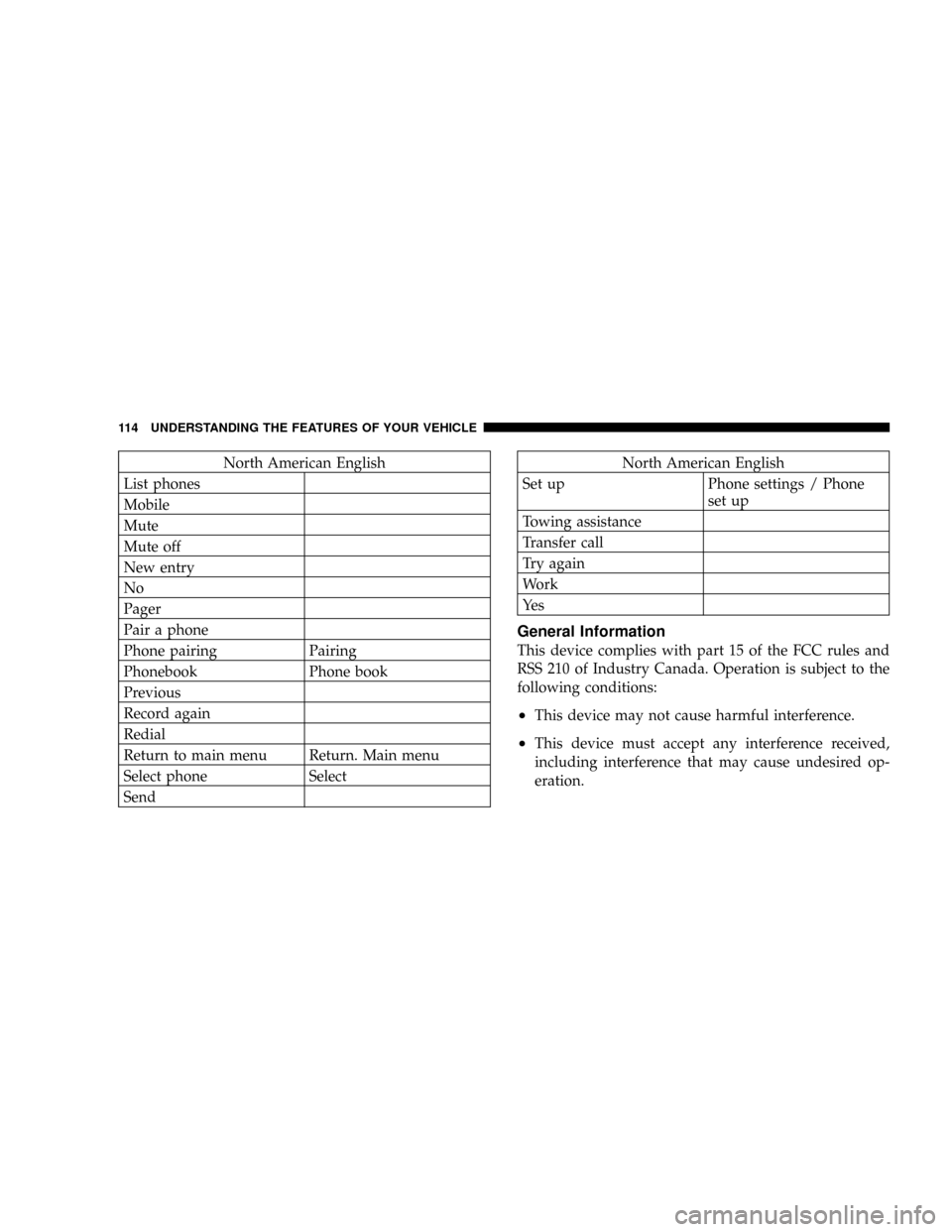
Page 114 of 457
North American English
List phones
Mobile
Mute
Mute off
New entry
No
Pager
Pair a phone
Phone pairing Pairing
Phonebook Phone book
Previous
Record again
Redial
Return to main menu Return. Main menu
Select phone Select
SendNorth American English
Set up Phone settings / Phone
set up
Towing assistance
Transfer call
Try again
Work
Ye s
General Information
This device complies with part 15 of the FCC rules and
RSS 210 of Industry Canada. Operation is subject to the
following conditions:
²This device may not cause harmful interference.
²This device must accept any interference received,
including interference that may cause undesired op-
eration.
114 UNDERSTANDING THE FEATURES OF YOUR VEHICLE
Page 139 of 457

NOTE:The fog lights will only operate with the head-
lights on low beam. Selecting high beam headlights will
turn off the fog lights.
Turn Signals
Move the lever up or down to signal a right-hand or
left-hand turn.
The arrow on either side of the instrument cluster flashes
to indicate the direction of the turn, and proper operation
of the front and rear turn signal lights. If an indicator fails
to light when the lever is moved, it would suggest that
the switch or indicator lamp is defective.
If a defective bulb or wiring circuit is detected for the
turn signal system, the arrow indicators will flash at a
faster rate.
You can signal a lane change by moving the lever
partially up or down.NOTE:If a turn signal has been left on for at least a mile
duration, a continuous chime will sound.
Turn Signal Lane Change Auto-Mode
Momentarily engage the multifunction control lever par-
tially up or down to activate the lane change feature
without holding the lever. The signal will flash 3 times,
and automatically turn off.
Highbeam/Lowbeam Select Switch
Pull the Multi-Function Lever towards you to switch the
headlights to HIGH beam. Pull the Lever a second time
to switch the headlights to LOW beam.
Passing Light
You can signal another vehicle with your headlights by
lightly pulling the Multi-Function Lever toward you.
This will cause the headlights to turn on at high beam
and remain on until the lever is released.
UNDERSTANDING THE FEATURES OF YOUR VEHICLE 139
3
Page 140 of 457
WINDSHIELD WIPERS AND WASHERS
The wipers and washers are operated by a switch
on the control lever. The lever is located on the
right side of the steering column. Rotate the end
of the control lever to select the desired wiper speed.
Windshield Washers
To use the front washer, pull the lever toward you and
hold while spray is desired. If the lever is pulled while in
the delay range, the wiper will operate for two wipe
cycles after the lever is released, and then resume the
intermittent interval previously selected.
If the lever is pulled while in the OFF position, the wipers
will operate for two wipe cycles, then turn OFF.
Mist Feature
Push down on the wiper lever to activate a single wipe to
clear off road mist or spray from a passing vehicle. As
long as the lever is held down, the wipers will continue
to operate.
Windshield Wiper/Washer Control
140 UNDERSTANDING THE FEATURES OF YOUR VEHICLE
Page 143 of 457
TILT STEERING COLUMN
To tilt the column, pull the lever, located behind the turn
signal control, toward you and move the steering wheel
up or down, as desired. Release the lever to lock the
steering wheel firmly in place.WARNING!
Tilting the steering column while the vehicle is
moving is dangerous. Without a stable steering col-
umn, you could lose control of the vehicle and have
an accident. Adjust the column only while the ve-
hicle is stopped. Be sure it is locked before driving.
Tilt Steering Column Control
UNDERSTANDING THE FEATURES OF YOUR VEHICLE 143
3
Page 159 of 457

NOTE:
²The ªESP Indicator Lightº and the ªESP/BAS Warning
Lightº come on momentarily each time the ignition
switch is turned ON.
²Each time the ignition is turned ON, the ESP System
will be ON even if it was turned off previously.
²The ESP Control System will make buzzing or clicking
sounds when it is active. This is normal; the sounds
will stop when ESP becomes inactive following the
maneuver that caused the ESP activation.
ADJUSTABLE PEDALS Ð IF EQUIPPED
This feature allows both the brake and accelerator pedals
to move toward or away from the driver to provide
improved position with the steering wheel. The adjust-
able pedal system is designed to allow a greater range of
driver comfort for steering wheel tilt and seat position.
The switch is located on the drivers door trim panel next
to the power seat switches.Press the switch forward to move the pedals forward
(toward the front of the vehicle).
Press the switch rearward to move the pedals rearward
(toward the driver).
²The pedals can be adjusted with the ignition OFF.
ADJUSTABLE PEDAL SWITCH
UNDERSTANDING THE FEATURES OF YOUR VEHICLE 159
3
Page 164 of 457

WARNING!
²Drivers must be careful when backing up even when
using the Rear Park Sense System. Always check
carefully behind your vehicle, and be sure to check
for pedestrians, animals, other vehicles, obstructions,
or blind spots before backing up. You are respon-
sible for the safety of your surroundings and must
continue to pay attention while backing up. Failure
to do so can result in serious injury or death.
²Before using the Rear Park Sense System, it is
strongly recommended that the ball mount and hitch
ball assembly be disconnected from the vehicle
when the vehicle is not used for towing. Failure to do
so can result in injury or damage to vehicles or
obstacles because the hitch ball will be much closer
to the obstacle than the rear fascia when the warning
display turns the red LEDs ON. Also, the sensors
could detect the ball mount and hitch ball assembly,
depending on its size and shape, giving a false
indication that an obstacle is behind the vehicle.
CAUTION!
²To avoid vehicle damage the Rear Park Sense
System should only be used as a parking aid and
is unable to recognize every obstacle, including
small objects. Parking curbs might be temporarily
detected or not detected at all. Obstacles located
above or below the sensors will not be detected
when they are in close proximity to the rear of the
vehicle.
²To avoid vehicle damage the vehicle must be
driven slowly when using the Rear Park Sense
System to be able to stop in time when an obstacle
is detected. It is recommended that the driver look
over his/her shoulder when using the Rear Park
Sense System.
164 UNDERSTANDING THE FEATURES OF YOUR VEHICLE
Page 176 of 457

Retractable Cargo Area Cover Ð If Equipped
To cover the cargo area:
1. Fold down the third row seatbacks.
2. Unfold the cargo cover extensions and lock into place.
3. Insert the pins on the ends of the cover into the slots
located on the trim panel behind the second row seat-
backs.
4. Grasp the center portion of the cover flap. Pull it over
the cargo area.
5. Insert the pins on the ends of the cover flap into the
slots on the rear trim panel.
6. The liftgate may be opened or closed with the cargo
cover in place.WARNING!
In an accident a cargo cover loose in the vehicle could
cause injury. It could fly around in a sudden stop and
strike someone in the vehicle. Do not store the cargo
cover on the cargo floor or in the passenger compart-
ment. Remove the cover from the vehicle when taken
from its mounting. Do not store in the vehicle.
Stowed Position
1. Fold down the third row seatbacks.
2. Fold the cargo cover extensions to their stowed posi-
tion and lock into place.
3. Insert the pins on the ends of the cover into the slots
located on the trim panel behind the third row seatbacks.
176 UNDERSTANDING THE FEATURES OF YOUR VEHICLE