2008 CHRYSLER 300 air condition
[x] Cancel search: air conditionPage 282 of 519
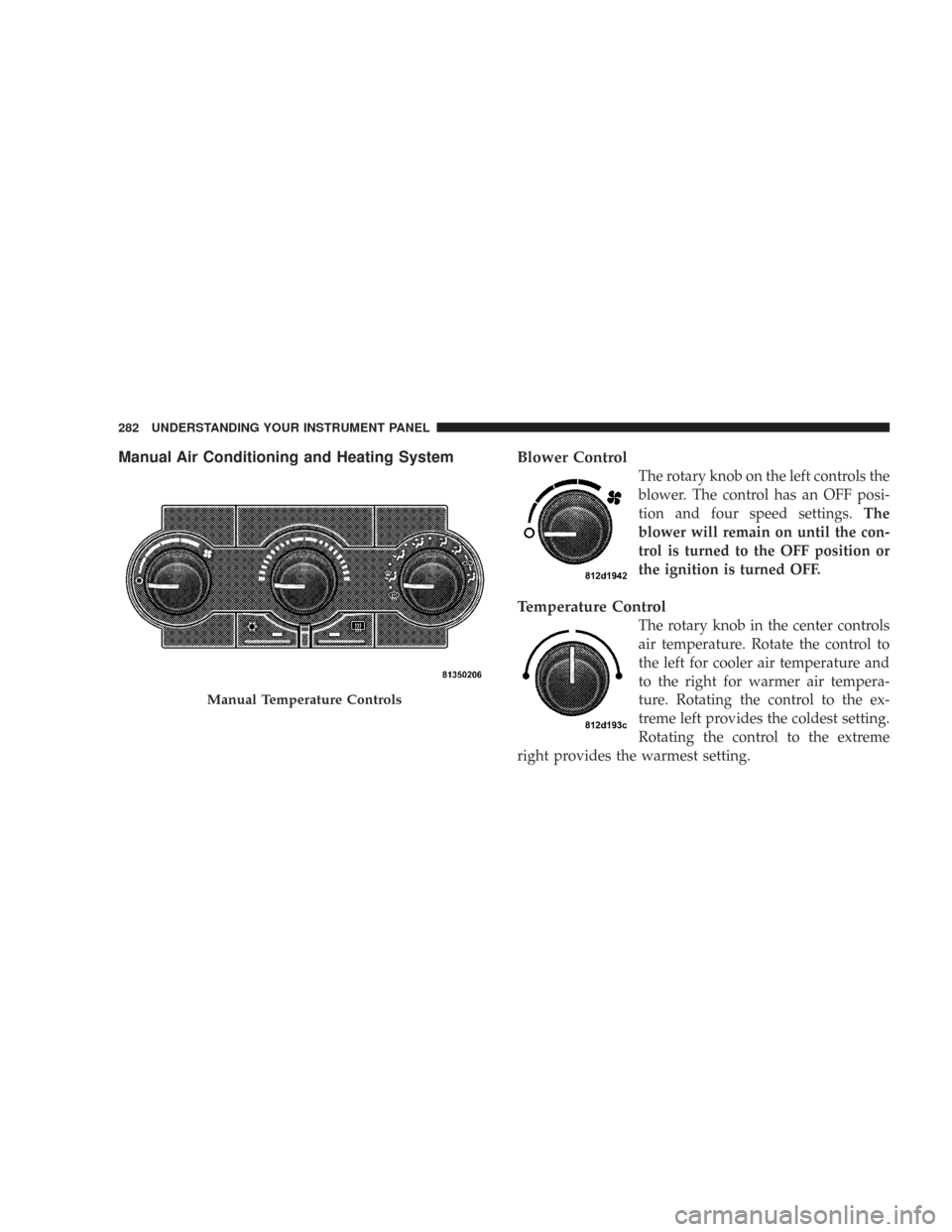
Manual Air Conditioning and Heating SystemBlower Control
The rotary knob on the left controls the
blower. The control has an OFF posi-
tion and four speed settings.The
blower will remain on until the con-
trol is turned to the OFF position or
the ignition is turned OFF.
Temperature Control
The rotary knob in the center controls
air temperature. Rotate the control to
the left for cooler air temperature and
to the right for warmer air tempera-
ture. Rotating the control to the ex-
treme left provides the coldest setting.
Rotating the control to the extreme
right provides the warmest setting.
Manual Temperature Controls
282 UNDERSTANDING YOUR INSTRUMENT PANEL
Page 284 of 519

•Recirculation Control
The mode control knob also controls the
recirculation feature. You can choose Bi-
Level Recirculation air outlets, Panel Recir-
culation air outlets, or a mix or both while in
this mode. Normally, air enters from outside the
vehicle. However, when in Recirculation mode air
inside the vehicle is re-used. Use this mode to cool the
inside of the vehicle rapidly. The Recirculation mode
can also be used to temporarily block out outside
odors, smoke, and dust.
Air Conditioning Control
Press this button to turn on and turn off the air
conditioning. When the air conditioning is turned
on, cool dehumidified air will flow through the
outlets selected with the mode control. Press this button
a second time to turn off the air conditioning. An LED in
the button will illuminate when compressor operation is
selected.
Automatic Temperature Control — If Equipped
Automatic Operation
The Infrared Dual-Zone Climate Control System auto-
matically maintains the climate in the cabin of the vehicle
at the comfort levels desired by the driver and passenger.
To accomplish this, the system gathers information from
Automatic Temperature Controls
284 UNDERSTANDING YOUR INSTRUMENT PANEL
Page 285 of 519
the controls on the climate control, from a dual sun-
sensor located in the top of the instrument panel, from an
infrared sensor located in the face of the climate control,
and from various sensors located throughout the vehicle.
The controls on the climate control provide the system
with operator input. The dual sun-sensor monitors sun
load coming through the windshield. The infrared sensor
independently measures the surface temperature of the
driver and passenger. Other sensors take account of
vehicle-speed, A/C pressure, outside temperature, and
engine cooling temperature. Using all of these inputs, the
system automatically adjusts airflow temperature, air-
flow distribution, airflow volume, and the amount of
outside air recirculation. This maintains a comfortable
temperature even under changing conditions.
Operation of the system is quite simple. Begin by turning
the Mode Control knob (on the right) to AUTO, and place
the Blower Control knob (on the left) to either LO AUTOor HI AUTO. The LO AUTO position should be used for
front seat occupants only. The HI AUTO position should
be used when more airflow is desired, or when rear seat
occupants are present. Then, dial in the temperature you
would like the system to maintain by rotating the driver
or passenger Temperature Control knob. Once the com-
fort level is selected, the system will maintain that level
automatically using the heating system. Should the de-
sired comfort level require air conditioning, the system
will automatically make the adjustment.
You will experience the greatest efficiency by simply
allowing the system to function automatically. Selecting
the OFF position on the fan control stops the system
completely and closes the outside air intake.
72°F (22°C) is the recommended setting for maximum
comfort for the average person; however, this may vary.
NOTE:The temperature setting can be adjusted at any
time without affecting automatic operation.
UNDERSTANDING YOUR INSTRUMENT PANEL 285
4
Page 286 of 519

Air conditioning in this system is automatic.
Pressing the Air Conditioning Control button
while in AUTO mode will cause the LED in the
control button to flash three times and then turn off. This
indicates that the system is in AUTO mode and request-
ing the air conditioning is not necessary.
The system will automatically control recircu-
lation. However, pressing the Recirculation
Control button will temporarily put the system
in recirculation mode (ten minutes). This can
be used when outside conditions such as smoke, odors,
dust, or high humidity are present. Activating recircula-
tion will cause the LED in the control button to illumi-
nate. After ten minutes, the system will return to normal
AUTO mode function and the LED will turn off.NOTE:
•The surface of the climate control panel and the top
center of the instrument panel should be kept free of
debris due to the location of the climate control
sensors. Mud on the windshield may also cause poor
operation of this system.
•Extended use of recirculation may cause the windows
to fog. If the interior of the windows begins to fog,
press the Recirculation button to return to outside air.
Some temp/humidity conditions will cause captured
interior air to condense on windows and hamper
visibility. For this reason, the system will not allow
Recirculation to be selected while in defrost or
defrost/floor mode. Attempting to use the recircula-
tion while in these modes will cause the LED in the
control button to blink and then turn off.
286 UNDERSTANDING YOUR INSTRUMENT PANEL
Page 289 of 519
The operator can override the AUTO mode setting to
change airflow distribution by rotating the Mode Control
knob (on the right) to one of the following positions.
•Defrost
Air is directed to the windshield through the
outlets at the base of the windshield. Air is also
directed to the front door windows through the side
window demister grilles.
•Defrost/Floor
Air flows through the front and rear floor outlets
and the outlets at the base of the windshield. Air
is also directed to the front door windows
through the side window demister grilles.
•Floor
Air flows through the floor outlets located under
the instrument panel and into the rear seating
area through vents under the front seats.
•Bi-Level
Air flows through the outlets located in the
instrument panel and through the outlets located
on the floor. Air flows through the registers in the back
of the center console to the rear seat passengers. These
registers can be closed to block airflow.
•Panel
Air flows through the outlets located in the in-
strument panel. Air flows through the registers in
the back of the center console to the rear seat passen-
gers. These registers can be closed to block airflow.
•Air Conditioning Control
Press this button to turn on the air conditioning
during manual operation only. When the air
conditioning is turned on, cool dehumidified
air will flow through the outlets selected with the
Mode control dial. Press this button a second time to
UNDERSTANDING YOUR INSTRUMENT PANEL 289
4
Page 290 of 519

turn off the air conditioning. An LED in the button
illuminates when manual compressor operation is
selected.
NOTE:To control the air conditioning manually, the
mode selector must be moved out of the AUTO position.
•Recirculation Control
This button can be used to block out smoke,
odors, dust, high humidity, or if rapid cooling
is desired. The recirculation mode should only
be used temporarily. An LED in the button
illuminates when the recirculation mode is active. You
may use this feature separately.
NOTE:Extended use of recirculation may cause the
windows to fog. If the interior of the windows begins to
fog, press the Recirculation button to return to outside
air. Some temp/humidity conditions will cause capturedinterior air to condense on windows and hamper visibil-
ity. For this reason, the system will not allow Recircula-
tion to be selected while in defrost or defrost/floor mode.
Attempting to use the recirculation while in these modes
will cause the LED in the control button to blink and then
turn off.Operating Tips
NOTE:Refer to the chart at the end of this section for
suggested control settings for various weather condi-
tions.
Summer Operation
The engine cooling system in air-conditioned vehicles
must be protected with a high-quality antifreeze coolant
to provide proper corrosion protection and to protect
against engine overheating. A 50% solution of ethylene
glycol antifreeze coolant in water is recommended. Refer
to “Maintenance Procedures” in Section 7 of this manual
for proper coolant selection.
290 UNDERSTANDING YOUR INSTRUMENT PANEL
Page 326 of 519

WARNING!
•The Anti-Lock Brake System contains sophisticated electronic
equipment that may be susceptible to interference caused by
improperly installed or high output radio transmitting equip-
ment. This interference can cause possible loss of anti-lock
braking capability. Installation of such equipment should be
performed by qualified professionals.
•Pumping of the Anti-Lock Brakes will diminish their effective-
ness and may lead to an accident. Pumping makes the stopping
distance longer. Just press firmly on your brake pedal when you
need to slow down or stop.
•Anti-lock system (ABS) cannot prevent the natural laws of
physics from acting on the vehicle, nor can it increase braking or
steering efficiency beyond that afforded by the condition of the
vehicle brakes and tires or the traction afforded.
•The ABS cannot prevent accidents, including those resulting
from excessive speed in turns, following another vehicle too
closely, or hydroplaning. Only a safe, attentive, and skillful
driver can prevent accidents.
•The capabilities of an ABS equipped vehicle must never be
exploited in a reckless or dangerous manner, which could jeop-
ardize the user’s safety or the safety of others.
All vehicle wheels and tires must be the same size and
type and tires must be properly inflated to produce
accurate signals for the computer.
Anti-Lock Brake Light
The ABS light monitors the Anti-Lock Brake Sys-
tem. The light will come on when the ignition
switch is turned to the ON position and may stay on for
as long as four seconds.
If the ABS light remains on or comes on while driving, it
indicates that the Anti-Lock portion of the brake system
is not functioning and that service is required. However,
the conventional brake system will continue to operate
normally if the BRAKE warning light is not on.
If the ABS light is on, the brake system should be serviced
as soon as possible to restore the benefits of Anti-Lock
brakes. If the ABS light does not come on when the
Ignition switch is turned to the ON position, have the
bulb repaired as soon as possible.
326 STARTING AND OPERATING
Page 346 of 519
check tire pressure. Do not make a visual judgement
when determining proper inflation. Radial tires may look
properly inflated even when they are under inflated.
CAUTION!
After inspecting or adjusting the tire pressure, al-
ways reinstall the valve stem cap (if equipped). This
will prevent moisture and dirt from entering the
valve stem, which could damage the valve stem.
Inflation pressures specified on the placard are always
“cold tire inflation pressure.” Cold tire inflation pressure
is defined as the tire pressure after the vehicle has not
been driven for at least 3 hours, or driven less than 1 mile
(1 km) after a 3 hour period. The cold tire inflation
pressure must not exceed the maximum inflation pres-
sure molded into the tire sidewall.Check tire pressures more often if subject to a wide range
of outdoor temperatures, as tire pressures vary with
temperature changes.
Tire pressures change by approximately 1 psi (7 kPa) per
12 °F (7 °C) of air temperature change. Keep this in mind
when checking tire pressure inside a garage, especially in
the winter.
Example: If garage temperature = 68 °F (20 °C) and the
outside temperature = 32 °F (0 °C) then the cold tire
inflation pressure should be increased by 3 psi (21 kPa),
which equals 1 psi (7 kPa) for every 12 °F (7 °C) for this
outside temperature condition.
Tire pressure may increase from 2 to 6 psi (13 to 40 kPa)
during operation. DO NOT reduce this normal pressure
build up or your tire pressure will be too low.
346 STARTING AND OPERATING