2008 CHEVROLET TRAIL BLAZER horn
[x] Cancel search: hornPage 190 of 472
Unlock Feedback
Press the customization button until UNLOCK
FEEDBACK: LAMPS appears in the display. To select
your preference for the feedback you will receive
when unlocking the vehicle with the Remote Keyless
Entry (RKE) transmitter, press the select button
while UNLOCK FEEDBACK: LAMPS is displayed on the
DIC. Pressing the select button will scroll through the
following settings:
UNLOCK FEEDBACK: LAMPS (default):The parking
lamps will ash each time you press the button with
the unlock symbol on the RKE transmitter.
UNLOCK FEEDBACK: HORN:The horn will chirp the
second time you press the button with the unlock
symbol on the RKE transmitter.
UNLOCK FEEDBACK: BOTH:The parking lamps will
ash each time you press the button with the unlock
symbol on the RKE transmitter and the horn will
chirp the second time you press the unlock button.
UNLOCK FEEDBACK: OFF:There will be no feedback
when unlocking the vehicle.
To select a setting and move on to the next feature,
press the customization button while the desired setting
is displayed on the DIC.
Headlamp Delay
Press the customization button until HEADLAMP
DELAY: 10 SEC appears in the display. To select your
preference for how long the headlamps will stay on
after you turn off the vehicle, press the select button
while HEADLAMP DELAY: 10 SEC is displayed on the
DIC. Pressing the select button will scroll through
the following settings:
HEADLAMP DELAY: 10 SEC (Seconds) (default):
The headlamps will stay on for 10 seconds.
HEADLAMP DELAY: 20 SEC:The headlamps will stay
on for 20 seconds.
HEADLAMP DELAY: 40 SEC:The headlamps will stay
on for 40 seconds.
HEADLAMP DELAY: 1 MIN (Minute):The headlamps
will stay on for 1 minute.
HEADLAMP DELAY: 2 MIN:The headlamps will stay
on for 2 minutes.
HEADLAMP DELAY: 3 MIN:The headlamps will stay
on for 3 minutes.
HEADLAMP DELAY: OFF:The headlamps will not
turn on.
To select a setting and move on to the next feature,
press the customization button while the desired setting
is displayed on the DIC.
3-60
Page 193 of 472
Alarm Warning
Press the customization button until ALARM WARNING:
BOTH appears in the display. To select your preference
for alarm warning, press the select button while
ALARM WARNING: BOTH is displayed on the DIC.
Pressing the select button will scroll through the
following settings:
ALARM WARNING: BOTH (default):The headlamps
will ash and the horn will chirp when the alarm is
active.
ALARM WARNING: HORN:The horn will chirp when
the alarm is active.
ALARM WARNING: LAMPS:The headlamps will ash
when the alarm is active.
ALARM WARNING: OFF:There will be no alarm
warning on activation.
To select a setting and move on to the next feature,
press the customization button while the desired setting
is displayed on the DIC.
SeeContent Theft-Deterrent on page 2-15for more
information.
Language
Press the customization button until LANGUAGE:
ENGLISH appears in the display. To select your
preference for display language, press the select button
while LANGUAGE: ENGLISH is displayed on the
DIC. Pressing the select button will scroll through the
following settings:
ENGLISH (default):All messages will appear in English.
FRANCAIS:All messages will appear in French.
ESPANOL:All messages will appear in Spanish.
To select a setting and move on to the next feature,
press the customization button while the desired setting
is displayed on the DIC.
If you accidentally choose a language that you do not
want or understand, press and hold the customization
button and the trip information button at the same
time. The DIC will begin scrolling through the languages
in their particular language. English will be in English,
Francais will be in French, and Espanol will be in
Spanish. When you see the language that you would
like, release both buttons. The DIC will then display the
information in the language you chose.
You can also scroll through the different languages by
pressing and holding the trip reset stem for four
seconds, as long as you are in the odometer mode.
3-63
Page 257 of 472
Driving Uphill
Once you decide you can safely drive up the hill, you
need to take some special steps.
Use a low gear and get a rm grip on the steering
wheel.
Get a smooth start up the hill and try to maintain
your speed. Do not use more power than you
need, because you do not want the wheels to start
spinning or sliding.
{CAUTION:
Turning or driving across steep hills can be
dangerous. You could lose traction, slide
sideways, and possibly roll over. You could be
seriously injured or killed. When driving up
hills, always try to go straight up.
Try to drive straight up the hill if at all possible. If
the path twists and turns, you might want to nd
another route.
Ease up on your speed as you approach the top of
the hill.
Attach a ag to the vehicle to make you more
visible to approaching traffic on trails or hills.
Sound the horn as you approach the top of the hill
to let opposing traffic know you are there.
Use your headlamps even during the day. They
make your vehicle more visible to oncoming
traffic.
{CAUTION:
Driving to the top (crest) of a hill at full speed
can cause an accident. There could be a
drop-off, embankment, cliff, or even another
vehicle. You could be seriously injured or
killed. As you near the top of a hill, slow down
and stay alert.
There are some things you should do if the vehicle stalls,
or is about to stall, and you cannot make it up the hill:
Push the brake pedal to stop the vehicle and keep it
from rolling backwards. Also, apply the parking
brake.
If the engine is still running, shift the transmission to
REVERSE (R), release the parking brake, and slowly
back down the hill in REVERSE (R).
4-19
Page 369 of 472
TPMS Sensor Matching Process
Each TPMS sensor has a unique identication code.
Any time you rotate your vehicle’s tires or replace one or
more of the TPMS sensors, the identication codes
will need to be matched to the new tire/wheel position.
The sensors are matched to the tire/wheel positions
in the following order: driver side front tire, passenger
side front tire, passenger side rear tire, and driver
side rear tire using a TPMS diagnostic tool. See your
dealer/retailer for service.
The TPMS sensors can also be matched to each
tire/wheel position by increasing or decreasing the tire’s
air pressure. If increasing the tire’s air pressure, do
not exceed the maximum ination pressure indicated on
the tire’s sidewall.
To decrease air-pressure out of a tire you can use the
pointed end of the valve cap, a pencil-style air pressure
gage, or a key.
You have two minutes to match the rst tire/wheel
position, and ve minutes overall to match all four
tire/wheel positions. If it takes longer than two minutes, to
match the rst tire and wheel, or more than ve minutes
to match all four tire and wheel positions the matching
process stops and you need to start over.The TPMS sensor matching process is outlined below:
1. Set the parking brake.
2. Turn the ignition switch to ON/RUN with the
engine off.
3. Turn the headlamp control from off to parking lamps
four times within three seconds. A double horn chirp
will sound and the TPMS low tire warning light will
begin to ash. The double horn chirp and ashing
TPMS warning light indicate that the TPMS matching
process has started. The TPMS warning light
should continue ashing throughout the matching
procedure.
4. Start with the driver side front tire.
5. Remove the valve cap from the valve cap stem.
Activate the TPMS sensor by increasing or
decreasing the tire’s air pressure for 10 seconds,
then stop and listen for a single horn chirp. The
single horn chirp should sound within 15 seconds,
conrming that the sensor identication code has
been matched to this tire and wheel position. If you
do not hear the conrming single horn chirp, you will
need to start over with step number one.
5-71
Page 370 of 472
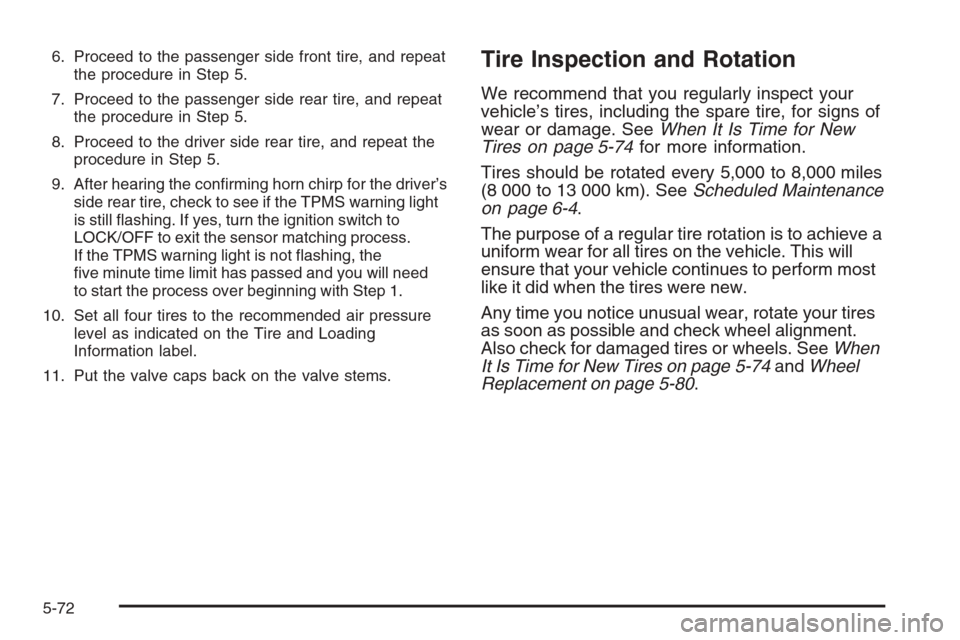
6. Proceed to the passenger side front tire, and repeat
the procedure in Step 5.
7. Proceed to the passenger side rear tire, and repeat
the procedure in Step 5.
8. Proceed to the driver side rear tire, and repeat the
procedure in Step 5.
9. After hearing the conrming horn chirp for the driver’s
side rear tire, check to see if the TPMS warning light
is still ashing. If yes, turn the ignition switch to
LOCK/OFF to exit the sensor matching process.
If the TPMS warning light is not ashing, the
ve minute time limit has passed and you will need
to start the process over beginning with Step 1.
10. Set all four tires to the recommended air pressure
level as indicated on the Tire and Loading
Information label.
11. Put the valve caps back on the valve stems.Tire Inspection and Rotation
We recommend that you regularly inspect your
vehicle’s tires, including the spare tire, for signs of
wear or damage. SeeWhen It Is Time for New
Tires on page 5-74for more information.
Tires should be rotated every 5,000 to 8,000 miles
(8 000 to 13 000 km). SeeScheduled Maintenance
on page 6-4.
The purpose of a regular tire rotation is to achieve a
uniform wear for all tires on the vehicle. This will
ensure that your vehicle continues to perform most
like it did when the tires were new.
Any time you notice unusual wear, rotate your tires
as soon as possible and check wheel alignment.
Also check for damaged tires or wheels. SeeWhen
It Is Time for New Tires on page 5-74andWheel
Replacement on page 5-80.
5-72
Page 411 of 472
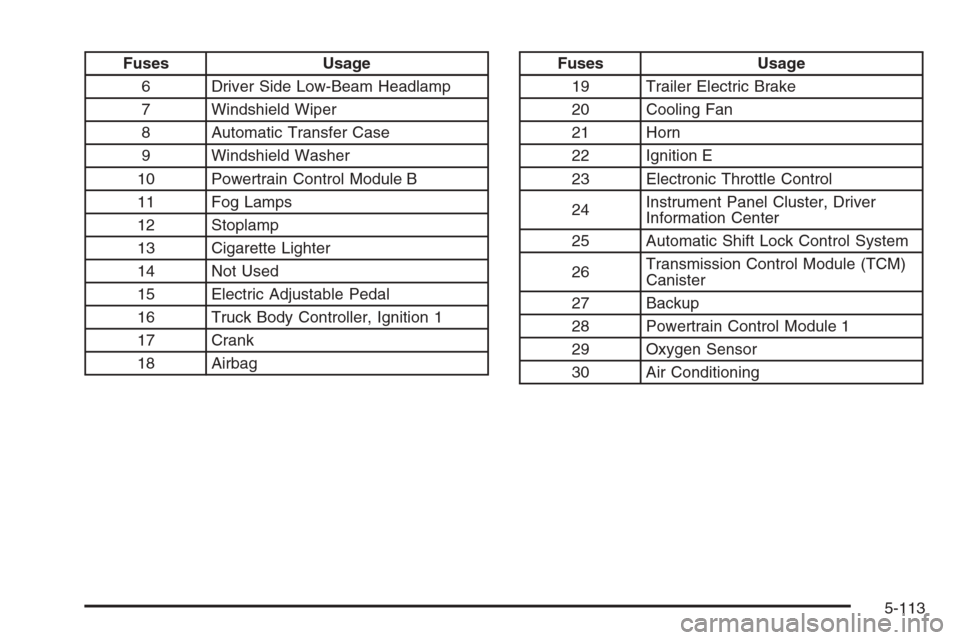
Fuses Usage
6 Driver Side Low-Beam Headlamp
7 Windshield Wiper
8 Automatic Transfer Case
9 Windshield Washer
10 Powertrain Control Module B
11 Fog Lamps
12 Stoplamp
13 Cigarette Lighter
14 Not Used
15 Electric Adjustable Pedal
16 Truck Body Controller, Ignition 1
17 Crank
18 AirbagFuses Usage
19 Trailer Electric Brake
20 Cooling Fan
21 Horn
22 Ignition E
23 Electronic Throttle Control
24Instrument Panel Cluster, Driver
Information Center
25 Automatic Shift Lock Control System
26Transmission Control Module (TCM)
Canister
27 Backup
28 Powertrain Control Module 1
29 Oxygen Sensor
30 Air Conditioning
5-113
Page 412 of 472
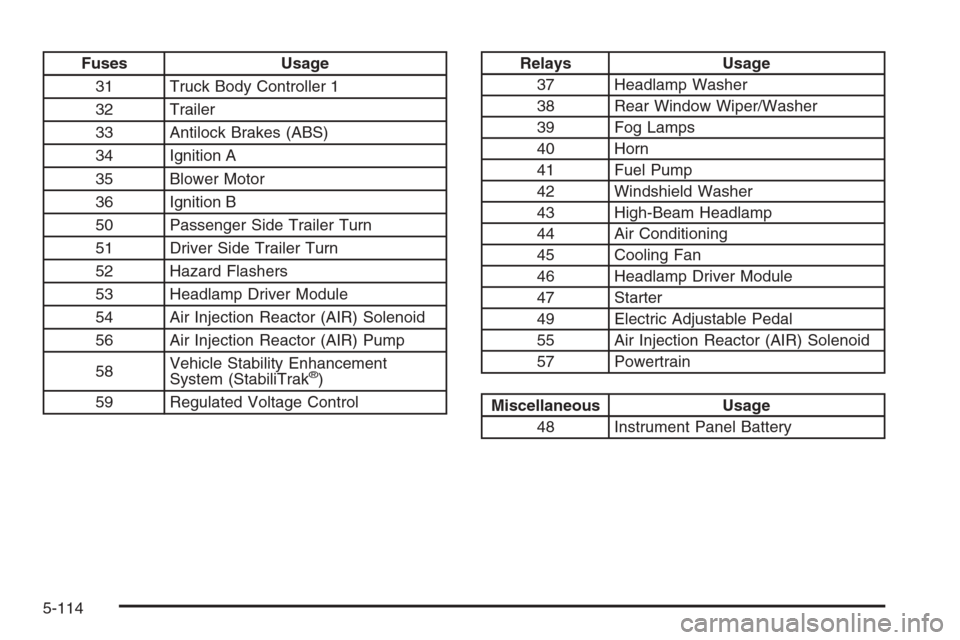
Fuses Usage
31 Truck Body Controller 1
32 Trailer
33 Antilock Brakes (ABS)
34 Ignition A
35 Blower Motor
36 Ignition B
50 Passenger Side Trailer Turn
51 Driver Side Trailer Turn
52 Hazard Flashers
53 Headlamp Driver Module
54 Air Injection Reactor (AIR) Solenoid
56 Air Injection Reactor (AIR) Pump
58Vehicle Stability Enhancement
System (StabiliTrak
®)
59 Regulated Voltage Control
Relays Usage
37 Headlamp Washer
38 Rear Window Wiper/Washer
39 Fog Lamps
40 Horn
41 Fuel Pump
42 Windshield Washer
43 High-Beam Headlamp
44 Air Conditioning
45 Cooling Fan
46 Headlamp Driver Module
47 Starter
49 Electric Adjustable Pedal
55 Air Injection Reactor (AIR) Solenoid
57 Powertrain
Miscellaneous Usage
48 Instrument Panel Battery
5-114
Page 414 of 472
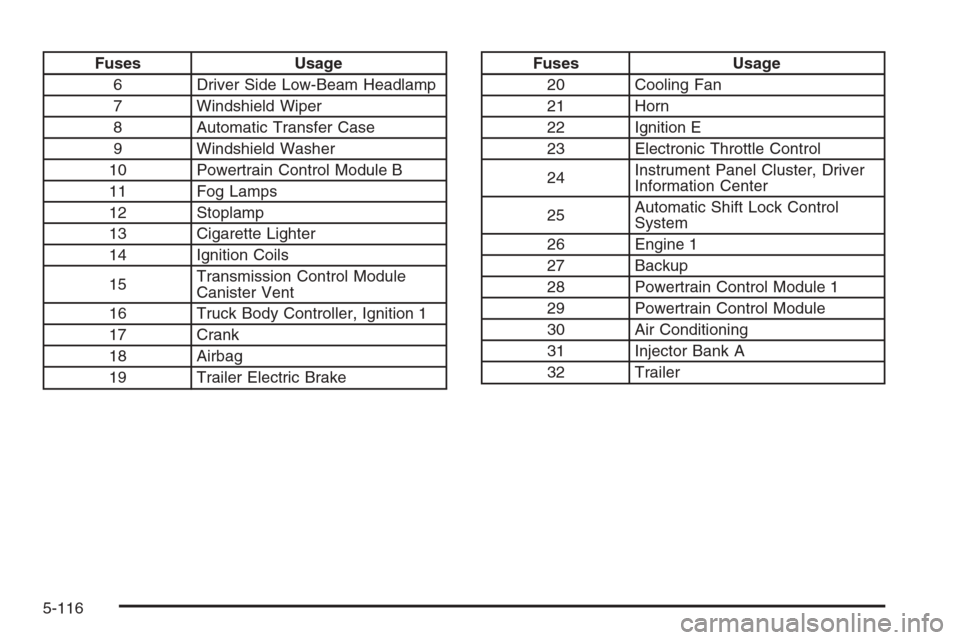
Fuses Usage
6 Driver Side Low-Beam Headlamp
7 Windshield Wiper
8 Automatic Transfer Case
9 Windshield Washer
10 Powertrain Control Module B
11 Fog Lamps
12 Stoplamp
13 Cigarette Lighter
14 Ignition Coils
15Transmission Control Module
Canister Vent
16 Truck Body Controller, Ignition 1
17 Crank
18 Airbag
19 Trailer Electric BrakeFuses Usage
20 Cooling Fan
21 Horn
22 Ignition E
23 Electronic Throttle Control
24Instrument Panel Cluster, Driver
Information Center
25Automatic Shift Lock Control
System
26 Engine 1
27 Backup
28 Powertrain Control Module 1
29 Powertrain Control Module
30 Air Conditioning
31 Injector Bank A
32 Trailer
5-116