2008 CHEVROLET TRAIL BLAZER audio
[x] Cancel search: audioPage 1 of 472
Seats and Restraint Systems........................... 1-1
Front Seats
............................................... 1-2
Rear Seats
..............................................1-10
Safety Belts
.............................................1-12
Child Restraints
.......................................1-30
Airbag System
.........................................1-51
Restraint System Check
............................1-66
Features and Controls..................................... 2-1
Keys
........................................................ 2-3
Doors and Locks
....................................... 2-6
Windows
.................................................2-12
Theft-Deterrent Systems
............................2-15
Starting and Operating Your Vehicle
...........2-19
Mirrors
....................................................2-37
OnStar
®System
......................................2-47
Universal Home Remote System
................2-50
Storage Areas
.........................................2-55
Sunroof
..................................................2-58
Instrument Panel............................................. 3-1
Instrument Panel Overview
.......................... 3-4
Climate Controls
......................................3-21
Warning Lights, Gages, and Indicators
........3-30
Driver Information Center (DIC)
..................3-49
Audio System(s)
.......................................3-64Driving Your Vehicle....................................... 4-1
Your Driving, the Road, and Your Vehicle
..... 4-2
Towing
...................................................4-41
Service and Appearance Care.......................... 5-1
Service
..................................................... 5-3
Fuel
......................................................... 5-5
Checking Things Under the Hood
...............5-10
All-Wheel Drive
........................................5-49
Rear Axle
...............................................5-49
Four-Wheel Drive
.....................................5-50
Front Axle
...............................................5-51
Headlamp Aiming
.....................................5-52
Bulb Replacement
....................................5-52
Windshield Wiper Blade Replacement
.........5-55
Tires
......................................................5-58
Appearance Care
...................................5-100
Vehicle Identication
...............................5-109
Electrical System
....................................5-109
Capacities and Specications
...................5-121
Maintenance Schedule..................................... 6-1
Maintenance Schedule
................................ 6-2
Customer Assistance Information.................... 7-1
Customer Assistance and Information
........... 7-2
Reporting Safety Defects
...........................7-14
Vehicle Data Recording and Privacy
...........7-17
Index................................................................ 1
2008 Chevrolet TrailBlazer Owner ManualM
Page 93 of 472
The battery could be drained if you leave the key in the
ignition while your vehicle is parked. You may not be
able to start your vehicle after it has been parked for an
extended period of time.
Retained Accessory Power (RAP)
These vehicle accessories can be used for up to
20 minutes after the engine is turned off:
Audio System
Power Windows
Overhead Console
Sunroof (if equipped)
These features will work when the key is in ON/RUN or
ACC/ACCESSORY. Once the key is turned from
ON/RUN to LOCK/OFF, these features continue to work
for up to 20 minutes, or until a door is opened.
Starting the Engine
Move your shift lever to PARK (P) or NEUTRAL (N).
Your engine will not start in any other position – this is a
safety feature. To restart when you are already
moving, use NEUTRAL (N) only.
Notice:Do not try to shift to PARK (P) if your
vehicle is moving. If you do, you could damage the
transmission. Shift to PARK (P) only when your
vehicle is stopped.
Starting Procedure
1. With your foot off the accelerator pedal, turn the
ignition key to START. When the engine starts,
let go of the key. The idle speed will go down as
your engine gets warm. Do not race the engine
immediately after starting it. Operate the engine and
transmission gently to allow the oil to warm up
and lubricate all moving parts.
Your vehicle has a Computer-Controlled Cranking
System. This feature assists in starting the engine
and protects components. If the ignition key is turned
to the START position, and then released when the
engine begins cranking, the engine will continue
cranking for a few seconds or until the vehicle starts.
2-21
Page 121 of 472
OnStar Virtual Advisor
OnStar Virtual Advisor is a feature of OnStar
Hands-Free Calling that uses your minutes to access
location-based weather, local traffic reports, and
stock quotes. By pressing the phone button and giving
a few simple voice commands, you can browse
through the various topics. See the OnStar Owner’s
Guide for more information (Only available in the
continental U.S.).
OnStar Steering Wheel Controls
Your vehicle may have a Talk/Mute button that can be
used to interact with OnStar Hands-Free Calling.
SeeAudio Steering Wheel Controls on page 3-105for
more information.
On some vehicles, you may have to hold the button for
a few seconds and give the command “ONSTAR” to
activate the OnStar Hands-Free Calling.
On some vehicles, the mute button can be used to dial
numbers into voicemail systems, or to dial phone
extensions. See the OnStar Owner’s Guide for more
information.
How OnStar Service Works
Your vehicle’s OnStar system has the capability of
recording and transmitting vehicle information. This
information is automatically sent to an OnStar Call
Center at the time of an OnStar button press,
Emergency button press or if your airbags or AACN
system deploys. The vehicle information usually includes
your GPS location and, in the event of a crash,
additional information regarding the accident that your
vehicle has been involved in (e.g. the direction from
which your vehicle was hit). When you use the Virtual
Advisor feature of OnStar Hands-Free Calling, your
vehicle also sends OnStar your GPS location so that we
can provide you with location-based services.
OnStar service cannot work unless your vehicle is in a
place where OnStar has an agreement with a wireless
service provider for service in that area. OnStar
service also cannot work unless you are in a place
where the wireless service provider OnStar has hired for
that area has coverage, network capacity and reception
when the service is needed, and technology that is
compatible with the OnStar service. Not all services are
available everywhere, particularly in remote or
enclosed areas, or at all times.
Location information about your vehicle is only available
if the GPS satellite signals are unobstructed and
available.
2-49
Page 127 of 472
Reprogramming a Single Universal
Home Remote Button
To reprogram any of the three Universal Home Remote
buttons, repeat the programming instructions earlier
in this section, beginning with Step 2.
For help or information on the Universal Home Remote
System, call the customer assistance phone number
underCustomer Assistance Offices on page 7-5.
Storage Areas
Glove Box
To open, lift the handle up. Use the key to lock and
unlock.
Overhead Console
Your vehicle may have this feature. The overhead
console may include reading lamps, a Universal Home
Remote and a sunroof switch. SeeSunroof on
page 2-58andUniversal Home Remote System on
page 2-50for more information.
Center Console Storage
Pull the front lever on the center console while lifting the
top to open it.
The console has cupholders on the front and rear of the
storage compartment.
The console may also contain:
Rear Seat Audio Controls
Rear Seat Accessory Power Outlets
Rear Climate Control
To open the center armrest compartment, lift the cover
by pulling up on the latch handle located under the
front edge of the armrest.
2-55
Page 132 of 472
Cruise Control Light......................................3-46
Reduced Engine Power Light.........................3-46
Highbeam On Light.......................................3-47
Service Four-Wheel Drive
Warning Light...........................................3-47
Check Gages Warning Light...........................3-47
Gate Ajar Light.............................................3-47
Fuel Gage...................................................3-48
Low Fuel Warning Light.................................3-48
Check Gas Cap Light....................................3-48
Driver Information Center (DIC).......................3-49
DIC Operation and Displays...........................3-50
DIC Warnings and Messages.........................3-53
DIC Vehicle Customization.............................3-58Audio System(s).............................................3-64
Setting the Clock..........................................3-66
Radio(s)......................................................3-66
Using an MP3..............................................3-83
XM Radio Messages.....................................3-87
Navigation/Radio System...............................3-89
Rear Seat Entertainment (RSE) System...........3-89
Rear Seat Audio (RSA)................................3-103
Theft-Deterrent Feature................................3-104
Audio Steering Wheel Controls......................3-105
Radio Reception.........................................3-106
Fixed Mast Antenna....................................3-106
XM™ Satellite Radio Antenna System............3-107
Chime Level Adjustment...............................3-107
Section 3 Instrument Panel
3-2
Page 135 of 472
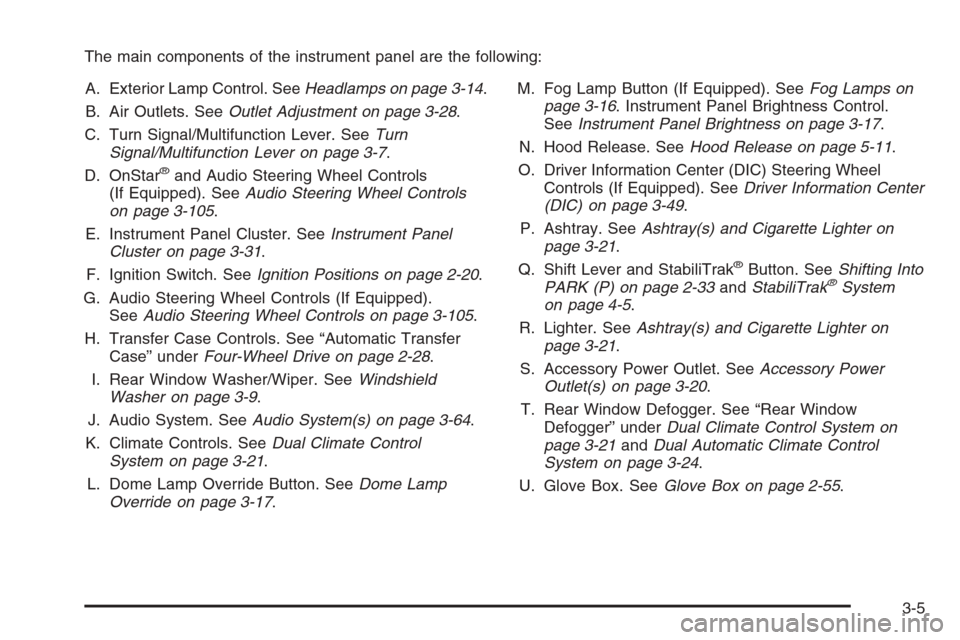
The main components of the instrument panel are the following:
A. Exterior Lamp Control. SeeHeadlamps on page 3-14.
B. Air Outlets. SeeOutlet Adjustment on page 3-28.
C. Turn Signal/Multifunction Lever. SeeTurn
Signal/Multifunction Lever on page 3-7.
D. OnStar
®and Audio Steering Wheel Controls
(If Equipped). SeeAudio Steering Wheel Controls
on page 3-105.
E. Instrument Panel Cluster. SeeInstrument Panel
Cluster on page 3-31.
F. Ignition Switch. SeeIgnition Positions on page 2-20.
G. Audio Steering Wheel Controls (If Equipped).
SeeAudio Steering Wheel Controls on page 3-105.
H. Transfer Case Controls. See “Automatic Transfer
Case” underFour-Wheel Drive on page 2-28.
I. Rear Window Washer/Wiper. SeeWindshield
Washer on page 3-9.
J. Audio System. SeeAudio System(s) on page 3-64.
K. Climate Controls. SeeDual Climate Control
System on page 3-21.
L. Dome Lamp Override Button. SeeDome Lamp
Override on page 3-17.M. Fog Lamp Button (If Equipped). SeeFog Lamps on
page 3-16. Instrument Panel Brightness Control.
SeeInstrument Panel Brightness on page 3-17.
N. Hood Release. SeeHood Release on page 5-11.
O. Driver Information Center (DIC) Steering Wheel
Controls (If Equipped). SeeDriver Information Center
(DIC) on page 3-49.
P. Ashtray. SeeAshtray(s) and Cigarette Lighter on
page 3-21.
Q. Shift Lever and StabiliTrak
®Button. SeeShifting Into
PARK (P) on page 2-33andStabiliTrak®System
on page 4-5.
R. Lighter. SeeAshtray(s) and Cigarette Lighter on
page 3-21.
S. Accessory Power Outlet. SeeAccessory Power
Outlet(s) on page 3-20.
T. Rear Window Defogger. See “Rear Window
Defogger” underDual Climate Control System on
page 3-21andDual Automatic Climate Control
System on page 3-24.
U. Glove Box. SeeGlove Box on page 2-55.
3-5
Page 159 of 472
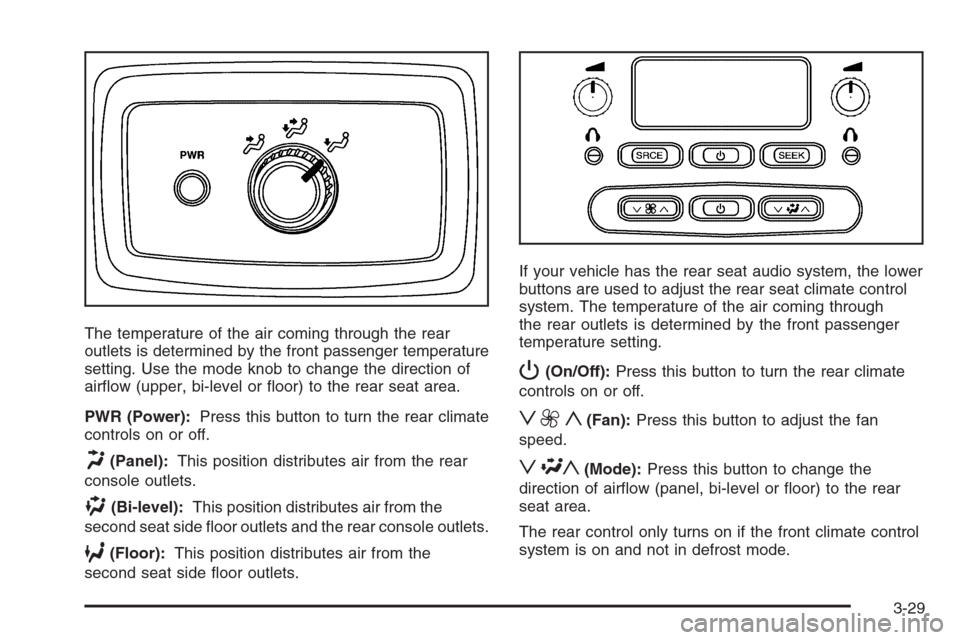
The temperature of the air coming through the rear
outlets is determined by the front passenger temperature
setting. Use the mode knob to change the direction of
airow (upper, bi-level or oor) to the rear seat area.
PWR (Power):Press this button to turn the rear climate
controls on or off.
H(Panel):This position distributes air from the rear
console outlets.
)(Bi-level):This position distributes air from the
second seat side oor outlets and the rear console outlets.
6(Floor):This position distributes air from the
second seat side oor outlets.If your vehicle has the rear seat audio system, the lower
buttons are used to adjust the rear seat climate control
system. The temperature of the air coming through
the rear outlets is determined by the front passenger
temperature setting.
P(On/Off):Press this button to turn the rear climate
controls on or off.
z9y(Fan):Press this button to adjust the fan
speed.
z\y(Mode):Press this button to change the
direction of airow (panel, bi-level or oor) to the rear
seat area.
The rear control only turns on if the front climate control
system is on and not in defrost mode.
3-29
Page 194 of 472
Units
Press the customization button until UNITS: U.S.
(ENGLISH) appears in the display. To select the units of
measurement in which the DIC will display vehicle
information, press the select button while UNITS: U.S.
(ENGLISH) is displayed on the DIC. Pressing the select
button will scroll through the following settings:
UNITS: U.S. (ENGLISH) (default):All information will
be displayed in English units.
UNITS: METRIC (km/L):All information will be
displayed in metric units.
UNITS: METRIC (L/100 km):All information will be
displayed in metric units.
To select a setting and exit out of the customizable
options, press the customization button while the desired
setting is displayed on the DIC.
Audio System(s)
Determine which radio your vehicle has and then read
the pages following to familiarize yourself with its
features.
{CAUTION:
This system provides you with far greater
access to audio stations and song listings.
Giving extended attention to entertainment
tasks while driving can cause a crash and you
or others can be injured or killed. Always keep
your eyes on the road and your mind on the
drive — avoid engaging in extended searching
while driving.
Keeping your mind on the drive is important for safe
driving. SeeDefensive Driving on page 4-2. Here are
some ways in which you can help avoid distraction
while driving.
3-64