2008 CHEVROLET SILVERADO tire pressure
[x] Cancel search: tire pressurePage 486 of 596

At the same time a message to check the pressure
in a specic tire appears on the Driver Information
Center (DIC) display. The low tire pressure warning
light and the DIC warning message come on at
each ignition cycle until the tires are inated to the
correct ination pressure. If your vehicle has DIC
buttons, tire pressure levels can be viewed by the driver.
For additional information and details about the DIC
operation and displays seeDIC Operation and Displays
(With DIC Buttons) on page 3-57orDIC Operation
and Displays (Without DIC Buttons) on page 3-63and
DIC Warnings and Messages on page 3-66.
The low tire pressure warning light may come on in
cool weather when the vehicle is rst started, and then
turn off as you start to drive. This could be an early
indicator that the air pressure in the tire(s) are getting
low and need to be inated to the proper pressure.A Tire and Loading Information label, attached to your
vehicle, shows the size of your vehicle’s original
equipment tires and the correct ination pressure for
your vehicle’s tires when they are cold. SeeLoading
Your Vehicle on page 4-36, for an example of the
Tire and Loading Information label and its location on
your vehicle. Also seeInflation - Tire Pressure on
page 5-76.
Your vehicle’s TPMS can warn you about a low tire
pressure condition but it does not replace normal
tire maintenance. SeeTire Inspection and Rotation
on page 5-83andTires on page 5-68.
Notice:Liquid tire sealants could damage the
Tire Pressure Monitor System (TPMS) sensors.
Sensor damage caused by using a tire sealant is
not covered by your warranty. Do not use liquid
tire sealants.
5-80
Page 488 of 596

TPMS Sensor Matching Process
Each TPMS sensor has a unique identication code.
Any time you rotate your vehicle’s tires or replace one or
more of the TPMS sensors, the identication codes
will need to be matched to the new tire/wheel position.
The sensors are matched to the tire/wheel positions
in the following order: driver side front tire, passenger
side front tire, passenger side rear tire, and driver
side rear tire using a TPMS diagnostic tool. See your
dealer/retailer for service.
The TPMS sensors can also be matched to each
tire/wheel position by increasing or decreasing the tire’s
air pressure. If increasing the tire’s air pressure, do
not exceed the maximum ination pressure indicated on
the tire’s sidewall.
To decrease air-pressure out of a tire you can use the
pointed end of the valve cap, a pencil-style air pressure
gage, or a key.
You have two minutes to match the rst tire/wheel
position, and ve minutes overall to match all
four tire/wheel positions. If it takes longer than
two minutes, to match the rst tire and wheel, or more
than ve minutes to match all four tire and wheel
positions the matching process stops and you need to
start over.The TPMS sensor matching process is outlined below:
1. Set the parking brake.
2. Turn the ignition switch to ON/RUN with the
engine off.
3. Press the Remote Keyless Entry (RKE) transmitter’s
LOCK and UNLOCK buttons at the same time for
approximately ve seconds. The horn sounds twice
to signal the receiver is in relearn mode and
TIRE LEARNING ACTIVE message displays on the
DIC screen.
If your vehicle does not have RKE, press the Driver
Information Center (DIC) vehicle information
button until the PRESS
VTO RELEARN TIRE
POSITIONS message displays. The horn sounds
twice to signal the receiver is in relearn mode
and TIRE LEARNING ACTIVE message displays on
the DIC screen.
If your vehicle does not have RKE or DIC buttons,
press the trip odometer reset stem located on
the instrument panel cluster until the PRESS
VTO
RELEARN TIRE POSITIONS message displays.
The horn sounds twice to signal the receiver
is in relearn mode and TIRE LEARNING ACTIVE
message displays on the DIC screen.
4. Start with the driver side front tire.
5-82
Page 489 of 596
5. Remove the valve cap from the valve cap stem.
Activate the TPMS sensor by increasing or
decreasing the tire’s air pressure for ve seconds,
or until a horn chirp sounds. The horn chirp,
which may take up to 30 seconds to sound,
conrms that the sensor identication code has
been matched to this tire and wheel position.
6. Proceed to the passenger side front tire, and repeat
the procedure in Step 5.
7. Proceed to the passenger side rear tire, and repeat
the procedure in Step 5.
8. Proceed to the driver side rear tire, and repeat the
procedure in Step 5. The horn sounds two times to
indicate the sensor identication code has been
matched to the driver side rear tire, and that
the TPMS sensor matching process is no longer
active. The TIRE LEARNING ACTIVE message on
the DIC display screen goes off.
9. Turn the ignition switch to LOCK/OFF.
10. Set all four tires to the recommended air pressure
level as indicated on the Tire and Loading
Information label.
11. Put the valve caps back on the valve stems.Tire Inspection and Rotation
We recommend that you regularly inspect your
vehicle’s tires, including the spare tire, for signs of
wear or damage. SeeWhen It Is Time for New
Tires on page 5-86for more information.
Tires should be rotated every 5,000 to 8,000 miles
(8 000 to 13 000 km). SeeScheduled Maintenance
(Gasoline Engine) on page 6-4.
The purpose of a regular tire rotation is to achieve
a uniform wear for all tires on the vehicle.
This will ensure that your vehicle continues to
perform most like it did when the tires were new.
Any time you notice unusual wear, rotate your
tires as soon as possible and check wheel
alignment. Also check for damaged tires or wheels.
SeeWhen It Is Time for New Tires on page 5-86
andWheel Replacement on page 5-90.
If your vehicle has dual rear wheels, also see
Dual Tire Operation on page 5-77.
5-83
Page 491 of 596

If your vehicle has dual
rear wheels and the
tread design for the front
tires is different from
the dual rear tires,
always use the correct
rotation pattern
shown here when
rotating the tires.
The dual tires are rotated as a pair, and the inside
rear tires become the outside rear tires.
When you install dual wheels, be sure the vent
holes in the inner and outer wheels on each side
are lined up.
After the tires have been rotated, adjust the
front and rear ination pressures as shown
on the Tire and Loading Information label.
SeeInflation - Tire Pressure on page 5-76
andLoading Your Vehicle on page 4-36.
Make certain that all wheel nuts are properly
tightened. See “Wheel Nut Torque” under
Capacities and Specifications on page 5-133.
{CAUTION:
Rust or dirt on a wheel, or on the parts to
which it is fastened, can make wheel nuts
become loose after time. The wheel could
come off and cause an accident. When
you change a wheel, remove any rust or
dirt from places where the wheel attaches
to the vehicle. In an emergency, you can
use a cloth or a paper towel to do this;
but be sure to use a scraper or wire brush
later, if needed, to get all the rust or dirt
off. SeeChanging a Flat Tire on page 5-94.
If your vehicle has a Tire Pressure Monitor
System (TPMS), reset the TPMS sensors after
rotating the tires. SeeTire Pressure Monitor
Operation on page 5-79.
Make sure the spare tire, if your vehicle has one,
is stored securely. Push, pull, and then try to
rotate or turn the tire. If it moves, tighten the cable.
SeeStoring a Flat or Spare Tire and Tools on
page 5-110.
5-85
Page 492 of 596
When It Is Time for New Tires
Various factors, such as maintenance, temperatures,
driving speeds, vehicle loading, and road conditions,
inuence when you need new tires.
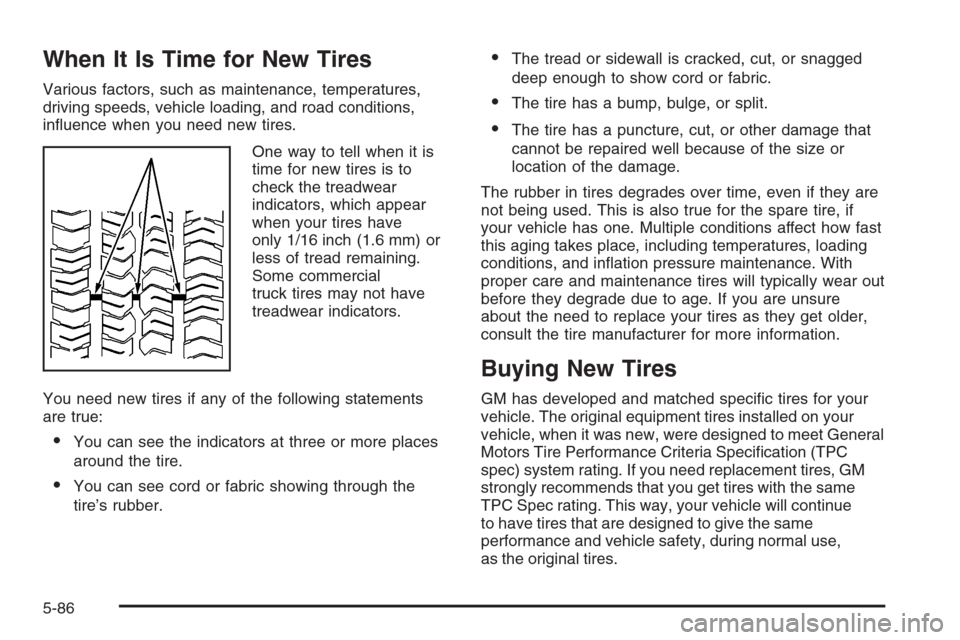
One way to tell when it is
time for new tires is to
check the treadwear
indicators, which appear
when your tires have
only 1/16 inch (1.6 mm) or
less of tread remaining.
Some commercial
truck tires may not have
treadwear indicators.
You need new tires if any of the following statements
are true:
You can see the indicators at three or more places
around the tire.
You can see cord or fabric showing through the
tire’s rubber.
The tread or sidewall is cracked, cut, or snagged
deep enough to show cord or fabric.
The tire has a bump, bulge, or split.
The tire has a puncture, cut, or other damage that
cannot be repaired well because of the size or
location of the damage.
The rubber in tires degrades over time, even if they are
not being used. This is also true for the spare tire, if
your vehicle has one. Multiple conditions affect how fast
this aging takes place, including temperatures, loading
conditions, and ination pressure maintenance. With
proper care and maintenance tires will typically wear out
before they degrade due to age. If you are unsure
about the need to replace your tires as they get older,
consult the tire manufacturer for more information.
Buying New Tires
GM has developed and matched specic tires for your
vehicle. The original equipment tires installed on your
vehicle, when it was new, were designed to meet General
Motors Tire Performance Criteria Specication (TPC
spec) system rating. If you need replacement tires, GM
strongly recommends that you get tires with the same
TPC Spec rating. This way, your vehicle will continue
to have tires that are designed to give the same
performance and vehicle safety, during normal use,
as the original tires.
5-86
Page 493 of 596
GM’s exclusive TPC Spec system considers over a
dozen critical specications that impact the overall
performance of your vehicle, including brake system
performance, ride and handling, traction control, and tire
pressure monitoring performance. GM’s TPC Spec
number is molded onto the tire’s sidewall near the tire
size. If the tires have an all-season tread design, the TPC
spec number will be followed by a MS, for mud and snow.
SeeTire Sidewall Labeling on page 5-69for additional
information.
GM recommends replacing tires in sets of four (or six
if your vehicle has dual rear wheels). This is because
uniform tread depth on all tires will help keep your vehicle
performing most like it did when the tires were new.
Replacing less than a full set of tires can affect the
braking and handling performance of your vehicle.
SeeTire Inspection and Rotation on page 5-83for
information on proper tire rotation.
{CAUTION:
Mixing tires could cause you to lose
control while driving. If you mix tires of
different sizes, brands, or types (radial
CAUTION: (Continued)
CAUTION: (Continued)
and bias-belted tires) the vehicle may not
handle properly, and you could have a
crash. Using tires of different sizes,
brands, or types may also cause damage
to your vehicle. Be sure to use the correct
size, brand, and type of tires on your
vehicle’s wheels.
{CAUTION:
If you use bias-ply tires on your vehicle,
the wheel rim anges could develop
cracks after many miles of driving. A tire
and/or wheel could fail suddenly, causing
a crash. Use only radial-ply tires with the
wheels on your vehicle.
If you must replace your vehicle’s tires with those that
do not have a TPC Spec number, make sure they
are the same size, load range, speed rating, and
construction type (radial and bias-belted tires) as your
vehicle’s original tires.
5-87
Page 494 of 596
Vehicles that have a tire pressure monitoring system
could give an inaccurate low-pressure warning if
non-TPC Spec rated tires are installed on your vehicle.
Non-TPC Spec rated tires may give a low-pressure
warning that is higher or lower than the proper warning
level you would get with TPC Spec rated tires. See
Tire Pressure Monitor System on page 5-78.
Your vehicle’s original equipment tires are listed on
the Tire and Loading Information label. SeeLoading
Your Vehicle on page 4-36, for more information about
the Tire and Loading Information label and its location
on your vehicle.
Different Size Tires and Wheels
If you add wheels or tires that are a different size than
your original equipment wheels and tires, this could
affect the way your vehicle performs, including its
braking, ride and handling characteristics, stability, and
resistance to rollover. Additionally, if your vehicle
has electronic systems such as anti-lock brakes, rollover
airbags, traction control, and electronic stability control,
the performance of these systems can be affected.
{CAUTION:
If you add different sized wheels, your vehicle
may not provide an acceptable level of
performance and safety if tires not
recommended for those wheels are selected.
You may increase the chance that you will
crash and suffer serious injury. Only use
GM specic wheel and tire systems developed
for your vehicle, and have them properly
installed by a GM certied technician.
SeeBuying New Tires on page 5-86andAccessories
and Modifications on page 5-4for additional information.
5-88
Page 519 of 596
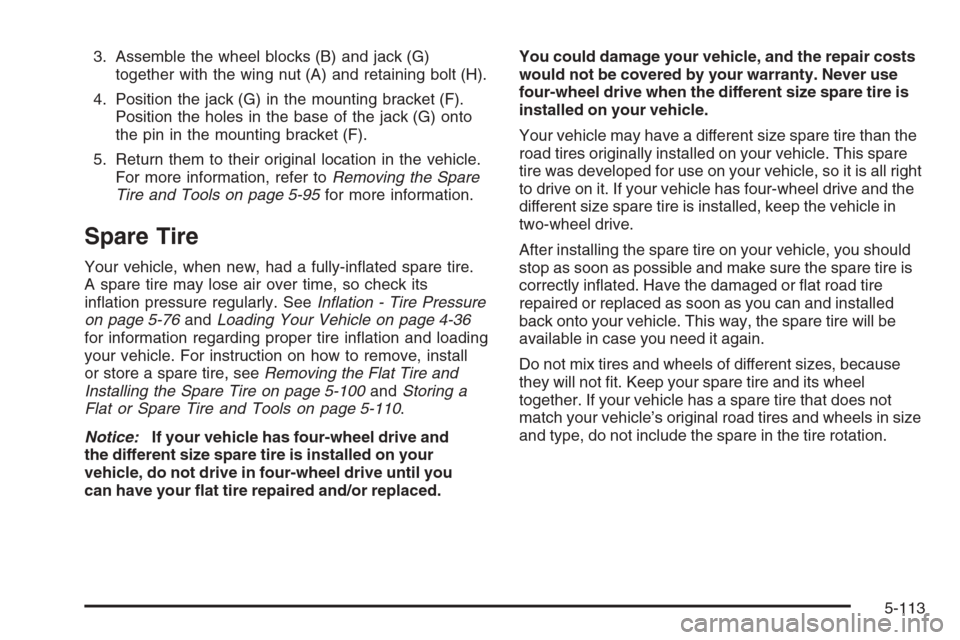
3. Assemble the wheel blocks (B) and jack (G)
together with the wing nut (A) and retaining bolt (H).
4. Position the jack (G) in the mounting bracket (F).
Position the holes in the base of the jack (G) onto
the pin in the mounting bracket (F).
5. Return them to their original location in the vehicle.
For more information, refer toRemoving the Spare
Tire and Tools on page 5-95for more information.
Spare Tire
Your vehicle, when new, had a fully-inated spare tire.
A spare tire may lose air over time, so check its
ination pressure regularly. SeeInflation - Tire Pressure
on page 5-76andLoading Your Vehicle on page 4-36
for information regarding proper tire ination and loading
your vehicle. For instruction on how to remove, install
or store a spare tire, seeRemoving the Flat Tire and
Installing the Spare Tire on page 5-100andStoring a
Flat or Spare Tire and Tools on page 5-110.
Notice:If your vehicle has four-wheel drive and
the different size spare tire is installed on your
vehicle, do not drive in four-wheel drive until you
can have your at tire repaired and/or replaced.You could damage your vehicle, and the repair costs
would not be covered by your warranty. Never use
four-wheel drive when the different size spare tire is
installed on your vehicle.
Your vehicle may have a different size spare tire than the
road tires originally installed on your vehicle. This spare
tire was developed for use on your vehicle, so it is all right
to drive on it. If your vehicle has four-wheel drive and the
different size spare tire is installed, keep the vehicle in
two-wheel drive.
After installing the spare tire on your vehicle, you should
stop as soon as possible and make sure the spare tire is
correctly inated. Have the damaged or at road tire
repaired or replaced as soon as you can and installed
back onto your vehicle. This way, the spare tire will be
available in case you need it again.
Do not mix tires and wheels of different sizes, because
they will not t. Keep your spare tire and its wheel
together. If your vehicle has a spare tire that does not
match your vehicle’s original road tires and wheels in size
and type, do not include the spare in the tire rotation.
5-113