2008 CHEVROLET SILVERADO buttons
[x] Cancel search: buttonsPage 180 of 596

StabiliTrak®Indicator Light.............................3-48
Engine Coolant Temperature Gage..................3-48
Tire Pressure Light.......................................3-49
Malfunction Indicator Lamp.............................3-49
Oil Pressure Gage........................................3-52
Oil Pressure Light.........................................3-53
Security Light...............................................3-53
Fog Lamp Light............................................3-53
Cruise Control Light......................................3-54
Highbeam On Light.......................................3-54
Four-Wheel-Drive Light..................................3-54
Tow/Haul Mode Light....................................3-54
Fuel Gage...................................................3-55
Low Fuel Warning Light.................................3-56
Driver Information Center (DIC).......................3-56
DIC Operation and Displays
(With DIC Buttons)....................................3-57
DIC Operation and Displays
(Without DIC Buttons)................................3-63DIC Warnings and Messages.........................3-66
DIC Vehicle Customization (With DIC Buttons) . . .3-76
Audio System(s).............................................3-84
Setting the Clock..........................................3-86
Radio(s)......................................................3-88
Using an MP3 (Radio with CD or
Six-Disc CD Player).................................3-108
Using an MP3 (Radio with CD and
DVD Player)...........................................3-114
XM Radio Messages...................................3-119
Navigation/Radio System..............................3-120
Rear Seat Entertainment (RSE) System.........3-121
Rear Seat Audio (RSA)................................3-130
Theft-Deterrent Feature................................3-132
Audio Steering Wheel Controls......................3-132
Radio Reception.........................................3-133
Fixed Mast Antenna....................................3-134
XM™ Satellite Radio Antenna System............3-134
Section 3 Instrument Panel
3-2
Page 183 of 596
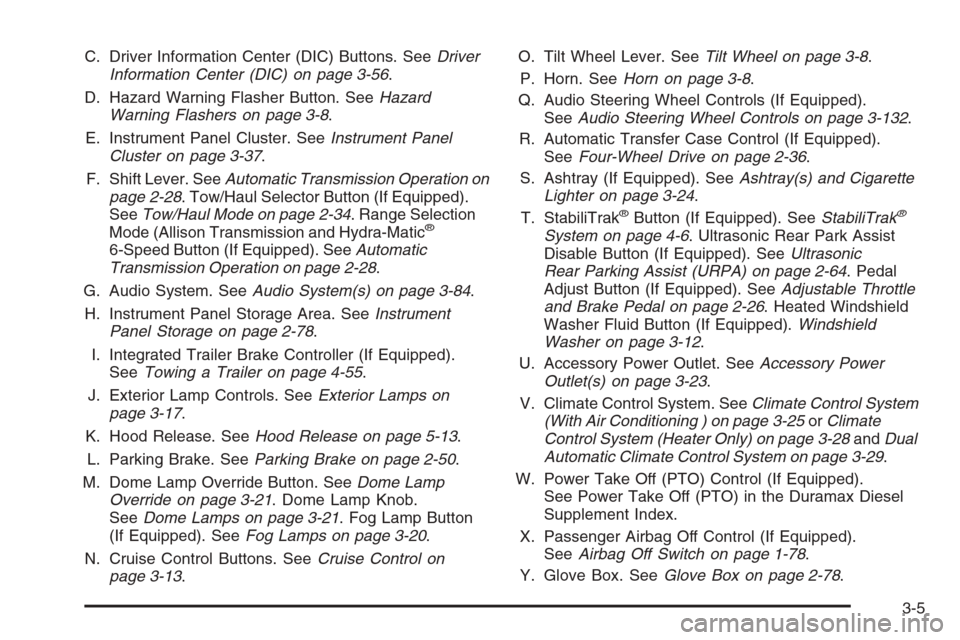
C. Driver Information Center (DIC) Buttons. SeeDriver
Information Center (DIC) on page 3-56.
D. Hazard Warning Flasher Button. SeeHazard
Warning Flashers on page 3-8.
E. Instrument Panel Cluster. SeeInstrument Panel
Cluster on page 3-37.
F. Shift Lever. SeeAutomatic Transmission Operation on
page 2-28. Tow/Haul Selector Button (If Equipped).
SeeTow/Haul Mode on page 2-34. Range Selection
Mode (Allison Transmission and Hydra-Matic
®
6-Speed Button (If Equipped). SeeAutomatic
Transmission Operation on page 2-28.
G. Audio System. SeeAudio System(s) on page 3-84.
H. Instrument Panel Storage Area. SeeInstrument
Panel Storage on page 2-78.
I. Integrated Trailer Brake Controller (If Equipped).
SeeTowing a Trailer on page 4-55.
J. Exterior Lamp Controls. SeeExterior Lamps on
page 3-17.
K. Hood Release. SeeHood Release on page 5-13.
L. Parking Brake. SeeParking Brake on page 2-50.
M. Dome Lamp Override Button. SeeDome Lamp
Override on page 3-21. Dome Lamp Knob.
SeeDome Lamps on page 3-21. Fog Lamp Button
(If Equipped). SeeFog Lamps on page 3-20.
N. Cruise Control Buttons. SeeCruise Control on
page 3-13.O. Tilt Wheel Lever. SeeTilt Wheel on page 3-8.
P. Horn. SeeHorn on page 3-8.
Q. Audio Steering Wheel Controls (If Equipped).
SeeAudio Steering Wheel Controls on page 3-132.
R. Automatic Transfer Case Control (If Equipped).
SeeFour-Wheel Drive on page 2-36.
S. Ashtray (If Equipped). SeeAshtray(s) and Cigarette
Lighter on page 3-24.
T. StabiliTrak
®Button (If Equipped). SeeStabiliTrak®
System on page 4-6. Ultrasonic Rear Park Assist
Disable Button (If Equipped). SeeUltrasonic
Rear Parking Assist (URPA) on page 2-64. Pedal
Adjust Button (If Equipped). SeeAdjustable Throttle
and Brake Pedal on page 2-26. Heated Windshield
Washer Fluid Button (If Equipped).Windshield
Washer on page 3-12.
U. Accessory Power Outlet. SeeAccessory Power
Outlet(s) on page 3-23.
V. Climate Control System. SeeClimate Control System
(With Air Conditioning ) on page 3-25orClimate
Control System (Heater Only) on page 3-28andDual
Automatic Climate Control System on page 3-29.
W. Power Take Off (PTO) Control (If Equipped).
See Power Take Off (PTO) in the Duramax Diesel
Supplement Index.
X. Passenger Airbag Off Control (If Equipped).
SeeAirbag Off Switch on page 1-78.
Y. Glove Box. SeeGlove Box on page 2-78.
3-5
Page 185 of 596
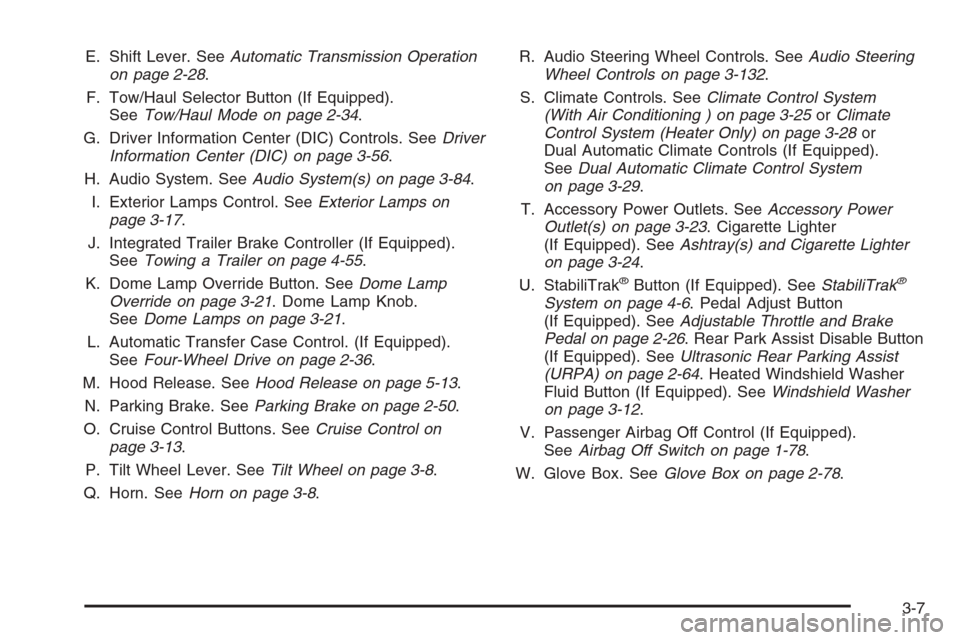
E. Shift Lever. SeeAutomatic Transmission Operation
on page 2-28.
F. Tow/Haul Selector Button (If Equipped).
SeeTow/Haul Mode on page 2-34.
G. Driver Information Center (DIC) Controls. SeeDriver
Information Center (DIC) on page 3-56.
H. Audio System. SeeAudio System(s) on page 3-84.
I. Exterior Lamps Control. SeeExterior Lamps on
page 3-17.
J. Integrated Trailer Brake Controller (If Equipped).
SeeTowing a Trailer on page 4-55.
K. Dome Lamp Override Button. SeeDome Lamp
Override on page 3-21. Dome Lamp Knob.
SeeDome Lamps on page 3-21.
L. Automatic Transfer Case Control. (If Equipped).
SeeFour-Wheel Drive on page 2-36.
M. Hood Release. SeeHood Release on page 5-13.
N. Parking Brake. SeeParking Brake on page 2-50.
O. Cruise Control Buttons. SeeCruise Control on
page 3-13.
P. Tilt Wheel Lever. SeeTilt Wheel on page 3-8.
Q. Horn. SeeHorn on page 3-8.R. Audio Steering Wheel Controls. SeeAudio Steering
Wheel Controls on page 3-132.
S. Climate Controls. SeeClimate Control System
(With Air Conditioning ) on page 3-25orClimate
Control System (Heater Only) on page 3-28or
Dual Automatic Climate Controls (If Equipped).
SeeDual Automatic Climate Control System
on page 3-29.
T. Accessory Power Outlets. SeeAccessory Power
Outlet(s) on page 3-23. Cigarette Lighter
(If Equipped). SeeAshtray(s) and Cigarette Lighter
on page 3-24.
U. StabiliTrak
®Button (If Equipped). SeeStabiliTrak®
System on page 4-6. Pedal Adjust Button
(If Equipped). SeeAdjustable Throttle and Brake
Pedal on page 2-26. Rear Park Assist Disable Button
(If Equipped). SeeUltrasonic Rear Parking Assist
(URPA) on page 2-64. Heated Windshield Washer
Fluid Button (If Equipped). SeeWindshield Washer
on page 3-12.
V. Passenger Airbag Off Control (If Equipped).
SeeAirbag Off Switch on page 1-78.
W. Glove Box. SeeGlove Box on page 2-78.
3-7
Page 192 of 596
When the brakes are applied, cruise control is
turned off.
For vehicles with an Allison
®automatic transmission,
see “Grade Braking and Cruise Grade Braking (Allison
Transmission) underTow/Haul Mode on page 2-34
for an explanation of how cruise control interacts with
the Range Selection Mode, tow/haul and grade braking
systems.
For vehicles with the StabiliTrak
®system that begins
to limit wheel spin while you are using cruise control, the
cruise control will automatically disengage.
SeeStabiliTrak
®System on page 4-6. When road
conditions allow the cruise control to be safely used
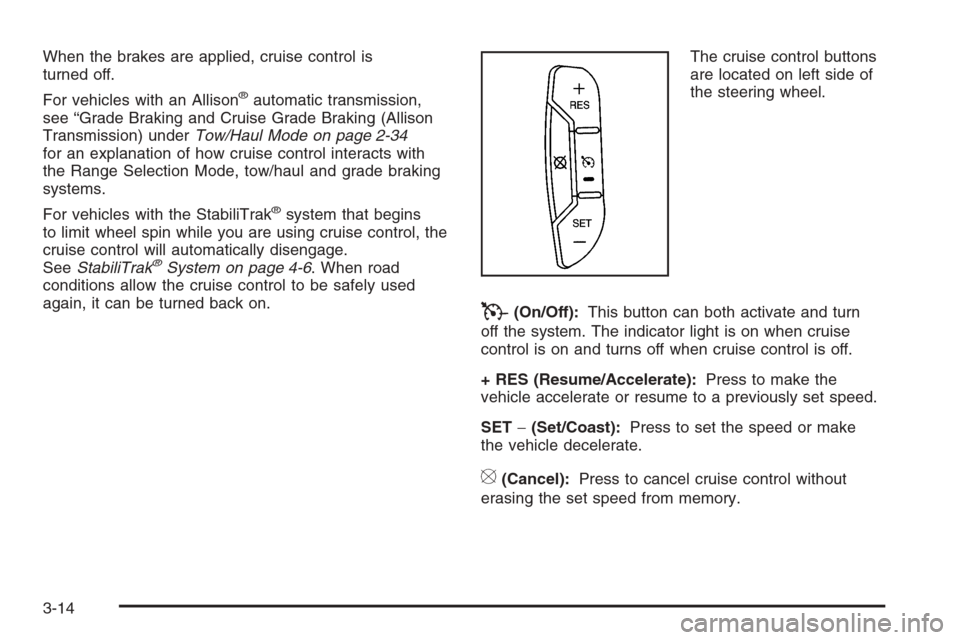
again, it can be turned back on.The cruise control buttons
are located on left side of
the steering wheel.
T(On/Off):This button can both activate and turn
off the system. The indicator light is on when cruise
control is on and turns off when cruise control is off.
+ RES (Resume/Accelerate):Press to make the
vehicle accelerate or resume to a previously set speed.
SET−(Set/Coast):Press to set the speed or make
the vehicle decelerate.
[(Cancel):Press to cancel cruise control without
erasing the set speed from memory.
3-14
Page 197 of 596

Automatic Headlamp System
When it is dark enough outside, the automatic headlamp
system will turn on the headlamps at the normal
brightness, along with the taillamps, sidemarker, parking
lamps, and the instrument panel lights. The radio lights
will also be dim.
To turn off the automatic headlamp system, turn the
exterior lamps switch to the off position and then release
it. For vehicles rst sold in Canada, the transmission
must be in the PARK (P) position, before the automatic
headlamp system can be turned off.
The vehicle has a light sensor located on the top of the
instrument panel in the defroster grille that regulates
when the automatic headlamps turn on. Be sure it is not
covered, or the headlamps will come on whenever
the ignition is on.
The system may also turn on the headlamps when
driving through a parking garage, heavy overcast
weather, or a tunnel. This is normal.
There is a delay in the transition between the
daytime and nighttime operation of the Daytime
Running Lamps (DRL) and the automatic headlamp
systems so that driving under bridges or bright
overhead street lights does not affect the system.The DRL and automatic headlamp system will only be
affected when the light sensor detects a change in
lighting lasting longer than the delay.
If the vehicle is started in a dark garage, the automatic
headlamp system will come on immediately. Once the
vehicle leaves the garage, it takes approximately
one minute for the automatic headlamp system to
change to DRL if it is bright enough outside. During that
delay, the instrument panel cluster may not be as
bright as usual. Make sure the instrument panel
brightness control is in the full bright position.
SeeInstrument Panel Brightness on page 3-21.
To idle the vehicle with the automatic headlamp system
off, turn the control to the off position.
The headlamps will also stay on after you exit the
vehicle. This feature can be programmed using the
Driver Information Center (DIC). SeeDIC Vehicle
Customization (With DIC Buttons) on page 3-76.
The regular headlamp system can be turned on
when needed.
3-19
Page 208 of 596
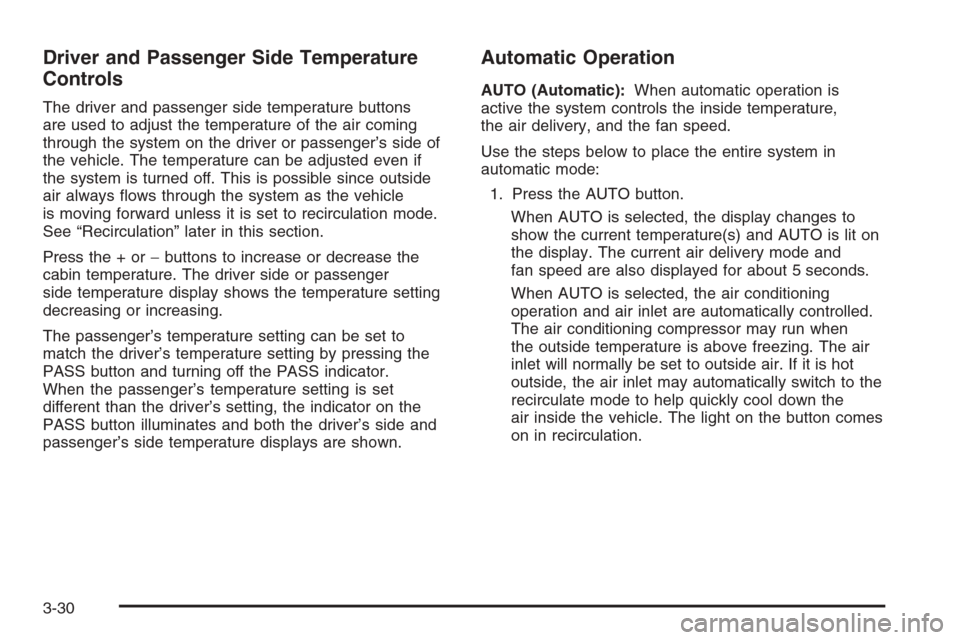
Driver and Passenger Side Temperature
Controls
The driver and passenger side temperature buttons
are used to adjust the temperature of the air coming
through the system on the driver or passenger’s side of
the vehicle. The temperature can be adjusted even if
the system is turned off. This is possible since outside
air always ows through the system as the vehicle
is moving forward unless it is set to recirculation mode.
See “Recirculation” later in this section.
Press the + or−buttons to increase or decrease the
cabin temperature. The driver side or passenger
side temperature display shows the temperature setting
decreasing or increasing.
The passenger’s temperature setting can be set to
match the driver’s temperature setting by pressing the
PASS button and turning off the PASS indicator.
When the passenger’s temperature setting is set
different than the driver’s setting, the indicator on the
PASS button illuminates and both the driver’s side and
passenger’s side temperature displays are shown.
Automatic Operation
AUTO (Automatic):When automatic operation is
active the system controls the inside temperature,
the air delivery, and the fan speed.
Use the steps below to place the entire system in
automatic mode:
1. Press the AUTO button.
When AUTO is selected, the display changes to
show the current temperature(s) and AUTO is lit on
the display. The current air delivery mode and
fan speed are also displayed for about 5 seconds.
When AUTO is selected, the air conditioning
operation and air inlet are automatically controlled.
The air conditioning compressor may run when
the outside temperature is above freezing. The air
inlet will normally be set to outside air. If it is hot
outside, the air inlet may automatically switch to the
recirculate mode to help quickly cool down the
air inside the vehicle. The light on the button comes
on in recirculation.
3-30
Page 209 of 596

2. Set the driver’s and passenger’s temperature.
To nd your comfort setting, start with a 74°F (23°C)
temperature setting and allow about 20 minutes
for the system to regulate. Use the driver’s or
passenger’s temperature buttons to adjust the
temperature setting as necessary. If you choose the
temperature setting of 60°F (15°C), the system
remains at the maximum cooling setting. If you
choose the temperature setting of 90°F (32°C),
the system remains at the maximum heat setting.
Choosing either maximum setting will not cause the
vehicle to heat or cool any faster.
Be careful not to cover the solar sensor located on
the top of the instrument panel near the windshield.
This sensor regulates air temperature based on
sun load. For more information on the solar sensor,
see “Sensors” later in this section.
To avoid blowing cold air in cold weather, the system
delays turning the fan on until warm air is available.
The length of delay depends on the engine coolant
temperature. Pressing the fan switch overrides this delay
and changes the fan to a selected speed.O(On/Off):Press this button to turn off the climate
control system. Outside air still enters the vehicle, and
is directed to the oor. This direction can be changed by
pressing the mode button. Recirculation can be
selected once you have selected vent or bi-level mode.
The temperature can also be adjusted using either
temperature button. If the air delivery mode or
temperature settings are adjusted with the system off,
the display illuminates briey to show the settings
and then returns to off. Press the on/off button or the up
down arrows on the fan switch, the defrost button,
AUTO button, or the air conditioning button to turn the
system on when it is off.
3-31
Page 210 of 596
Manual Operation
The air delivery mode or fan speed can be manually
adjusted.
DC(Fan):These buttons let you manually adjust the
fan speed. Press
Dto increase fan speed andCto
decrease fan speed.
Pressing either fan button while the system is off turns
the system on. Pressing either fan button while in
automatic control places the fan under manual control.
The fan setting remains displayed and the AUTO
light turns off. The air delivery mode remains under
automatic control.
HG(Mode):PressHandGto manually change the
direction of the airow in the vehicle. Repeatedly press
either button until the desired mode appears on the
display. Pressing either mode button while the system is
off changes the air delivery mode without turning the
system on. Pressing either mode button while in
automatic control places the mode under manual control.
The air delivery mode setting is displayed and the
AUTO light turns off. The fan remains under automatic
control.
H(Vent):Air is directed to the instrument panel outlets.
)(Bi-Level):Air is directed partly to the instrument
panel outlets and to the oor outlets. A little air is
directed towards the windshield and side window outlets.
Cooler air is directed to the upper outlets and warmer
air to the oor outlets.
6(Floor):Air is directed to the oor outlets, with
some to the windshield, side window outlets, and
second row oor outlets. In this mode, the system will
automatically select outside air.
-(Defog):See “Defogging and Defrosting” later in
this section.
@(Recirculation):Press this button to turn the
recirculation mode on. When the button is pressed, an
indicator light comes on.
This mode keeps outside air from entering the vehicle.
It can be used to reduce outside air and prevent
odors from entering the vehicle. Recirculation may also
help cool the air inside the vehicle more quickly once
the temperature inside the vehicle is less than the
outside temperature.
3-32