2008 CHEVROLET SILVERADO buttons
[x] Cancel search: buttonsPage 291 of 596
It could take several minutes to scan the disc depending
on the number of MP3 les recorded to the CD-R or
CD-RW. The radio can begin playing while it is scanning
the disc in the background. When the scan is nished,
the CD-R or CD-RW begins playing again.
Once the disc has scanned, the player defaults to playing
MP3 les in order by artist. The current artist playing is
shown on the second line of the display between the
arrows. Once all songs by that artist are played, the
player moves to the next artist in alphabetical order on
the CD-R or CD-RW and begins playing MP3 les by that
artist. To listen to MP3 les by another artist, press the
pushbutton located below either arrow button. The next or
previous artist in alphabetical order plays. Continue
pressing either button until the desired artist is displayed.
To change from playback by artist to playback by album,
press the pushbutton located below the Sort By label.
From the sort screen, push one of the buttons below the
album button. Press the pushbutton below the back
label to return to the main music navigator screen.Now the album name is displayed on the second line
between the arrows and songs from the current album
begins to play. Once all songs from that album are
played, the player moves to the next album in
alphabetical order on the CD-R or CD-RW and begins
playing MP3 les from that album.
To exit music navigator mode, press the pushbutton
below the Back label to return to normal MP3 playback.
BAND:Press this button to listen to the radio when a
CD is playing. The CD remains safely inside the radio for
future listening.
CD/AUX (CD/Auxiliary):Press this button to play
a CD when listening to the radio. The CD icon and a
message showing disc and/or track number displays
when a CD is in the player. Press this button again and
the system automatically searches for an auxiliary
input device such as a portable audio player. If a
portable audio player is not connected, “No Input Device
Found” displays.
3-113
Page 293 of 596
Root Directory
The root directory of the CD-R or CD-RW is treated as
a folder. If the root directory has compressed audio
les, the directory is displayed as F1 ROOT. All les
contained directly under the root directory are accessed
prior to any root directory folders. However, playlists (Px)
are always accessed before root folders or les.
Empty Directory or Folder
If a root directory or a folder exists somewhere in the
le structure that contains only folders/subfolders and
no compressed les directly beneath them, the player
advances to the next folder in the le structure that
contains compressed audio les. The empty folder does
not display.
No Folder
When the CD contains only compressed les, the les
are located under the root folder. The next and previous
folder function does not function on a CD that was
recorded without folders or playlists. When displaying
the name of the folder the radio displays ROOT.When the CD contains only playlists and compressed
audio les, but no folders, all les are located under the
root folder. The folder down and the folder up buttons
search playlists (Px) rst and then goes to the root
folder. When the radio displays the name of the folder
the radio displays ROOT.
Order of Play
Tracks recorded to the CD-R or CD-RW are played in
the following order:
Play begins from the rst track in the rst playlist
and continues sequentially through all tracks in
each playlist. When the last track of the last playlist
has played, play continues from the rst track of
the rst playlist.
Play begins from the rst track in the rst folder and
continues sequentially through all tracks in each
folder. When the last track of the last folder has
played, play continues from the rst track of the
rst folder.
When play enters a new folder, the display does not
automatically show the new folder name unless
folder mode has been chosen as the default display.
The new track name displays.
3-115
Page 296 of 596
h(Music Navigator):Use the music navigator
feature to play MP3/WMA les on the CD-R or CD-RW
in order by artist or album. Press the pushbutton
located below the music navigator label. The player
scans the disc to sort the les by artist and album ID3
tag information. It could take several minutes to scan the
disc depending on the number of MP3/WMA les
recorded to the CD-R or CD-RW.
To cancel music navigator while the player is scanning,
press the pushbutton located below the music
navigator label or eject the disc.
The radio can begin playing while it is scanning the disc
in the background. When the scan is nished, the
CD-R or CD-RW begins playing again.
Once the disc has been scanned, the player defaults to
playing MP3/WMA les in order by artist. The current
artist playing is shown on the second line of the display
between the arrows. To listen to MP3/WMA les by
another artist, press the pushbutton located below either
arrow button. The disc goes to the next or previous
artist in alphabetical order. Continue pressing either
button until the desired artist is displayed.To change from playback by artist to playback by
album, press the pushbutton located below the Sort By
label. From the sort screen, push one of the buttons
below the album button. Press the pushbutton below
the back label to return to the main music navigator
screen. Now the album name displays on the second
line between the arrows and songs from the current
album begin to play. Once all songs from that album
are played, the player moves to the next album in
alphabetical order on the CD-R or CD-RW and begins
playing MP3/WMA les from that album.
To exit music navigator mode, press the pushbutton
below the Back label to return to normal MP3/WMA
playback.
BAND:Press this button to listen to the radio when a
CD or a DVD is playing. The CD or DVD remains inside
the radio for future listening or viewing entertainment.
3-118
Page 304 of 596

Remote Control Buttons
O(Power):Press this button to turn the video screen
on and off.
P(Illumination):Press this button to turn the remote
control backlight on. The backlight automatically times
out after seven to ten seconds if no other button is
pressed while the backlight is on.
v(Title):Press this button to return the DVD to the
main menu of the DVD. This function could vary for
each disc.
y(Main Menu):Press this button to access the DVD
menu. The DVD menu is different on every DVD.
Use the navigation arrows to move the cursor around
the DVD menu. After making a selection press the enter
button. This button only operates when using a DVD.
n,q,p,o(Menu Navigation Arrows):Use the
arrow buttons to navigate through a menu.
r(Enter):Press this button to select the choice that
is highlighted in any menu.
z(Display Menu):Press this button to adjust the
brightness, screen display mode (normal, full, or zoom),
and display the language menu.
q(Return):Press this button to exit the current active
menu and return to the previous menu. This button
operates only when the display menu or a DVD menu
is active.
c(Stop):Press this button to stop playing, fast
reversing, or fast forwarding a DVD. Press this button
twice to return to the beginning of the DVD.
s(Play/Pause):Press this button to start playing
a DVD. Press this button while a DVD is playing to
pause it. Press it again to continue playing the DVD.
3-126
Page 309 of 596
To listen to an iPod or portable audio device through
the RSA, attach the iPod or portable audio device to the
front auxiliary input (if available), located on the front
audio system. Turn the iPod on, then choose the
front auxiliary input with the RSA SRCE button.
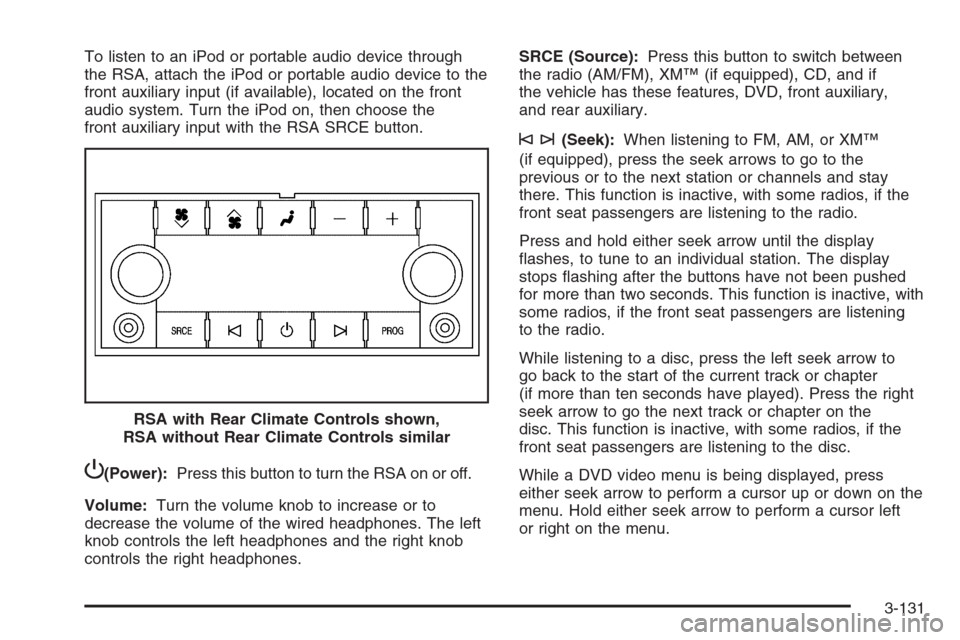
P(Power):Press this button to turn the RSA on or off.
Volume:Turn the volume knob to increase or to
decrease the volume of the wired headphones. The left
knob controls the left headphones and the right knob
controls the right headphones.SRCE (Source):Press this button to switch between
the radio (AM/FM), XM™ (if equipped), CD, and if
the vehicle has these features, DVD, front auxiliary,
and rear auxiliary.
©¨(Seek):When listening to FM, AM, or XM™
(if equipped), press the seek arrows to go to the
previous or to the next station or channels and stay
there. This function is inactive, with some radios, if the
front seat passengers are listening to the radio.
Press and hold either seek arrow until the display
ashes, to tune to an individual station. The display
stops ashing after the buttons have not been pushed
for more than two seconds. This function is inactive, with
some radios, if the front seat passengers are listening
to the radio.
While listening to a disc, press the left seek arrow to
go back to the start of the current track or chapter
(if more than ten seconds have played). Press the right
seek arrow to go the next track or chapter on the
disc. This function is inactive, with some radios, if the
front seat passengers are listening to the disc.
While a DVD video menu is being displayed, press
either seek arrow to perform a cursor up or down on the
menu. Hold either seek arrow to perform a cursor left
or right on the menu. RSA with Rear Climate Controls shown,
RSA without Rear Climate Controls similar
3-131
Page 392 of 596
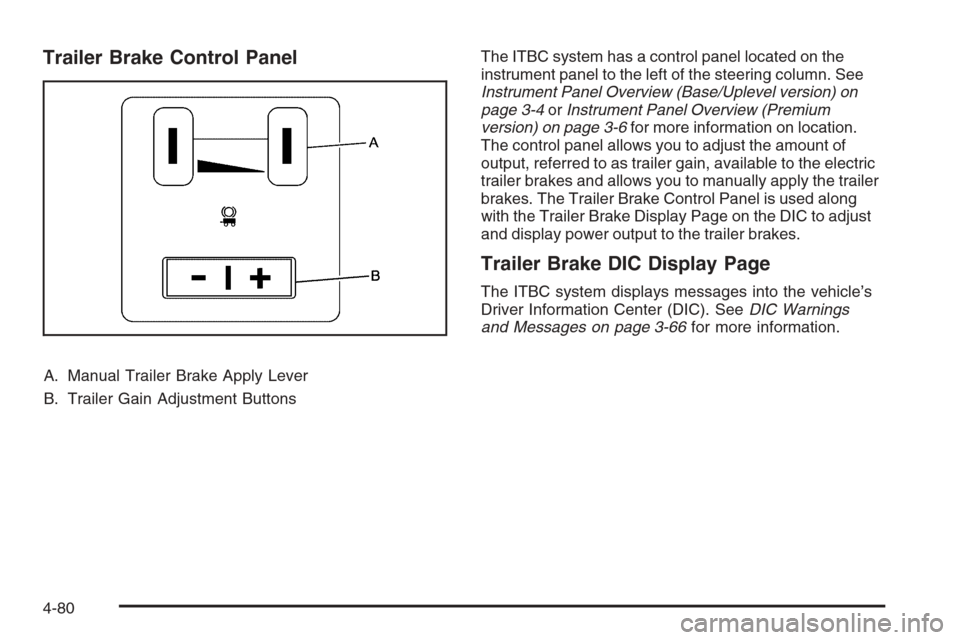
Trailer Brake Control Panel
A. Manual Trailer Brake Apply Lever
B. Trailer Gain Adjustment ButtonsThe ITBC system has a control panel located on the
instrument panel to the left of the steering column. See
Instrument Panel Overview (Base/Uplevel version) on
page 3-4orInstrument Panel Overview (Premium
version) on page 3-6for more information on location.
The control panel allows you to adjust the amount of
output, referred to as trailer gain, available to the electric
trailer brakes and allows you to manually apply the trailer
brakes. The Trailer Brake Control Panel is used along
with the Trailer Brake Display Page on the DIC to adjust
and display power output to the trailer brakes.
Trailer Brake DIC Display Page
The ITBC system displays messages into the vehicle’s
Driver Information Center (DIC). SeeDIC Warnings
and Messages on page 3-66for more information.
4-80
Page 393 of 596
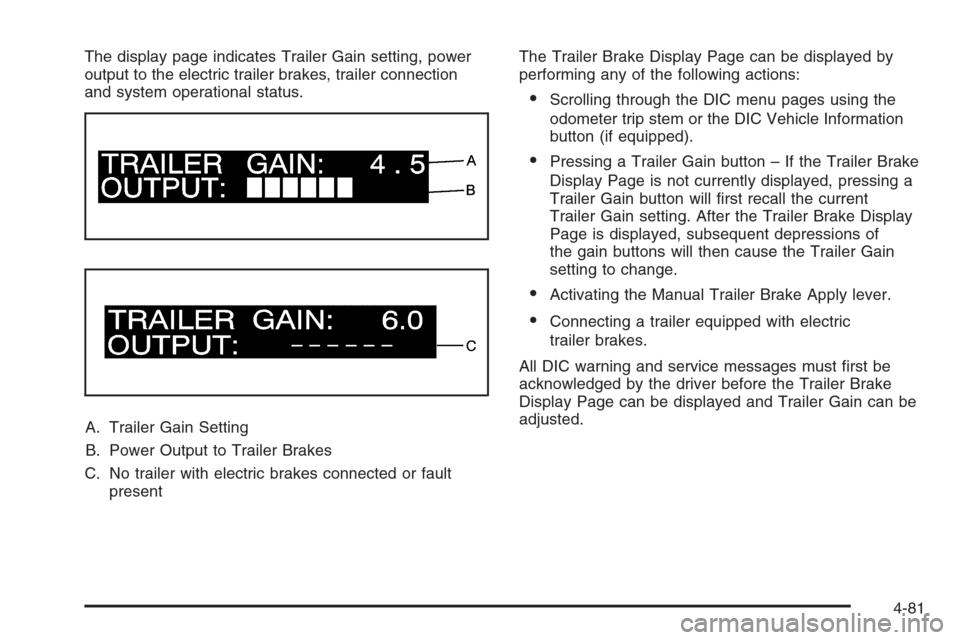
The display page indicates Trailer Gain setting, power
output to the electric trailer brakes, trailer connection
and system operational status.
A. Trailer Gain Setting
B. Power Output to Trailer Brakes
C. No trailer with electric brakes connected or fault
presentThe Trailer Brake Display Page can be displayed by
performing any of the following actions:
Scrolling through the DIC menu pages using the
odometer trip stem or the DIC Vehicle Information
button (if equipped).
Pressing a Trailer Gain button – If the Trailer Brake
Display Page is not currently displayed, pressing a
Trailer Gain button will rst recall the current
Trailer Gain setting. After the Trailer Brake Display
Page is displayed, subsequent depressions of
the gain buttons will then cause the Trailer Gain
setting to change.
Activating the Manual Trailer Brake Apply lever.
Connecting a trailer equipped with electric
trailer brakes.
All DIC warning and service messages must rst be
acknowledged by the driver before the Trailer Brake
Display Page can be displayed and Trailer Gain can be
adjusted.
4-81
Page 394 of 596
TRAILER GAIN – This setting is displayed anytime the
Trailer Brake Display Page is active. This setting
can be adjusted from 0.0 to 10.0 with either a trailer
connected or disconnected. To adjust the Trailer Gain,
press one of the Trailer Gain adjustment buttons
located on the Trailer Brake Control Panel. Press and
hold a gain button to cause the Trailer Gain to
continuously adjust. To turn the output to the trailer off,
adjust the Trailer Gain setting to 0.0 (zero).
0.0 (zero) gain is the factory default setting. To properly
adjust trailer gain, see the Trailer Gain Adjustment
Procedure later in this section.
TRAILER OUTPUT – This is displayed any time a trailer
with electric brakes is connected. Output to the electric
brakes is based on the amount of vehicle braking
present and relative to the Trailer Gain setting. Output is
displayed from 0 to 10 bars for each gain setting.
The Trailer Output will indicate “------“ontheTrailer
Brake Display Page whenever the following occur:
No trailer is connected.
A trailer without electric brakes is connected (no
DIC message is displayed).
A trailer with electric brakes has become
disconnected (a CHECK TRAILER WIRING
message will also be displayed on the DIC).
There is a fault present in the wiring to the electric
trailer brakes (a CHECK TRAILER WIRING
message will also be displayed on the DIC).
There is a fault in the ITBC system (a SERVICE
TRAILER BRAKE SYSTEM message will also
be displayed in the DIC).
Manual Trailer Brake Apply
The Manual Trailer Brake Apply Lever is located on the
Trailer Brake Control Panel and is used to apply the
trailer’s electric brakes independent of your vehicle’s
brakes. This lever is used in the Trailer Gain Adjustment
Procedure to properly adjust the power output to the
trailer brakes. Sliding the lever to the left will apply only
the trailer brakes. The power output to the trailer is
indicated in the Trailer Brake Display Page in the DIC. If
your vehicle’s service brakes are applied while using the
Manual Trailer Brake Apply Lever, the trailer output
power will be the greater of the two.
The trailer and the vehicle’s brake lamps will come on
when either vehicle braking or manual trailer brakes
are applied.
4-82