2008 CHEVROLET SILVERADO automatic transmission
[x] Cancel search: automatic transmissionPage 238 of 596
Timer
Press the trip/fuel button until TIMER displays.
This display can be used as a timer.
To start the timer, press the set/reset button while
TIMER is displayed. The display will show the amount
of time that has passed since the timer was last
reset, not including time the ignition is off. Time will
continue to be counted as long as the ignition is
on, even if another display is being shown on the DIC.
The timer will record up to 99 hours, 59 minutes
and 59 seconds (99:59:59) after which the display will
return to zero.
To stop the timer, press the set/reset button briey while
TIMER is displayed.
To reset the timer to zero, press and hold the set/reset
button while TIMER is displayed.
Transmission Temperature
Press the trip/fuel button until TRANS TEMP displays.
This display shows the temperature of the automatic
transmission uid in either degrees Fahrenheit (°F) or
degrees Celsius (°C).
Instantaneous Economy and Active
Fuel Management™ Indicator
If your vehicle has this display, press the trip/fuel
button until INST ECONOMY V8 MODE displays.
This display shows the current fuel economy at a
particular moment and will change frequently as driving
conditions change. This display shows the instantaneous
fuel economy in miles per gallon (mpg) or liters per
100 kilometers (L/100 km). Unlike average economy,
this screen cannot be reset.
An Active Fuel Management™ indicator will display on
the right side of the DIC, while INST ECONOMY
displays on the left side. Active Fuel Management™
allows the engine to operate on either four or eight
cylinders, depending on your driving demands. When
Active Fuel Management™ is active, V4 MODE will
display on the DIC. When Active Fuel Management™
is inactive, V8 MODE will display. SeeActive Fuel
Management™ on page 2-28for more information.
Blank Display
This display shows no information.
3-60
Page 242 of 596
To use the retro-active reset feature, press and hold the
trip odometer reset stem for at least four seconds.
The trip odometer will display the number of miles (mi)
or kilometers (km) driven since the ignition was last
turned on and the vehicle was moving. Once the vehicle
begins moving, the trip odometer will accumulate
mileage. For example, if the vehicle was driven
5 miles (8 km) before it is started again, and then the
retro-active reset feature is activated, the display
will show 5 miles (8 km). As the vehicle begins moving,
the display will then increase to 5.1 miles (8.2 km),
5.2 miles (8.4 km), etc.
Transmission Temperature
Press the trip odometer reset stem until TRANS TEMP
displays. This display shows the temperature of the
automatic transmission uid in either degrees
Fahrenheit (°F) or degrees Celsius (°C).
Trailer Gain and Output
On vehicles with the Integrated Trailer Brake Control
(ITBC) system, the trailer brake display appears in the
DIC. Press the trip odometer reset stem until TRAILER
GAIN and OUTPUT display.TRAILER GAIN shows the trailer gain setting. This
setting can be adjusted from 0.0 to 10.0 with either a
trailer connected or disconnected. To adjust this setting,
see “Integrated Trailer Brake Control System” under
Towing a Trailer on page 4-55for more information.
OUTPUT shows the power output to the trailer anytime
a trailer with electric brakes is connected. Output is
displayed in 0 to 10 bars. Dashes may appear in
the OUTPUT display. See “Integrated Trailer Brake
Control System” underTowing a Trailer on page 4-55
for more information.
Oil Life
To access this display, the vehicle must be in PARK (P).
Press the trip odometer reset stem until OIL LIFE
REMAINING displays. This display shows an estimate
of the oil’s remaining useful life. If you see 99% OIL LIFE
REMAINING on the display, that means 99% of the
current oil life remains. The engine oil life system
will alert you to change the oil on a schedule consistent
with your driving conditions.
When the remaining oil life is low, the CHANGE
ENGINE OIL SOON message will appear on the
display. See “CHANGE ENGINE OIL SOON” under
DIC Warnings and Messages on page 3-66.
3-64
Page 320 of 596
In this mode, engine power is not reduced automatically
and the driven wheels can spin more freely. This can
cause the brake-traction control to activate constantly.
Notice:If you allow the wheel(s) of one axle to spin
excessively while the StabiliTrak
®, ABS and brake
warning lights and the SERVICE STABILITRAK
message are displayed, you could damage the
transfer case. The repairs would not be covered by
your warranty. Reduce engine power and do not
spin the wheel(s) excessively while these lights and
this message are displayed.
The traction control system may activate on dry or
rough roads or under conditions such as heavy
acceleration while turning or abrupt upshifts/downshifts
of the transmission. When this happens, you may
notice a reduction in acceleration, or may hear a noise
or vibration. This is normal.
If your vehicle is in cruise control when the system
activates, the StabiliTrak
®light will ash and the cruise
control will automatically disengage. When road
conditions allow you to use cruise again, you may
re-engage the cruise control. SeeCruise Control on
page 3-13.
StabiliTrak
®may also turn off automatically if it
determines that a problem exists with the system. If the
problem does not clear itself after restarting the
vehicle, you should see your dealer/retailer for service.
Steering
Power Steering
If you lose power steering assist because the engine
stops or the system is not functioning, you can steer but
it will take much more effort.
Steering Tips
It is important to take curves at a reasonable speed.
A lot of the “driver lost control” accidents mentioned on
the news happen on curves. Here is why:
Experienced driver or beginner, each of us is subject to
the same laws of physics when driving on curves.
The traction of the tires against the road surface makes
it possible for the vehicle to change its path when
you turn the front wheels. If there is no traction, inertia
will keep the vehicle going in the same direction. If
you have ever tried to steer a vehicle on wet ice, you
will understand this.
Traction in a curve depends on the condition of the tires
and the road surface, the angle at which the curve is
banked, and your speed. While in a curve, speed is the
one factor you can control.
4-8
Page 402 of 596
When You Are Ready to Leave After
Parking on a Hill
1. Apply your regular brakes and hold the pedal down
while you:
Start your engine
Shift into a gear
Release the parking brake
2. Let up on the brake pedal.
3. Drive slowly until the trailer is clear of the chocks.
4. Stop and have someone pick up and store the
chocks.
Maintenance When Trailer Towing
Your vehicle will need service more often when you’re
pulling a trailer. SeeScheduled Maintenance (Gasoline
Engine) on page 6-4for more information. Things
that are especially important in trailer operation are
automatic transmission uid (don’t overll), engine oil,
axle lubricant, belt, cooling system and brake system.
Each of these is covered in this manual, and the Index
will help you nd them quickly. If you’re trailering, it’s
a good idea to review these sections before you
start your trip.
Check periodically to see that all hitch nuts and bolts
are tight.
Trailer Wiring Harness
Your vehicle is equipped with one of the following wiring
harnesses for towing a trailer or hauling a slide-in
camper.
Basic Trailer Wiring
All regular, extended cab and crew cab pickups have a
seven-wire trailer towing harness.
For vehicles not equipped with heavy duty trailering, the
harness is clipped to the vehicle’s frame behind the
spare tire mount. The harness requires the installation
of a trailer connector, which is available through
your dealer.
If you need to tow a light-duty trailer with a standard
four-way round pin connector, you can also get an
adapter from your dealer.
4-90
Page 407 of 596
Service............................................................5-4
Accessories and Modications..........................5-4
California Proposition 65 Warning.....................5-4
California Perchlorate Materials Requirements.....5-5
Doing Your Own Service Work.........................5-5
Adding Equipment to the Outside of
Your Vehicle..............................................5-5
Fuel................................................................5-6
Gasoline Octane............................................5-6
Gasoline Specications....................................5-6
California Fuel...............................................5-7
Additives.......................................................5-7
Fuel E85 (85% Ethanol)..................................5-8
Fuels in Foreign Countries...............................5-9
Filling the Tank............................................5-10
Filling a Portable Fuel Container.....................5-12
Checking Things Under the Hood....................5-12
Hood Release..............................................5-13
Engine Compartment Overview.......................5-14
Engine Oil (Gasoline Engine)..........................5-15
Engine Oil Life System..................................5-18
Engine Air Cleaner/Filter (Gasoline Engines).....5-20
Automatic Transmission Fluid
(6-Speed Transmission)..............................5-22Automatic Transmission Fluid
(4-Speed Transmission)..............................5-26
Engine Coolant.............................................5-29
Coolant Surge Tank Pressure Cap..................5-32
Engine Overheating.......................................5-32
Overheated Engine Protection
Operating Mode (V8 Engines Only)..............5-34
Cooling System............................................5-35
Engine Fan Noise.........................................5-40
Power Steering Fluid.....................................5-41
Windshield Washer Fluid................................5-42
Brakes........................................................5-43
Battery........................................................5-46
Jump Starting...............................................5-47
Rear Axle.......................................................5-52
Four-Wheel Drive............................................5-54
Front Axle......................................................5-56
Noise Control System.....................................5-57
Tampering with Noise Control System
Prohibited.................................................5-57
Headlamp Aiming...........................................5-58
Section 5 Service and Appearance Care
5-1
Page 421 of 596
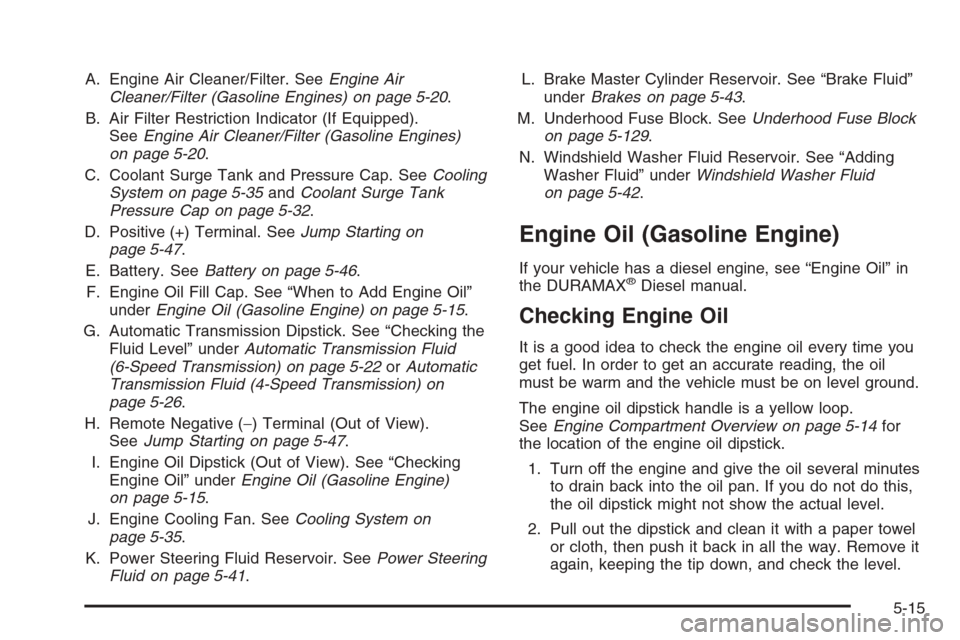
A. Engine Air Cleaner/Filter. SeeEngine Air
Cleaner/Filter (Gasoline Engines) on page 5-20.
B. Air Filter Restriction Indicator (If Equipped).
SeeEngine Air Cleaner/Filter (Gasoline Engines)
on page 5-20.
C. Coolant Surge Tank and Pressure Cap. SeeCooling
System on page 5-35andCoolant Surge Tank
Pressure Cap on page 5-32.
D. Positive (+) Terminal. SeeJump Starting on
page 5-47.
E. Battery. SeeBattery on page 5-46.
F. Engine Oil Fill Cap. See “When to Add Engine Oil”
underEngine Oil (Gasoline Engine) on page 5-15.
G. Automatic Transmission Dipstick. See “Checking the
Fluid Level” underAutomatic Transmission Fluid
(6-Speed Transmission) on page 5-22orAutomatic
Transmission Fluid (4-Speed Transmission) on
page 5-26.
H. Remote Negative (−) Terminal (Out of View).
SeeJump Starting on page 5-47.
I. Engine Oil Dipstick (Out of View). See “Checking
Engine Oil” underEngine Oil (Gasoline Engine)
on page 5-15.
J. Engine Cooling Fan. SeeCooling System on
page 5-35.
K. Power Steering Fluid Reservoir. SeePower Steering
Fluid on page 5-41.L. Brake Master Cylinder Reservoir. See “Brake Fluid”
underBrakes on page 5-43.
M. Underhood Fuse Block. SeeUnderhood Fuse Block
on page 5-129.
N. Windshield Washer Fluid Reservoir. See “Adding
Washer Fluid” underWindshield Washer Fluid
on page 5-42.
Engine Oil (Gasoline Engine)
If your vehicle has a diesel engine, see “Engine Oil” in
the DURAMAX®Diesel manual.
Checking Engine Oil
It is a good idea to check the engine oil every time you
get fuel. In order to get an accurate reading, the oil
must be warm and the vehicle must be on level ground.
The engine oil dipstick handle is a yellow loop.
SeeEngine Compartment Overview on page 5-14for
the location of the engine oil dipstick.
1. Turn off the engine and give the oil several minutes
to drain back into the oil pan. If you do not do this,
the oil dipstick might not show the actual level.
2. Pull out the dipstick and clean it with a paper towel
or cloth, then push it back in all the way. Remove it
again, keeping the tip down, and check the level.
5-15
Page 428 of 596
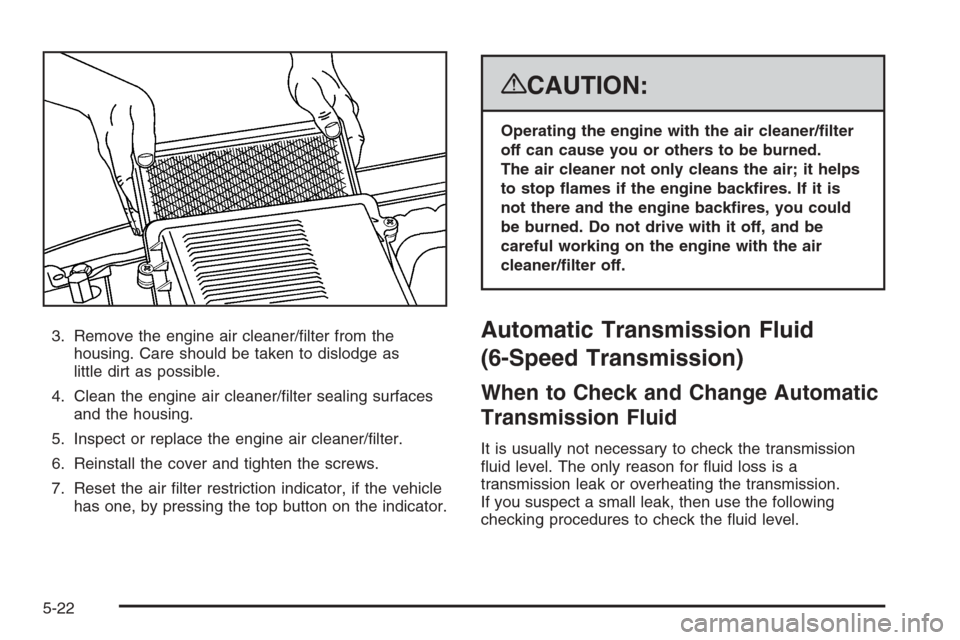
3. Remove the engine air cleaner/lter from the
housing. Care should be taken to dislodge as
little dirt as possible.
4. Clean the engine air cleaner/lter sealing surfaces
and the housing.
5. Inspect or replace the engine air cleaner/lter.
6. Reinstall the cover and tighten the screws.
7. Reset the air lter restriction indicator, if the vehicle
has one, by pressing the top button on the indicator.
{CAUTION:
Operating the engine with the air cleaner/lter
off can cause you or others to be burned.
The air cleaner not only cleans the air; it helps
to stop ames if the engine backres. If it is
not there and the engine backres, you could
be burned. Do not drive with it off, and be
careful working on the engine with the air
cleaner/lter off.
Automatic Transmission Fluid
(6-Speed Transmission)
When to Check and Change Automatic
Transmission Fluid
It is usually not necessary to check the transmission
uid level. The only reason for uid loss is a
transmission leak or overheating the transmission.
If you suspect a small leak, then use the following
checking procedures to check the uid level.
5-22
Page 429 of 596
However, if there is a large leak, then it may be
necessary to have the vehicle towed to a dealer/retailer
service department and have it repaired before driving
the vehicle further.
Notice:Use of the incorrect automatic transmission
uid may damage your vehicle, and the damages
may not be covered by your warranty. Always
use the automatic transmission uid listed in
Recommended Fluids and Lubricants on page 6-14.
Change the uid and lter at the intervals listed in
the Maintenance Schedule. SeeScheduled Maintenance
(Gasoline Engine) on page 6-4. Be sure to use the
transmission uid listed inRecommended Fluids and
Lubricants on page 6-14.
How to Check Automatic
Transmission Fluid
Notice:Too much or too little uid can damage
your transmission. Too much can mean that some
of the uid could come out and fall on hot engine
parts or exhaust system parts, starting a re.
Too little uid could cause the transmission to
overheat. Be sure to get an accurate reading if you
check your transmission uid.Before checking the uid level, prepare your vehicle
as follows:
1. Start the engine and park your vehicle on a level
surface. Keep the engine running.
2. Apply the parking brake and place the shift lever
in P (PARK).
3. With your foot on the brake pedal, move the shift
lever through each gear range, pausing for about
three seconds in each range. Then, move the
shift lever back to P (PARK).
4. Allow the engine to idle (500 – 800 rpm) for at least
one minute. Slowly release the brake pedal.
5. Keep the engine running and press the Trip/Fuel
button or trip odometer reset stem until TRANS
TEMP (Transmission Temperature) displays on the
Driver Information Center (DIC).
6. Using the TRANS TEMP reading, determine and
perform the appropriate check procedure. If the
TRANS TEMP reading is not within the required
temperature ranges, allow the vehicle to cool,
or operate the vehicle until the appropriate
transmission uid temperature is reached.
5-23