2008 CHEVROLET MALIBU audio
[x] Cancel search: audioPage 1 of 412
Seats and Restraint Systems........................... 1-1
Front Seats
............................................... 1-2
Rear Seats
............................................... 1-9
Safety Belts
.............................................1-11
Child Restraints
.......................................1-31
Airbag System
.........................................1-56
Restraint System Check
............................1-72
Features and Controls..................................... 2-1
Keys
........................................................ 2-3
Doors and Locks
......................................2-10
Windows
.................................................2-15
Theft-Deterrent Systems
............................2-18
Starting and Operating Your Vehicle
...........2-22
Mirrors
....................................................2-39
OnStar
®System
......................................2-42
Universal Home Remote System
................2-45
Storage Areas
.........................................2-52
Sunroof
..................................................2-53
Instrument Panel............................................. 3-1
Instrument Panel Overview
.......................... 3-4
Climate Controls
......................................3-21
Warning Lights, Gages, and Indicators
........3-30
Driver Information Center (DIC)
..................3-46
Audio System(s)
.......................................3-59Driving Your Vehicle....................................... 4-1
Your Driving, the Road, and the Vehicle
....... 4-2
Towing
...................................................4-26
Service and Appearance Care.......................... 5-1
Service
..................................................... 5-3
Fuel
......................................................... 5-5
Checking Things Under the Hood
...............5-12
Headlamp Aiming
.....................................5-48
Bulb Replacement
....................................5-48
Windshield Wiper Blade Replacement
.........5-51
Tires
......................................................5-52
Appearance Care
.....................................5-89
Vehicle Identication
.................................5-97
Electrical System
......................................5-98
Capacities and Specications
...................5-108
Maintenance Schedule..................................... 6-1
Maintenance Schedule
................................ 6-2
Customer Assistance Information.................... 7-1
Customer Assistance and Information
........... 7-2
Reporting Safety Defects
...........................7-15
Vehicle Data Recording and Privacy
...........7-18
Index................................................................ 1
2008 Chevrolet Malibu Owner ManualM
Page 102 of 412
Retained Accessory Power (RAP)
These vehicle accessories can be used for up to
10 minutes after the engine is turned off:
Audio System
Power Windows
Heated Seats (if equipped)
Sunroof (if equipped)
These features continue to work up to 10 minutes after
the ignition is turned to LOCK/OFF.
The power windows, heated seats, and sunroof will
work until any door is opened.
The radio continues to work until the driver’s door is
opened.
All these features operate when the key is in the
ON/RUN or ACC/ACCESSORY.
Starting the Engine
Move your shift lever to PARK (P) or NEUTRAL (N).
Your engine will not start in any other position – this is a
safety feature. To restart when you are already
moving, use NEUTRAL (N) only.
Notice:Do not try to shift to P (Park) if your vehicle
is moving. If you do, you could damage the
transmission. Shift to P (Park) only when your
vehicle is stopped.
Starting Procedure
1. With your foot off the accelerator pedal, turn the
ignition key to START. When the engine starts,
let go of the key. The idle speed will go down as
your engine gets warm. Do not race the engine
immediately after starting it. Operate the engine and
transmission gently to allow the oil to warm up
and lubricate all moving parts.
2-24
Page 122 of 412
OnStar Virtual Advisor
OnStar Virtual Advisor is a feature of OnStar
Hands-Free Calling that uses your minutes to access
location-based weather, local traffic reports, and
stock quotes. By pressing the phone button and giving
a few simple voice commands, you can browse
through the various topics. See the OnStar Owner’s
Guide for more information (Only available in the
continental U.S.).
OnStar Steering Wheel Controls
Your vehicle may have a Talk/Mute button that can be
used to interact with OnStar Hands-Free Calling.
SeeAudio Steering Wheel Controls on page 3-79for
more information.
On some vehicles, you may have to hold the button for
a few seconds and give the command “ONSTAR” to
activate the OnStar Hands-Free Calling.
On some vehicles, the mute button can be used to dial
numbers into voicemail systems, or to dial phone
extensions. See the OnStar Owner’s Guide for more
information.
How OnStar Service Works
Your vehicle’s OnStar system has the capability of
recording and transmitting vehicle information. This
information is automatically sent to an OnStar Call
Center at the time of an OnStar button press,
Emergency button press or if your airbags or AACN
system deploys. The vehicle information usually includes
your GPS location and, in the event of a crash,
additional information regarding the accident that your
vehicle has been involved in (e.g. the direction from
which your vehicle was hit). When you use the Virtual
Advisor feature of OnStar Hands-Free Calling, your
vehicle also sends OnStar your GPS location so that we
can provide you with location-based services.
OnStar service cannot work unless your vehicle is in a
place where OnStar has an agreement with a wireless
service provider for service in that area. OnStar
service also cannot work unless you are in a place
where the wireless service provider OnStar has hired for
that area has coverage, network capacity and reception
when the service is needed, and technology that is
compatible with the OnStar service. Not all services are
available everywhere, particularly in remote or
enclosed areas, or at all times.
2-44
Page 134 of 412
Security Light...............................................3-44
Cruise Control Light......................................3-44
Highbeam On Light.......................................3-45
Fuel Gage...................................................3-45
Driver Information Center (DIC).......................3-46
DIC Operation and Displays...........................3-46
DIC Warnings and Messages.........................3-48
DIC Vehicle Personalization............................3-53Audio System(s).............................................3-59
Setting the Clock..........................................3-60
Radio(s)......................................................3-62
Using an MP3..............................................3-73
XM Radio Messages.....................................3-78
Theft-Deterrent Feature..................................3-79
Audio Steering Wheel Controls.......................3-79
Radio Reception...........................................3-80
Backglass Antenna.......................................3-81
XM™ Satellite Radio Antenna System.............3-81
Section 3 Instrument Panel
3-2
Page 137 of 412
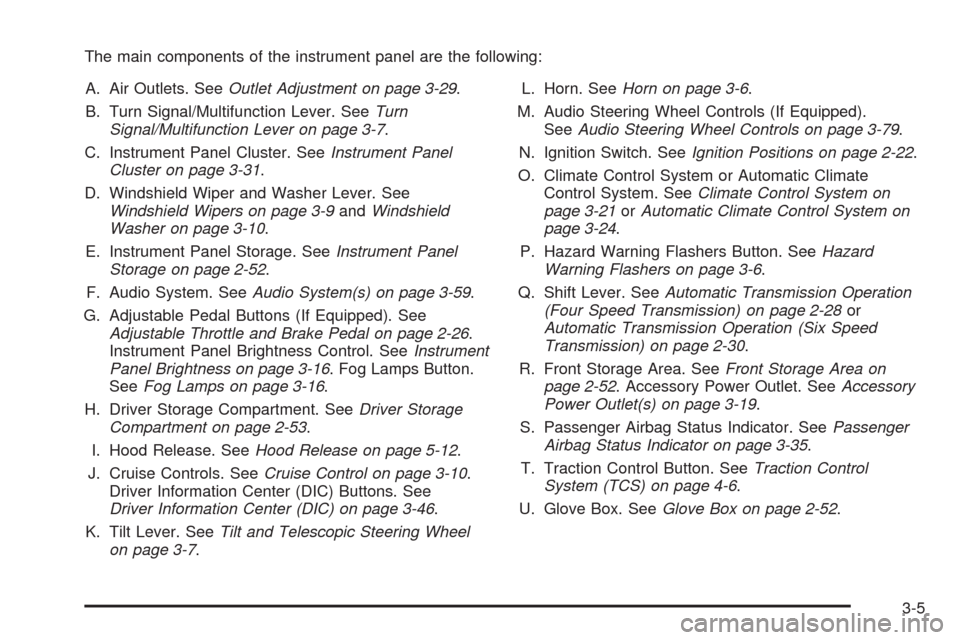
The main components of the instrument panel are the following:
A. Air Outlets. SeeOutlet Adjustment on page 3-29.
B. Turn Signal/Multifunction Lever. SeeTurn
Signal/Multifunction Lever on page 3-7.
C. Instrument Panel Cluster. SeeInstrument Panel
Cluster on page 3-31.
D. Windshield Wiper and Washer Lever. See
Windshield Wipers on page 3-9andWindshield
Washer on page 3-10.
E. Instrument Panel Storage. SeeInstrument Panel
Storage on page 2-52.
F. Audio System. SeeAudio System(s) on page 3-59.
G. Adjustable Pedal Buttons (If Equipped). See
Adjustable Throttle and Brake Pedal on page 2-26.
Instrument Panel Brightness Control. SeeInstrument
Panel Brightness on page 3-16. Fog Lamps Button.
SeeFog Lamps on page 3-16.
H. Driver Storage Compartment. SeeDriver Storage
Compartment on page 2-53.
I. Hood Release. SeeHood Release on page 5-12.
J. Cruise Controls. SeeCruise Control on page 3-10.
Driver Information Center (DIC) Buttons. See
Driver Information Center (DIC) on page 3-46.
K. Tilt Lever. SeeTilt and Telescopic Steering Wheel
on page 3-7.L. Horn. SeeHorn on page 3-6.
M. Audio Steering Wheel Controls (If Equipped).
SeeAudio Steering Wheel Controls on page 3-79.
N. Ignition Switch. SeeIgnition Positions on page 2-22.
O. Climate Control System or Automatic Climate
Control System. SeeClimate Control System on
page 3-21orAutomatic Climate Control System on
page 3-24.
P. Hazard Warning Flashers Button. SeeHazard
Warning Flashers on page 3-6.
Q. Shift Lever. SeeAutomatic Transmission Operation
(Four Speed Transmission) on page 2-28or
Automatic Transmission Operation (Six Speed
Transmission) on page 2-30.
R. Front Storage Area. SeeFront Storage Area on
page 2-52. Accessory Power Outlet. SeeAccessory
Power Outlet(s) on page 3-19.
S. Passenger Airbag Status Indicator. SeePassenger
Airbag Status Indicator on page 3-35.
T. Traction Control Button. SeeTraction Control
System (TCS) on page 4-6.
U. Glove Box. SeeGlove Box on page 2-52.
3-5
Page 191 of 412
Audio System(s)
Determine which radio your vehicle has and then read
the pages following to familiarize yourself with its
features.
{CAUTION:
This system provides you with far greater
access to audio stations and song listings.
Giving extended attention to entertainment
tasks while driving can cause a crash and you
or others can be injured or killed. Always keep
your eyes on the road and your mind on the
drive — avoid engaging in extended searching
while driving.
Keeping your mind on the drive is important for safe
driving. SeeDefensive Driving on page 4-2. Here are
some ways in which you can help avoid distraction
while driving.
While your vehicle is parked:
Familiarize yourself with all of its controls.
Familiarize yourself with its operation.
Set up your audio system by presetting your
favorite radio stations, setting the tone, and
adjusting the speakers. Then, when driving
conditions permit, you can tune to your favorite
radio stations using the presets and steering wheel
controls if the vehicle has them.
Notice:Before adding any sound equipment to
your vehicle, such as an audio system, CD player,
CB radio, mobile telephone, or two-way radio, make
sure that it can be added by checking with your
dealer/retailer. Also, check federal rules covering
mobile radio and telephone units. If sound
equipment can be added, it is very important to do
it properly. Added sound equipment may interfere
with the operation of your vehicle’s engine, radio, or
other systems, and even damage them. Your
vehicle’s systems may interfere with the operation
of sound equipment that has been added.
Your vehicle has a feature called Retained Accessory
Power (RAP). With RAP, the audio system can be
played even after the ignition is turned off. SeeRetained
Accessory Power (RAP) on page 2-24for more
information.
3-59
Page 195 of 412
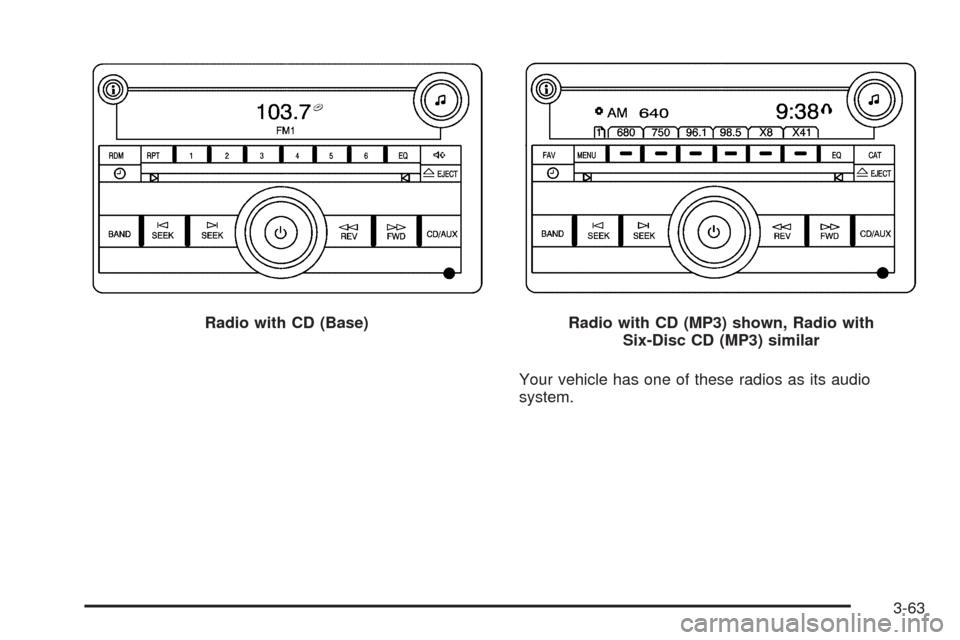
Your vehicle has one of these radios as its audio
system. Radio with CD (Base)
Radio with CD (MP3) shown, Radio with
Six-Disc CD (MP3) similar
3-63
Page 201 of 412
Radio Messages
Calibration Error:The audio system has been
calibrated for your vehicle from the factory. If Calibration
Error displays, it means that the radio has not been
congured properly for your vehicle and it must
be returned to your dealer/retailer for service.
Loc or Locked:If Loc or Locked displays, it means
the THEFTLOCK
®system has locked up. Take the
vehicle to your dealer/retailer for service.
If any error occurs repeatedly or if an error cannot be
corrected, contact your dealer/retailer.
XM™ Satellite Radio Service
XM™ is a satellite radio service that is based in the
48 contiguous United States and 10 Canadian
provinces. XM™ Satellite Radio has a wide variety
of programming and commercial-free music,
coast-to-coast, and in digital-quality sound. During your
trial or when you subscribe, you will get unlimited
access to XM™ Radio Online for when you are not in
your vehicle. A service fee is required to receive
the XM™ service. For more information, contact XM™
at www.xmradio.com or call 1-800-929-2100 in the
U.S. and www.xmradio.ca or call 1-877-438-9677 in
Canada.
Radio Messages for XM™ Only
SeeXM Radio Messages on page 3-78later in this
section for further detail.
Playing a CD
Insert a CD partway into the slot, label side up.
The player pulls it in and the CD should begin playing.
If the ignition or radio is turned off with a CD in the
player it stays in the player. When the ignition or radio
is turned on, the CD starts to play where it stopped, if it
was the last selected audio source.
When the CD is inserted, the CD symbol displays.
As each new track starts to play, the track number
displays.
The CD player can play the smaller 3 inch (8 cm)
single CDs with an adapter ring. Full-size CDs and the
smaller CDs are loaded in the same manner.
3-69