2008 CHEVROLET MALIBU start stop button
[x] Cancel search: start stop buttonPage 8 of 412
Heated Seats
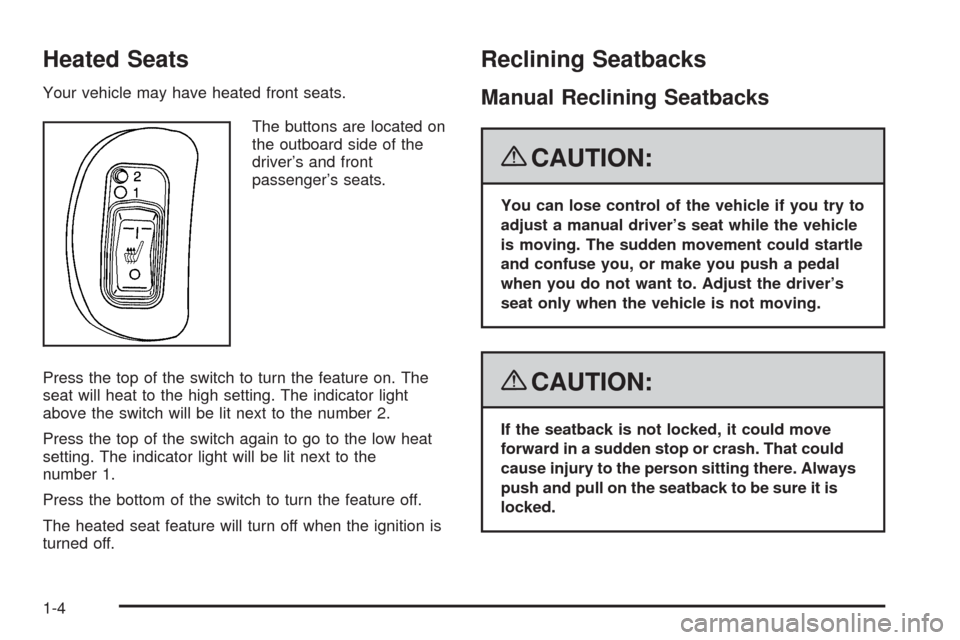
Your vehicle may have heated front seats.
The buttons are located on
the outboard side of the
driver’s and front
passenger’s seats.
Press the top of the switch to turn the feature on. The
seat will heat to the high setting. The indicator light
above the switch will be lit next to the number 2.
Press the top of the switch again to go to the low heat
setting. The indicator light will be lit next to the
number 1.
Press the bottom of the switch to turn the feature off.
The heated seat feature will turn off when the ignition is
turned off.
Reclining Seatbacks
Manual Reclining Seatbacks
{CAUTION:
You can lose control of the vehicle if you try to
adjust a manual driver’s seat while the vehicle
is moving. The sudden movement could startle
and confuse you, or make you push a pedal
when you do not want to. Adjust the driver’s
seat only when the vehicle is not moving.
{CAUTION:
If the seatback is not locked, it could move
forward in a sudden stop or crash. That could
cause injury to the person sitting there. Always
push and pull on the seatback to be sure it is
locked.
1-4
Page 97 of 412
Disarming the System
To disarm the system, do one of the following:
Press the RKE transmitter unlock button.
Turn the ignition to ON/RUN.
Once the system is disarmed, the security light will
stop ashing.
How the System Alarm is Activated
To activate the system if it is armed:
Open the driver’s door or trunk. A ten second
pre-alarm chirp will sound followed by a
thirty second full alarm of horn and lights.
Open any other door. A full alarm of horn and
lights will immediately sound for thirty seconds.
Open the hood. If the vehicle has the remote
start feature, it will activate the full alarm.
When an alarm event has nished, the system
will re-arm itself automatically.
How to Turn Off the System Alarm
To turn off the system alarm:
Press the lock button on the RKE transmitter.
The system will then re-arm itself.
Press the unlock button on the RKE transmitter.
This will also disarm the system.
Insert the key in the ignition and turn it on.
This will also disarm the system.
How to Detect a Tamper Condition
If three chirps are heard when the unlock or lock button
is pressed on the RKE transmitter, it means that the
content theft security system alarm was previously
triggered.
2-19
Page 109 of 412
{CAUTION:
It is dangerous to get out of the vehicle if the
shift lever is not fully in P (Park) with the
parking brake rmly set. The vehicle can roll.
Do not leave the vehicle when the engine is
running unless you have to. If you have left the
engine running, the vehicle can move suddenly.
You or others could be injured. To be sure the
vehicle will not move, even when you are on
fairly level ground, always set the parking brake
and move the shift lever to P (Park). SeeShifting
Into Park on page 2-35. If you are pulling a
trailer, seeTowing a Trailer on page 4-30.Make sure the shift lever is fully in PARK (P) before
starting the engine. Your vehicle has an automatic
transmission shift lock control system. You must fully
apply your regular brake rst and press the shift
lever button before you can shift from PARK (P) while
the ignition key is in ON. If you cannot shift out of
PARK (P), ease pressure on the shift lever and push
the shift lever all the way into PARK (P) as you maintain
brake application. Then move the shift lever into
another gear. SeeShifting Out of Park on page 2-37.
REVERSE (R):Use this gear to back up.
Notice:Shifting to R (Reverse) while the vehicle is
moving forward could damage the transmission.
The repairs would not be covered by the vehicle
warranty. Shift to R (Reverse) only after the vehicle
is stopped.
To rock your vehicle back and forth to get out of snow,
ice, or sand without damaging your transmission,
seeIf Your Vehicle is Stuck in Sand, Mud, Ice, or Snow
on page 4-20.
2-31
Page 112 of 412
Second or Third Gear Start Feature
When accelerating your vehicle from a stop in snowy
and icy conditions, you may want to shift the gear select
tap switch into Second or Third gear. A higher gear
allows you to gain more traction on slippery surfaces.
With the DSC feature, the vehicle can be set to pull
away in Second or Third gear.
1. Move the shift lever from DRIVE (D) into the
MANUAL MODE (M).
2. With the vehicle stopped, press (+) end of the button
to select Second or Third gear. The vehicle will start
from a stop position in Second or Third gear.
3. Once moving select the desired drive gear.
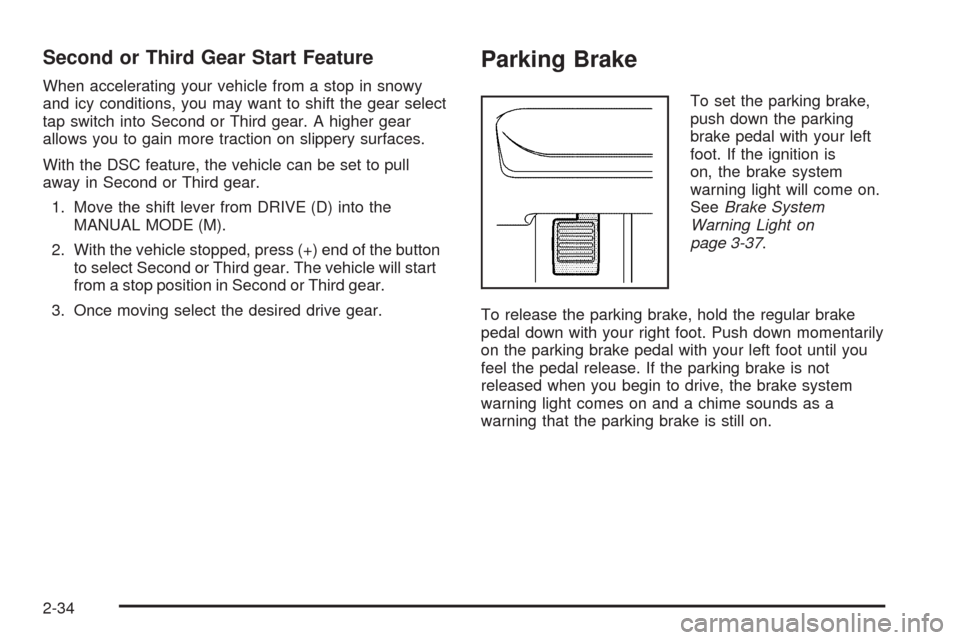
Parking Brake
To set the parking brake,
push down the parking
brake pedal with your left
foot. If the ignition is
on, the brake system
warning light will come on.
SeeBrake System
Warning Light on
page 3-37.
To release the parking brake, hold the regular brake
pedal down with your right foot. Push down momentarily
on the parking brake pedal with your left foot until you
feel the pedal release. If the parking brake is not
released when you begin to drive, the brake system
warning light comes on and a chime sounds as a
warning that the parking brake is still on.
2-34
Page 203 of 412
To insert multiple CDs, do the following:
1. Press and hold the
^button for two seconds.
A beep sounds and Load All Discs displays.
2. Follow the displayed instruction on when to insert
the discs. The CD player takes up to six CDs.
3. Press the
^button again to cancel loading
more CDs.
If the ignition or radio is turned off with a CD in the
player it stays in the player. When the ignition or radio
is turned on, the CD starts to play where it stopped, if it
was the last selected audio source.
ZEJECT:Press to eject the CD. If the CD is not
removed, after several seconds, the CD automatically
pulls back into the player.
For the Six-Disc CD player, press and release to eject the
CD that is currently playing. The radio beeps once and
Ejecting Disc displays. Once the disc is ejected, Remove
Disc displays. The CD can be removed, If the CD is not
removed, after several seconds, the CD automatically
pulls back into the player and begins playing. Press and
hold for two seconds to eject all discs.
f(Tune):Turn to select tracks on the CD currently
playing.
©SEEK¨:Press the left arrow to go to the start of
the current track, if more than ten seconds have
played. Press the right arrow to go to the next track.
If either arrow is held, or pressed multiple times,
the player continues moving backward or forward
through the tracks on the CD.
sREV (Reverse):Press and hold to reverse
playback quickly within a track. You will hear sound
at a reduced volume. Release to resume playing
the track. The elapsed time of the track displays.
\FWD (Fast Forward):Press and hold to advance
playback quickly within a track. You will hear sound
at a reduced volume. Release to resume playing
the track. The elapsed time of the track displays.
RDM (Random):Tracks can be listened to in random,
rather than sequential order, on one CD or all CDs
in a Six-Disc CD player. To use random on the base
radio with Single CD player, do the following:
1. Press the CD/AUX button, insert a disc partway into
the slot of the CD player. A RDM label displays.
2. To play the tracks in random order, press the
pushbutton positioned under the RDM label
until Random Current Disc displays. Press the
pushbutton again to turn off random play.
3-71
Page 316 of 412
TPMS Sensor Matching Process
Each TPMS sensor has a unique identication code.
Any time you replace one or more of the TPMS sensors
or rotate the vehicle’s tires, the identication codes
need to be matched to the new tire/wheel location.
The sensors are matched, to the tire/wheel locations,
in the following order: driver side front tire, passenger
side front tire, passenger side rear tire, and driver
side rear tire using a TPMS diagnostic tool. See your
dealer/retailer for service.
The TPMS sensors can also be matched to each
tire/wheel position by increasing or decreasing the tire’s
air pressure. When increasing the tire’s pressure, do
not exceed the maximum ination pressure indicated on
the tire’s sidewall. To decrease the tire’s air-pressure
use the pointed end of the valve cap, a pencil-style
air pressure gage, or a key.
You have two minutes to match each tire and wheel
position. If it takes longer than two minutes to match
any tire and wheel position, the matching process stops
and you need to start over.The TPMS matching process is outlined below:
1. Set the parking brake.
2. Turn the ignition switch to ON/RUN with the
engine off.
3. Press and hold the Remote Keyless Entry (RKE)
transmitter’s LOCK and UNLOCK buttons, at the
same time, for about ve seconds to start the TPMS
learn mode. The horn sounds twice indicating the
TPMS receiver is ready and in learn mode.
4. Start with the driver side front tire. The driver side
front turn signal also comes on to indicate that
corner’s sensor is ready to be learned.
5. Remove the valve cap from the tire’s valve
stem. Activate the TPMS sensor by increasing
or decreasing the tire’s air pressure for about
eight seconds. The horn chirp, can take up to
30 seconds to sound. It chirps one time and then
all the turn signals ash one time to conrm the
sensor identication code has been matched to
the tire/wheel position.
6. The passenger side front turn signal comes on to
indicate that corner sensor is ready to be learned.
Proceed to the passenger side front tire and
repeat the procedure in Step 5.
5-66