2008 CHEVROLET HHR horn
[x] Cancel search: hornPage 83 of 430
Remote Keyless Entry (RKE)
System Operation
The vehicle’s doors can be locked and unlocked from
about 3 feet (1 m) up to 60 feet (18 m) away with
the Remote Keyless Entry (RKE) transmitter.
There are other conditions which can affect the
performance of the transmitter. SeeRemote Keyless
Entry (RKE) System on page 2-4.The following functions may be available:
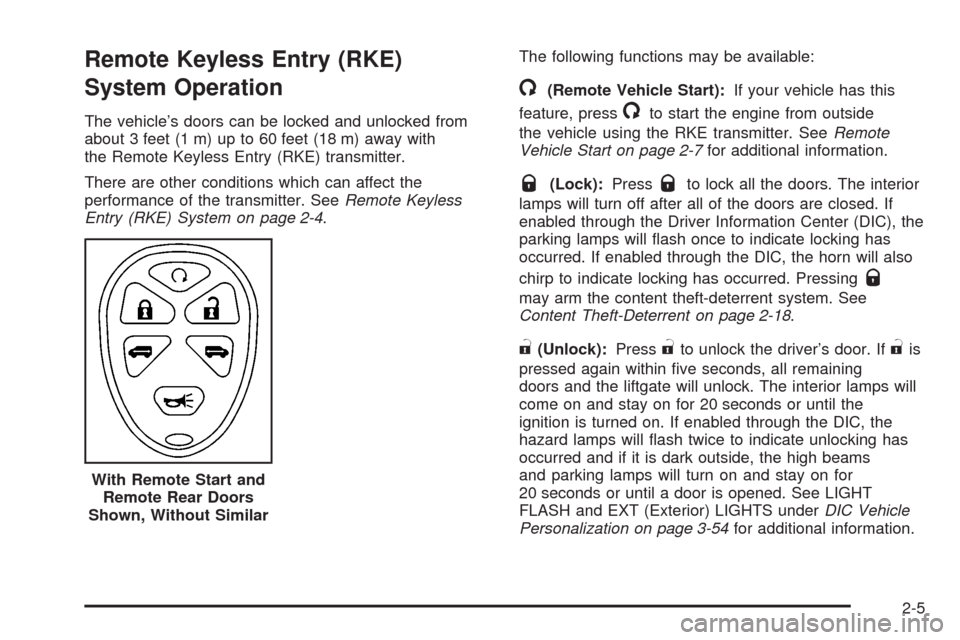
/(Remote Vehicle Start):If your vehicle has this
feature, press
/to start the engine from outside
the vehicle using the RKE transmitter. SeeRemote
Vehicle Start on page 2-7for additional information.
Q(Lock):PressQto lock all the doors. The interior
lamps will turn off after all of the doors are closed. If
enabled through the Driver Information Center (DIC), the
parking lamps will ash once to indicate locking has
occurred. If enabled through the DIC, the horn will also
chirp to indicate locking has occurred. Pressing
Q
may arm the content theft-deterrent system. See
Content Theft-Deterrent on page 2-18.
"(Unlock):Press"to unlock the driver’s door. If"is
pressed again within ve seconds, all remaining
doors and the liftgate will unlock. The interior lamps will
come on and stay on for 20 seconds or until the
ignition is turned on. If enabled through the DIC, the
hazard lamps will ash twice to indicate unlocking has
occurred and if it is dark outside, the high beams
and parking lamps will turn on and stay on for
20 seconds or until a door is opened. See LIGHT
FLASH and EXT (Exterior) LIGHTS underDIC Vehicle
Personalization on page 3-54for additional information. With Remote Start and
Remote Rear Doors
Shown, Without Similar
2-5
Page 84 of 430
L(Vehicle Locator/Panic Alarm):Press and
release
Lto activate the vehicle locate feature. The
horn will chirp three times and the headlamps and
parking lamps will ash three times.
Press and hold
Lfor three seconds to sound the
panic alarm. The horn will chirp and the headlamps and
parking lamps will ash for 30 seconds. Press
L
again to cancel the panic alarm.
Remote Rear Door Operation (Panel)
*:Press and hold*for about one second to
open the rear driver side door.
+:Press and hold+for about one second to
open the rear passenger side door.
Programmable Horn Chirp
Through the DIC, you may choose whether or not to
have a horn chirp when you use the RKE transmitter to
lock or unlock the doors. See “LOCK HORN” and
“UNLOCK HORN” underDIC Vehicle Personalization on
page 3-54for more information.
Matching Transmitter(s) to Your
Vehicle
Each RKE transmitter is coded to prevent another
transmitter from unlocking your vehicle. All transmitters
need to be re-coded to match the new transmitter.
The lost transmitter will no longer work after the new
transmitters are re-coded. Each vehicle can have
a maximum of four transmitters matched to it.
Battery Replacement
Replace the battery if the KEY FOB BATT LOW
message displays in the DIC. See “KEY FOB BATT
LOW” underDIC Warnings and Messages on page 3-48
for additional information.
Notice:When replacing the battery, use care not to
touch any of the circuitry. Static from your body
transferred to these surfaces may damage the
transmitter.
2-6
Page 97 of 430
How the System Alarm is Activated
If the system is armed, it can be activated by either:
Opening the driver’s door or tailgate. This will cause
a ten second pre-alarm chirp followed by a
thirty second full alarm of horn and lights.
Opening any other door. This will immediately cause
a full alarm of horn and lights for thirty seconds.
When an alarm event has nished, the system will
re-arm itself automatically.
How to Turn Off the System Alarm
To turn off the system alarm:
Press the lock button on the RKE transmitter. The
system will then re-arm itself.
Press the unlock button on the RKE transmitter.
This will also disarm the system.
Insert the key in the ignition and turn it on. This will
also disarm the system.
How to Detect a Tamper Condition
If you hear three chirps when you press the unlock or lock
buttons on the RKE transmitter, it means that the content
theft security system alarm was previously activated.
PASS-Key®III+
The PASS-Key®III+ system operates on a radio
frequency subject to Federal Communications
Commission (FCC) Rules and with Industry Canada.
This device complies with Part 15 of the FCC Rules.
Operation is subject to the following two conditions:
1. This device may not cause harmful interference.
2. This device must accept any interference received,
including interference that may cause undesired
operation.
This device complies with RSS-210 of Industry Canada.
Operation is subject to the following two conditions:
1. This device may not cause interference.
2. This device must accept any interference received,
including interference that may cause undesired
operation of the device.
Changes or modications to this system by other than
an authorized service facility could void authorization to
use this equipment.
PASS-Key
®III+ uses a radio frequency transponder in
the key that matches a decoder in your vehicle.
2-19
Page 133 of 430
Instrument Panel Overview...............................3-4
Hazard Warning Flashers................................3-6
Other Warning Devices...................................3-6
Horn.............................................................3-6
Tilt Wheel.....................................................3-6
Turn Signal/Multifunction Lever.........................3-7
Turn and Lane-Change Signals........................3-8
Headlamp High/Low-Beam Changer..................3-8
Flash-to-Pass.................................................3-8
Windshield Wipers..........................................3-9
Windshield Washer.......................................3-10
Rear Window Wiper/Washer...........................3-11
Cruise Control..............................................3-12
Headlamps..................................................3-15
Wiper Activated Headlamps............................3-16
Headlamps on Reminder................................3-16
Daytime Running Lamps (DRL).......................3-16
Automatic Headlamp System..........................3-17
Fog Lamps..................................................3-18
Instrument Panel Brightness...........................3-18
Dome Lamp.................................................3-19
Entry/Exit Lighting.........................................3-19
Mirror Reading Lamps...................................3-19
Rear Reading Lamps....................................3-19
Electric Power Management...........................3-20
Battery Run-Down Protection..........................3-20Accessory Power Outlet(s).............................3-20
Ashtray(s) and Cigarette Lighter......................3-22
Climate Controls............................................3-23
Climate Control System.................................3-23
Outlet Adjustment.........................................3-26
Passenger Compartment Air Filter...................3-26
Warning Lights, Gages, and Indicators............3-28
Instrument Panel Cluster...............................
.3-29
Speedometer and Odometer...........................3-30
Tachometer.................................................3-30
Safety Belt Reminders...................................3-30
Airbag Readiness Light..................................3-31
Passenger Airbag Status Indicator...................3-32
Charging System Light..................................3-34
Up-Shift Light...............................................3-35
Brake System Warning Light..........................3-35
Antilock Brake System Warning Light...............3-36
Enhanced Traction System Warning Light.........3-37
Electronic Stability Control (ESC)/Traction
Control System (TCS) Indicator/Warning
Light........................................................3-37
Engine Coolant Temperature Warning Light......3-38
Engine Coolant Temperature Gage..................3-39
Tire Pressure Light.......................................3-39
Malfunction Indicator Lamp.............................3-40
Section 3 Instrument Panel
3-1
Page 137 of 430
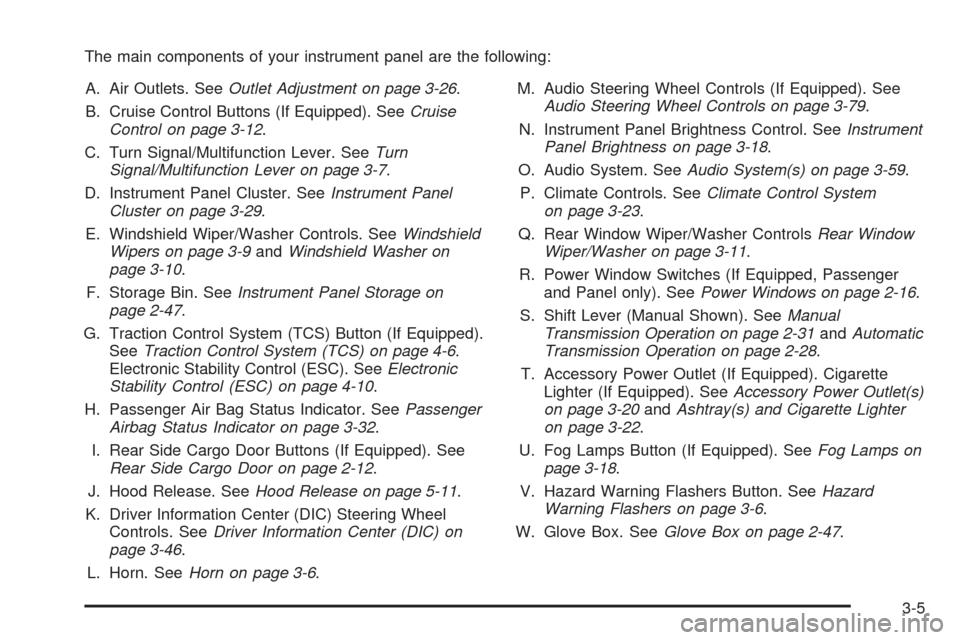
The main components of your instrument panel are the following:
A. Air Outlets. SeeOutlet Adjustment on page 3-26.
B. Cruise Control Buttons (If Equipped). SeeCruise
Control on page 3-12.
C. Turn Signal/Multifunction Lever. SeeTurn
Signal/Multifunction Lever on page 3-7.
D. Instrument Panel Cluster. SeeInstrument Panel
Cluster on page 3-29.
E. Windshield Wiper/Washer Controls. SeeWindshield
Wipers on page 3-9andWindshield Washer on
page 3-10.
F. Storage Bin. SeeInstrument Panel Storage on
page 2-47.
G. Traction Control System (TCS) Button (If Equipped).
SeeTraction Control System (TCS) on page 4-6.
Electronic Stability Control (ESC). SeeElectronic
Stability Control (ESC) on page 4-10.
H. Passenger Air Bag Status Indicator. SeePassenger
Airbag Status Indicator on page 3-32.
I. Rear Side Cargo Door Buttons (If Equipped). See
Rear Side Cargo Door on page 2-12.
J. Hood Release. SeeHood Release on page 5-11.
K. Driver Information Center (DIC) Steering Wheel
Controls. SeeDriver Information Center (DIC) on
page 3-46.
L. Horn. SeeHorn on page 3-6.M. Audio Steering Wheel Controls (If Equipped). See
Audio Steering Wheel Controls on page 3-79.
N. Instrument Panel Brightness Control. SeeInstrument
Panel Brightness on page 3-18.
O. Audio System. SeeAudio System(s) on page 3-59.
P. Climate Controls. SeeClimate Control System
on page 3-23.
Q. Rear Window Wiper/Washer ControlsRear Window
Wiper/Washer on page 3-11.
R. Power Window Switches (If Equipped, Passenger
and Panel only). SeePower Windows on page 2-16.
S. Shift Lever (Manual Shown). SeeManual
Transmission Operation on page 2-31andAutomatic
Transmission Operation on page 2-28.
T. Accessory Power Outlet (If Equipped). Cigarette
Lighter (If Equipped). SeeAccessory Power Outlet(s)
on page 3-20andAshtray(s) and Cigarette Lighter
on page 3-22.
U. Fog Lamps Button (If Equipped). SeeFog Lamps on
page 3-18.
V. Hazard Warning Flashers Button. SeeHazard
Warning Flashers on page 3-6.
W. Glove Box. SeeGlove Box on page 2-47.
3-5
Page 138 of 430
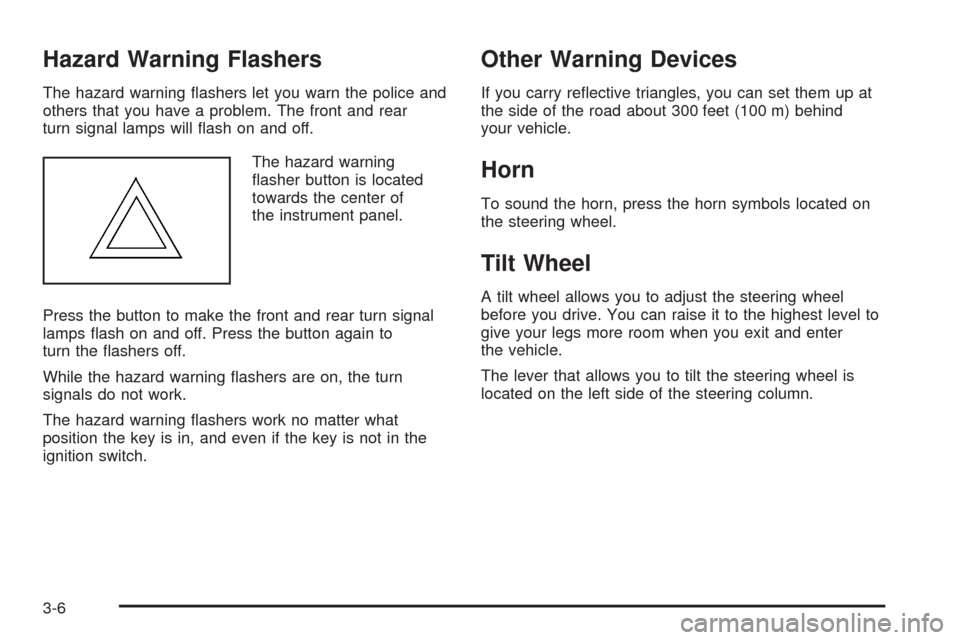
Hazard Warning Flashers
The hazard warning ashers let you warn the police and
others that you have a problem. The front and rear
turn signal lamps will ash on and off.
The hazard warning
asher button is located
towards the center of
the instrument panel.
Press the button to make the front and rear turn signal
lamps ash on and off. Press the button again to
turn the ashers off.
While the hazard warning ashers are on, the turn
signals do not work.
The hazard warning ashers work no matter what
position the key is in, and even if the key is not in the
ignition switch.
Other Warning Devices
If you carry reective triangles, you can set them up at
the side of the road about 300 feet (100 m) behind
your vehicle.
Horn
To sound the horn, press the horn symbols located on
the steering wheel.
Tilt Wheel
A tilt wheel allows you to adjust the steering wheel
before you drive. You can raise it to the highest level to
give your legs more room when you exit and enter
the vehicle.
The lever that allows you to tilt the steering wheel is
located on the left side of the steering column.
3-6
Page 151 of 430
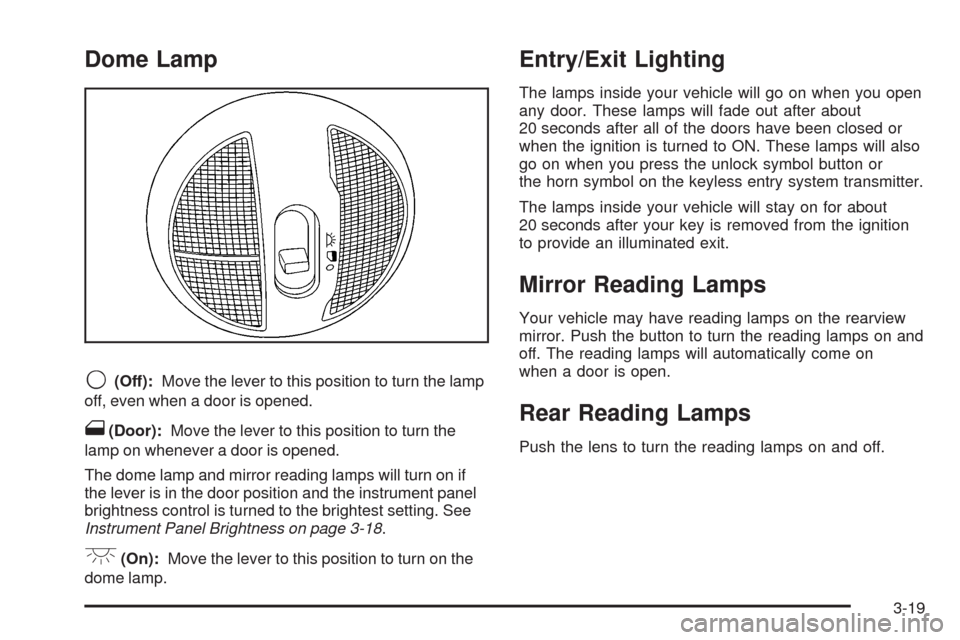
Dome Lamp
9(Off):Move the lever to this position to turn the lamp
off, even when a door is opened.
1(Door):Move the lever to this position to turn the
lamp on whenever a door is opened.
The dome lamp and mirror reading lamps will turn on if
the lever is in the door position and the instrument panel
brightness control is turned to the brightest setting. See
Instrument Panel Brightness on page 3-18.
+(On):Move the lever to this position to turn on the
dome lamp.
Entry/Exit Lighting
The lamps inside your vehicle will go on when you open
any door. These lamps will fade out after about
20 seconds after all of the doors have been closed or
when the ignition is turned to ON. These lamps will also
go on when you press the unlock symbol button or
the horn symbol on the keyless entry system transmitter.
The lamps inside your vehicle will stay on for about
20 seconds after your key is removed from the ignition
to provide an illuminated exit.
Mirror Reading Lamps
Your vehicle may have reading lamps on the rearview
mirror. Push the button to turn the reading lamps on and
off. The reading lamps will automatically come on
when a door is open.
Rear Reading Lamps
Push the lens to turn the reading lamps on and off.
3-19
Page 187 of 430
REMOTE START
If your vehicle has remote start, this feature allows
remote start to be turned off or on. Remote start allows
you to start the engine from outside of the vehicle
using your Remote Keyless Entry (RKE) transmitter.
When REMOTE START appears on the display, press
and hold the reset button for at least one second to
scroll through the available settings:
OFF:The remote start feature will be disabled.
ON (default):The remote start feature will be enabled.
SeeRemote Vehicle Start on page 2-7for more
information.
To select a setting and move on to the next feature,
press the information button while the desired setting is
displayed on the DIC.
LOCK HORN
This feature, which allows the vehicle’s horn to chirp
every time the lock button on the Remote Keyless Entry
(RKE) transmitter is pressed, can be enabled or
disabled. When LOCK HORN appears on the display,
press and hold the reset button for at least one
second to scroll through the available settings:
OFF (default):The horn will not chirp on the rst press
of the lock button on the RKE transmitter. The horn
will still chirp on the second press.ON:The horn will chirp on the rst press of the lock
button on the RKE transmitter.
SeeRemote Keyless Entry (RKE) System Operation on
page 2-5for more information.
To select a setting and move on to the next feature,
press the information button while the desired setting is
displayed on the DIC.
UNLOCK HORN
This feature, which allows the vehicle’s horn to chirp on
the rst press of the unlock button on the Remote
Keyless Entry (RKE) transmitter, can be enabled or
disabled. When UNLOCK HORN appears on the display,
press and hold the reset button for at least one
second to scroll through the available settings:
OFF (default):The horn will not chirp when the unlock
button on the RKE transmitter is pressed.
ON:The horn will chirp on the rst press of the unlock
button on the RKE transmitter.
SeeRemote Keyless Entry (RKE) System Operation on
page 2-5for more information.
To select a setting and move on to the next feature,
press the information button while the desired setting is
displayed on the DIC.
3-55