2008 CHEVROLET EQUINOX Starting
[x] Cancel search: StartingPage 1 of 436
Seats and Restraint Systems........................... 1-1
Front Seats
............................................... 1-2
Rear Seats
..............................................1-10
Safety Belts
.............................................1-12
Child Restraints
.......................................1-31
Airbag System
.........................................1-56
Restraint System Check
............................1-72
Features and Controls..................................... 2-1
Keys
........................................................ 2-3
Doors and Locks
......................................2-10
Windows
.................................................2-15
Theft-Deterrent Systems
............................2-17
Starting and Operating Your Vehicle
...........2-20
Mirrors
....................................................2-37
OnStar
®System
......................................2-39
Storage Areas
.........................................2-42
Sunroof
..................................................2-49
Instrument Panel............................................. 3-1
Instrument Panel Overview
.......................... 3-4
Climate Controls
......................................3-19
Warning Lights, Gages, and Indicators
........3-24
Driver Information Center (DIC)
..................3-42
Audio System(s)
.......................................3-64Driving Your Vehicle....................................... 4-1
Your Driving, the Road, and Your Vehicle
..... 4-2
Towing
...................................................4-28
Service and Appearance Care.......................... 5-1
Service
..................................................... 5-3
Fuel
......................................................... 5-5
Checking Things Under the Hood
...............5-10
All-Wheel Drive
........................................5-42
Headlamp Aiming
.....................................5-44
Bulb Replacement
....................................5-44
Windshield Wiper Blade Replacement
.........5-50
Tires
......................................................5-52
Appearance Care
.....................................5-89
Vehicle Identication
.................................5-99
Electrical System
....................................5-100
Capacities and Specications
...................5-107
Maintenance Schedule..................................... 6-1
Maintenance Schedule
................................ 6-2
Customer Assistance Information.................... 7-1
Customer Assistance and Information
........... 7-2
Reporting Safety Defects
...........................7-14
Vehicle Data Recording and Privacy
...........7-16
Index................................................................ 1
2008 Chevrolet Equinox Owner ManualM
Page 60 of 436
7. If your vehicle does not have a rear seat and your
child restraint has a top tether, follow the child
restraint manufacturer’s instructions regarding the
use of the top tether. SeeLower Anchors and
Tethers for Children (LATCH) on page 1-42for
more information.
8. Push and pull the child restraint in different
directions to be sure it is secure.
If the airbag is off, the off indicator in the passenger
airbag status indicator will come on and stay on when
the vehicle is started.
If a child restraint has been installed and the on
indicator is lit, turn the vehicle off. Remove the child
restraint from the vehicle and reinstall the child restraint.
If, after reinstalling the child restraint and restarting
the vehicle, the on indicator is still lit, check to make
sure that the vehicle’s seatback is not pressing the child
restraint into the seat cushion. If this happens, slightly
recline the vehicle’s seatback and adjust the seat
cushion if possible. Also make sure the child restraint
is not trapped under the vehicle head restraint.
If this happens, adjust the head restraint.
Remove any additional material from the seat such
as blankets, cushions, seat covers, seat heaters or
seat massagers before reinstalling or securing the
child restraint.If the on indicator is still lit, secure the child in the child
restraint in a rear seat position in the vehicle and
check with your dealer/retailer. If no rear seat is
available, do not install a child restraint in this vehicle
and check with your dealer/retailer.
To remove the child restraint, unbuckle the vehicle’s
safety belt and let it go back all the way. If the top tether
is attached to a top tether anchor, disconnect it.
Airbag System
Your vehicle has the following airbags:
A frontal airbag for the driver.
A frontal airbag for the right front passenger.
Your vehicle may have the following airbags:
A roof-rail airbag for the driver and the passenger
seated directly behind the driver.
A roof-rail airbag for the right front passenger
and the passenger seated directly behind that
passenger.
All of the airbags in your vehicle will have the word
AIRBAG embossed in the trim or on an attached label
near the deployment opening.
1-56
Page 71 of 436
If your vehicle does not have a rear seat that will
accommodate a rear-facing child restraint, we
recommend that rear-facing child restraints not be
transported in your vehicle, even if the airbag is off.
The passenger sensing system is designed to turn off
the right front passenger’s frontal airbag if:
The right front passenger seat is unoccupied.
The system determines that an infant is present in
a rear-facing infant seat.
The system determines that a small child is present
in a child restraint.
The system determines that a small child is present
in a booster seat.
A right front passenger takes his/her weight off of
the seat for a period of time.
The right front passenger seat is occupied by a
smaller person, such as a child who has outgrown
child restraints.
Or, if there is a critical problem with the airbag
system or the passenger sensing system.
When the passenger sensing system has turned off the
right front passenger’s frontal airbag, the off indicator
will light and stay lit to remind you that the airbag is off.
SeePassenger Airbag Status Indicator on page 3-28.If a child restraint has been installed and the on indicator
is lit, turn the vehicle off. Remove the child restraint from
the vehicle and reinstall the child restraint following the
child restraint manufacturer’s directions and refer to
Securing a Child Restraint in the Right Front Seat
Position on page 1-52.
If, after reinstalling the child restraint and restarting the
vehicle, the on indicator is still lit, check to make sure that
the vehicle’s seatback is not pressing the child restraint
into the seat cushion. If this happens, slightly recline
the vehicle’s seatback and adjust the seat cushion if
possible. Also make sure the child restraint is not trapped
under the vehicle head restraint. If this happens, adjust
the head restraint. SeeHead Restraints on page 1-7.
Remove any additional material from the seat such as
blankets, cushions, seat covers, seat heaters, or seat
massagers before reinstalling or securing the child
restraint.
If the on indicator is still lit, secure the child in the child
restraint in a rear seat position in the vehicle, and check
with your dealer/retailer. If no rear seat is available,
do not install a child restraint in this vehicle, and check
with your dealer/retailer.
1-67
Page 79 of 436
Keys...............................................................2-3
Remote Keyless Entry (RKE) System................2-4
Remote Keyless Entry (RKE) System
Operation...................................................2-5
Remote Vehicle Start......................................2-8
Doors and Locks............................................2-10
Door Locks..................................................2-10
Power Door Locks........................................2-11
Delayed Locking...........................................2-11
Programmable Automatic Door Locks..............2-11
Rear Door Security Locks..............................2-12
Lockout Protection........................................2-12
Liftgate........................................................2-13
Windows........................................................2-15
Power Windows............................................2-16
Sun Visors...................................................2-17
Theft-Deterrent Systems..................................2-17
Content Theft-Deterrent.................................2-17
PASS-Key
®III+............................................2-18
PASS-Key®III+ Operation..............................2-18Starting and Operating Your Vehicle................2-20
New Vehicle Break-In....................................2-20
Ignition Positions..........................................2-20
Retained Accessory Power (RAP)...................2-21
Starting the Engine.......................................2-22
Engine Coolant Heater..................................2-23
Automatic Transmission Operation
(3.4L V6 with 5-Speed)..............................2-24
Automatic Transmission Operation
(3.6L V6 with 6-Speed)..............................2-27
Parking Brake..............................................2-31
Shifting Into PARK (P)...................................2-32
Shifting Out of PARK (P)...............................2-34
Parking Over Things That Burn.......................2-34
Engine Exhaust............................................2-35
Running the Engine While Parked...................2-36
Mirrors...........................................................2-37
Manual Rearview Mirror.................................2-37
Manual Rearview Mirror with OnStar
®..............2-37
Automatic Dimming Rearview Mirror with
OnStar
®...................................................2-37
Outside Power Mirrors...................................2-38
Outside Convex Mirrors.................................2-38
Section 2 Features and Controls
2-1
Page 86 of 436
Remote Vehicle Start
Your vehicle may have the remote start feature. This
feature allows you to start the engine from outside
the vehicle. See “REMOTE START” underDIC Vehicle
Personalization on page 3-58for instructions on how
to enable and disable this feature.
During a remote start, the climate control system will
turn on at the fan, temperature, and mode settings the
vehicle was set to when the vehicle was last turned
off. The rear window defogger will also turn on.
If your vehicle has heated seats, they may turn on
during colder outside temperatures and will shut
off when the key is turned to ON/RUN. You may not
notice an increase in seat surface temperature until the
seat is occupied for a short period of time.
Laws in some local communities may restrict the use of
remote starters. For example, some laws may require
a person using remote start to have the vehicle in view
when doing so. Check local regulations for any
requirements on remote starting of vehicles.
/(Remote Vehicle Start):This button will be on the
RKE transmitter if you have remote start.
Your RKE transmitter, with the remote start button,
provides an increased range of operation. However,
the range may be less while the vehicle is running.
As a result, you may need to be closer to your
vehicle to turn it off, than you were to turn it on.If your vehicle is low on fuel, do not use the remote
start feature. The vehicle may run out of fuel.
To start the engine using the remote start feature:
1. Aim the RKE transmitter, that has a remote vehicle
start button, at the vehicle.
2. Press and release the transmitter’s lock button,
then immediately press and hold the remote
vehicle start button. Hold the remote start button
until the vehicle’s turn signal lamps ash, or
for at least four seconds if the vehicle’s lights are
not visible. The vehicle’s doors will be locked.
Pressing the remote start button again after the
vehicle has started will turn off the ignition.
When the vehicle’s engine starts, the parking
lamps will turn on and remain on while the engine
is running.
3. To extend the engine run time by 10 minutes,
repeat Steps 1 and 2 while the engine is still
running. The engine run time can only be extended
if it is the rst remote start since the vehicle has
been driven. Remote start can be extended
one time.
If the remote start procedure is used again before
the rst 10 minute time frame has ended, the
rst 10 minutes will immediately expire and the
second 10 minute time frame will start.
2-8
Page 96 of 436
PASS-Key®III+
The PASS-Key®III+ system operates on a radio
frequency subject to Federal Communications
Commission (FCC) Rules and with Industry Canada.
This device complies with Part 15 of the FCC Rules.
Operation is subject to the following two conditions:
1. This device may not cause harmful interference.
2. This device must accept any interference received,
including interference that may cause undesired
operation.
This device complies with RSS-210 of Industry Canada.
Operation is subject to the following two conditions:
1. This device may not cause interference.
2. This device must accept any interference received,
including interference that may cause undesired
operation of the device.
Changes or modications to this system by other than
an authorized service facility could void authorization to
use this equipment.
PASS-Key
®III+ uses a radio frequency transponder
in the key that matches a decoder in your vehicle.
PASS-Key®III+ Operation
Your vehicle has PASS-Key®III+ (Personalized
Automotive Security System) theft-deterrent system.
PASS-Key
®III+ is a passive theft-deterrent system.
The system is automatically armed when the key
is removed from the ignition.
The system is automatically disarmed when the key is
turned to ON/RUN, ACC/ACCESSORY or START
from the LOCK/OFF position.
You do not have to manually arm or disarm the system.
The security light will come on if there is a problem
with arming or disarming the theft-deterrent system.
When the PASS-Key
®III+ system senses that someone
is using the wrong key, it prevents the vehicle from
starting. Anyone using a trial-and-error method to start
the vehicle will be discouraged because of the high
number of electrical key codes.
If the engine does not start and the security light on the
instrument panel comes on when trying to start the
vehicle, there may be a problem with your theft-deterrent
system. Turn the ignition off and try again.
2-18
Page 98 of 436
Starting and Operating
Your Vehicle
New Vehicle Break-In
Notice:Your vehicle does not need an elaborate
break-in. But it will perform better in the long
run if you follow these guidelines:
Do not drive at any one constant speed,
fast or slow, for the rst 500 miles (805 km).
Do not make full-throttle starts. Avoid
downshifting to brake or slow the vehicle.
Avoid making hard stops for the rst 200 miles
(322 km) or so. During this time the new
brake linings are not yet broken in. Hard
stops with new linings can mean premature
wear and earlier replacement. Follow this
breaking-in guideline every time you get
new brake linings.
Do not tow a trailer during break-in.
SeeTowing a Trailer on page 4-33for the
trailer towing capabilities of your vehicle
and more information.
Following break-in, engine speed and load can
be gradually increased.
Ignition Positions
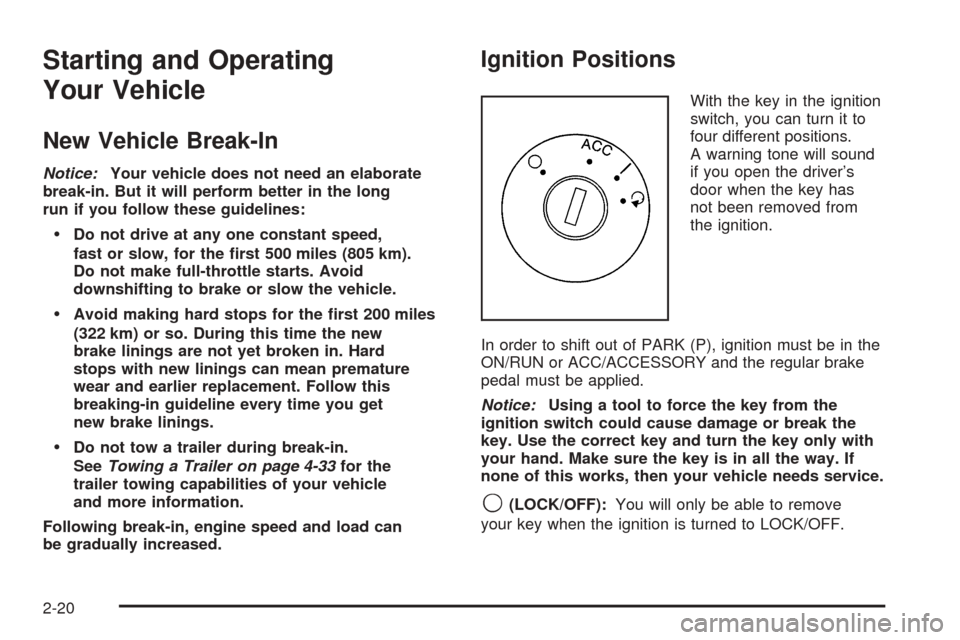
With the key in the ignition
switch, you can turn it to
four different positions.
A warning tone will sound
if you open the driver’s
door when the key has
not been removed from
the ignition.
In order to shift out of PARK (P), ignition must be in the
ON/RUN or ACC/ACCESSORY and the regular brake
pedal must be applied.
Notice:Using a tool to force the key from the
ignition switch could cause damage or break the
key. Use the correct key and turn the key only with
your hand. Make sure the key is in all the way. If
none of this works, then your vehicle needs service.
9(LOCK/OFF):You will only be able to remove
your key when the ignition is turned to LOCK/OFF.
2-20
Page 100 of 436
Starting the Engine
Move your shift lever to PARK (P) or NEUTRAL (N).
Your engine will not start in any other position – this
is a safety feature. To restart when you are already
moving, use NEUTRAL (N) only.
Notice:Do not try to shift to PARK (P) if your
vehicle is moving. If you do, you could damage
the transmission. Shift to PARK (P) only when
your vehicle is stopped.
Starting Procedure
1. With your foot off the accelerator pedal, turn the
ignition key to START. When the engine starts,
let go of the key. The idle speed will go down as
your engine gets warm. Do not race the engine
immediately after starting it. Operate the engine
and transmission gently to allow the oil to warm
up and lubricate all moving parts.
Your vehicle has a Computer-Controlled Cranking
System. This feature assists in starting the
engine and protects components. If the ignition
key is turned to the START position, and then
released when the engine begins cranking, the
engine will continue cranking for a few seconds
or until the vehicle starts. If the engine does not start
and the key is held in START for many seconds,cranking will be stopped after 15 seconds to prevent
cranking motor damage. To prevent gear damage,
this system also prevents cranking if the engine
is already running. Engine cranking can be stopped
by turning the ignition switch to the
ACC/ACCESSORY or LOCK/OFF position.
Notice:Cranking the engine for long periods of
time, by returning the key to the START position
immediately after cranking has ended, can overheat
and damage the cranking motor, and drain the
battery. Wait at least 15 seconds between each try,
to let the cranking motor cool down.
2. If the engine does not start after 5-10 seconds,
especially in very cold weather (below 0°F
or−18°C), it could be ooded with too much
gasoline. Try pushing the accelerator pedal all
the way to the oor and holding it there as you
hold the key in START for up to a maximum
of 15 seconds. Wait at least 15 seconds between
each try, to allow the cranking motor to cool
down. When the engine starts, let go of the key
and accelerator. If the vehicle starts briey but
then stops again, do the same thing. This clears
the extra gasoline from the engine. Do not race the
engine immediately after starting it. Operate the
engine and transmission gently until the oil warms
up and lubricates all moving parts.
2-22