2008 CHEVROLET CORVETTE tow
[x] Cancel search: towPage 1 of 432

Seats and Restraint Systems........................... 1-1
Front Seats
............................................... 1-2
Safety Belts
.............................................. 1-9
Child Restraints
.......................................1-26
Airbag System
.........................................1-43
Restraint System Check
............................1-58
Features and Controls..................................... 2-1
Keys
........................................................ 2-3
Doors and Locks
......................................2-10
Windows
.................................................2-16
Theft-Deterrent Systems
............................2-18
Starting and Operating Your Vehicle
...........2-21
Mirrors
....................................................2-37
OnStar
®System
......................................2-43
Universal Home Remote System
................2-46
Storage Areas
.........................................2-53
Roof Panel
..............................................2-57
Convertible Top
.......................................2-62
Instrument Panel............................................. 3-1
Instrument Panel Overview
.......................... 3-4
Climate Controls
......................................3-26
Warning Lights, Gages, and Indicators
........3-34
Driver Information Center (DIC)
..................3-51
Audio System(s)
.......................................3-84Driving Your Vehicle....................................... 4-1
Your Driving, the Road, and the Vehicle
....... 4-2
Towing
...................................................4-29
Service and Appearance Care.......................... 5-1
Service
..................................................... 5-3
Fuel
......................................................... 5-5
Checking Things Under the Hood
...............5-12
Rear Axle
...............................................5-51
Headlamp Aiming
.....................................5-51
Bulb Replacement
....................................5-52
Windshield Replacement
...........................5-55
Windshield Wiper Blade Replacement
.........5-55
Tires
......................................................5-58
Appearance Care
.....................................5-87
Vehicle Identication
.................................5-98
Electrical System
......................................5-99
Capacities and Specications
...................5-107
Maintenance Schedule..................................... 6-1
Maintenance Schedule
................................ 6-2
Customer Assistance Information.................... 7-1
Customer Assistance and Information
........... 7-2
Reporting Safety Defects
...........................7-16
Vehicle Data Recording and Privacy
...........7-18
Index................................................................ 1
2008 Chevrolet Corvette Owner ManualM
Page 53 of 432
Your vehicle may or may not have seat-mounted side
impact airbags. SeeAirbag System on page 1-43.
Seat-mounted side impact airbags are intended to inate
in moderate to severe side crashes. Seat-mounted
side impact airbags will inate if the crash severity is
above the system’s designed threshold level. The
threshold level can vary with specic vehicle design.
Seat-mounted side impact airbags are not intended to
inate in frontal impacts, near-frontal impacts, rollovers,
or rear impacts. A seat-mounted side impact airbag
is intended to deploy on the side of the vehicle that
is struck.
In any particular crash, no one can say whether an
airbag should have inated simply because of the
damage to a vehicle or because of what the repair
costs were. For seat-mounted side impact airbags,
deployment is determined by the location and
severity of the side impact.
What Makes an Airbag Inate?
In a deployment event, the sensing system sends
an electrical signal triggering a release of gas from
the inator. Gas from the inator lls the airbag
causing the bag to break out of the cover and deploy.
The inator, the airbag, and related hardware are all
part of the airbag module.Frontal airbag modules are located inside the steering
wheel and instrument panel. For vehicles with
seat-mounted side impact airbags, there are airbag
modules in the side of the front seatbacks closest
to the door.
How Does an Airbag Restrain?
In moderate to severe frontal or near frontal collisions,
even belted occupants can contact the steering wheel
or the instrument panel. In moderate to severe side
collisions, even belted occupants can contact the inside
of the vehicle.
Airbags supplement the protection provided by safety
belts. Frontal airbags distribute the force of the
impact more evenly over the occupant’s upper body,
stopping the occupant more gradually. Seat-mounted
side impact airbags distribute the force of the impact
more evenly over the occupant’s upper body.
But airbags would not help in many types of collisions,
primarily because the occupant’s motion is not
toward those airbags. SeeWhen Should an Airbag
Inflate? on page 1-48for more information.
Airbags should never be regarded as anything more
than a supplement to safety belts.
1-49
Page 59 of 432
If you ever pull the shoulder portion of the belt out all
the way, you will engage the child restraint locking
feature. This may unintentionally cause the passenger
sensing system to turn the airbag(s) off for some
adult size occupants. If this happens, just let the belt go
back all the way and start again.
{CAUTION:
If the airbag readiness light in the instrument
panel cluster ever comes on and stays on,
it means that something may be wrong with
the airbag system. If this ever happens, have
the vehicle serviced promptly, because an
adult-size person sitting in the right front
passenger’s seat may not have the protection
of the airbag(s). SeeAirbag Readiness Light
on page 3-37for more on this, including
important safety information.A thick layer of additional material, such as a blanket
or cushion, or aftermarket equipment such as seat
covers, seat heaters, and seat massagers can affect
how well the passenger sensing system operates.
We recommend that you not use seat covers or other
aftermarket equipment other than any that GM has
approved for your specic vehicle. SeeAdding
Equipment to Your Airbag-Equipped Vehicle on
page 1-56for more information about modications
that can affect how the system operates.
{CAUTION:
Stowing of articles under the passenger seat
or between the passenger seat cushion and
seatback may interfere with the proper
operation of the passenger sensing system.
1-55
Page 71 of 432
Matching Transmitter(s) to Your
Vehicle
Each keyless access transmitter is coded to allow only
transmitters programmed to the vehicle to work. If a
transmitter is lost or stolen, a replacement can be
purchased and programmed by your dealer/retailer.
Your dealer/retailer can reprogram the vehicle so lost
or stolen transmitters no longer work with the vehicle.
Each vehicle can have a maximum of four transmitters
matched to it.
To match a new transmitter to the vehicle when there is
a recognized transmitter (two recognized transmitters
are required for Canadian owners):
1. Turn the vehicle off.
2. Have the recognized and new, unrecognized
transmitters available.
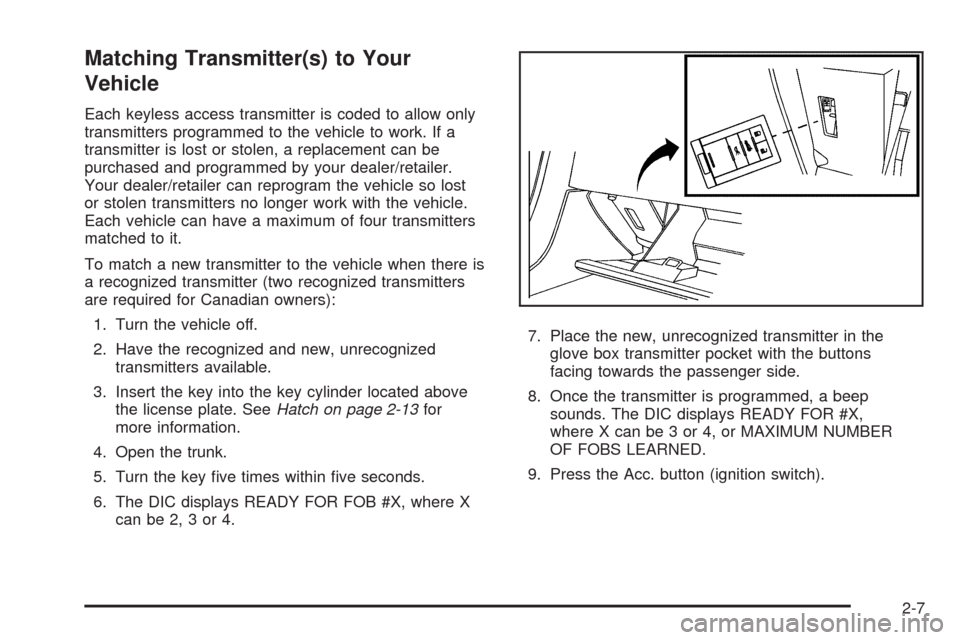
3. Insert the key into the key cylinder located above
the license plate. SeeHatch on page 2-13for
more information.
4. Open the trunk.
5. Turn the key ve times within ve seconds.
6. The DIC displays READY FOR FOB #X, where X
can be 2, 3 or 4.7. Place the new, unrecognized transmitter in the
glove box transmitter pocket with the buttons
facing towards the passenger side.
8. Once the transmitter is programmed, a beep
sounds. The DIC displays READY FOR #X,
where X can be 3 or 4, or MAXIMUM NUMBER
OF FOBS LEARNED.
9. Press the Acc. button (ignition switch).
2-7
Page 72 of 432
The Canadian immobilizer standard requires Canadian
owners to see their dealer/retailer for matching new
transmitters when two recognized transmitters are not
available. United States owners are permitted to match
a new transmitter to their vehicle when a recognized
transmitter is not available. The procedure requires
three ten minutes cycles to complete the matching
process.
1. Turn the vehicle off.
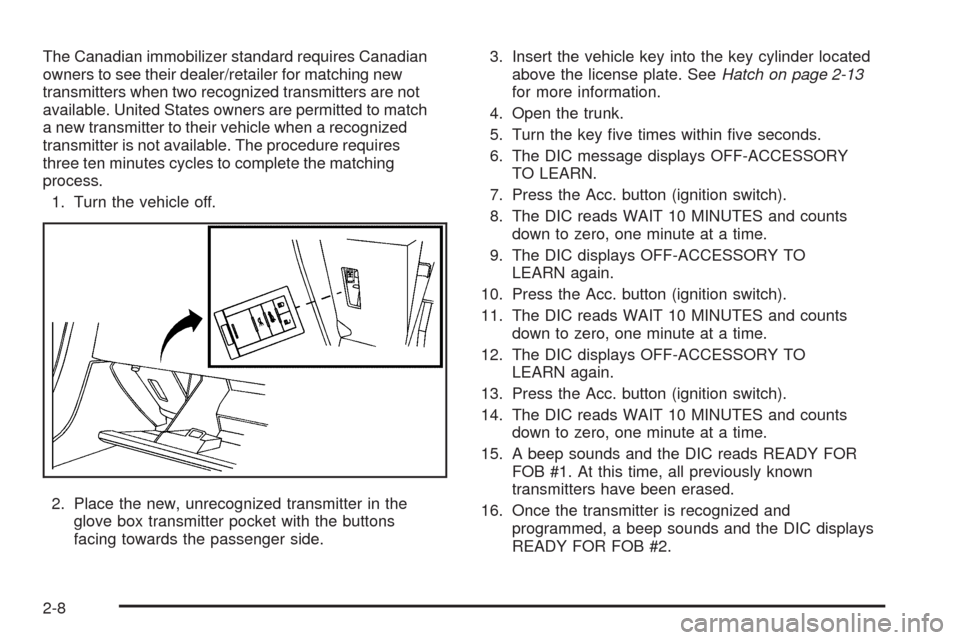
2. Place the new, unrecognized transmitter in the
glove box transmitter pocket with the buttons
facing towards the passenger side.3. Insert the vehicle key into the key cylinder located
above the license plate. SeeHatch on page 2-13
for more information.
4. Open the trunk.
5. Turn the key ve times within ve seconds.
6. The DIC message displays OFF-ACCESSORY
TO LEARN.
7. Press the Acc. button (ignition switch).
8. The DIC reads WAIT 10 MINUTES and counts
down to zero, one minute at a time.
9. The DIC displays OFF-ACCESSORY TO
LEARN again.
10. Press the Acc. button (ignition switch).
11. The DIC reads WAIT 10 MINUTES and counts
down to zero, one minute at a time.
12. The DIC displays OFF-ACCESSORY TO
LEARN again.
13. Press the Acc. button (ignition switch).
14. The DIC reads WAIT 10 MINUTES and counts
down to zero, one minute at a time.
15. A beep sounds and the DIC reads READY FOR
FOB #1. At this time, all previously known
transmitters have been erased.
16. Once the transmitter is recognized and
programmed, a beep sounds and the DIC displays
READY FOR FOB #2.
2-8
Page 73 of 432
If additional transmitters need programing, take
transmitter 1 out of the transmitter pocket and place
transmitter 2 in the pocket. Up to four transmitters can
be programmed. The DIC then displays MAXIMUM
NUMBER OF FOBS LEARNED and exits the
programming mode.
Press the Acc. button (ignition switch) when all the
transmitters are programmed.
Battery Replacement
If NO FOBS DETECTED displays on the DIC when you
try to start the vehicle, the battery is weak. Place the
transmitter in the glove box transmitter pocket with the
buttons facing towards the passenger side. Then, with
the vehicle in PARK (P) for an automatic transmission,
press the brake pedal and the START button. If the
vehicle has a manual transmission, press the clutch and
the START button. This starts the vehicle, however, it is
recommended that the battery be replaced as soon as
possible. The DIC may display FOB BATTERY LOW.
Notice:When replacing the battery, do not touch
any of the circuitry on the transmitter. Static
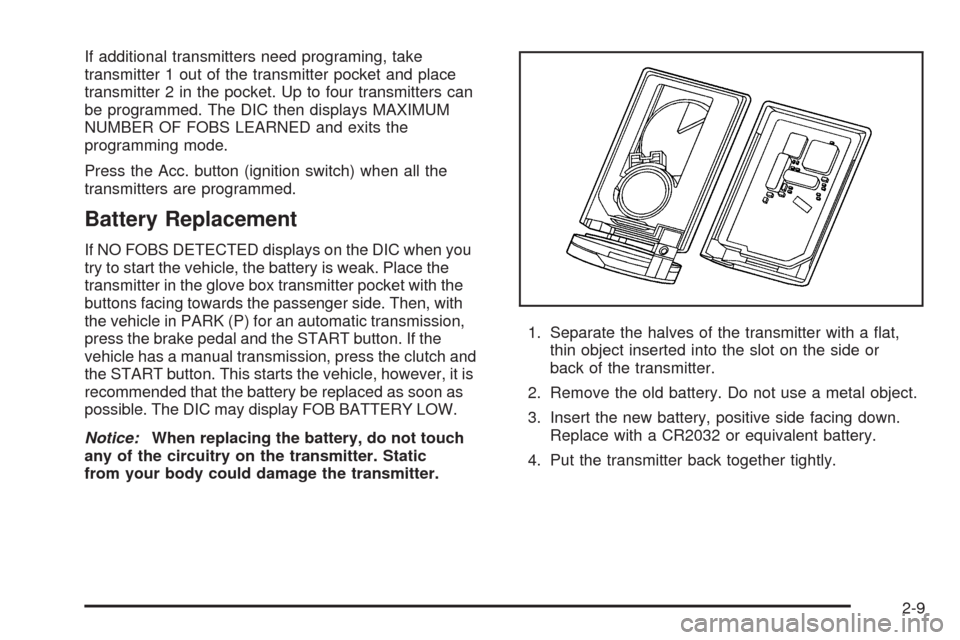
from your body could damage the transmitter.1. Separate the halves of the transmitter with a at,
thin object inserted into the slot on the side or
back of the transmitter.
2. Remove the old battery. Do not use a metal object.
3. Insert the new battery, positive side facing down.
Replace with a CR2032 or equivalent battery.
4. Put the transmitter back together tightly.
2-9
Page 82 of 432
Power Window Initialize
After a power reconnect such as battery replacement,
the window index-up feature will not function until
the system is initialized.
Once power is restored:
1. Close the door.
2. Raise the window and hold the switch up for
three seconds after the window is closed.
3. Release the switch, then hold the switch up again
for three seconds and release.
Sun Visors
Pull the visor toward you, or move it to the side to help
reduce glare.
To use the lighted mirror, lift the cover.
Theft-Deterrent Systems
Vehicle theft is big business, especially in some cities.
This vehicle has theft-deterrent features, however,
they do not make it impossible to steal.
Theft-Deterrent System
This vehicle has a theft-deterrent alarm system.
The security light ashes if
a door is open and locked
with the power door
lock switch.
If this light stays on while the engine is running, the
vehicle needs service.
2-18
Page 87 of 432
When the engine is off, press this button to place the
vehicle in accessory mode. ACCESSORY MODE
ON will display on the Driver Information Center (DIC).
This mode allows you to use things like the radio
and the windshield wipers while the engine is off. Use
accessory mode if you must have your vehicle in motion
while the engine is off, for example, if your vehicle is
being pushed or towed.
After being in accessory mode for about 10 minutes, the
vehicle will automatically enter RAP or OFF, depending
on if the doors are opened or closed.
Retained Accessory Power (RAP)
These vehicle accessories can be used for up to
10 minutes after the engine is turned off:
Audio System
Power Windows
These features continue to work up to 10 minutes after
the engine is turned off or until either door is opened.
If a door is opened, the power windows and audio
system will shut off.
Starting the Engine
Move the shift lever to PARK (P) or NEUTRAL (N) for
an automatic transmission. For a manual transmission
the vehicle can be started in NEUTRAL or any other
gear as long as the clutch is depressed. To restart
a manual transmission when you are already moving,
use the NEUTRAL position only. To restart an automatic
transmission when you are already moving, use
NEUTRAL (N).
Notice:Do not try to shift to P (Park) if your vehicle
is moving. If you do, you could damage the
transmission. Shift to P (Park) only when your
vehicle is stopped.
The keyless access transmitter must be inside the
vehicle for the ignition to work.
Cell phone chargers can interfere with the operation of
the Keyless Access System. Battery chargers should
not be plugged in when starting or turning off the engine.
2-23