2008 CHEVROLET CORVETTE ignition
[x] Cancel search: ignitionPage 206 of 432
SHIFT TO PARK
If your vehicle has an automatic transmission, this
message displays if the vehicle is not in PARK (P) when
the engine is being turned off. The vehicle will be in
ACCESSORY Once the shift lever is moved to
PARK (P), the vehicle will turn off.
The vehicle will remain in ACCESSORY, without the
20 minute time-out period, until the shift lever is moved
to PARK (P) or until the driver presses the pushbutton
to restart the vehicle. SeeIgnition Positions on
page 2-22for more information.
SHIFT TO PARK OR SET PARK BRAKE
FOR TOP
If your vehicle has an automatic transmission, this
message displays and a chime sounds if you try to
operate the power convertible top without rst shifting
into PARK (P) or setting the parking brake. Either
shift the vehicle into PARK (P) or set the parking brake
before trying to operate the power convertible top.
SeeConvertible Top (Manual) on page 2-62or
Convertible Top (Power) on page 2-68for more
information.
SHOCKS INOPERATIVE
This message displays when a malfunction is present in
the Selective Ride Control system which is causing
the shocks to be in their full soft mode. This is a warning
to the driver that the vehicle handling may be affected.
Have your vehicle serviced by your dealer/retailer
as soon as possible.
To acknowledge the message, press the RESET button.
The message reappears every 10 minutes until this
condition changes.
TIRE FLAT
{CAUTION:
When the LOW TIRE PRESSURE or TIRE FLAT
message is displayed on the Driver Information
Center, your vehicle’s handling capabilities will
be reduced during severe maneuvers. If you
drive too fast, you could lose control of your
vehicle. You or others could be injured. Do not
drive over 55 mph (90 km/h) when the LOW
TIRE PRESSURE or TIRE FLAT message is
displayed. Drive cautiously and check your tire
pressures as soon as you can.
3-70
Page 213 of 432
Press the OPTION button until AUTO MEMORY
RECALL appears on the display, then press the RESET
button to scroll through the following modes:
YES
NO (default)
If you choose YES, the driver’s seat, the outside
rearview mirrors and the telescopic steering column, if
your vehicle has this feature, positions are recalled when
you turn the ignition on.
If you choose NO, this option will turn off.
When the mode you want is selected, press the
OPTION button to set your choice and advance to the
next personal option.
Auto Exit Recall:If your vehicle has the memory
package, you may have this option. This option allows
the driver’s seat and telescopic steering column, if
your vehicle has this feature, to automatically move to
the current driver’s exit position when one of the
following occurs:
The vehicle is turned off or in Retained Accessory
Power (RAP) or accessory mode and the driver’s
door is opened.
The vehicle is turned off or in RAP and the unlock
button on the keyless access transmitter is
pressed.In order for the Auto Exit Recall feature to work on an
automatic transmission vehicle, the vehicle must be
in PARK (P). On a manual transmission vehicle,
the parking brake must be set.
Press the OPTION button until AUTO EXIT RECALL
appears on the display, then press the RESET button to
scroll through the following modes:
YES
NO (default)
If you choose YES, when you turn the ignition off and
open the driver’s door or press the unlock button on the
keyless access transmitter, the seat and the telescopic
steering wheel, if your vehicle has this feature, will return
to their stored exit positions for an easy exit or an
easy entrance when returning to the vehicle.
The seat and steering wheel will only return to the
stored driving position if you press the appropriate
memory button or activate the auto memory recall
feature.
If you choose NO, this option will turn off.
When the mode you want is selected, press the
OPTION button to set your choice and advance to the
next personal option.
3-77
Page 216 of 432
FOB Reminder:This option chirps the horn three times
when the driver’s door is closed and there is a keyless
access transmitter inside the interior of the vehicle.
This will only occur when the vehicle is off.
Press the OPTION button until FOB REMINDER
appears on the display, then press the RESET button to
scroll through the following modes:
YES
NO (default)
If you choose YES, the horn will chirp three times when
a keyless access transmitter is inside of the vehicle
while the ignition is turned off and the driver’s door is
closed.
If you choose NO, this option will turn off.
When the mode you want is selected, press the
OPTION button to set your choice and advance to the
next personal option.
Passive Door Locking:This option allows you to
select whether the doors automatically lock during
normal vehicle exit. When the ignition is turned off and
all doors become closed, the vehicle will determine
how many keyless access transmitters remain in
the vehicle interior. If at least one keyless access
transmitter has been removed from the interior of the
vehicle, the doors will lock after eight seconds.For example, if there are two keyless access
transmitters in the vehicle and one is removed, the
other will be locked in. The keyless access transmitter
locked in the vehicle can still be used to start the vehicle
or unlock the doors, if needed. A person approaching
the outside of the locked vehicle without an authorized
keyless access transmitter, however, will not be able
to open the door, even with a transmitter in the vehicle.
You may temporarily disable the passive door locking
feature by pressing the door unlock switch for
three seconds on an open door. Passive door locking will
then remain disabled until a door lock switch is pressed or
until the power mode transitions from the off power mode.
Press the OPTION button until PASSIVE DOOR
LOCKING appears on the display, then press the
RESET button to scroll through the following modes:
OFF (default)
SILENT
HORN
If you choose OFF, this option will turn off.
If you choose SILENT, the doors will automatically lock
eight seconds after you turn the ignition off, remove
a keyless access transmitter from the interior of
the vehicle, and close both doors.
3-80
Page 217 of 432
If you choose HORN, the doors will automatically lock
and the horn will chirp eight seconds after you turn
the ignition off, remove a keyless access transmitter
from the interior of the vehicle, and close both doors.
If you are parking in a quiet area and do not want
the horn to sound when the doors lock, press the lock
button on the keyless access transmitter immediately
after removing it from the interior and closing the doors.
This will lock the doors and cancel the passive locking
for this ignition cycle.
When the mode you want is selected, press the
OPTION button to set your choice and advance to the
next personal option.
Passive Door Unlock:This option allows you to select
which doors will automatically unlock when you
approach and open the driver’s door with the keyless
access transmitter. SeeDoor Locks on page 2-10
for more information.
Press the OPTION button until PASSIVE DOOR
UNLOCK appears on the display, then press the RESET
button to scroll through the following modes:
DRIVER (default)
BOTHIf you choose DRIVER, only the driver’s door will
automatically unlock when you approach and open the
driver’s door with the keyless access transmitter.
If you choose BOTH, both doors will automatically
unlock when you approach and open the driver’s door
with the keyless access transmitter.
Auto Unlock:This option allows you to select whether
the driver’s door, both doors or neither door
automatically unlocks when the shift lever is moved into
PARK (P) for automatic transmission vehicles or
when the ignition is turned off or is in RAP for manual
transmission vehicles.
Press the OPTION button until AUTO UNLOCK appears
on the display, then press the RESET button to scroll
through the following modes:
OFF
DRIVER
BOTH (default)
If you choose OFF, this option will turn off.
If you choose DRIVER, on automatic transmission
vehicles, the driver’s door will automatically unlock when
the shift lever is moved into PARK (P). On manual
transmission vehicles, the driver’s door will automatically
unlock when the ignition is turned off or is in RAP.
3-81
Page 218 of 432
If you choose BOTH, on automatic transmission
vehicles, both doors will automatically unlock when the
shift lever is moved into PARK (P). On manual
transmission vehicles, both doors will automatically
unlock when the ignition is turned off or is in RAP.
When the mode you want is selected, press the OPTION
button to set your choice and advance to the next
personal option.
Language:This option allows you to select the
language the DIC, the Head-Up Display (HUD), if your
vehicle has this feature, and the radio uses to display
messages. Each language mode will be displayed in its
own language. For example, English will be displayed
as ENGLISH, Spanish as ESPANOL, etc. If your vehicle
has the navigation system, you will not have the
Japanese language mode.
Press the OPTION button until LANGUAGE appears on
the display, then press the RESET button to scroll
through the following modes:
ENGLISH (default)
DEUTSCH (German)
FRANCAIS (French)
ITALIANO (Italian)
ESPANOL (Spanish)If you choose a language that you do not understand,
press the OPTION and RESET buttons for ve seconds.
The DIC will begin displaying all of the various
languages one by one for as long as the buttons are
pressed. When the desired language is displayed,
release the buttons and the DIC will set to this language.
When the mode you want is selected, press the
OPTION button to set your choice and advance to the
next personal option.
Personalize Name:This option allows you to type in a
name or greeting that will appear on the DIC display
whenever the corresponding keyless access
transmitter (1 or 2) is used or one of the memory
buttons (1 or 2) located on the driver’s door is pressed.
Press the OPTION button until PERSONALIZE
NAME appears on the display, then press the RESET
button to scroll through the following modes:
YES
NO (default)
If you choose YES, you can type in a name that will
appear on the DIC display.
3-82
Page 220 of 432
Audio System(s)
Determine which radio your vehicle has and then read
the pages following to familiarize yourself with its
features.
{CAUTION:
This system provides you with far greater
access to audio stations and song listings.
Giving extended attention to entertainment
tasks while driving can cause a crash and you
or others can be injured or killed. Always keep
your eyes on the road and your mind on the
drive — avoid engaging in extended searching
while driving.
Keeping your mind on the drive is important for
safe driving. SeeDefensive Driving on page 4-2.
Here are some ways in which you can help avoid
distraction while driving.While your vehicle is parked:
Familiarize yourself with all of its controls.
Familiarize yourself with its operation.
Set up your audio system by presetting your
favorite radio stations, setting the tone, and
adjusting the speakers. Then, when driving
conditions permit, you can tune to your favorite
radio stations using the presets and steering wheel
controls if the vehicle has them.
Notice:Before adding any sound equipment to
your vehicle, such as an audio system, CD player,
CB radio, mobile telephone, or two-way radio, make
sure that it can be added by checking with your
dealer/retailer. Also, check federal rules covering
mobile radio and telephone units. If sound
equipment can be added, it is very important to do
it properly. Added sound equipment may interfere
with the operation of your vehicle’s engine, radio,
or other systems, and even damage them. Your
vehicle’s systems may interfere with the operation
of sound equipment that has been added.
Your vehicle has a feature called Retained Accessory
Power (RAP). With RAP, the audio system can be
played even after the ignition is turned off. SeeRetained
Accessory Power (RAP) on page 2-23for more
information.
3-84
Page 221 of 432
Setting the Clock
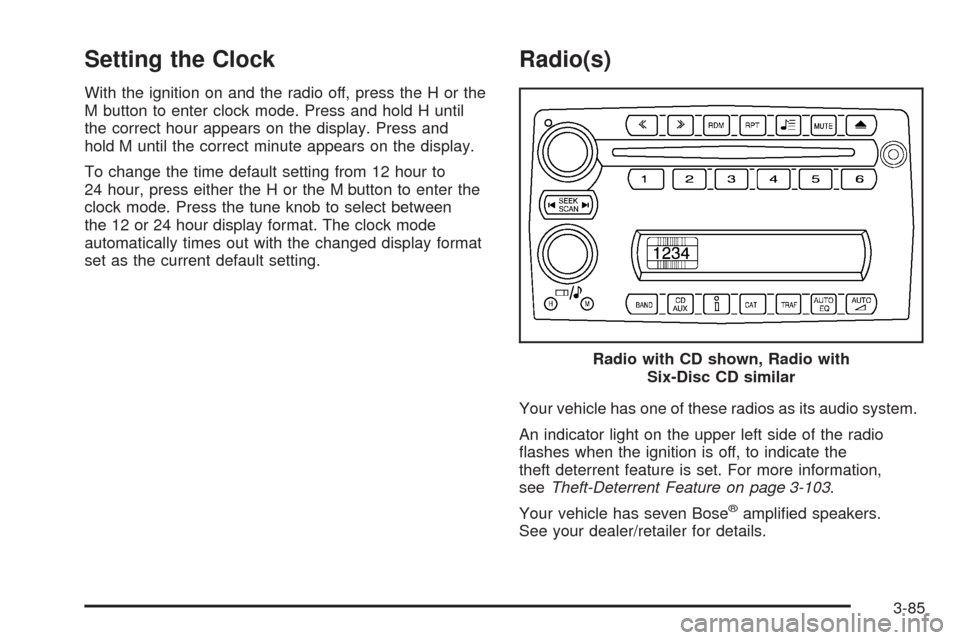
With the ignition on and the radio off, press the H or the
M button to enter clock mode. Press and hold H until
the correct hour appears on the display. Press and
hold M until the correct minute appears on the display.
To change the time default setting from 12 hour to
24 hour, press either the H or the M button to enter the
clock mode. Press the tune knob to select between
the 12 or 24 hour display format. The clock mode
automatically times out with the changed display format
set as the current default setting.
Radio(s)
Your vehicle has one of these radios as its audio system.
An indicator light on the upper left side of the radio
ashes when the ignition is off, to indicate the
theft deterrent feature is set. For more information,
seeTheft-Deterrent Feature on page 3-103.
Your vehicle has seven Bose
®amplied speakers.
See your dealer/retailer for details.Radio with CD shown, Radio with
Six-Disc CD similar
3-85
Page 228 of 432
Playing a CD (Single CD Player)
Insert a CD partway into the slot, label side up.
The player pulls it in and the CD should begin playing if
the radio is on, or if the radio is off and the vehicle is
running or in accessory mode.
If the ignition or radio is turned off with a CD in the
player, it stays in the player. When the ignition or radio
is turned on, the CD starts playing where it stopped,
if it was the last selected audio source.
When a CD is inserted, CD and the CD symbol displays.
As each new track starts to play, the track number
displays.
The CD player can play the smaller 3 inch (8 cm)
single CDs with an adapter ring. Full-size CDs and the
smaller CDs are loaded in the same manner.
Care of Your CDs
If playing a CD-R, the sound quality can be reduced
due to CD-R quality, the method of recording, the quality
of the music that has been recorded, and the way the
CD-R has been handled. Handle them carefully.
Store CD-R(s) in their original cases or other protective
cases and away from direct sunlight and dust.
The CD player scans the bottom surface of the disc.
If the surface of a CD is damaged, such as cracked,
broken, or scratched, the CD does not play properly ornot at all. Do not touch the bottom side of a CD while
handling it; this could damage the surface. Pick up CDs
by grasping the outer edges or the edge of the hole
and the outer edge.
If the surface of a CD is soiled, take a soft, lint free cloth
or dampen a clean, soft cloth in a mild, neutral detergent
solution mixed with water, and clean it. Make sure the
wiping process starts from the center to the edge.
Care of Your CD Player
Do not add any label to a CD, it could get caught in the
CD player. If a CD is recorded on a personal computer
and a description label is needed, try labeling the top of
the recorded CD with a marking pen.
The use of CD lens cleaners for CDs is not advised,
due to the risk of contaminating the lens of the CD optics
with lubricants internal to the CD player mechanism.
Notice:If a label is added to a CD, or more than one
CD is inserted into the slot at a time, or an attempt
is made to play scratched or damaged CDs, the
CD player could be damaged. While using the CD
player, use only CDs in good condition without any
label, load one CD at a time, and keep the CD
player and the loading slot free of foreign materials,
liquids, and debris.
If an error displays, see “CD Messages” later in this
section.
3-92