2008 CHEVROLET CORVETTE ignition
[x] Cancel search: ignitionPage 229 of 432
Playing a CD(s) (Six-Disc CD Player)
If the ignition or radio is turned off, with a CD in
the player, it stays in the player. When the ignition or
radio is turned on, the CD starts playing where it
stopped, if it was the last selected audio source.
When a CD is inserted, the CD symbol appears on
the CD. As each new track starts to play, the track
number displays.
M(Load):Press to load CDs into the CD player.
This CD player holds up to six CDs.
To insert one CD, do the following:
1. Press and release the
Mbutton.
2. When INSERT CD # displays, load a CD and
insert the CD partway into the slot, label side
up. The player pulls the CD in.
To insert multiple CDs, do the following:
1. Press and hold the
Mbutton for two seconds.
Two beeps sound and LOAD ALL DISCS displays.
2. When INSERT CD # displays, load a CD and
insert the CD partway into the slot, label side
up. The player pulls the CD in.
Once the CD is loaded, wait for INSERT CD # to
display, then load the next CD. The CD player takes
up to six CDs.To load more than one CD but less than six, complete
Steps 1 through 3. When nished loading CDs,
press the
Mbutton to cancel the loading function.
The radio begins to play the last CD loaded.
If more than one CD has been loaded, a number for
each CD displays.
Playing a Specic Loaded CD
For every CD loaded, a number displays. To play a
specic CD press the numbered pushbutton that
corresponds to the CD.
If an error displays, see “CD Messages” later in this
section.
X(Eject):Press to eject CD(s).
To eject the CD that is currently playing, press and
release this button.
To eject multiple CDs, do the following:
1. Press and hold for two seconds.
A beep sounds and EJECT ALL displays.
2. When REMOVE DISC displays, the CD ejects and
can be removed.
To stop ejecting the CDs, press the
Mor
the
Xbutton.
3-93
Page 231 of 432
X(Eject):Press to eject the CD. EJECT can be
activated with either the ignition or radio off.
tSEEKu:Press the left arrow to go to the start of
the current track if more than eight seconds have
played. Press the right arrow to go to the start of the
next track. If either arrow is held or pressed more than
once, the player continues moving backward or
forward through the CD.
tSCANu:To scan one CD, press and hold either
arrow for more than two seconds until SCAN displays
and a beep sounds. The radio goes to the next
track, plays for 10 seconds, then goes to the next track.
Press either arrow again, to stop scanning.
To scan all loaded CDs, press and hold either arrow for
more than four seconds until CD SCAN displays and
a beep sounds. Use this feature to listen to 10 seconds
of the rst track of each loaded CD. Press either
arrow again, to stop scanning.AUTO EQ (Automatic Equalization):Press to select
the equalization setting while playing a CD. The
equalization is stored when a CD is played. For more
information on AUTO EQ, see “AUTO EQ” listed
previously in this section.
BAND:Press to listen to the radio when a CD is
playing. The inactive CD(s) remains inside the radio for
future listening.
CD AUX (Auxiliary):Press to play a CD when listening
to the radio. CD displays when a CD is in the player.
If your system has a remote playback device, pressing
this button a second time allows the remote device
to play.
Playing an MP3 CD-R Disc
Vehicles with the MP3 feature has the capability of
playing an MP3 CD-R disc. For more information on how
to play an MP3 CD-R disc, seeUsing an MP3 on
page 3-98later in this section.
3-95
Page 236 of 432
Order of Play
Tracks are played in the following order:
Play begins from the rst track in the rst playlist
and continues sequentially through all tracks in
each playlist. When the last track of the last playlist
has played, play continues from the rst track of
the rst playlist.
If the CD does not contain any playlists, then play
begins from the rst track under the root directory.
When all tracks from the root directory have
played, play continues from les according to their
numerical listing. After playing the last track
from the last folder, play begins again at the rst
track of the rst folder or root directory.
When play enters a new folder, the display does not
automatically show the new folder name unless
the folder mode has been chosen as the default display.
See the information button later in this section for
more information. The new track name displays.
File System and Naming
The song name that is displayed is the song name that
is contained in the ID3 tag. If the song name is not
present in the ID3 tag, then the radio displays the le
name without the extension (such as .mp3) as the
track name.Track names longer than 32 characters or four pages
are shortened. Parts of words on the last page of
text and the extension of the lename does not display.
Preprogrammed Playlists
Preprogrammed playlists that were created by
WinAmp™, MusicMatch™, or Real Jukebox™ software
can be accessed, however, they cannot be edited
using the radio. These playlists are treated as special
folders containing compressed audio song les.
Playing an MP3
Insert a CD partway into the slot, label side up.
The player pulls it in, and READING displays. The CD
should begin playing and the CD symbol displays.
If the ignition or radio is turned off with a CD-R in the
player, it stays in the player. When the ignition or radio is
turned on, the CD-R starts to play where it stopped, if
it was the last selected audio source.
As each new track starts to play, the track number
displays.
O/e(Tune):Turn clockwise or counterclockwise to
go to the next or previous track.
{(Previous Folder):Press to go to the rst track in
the previous folder. Press and hold to reverse
through the current track.
3-100
Page 237 of 432
|(Next Folder):Press to go to the rst track in the
next folder. Press and hold to fast forward the
current track.
RDM (Random):Press to hear the tracks in random,
rather than sequential order, on one CD, one folder,
or all of the loaded CDs.
To use random, do one of the following:
To play the tracks on the CD in random order, press
and release until RANDOM DISC PLAY displays.
To play the tracks in the folder in random order,
press and release until RANDOM FOLDER displays.
To play the tracks on all of the CDs that are loaded in
random order, press and release until RANDOM ALL
DISCS displays.
To turn off random play, press and release the RDM
button until RANDOM OFF displays.
RPT (Repeat):Press to hear a track, CD, or a folder
over again.
To use repeat, do one of the following:
To repeat a track, press and release until REPEAT
displays.
To repeat a CD, press and release until REPEAT
ONE DISC displays.
To repeat a folder, press and release until REPEAT
FOLDER displays.To turn off repeated play, press and release the RPT
button until REPEAT OFF displays.
MUTE:Press to silence the system. Press again to
turn the sound on.
This button is not available on the Radio with
Six-Disc CD.
tSEEKu:Press the left arrow to go to the start of
the current track, if more than eight seconds have
played. Press the right arrow to go to the next track.
If either arrow is held or pressed more than once,
the player continues moving backward or forward
through the CD.
4(Information):Press to display the artist name and
album contained in the ID3 tag.
BAND:Press to listen to the radio when a CD is
playing. The inactive CD remains inside the radio for
future listening.
CD AUX (Auxiliary):Press to play a CD when listening
to the radio. The CD symbol displays when a CD is
loaded.
Y(Eject):Press to eject a CD. Eject can activated
with either the ignition or radio off.
3-101
Page 239 of 432
Navigation/Radio System
Your vehicle may have a navigation radio system.
The navigation system has built-in features intended to
minimize driver distraction. Technology alone, no
matter how advanced, can never replace your own
judgment. See the Navigation System manual for some
tips to help you reduce distractions while driving.
Theft-Deterrent Feature
THEFTLOCK®is designed to discourage theft of your
vehicle’s radio. The feature works automatically by
learning a portion of the Vehicle Identication Number
(VIN). If the radio is moved to a different vehicle, it
will not operate and LOCKED will appear on the display.
With THEFTLOCK
®activated, the radio will not
operate if stolen.
Your radio has a blinking indicator light located on the
upper left side of the radio. The indicator light is used
to show that the theft-deterrent feature mode is set.
The blinking indicator light will only ash when the
ignition is in the off position.
Audio Steering Wheel Controls
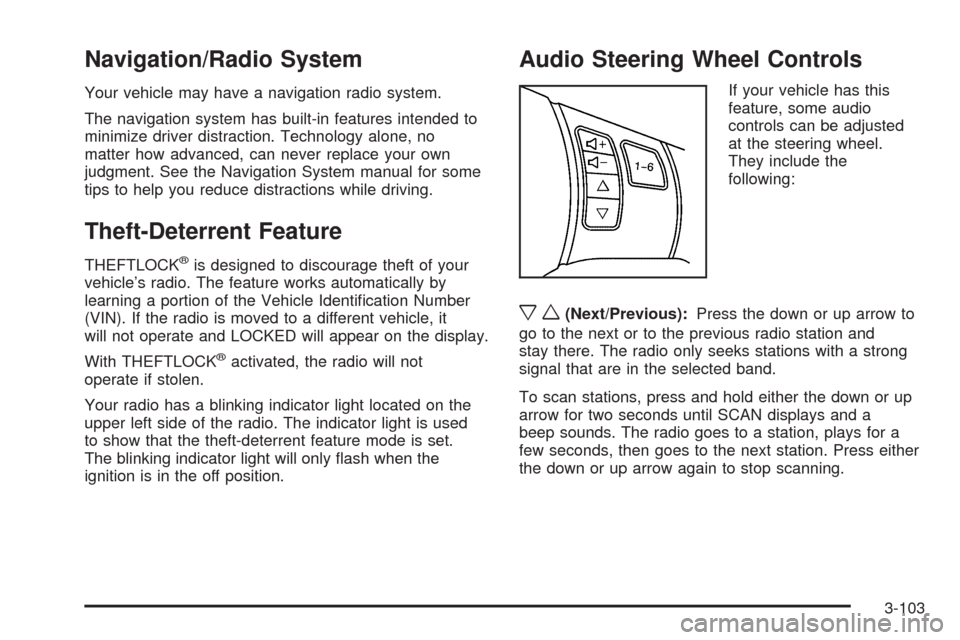
If your vehicle has this
feature, some audio
controls can be adjusted
at the steering wheel.
They include the
following:
xw(Next/Previous):Press the down or up arrow to
go to the next or to the previous radio station and
stay there. The radio only seeks stations with a strong
signal that are in the selected band.
To scan stations, press and hold either the down or up
arrow for two seconds until SCAN displays and a
beep sounds. The radio goes to a station, plays for a
few seconds, then goes to the next station. Press either
the down or up arrow again to stop scanning.
3-103
Page 261 of 432
{CAUTION:
If you do not shift down, the brakes could get
so hot that they would not work well. You
would then have poor braking or even none
going down a hill. You could crash. Shift down
to let the engine assist the brakes on a steep
downhill slope.
{CAUTION:
Coasting downhill in N (Neutral) or with the
ignition off is dangerous. The brakes will have
to do all the work of slowing down and they
could get so hot that they would not work well.
You would then have poor braking or even
none going down a hill. You could crash.
Always have the engine running and the
vehicle in gear when going downhill.
Stay in your own lane. Do not swing wide or cut
across the center of the road. Drive at speeds
that let you stay in your own lane.
Top of hills: Be alert — something could be in your
lane (stalled car, accident).
Pay attention to special road signs (falling rocks
area, winding roads, long grades, passing or
no-passing zones) and take appropriate action.
Winter Driving
Here are some tips for winter driving:
Have your vehicle in good shape for winter.
You might want to put winter emergency supplies in
your vehicle.
Include an ice scraper, a small brush or broom, a
supply of windshield washer uid, a rag, some winter
outer clothing, a small shovel, a ashlight, a red
cloth, and a couple of reective warning triangles. And,
if you will be driving under severe conditions, include
a small bag of sand, a piece of old carpet, or a couple of
burlap bags to help provide traction. Be sure you
properly secure these items in your vehicle.
Also seeTires on page 5-58.
4-19
Page 312 of 432
How to Check Power Steering Fluid
To check the power steering uid, do the following:
1. Turn the ignition off and let the engine compartment
cool down.
2. Wipe the cap and the top of the reservoir clean.
3. Unscrew the cap and wipe the dipstick with a
clean rag.
4. Replace the cap and completely tighten it.
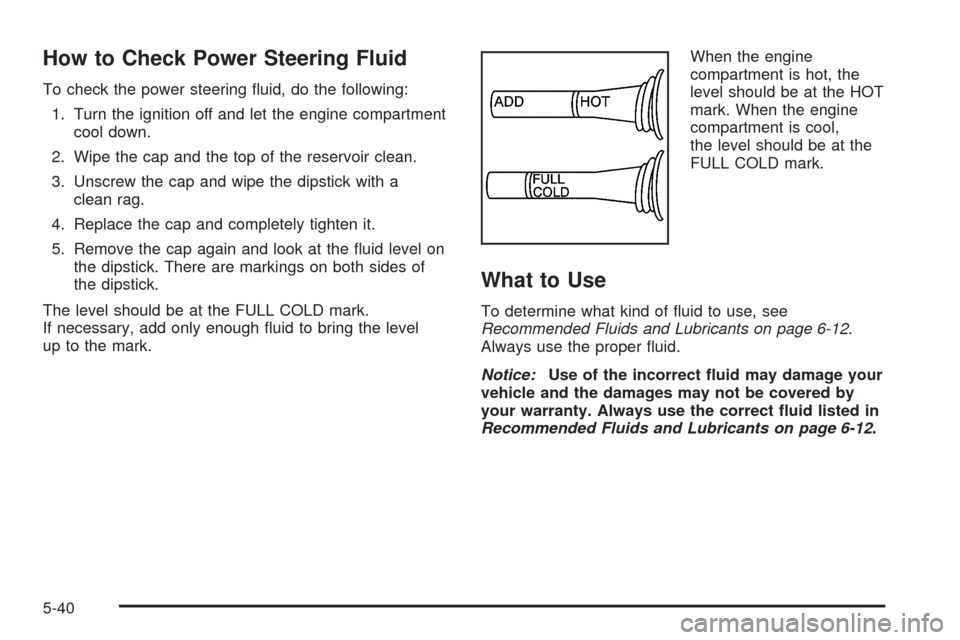
5. Remove the cap again and look at the uid level on
the dipstick. There are markings on both sides of
the dipstick.
The level should be at the FULL COLD mark.
If necessary, add only enough uid to bring the level
up to the mark.When the engine
compartment is hot, the
level should be at the HOT
mark. When the engine
compartment is cool,
the level should be at the
FULL COLD mark.
What to Use
To determine what kind of uid to use, see
Recommended Fluids and Lubricants on page 6-12.
Always use the proper uid.
Notice:Use of the incorrect uid may damage your
vehicle and the damages may not be covered by
your warranty. Always use the correct uid listed in
Recommended Fluids and Lubricants on page 6-12.
5-40
Page 319 of 432
Notice:If you leave your radio or other accessories
on during the jump starting procedure, they could
be damaged. The repairs would not be covered
by your warranty. Always turn off your radio and
other accessories when jump starting your vehicle.
3. Turn off the ignition on both vehicles. Unplug
unnecessary accessories plugged into the cigarette
lighter or the accessory power outlet. Turn off
the radio and all lamps that are not needed.
This will avoid sparks and help save both batteries.
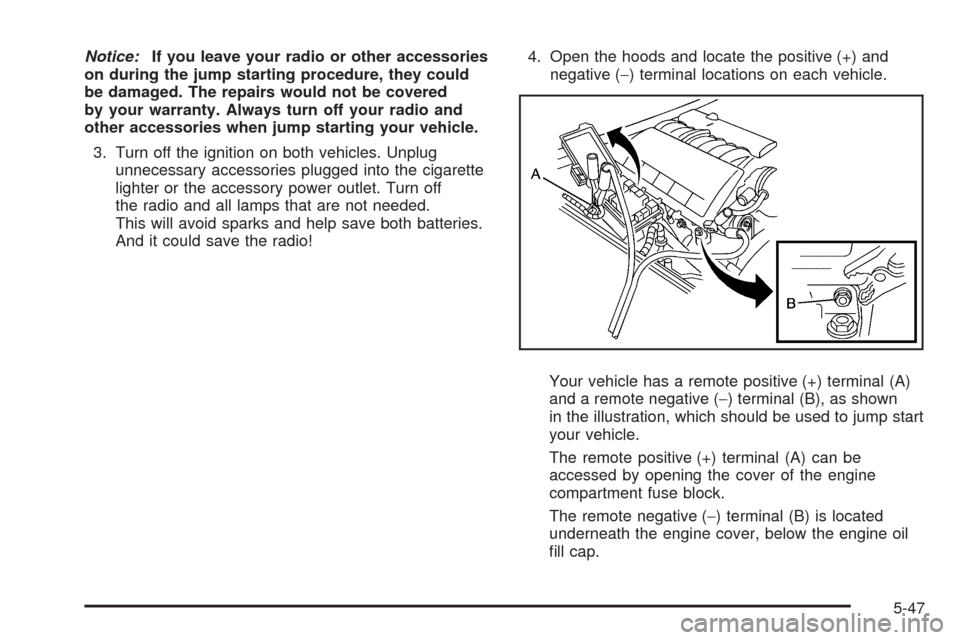
And it could save the radio!4. Open the hoods and locate the positive (+) and
negative (−) terminal locations on each vehicle.
Your vehicle has a remote positive (+) terminal (A)
and a remote negative (−) terminal (B), as shown
in the illustration, which should be used to jump start
your vehicle.
The remote positive (+) terminal (A) can be
accessed by opening the cover of the engine
compartment fuse block.
The remote negative (−) terminal (B) is located
underneath the engine cover, below the engine oil
ll cap.
5-47