Page 103 of 432
Cleaning the Mirror
When cleaning the mirror, use a paper towel or similar
material dampened with glass cleaner. Do not spray
glass cleaner directly on the mirror as that may cause
the liquid cleaner to enter the mirror housing.
Automatic Dimming Rearview Mirror
with Compass
If the vehicle has this feature, an automatic dimming
mirror automatically dims to the proper level to minimize
glare at night from lights behind your vehicle.
The mirror also includes a compass display in the upper
right corner of the mirror face.
P(On/Off):This is the on/off button.
Automatic Dimming Mirror Operation
The automatic dimming mirror function is turned on each
time the ignition is started. A light near the on/off button
will come on to indicate the automatic dimming is on.
Press the on/off button for about six seconds to
manually turn the automatic dimming function on or off.
Compass Display
Press the on/off button, located to the far left, briey to
turn the compass display on or off.
If the display reads CAL, the compass needs to be
calibrated. For more information, see “Compass
Calibration” later in this section.
To adjust between Fahrenheit and Celsius:
1. Press and hold the on/off button for approximately
four seconds until either a ashing °F, or °C
appears.
2. Press the button again to change the display to the
desired unit of measurement. After approximately
four seconds of inactivity, the new unit will be locked
in and the compass/temperature display will return.
If an abnormal temperature reading is displayed
for an extended period of time, please consult your
dealer/retailer. Under certain circumstances, a delay in
updating the temperature is normal.
2-39
Page 104 of 432
Compass Variance
Compass variance is the difference between earth’s
magnetic north and true geographic north. If not
adjusted to account for compass variance, the mirror’s
compass could give false readings. The mirror is
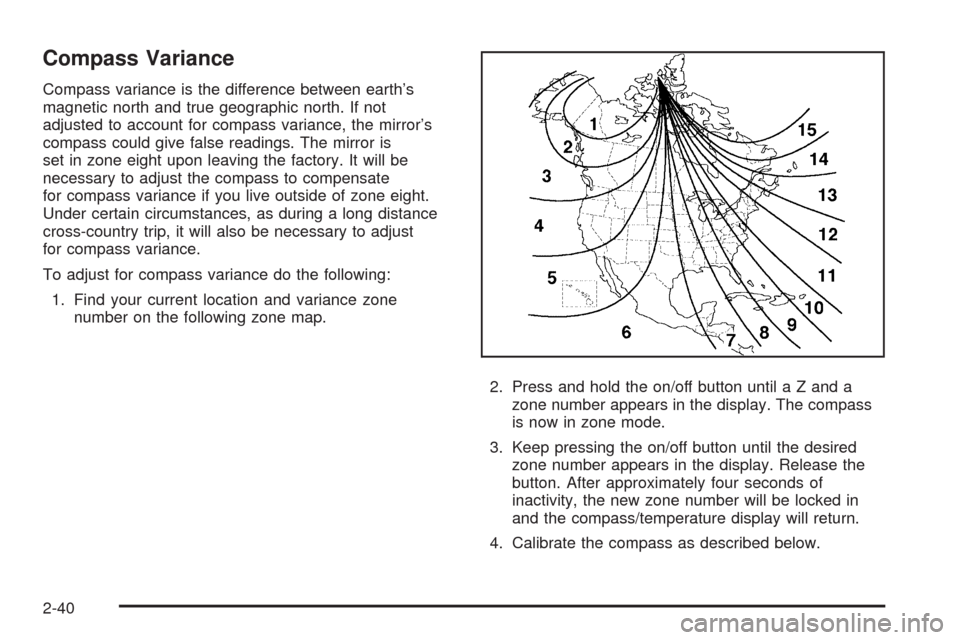
set in zone eight upon leaving the factory. It will be
necessary to adjust the compass to compensate
for compass variance if you live outside of zone eight.
Under certain circumstances, as during a long distance
cross-country trip, it will also be necessary to adjust
for compass variance.
To adjust for compass variance do the following:
1. Find your current location and variance zone
number on the following zone map.
2. Press and hold the on/off button until a Z and a
zone number appears in the display. The compass
is now in zone mode.
3. Keep pressing the on/off button until the desired
zone number appears in the display. Release the
button. After approximately four seconds of
inactivity, the new zone number will be locked in
and the compass/temperature display will return.
4. Calibrate the compass as described below.
2-40
Page 107 of 432
OnStar®System
OnStar uses several innovative technologies and live
advisors to provide a wide range of safety, security,
information, and convenience services. If the airbags
deploy, the system is designed to make an automatic call
to OnStar Emergency advisors who can request
emergency services be sent to your location. If the keys
are locked in the vehicle, call OnStar at 1-888-4-ONSTAR
and they can send a signal to unlock the doors. For
roadside assistance, press the OnStar button and they
can contact Roadside Service for you.OnStar service is provided to you subject to the OnStar
Terms and Conditions. OnStar service can be canceled
at any time by contacting OnStar. A complete OnStar
Owner’s Guide and the OnStar Terms and Conditions
are included in the vehicle’s OnStar Subscriber glove
box literature. For more information, visit onstar.com
or onstar.ca, contact OnStar at 1-888-4-ONSTAR
(1-888-466-7827) or TTY 1-877-248-2080, or press
the OnStar button to speak with an OnStar advisor
24 hours a day, 7 days a week.
Not all OnStar features are available on all vehicles.
To check if the vehicle has the services described
below, or for a full description of OnStar services and
system limitations, see the OnStar Owner’s Guide in
the glove box or visit onstar.com.
OnStar Services
For new vehicles with OnStar, the Safe & Sound Plan,
or the Directions & Connections Plan is included for
one year from the date of purchase. This plan can be
extended beyond the rst year, or can be upgraded
to the Directions & Connections Plan. For more
information, press the OnStar button to speak with an
advisor. Some OnStar services (such as Remote
Door Unlock or Stolen Vehicle Location Assistance)
are not be available until you register with OnStar.
2-43
Page 108 of 432
Available Services with Safe & Sound Plan
Automatic Notication of Airbag Deployment
Advanced Automatic Crash Notication (AACN)
(If equipped)
Link to Emergency Services
Roadside Assistance
Stolen Vehicle Location Assistance
AccidentAssist
Remote Door Unlock/Vehicle Alert
OnStar Vehicle Diagnostics
GM Goodwrench On Demand Diagnostics
OnStar Hands-Free Calling with 30 complimentary
minutes
OnStar Virtual Advisor (U.S. Only)
Available Services included with
Directions & Connections Plan
All Safe and Sound Plan Services
Driving Directions - Advisor delivered or OnStar
Turn-by-Turn Navigation (If equipped)
RideAssist
Information and Convenience Services
OnStar Hands-Free Calling
OnStar Hands-Free Calling allows eligible OnStar
subscribers to make and receive calls using voice
commands. Hands-Free Calling is fully integrated into
the vehicle, and can be used with OnStar Pre-Paid
Minute Packages. Hands-Free Calling can also be linked
to a Verizon Wireless service plan in the U.S. or a
Bell Mobility service plan in Canada, depending
on eligibility. To nd out more, refer to the OnStar
Owner’s Guide in the vehicle’s glove box, visit
www.onstar.com or www.onstar.ca, or speak with an
OnStar advisor by pressing the OnStar button or calling
1-888-4-ONSTAR (1-888-466-7827).
OnStar Virtual Advisor
OnStar Virtual Advisor is a feature of OnStar
Hands-Free Calling that uses minutes to access
location-based weather, local traffic reports, and stock
quotes. Press the phone button and give a few
simple voice commands to browse through the various
topics. See the OnStar Owner’s Guide for more
information (only available in the continental U.S.).
2-44
Page 117 of 432
Reprogramming Universal Home
Remote Buttons
Any of the three buttons can be reprogrammed by
repeating the instructions.
Erasing Universal Home Remote
Buttons
The programmed buttons should be erased when the
vehicle is sold or the lease ends.
To erase either Rolling Code or Fixed Code on the
Universal Home Remote device:
1. Press and hold the two outside buttons at the same
time for approximately 20 seconds, until the
indicator lights, located directly above the buttons,
begin to blink rapidly.
2. Once the indicator lights begin to blink, release both
buttons. The codes from all buttons are erased.
For help or information on the Universal Home Remote
System, call the customer assistance phone number
underCustomer Assistance Offices on page 7-6.
Storage Areas
Glove Box
To open the glove box, lift up on the lever. Use the key
to lock and unlock. The glove box has a light inside.
Cupholders
There are two cupholders located on the center console
next to the shift lever. To access, place your thumb
on the left side of the lid and slide the handle to
the right.
Center Console Storage
To use this storage area, pull up the lid on the driver’s
side front edge of the console and swing it to the
passenger side.
2-53
Page 118 of 432
Floor Mats
The oor mats are designed to remain in position under
your feet and out of reach of the accelerator pedal.
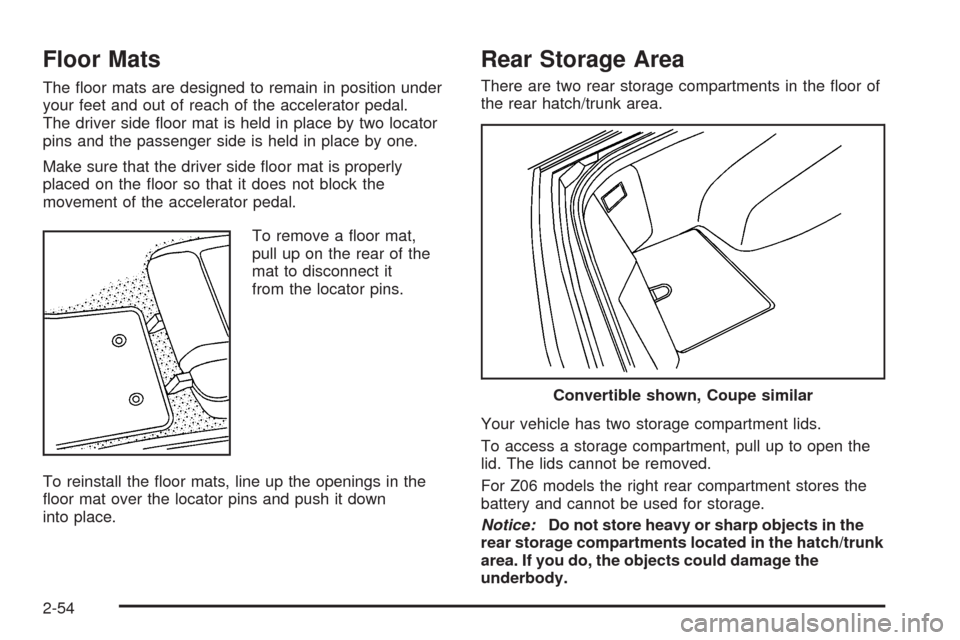
The driver side oor mat is held in place by two locator
pins and the passenger side is held in place by one.
Make sure that the driver side oor mat is properly
placed on the oor so that it does not block the
movement of the accelerator pedal.
To remove a oor mat,
pull up on the rear of the
mat to disconnect it
from the locator pins.
To reinstall the oor mats, line up the openings in the
oor mat over the locator pins and push it down
into place.
Rear Storage Area
There are two rear storage compartments in the oor of
the rear hatch/trunk area.
Your vehicle has two storage compartment lids.
To access a storage compartment, pull up to open the
lid. The lids cannot be removed.
For Z06 models the right rear compartment stores the
battery and cannot be used for storage.
Notice:Do not store heavy or sharp objects in the
rear storage compartments located in the hatch/trunk
area. If you do, the objects could damage the
underbody.
Convertible shown, Coupe similar
2-54
Page 120 of 432
Cargo Cover
If your vehicle has this feature, the security shade can
provide hidden storage in the rear area of the vehicle.
The shade is also helpful in blocking the glare from the
removable roof when it is stored in the rear compartment.
Using the Cargo Cover
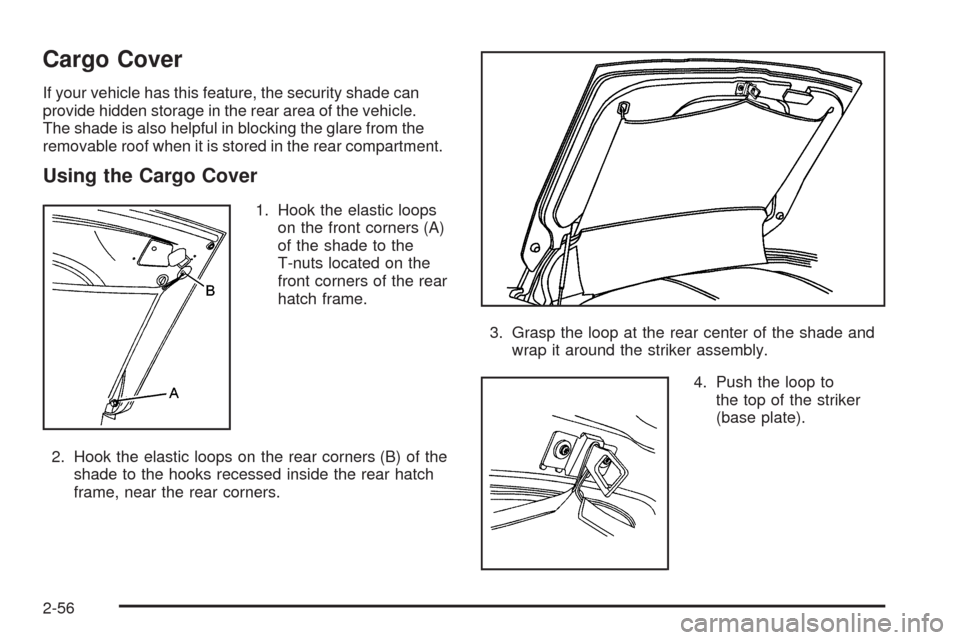
1. Hook the elastic loops
on the front corners (A)
of the shade to the
T-nuts located on the
front corners of the rear
hatch frame.
2. Hook the elastic loops on the rear corners (B) of the
shade to the hooks recessed inside the rear hatch
frame, near the rear corners.3. Grasp the loop at the rear center of the shade and
wrap it around the striker assembly.
4. Push the loop to
the top of the striker
(base plate).
2-56
Page 122 of 432
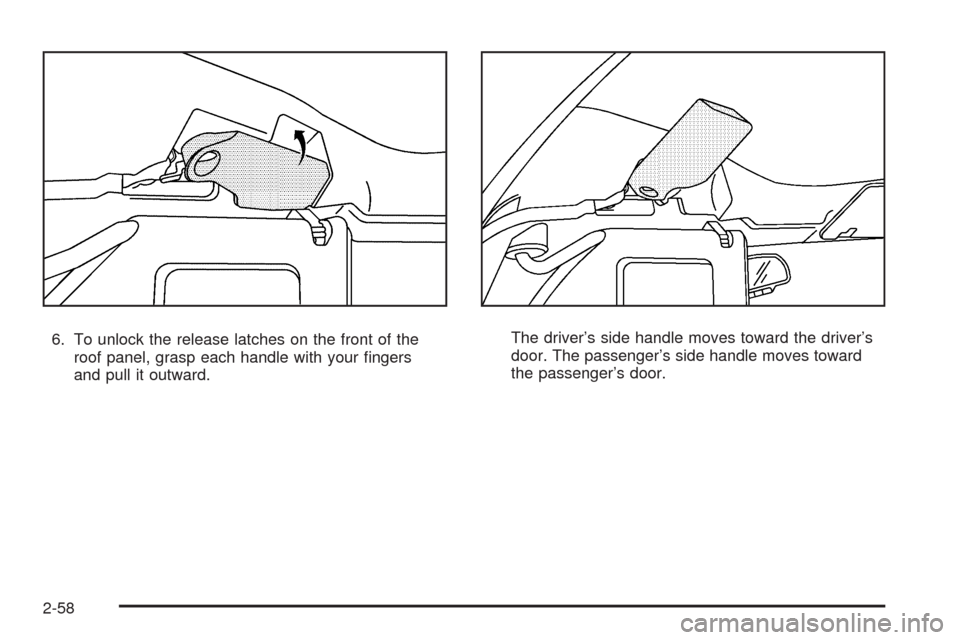
6. To unlock the release latches on the front of the
roof panel, grasp each handle with your ngers
and pull it outward.The driver’s side handle moves toward the driver’s
door. The passenger’s side handle moves toward
the passenger’s door.
2-58