2008 CHEVROLET CORVETTE radio
[x] Cancel search: radioPage 160 of 432
Clean the inside of the windshield as needed to remove
any dirt or lm that reduces the sharpness or clarity
of the HUD image.
To clean the HUD, spray household glass cleaner on a
soft, clean cloth. Wipe the HUD lens gently, then dry
it. Do not spray cleaner directly on the lens because the
cleaner could leak into the unit.
If the ignition is on and you can not see the HUD
image, check to see if:
Something is covering the HUD unit.
The HUD dimmer control is adjusted properly.
The HUD image is adjusted to the proper height.
Ambient light is low, in the direction your vehicle
is facing.
A fuse is blown. SeeFuses and Circuit Breakers
on page 5-100.
Keep in mind that your windshield is part of the HUD
system. SeeWindshield Replacement on page 5-55.
Accessory Power Outlet(s)
The accessory power outlet can be used to connect
electrical equipment such as a cellular phone or
CB radio.
The accessory power outlet is located inside the center
console storage compartment, on the forward left side.
To use the outlet, remove the tethered cap. When not
using it, always cover the outlet with the protective cap.
Notice:Leaving electrical equipment plugged in
for an extended period of time while the vehicle is
off will drain the battery. Power is always supplied to
the outlets. Always unplug electrical equipment
when not in use and do not plug in equipment that
exceeds the maximum 20 ampere rating.
Certain electrical accessories may not be compatible
with the accessory power outlet and could result
in blown vehicle or adapter fuses. If you experience a
problem, see your dealer/retailer for additional
information on accessory power outlets.
3-24
Page 201 of 432
NO FOBS DETECTED
This message displays if the vehicle does not detect the
presence of a keyless access transmitter when you
have attempted to start the vehicle or a vehicle door has
just closed. The following conditions may cause this
message to appear:
Driver-added equipment plugged into the accessory
power outlet on the center console is causing
interference. Examples of these devices are cell
phones and cell phone chargers, two-way radios,
power inverters, or similar items. Try moving
the keyless access transmitter away from these
devices when starting the vehicle. In addition,
PDA devices and remote garage and gate openers
may also generate Electromagnetic Interference
(EMI) that may interfere with the keyless access
transmitter. Do not carry the keyless access
transmitter in the same pocket or bag as these
devices.
The vehicle is experiencing Electromagnetic
Interference (EMI). Some locations, such as
airports, automatic toll booths, and some gas
stations have EMI elds which may interfere with
the keyless access transmitter.If moving the transmitter to different locations within
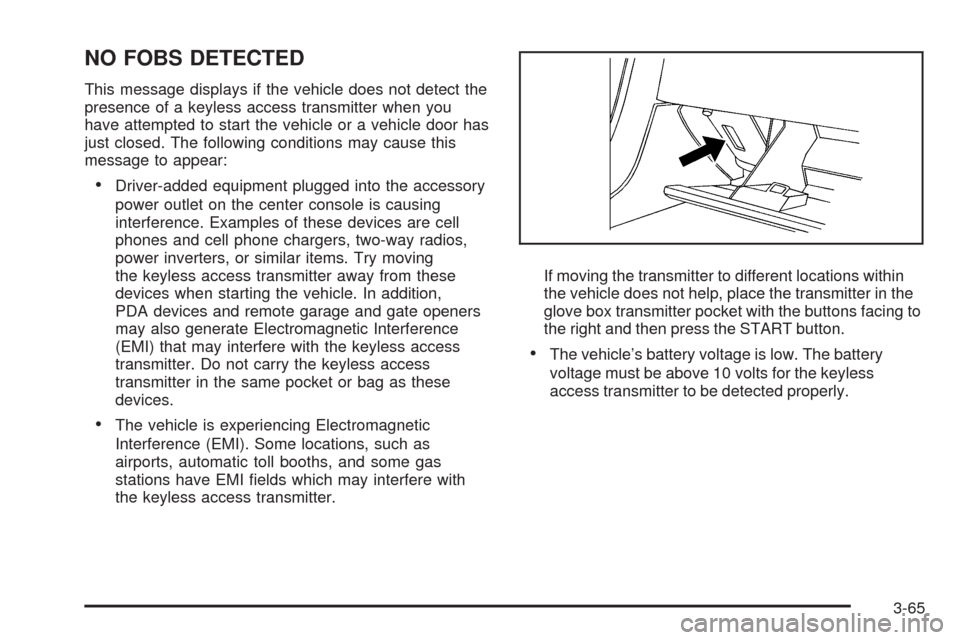
the vehicle does not help, place the transmitter in the
glove box transmitter pocket with the buttons facing to
the right and then press the START button.
The vehicle’s battery voltage is low. The battery
voltage must be above 10 volts for the keyless
access transmitter to be detected properly.
3-65
Page 202 of 432
NO FOB - OFF OR RUN?
This message displays when the keyless access
transmitter is not detected inside the vehicle while you
are trying to turn the ignition off. Your vehicle may
be near a strong radio antenna signal causing
the keyless access system to be jammed. The vehicle
will remain in ACCESSORY until the vehicle is turned off
or is restarted, or ve minutes has expired. If you turn
the ignition off and you cannot nd the keyless access
transmitter, you will not be able to restart the vehicle.
The keyless access transmitter needs to be inside of the
vehicle in order for the vehicle to start. SeeStarting
the Engine on page 2-23for more information.
OPTIONS UNAVAILABLE
This message displays for a few seconds if a keyless
access transmitter that is not labelled 1 or 2 is used and
you try to personalize the features on your vehicle by
pressing the OPTION button. The personalization
system will not recognize the transmitter and the
DIC will not display the current driver number or the
menus used to set personalizations. The personalization
features will then be set to the default states. SeeDIC
Vehicle Personalization on page 3-75for more
information.
PRESS BRAKE TO START ENGINE
(Automatic Transmission Only)
This message displays if you try to start the engine by
pressing the keyless ignition start button without
having the brake pressed. The brake needs to be
pressed when starting the engine. SeeIgnition Positions
on page 2-22for more information.
REDUCED ENGINE POWER
If this message displays and the check engine light
comes on, a noticeable reduction in the vehicle’s
performance may occur. If the REDUCED ENGINE
POWER message is displayed, but there is no reduction
in performance, proceed to your destination. The
performance may be reduced the next time the vehicle
is driven.
The vehicle may be driven at a reduced speed while the
REDUCED ENGINE POWER message is displayed,
but acceleration and speed may be reduced. Anytime
the check engine light stays on, the vehicle should
be taken to your dealer/retailer as soon as possible for
diagnosis and repair. SeeMalfunction Indicator
Lamp on page 3-45for more information.
Multiple chimes sound when this message is displayed.
3-66
Page 204 of 432
SERVICE CHARGING SYSTEM
If this message displays while you are driving, there
may be a problem with the electrical charging system.
It could mean that there is a loose or broken drive belt or
that there is another electrical problem. Have your
vehicle checked right away by your dealer/retailer.
Driving while this message is on could drain the battery.
If you must drive a short distance with the message
on, be certain to turn off the vehicle’s accessories, such
as the radio and air conditioner.
Multiple chimes sound when this message is displayed.
To acknowledge the message, press the RESET
button. The message reappears every 10 minutes until
this condition changes.
SERVICE ELECTRICAL SYSTEM
This message displays if an electrical problem has
occurred within the Powertrain Control Module (PCM).
Have your vehicle serviced by your dealer/retailer.
SERVICE FUEL SYSTEM
This message displays if the Powertrain Control Module
(PCM) has detected a problem within the fuel system.
Have your vehicle serviced by your dealer/retailer.
This message also displays when the cluster is
not getting fuel information from the PCM.
SERVICE RIDE CONTROL
This message displays when the Selective Ride Control
system has detected a malfunction and the system
must be serviced. See your dealer/retailer. If a fault is
present in the Selective Ride Control system which
causes the shocks to be in their full soft condition,
the messages SERVICE RIDE CONTROL, SHOCKS
INOPERATIVE, and MAXIMUM SPEED 80 MPH
(129 km/h) will display together. SeeSelective Ride
Control on page 4-10for more information.
SERVICE TIRE MONITOR
This message displays if a part on the Tire Pressure
Monitor System (TPMS) is not working properly. The tire
pressure light also ashes and then remains on during
the same ignition cycle. SeeTire Pressure Light on
page 3-44. Several conditions may cause this message
to appear. SeeTire Pressure Monitor Operation on
page 5-70for more information. If the warning comes on
and stays on, there may be a problem with the TPMS.
See your dealer/retailer.
3-68
Page 211 of 432
DIC Vehicle Personalization
Many features on your vehicle can be personalized.
This means that the operation of these features can be
set to operate differently depending on who is driving
the vehicle. See “Personal Options” later in this section
for the features that you can personalize.
The personalization settings for other features are
automatically updated and saved as the driver adjusts
them. These include the following settings and presets:
The radio presets, tone, volume, fade, balance,
equalization (EQ) settings and source (radio or CD)
The last climate control setting
The Head-Up Display (HUD) position and dimming
level, if your vehicle has this feature
The instrument panel cluster dimming level and last
selected DIC display
Separate personalization settings are saved for
two different drivers. One of the keyless access
transmitters is assigned to driver 1. The other is
assigned to driver 2. The back of the keyless access
transmitters are labelled 1 or 2 to correspond to
each driver.The current driver’s preferences are recalled when one
of the following occurs:
The lock or unlock button on the keyless access
transmitter, labelled 1 or 2, is pressed.
The appropriate memory button, 1 or 2, located on
the driver’s door is pressed. SeeMemory Seat,
Mirrors and Steering Wheel on page 1-4for more
information.
A valid keyless access transmitter is detected upon
opening the driver’s door.
If more than one valid keyless access transmitter is
detected upon opening the driver’s door, the driver
preferences for the lowest driver number will be recalled.
If a keyless access transmitter that is not labelled 1 or 2
is used, the personalization system will not recognize
the transmitter. The Driver Information Center (DIC) will
not display a current driver number and the features
that are normally programmed through the DIC will be
set to the default states. Also, if the OPTION button
is pressed, the DIC does not display the menus used to
set personalizations, but instead displays OPTIONS
UNAVAILABLE for a few seconds.
3-75
Page 218 of 432
If you choose BOTH, on automatic transmission
vehicles, both doors will automatically unlock when the
shift lever is moved into PARK (P). On manual
transmission vehicles, both doors will automatically
unlock when the ignition is turned off or is in RAP.
When the mode you want is selected, press the OPTION
button to set your choice and advance to the next
personal option.
Language:This option allows you to select the
language the DIC, the Head-Up Display (HUD), if your
vehicle has this feature, and the radio uses to display
messages. Each language mode will be displayed in its
own language. For example, English will be displayed
as ENGLISH, Spanish as ESPANOL, etc. If your vehicle
has the navigation system, you will not have the
Japanese language mode.
Press the OPTION button until LANGUAGE appears on
the display, then press the RESET button to scroll
through the following modes:
ENGLISH (default)
DEUTSCH (German)
FRANCAIS (French)
ITALIANO (Italian)
ESPANOL (Spanish)If you choose a language that you do not understand,
press the OPTION and RESET buttons for ve seconds.
The DIC will begin displaying all of the various
languages one by one for as long as the buttons are
pressed. When the desired language is displayed,
release the buttons and the DIC will set to this language.
When the mode you want is selected, press the
OPTION button to set your choice and advance to the
next personal option.
Personalize Name:This option allows you to type in a
name or greeting that will appear on the DIC display
whenever the corresponding keyless access
transmitter (1 or 2) is used or one of the memory
buttons (1 or 2) located on the driver’s door is pressed.
Press the OPTION button until PERSONALIZE
NAME appears on the display, then press the RESET
button to scroll through the following modes:
YES
NO (default)
If you choose YES, you can type in a name that will
appear on the DIC display.
3-82
Page 220 of 432
Audio System(s)
Determine which radio your vehicle has and then read
the pages following to familiarize yourself with its
features.
{CAUTION:
This system provides you with far greater
access to audio stations and song listings.
Giving extended attention to entertainment
tasks while driving can cause a crash and you
or others can be injured or killed. Always keep
your eyes on the road and your mind on the
drive — avoid engaging in extended searching
while driving.
Keeping your mind on the drive is important for
safe driving. SeeDefensive Driving on page 4-2.
Here are some ways in which you can help avoid
distraction while driving.While your vehicle is parked:
Familiarize yourself with all of its controls.
Familiarize yourself with its operation.
Set up your audio system by presetting your
favorite radio stations, setting the tone, and
adjusting the speakers. Then, when driving
conditions permit, you can tune to your favorite
radio stations using the presets and steering wheel
controls if the vehicle has them.
Notice:Before adding any sound equipment to
your vehicle, such as an audio system, CD player,
CB radio, mobile telephone, or two-way radio, make
sure that it can be added by checking with your
dealer/retailer. Also, check federal rules covering
mobile radio and telephone units. If sound
equipment can be added, it is very important to do
it properly. Added sound equipment may interfere
with the operation of your vehicle’s engine, radio,
or other systems, and even damage them. Your
vehicle’s systems may interfere with the operation
of sound equipment that has been added.
Your vehicle has a feature called Retained Accessory
Power (RAP). With RAP, the audio system can be
played even after the ignition is turned off. SeeRetained
Accessory Power (RAP) on page 2-23for more
information.
3-84
Page 221 of 432
Setting the Clock
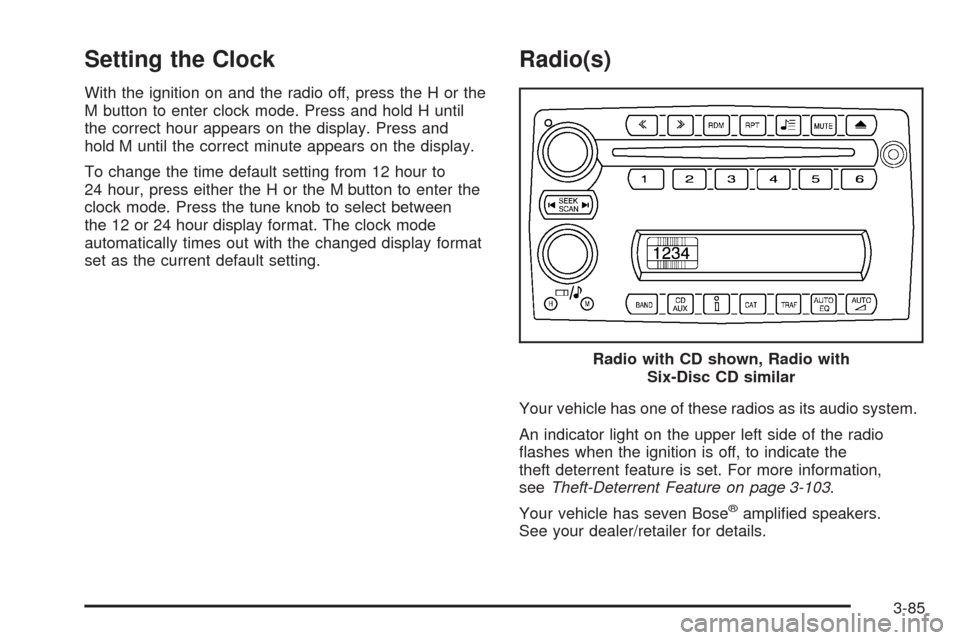
With the ignition on and the radio off, press the H or the
M button to enter clock mode. Press and hold H until
the correct hour appears on the display. Press and
hold M until the correct minute appears on the display.
To change the time default setting from 12 hour to
24 hour, press either the H or the M button to enter the
clock mode. Press the tune knob to select between
the 12 or 24 hour display format. The clock mode
automatically times out with the changed display format
set as the current default setting.
Radio(s)
Your vehicle has one of these radios as its audio system.
An indicator light on the upper left side of the radio
ashes when the ignition is off, to indicate the
theft deterrent feature is set. For more information,
seeTheft-Deterrent Feature on page 3-103.
Your vehicle has seven Bose
®amplied speakers.
See your dealer/retailer for details.Radio with CD shown, Radio with
Six-Disc CD similar
3-85