2008 CHEVROLET CORVETTE display
[x] Cancel search: displayPage 93 of 432
The Manual Paddle Shift system will not allow either an
up-shift or a down-shift if the vehicle speed is too
fast or too slow, nor will it allow a start from Fourth (4)
or higher gear
If up-shifting does not occur when needed, the vehicle
speed will be limited to protect the engine.
The transmission will also automatically down-shift as
the vehicle slows down and comes to a stop.
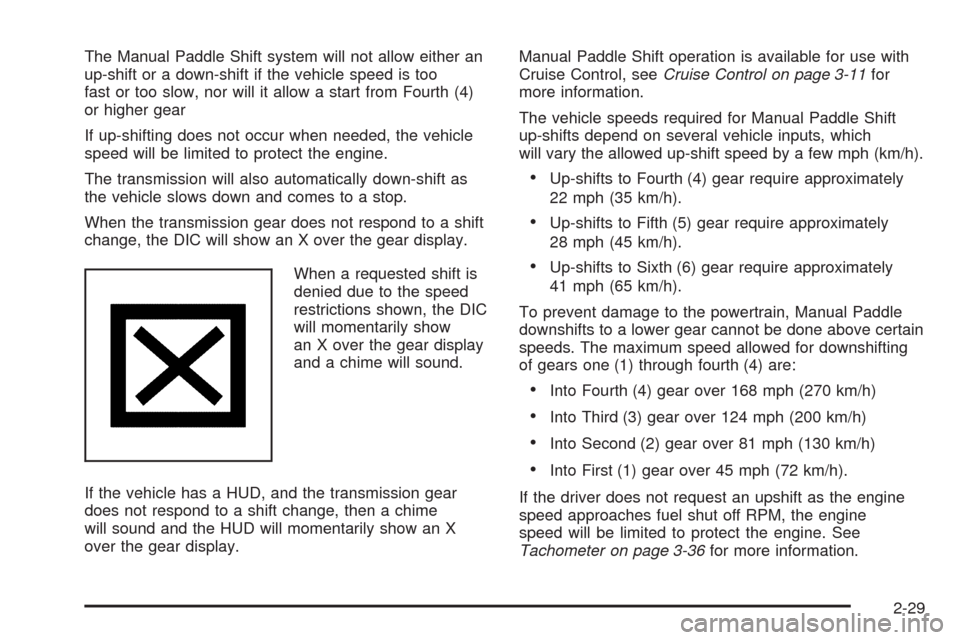
When the transmission gear does not respond to a shift
change, the DIC will show an X over the gear display.
When a requested shift is
denied due to the speed
restrictions shown, the DIC
will momentarily show
an X over the gear display
and a chime will sound.
If the vehicle has a HUD, and the transmission gear
does not respond to a shift change, then a chime
will sound and the HUD will momentarily show an X
over the gear display.Manual Paddle Shift operation is available for use with
Cruise Control, seeCruise Control on page 3-11for
more information.
The vehicle speeds required for Manual Paddle Shift
up-shifts depend on several vehicle inputs, which
will vary the allowed up-shift speed by a few mph (km/h).
Up-shifts to Fourth (4) gear require approximately
22 mph (35 km/h).
Up-shifts to Fifth (5) gear require approximately
28 mph (45 km/h).
Up-shifts to Sixth (6) gear require approximately
41 mph (65 km/h).
To prevent damage to the powertrain, Manual Paddle
downshifts to a lower gear cannot be done above certain
speeds. The maximum speed allowed for downshifting
of gears one (1) through fourth (4) are:
Into Fourth (4) gear over 168 mph (270 km/h)
Into Third (3) gear over 124 mph (200 km/h)
Into Second (2) gear over 81 mph (130 km/h)
Into First (1) gear over 45 mph (72 km/h).
If the driver does not request an upshift as the engine
speed approaches fuel shut off RPM, the engine
speed will be limited to protect the engine. See
Tachometer on page 3-36for more information.
2-29
Page 101 of 432
Mirrors
Automatic Dimming Rearview Mirror
with OnStar
®and Compass
The vehicle may have an automatic dimming rearview
mirror with OnStar®, a compass and map lamps.
Three OnStar®buttons are at the bottom of the mirror.
SeeOnStar®System on page 2-43for more
information on the services OnStar®provides.
Mirror Operation
The mirror automatically changes to reduce glare from
headlamps behind you. A time delay feature prevents
rapid changing from the day to night positions while
driving under lights and through traffic.
P(On/Off):The automatic dimming feature is
activated when the vehicle is started. The automatic
dimming feature is turned on or off by pressing
this button located on the lower part of the mirror. Press
and hold the button for up to three seconds to turn
this feature on or off.
T(Indicator Light):This light will turn on when the
automatic dimming feature is active.
Map Lamps
The mirror has map lamps located at the bottom of the
mirror. To manually turn the lamps on or off, press
the button next to each lamp.
Compass Operation
The mirror has an eight-point compass display in the
bottom of the mirror face.
When the ignition and the compass feature are on,
the compass will show two character boxes for
approximately two seconds. After two seconds, the
mirror will display the current compass heading.
For example, NE is displayed for north-east.
Compass Calibration
If after two seconds the display does not show a
compass heading, there may be a strong magnetic eld
interfering with the compass. Such interference may
be caused by a magnetic antenna mount, note
pad holder or similar object. If the letter C appears in
the compass window, the compass needs calibration.
The mirror compass can be calibrated by driving
the vehicle in circles at 5 mph (8 km/h) or less until the
display reads a direction.
The compass can be placed in calibration mode by
pressing and holding the left map light button until
a C appears on the compass display.
2-37
Page 102 of 432
Compass Variance
Compass variance is the difference between earth’s
magnetic north and true geographic north. If the mirror
is not adjusted for compass variance, your compass
could give false readings.
The mirror is set in zone eight upon leaving the factory.
It will be necessary to adjust the compass to
compensate for compass variance if you live outside
zone eight. Under certain circumstances, such as a long
distance, cross-country trip, it will be necessary to
adjust the compass variance.
To adjust for compass variance, do the following:
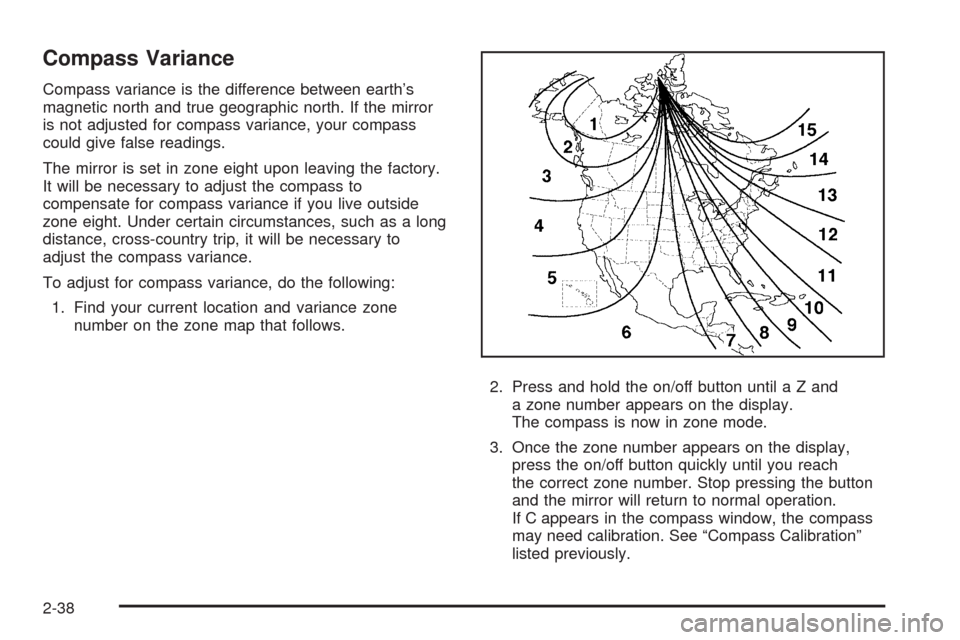
1. Find your current location and variance zone
number on the zone map that follows.
2. Press and hold the on/off button untilaZand
a zone number appears on the display.
The compass is now in zone mode.
3. Once the zone number appears on the display,
press the on/off button quickly until you reach
the correct zone number. Stop pressing the button
and the mirror will return to normal operation.
If C appears in the compass window, the compass
may need calibration. See “Compass Calibration”
listed previously.
2-38
Page 103 of 432
Cleaning the Mirror
When cleaning the mirror, use a paper towel or similar
material dampened with glass cleaner. Do not spray
glass cleaner directly on the mirror as that may cause
the liquid cleaner to enter the mirror housing.
Automatic Dimming Rearview Mirror
with Compass
If the vehicle has this feature, an automatic dimming
mirror automatically dims to the proper level to minimize
glare at night from lights behind your vehicle.
The mirror also includes a compass display in the upper
right corner of the mirror face.
P(On/Off):This is the on/off button.
Automatic Dimming Mirror Operation
The automatic dimming mirror function is turned on each
time the ignition is started. A light near the on/off button
will come on to indicate the automatic dimming is on.
Press the on/off button for about six seconds to
manually turn the automatic dimming function on or off.
Compass Display
Press the on/off button, located to the far left, briey to
turn the compass display on or off.
If the display reads CAL, the compass needs to be
calibrated. For more information, see “Compass
Calibration” later in this section.
To adjust between Fahrenheit and Celsius:
1. Press and hold the on/off button for approximately
four seconds until either a ashing °F, or °C
appears.
2. Press the button again to change the display to the
desired unit of measurement. After approximately
four seconds of inactivity, the new unit will be locked
in and the compass/temperature display will return.
If an abnormal temperature reading is displayed
for an extended period of time, please consult your
dealer/retailer. Under certain circumstances, a delay in
updating the temperature is normal.
2-39
Page 104 of 432
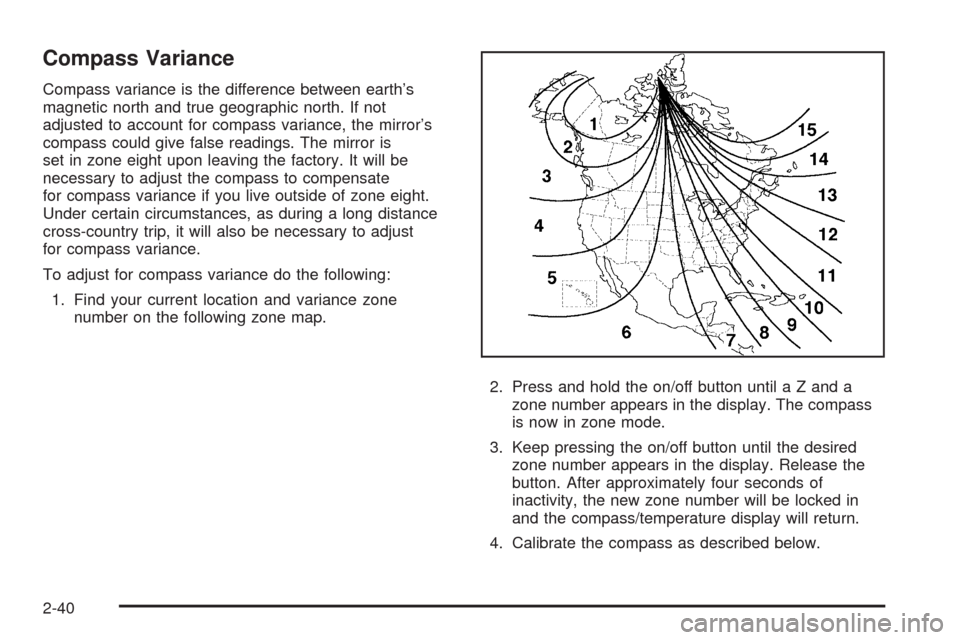
Compass Variance
Compass variance is the difference between earth’s
magnetic north and true geographic north. If not
adjusted to account for compass variance, the mirror’s
compass could give false readings. The mirror is
set in zone eight upon leaving the factory. It will be
necessary to adjust the compass to compensate
for compass variance if you live outside of zone eight.
Under certain circumstances, as during a long distance
cross-country trip, it will also be necessary to adjust
for compass variance.
To adjust for compass variance do the following:
1. Find your current location and variance zone
number on the following zone map.
2. Press and hold the on/off button until a Z and a
zone number appears in the display. The compass
is now in zone mode.
3. Keep pressing the on/off button until the desired
zone number appears in the display. Release the
button. After approximately four seconds of
inactivity, the new zone number will be locked in
and the compass/temperature display will return.
4. Calibrate the compass as described below.
2-40
Page 105 of 432
Compass Calibration
The compass may need calibration if one of the
following occurs:
After approximately ve seconds, the display does
not show a compass heading (N for North, for
example), there may be a strong magnetic eld
interfering with the compass. Such interference may
be caused by a magnetic antenna mount, magnetic
note pad holder, or a similar magnetic item.
The compass does not display the correct heading
and the compass zone variance is set correctly.
In order to calibrate, CAL must be displayed in the
mirror compass windows. If CAL is not displayed, push
the on/off button for approximately 12 seconds or
until CAL is displayed.
The compass can be calibrated by driving the vehicle in
circles at 5 mph (8 km/h) or less until the display
reads a direction.
Cleaning the Mirror
When cleaning the mirror, use a paper towel or similar
material dampened with glass cleaner. Do not spray
glass cleaner directly on the mirror as that may cause
the liquid cleaner to enter the mirror housing.
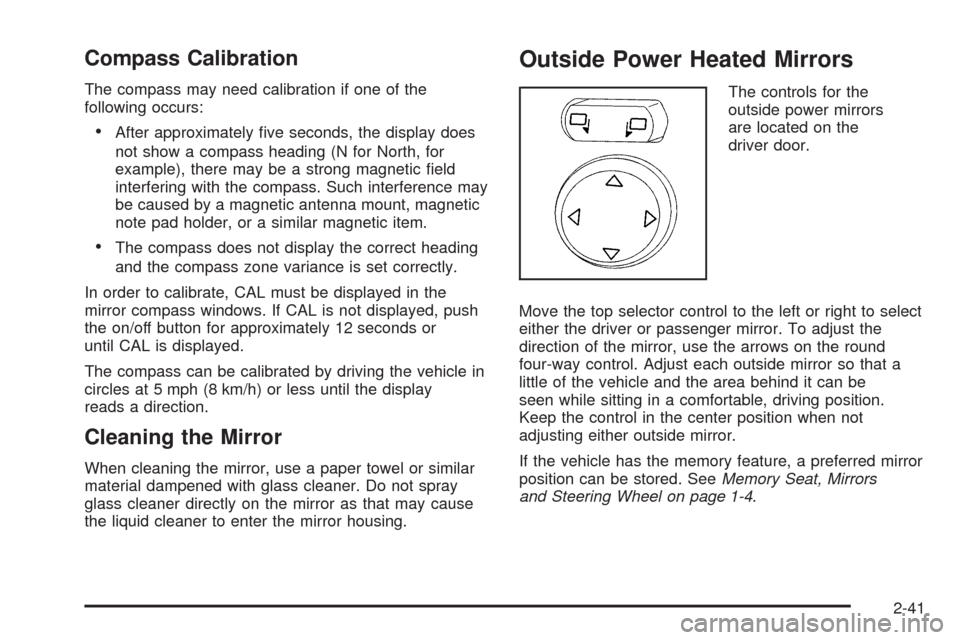
Outside Power Heated Mirrors
The controls for the
outside power mirrors
are located on the
driver door.
Move the top selector control to the left or right to select
either the driver or passenger mirror. To adjust the
direction of the mirror, use the arrows on the round
four-way control. Adjust each outside mirror so that a
little of the vehicle and the area behind it can be
seen while sitting in a comfortable, driving position.
Keep the control in the center position when not
adjusting either outside mirror.
If the vehicle has the memory feature, a preferred mirror
position can be stored. SeeMemory Seat, Mirrors
and Steering Wheel on page 1-4.
2-41
Page 119 of 432
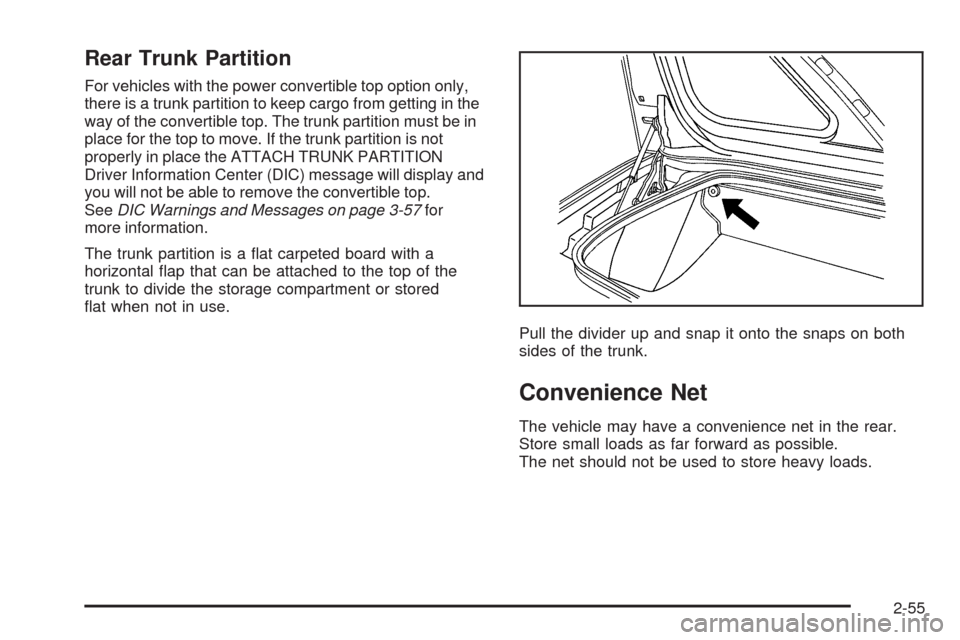
Rear Trunk Partition
For vehicles with the power convertible top option only,
there is a trunk partition to keep cargo from getting in the
way of the convertible top. The trunk partition must be in
place for the top to move. If the trunk partition is not
properly in place the ATTACH TRUNK PARTITION
Driver Information Center (DIC) message will display and
you will not be able to remove the convertible top.
SeeDIC Warnings and Messages on page 3-57for
more information.
The trunk partition is a at carpeted board with a
horizontal ap that can be attached to the top of the
trunk to divide the storage compartment or stored
at when not in use.
Pull the divider up and snap it onto the snaps on both
sides of the trunk.
Convenience Net
The vehicle may have a convenience net in the rear.
Store small loads as far forward as possible.
The net should not be used to store heavy loads.
2-55
Page 133 of 432
Lowering the Power Convertible Top
1. Park on a level surface. Start the engine. Shift an
automatic transmission into PARK (P) and set the
parking brake. Shift a manual transmission into
NEUTRAL, and set the parking brake.
2. Make sure the trunk is closed and the rear trunk
partition in the rear storage area is in the fastened
upright position, and that no objects are forward
of the divider. See “Rear Trunk Partition” under
Rear Storage Area on page 2-54.
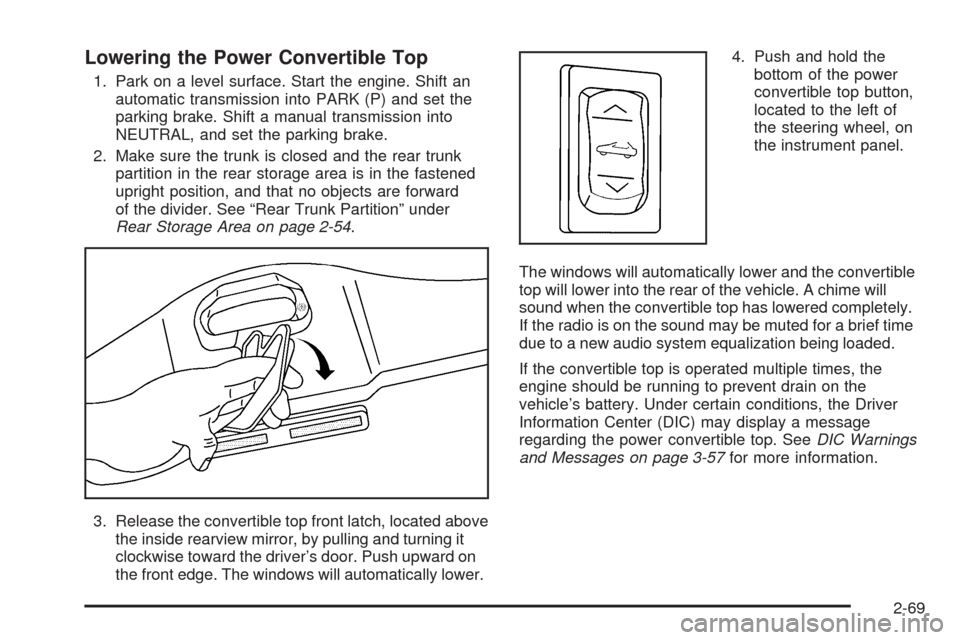
3. Release the convertible top front latch, located above
the inside rearview mirror, by pulling and turning it
clockwise toward the driver’s door. Push upward on
the front edge. The windows will automatically lower.4. Push and hold the
bottom of the power
convertible top button,
located to the left of
the steering wheel, on
the instrument panel.
The windows will automatically lower and the convertible
top will lower into the rear of the vehicle. A chime will
sound when the convertible top has lowered completely.
If the radio is on the sound may be muted for a brief time
due to a new audio system equalization being loaded.
If the convertible top is operated multiple times, the
engine should be running to prevent drain on the
vehicle’s battery. Under certain conditions, the Driver
Information Center (DIC) may display a message
regarding the power convertible top. SeeDIC Warnings
and Messages on page 3-57for more information.
2-69