2008 CHEVROLET AVEO traction control
[x] Cancel search: traction controlPage 102 of 384
Hold Mode
If your vehicle’s transmission has hold mode, you can
select this mode to drive with some characteristics
of a manual transmission. With hold mode turned on,
the automatic transmission will stay in a specific
gear range.
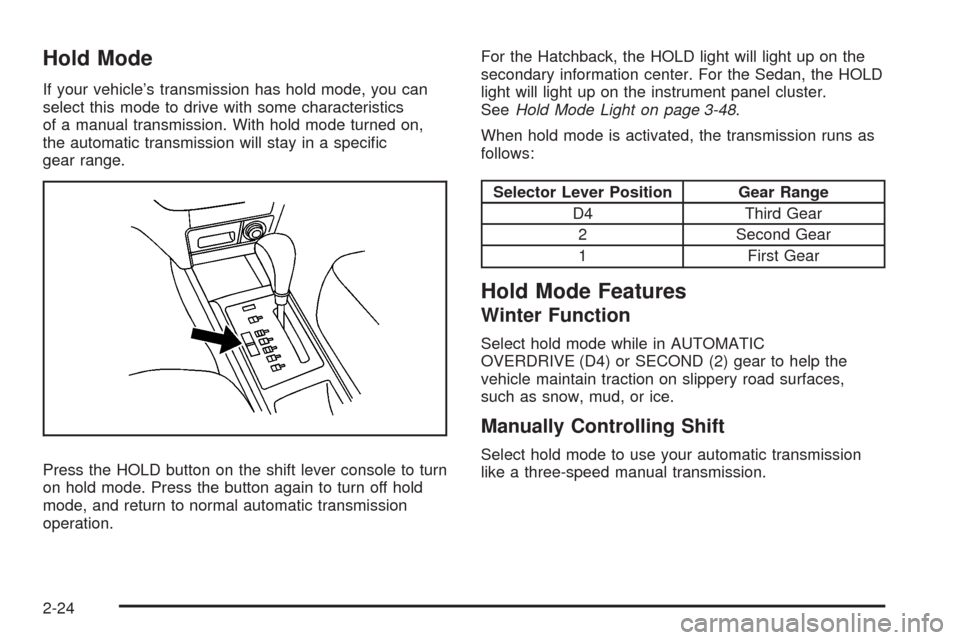
Press the HOLD button on the shift lever console to turn
on hold mode. Press the button again to turn off hold
mode, and return to normal automatic transmission
operation.For the Hatchback, the HOLD light will light up on the
secondary information center. For the Sedan, the HOLD
light will light up on the instrument panel cluster.
SeeHold Mode Light on page 3-48.
When hold mode is activated, the transmission runs as
follows:
Selector Lever Position Gear Range
D4 Third Gear
2 Second Gear
1 First Gear
Hold Mode Features
Winter Function
Select hold mode while in AUTOMATIC
OVERDRIVE (D4) or SECOND (2) gear to help the
vehicle maintain traction on slippery road surfaces,
such as snow, mud, or ice.
Manually Controlling Shift
Select hold mode to use your automatic transmission
like a three-speed manual transmission.
2-24
Page 127 of 384
Cruise Control
If your vehicle has cruise control, a speed of about
24 mph (39 km/h) or more can be maintained without
keeping your foot on the accelerator. This can really help
on long trips. Cruise control does not work at speeds
below 24 mph (39 km/h).
When the brakes are applied, or the clutch pedal if you
have a manual transmission, the cruise control turns off.
{CAUTION:
Cruise control can be dangerous where you
cannot drive safely at a steady speed. So, do
not use your cruise control on winding roads
or in heavy traffic.
Cruise control can be dangerous on slippery
roads. On such roads, fast changes in tire
traction can cause excessive wheel slip, and
you could lose control. Do not use cruise
control on slippery roads.
Setting Cruise Control
{CAUTION:
If you leave your cruise control on when you
are not using cruise, you might hit a button
and go into cruise when you do not want to.
You could be startled and even lose control.
Keep the cruise control switch off until you
want to use cruise control.
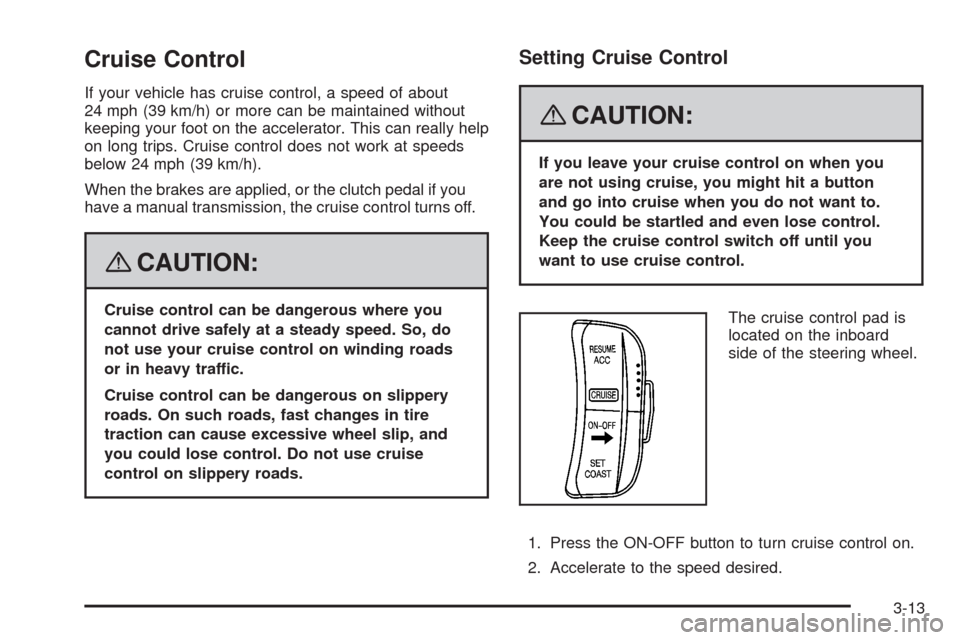
The cruise control pad is
located on the inboard
side of the steering wheel.
1. Press the ON-OFF button to turn cruise control on.
2. Accelerate to the speed desired.
3-13
Page 168 of 384
Audio System(s)
Determine which radio your vehicle has and then read
the pages following to familiarize yourself with its
features.
{CAUTION:
This system provides you with far greater
access to audio stations and song listings.
Giving extended attention to entertainment
tasks while driving can cause a crash and you
or others can be injured or killed. Always keep
your eyes on the road and your mind on the
drive — avoid engaging in extended searching
while driving.
Keeping your mind on the drive is important for safe
driving. SeeDefensive Driving on page 4-2. Here
are some ways in which you can help avoid distraction
while driving.While your vehicle is parked:
•Familiarize yourself with all of its controls.
•Familiarize yourself with its operation.
•Set up your audio system by presetting your
favorite radio stations, setting the tone, and
adjusting the speakers. Then, when driving
conditions permit, you can tune to your favorite
radio stations using the presets and steering
wheel controls if the vehicle has them.
Notice:Before adding any sound equipment to
your vehicle, such as an audio system, CD player,
CB radio, mobile telephone, or two-way radio, make
sure that it can be added by checking with your
dealer/retailer. Also, check federal rules covering
mobile radio and telephone units. If sound equipment
can be added, it is very important to do it properly.
Added sound equipment may interfere with the
operation of your vehicle’s engine, radio, or other
systems, and even damage them. Your vehicle’s
systems may interfere with the operation of sound
equipment that has been added.
3-54
Page 200 of 384
Steering
Power Steering
If you lose power steering assist because the engine
stops or the system is not functioning, you can steer
but it will take much more effort.
Steering Tips
It is important to take curves at a reasonable speed.
A lot of the “driver lost control” accidents mentioned
on the news happen on curves. Here is why:
Experienced driver or beginner, each of us is subject
to the same laws of physics when driving on curves.
The traction of the tires against the road surface makes
it possible for the vehicle to change its path when
you turn the front wheels. If there is no traction, inertia
will keep the vehicle going in the same direction.
If you have ever tried to steer a vehicle on wet ice,
you will understand this.
The traction you can get in a curve depends on the
condition of the tires and the road surface, the angle at
which the curve is banked, and your speed. While you
are in a curve, speed is the one factor you can control.
Suppose you are steering through a sharp curve.
Then you suddenly apply the brakes. Both control
systems — steering and braking — have to do theirwork where the tires meet the road. Unless you have
antilock brakes, adding the hard braking can demand
too much of those places. You can lose control.
The same thing can happen if you are steering through
a sharp curve and you suddenly accelerate. Those
two control systems — steering and acceleration — can
overwhelm those places where the tires meet the road
and make you lose control.
What should you do if this ever happens? Ease up on
the brake or accelerator pedal, steer the vehicle the
way you want it to go, and slow down.
Speed limit signs near curves warn that you should adjust
your speed. Of course, the posted speeds are based on
good weather and road conditions. Under less favorable
conditions you will want to go slower.
If you need to reduce your speed as you approach a
curve, do it before you enter the curve, while the front
wheels are straight ahead.
Try to adjust your speed so you can drive through the
curve. Maintain a reasonable, steady speed. Wait
to accelerate until you are out of the curve, and then
accelerate gently into the straightaway.
Adding non-dealer/non-retailer accessories can affect
your vehicle’s performance. SeeAccessories and
Modifications on page 5-3.
4-6
Page 203 of 384
Skidding
In a skid, a driver can lose control of the vehicle.
Defensive drivers avoid most skids by taking reasonable
care suited to existing conditions, and by not overdriving
those conditions. But skids are always possible.
The three types of skids correspond to your vehicle’s
three control systems. In the braking skid, the wheels
are not rolling. In the steering or cornering skid, too
much speed or steering in a curve causes tires to
slip and lose cornering force. And in the acceleration
skid, too much throttle causes the driving wheels
to spin.
A cornering skid and an acceleration skid are best
handled by easing your foot off the accelerator pedal.
If your vehicle starts to slide, ease your foot off the
accelerator pedal and quickly steer the way you want
the vehicle to go. If you start steering quickly enough,
your vehicle may straighten out. Always be ready
for a second skid if it occurs.Of course, traction is reduced when water, snow, ice,
gravel, or other material is on the road. For safety,
you will want to slow down and adjust your driving to
these conditions. It is important to slow down on slippery
surfaces because stopping distance will be longer and
vehicle control more limited.
While driving on a surface with reduced traction,
try your best to avoid sudden steering, acceleration,
or braking, including reducing vehicle speed by shifting
to a lower gear. Any sudden changes could cause
the tires to slide. You may not realize the surface
is slippery until your vehicle is skidding. Learn to
recognize warning clues — such as enough water,
ice, or packed snow on the road to make a mirrored
surface — and slow down when you have any doubt.
If you have the Antilock Brake System (ABS), remember:
It helps avoid only the braking skid. If you do not have
ABS, then in a braking skid, where the wheels are no
longer rolling, release enough pressure on the brakes to
get the wheels rolling again. This restores steering
control. Push the brake pedal down steadily when you
have to stop suddenly. As long as the wheels are rolling,
you will have steering control.
4-9
Page 225 of 384
Service
For service and parts needs, visit your dealer/retailer.
You will receive genuine GM parts and GM-trained and
supported service people.
Genuine GM parts have one of these marks:
Accessories and Modications
When non-dealer/non-retailer accessories are added to
your vehicle they can affect your vehicle’s performance
and safety, including such things as, airbags, braking,
stability, ride and handling, emissions systems,
aerodynamics, durability, and electronic systems like
antilock brakes, traction control and stability control.
Some of these accessories could even cause
malfunction or damage not covered by warranty.
GM Accessories are designed to complement and
function with other systems on your vehicle. Your
GM dealer/retailer can accessorize your vehicle using
genuine GM Accessories. When you go to your
GM dealer/retailer and ask for GM Accessories, you
will know that GM-trained and supported service
technicians will perform the work using genuine
GM Accessories.
Also, seeAdding Equipment to Your Airbag-Equipped
Vehicle on page 1-71.
5-3
Page 287 of 384
{CAUTION:
If you use bias-ply tires on your vehicle,
the wheel rim anges could develop
cracks after many miles of driving. A tire
and/or wheel could fail suddenly, causing
a crash. Use only radial-ply tires with the
wheels on your vehicle.
Vehicles that have a tire pressure monitoring system
could give an inaccurate low-pressure warning if
tires not recommended for your vehicle are installed.
Tires that do not match the original equipment tires
could give a low-pressure warning that is higher or
lower than the proper warning level you would get with
original equipment tires. SeeTire Pressure Monitor
System on page 5-58.
Your vehicle’s original equipment tires are listed on
the Tire and Loading Information Label. SeeLoading
Your Vehicle on page 4-18, for more information
about the Tire and Loading Information label and its
location on your vehicle.
Different Size Tires and Wheels
If you add wheels or tires that are a different size than
your original equipment wheels and tires, this may
affect the way your vehicle performs, including its
braking, ride and handling characteristics, stability,
and resistance to rollover. Additionally, if your vehicle
has electronic systems such as, anti-lock brakes,
traction control, and electronic stability control, the
performance of these systems can be affected.
{CAUTION:
If you add different sized wheels, your
vehicle may not provide an acceptable
level of performance and safety if tires not
recommended for those wheels are selected.
You may increase the chance that you will
crash and suffer serious injury. Only use
GM specic wheel and tire systems developed
for your vehicle, and have them properly
installed by a GM certied technician.
SeeBuying New Tires on page 5-64andAccessories
and Modifications on page 5-3for additional information.
5-65
Page 288 of 384

Uniform Tire Quality Grading
Quality grades can be found where applicable
on the tire sidewall between tread shoulder
and maximum selection width. For example:
Treadwear 200 Traction AA Temperature A
The following information relates to the system
developed by the Unites States National Highway
Traffic Safety Administration (NHTSA), which
grades tires by treadwear, traction, and
temperature performance. This applies only to
vehicles sold in the United States. The grades are
molded on the sidewalls of most passenger car
tires. The Uniform Tire Quality Grading (UTQG)
system does not apply to deep tread, winter-type
snow tires, space-saver, or temporary use
spare tires, tires with nominal rim diameters of
10 to 12 inches (25 to 30 cm), or to some
limited-production tires.
While the tires available on General Motors
passenger cars and light trucks may vary with
respect to these grades, they must also conform
to federal safety requirements.Treadwear
The treadwear grade is a comparative rating based
on the wear rate of the tire when tested under
controlled conditions on a specified government
test course. For example, a tire graded 150 would
wear one and a half (1
1⁄2) times as well on the
government course as a tire graded 100. The
relative performance of tires depends upon the
actual conditions of their use, however, and may
depart significantly from the norm due to variations
in driving habits, service practices, and differences
in road characteristics and climate.
Traction — AA, A, B, C
The traction grades, from highest to lowest,
are AA, A, B, and C. Those grades represent
the tire’s ability to stop on wet pavement as
measured under controlled conditions on
specified government test surfaces of asphalt
and concrete. A tire marked C may have
poor traction performance.
The traction grade assigned to this tire is based
on straight-ahead braking traction tests, and does
not include acceleration, cornering, hydroplaning,
or peak traction characteristics.
5-66