2008 CHEVROLET AVEO Red
[x] Cancel search: RedPage 166 of 384
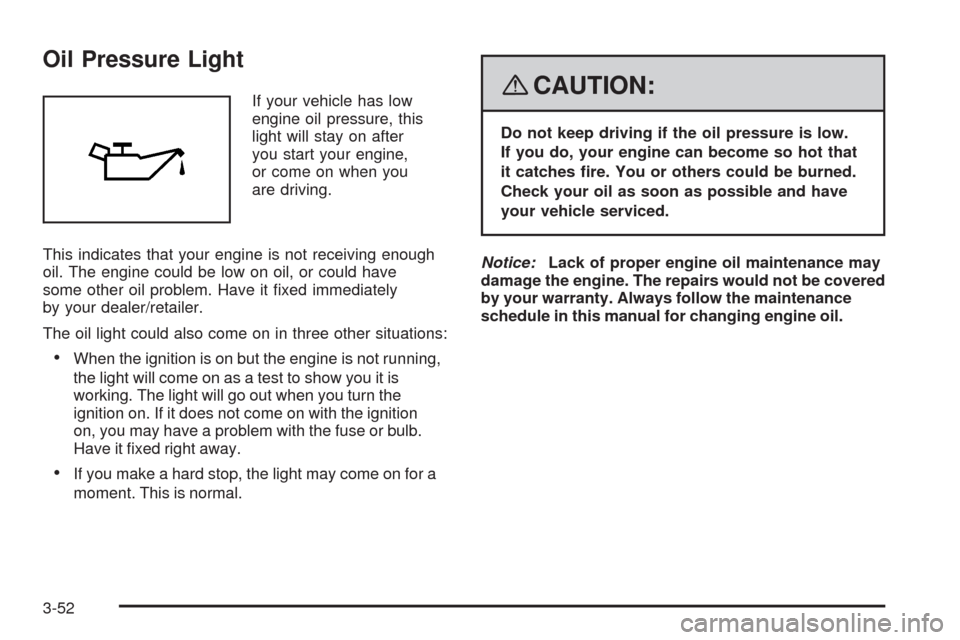
Oil Pressure Light
If your vehicle has low
engine oil pressure, this
light will stay on after
you start your engine,
or come on when you
are driving.
This indicates that your engine is not receiving enough
oil. The engine could be low on oil, or could have
some other oil problem. Have it fixed immediately
by your dealer/retailer.
The oil light could also come on in three other situations:
•When the ignition is on but the engine is not running,
the light will come on as a test to show you it is
working. The light will go out when you turn the
ignition on. If it does not come on with the ignition
on, you may have a problem with the fuse or bulb.
Have it fixed right away.
•If you make a hard stop, the light may come on for a
moment. This is normal.
{CAUTION:
Do not keep driving if the oil pressure is low.
If you do, your engine can become so hot that
it catches re. You or others could be burned.
Check your oil as soon as possible and have
your vehicle serviced.
Notice:Lack of proper engine oil maintenance may
damage the engine. The repairs would not be covered
by your warranty. Always follow the maintenance
schedule in this manual for changing engine oil.
3-52
Page 168 of 384
Audio System(s)
Determine which radio your vehicle has and then read
the pages following to familiarize yourself with its
features.
{CAUTION:
This system provides you with far greater
access to audio stations and song listings.
Giving extended attention to entertainment
tasks while driving can cause a crash and you
or others can be injured or killed. Always keep
your eyes on the road and your mind on the
drive — avoid engaging in extended searching
while driving.
Keeping your mind on the drive is important for safe
driving. SeeDefensive Driving on page 4-2. Here
are some ways in which you can help avoid distraction
while driving.While your vehicle is parked:
•Familiarize yourself with all of its controls.
•Familiarize yourself with its operation.
•Set up your audio system by presetting your
favorite radio stations, setting the tone, and
adjusting the speakers. Then, when driving
conditions permit, you can tune to your favorite
radio stations using the presets and steering
wheel controls if the vehicle has them.
Notice:Before adding any sound equipment to
your vehicle, such as an audio system, CD player,
CB radio, mobile telephone, or two-way radio, make
sure that it can be added by checking with your
dealer/retailer. Also, check federal rules covering
mobile radio and telephone units. If sound equipment
can be added, it is very important to do it properly.
Added sound equipment may interfere with the
operation of your vehicle’s engine, radio, or other
systems, and even damage them. Your vehicle’s
systems may interfere with the operation of sound
equipment that has been added.
3-54
Page 169 of 384
AM-FM Radio (Single Display,
Base Level)
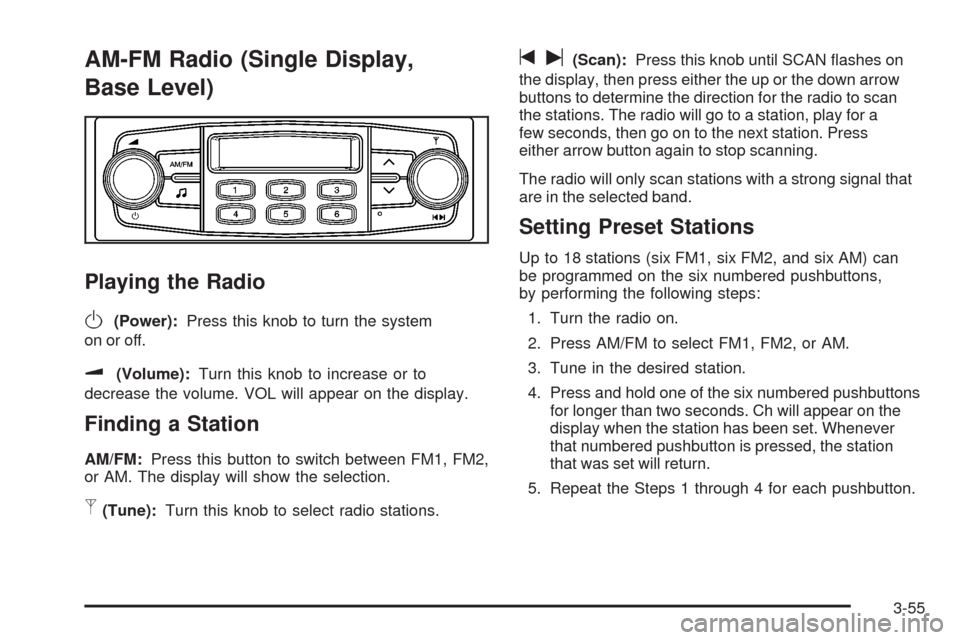
Playing the Radio
O
(Power):Press this knob to turn the system
on or off.
u(Volume):Turn this knob to increase or to
decrease the volume. VOL will appear on the display.
Finding a Station
AM/FM:Press this button to switch between FM1, FM2,
or AM. The display will show the selection.
p(Tune):Turn this knob to select radio stations.
tu(Scan):Press this knob until SCAN flashes on
the display, then press either the up or the down arrow
buttons to determine the direction for the radio to scan
the stations. The radio will go to a station, play for a
few seconds, then go on to the next station. Press
either arrow button again to stop scanning.
The radio will only scan stations with a strong signal that
are in the selected band.
Setting Preset Stations
Up to 18 stations (six FM1, six FM2, and six AM) can
be programmed on the six numbered pushbuttons,
by performing the following steps:
1. Turn the radio on.
2. Press AM/FM to select FM1, FM2, or AM.
3. Tune in the desired station.
4. Press and hold one of the six numbered pushbuttons
for longer than two seconds. Ch will appear on the
display when the station has been set. Whenever
that numbered pushbutton is pressed, the station
that was set will return.
5. Repeat the Steps 1 through 4 for each pushbutton.
3-55
Page 171 of 384

The previous volume setting is maintained whenever
the radio is turned on. The volume can be adjusted by
using the volume knob.
Finding a Station
AM/AUX:Press this button to play an AM station while
a portable audio device is playing. Press this button
again and the system will begin playing audio from the
connected portable audio player. If a portable audio
player is not connected, “no input device found” will be
displayed.
FM:Press this button to switch between FM1 or FM2.
The display will show the selection.
¦¥SEEK:Press the up or down SEEK arrow to go
to the next or to the previous station and stay there.
The radio will only seek stations with a strong signal that
are in the selected band.
¦¥TUNE:Press the up or down TUNE arrow to go
to the next or to the previous radio station.
SCAN:Push and release this button to scan radio
stations. The radio will go to a station, play for a
few seconds, then go on to the next station.
Push this button again to stop scanning.
The radio will only scan stations with a strong signal
that are in the selected band.
Setting Preset Stations
Up to 36 stations (six FM1, six FM2, six FM-A and
six AM1, six AM2, six AM-A), can be programmed on
the six numbered pushbuttons, by performing the
following steps:
1. Turn the radio on.
2. Press AM/AUX to select AM1, AM2, or AM-A.
Press FM to select FM1, FM2 or FM-A.
3. Tune in the desired station.
4. Press and hold one of the six numbered
pushbuttons for longer than two seconds.
The channel number (CH#1 through CH#6) will
flash on the display when the station has been set.
Whenever that numbered preset button is
pressed, the station that was set will return.
5. Repeat the first four steps for each preset button.
AST (Automatic Store):Six FM1 preset stations with
the strongest reception in the region can be automatically
stored. Press the AST button for longer than one second.
The display will show AUTO SCANNING and then
SCANNING will flash on display. Once the stations are
stored, the radio will switch to FM1 and the first preset
station will begin to play. FM-A will appear on the display
when listening to the automatic stored stations. Press the
AM or FM button to cancel automatic store.
3-57
Page 172 of 384
Order of Sound Function
The order for displayed sound function is BASS, MID,
TRE, FAD, BAL, EQ OFF, and VOL.
Setting the Tone
(Bass/Midrange/Treble)
SOUND (Bass/Midrange/Treble):Press this button
until BAS appears on the display. Turn the power/volume
knob to increase or to decrease the bass. The display will
show the bass level. When finished making the selection,
press this button to select the bass level.
Press this button until MID appears on the display.
Turn the power/volume knob to increase or to decrease
the midrange. The display will show the midrange level.
When finished making the selection, press this button to
select the midrange level.
Press this button until TRE appears on the display.
Turn the power/volume knob to increase or to decrease
the treble. The display will show the treble level. When
finished making the selection, press this button to select
the treble level. If a station is weak or there is static,
decrease the treble.
Adjusting the Speakers (Balance/Fade)
SOUND (Balance/Fade):To adjust the balance
between the right and the left speakers, press this button
until BAL appears on the display. Turn the power/volume
knob to increase or to decrease. The display will show the
balance level. When finished making the selection, press
this button to select the balance level.
To adjust the fade between the front and the rear
speakers, press this button until FAD appears on the
display. Turn the power/volume knob to increase or
to decrease the fade between the front and the rear
speakers. The display will show the fade level. When
finished making the selection, press this button to select
the fade level.
Setting the EQ (Equalization)
SOUND (Equalization):Press this button until EQ OFF
appears on the display to select customized equalization
settings designed for classic, dance, rock, jazz, pop,
voice, and techno. Turn the power/volume knob until
the desired equalization setting appears on the display.
When finished making the selection, press the
SOUND button to select the equalization setting.
To cancel an equalization setting, press the SOUND
button until EQ OFF appears on the display, turn the
power/volume knob until OFF appears on the display,
then press the SOUND button again to select the
equalization setting.
3-58
Page 175 of 384
AST (Automatic Store)
Six FM1 preset stations with the strongest reception in
the region can be automatically stored. Press the AST
button for more than two seconds. The display shows
AUTO SCANNING and then SCANNING flashes on the
display. Once the stations are stored, the radio switches
to FM1 and the first preset station begins to play. FM-A
displays while listening to the automatic stored stations.
Press the AM or FM button to cancel automatic store.
Setting Preset Stations
Up to 24 stations (six FM1, six FM2, six AM1, and
six AM2), can be programmed on the six numbered
buttons, by performing the following steps:
1. Turn the radio on.
2. Press the AM or FM button to select FM1, FM2,
AM1 or AM2.
3. Tune in the desired station.
4. Press and hold one of the six numbered buttons for
more than two seconds. The preset button number
one through six flashes on the display when the
station has been set. When that numbered preset
button is pressed, that preset station returns.
5. Repeat the Steps 1 through 4 for each preset
button.
Order of Sound Function
The order for displayed sound function is BASS, TRE,
BAL, FADE, EQ OFF, and VOL (Bass, Treble, Fade,
Balance, Equalization Off, and Volume).
Setting the Tone (Bass/Treble)
SOUND (Bass/Treble):Press this button until
BAS (bass) displays. Turn the
Oknob to increase or
to decrease the bass. The display shows the bass level.
After making the selection, press this button to set the
bass level selection.
Press this button until TRE (treble) displays.
Turn the
Oknob to increase or to decrease the treble.
The display shows the treble level. After making the
selection, press this button to set the treble level
selection. If a station is weak or has static, decrease
the treble.
3-61
Page 176 of 384
Adjusting the Speakers (Balance/Fade)
SOUND (Balance/Fade):To adjust the balance
between the right and the left speakers, press this
button until BAL (balance) displays. Turn the
Oknob
to increase or to decrease. The display shows the
balance level. After making the selection, press
this button to set the balance level.
To adjust the fade between the front and the rear
speakers, press this button until FAD (fade) displays.
Turn the
Oknob to increase or to decrease the
fade between the front and the rear speakers. The
display shows the fade level. After making the selection,
press this button to set the fade level.
Setting the Equalization
The order for displayed customized equalization settings
are EQ OFF, CLASSIC, DANCE, ROCK, JAZZ, POP,
VOICE, TECHNO, EQ OFF.
SOUND (Equalization):Press this button until EQ OFF
(equalization) displays to select customized equalization
settings designed for classic, dance, rock, jazz, pop,
voice and techno. Turn the
Oknob until the desired
equalization setting displays. After making the selection,
press the SOUND button to set the equalization setting.
To cancel an equalization setting, press the SOUND
button until EQ OFF displays, turn the
Oknob until OFF
displays, then press the SOUND button again to set the
equalization setting.
Playing a CD
Insert a CD partway into the slot, label side up.
The player pulls it in and the CD should begin playing.
When a CD is inserted, CDP displays. As the CD is
loading, Filecheck displays. As each new track starts
to play, Track and the track number displays.
If the ignition or radio is turned off with a CD in the
player, it stays in the player. When a CD is in the player
and the ignition is turned on, the radio must be turned
on before the CD starts playback. When the ignition
and radio are turned on, the CD starts playing where
it stopped, if it was the last selected audio source.
The CD player can play the smaller 3 inch (8 cm)
single CDs with an adapter ring. Full-size CDs and
the smaller CDs are loaded in the same manner.
If playing a CD-R, the sound quality can be reduced due
to CD-R quality, the method of recording, the quality of
the music that has been recorded, and the way the CD-R
has been handled. There can be an increase in skipping,
difficulty in finding tracks, and/or difficulty in loading and
ejecting. If these problems occur, check the bottom
surface of the CD. If the surface of the CD is damaged,
such as cracked, broken, or scratched, the CD will not
play properly. If the surface of the CD is soiled, seeCare
of Your CDs on page 3-79for more information.
If there is no apparent damage, try a known good CD.
3-62
Page 179 of 384
Using the Auxiliary Input Jack
The radio system has an auxiliary input jack located on
the lower right side of the faceplate. This is not an audio
output. Do not plug the headphone set into the front
auxiliary input jack. An external audio device such as
an iPod, laptop computer, MP3 player, CD changer,
or cassette tape player, etc. can be connected to the
auxiliary input jack for use as another source for audio
listening.
The auxiliary input jack also accepts cell phone
connectors. Plug the cell phone connector into the
auxiliary input jack to hear a person speaking on a cell
phone during conversation through the vehicle sound
system.
Drivers are encouraged to set up any auxiliary device
while the vehicle is in PARK (P). SeeDefensive Driving
on page 4-2for more information on driver distraction.To use a portable audio player, connect a 3.5 mm
(1/8 inch) cable to the radio’s front auxiliary input jack.
While a device is connected, turn the portable audio
player on and press the radio CD/AUX button to
hear audio from the device over the vehicle speakers.
CD/AUX (CD/Auxiliary):Press this button once to
play a CD while a portable audio device is playing.
Press this button a second time for the system to begin
playing audio from the connected portable audio player.
Once in this mode, Auxinput appears on the display. If the
auxiliary jack does not detect the presence of an output
jack, the auxiliary mode does not display.
O(Power/Volume):Turn theOknob clockwise or
counterclockwise to increase or decrease the volume
of the portable player. Additional adjustments on a
portable device might be needed to get the desired
volume.
3-65