Page 142 of 528

The system can be
disabled by pressing the
rear park aid disable button
located next to the radio.
The indicator light will
come on and PARKING
ASSIST OFF displays
on the
Driver Information Center (DIC) to indicate that URPA is
off, seeDIC Warnings and Messages on page 3-59
for information about clearing the message.
Notice:If you use URPA while the tailgate is
lowered, it may not detect an object behind your
vehicle, and you might back into the object and
damage your vehicle. Always verify the tailgate is
closed when using URPA or turn off URPA when
driving with the tailgate lowered.When the System Does Not Seem to
Work Properly
If the URPA system will not activate due to a temporary
condition, the message PARKING ASSIST OFF will be
displayed on the DIC and a red light will be shown on
the rear URPA display when the shift lever is moved into
R (Reverse). This occurs under the following conditions:
The driver disables the system.
The parking brake pedal is depressed.
The ultrasonic sensors are not clean. Keep the
vehicle’s rear bumper free of mud, dirt, snow, ice and
slush. For cleaning instructions, seeWashing Your
Vehicle on page 5-102.
A trailer was attached to the vehicle, or a bicycle or
an object was hanging out of the tailgate during the
last drive cycle, the red light may illuminate in the
rear display. Once the attached object is removed,
URPA will return to normal operation.
A tow bar is attached to the vehicle.
The vehicle’s bumper is damaged. Take the vehicle
to your dealer/retailer to repair the system.
Other conditions may affect system performance,
such as vibrations from a jackhammer or the
compression of air brakes on a very large truck.
If the system is still disabled, after driving forward at
least 15 mph (25 km/h), take the vehicle to your dealer/
retailer.
2-60
Page 159 of 528
3. Store cargo panel 2 by loading the cargo panel with
latches down and facing toward you.4. Store cargo panel 3 by loading the cargo panel with
latches up and facing away from you.
2-77
Page 166 of 528
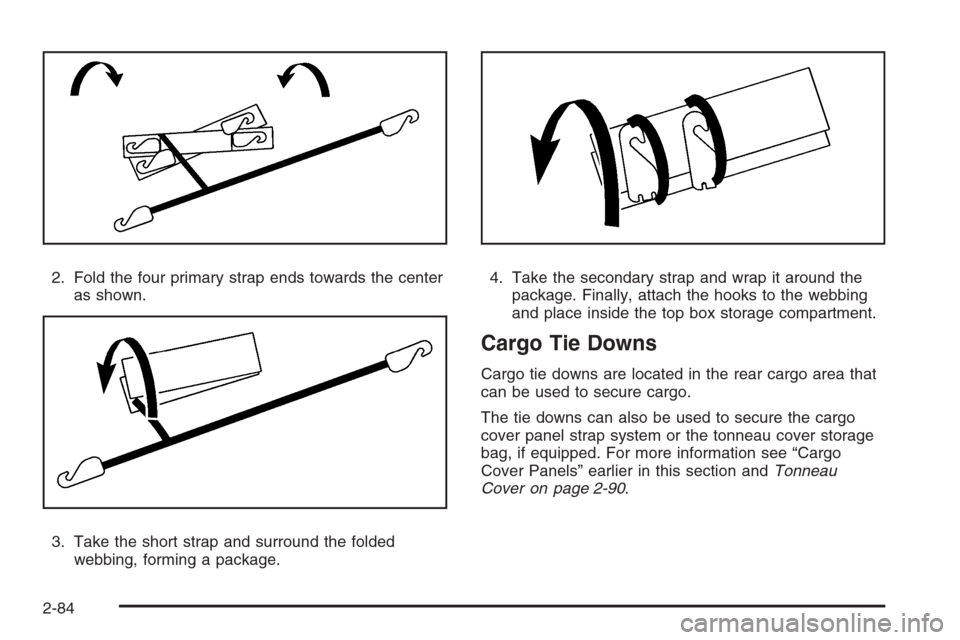
2. Fold the four primary strap ends towards the center
as shown.
3. Take the short strap and surround the folded
webbing, forming a package.4. Take the secondary strap and wrap it around the
package. Finally, attach the hooks to the webbing
and place inside the top box storage compartment.
Cargo Tie Downs
Cargo tie downs are located in the rear cargo area that
can be used to secure cargo.
The tie downs can also be used to secure the cargo
cover panel strap system or the tonneau cover storage
bag, if equipped. For more information see “Cargo
Cover Panels” earlier in this section andTonneau
Cover on page 2-90.
2-84
Page 173 of 528
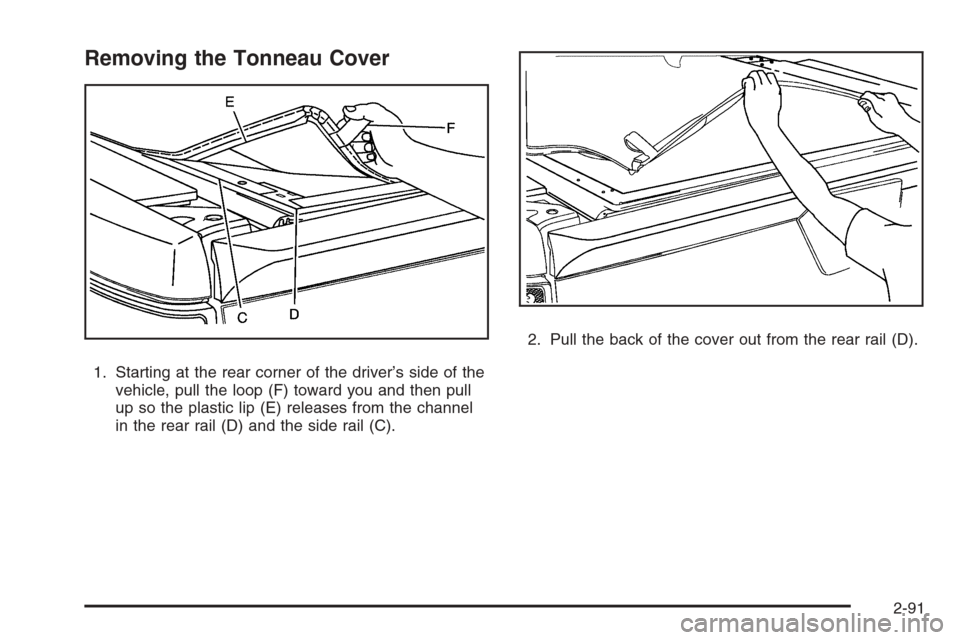
Removing the Tonneau Cover
1. Starting at the rear corner of the driver’s side of the
vehicle, pull the loop (F) toward you and then pull
up so the plastic lip (E) releases from the channel
in the rear rail (D) and the side rail (C).2. Pull the back of the cover out from the rear rail (D).
2-91
Page 174 of 528
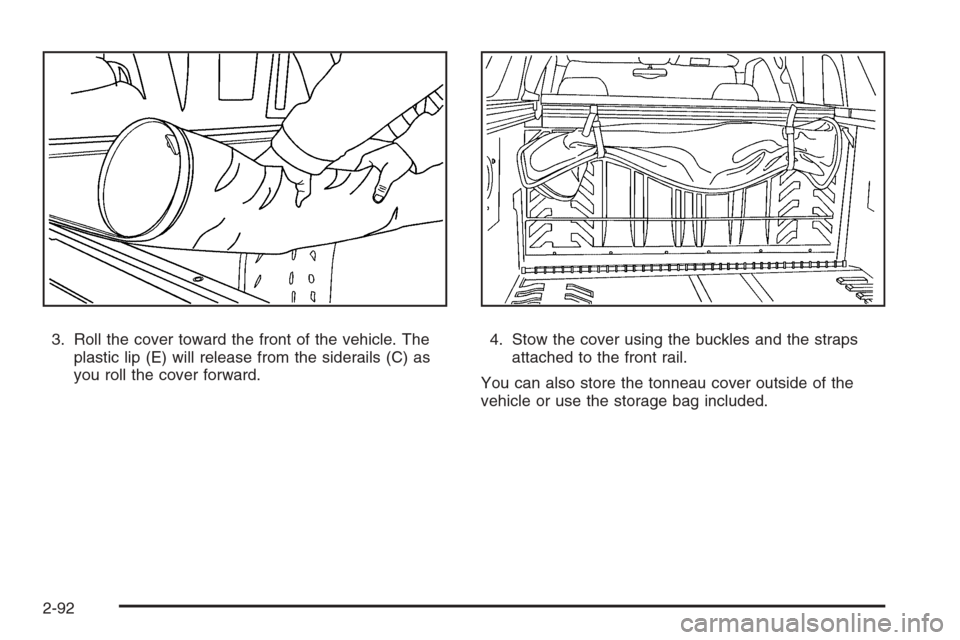
3. Roll the cover toward the front of the vehicle. The
plastic lip (E) will release from the siderails (C) as
you roll the cover forward.4. Stow the cover using the buckles and the straps
attached to the front rail.
You can also store the tonneau cover outside of the
vehicle or use the storage bag included.
2-92
Page 177 of 528
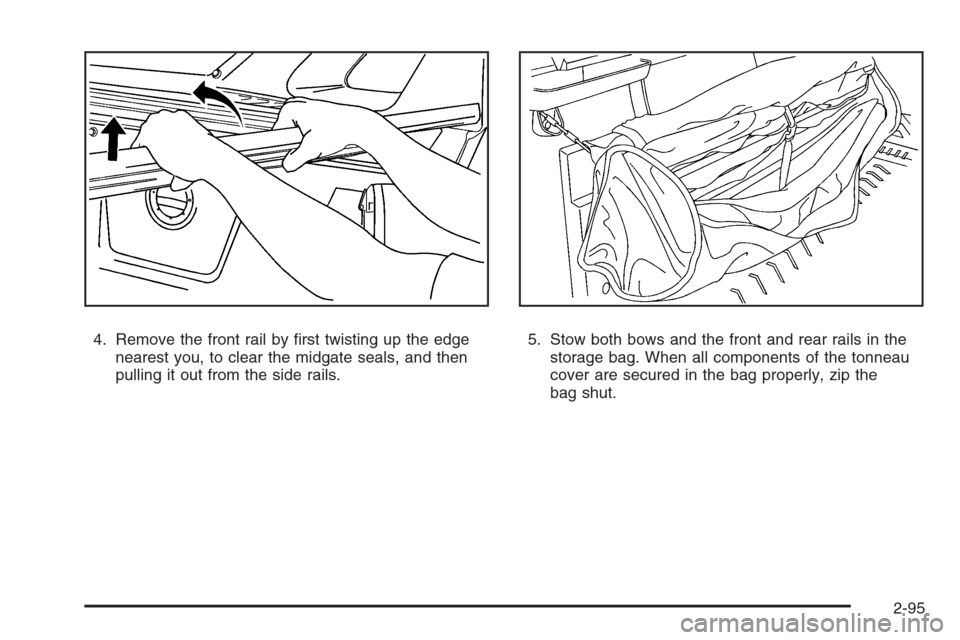
4. Remove the front rail by rst twisting up the edge
nearest you, to clear the midgate seals, and then
pulling it out from the side rails.5. Stow both bows and the front and rear rails in the
storage bag. When all components of the tonneau
cover are secured in the bag properly, zip the
bag shut.
2-95
Page 182 of 528

Fog Lamp Light............................................3-48
Cruise Control Light......................................3-48
Highbeam On Light.......................................3-48
Tow/Haul Mode Light....................................3-48
Fuel Gage...................................................3-49
Low Fuel Warning Light.................................3-50
Driver Information Center (DIC).......................3-50
DIC Operation and Displays
(With DIC Buttons)....................................3-51
DIC Operation and Displays
(Without DIC Buttons)................................3-56
DIC Warnings and Messages.........................3-59
DIC Vehicle Customization
(With DIC Buttons)....................................3-66Audio System(s).............................................3-75
Setting the Clock..........................................3-76
Radio(s) (MP3).............................................3-78
Using an MP3 (Radio with CD or
Six-Disc CD Player)...................................3-96
Using an MP3 (Radio with CD and
DVD Player)...........................................3-101
XM Radio Messages...................................3-106
Navigation/Radio System..............................3-107
Rear Seat Entertainment (RSE) System.........3-107
Rear Seat Audio (RSA)................................3-116
Theft-Deterrent Feature................................3-118
Audio Steering Wheel Controls......................3-118
Radio Reception.........................................3-119
Fixed Mast Antenna....................................3-120
XM™ Satellite Radio Antenna System............3-120
Section 3 Instrument Panel
3-2
Page 185 of 528
The main components of the instrument panel are the following:
A. Air Outlets. SeeOutlet Adjustment on page 3-31.
B. Turn Signal/Multifunction Lever. SeeTurn
Signal/Multifunction Lever on page 3-7.
C. Instrument Panel Cluster. SeeInstrument Panel
Cluster on page 3-33.
D. Hazard Warning Flasher Button. SeeHazard
Warning Flashers on page 3-6.
E. Shift Lever. SeeAutomatic Transmission Operation
on page 2-35.
F. Tow/Haul Selector Button (If Equipped).
SeeTow/Haul Mode on page 2-38.
G. Driver Information Center Controls. SeeDriver
Information Center (DIC) on page 3-50.
H. Audio System. SeeAudio System(s) on page 3-75.
I. Exterior Lamps Control. SeeExterior Lamps on
page 3-14.
J. Dome Lamp Override Button. SeeDome Lamp
Override on page 3-18.
K. Automatic Transfer Case Control. (If Equipped).
SeeFour-Wheel Drive on page 2-39.
L. Cruise Control Buttons. SeeCruise Control on
page 3-12.M. Tilt Wheel Lever. SeeTilt Wheel on page 3-7.
N. Horn. SeeHorn on page 3-6.
O. Audio Steering Wheel Controls. SeeAudio Steering
Wheel Controls on page 3-118.
P. Climate Control System or Dual Automatic Climate
Control System (If Equipped). SeeClimate Control
System on page 3-21orDual Automatic Climate
Control System on page 3-24.
Q. Accessory Power Outlets. SeeAccessory
Power Outlet(s) on page 3-20. Cigarette Lighter
(If Equipped). SeeAshtray(s) and Cigarette Lighter
on page 3-20.
R. StabiliTrak
®Button. SeeStabiliTrak®System
on page 4-6. Pedal Adjust Button (If Equipped).
SeeAdjustable Throttle and Brake Pedal on
page 2-33. Rear Park Assist Disable Button
(If Equipped). SeeUltrasonic Rear Parking Assist
(URPA) on page 2-58. Heated Windshield Washer
Fluid Button (If Equipped). SeeWindshield Washer
on page 3-11. Power Running Boards Disable Button
(If Equipped). SeePower Running Boards on
page 2-22.
S. Glove Box. SeeGlove Box on page 2-71.
3-5