2008 AUDI S6 warning light
[x] Cancel search: warning lightPage 178 of 390

• .___A_ u_d_ i _P _a_ r_ k_ i_ n ..:g=-- S_ y=-- s_t _ e _m _____________________________________________ _
When the turn signal is switched on, only the necessary surfaces
and curves are shown. To change the side that is shown, simply
change the turn signal.
The displayed light blue® or dark blue © curved line identifies the
turn-around point when maneuvering to park. If the curved line
touches the curb, the steering wheel turn -around point has been
reached =>
page 175, fig. 175.
The distance from the rear bumper © to the red line@ is approxi
mately 1.3 ft (40 cm). Here, at the latest, you should stop backing up
=>
page 177.
& WARNING
Please note that objects not touching the ground can appear to be
further away than they really are (for example, the bumper of a parked vehicle, a trailer hitch, or the rear of a truck).
In this case,
you should not use the guide help lines to measure distance -
danger of accident!
0 Note
In the MMI Display, the direction of travel of the vehicle rear is repre
sented depending on the steering wheel angle. The vehicle front
swings out more than the vehicle rear .
[ i] Tips
• In order for the rear-view camera to function properly, the
camera lens=>
page 169, fig. 167 must be kept clean, and free of
snow and ice. Please follow the additional notes on=>
page 180.
• The positions of the orientation lines/ surfaces are displaced up
or down if the parking process is carried out with the rear-view
camera in Adaptive Air Suspension*=>
page 21 dynamic, off -road,
or lift mode. Therefore, the accuracy is reduced. •
Special parking situations
Applies to vehicles : with Audi Parkin g System (rea r) and rear-view camera
Parking next to obstacles
When parking next to an obstacle, enough distance must
left on the side.
=
Fig. 176 Top view:
Parking next
to a brick
wall
With "parking mode 2", you can park very closely to a sidewalk curb
with your vehicle=>
page 171, fig. 169.
However, when parking next to an obstacle, such as a brick wall, a
larger side distance must be selected in order to prevent collision
damage to the vehicle. Position the long side of the marked blue
surface so that there is enough distance from the curb; the surface
must not touch the curb=> fig. 176 .
Also, the turning process has to occur considerably sooner. This means that the corresponding blue curved line=>
page 175, fig. 175
must not touch the curb, but should rather be at a distance far
enough from the curb=>&.
& WARNING
• Keep plenty of distance from an obstacle, so that your outside
mirror or a corner of your vehicle does not collide with any obsta-
cles -danger of accident! ..
Page 182 of 390

• .___A_ u_d_ i _P _a_ r_ k_ i_ n ..:g=-- S_ y=-- s_t _ e _m _____________________________________________ _
Applies to vehic les: with Audi Park ing System (rearl and rear-view camera
Rear-view camera tips
We recommend that you practice parking with t he rear -view camera
in a traff ic -free location, or parking lot, to become fami liar with the
system, the orientati on line s, a nd th eir functi on. When doi ng this,
there should be good light and weather conditions.
In the MMI Display, objects or vehicles ap pea r closer or further away
i f:
• you are driving in reverse gear from a level surface onto an
inc lin e, o r a downwa rd sl ope,
• you are driving in reverse gear toward protruding objects,
• the ve hicle is carrying too much load in the rear.
The accuracy of the orientation lines and blue surfaces diminishes if :
• the Adaptive Air Suspension* is defective, or th e dynamic, off
road, o r lift mode is swi tched on,
• the rear -view camera does not provide a reliable image, for
exam ple, in po or vi sibi lit y c ondi tio ns or if the lens is dirt y,
• the image on the screen is not visible due to sun g lare and reflec
t ion .
Caring for the rear-view camera lens:
• Dampen the lens with a household a lcoho l- based g lass c leaner,
and c lean th e lens wit h a dry cl oth.
• Remove snow with a hand brush.
• Remove ice, preferably with de -icing spray~
0.
& WARNING
• The rear-v iew camera does not replace the view to the rear and
the rear view mirrors .
• The rear-view camer a - because of technical limitat ions -does
not show the entire area behind the vehicle~
page 17 3, fig. 171.
& WARNING (continued )
Be especially careful to che ck for small children and animals
before backing up . Small children and animals will not alway s be
shown in the rear-view display .
• The Audi Parking System is not a sub stitute for being careful
and alert when back ing up . Be especially careful during parking
and similar maneuver s. Always watch where you are driving and
make su re that nothing is in the way .
• Do not allow yourself to be distracted from traffic by the rear
view camera pi ctures .
• When maneuvering or parking , do not only u se the MMI Display
for orientat ion . Certain obje cts - depending on the screen resolu
tion -may not, or not entirely, be displayed ; for example tr ailer
hitches , cha ins , narrow posts , or fences .
• Only use the rear -view camera for aid if it shows a good , clear
picture . The image may be obscured , for example , by the sun
shining into the lens, dirt on the lens, or as the result of a defect -
danger of accident!
• If the image i s hazy when the MMI Display is switched on or the
area behind the vehicle is not visible (for e xample , as the result of
a dirty or defective lens ), the rear -view camera must not be used
for aid in maneuver ing - danger of accident!
• The rear -view camera generates two -dimensional images . For
this reason , please note that recesses in the ground and
protruding parts on another vehicle , or protruding objects fixed to
the ground , will be more difficult or impossible to recognize on the
MMI Di splay, due to the missing spacial depth .
• If the position and the installation angle of the camera has
changed, for example , after a rear end collision , do not continue to
use the system for safety reasons . Have it checked by an autho
rized Audi dealer or qualified work shop .
• Only use the rear-v iew camera when the rear lid is fully closed .
Make sure that objects mounted on the rear are not obscuring the
camera v iew .
Page 185 of 390

____________________________________________ A_ d_a--' p=-- t_iv _e_ A_ ir_ S_u_ s-=- p_e _ n_ s _ io_ n __ lllll
Ap plies to vehicl es: wi th Adap tive Ai r Su sp ension
Chassis controls
Four different driving modes can be set by the driver.
The automatic contro l processes are speed -and time -dependent.
For example, it is not possib le to raise the suspension to the lift
mode above certain speeds.
L ev el a djustment
automatic
dynamic
aut om ati c Ground clearan
ce
about 4.7 - 4 .1 inches
(120 -105 mm)
about 4.7 inches (120 mm)
about 4.1 inches (105 mm)
a bo ut 5.3 inches ( 135 mm)
Se lect the automatic mode i f you p refer suspension and damping
settings emphasizing comfort .
• Low ering : When a speed of about 75 mph (120 km/h) is exceeded
for more than 30 seconds, the vehicle is automatically lowered by about 0.6 inch (15 mm) to the dynamic level which is more suitable
for highway speeds. Road holding is optimized as a result of the lower center of gravity and fuel consumption is reduced as a result
of reduced wind res istance.
• Rais ing : The vehicle is automatically raised again if the speed
falls below about 44 mph (70 km/h) for a period of 2 minutes . The
vehic le is raised immediate ly when speed falls below about 22 mph
(35 km/h).
s ta nd ard
Select the standard mode if you desire a suspension setting with a
special emphasis on comfort. In the standard mode there is
no
lowering of the suspension. Even a t high speeds, the vehicle stays
at the same level. Damping characteristics with a decided emphasis
on comfort are selected in this mode.
Controls and equip
ment d
y n ami c
Select the dynamic mode if you prefer a sporty suspension setting .
In this mode, the vehicle is lowered whi le it is still stationary and
spo rty damping characteristics are selected . The warn ing light
c.::i
in the instrument cluster will come on for a few seconds just to
remind you of the reduced ground clearance .
If y ou switch off the engine wh ile the ve hicle is in the dynamic mode
and then switch on the ignition once again, the
c.::i warning light
wi ll also come on again f or a few seconds as a reminder .
lift
Select the lift mode when you have to travel over poor sect ions of
road (e .g. trails). In the lift mode, the vehic le is raised by 0.6 inch (15
m m) compared to norma l leve l while it is stil l stationary and
damping characteristics are adjusted to emphasize comfort .
The lift mode can be activated only at speeds below 50 mp h (80
km/h) . When a speed of about 62 mph (100 km/h) is exceeded, the
system automatical ly leaves lift mode and the mode set previously
(standard, automat ic, dynam ic) is activated aga in. •
App lies to v ehic les : with Ada ptive Air Suspens io n
Setting the driving modes
The driving modes are set in MM/.
Fig . 18 2 MMI di splay:
Settin gs _,.
I • •
Page 188 of 390

• ..__H_ o_ m_ e_ L_in _ k_® ____________________________________________________ _
Homelink®
Universal remote control
Applies to vehicles: w ith Home Link® universal remote control
General information
The Homelink® feature can learn the up to three radio
frequency codes for most current transmitters used for
operating garage doors, estate gates, home or outdoor
lighting systems, and other devices.
You must first program the Homelink® transmitter before you can
use the system=>
page 186, "Programming the Homelink® trans
mitter".
In order to program the Homelink® transmitter for devices utilizing
rolling code, a second person on a ladder who can safely reach the
garage door opener motor is recommended. It is also necessary to
locate the "learn" button on your garage door opener motor. Refer
to the operating instructions for the opener, as the location and
color of this button may vary by manufacturer.
You can still use the original remote control for the device at any
time .
& WARNING
• Never use the Homelink"" transmitter with any garage door
opener that does have not the safety stop and reverse feature as
required by federal safety standards. This includes any garage
door opener model manufactured before April 1, 1982.
• A garage door opener which cannot detect an object, signaling
the door to stop and reverse does not meet current federal safety
standards . Using a garage door opener without these features
increases risk of serious injury or death .
& WARNING (continued)
• For safety reasons never release the parking brake or start the
engine while anyone is standing in front of the vehicle.
• A garage door or an estate gate may sometimes be set in
motion when the Homelink ® remote control is being
programmed . If the device is repeatedly activated, this can over
strain motor and damage its electrical components -an over
heated motor is a fire hazard!
• To avoid possible injuries or property damage, please always
make absolutely certain that no persons or objects are located in
the range of motion of any equipment being operated. •
Applies to vehicles: wit h Home link® universal remote contro l
Programming the Homelink ® transmitter
The transmitter is programmed in two phases. For rolling
code transmitters, a third phase is also necessary.
Fig . 185 Overhead
console: Homelink ®
keypad ...
Page 195 of 390

________________________________________________ D_r_iv _ i _n_ g~ S_ a_ fe_ ly __ l!III
Important things to do before driving
Safety is everybody's job! Vehicle and occupant safety
always depends on the informed and careful driver.
For your safety and the safety of your passengers, before
driving always:
-Make sure that all lights and signals are operat ing
correctly.
- Make sure that the tire pressure is correct.
- Make sure that all windows are clean and afford good
visibility to the outside.
- Secure all luggage and other items carefully~
page 107.
-Make sure that noth ing can interfere w ith the pedals.
- Adjust front seat, head restraint and mirrors correctly for your height .
- Instruct passengers to adjust the head restraints
according to their height.
- Make sure to use the right ch ild restraint correctly to
protect children ~
page 234, "Child Safety ".
- Sit properly in your seat and make sure that your passen
gers do the same~
page 87, "General recommenda
tions".
- Fasten your safety belt and wear it p roperly. Also instruct
your passengers to fasten the ir safety belts properly
~ page 202. •
Controls and equip
ment Safety first
Vehicle operation
What impairs driving safety?
Safe driving is directly related to the condition of the
vehicle, the driver as well as the driver's ability to concen
trate on the road without being distracted.
The driver is responsible for the safety of the vehicle and all
of its occupants. If your ability to drive is impaired, safety
risks for everybody in the vehicle increase and you also
become a hazard to everyone else on the road ~& .There
fore:
Do not let yourself be distracted by passengers or by
using a cellular telephone .
NEVER drive when your driving ability is impaired (by
medications, alcohol, drugs, etc.).
- Observe all traffic laws, rules of the road and speed limits
and plain common sense .
- ALWAYS adjust your speed to road, traffic and weather
conditions.
- Take frequent breaks on long trips. Do not drive for more
than two hours at a stretch.
- Do NOT drive when you are tired, under pressure or when
you are stressed .
& WARNING
Impaired driving safety increases the risk of serious personal
injury and death whenever a vehicle is being used. •
Vehicle care Do-it-yourself service Technical data
Page 196 of 390

___ D_ ri_v _i_n -=g=--- S_ a_ f _e___, ly'---------------------------------------------------
Proper occupant seating positi ·ons
Proper seating position for the driver
The proper driver seating position is important for safe,
relaxed driving.
Fig. 188 The correct
distance between
driver and steering
wheel
Fig. 189 Correct head
restraint position for
driver
For your own safety and to reduce the risk of injury in the
event of an accident, we recommend that you adjust the
driver's seat to the following position:
- Adjust the driver's seat so that you can easily push the
pedals all the way to the floor while keeping your knee(s)
slightly bent=:>& . - Adjust the angle of the seatback so that it is in an upright
position so that your back comes in full contact with it
when you drive.
- Adjust the steering wheel so that there is a distance of at
least 10 inches (25 cm) between the steering wheel and
your breast bone=:> fig. 188. If not possible, see your
authorized Audi dealership about adaptive equipment.
- Adjust the steering wheel so that the steering wheel and
airbag cover points at your chest and not at your face.
- Grasp the top of the steering wheel with your elbow(s)
slightly bent.
- Adjust the head restraint so that the upper edge is as even with the top of your head as possible but no lower
than eye level and so that it is as close to the back of your
head as possible =:> fig . 189.
- Fasten and wear safety belts correctly=:>
page 206.
- Always keep both feet in the footwell so that you are in
control of the vehicle at all times.
For detailed information on how to adjust the driver's seat, see
=> page 88 .
& WARNING
Drivers who are unbelted, out of position or too close to the airbag
can be seriously injured by an airbag as it unfolds. To help reduce
the risk of serious personal injury:
• Always adjust the driver's seat and the steering wheel so that
there are at least 10 inches
125 cm) between your breastbone and
the steering wheel.
• Always hold the steering wheel on the outside of the steering
wheel rim with your hands at the 9 o'clock and 3 o'clock positions ..
Page 204 of 390
lffl)....__S_a _ fe_ t _y=-- b_ e_ lt_s ________________________________________________ _
Safety belts
General notes
Always wear safety belts!
Wearing safety belts correctly saves lives!
This chapter explains why safety belts are necessary, how
they work and how to adjust and wear them correctly.
- Read all the information that follows and heed all of the
instructions and WARNINGS.
& WARNING
Not wearing safety belts or wearing them improperly increases
the risk of serious personal injury and death.
• Safety belts are the single most effective means available to
reduce the risk of serious injury and death in automobile acci
dents. For your protection and that of your passengers, always
wear the safety belts properly when the vehicle is moving.
• Pregnant women, injured, or physically impaired persons must
also use safety belts. Like all vehicle occupants, they are more
likely to be seriously injured if they do not wear safety belts. The
best way to protect a fetus is to protect the mother - throughout
the entire pregnancy. •
Number of seats
Your Audi has a total of five seating positions: two in the front and
three in the rear. Each seating position has a safety belt .
& WARNING
Not wearing safety belts or wearing them improperly increases
the risk of serious personal injury and death.
• Never strap more than one person, including small children,
into any belt. It is especially dangerous to place a safety belt over
a child sitting on your lap.
• Never let more people ride in the vehicle than there are safety
belts available.
• Be sure everyone riding in the vehicle is properly restrained
with a separate safety belt or child restraint. •
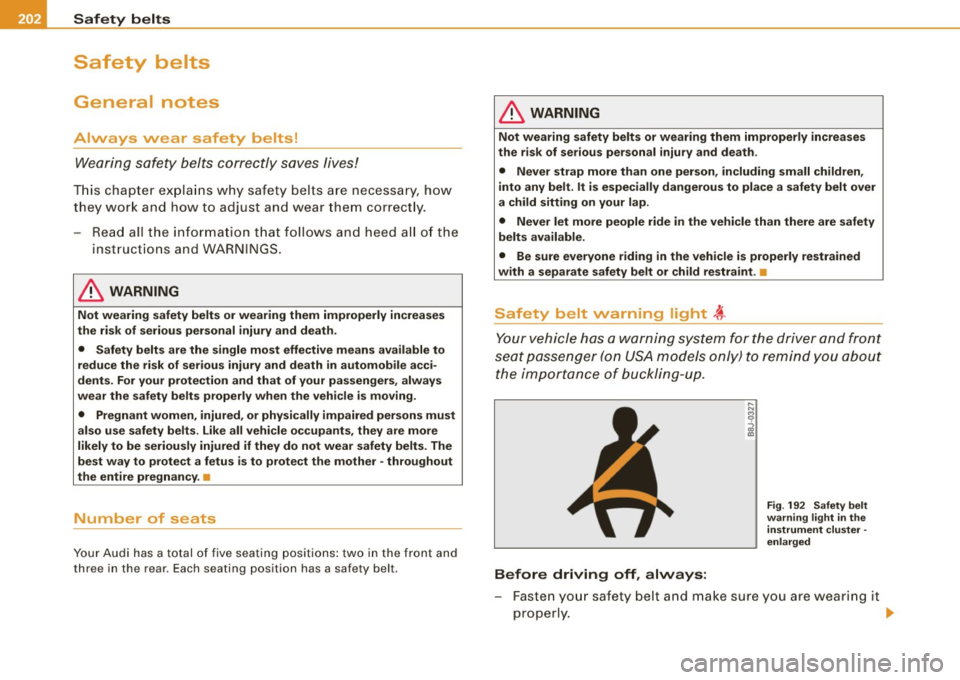
Safety belt warning light ~
Your vehicle has a warning system for the driver and front
seat passenger (on USA models only) to remind you about
the importance of buckling-up.
Before driving off, always:
Fig . 192 Safety belt
warning light in the
instrument cluster -
enlarged
- Fasten your safety belt and make sure you are wearing it
properly. ._
Page 205 of 390

- Make sure that your passengers also buckle up and prop
erly wear their safety belts.
- Protect children with a child restraint system appropriate
for the size and age.
The warning light 4,-in the instrument cluster lights up when the
ignition is switched on as a reminder to fasten the safety belts . In
addition , you will hear a warning tone .
After the ignition is switched on, the warning light in the instrument cluster will always come on for about 6 seconds and if the driver has
not fastened the safety belt , a warning tone will also sound for
about 6 seconds. As soon as the driver has fastened the safety belt,
the warning tone will stop and the warning ligh t will go out .
If the driver or front seat passenger have not buckled -up within
about 10 seconds after the warning tone has stopped and the
vehicle is moving faster than about 15 mph, the warning tone will
sound again for about 6 seconds and then stop for 24 seconds and
then repeat this reminder sequence for a maximum of 2 minutes . At
speeds below 5 mph, the warning tone will not sound.
Fasten your safety belt and make sure that your passengers also
properly put on their safety belts.
& WARNING
• Safety belts are the single most effective means available to
reduce the risk of serious injury and death in automobile acci
dents. For your protection and that of your passengers, always
correctly wear safety belts when the vehicle is moving.
• Failure to pay attention to the warning light that come on,
could lead to personal injury. •
Safety first
Safety belts
Why safety belts?
Frontal collisions and the law of physics
Frontal crashes create very strong forces for people riding
in vehicles.
Fig . 193 Unbelted
occupants in a vehicle
heading for a wall
Fig. 194 The vehicle
crashes into the wall
The physical principles are simple. Both the vehicle and the passen
gers possess energy which varies with vehicle speed and body
weight . Engineers call this energy "kinetic energy."
The higher the speed of the vehicle and the greater the vehicle's
weight, the more energy that has to be "absorbed" in the crash.
Vehicle speed is the most significant factor . If the speed doubles
from 15 to 30 mph (25 to 50 km/h) , the energy increases 4 times!
~
Vehicle care I I Technical data