2008 AUDI S6 tow
[x] Cancel search: towPage 161 of 390

_________________________________________________ A_ u_t_ o_ m_ a_t _i _ c _ t _ra_ n_s_ m __ is_ s_ io_ n _ __.1!111
Ap plies to vehicle s: with 6-speed automat ic transmission
Emergency release for selector lever
If the vehicle's power supply fails, the selector lever can
be released in an emergency.
Fig . 156 Remove the
as htray i nsert
Fig . 157 Eme rge ncy
r elease fo r se lecto r
l ever
The emergency release is located under the insert for the
ashtray.
- Slide open the cover for the ashtray .
- Grasp the ashtray insert~ fig. 156 by the recesses on
both sides and pull it upward and out.
- Now you can see a sma ll cover in t he as htray holder.
- Release and remove this cover from the ashtray holder.
Con tro ls and eq uip
ment
Using a screwdriver or a similar tool, press down on the
screw in the m iddle of the ashtray holder, which is now
accessib le, and hold it down
~ fig. 157 .
Now press the interlock and move the selector lever to
the
N position.
The selector lever can only be moved from the P position if the igni
tion key is in the lock and the ignition is turned on. If the vehicle has
to be pushed or towed if the power supply fails (e.g. battery is discharged), the selector lever must be moved to the N position
using the emergency locking device .•
multitronic ®
Applies to veh icles: with multitronic® Continuously Variable Transm ission (CVT l
General information
Your vehicle is equipped with a electronically controlled continu
ously variable transmission (multitronic ®l. Inside the multitronic ®
system, the gear ratios are not shi fted in finite steps as in a conven
tional automatic transmission, but rather
co ntin uously. As a result,
engine power is applied smoothly and comfortably, and better fuel
economy is achieved.
The transmission selects the appropriate gear ratio (upshifts and
downshifts) automatically based on set driving programs
=> page 163, "Dynamic shift program (DSP)".
You can also manually select a shift program (tiptronic®)
=> page 164.
You should note, that the multitronic transmission differs from a conventiona l Automatic Transmission . In the multitronic transmis
sion the engine power is transferred via a link -plate chain, rather
than by a conventional torque converter. The multitronic transmis
sion greatly reduces vehicle "creep'"' when at a standsti ll and the
transmission is in
D Sor R. •
Vehicle care I I Technical data
Page 168 of 390
•L---=A....::...: u:;.. t:..: o:..::....: m.....;::. a..;:t :;..ic ~ t:..: r..;: a ..:..; n.....;::. s..:.m ;.;..:. is::.. s .::....:. io::....:. n;__ ____________________________________________ _
Applies to vehic les: with mul tit roni c® Cont inuous ly Variab le Transmission (CVTl
Emergency release for selector lever
If the vehicle's power supply fails, the selector lever can
be released in an emergency.
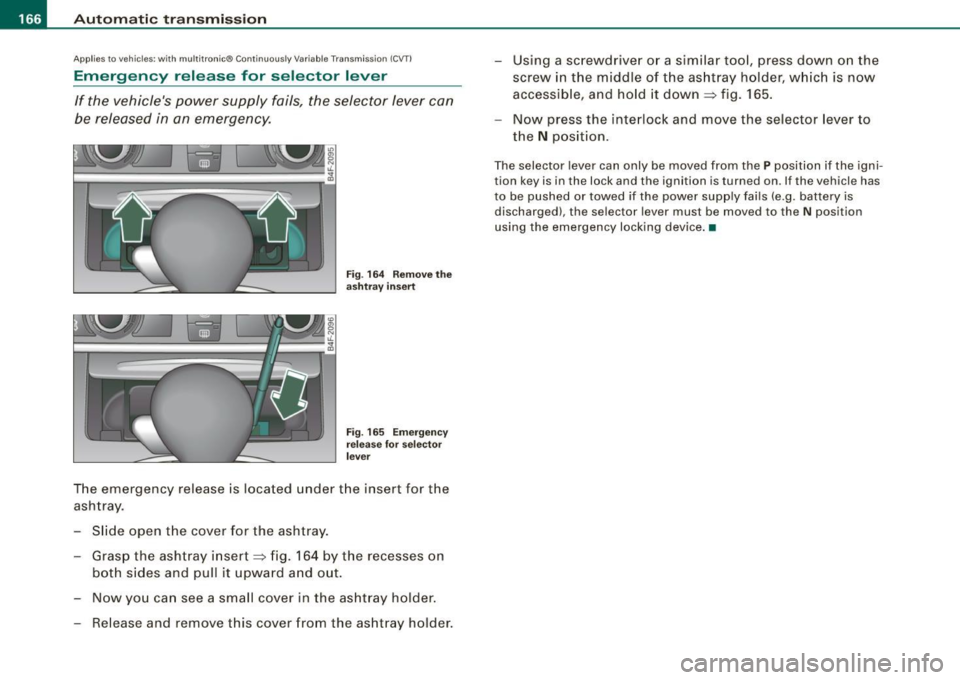
Fig. 164 Remove the
ashtray insert
Fig. 165 Emergency
release for selector
lever
The emergency release is located under the insert for the
ashtray.
- Slide open the cover for the ashtray.
- Grasp the ashtray insert~ fig. 164 by the recesses on
both sides and pull it upward and out.
- Now you can see a small cover in the ashtray holder.
- Release and remove this cover from the ashtray holder. -
Using a screwdriver or a similar tool, press down on the
screw in the middle of the ashtray holder, which is now
accessible, and hold it down
~ fig. 165.
- Now press the interlock and move the selector lever to
the
N position.
The selector lever can only be moved from the P position if the igni
tion key is in the lock and the ignition is turned on. If the vehicle has
to be pushed or towed if the power supply fails (e .g. battery is
discharged), the selector lever must be moved to the N position
using the emergency locking device. •
Page 179 of 390

_____________________________________________ A_u_ d_ i _P _a_ r_ k_ i_n -=g a..- S-=y'--- s_ t_ e_ m __ ....J_
& W ARNING ! continued )
• The Audi Parking System is not a substitute for being careful
and alert when b acking up. Be e spe cially careful during parking
and similar maneuvers . Alw ays wat ch where you are dr iv ing and
make sure that nothing is in the way.
• When maneuvering or parking , do not only use the MMI Display
for orientation . Cert ain ob ject s · depending on the screen resolu
tion -may not , or not ent irely , be displ ayed ; for example trailer
hitches , chains, narrow posts , or fence s.
• Improper reliance on the Audi Parking System can cause colli
s ions and serious personal injury .
- Never rely only on parking assist when changing backing up.
- Always check rear view mirrors to make sure it is safe to back
up. •
Applies to vehic les : w it h Audi Pa rk in g System (rea rl and rear-v iew camera
Notes on distance information
Con tro ls and eq uip
ment
Fig . 177 MMI Displ ay :
di splay ed red l ine
t o uche s the bumpe r Fig
. 178 Actu al
di stan ce from bumpe r
The red line in the MMI Display=> fig. 177 indicates the distance you
should ma intain fr om an obs tacle, when park ing. If an ob stacle is
located at road level, you can approach the obstacle unti l the red
line touches the obstacle
(1.3 ft, or 40 cm, dis tance) . On the othe r
hand , if an obs tacle is not located at road level (the bumper o f a
vehic le, for example), you should
not approach this obstac le unti l
the red lin e touches the obstac le.
F or instance , if you back up toward another vehic le, it wil l appear as
t ho ugh the guide hel p lin es a nd su rfaces are being pushed over t he
vehic le behind you=> fig. 177 . In this example, it can be recognized
in the MMI Disp lay that the red lin e exactly touches the bumper of
the vehicle behind you . Indeed, however, the red line@=> fig. 178
does not touch the bumper, but has rather been pushed
underneath
t he bumper. The actual distance (dashed line G) ) to the veh icle
beh ind you is meanwhile less than
1.3 ft (40 cm). Your vehicle
bu mper mus t also be tak en in to conside rat ion f or the distance
=> & .
& WARNING
• Please note that objects not touching the ground can appear to
be further a way than they really are (for example , the bumper of a
p arked vehi cle, a trailer h itch , or the rear of a truck ). In this ca se ,
you should not use the guide help lines to measure distan ce -
d anger of accident! ..
Vehicle care I I irechnical data
Page 182 of 390

• .___A_ u_d_ i _P _a_ r_ k_ i_ n ..:g=-- S_ y=-- s_t _ e _m _____________________________________________ _
Applies to vehic les: with Audi Park ing System (rearl and rear-view camera
Rear-view camera tips
We recommend that you practice parking with t he rear -view camera
in a traff ic -free location, or parking lot, to become fami liar with the
system, the orientati on line s, a nd th eir functi on. When doi ng this,
there should be good light and weather conditions.
In the MMI Display, objects or vehicles ap pea r closer or further away
i f:
• you are driving in reverse gear from a level surface onto an
inc lin e, o r a downwa rd sl ope,
• you are driving in reverse gear toward protruding objects,
• the ve hicle is carrying too much load in the rear.
The accuracy of the orientation lines and blue surfaces diminishes if :
• the Adaptive Air Suspension* is defective, or th e dynamic, off
road, o r lift mode is swi tched on,
• the rear -view camera does not provide a reliable image, for
exam ple, in po or vi sibi lit y c ondi tio ns or if the lens is dirt y,
• the image on the screen is not visible due to sun g lare and reflec
t ion .
Caring for the rear-view camera lens:
• Dampen the lens with a household a lcoho l- based g lass c leaner,
and c lean th e lens wit h a dry cl oth.
• Remove snow with a hand brush.
• Remove ice, preferably with de -icing spray~
0.
& WARNING
• The rear-v iew camera does not replace the view to the rear and
the rear view mirrors .
• The rear-view camer a - because of technical limitat ions -does
not show the entire area behind the vehicle~
page 17 3, fig. 171.
& WARNING (continued )
Be especially careful to che ck for small children and animals
before backing up . Small children and animals will not alway s be
shown in the rear-view display .
• The Audi Parking System is not a sub stitute for being careful
and alert when back ing up . Be especially careful during parking
and similar maneuver s. Always watch where you are driving and
make su re that nothing is in the way .
• Do not allow yourself to be distracted from traffic by the rear
view camera pi ctures .
• When maneuvering or parking , do not only u se the MMI Display
for orientat ion . Certain obje cts - depending on the screen resolu
tion -may not, or not entirely, be displayed ; for example tr ailer
hitches , cha ins , narrow posts , or fences .
• Only use the rear -view camera for aid if it shows a good , clear
picture . The image may be obscured , for example , by the sun
shining into the lens, dirt on the lens, or as the result of a defect -
danger of accident!
• If the image i s hazy when the MMI Display is switched on or the
area behind the vehicle is not visible (for e xample , as the result of
a dirty or defective lens ), the rear -view camera must not be used
for aid in maneuver ing - danger of accident!
• The rear -view camera generates two -dimensional images . For
this reason , please note that recesses in the ground and
protruding parts on another vehicle , or protruding objects fixed to
the ground , will be more difficult or impossible to recognize on the
MMI Di splay, due to the missing spacial depth .
• If the position and the installation angle of the camera has
changed, for example , after a rear end collision , do not continue to
use the system for safety reasons . Have it checked by an autho
rized Audi dealer or qualified work shop .
• Only use the rear-v iew camera when the rear lid is fully closed .
Make sure that objects mounted on the rear are not obscuring the
camera v iew .
Page 184 of 390

• .___A_ d_ a --=- p_t_ i_v _e _ A_ ir_ S_u_ s_,_ p_e_ n_ s_io _ n _____________________________________________ _
Adaptive Air Suspension
Adaptive Air Suspension and
Damping
A pplies to veh icles: with Adaptive Air Suspens ion
Description
Adaptive Air Suspension and damping can be regulated
and they adapt automatically to a request from the driver
and the driving situation at the time.
Adaptive Air Suspension is an electronically controlled springing
and damping system . Th is chassis system makes it easier on the
driver by adapting to the particular situation through imperceptible
control processes.
The
Adaptive Air Suspension component regulates ground clear
ance depending on vehicle speed, load condition and driver input.
When the system is in automatic mode, accelerating to a speed above a predetermined limit will make the vehicle lower itself. On
the other hand, driving more slowly results in the vehicle raising
again at specific speeds.
The
damping component provides individual control of the
damping forces. For example, with damping characteristics set to
provide greater comfort, damping is set somewhat harder for a brief
period only as required, for example, when going around a curve or
over rough road surfaces as well as when braking.
Settings
Adaptive Air Suspension provides the driver with the opportunity to
set the chassis characteristics also to their individual preference.
With the driving modes
standard, automatic and dynamic the driver
has three chassis settings available, ranging from comfort to sporty .
In addition,
lift provides a fourth mode which can be selecting for
driving over poor stretches of road :::::,
page 183, "Chassis controls". The modes are set in
MMI:::::,
page 183.
& WARNING
The height of the parked vehicle can change due to temperature
fluctuations or changes in load.
0 Note
• Whenever you park your vehicle, always make sure there is
adequate clearance above and below the vehicle. The height of the parked vehicle can change as the result of temperature fluctuations,
changes in load condition and changes in the driving mode (ground
clearance!.
• If the vehicle is being transported (e.g. by tow truck, train, ship,
etc.), mount the tie -down chains/cables over the running surface
(circumference) of the tires . Never secure the vehicle by the axle, the
suspension struts or the front or rear towline eye. For technical
reasons, the pressure in the suspension struts may change during
the transport, which could result in the vehicle no longer being
secured properly.
• To prevent damage to the vehicle underbody, remember that
your vehicle is not an off-road vehicle, even in the "lift" mode. The
ground clearance is insufficient for this type of operation.
• If you are going to tow a trailer, you must activate the trailer oper
ation mode :::::,
page 184.
[ i] Tips
Before you raising your vehicle using the vehicle jack (for example,
when changing a flat tire) you must activate the jacking mode
=> page 184. •
Page 186 of 390
• ..__A_ d_ a--=- p_t _iv _ e_ A_ i_ r _ S_ u_ s....; p=--- e_n_ s_ io_ n _____________________________________________ _
The ignition must be switched on to set the driving modes.
- Press the !CARI function button. The main menu
Adaptive Air Suspension appears=>
page 183, fig. 182.
- Select the desired mode with the control knob.
Please note that not every driving mode can be selected in every
driving situation. For example, it is not possible to switch to "lift"
mode at speeds above 50 mph (80 km/h). This mode is then shown
greyed out in the MMI display.
For additional information on the driving modes=>
page 183,
"Chassis controls". •
Applies to vehicles: with Adaptive Air Suspension
Jacking mode when changing a flat tire
This mode must be activated before raising the vehicle
with a vehicle jack.
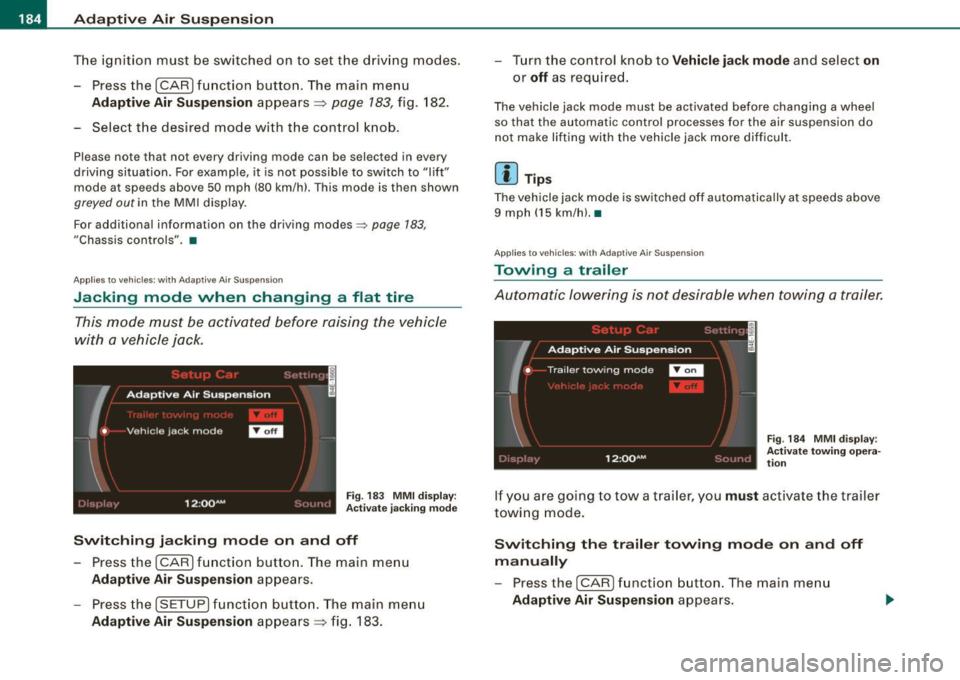
Fig. 183 MMI display :
Activate jacking mode
Switching jacking mode on and off
-Press the (CAR] function button. The main menu
Adaptive Air Suspension appears.
- Press the !SETUP) function button. The main menu
Adaptive Air Suspension appears=> fig. 183. - Turn the control knob to
Vehicle jack mode and select on
or
off as required.
The vehicle jack mode must be activated before changing a wheel
so that the automatic control processes for the air suspension do
not make lifting with the vehicle jack more difficult.
[ i ] Tips
The vehicle jack mode is switched off automatically at speeds above
9 mph (15 km/h).•
Applies to vehicles: with Adaptive Air Suspension
Towing a trailer
Automatic lowering is not desirable when towing a trailer.
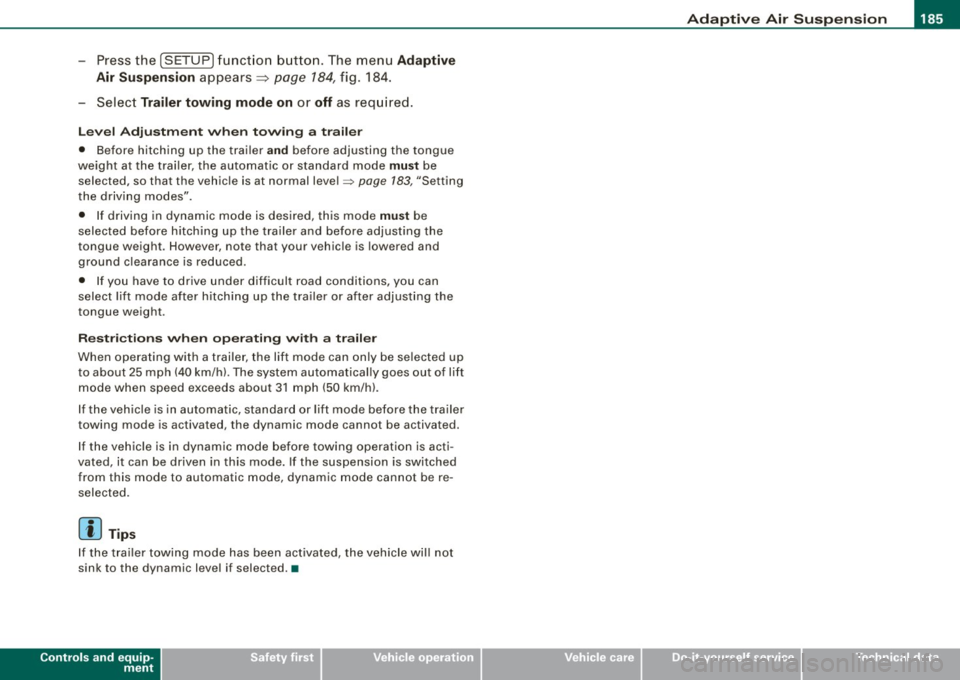
Fig. 184 MMI display:
Activate towing opera
tion
If you are going to tow a trailer, you must activate the trailer
towing mode.
Switching the trailer towing mode on and off
manually
- Pressthe!CARJfunction button. The main menu
Adaptive Air Suspension appears.
Page 187 of 390
____________________________________________ A_ d_a--' p=-- t_iv _e_ A_ ir_ S_u_ s-=- p_e _ n_ s _ io_ n __ llll
- Press the I SETUP I functio n button . The menu Ad aptiv e
Air
Su spen sion appears~ page 784, fig. 184.
- Select
Trailer towing mode on or off as requ ired .
Leve l Adjus tment w he n t ow ing a tra il e r
• Before hitching up the trailer and before adjusting the tongue
weight at the trailer, the automatic or standard mode
mu st be
selected, so that the vehicle is at normal level=>
page 183, "Setting
the driving modes".
• If driving in dynamic mode is desired, this mode
mu st be
selected before hitching up the tra iler and before adjust ing the
tongue weight . However, note that your vehicle is lowered and
ground c learance is reduced .
• If you have to drive under difficult road conditions, you can
select lift mode after hitching up the trailer or after adjusting the
tongue weight .
Restri ctions when op erating wit h a trailer
When operating wi th a trailer, the lift mode can only be selected up
to about 25 mph (40 km/h) . The system automatically goes out of li ft
mode when speed exceeds about 31 mph (50 km/hl.
If the veh icle is in automatic, standard or lift mode before the tra iler
towing mode is activated, the dynamic mode cannot be activated.
If the vehic le is in dynamic mode before towing operation is acti
vated, it can be driven in this mode. If the suspension is switched
from this mode to automatic mode, dynamic mode cannot be re
selected.
[ i ) Tips
If the trai ler towing mode has been activated, the vehicle will not
sink to the dynamic level if selected. •
Controls and equip
ment I • •
Page 197 of 390

________________________________________________ D_r_iv _ i _n_ g~ S_ a_ fe_ ly __ lffllll
& WARNING (continued)
to help reduce the risk of personal injury if the driver's airbag
inflates.
• Never hold the steering wheel at the 12 o'clock position or with
your hands at other positions inside the steering wheel rim or on
the steering wheel hub . Holding the steering wheel the wrong way
can cause serious injuries to the hands, arms and head if the
driver's airbag deploys .
• Pointing the steering wheel toward your face decreases the
ability of the supplemental driver's airbag to protect you in a colli
sion.
• Always sit in an upright position and never lean against or
place any part of your body too close to the area where the airbags
are located .
• Before driving, always adjust the front seats and head
restraints properly and make sure that all passengers are properly
restrained.
• Never adjust the seats while the vehicle is moving. Your seat
may move unexpectedly and you could lose control of the vehicle. • Never drive with the backrest reclined or tilted far back! The
farther the backrests are tilted back, the greater the risk of injury
due to incorrect positioning of the safety belt and improper
seating position.
• Children must always ride in child safety seats => page
234.
Special precautions apply when installing a child safety seat on
the front passenger seat=> page
212 . •
Controls and equip
ment Safety first
Vehicle operation
Proper seating position for the front
passenger
The proper front passenger seating position is important
for safe, relaxed driving.
For your own safety and to reduce the risk of injury in the
event of an accident, we recommend that you adjust the
seat for the front passenger to the following pos ition:
- Move the front passenger seat back as far as possible.
There must be a minimum of 10 inches (25 cm) between
the breastbone and the instrument panel =>
&.
- Adjust the angle of the seatback so that it is in an upright
position and your back comes in full contact with it
whenever the vehicle is moving.
- Adjust the head restraint so that the upper edge is as
even with the top of your head as possible but not lower
than eye level and so that it is as close to the back of your
head as possible =>
page 197.
-Keep both feet flat on the floor in front of the front
passenger seat.
- Fasten and wear safety belts correctly=:>
page 206.
For detailed information on how to adjust the front passenger's
seat, see =>
page 87.
& WARNING
Front seat passengers who are unbelted, out of position or too
close to the airbag can be seriously injured or killed by the airbag
as it unfolds. To help reduce the risk of serious personal injury : .,
Vehicle care Do-it-yourself service Technical data