2008 AUDI S6 instrument cluster
[x] Cancel search: instrument clusterPage 48 of 390

Driver inf ormati on displ ay
• The tire pressure monitoring system helps the driver to keep an
eye on tire pressures. But the driver stil l has the responsibility for
maintaining the correct tire pressure .•
Wheel change
If a wheel is changed, the wheels that were exchanged
have to be re-programmed.
- Turn on the ignit ion.
- Pressthe!CARlfunction button.
- Select
Systems in the CAR menu.
- Selec t
Tire pre ssure monitoring .
Select Initialize wheel s.
Programming is necessary:
• after the tires have been rotated on the vehicle, or the spare tire
is used,
• if tires with new wheel sensors are used.
A ll pressure warning and system malfunction indicators in the
display will be canceled.
If a wheel change has been made, it is necessary to complete the
Initi alize w heel s function . After you have selected the function, the
new wheels are programmed and the actual pressures are stored.
This learning phase can take up to 20 minutes driving time.
During the learning process the tire pressure monitoring system is
not avai lable .•
Malfunctions :.r,,11~
A malfunction can h ave various causes.
Fig . 28 Displ ay :
Syste m malfu nc tion
If the warning light in the instrument cluster flashes for approxi
mately one minute and then remains continuously il luminated and
additionally the
JIS => fig . 28 symbol appears in the display , the
tire pressure monitoring system is not available. This can have
various causes.
• If the message appears at the end of the learning process, the
system cannot recognize the wheels installed on the vehicle. This
can be because one or more wheels without a whee l sensor were
insta lled .
• A wheel sensor or other component may have failed .
• During initialization the system has detected more than 4 whee ls
on the vehicle, for examp le while driving next to another car with a
tire pressure monitoring system .
• A wheel change was made but the Initialize wheel s function
=> page 46was not activated.
• Audi replacement parts were not used .
• I f snow chains are being used , system function can be compro
m ised due to the shielding properties of the cha ins .
• T he tire pressure monitoring system may not be available
because of a radio ma lfunction.
Page 52 of 390

Opening and closing
Vehicle within range of the key
If the vehicle is within range of the key, the check light comes on
briefly once when a button is pressed .
Vehicle outside the range of the key
If the vehicle is outside the range of the key, the check light comes
on briefly once and then shows the status of the vehicle door locks:
• If the light is flashing quickly , the vehicle is not locked .
• If the light is flashing slowly, the vehicle is locked .
State of master key battery
If the check light does not come on, the battery is dead and has to
be replaced . In addition, when the battery is dead the symbol
appears in the instrument cluster display as well as the message:
Please replace master key battery
Battery replacement ~ page 50.
[ i J Tips
Please note that the current state of the vehicle door locks can only
be recalled with the master key that was last used to lock the
vehicle . It is possible that a different state is shown for the door
locks on the other master key which is not the same as that of the
vehicle .•
Master key battery replacement
Each master key contains a battery housed under the
cover.
Fig . 32 Master key :
opening the cover
We recommend having the battery changed by an autho
rized dealership. However, if you w ish to replace the dead
battery yourself, proceed as follows:
- Pry apart the base~ fig. 32 @and the
cover @carefully
with a coin.
- Remove the cover (arrow).
- Remove the dead battery from the cover.
- Install the new battery. Please make certain that the"+"
sign on the battery faces down. Correct polarity is shown
on the cover.
- Place the cover with the new battery on the key base and
press both parts together.
ci> For the sake of the environment
Dispose of dead batteries properly so as not to pollute the environ -
ment . _,,,
Page 60 of 390

Opening and closing
Rear lid
Opening and closing rear lid
You can open the r ea r lid from ins ide the v ehicle using a
sw itc h in the dr iver 's door.
Opening the rear lid
Fig. 40 Driver's door :
remote rea r lid relea se
Fig . 41 Position of
handle in the re ar lid
- Pre ss the ce nte r butto n ~ on t he ma ste r key o r pull the
release butt on
~ in t he d river's door => fig. 40. T he rear
l id is unl ocked a nd opens.
Closing the rear lid
- Pull th e r ear lid dow n a nd a llow i t to drop gently into t he
latch=> &.
& WARNING
• After closing the rear lid , always pull up on it to make sure that
it is properly closed. Otherwise it could open suddenly when the
vehicle is moving.
• To help prevent poisonous exhaust gas from being drawn into
the vehicle, always keep the rear lid closed while driving . Never
transport objects larger than those which fit completely into the
luggage area, because then the rear lid cannot be fully closed.
• Never leave your vehicle unattended especially with the rear lid
left open . A child could crawl into the car through the luggage
compartment and pull the lid shut, becoming trapped and unable
to get out. To reduce the risk of personal injury , never let children
play in or around your vehicle. Always keep the rear lid as well as
the vehicle doors closed when not in use.
• Always ensure that no one is within range of the rear lid when
it is moving , in particular close to the hinges -fingers or hands can
be pinched.
[ i ] Tips
• I f the rear lid is open or not proper ly closed when the ignition is
t urne d on, t he doo r and r ear l id wa rning =>
pag e 27 appea rs in the
instrument cluster display .
• S hould you not be a ble to open t he rear l id as desc ribed, ma ke
s u re the va let key f unction is not activated~
page 51 .
• If the central lock ing syst em fa ils (power supp ly ), you can a lso
o pen the rea r lid usin g th e t runk es cape ha ndle fr om the ins ide
=>
pa ge 33 6. •
Page 73 of 390

brightness increases again, the low beams are turned off again
automatically =>& .
In the
AU TO position the low beams are sw itched off automatically
when the ignition is turned off .
Light Sensor M alfun ction
In the event of a light sensor ma lfunction, the driver is notified in the
instrument cluster display:
Automat ic headl ights /autom ati c wipers defe ctive
Fo r safety reasons the low beams are turned on permanently with
the switch in
AUTO . However, you can continue to turn the lights on
and off using the light sw itch. Have the light sensor checked as so on
as possible at a dealership.
& WARNING
• Never use daytime running lights to see where you are go ing.
They are not bright enough and will not let you see far enough ahead for safet y, es peciall y at du sk or when it i s dark . Al way s
s witch on the low beam s at du sk or when it is dark.
• Autom ati c he adlight s are onl y intended to assist the dr iver .
They do not relieve the driver of his re spon sibility to check the
headlight s and to turn them on manu ally a ccordi ng to the current
light and visibility conditions. For ex ample , fog and rain c annot be
dete cted by the l ight sen so rs . S o al ways switch on the headlight s
und er the se we ather conditions and when dr iving in the dark
~D.
• Cra she s c an happen wh en you cannot see the road ahead and
when you cannot be seen by other motor ists.
- Alway s turn on the hea dl ight s so that you can see ahead and
so that others can see your car from the back.
[ i ) Tips
• With the switch in AUTO front fog lights and rear fog lights
cannot be turned on in addition .
Controls and equip
ment
Cl ea r vision
• The light sensor for headlight control is located in the rear view
mi rror moun t. Do n ot app ly any stickers to the windshie ld in this
area to prevent malfunct ions or failures.
• I f you remove the ign ition from the ign ition lock wh ile the head
lights are still on, a buzzer will sound as long as the driver's door is
open to remind you to tur n off the lights .
• Always observe the specific loca l regulations for your area as to
when t o use your ligh ts .•
Adjusting exterior lighting
The functions are set in the MM/.
Fig . 55 MMI di splay:
Ex te ri or li ghting
- Press the [ CAR) fu nction button .
Selec t Exte rior lighting . The menu Exterior lighting
a p pears => fig. 55.
Coming home
The Coming home function ensures that after turnin g off the igni
tion and opening the driver' s door
the vehicle periphery is il lumi
nated in the dark . In addition, the front fog lights, the tai l lights and
the license plate l ight are turned on . On-time ca n be set for a pe riod
from
O (off) to 60 seconds. .,_
I • •
Page 76 of 390

Clear vision
[ i J Tips
You should turn on the emergency flashers when:
• you are the last vehicle standing in a traffic jam so that any other
vehicles coming can see you, or when
• your vehicle has broken down or you are in an emergency situa
tion, or when
• your vehicle is being towed by a tow truck or if you are towing
another vehicle behind you. •
Turn signal ¢ ¢ and high beam ~D lever
The lever on the left side of the steering column is used to
operate the turn signals and the high beam as well as the
headlight flasher.
Fig . 60 Turn signa l and
high beam lever
The turn signal and high beam lever has the following func
tions :
Turn signals ¢ ¢
- Lift the lever up all the way=:> fig . 60 to use the right turn
signals, or push the lever down all the way to use the left
turn signals.
Auto -blink
- Move the lever (up or down) just to the point of resis
tance to use the turn signals for as long as you need
them, for example when changing lanes .
- Move the lever (up or down) just to the point of resis
tance and then release it right away to make the turn
signals blink
three times . You can use this feature for
example when changing lanes on highways.
High beam ~D
- Push the lever forward to switch on the high beam.
- Pull the lever back towards you to switch off the high
beam .
Headlight flasher ~D
Pull the lever toward the steering wheel to use the head
light flasher.
Notes on these features
• The turn signals only work with the ignition turned on. The indi
cator lights ¢ or¢ in the instrument cluster::::;, page 17 also blink.
• After you have turned a corner, the turn signal switches off auto
matically.
• The high beam works only when the head lights are on . The indi
cator light ~D in the instrument cluster illuminates when the high
beams are on.
• The headligh t flasher works only as long as you hold the lever -
even if there are no lights turned on. The indicator light ~Din the
instrument cluster illuminates when you use the headlight flasher. _.,
Page 117 of 390

Warm and cold 1111
-------------------'
Applies to vehicles: with heated rear se ats
Heated rear seats
The seat cushions and seat backs of the two outer rear
seats can be heated electrically.
Fig . 112 Center
console rear : Heated
seats
- Rotate the thumb wheel @ to turn on and adjust the
heating for the left rear seat.
- Rotate the thumb wheel
® to turn on and adjust the
heating for the right rear seat.
With the thumb wheel in the O position, heating for the seats is
turned off . The range of adjustment is from 1 to 6.
The rear seat heating operates only when the seats are occupied. If
the rear seat is not occupied, you should turn the heating for the
sea ts off to preven t unintended heating of the seating sur faces .
0 Note
To avoid damage to the heating elements in the seats , do not kneel
on the seats or place heavy loads on a small area of the seat. •
Contro ls and eq uip
ment
Ap plies to vehi cle s: with ste erin g w heel heatin g
Steering wheel heating @
The steering wheel can be heated electrically.
Fig . 113 Multifunction
steering wheel: Button
for steering wheel
heating
Press the[@!] button to turn the steer ing wheel heating on
and off~ fig. 113. The message
Steering wheel heating on ! or
Steering wheel heating off! appears in the instrument
cluster display.
When the steering wheel heating is switched on , the steering wheel
is heated to about 82 °F (28 °Cl and held there.
The last setting selected for the steering wheel heating (on or off) is
automatically saved when the vehicle is shut off and is assigned to
the remote key. •
Vehicle care I I irechnical data
Page 130 of 390
• .___O_ n_ t_h _e _ r_o _a_ d __________________________________________________ _
& WARNING
• Never turn off the engine until the vehicle has come to a
complete stop.
• The brake booster and servotronic only work when the engine
is running. With the ignition turned off, you have to apply more
force when steering or braking. Since you cannot steer and stop
normally, this can lead to accidents and serious injuries.
• For safety reasons, you should always park your vehicle with
the selector lever in P. Otherwise, the vehicle could inadvertently roll away.
• After the engine has been switched off, the radiator fan can
continue to run for up to 10 minutes -even with the ignition
switched off. It can also switch on again after some time if the
coolant temperature rises as the result of a heat buildup or if the
engine is hot and the engine compartment is additionally heated
by the sun's rays.
0 Note
If the engine has been under heavy load for an extended period,
heat builds up in the engine compartment after the engine is
switched off -there is a risk of damaging the engine. Allow the
engine to run at idle for about 2 minutes before switching it off. •
Applies to vehicles: w ith Advanced Key
Driver messages in the instrument cluster
display
If a function is not present, a driver message appears.
No key identified
This message appears when the [STAR T) button is pressed if there
is no master key inside the vehicle or if the system does not recog
nize it. For example, the master key cannot be recognized if it is
covered by an object (e.g. aluminum brief case) which
screens the radio signal.
.Electronic devices such as cell phones can also inter
fere with the radio signal.
Press brake pedal to start engine
This message appears if you press the [ START) button to start the
engine and do not depress the brake pedal. The engine can only be
started if the brake pedal is depressed.
Engage N or P to start engine
This message appears when the engine is started if the selector
lever for the automatic transmission is not in the P or N position.
The engine can only be started with the selector in these positions.
? Key not in vehicle
This message appears along with the symbol if the master key is
removed from the vehicle with the engine running. It is intended to
remind you (e.g. when changing drivers) not to continue the journey
without the master key.
If the master key is no longer in the vehicle, you cannot switch off
the ignition after stopping the engine and you also cannot start the engine again. Moreover, you cannot lock the vehicle from the
outside with the key.
Shift to P, otherwise vehicle can roll away. Doors do not lock if lever
is not in
P.
This message appears for safety reasons along with a warning
buzzer if the selector lever for the automatic transmission is not in
the P position when the ignition is switched off with the
[STOP)
button and the driver's door is opened. Move the selector lever to
the P position, otherwise the vehicle is not secured against rolling
away. You also cannot lock the vehicle using the locking button on
the door handle or using the remote key.
To engage steering lock, press and hold STOP button
This message appears for safety reasons if the engine and the igni
tion have been switched off by pressing the [
STOP) button once, .,,_
Page 131 of 390
___________________________________________________ O_ n_ t_h _e_ r_o _a_ d _ ___.9I
and then the driver's door is opened. In this instance, the steering is
not locked . The steering is locked :
• If you press the
I STOP ] button aga in for more than 1 second.
• If you c lose the driver's door and lock your vehicle from the
outside .•
Electromechanical parking brake
Operation
The electromechanical parking brake replaces the hand
brake.
Fi g. 12 6 Center
co nso le: Parki ng bra ke
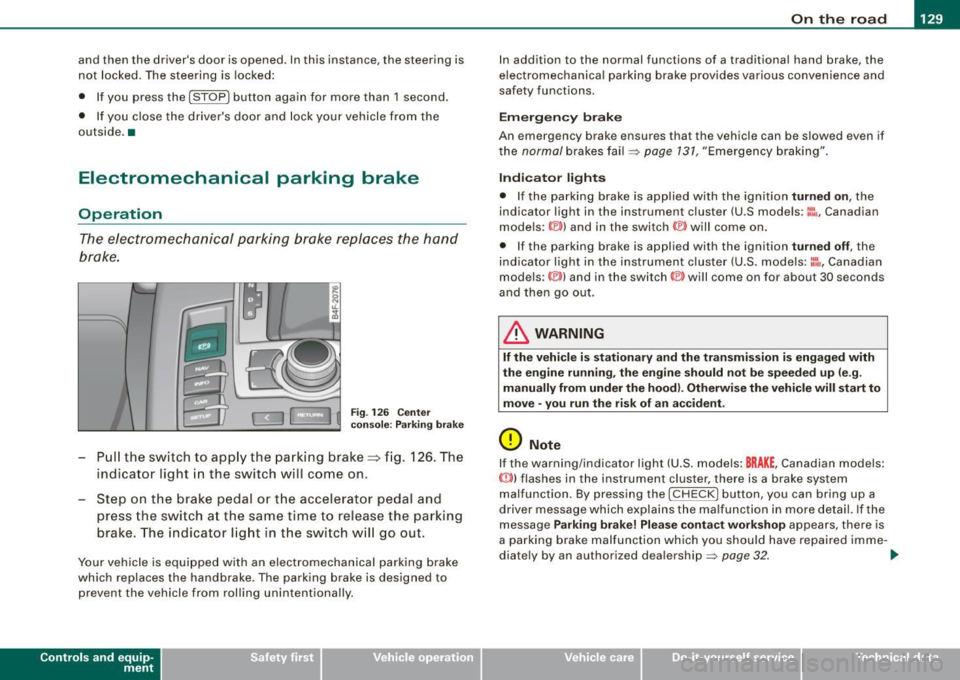
- Pull the switch to app ly the park ing brake => fig. 12 6. The
indicator light in the switch will come on .
- Step on the brake pedal or the accelerator pedal and
press the switch at the same time to rel ease the parking
brake. The indicator lig ht in the switch wi ll go out.
Your vehicle is equipped with an elect romechanical parking brake
which replaces the handbrake . T he parking brake is designed to
prevent the vehicle from rol ling unintentional ly.
Con tro ls and eq uip
ment
I n add ition to the normal functions of a traditional hand brake, the
e lectromechanica l parking brake provides various convenience and
safety functions.
Emergen cy brake
An emergency brake ensur es that the vehicle can be slowed even if
t he
normal brakes fail=> page 131, "Emergency braking".
Ind icator lights
• If the parking brake is applied with the ignition tu rned on , the
indicator light in the instrument cluster (U.S models :
::i.:,, Canadian
models: ®)) and in the switch <®) will com e on .
• I f the parking brake is app lie d with the ignition
tu rn ed off , the
indicator light in the instrument cluster (U.S. models: ::.:\,, Canadian
models :(®) ) and in the switch© will come on for about 30 seconds
and then go out .
& WARNING
If the vehicle i s stationary and the tr ansmi ssion is engag ed with
the engine ru nning , the engine should not be speeded up (e .g .
manu ally from under the hood ). Otherwi se the vehicle will sta rt to
move -you run the risk of a n accident .
0 Note
If the warning/indica tor light (U.S . mode ls: BRAKE , Canadian mode ls :
(Ci)) ) flashes in the instrument clus ter, there is a brake system
malfunction . By pressing the
I CHECK] button, you can bring up a
driver message which explai ns the ma lfunc tion in more detail. If the
message
P a rki ng brake ! Plea se conta ct w ork shop appears, there is
a par king brake malfunction which you should have repaired imme -
d iate ly by an authorized dealership=>
page 32. ..
Vehicle care
I I irechnical data