2008 AUDI S6 cruise control
[x] Cancel search: cruise controlPage 139 of 390
_____________________________________________ A_ d_a ...: p_ t_ i_ v _e_ C_ ru_ is_ e_ C_ o_n _ t_ r_o _ l _ __._
If the vehicle in front accelerates, Adaptive Cruise Control a lso accel
erates up to the speed tha t you have set.
Si tu ation requiring d river interv ention
In some situa tions you will have to use the footbrake to s low the
vehic le down in order to keep a safe distance from vehicle in front
of you or to avoid a rear -end collision . In this situa tion, a symbol
appears and a warning tone sounds~
page 146.
P ass ing an ot her vehicle
If you move into the passing lane and no vehicle is detected ahead,
the Adaptive Cruise Control accelerates to the speed you have set
and maintains it.
O ve rrid e
You can increase your speed at any time by stepping on the acceler
ator pedal. After you re lease the acce lerator pedal, the system
adjusts back down to the speed you previously set.
[ i ) Tips
Please note that the amount of acceleration the Adaptive Cruise
Control uses depends on the Distance se tt ing selected. DISTANCE 1
gives you acceleration that is dynamic and sporty . DISTANCE 4 , on
t he other hand, gives more moderate acce leration . For more infor
mation about the time intervals~
page 140, "H ow is the distance
(time interval) set?" .
• Please note that if the Adap tive Cruise Contro l has begun braking
t he vehicle and the driver chooses to brake the vehicle additiona lly,
the brakes may feel "hard". This is s imply due to the pressure build
up of the initial braking.
• Adaptive Cruise Contro l is switched off after pressing the foot
b rake . The speed saved up this point can be resumed . To resume the
saved speed, release the brake pedal and press the contro l lever
:;) page 139, "Turning Adaptive Cru ise Contro l off temporarily" .•
Con tro ls and eq uip
ment
A pp lies to veh ic les: with Ad aptive Crui se Co ntro l
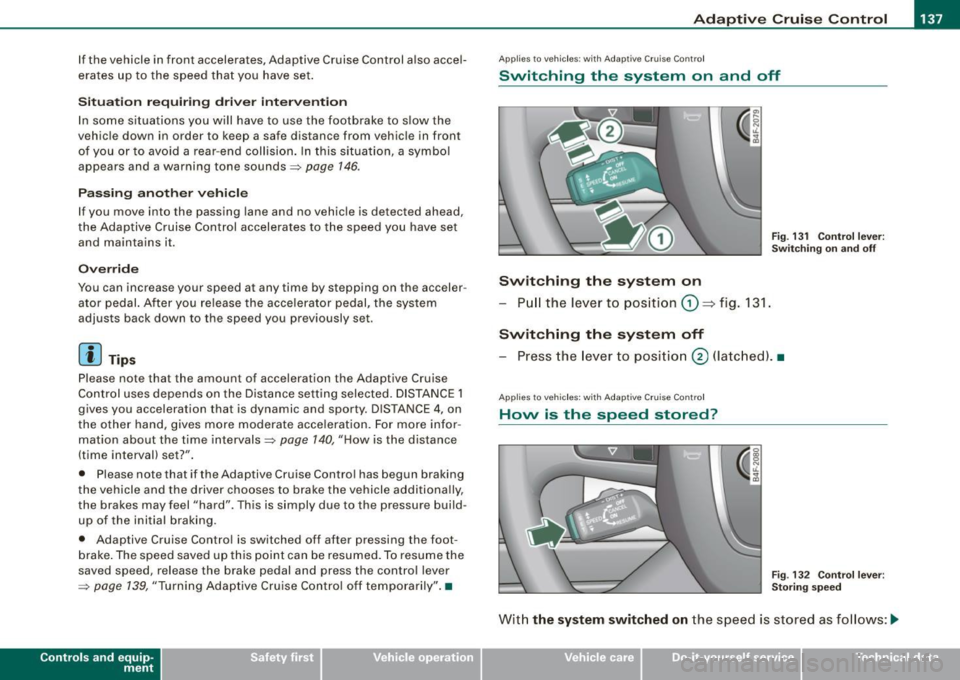
Switching the system on and off
Fig . 131 C ontrol l ever :
Swi tchin g on an d off
Switching the system on
- Pull the lever to position G) => fig. 131 .
Switching the system off
-Press the lever to pos ition @ (latc hed). •
Applies to vehic les : w ith Ada ptive Cruise C ont ro l
Hovv is the speed stored?
Fig . 13 2 Cont ro l l eve r:
St oring speed
Wit h the sy stem switched on the speed is stored as follows :-.,
Vehicle care I I irechnical data
Page 140 of 390

• ..__A_ d_a...: p:,..._ ti_v _ e_ C_ ru_ is_ e_ C_ o_n_ t_ r_ o _ l ___________________________________________ _
- Drive at the speed you want. The speed must be between
20 and 95 mph (30 and 150 km/h).
Press the !S ETI button ~
page 137, fig. 132 to store the
desired speed.
Af te r the (S ET) button is released, the current speed is stored and
maintained .
The saved speed is now shown in the LED display in the speedom
eter by one or two illuminat ed red light diod es =>
page 143. At the
same time, the saved speed is also shown for a short time in the
Information line=>
page 745.
[ i ) Tips
For safety reasons , the stored speed is dele ted when the ignition is
turned off. •
Applie s to vehi cle s: wi th Ad aptive Cruise Co ntrol
Changing stored speed
The speed can be changed without touching the acceler
ator or brake pedal.
Fig. 133 Control lever:
Changing speed
Increasing speed
- Press the lever up briefly upwards 0 ~ fig. 133. USA
models: the speed increases by about 2.5 mph. Canada
models: speed will increase by one mark on the speed
ometer scale.
- Press the lever upwards
0 and hold it. As long as you
hold the control switch down, the light diode display in
the speedometer LED display in the speedometer moves
forward and the speed is increased.
Reducing speed
- Press the lever downwards briefly Q. USA models: the
speed decreases by 2.5 mph. Canada models: speed will
decrease by one mark on the speedometer scale.
- Press the lever downwards
O and hold it. As long as you
hold the control switch down, the light diode display in
the speedometer LED display moves backward and the
speed is reduced .
After releasing the control switch, the system regulates the speed to
the value just set.
After each adjus tmen t, the n ewly-set speed is shown for a short
time in the Information line=>
page 145.
[ i ) Tips
You can increase your speed at any time by stepping on the acceler
ator pedal. After you release the accelerator pedal , the system
adjusts back down to the speed you previously set. A new desired
speed can be stored at any time by pressing the
( S ETI button
=> page 137, fig. 132. •
Page 141 of 390
_____________________________________________ A_ d_a ...: p_ t_ i_ v _e_ C_ ru_ is_e_ C_ o_n _ t_ r_o _ l _ __.9I
Ap plies to veh ic les: w ith Adapt ive Cru ise Co nt rol
Turning Adaptive Cruise Control off
temporarily
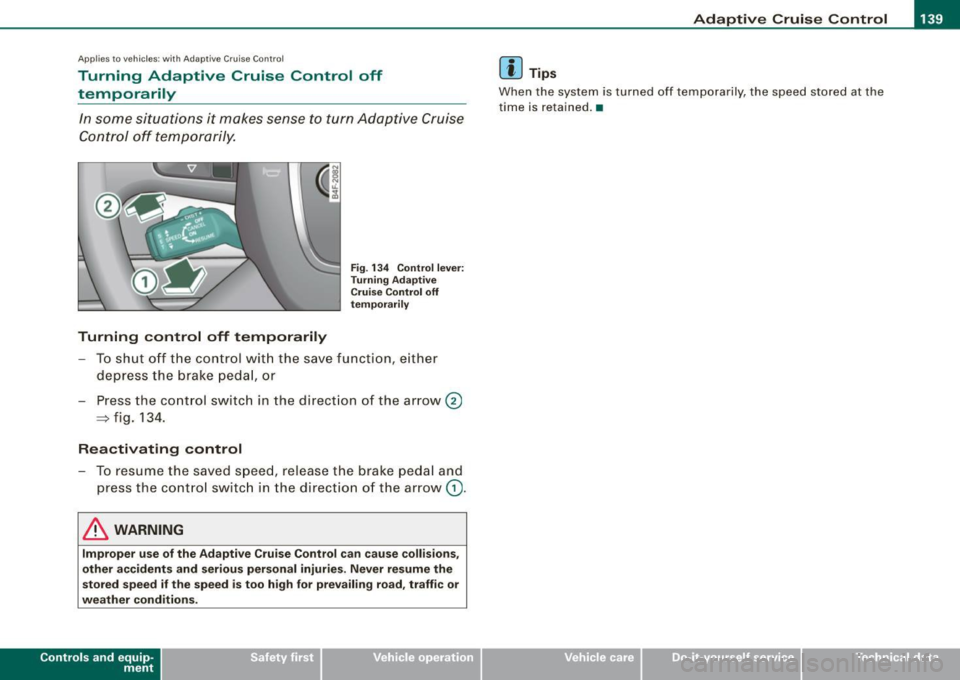
In some situations it makes sense to turn Adaptive Cruise
Control off temporarily.
Turning control off temporarily
Fig. 134 Control lever:
Turning Adaptive
Cruise Control off
temporarily
- To shut off the control w ith the save function, either
depress the brake pedal, or
- Press the con trol sw itch in the direction of the arrow@
~ fig. 134.
Reactivating control
- To resume the saved speed, release the b rake pedal and
press the control switch in the d irection of the arrow
G) .
& WARNING
Improper use of the Adaptive Cruise Control can cause collisions,
other accidents and serious personal injuries. Never resume the
stored speed if the speed is too high for prevailing road, traffic or
weather conditions.
Con tro ls and eq uip
ment
[ i] Tips
When the system is turned off temporarily, the speed stored at the
time is re ta ined. •
Vehicle care I I irechnical data
Page 142 of 390
• ..__A_ d_ a-:.. p_t _iv _ e_ C_r_ u_ i _s _ e_ C_ o_n_ t_ r_ o_ l _____________________________________________ _
Applies to ve hicles : w it h Ad aptive Crui se Co nt rol
How is the distance (time interval) set?
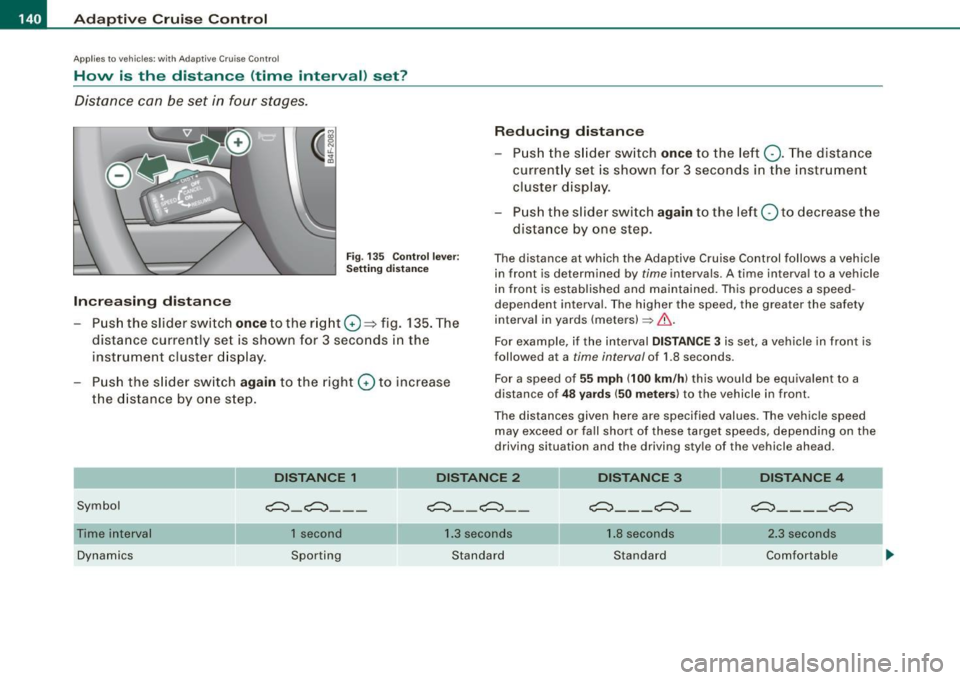
Distance can be set in four stages.
Fig . 135 Co ntrol lev er:
Se tting d is ta nce
Increasing distance
- Pus h the slid er switch once to the r ig ht G) ::::;> fig. 135. The
dista nce currently set is shown for 3 seconds in the
inst rument cluster d isp lay.
Push the s lid er sw itch
again to the right G) to increase
the d istanc e by o ne s tep .
Reducing distance
Push th e sli de r sw itch once to the left Q. The distance
current ly set is shown for 3 seconds in the instrument
cluster disp lay.
- Pu sh the s lider swi tch
again to the left Q to dec rease t he
dista nce by one step.
The distance at which the Adap tive Cruise Control follows a vehicle
in front is determ ined by
time intervals. A time interva l to a vehicle
in front is estab lished and mai nta ined . This produces a speed
dependent interval. The higher the speed , the greater the safety
interval in yards (meters)~& .
For example, i f the interval
DISTANCE 3 is set, a vehicle in front is
followed at a
t i me interval of 1.8 seconds .
Fo r a speed of
55 mph (100 km /h ) this would be equiva lent to a
distance of
4 8 yard s (50 mete rs ) to the vehicle in front.
The distances given here are specified values. The vehicle speed may exceed or fa ll shor t of these target speeds, depending on the
driving situation and the driving sty le of the v ehicle ahead.
DISTANCE 1
Symbol c:::::,_c:::::, __ _
DISTANCE 2
c:::::, __ c:::::, _ -
DISTANCE 3
c:::::,_ - _ c:::::,_
DISTANCE 4
c:::::,_ - - _c:::::,
Time interval
Dynamics 1 second
Sporting 1
.3 seconds
Standard 1.
8 seconds
Standard 2
.3 secon ds
Comfortable
Page 143 of 390
_____________________________________________ A_ d_a ...: pc.. t _i_ v _e_ C_ ru_ is_ e_ C_ o_n_ t_ r_ o _ l __ llllll
Distance at 25 mph (40
km/hi
Distance at 50 mph (80
km/hi
Distance at 75 mph (120
km/hi
- -
DISTANCE 1 DISTANCE 2
36 Feet (11 Meters) 46 Feet (14 Meters)
72 Feet (22 Meters) 95 Feet (29 Meters)
108 Feet (33 Meters) 144 Feet (44 Meters)
DISTANCE 3 DISTANCE 4
66 Feet (20 Meters) 82 Feet (25 Meters)
131 Feet (40 Meters) 167 Feet (51 Mete rs)
197 Feet (60 Meters) 249 Feet (76 Meters)
-
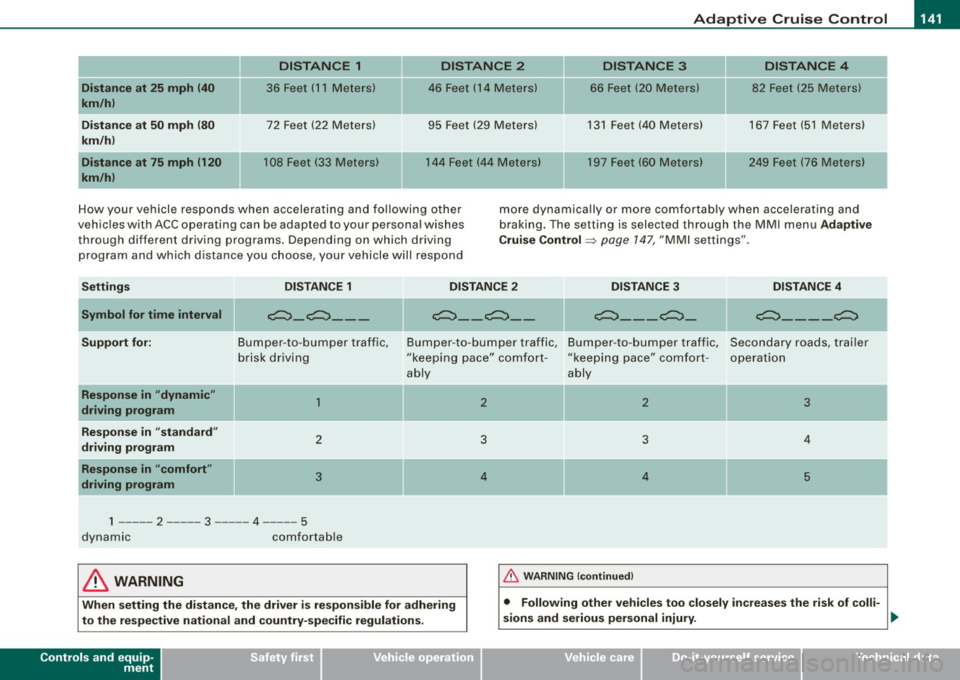
How your vehicle responds when accelerating and following other
vehicles with ACC operating can be adapted to your personal wishes
through different driving programs. Depending on which driving
program and which distance you choose, your vehicle will respond more
dynamically or more comfortably when accelerating and
braking. The setting is selected through the MMI menu Adaptive
Cruise Control =>
page 147, "MMI settings".
Settings DISTANCE 1 DISTANCE 2 DISTANCE 3 DISTANCE 4
-
---
Symbol for time interval
Support for:
-Response in "dynamic"
driving program
Response in "standard"
driving program
Response in "comfort"
driving program
-
e:::::::}_e:::::::} ___
Bumper -to -bumper traffic,
brisk driving
1
2
3
1 ----- 2 ----- 3 ----- 4 -- 5
dynamic comfortable
II
e:::::::}_ - e:::::::}_ -e:::::::} _ - - e:::::::} _ II e:::::::}_ - - _e:::::::}
Bumper
-to -bumper traffic, Bumper -to -bumper traffic, Secondary roads, trailer
"keeping pace" comfort -"keeping pace" comfort -
operation
ably ably
-
2 2 3
3 3 4
4 4 5
& WARNING 1-&_ !_ W_A_ R _N _IN _ G_ (c_o _nt _in _ u_ e _d _ l ------------------1
When setting the distance, the driver is responsible for adhering
to the respective national and country-specific regulations.
Controls and equip
ment • Following other vehicles too
closely increases the risk of colli-
sions and serious personal injury.
~
I • •
Page 144 of 390

• ..__A_ d_a...: p:,..._ ti_v _ e_ C_ ru_ is_ e_ C_ o_n_ t_ r_ o _ l ___________________________________________ _
& WARNING (continued)
• Setting short distances to the traffic ahead reduces the time
and distance available to bring your vehicle to a safe stop and
makes it even more necessary to pay close attention to traffic.
• Always use good judgment and select a safe following distance
for the traffic, road and weather conditions.
[ i ] Tips
The distance setting is reset to the factory default DISTANCE 3 the
next time the ignition is turned on.•
Driver information
Applies to veh icles : with Ada ptive C ru is e Cont ro l
Displays in the instrument cluster
Depending on the driving situation, driver information is
displayed in the instrument cluster.
Fig. 136 Overview instrument cluster
© Display in the speedometer
® Display in the instrument cluster
© Status indicator
© Display in the speedometer
Important information concerning vehicle operation with Adaptive
Cruise Control is shown in display area@. The desired speed you
set is indicated in the speedometer (LED lights around the edge)
and the indicator lights show whether the system has detected a
vehicle traveling ahead. -.,
Page 145 of 390

_____________________________________________ A_ d_a ...: p_ t_ i_ v _e_ C_ ru_ is_ e_ C_ o_n _ t_ r_o _ l _ __.11111
@ Di spl ay in t he instrum ent clust er
In display area@ information from the navigation system and the
trip computer is disp layed in addition to information about Adap tive
Cruise Cont rol.
You can select among the different information by repeated brie f
taps on the
[RESET) button on the w indsh ie ld wiper lever
=> page 41, "Operation" .
© Statu s indi cator
The information in area@ is not displayed permanently . Informa
tion is displayed only if you set or change the speed setting, change
t he time interval, when messages are disp layed or if the Adaptive
Cruise Control is turned off for safety reasons. •
Applies to veh ic les: with Ad apt ive Cru ise Co nt rol
Display in the speedometer
Desired speed
Fig . 1 37 Display in th e
s pe ed om eter
The desired speed set by the driver is displayed by a red LED .
I f the desired speed was set between two lines on the speedometer
us ing the
[ SET ) button, the two closest light diodes will come on
=> fig. 137.
Con tro ls and eq uip
ment
The system al lows only speeds from 20 to 95 mph (30 to 150 km/h)
t o be set. This speed range is faintly i lluminated in the speedome ter
(LED ligh ts) .
Ind icator light s (sy mbols )
• "'' ~ Open ro ad :
The indicator light""~ shows that Adaptive
Cruise Control is active and that no object is ahead o f the vehicle.
A
stored speed requested is maintained .
• ~'" '~ Driving in traffic: The indicator light~""~ indicates that
an object has been detected trav eling in front. Your speed is
adjusted according to the speed of the vehicle in fr ont . The Adap tive
Cruise Control acce lerates and brakes automatica lly within the
system's operation pa rameters.
• ~" "~ Driver inter vention p rompt : The red flashing warning
light
c::::, ,,, ,~ means Request for driver to a ssume control. Yo u as the
drive r must slow the vehic le with the foot brake . The symbol ~,, ..
~
tel ls you that the Adaptive Cruise Control is not able t o slow t he
vehicle down enough to keep a enough distance to the vehic le in
front of you . An warning tone will also sound when the symbol
appears. For more information about the driver intervention prompt
=> page 146.
[ i ] Tips
• I f you use the accelerator to go faster than the speed of the
object ahead of you, the
driver intervention prompt wi ll no t be
accompanied by a warning signal.
• I f the speed you prev iously set is exceeded, the ind icator light in
the speedometer will switch off. •
Vehicle care I I Technical data
Page 146 of 390

-L----=.A....:..:: d:..:a::.! p~ ti:..v :.. e::.._ C=-:_ ru.:.;.:.: is=- e-=-- C-=--= o...:n.:.. t.:.: r...: o :.. I:...._ __________________________________________ _
Applies to vehic les : w it h Ad aptive Crui se Co nt rol
Display in the instrument cluster
Fig. 138 Displ ay in the
in strumen t cluster
Scroll through the avai lab le information displays by briefly tapping
the
I RESE T] button at the end of the windshield wiper lever. You can
select information from the trip compu ter, navigation system or
Adaptive Cruise Contro l.
@ Vehicle symbol
@ Sta tus
© Distance
@ Veh icle sy mbol
The vehicle symbol indicates whether the system has detected an
object traveling in front.
• With an open road without a vehicle traveling ahead, only the
outline of the vehicle is visible.
• A
gray vehicle will appear when a vehic le is detected up ahead.
• If the situation is close to a request for the driver to assume
co ntrol, a
red vehic le is displayed.
If Adaptive Cruise Control is turned off or no speed is set. "Adaptive
Cruise Control" will be disp layed .
@ Statu s
• The te xt OFF appears in white letters when Adapt ive C ruise
Control is turned off.
• T he tex t
AVAILABLE ap pears in white letters when the sys tem is
turned on but no desired speed has been set .
• The text
OVERRIDE appears in white letters when you exceed the
desired spe ed by accelerating .
• The text
DISTANCE! appears in red letters w hen the interval to a
vehic le traveling ahead is too short and you have to slow your
vehic le add itionally with the foot brake.
• The text messages
DISTANCE 1, DISTANCE 2 , DI STANCE 3 or
DISTANCE 4
appear in green le tters to indicate the time interval you
have set and Adaptive Cruise Control is in management mode .
• If the dr iving program "standard" is replaced by "co mfo rt" or
"dynamic" using the MMI, the above te xt message is supplemented
by an appropriate prompt, e.g.
DI STANCE 1 DYN .
© Distance
A pointer (arrow) is shown in this area . When approaching slowly,
this pointer visualizes the distance to vehicles traveling ahead .
When approaching rap id ly, it serves as early warning of an
impending request for the driver to assume control. The pointer
m oves on a scale from r ight t o left.
Open road : With an open road and no vehicle trave ling ahead, no
pointer is shown.
Driving in traffi c: If a veh icle trave ling ahead is detected, the pointer
moves in the center area of the scale. This area represents the
distance set . It is marked
green to make it easier to see .
Driver intervention prompt : Whenever the selected time interval
(distance) to the object trave ling in fron t is b reached, the pointer
moves into the
red area of the display . When the pointer reaches the
farthest left position, the driver intervention prompt is disp layed to
ind ica te that the driver must assume control:::::,
page 146 . •