2008 AUDI S6 cruise control
[x] Cancel search: cruise controlPage 147 of 390

_____________________________________________ A_ d_a ...: p_ t_ i_ v _e_ C_ ru_ is_ e_ C_ o_n _ t_ r_o _ l _ __.11111
Ap plies to vehicles: with Adaptive Cru ise Co nt rol
System status indicator
The text messages and symbols shown in this area of the
display are not displayed perm anently.
T ime intervals
Fig . 139 Sy stem
sta tus indi cator
The different symbols for the time intervals appear if you change the
settings ~ fig. 139 .
The text message ... (three white dots) appears if a setting cannot be implemented with the operating lever . The following are possible
reasons:
• If you pul l the control lever towards you to resume speed but no
requested speed was set .
• I f you push the lever up to increase (or down to reduce) speed
when no speed has been set previously.
• If you push the lever up to increase (or down to reduce) speed
and this speed is outside the range from 20 to 95 mph (Canada
models : 30 to 150 km/h) .
ACC fun cti ona lity limited
The text message AC C functionalit y limited appears when the ACC
System does not detect any objects over an extended time period.
For the time being, the distance to vehicles up ahead is not being
Con tro ls and eq uip
ment
controlled. The ACC system is not switched off, so increased alert
ness is required. The following may be reasons for the text message
ACC Functiona lly limited:
• The ACC sensor is dirty. The ACC system is not reacting, or is not
reacting correctly, to veh ic les travel ing ahead.
• I t is possible that you are driving on a road with very light traffic
without anything at the side of the road (e.g. guard rai ls, traffic
signs, trees). As soon as a vehicle is detected by the system again,
it returns to its control range and the text message disappears .
The ACC sensor is located in the area under the front license plate.
If there is a loss of operation due to heavy contamination, this area
should cleaned to restore proper operation .
ACC not available
The text message ACC n ot ava ila ble appears, for example, if the
t emperature of the brakes is excessive. Adap tive Cruise Control is
temporarily not available . A warning tone sounds as a reminder .
ACC not available!
The text message ACC not ava ilable ! appears in the event of a
malfunction . Adaptive Cruise Contro l is tur ned o ff. A warning to ne
sounds as a reminder. Have the system inspected by a qua lified
dea lership .
ACC se nsor bl ocked !
The text message AC C sensor blocked ! appears when the ACC
System can no longer guarantee safe detection of objects . Adaptive
cruise control is turned off. A chime sounds as a rem inder .
To decide whether it is necessary to switch off the ACC (ACC sensor
blocked
!) or if it is only a temporary condition (ACC functionality
limited), the system wi ll also takes into consideration the outside
temperature and/or the windshield wiper operation.
The ACC sensor is dirty o r blocked (e .g . leaves, sn ow).
Vehicle care I I irechnical data
Page 148 of 390

• ..__A_ d_a...: p:,..._ ti_v _ e_ C_ ru_ is_ e_ C_ o_n_ t_ r_ o _ l ___________________________________________ _
The ACC sensor is located in the area under the front license plate .
If there is a loss of opera tion d ue to heavy contam ination, this area
should cleaned to restore proper operation.
E PB activatio n
The text message EPB activation appears if emergency braking was
manual ly initia ted with the Electromechanica l Parking Brake (EPB).
The Adaptive Cruise Contro l is turned off. This is accompanied by a
wa rning tone .
ESP activa tio n
The tex t message ESP activat ion appears i f the Elec tronic Stabil iza
tion Program (ESP) has intervened. In this case the Adaptive Cruise
Contr ol is a utomat ical ly turned off . This is accompanied by a
warning tone.
Speed
The set speed in mph (Canada km/h) a lways appears when saving or
cha nging the speed in Adaptive c ruise control =>
page 137, "How is
the speed stored?" and=>
page 138, "Changing stored speed".
Speed range
The text message Speed r ange appears if the current speed is too
low
to set or to hold the requested speed .
When setting a desired speed, it must be at least 20 mph (30 km/h).
At speeds below 12 mph (20 km/h), the cruise control is turned off .
In speeds
over 95 mph (150 km/h), the system remains active and
resumes the speed of 95 mph (150 km/h) if the driver removes the
foot from the accelerator .
Selector lever position!
The text message Selector lever po sition! appears when the
selector lever is moved to position N. In this position, Adaptive
Cruise Control is not ava ilable .•
App lies to vehic les: w ith Ad apt ive Cruise Contro l
Driver intervention prompt
The driver intervention promp t calls on the driver to take
over the situation.
F ig . 140 I nstru ment
c lu ster: Dri ver int er
v ention prompt
In cer tain situati ons, the braking power of t he Adaptive cruise
control is not sufficient to maintain an adequate distance from the
object ahead. In this situation, the Adap tive cruise contro l ca lls on
you as the driver to take action.
The
driver intervent ion prompt a lerts you visual ly and audibly.
• A red vehicle is shown in the instrument c luster disp lay
=> fig. 1 40 .
• The tex t
DISTANCE! appears in the sta tus line.
• The indicator light
,;:::::,11 .. ,;:::::, in the speedometer b links red.
• An warning tone sounds .
[ i ] Tips
• I f the Adaptive cruise control initiates braking, the hydraul ic
brake system is under pressure. Therefore, the brake peda l distance
is shorter and the pedal "feels" harder.
• Adaptive Cruise C ontro l is switched off af ter pressing the foot -
brake. The speed
saved up this point can be resumed. _,,,
Page 149 of 390

_____________________________________________ A_ d_a ...: pc.. t _i_ v _e_ C_ ru_ is_ e_ C_ o_n_ t_ r_ o _ l __ ,n
• To resume the saved speed, release the brake pedal and press
t he control lever~
page 139, "Turning Adaptive Cruise Contro l off
temporarily".
• If you use the accelerator to go faster than the speed of the
object ahead of you, the
drive r int erv enti on prompt will not be
accompanied by a warning signal.
• If the speed you previously set is exceeded, the indicator light in
t he speedometer wi ll switch off .•
Appl ies to veh icles : w ith Ada ptive C ru ise Cont rol
MMI settings
Individual settings for Adaptive Cruise C ontr ol can be
selected in the MM/ .
Fig. 1 41 MMI D isplay:
Ad apti ve C ru is e
Co ntrol
Sett ings for t he driving program can be adjusted indiv id u
ally to the particular user and saved in the MMI. This can
only be done with the eng ine running.
- Press the
I CARI funct ion b utton .
- Selec t
System s* in the CAR menu.
Select
Ad aptive Cruise Control. The Adaptive Cruise
Control
menu appears .
Controls and equip
ment
Select driving progr am.
- Selec t the desi red driving program .
Setting th e dri ving p rogr am
In the dri ving program menu you can adjus t the characteristics of
Adaptive Cruise Contro l to what you want using
dyn ami c, s ta ndard
or co mfort .
Saving setting s
Your individual settings are automat ical ly saved and assigned to the
remote contro l key being used (remote key storage). If the key is
given to another person, the saved settings remain as they a re. •
System limitations
Ap plie s t o v ehi cles: with Ad apt ive Crui se Co nt rol
General information
Some driving situations which affect the function of the
radar sensor ore described below.
When driving, the Adaptive Cru ise Control is governed by physical
and system -specified limits. Also, under certain circumstances, the
ACC system may react unexpec tedly or late from the dr iver's point
of view. Therefore, always be attentive and intervene, if necessary :
• when driv ing around curves~
page 148
• when vehicles in front are not in line with your
vehic le ~
page 148
• when other vehicles are changing lanes~ page 149
• when other vehic les are difficu lt to detect~ page 149.
I • •
Page 150 of 390
• ..__A_ d_a...: p:,..._ ti_v _ e_ C_ ru_ is_ e_ C_ o_n_ t_ r_ o _ l ___________________________________________ _
& WARNING
The radar sensor's vision can be reduced by rain, snow and heavy
spray. This can result in vehicles driving ahead being inadequately
detected or, in some circumstances, not detected at all. If neces
sary, take action yourself! •
Applies to ve hicle s: with Ad aptive Cruise Co nt rol
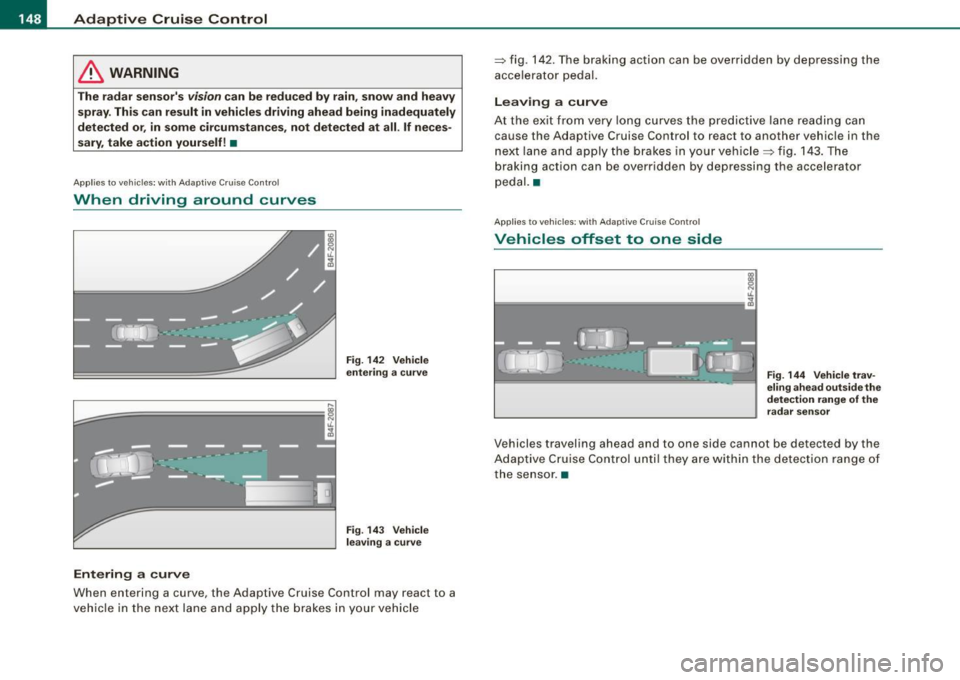
When driving around curves
L=~=======; ~
c'i
Entering a curve
Fig. 142 Vehicle
entering a curve
Fig. 143 Vehicle
leaving a curve
When entering a curve, the Adaptive Cruise Control may react to a
vehicle in the next lane and apply the brakes in your vehicle =>
fig. 142. The braking action can be overridden by depressing the
accelerator pedal.
Leaving a curve
At the exit from very long curves the predictive lane reading can
cause th e Adaptive Cruise Control to react to another vehicle in the
next lane and apply the brakes in your vehicle => fig. 143. The
braking action can be over ridden by depressing the accelerator
pedal. •
Applies to ve hicles: w ith Adaptive C ru ise Co nt rol
Vehicles offset to one side
Fig . 144 Vehicle trav
eling ahead outside the
detection range of the
radar sensor
Vehicles traveling ahead and to one side cannot be detected by the
Adaptive Cruise Control until they are within the detection range of
the sensor. •
Page 151 of 390
_____________________________________________ A_ d_a ...: p_ t_ i_ v _e_ C_ ru_ is_e_ C_ o_n _ t_ r_o _ l _ __.BIII
Ap plies t o vehi cle s: wi th Ada ptive Crui se Co nt rol
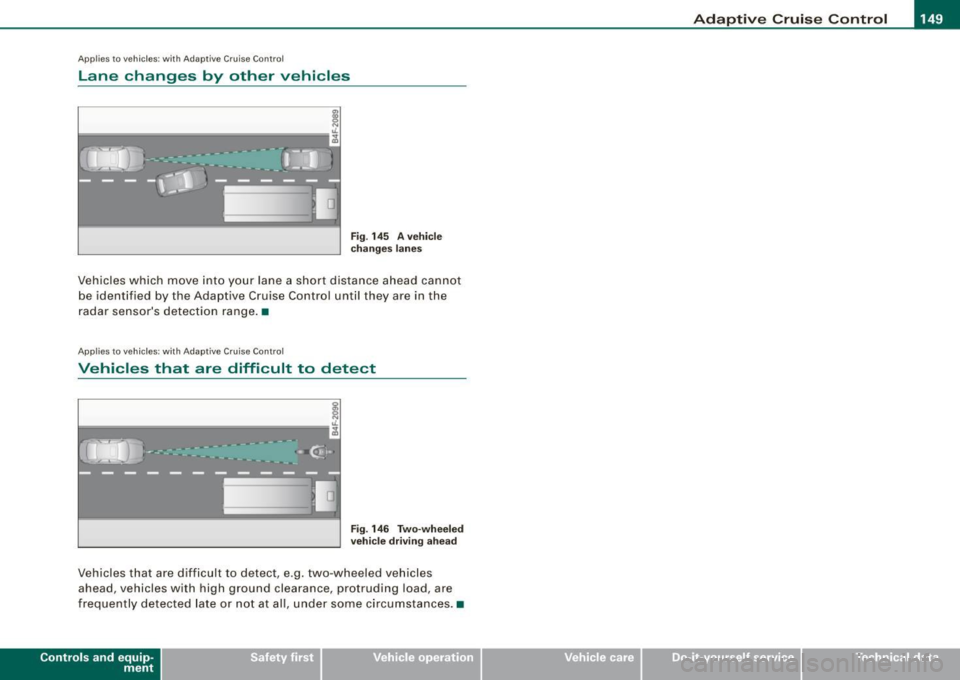
Lane changes by other vehicles
Fig . 145 A vehicle
changes lanes
Vehicles which move into your lane a short distance ahead cannot
be identified by the Adaptive Cruise Control until they are in the
radar sensor's detection range. •
Applies to veh ic le s: w ith Adap tiv e C ruise Cont rol
Vehicles that are difficult to detect
I
i------------------"-;A
Fig . 146 Two-wheeled
vehicle driving ahead
Vehicles that are d ifficult to detect , e.g. two -wheeled vehicles
ahead, vehicles with high ground clearance, protruding load, are
frequently detected late or not at al l, under some circumstances. •
Contro ls and eq uip
ment Vehicle care I I irechnical data
Page 265 of 390

& WARNING
Although the ABS is very effective, always remember that braking
capability is limited by tire traction. Always adjust your driving
speed according to the road and traffic conditions. Do not let the
extra safety afforded by the ABS tempt you into taking extra risks.
The ABS cannot overcome the laws of physics.
[ i] Tips
• If ABS is not functioning properly, a warning light will come on .
See
=> page 22.
• If a fault occurs in the ABS , the EDL is also not functioning. This
is indicated by the ABS warning light. •
Brake assistant
The brake assistant is designed to achieve the optimum
braking effect.
The brake assistant helps to increase the effective braking power
and thus to achieve a shorter stopping distance . If the driver
presses the brake pedal very quickly, the brake assistant automati
cally boosts the braking force to the maximum level, up to the point
where the anti-lock brake function (ABS) intervenes to stop the
wheels from locking. You should then keep the brake pedal pressed
until the vehicle has braked to the required speed. The brake assis
tant switches itself off as soon as you release the brake pedal.
The brake assistant will not be operative if there is a malfunction in
the ABS.
In vehicles with Adaptive Cruise Control* (ACC), the distance to the
vehicle ahead is continuously calculated using a radar sensor,
within the limits of the system=>
page 135. If the radar system
detects a short distance to the vehicle ahead, the brake system
exerts a small braking force to reduce the brake response time in
Controls and equip
ment Safety first Vehicle operation
Intelligent technology
case of braking. In this way, the brake application can be quickened
and
the stopping distance reduced.
& WARNING
Please remember that the accident risk always increases if you
drive too fast, especially in corners or on a slippery road, or if you
follow the vehicle ahead of you too closely. Increased risk of an accident cannot be compensated for even by the brake assistant,
so always maintain a safe speed.
n
Servotronic® -advanced power
steering system
The power steering systems uses the power of the
running engine to allow precise steering with little effort.
The advanced Servotronic ® power steering system senses the road
speed and electronically adjusts power assistance to provide
comfortable and safe steering response exactly matched to the
vehicle speed.
Power steering will not work if the engine is off. As a result, the
steering wheel will be hard to turn.
The power steering fluid level is checked during the scheduled
maintenance services.
0 Note
If there is an electronic malfunction, servotronic will still function
like a conventional power steering system, providing a constant
steering support force that is no longer proportionate to the vehicle
speed. This is most noticeable when turning the steering wheel at
low speeds (for example when parking), -more effort will be
required than usual.
II-
Vehicle care Do-it-yourself service Technical data
Page 348 of 390

llft!I Fuses and bulbs ..._ __________________________________________ _
[ i J Tip s
You are wel l advised to keep a supply of spare fuses in your vehicle .
Fuses with the proper ampere ratings are availab le at your Audi
dea ler. •
Fuse Location , Instrument Panel left
Fig . 258 Fuse pa nel
l ayo ut
Some of the equipment items listed are optional or only ava ilable on
certain model configurations .
Note th at t he fo llo wi ng t able i s acc urat e at th e time of goin g to
pr ess and is subject t o ch ang e. In th e eve nt of d iscrep ancie s, th e
labe l on th e in side of th e cover always ta kes prece de nce .
The power seats are protected by cir cuit br eaker s, which automati
cally reset after a few seconds after the overload has been reme
died.
N o. Equipm ent
1 Not used
2
3
4
Not used
Engine management
Oil level sensor Amps
5
5
No
.
5
6
..
7
8
9
10
1 1
12
13
14
15
16
17
18
19
20
21
22
23
24
25
26
27
28
Equipm ent
Climate cont rol , tire pressure monitoring sys
tem
Electronic Stabilization Program (ESP), clutch
sensor
Diagnostic connector
Homelink control unit
Automa tic dimming interior mirror
Adaptive Cruise Control
Not used
Diagnostic connector
Switch modu le steering column
Brake light switch
I nstrument c luster, control module Ga teway
Telephone, cell phone E lectronic Stabilization Program (ESP)
Headlight electronics, left -side
Rain sensor
Heated washer nozzles
Seat adjustment (driver)
MMI display
E lectromechanica l parking brake
Not used
Not used
Not used
N ot used
Not used Amps
5
5
5
5
5
5
10
10
5
10
10
10
5
5
5
10
5
5
-
Page 374 of 390

-Alphabetical index ..,,,_.:_.__ ____ _...::.:...::..;.:___ ________________ _
A
A . ccessones ............. .... .... .. .
Adapter for cupholder ..... ...... ... . 368
103
Ad . A' S .
apt1ve 1r uspens1on .. .... ... .... 182
Automatic mode . . . . . . . . . . . . . . . . . 183
Description . . . . . . . . . . . . . . . . . . . . . 182
Dynamic mode . . . . . . . . . . . . . . . . . . 183
Jacking mode when changing a flat tire .
184
Lift mode . . . . . . . . . . . . . . . . . . . . . . . 183
Setting the driving modes .. .... ... 183
Standard mode . . . . . . . . . . . . . . . . . . 183
Trailer towing mode ... .... .... ... 184
Warning/indicator lights ....... .... 21
Adaptive Cruise Control . . . . . . . . . . . . . . 135
Changing speed .. ........... .... 138
Driver information ............... 142
Driver interven tion prompt ........ 146
Driving in traffic ...... .... ...... . 136
Driving program ...... .... .... ... 147
Error messages . . . . . . . . . . . . . . . . . . 145
Open road . . . . . . . . . . . . . . . . . . . . . . 136
Override . . . . . . . . . . . . . . . . . . . . . . . . 136
Request for driver to assume control 136
Save speed . . . . . . . . . . . . . . . . . . . . . . 137
Setting distance . . . . . . . . . . . . . . . . . 140
Setting time interval .. .. .......... 140
Settings . . . . . . . . . . . . . . . . . . . . . . . . 147
Specia l driving situations ......... 147
Status messages . . . . . . . . . . . . . . . . . 145
Switching on and off .. .... ... .... 137
System limits ...... .... .......... 147
Tempor arily turning off ... ...... .. 139
warning/indicator lights .... ...... . 143
Adaptive Light ......... ... .... .... ... 73
defective .......... .... ..... .. .... 37
Adding
Engine coolant ......... ... .... ...
305
Engine oil ... .. ...... ....... ..... 302
Windshield washer fluid .... .... ... 312
Additional accessories .... .... .... ... 368
Additives
Engine oil ... .. ..... .. ...... .....
302
Adjusting
Instrument cluster i llumination ......
16
Steering column electrically .... ... 123
Steering column manually ...... ... 122
Ad' . f Justing ront seats .. .... .... .... ... 87
Advanced Key ...... .. .... ........... 59 Care
........ ..... ....... ... .. ...
226
Child restraints .................. 236
Children ....... ....... .... ..... . 235
Components (front airbags) ........ 219
Danger of fitting a chi ld safety seat on the
front passenger seat .. ..... .. ...
214
Disposal ............ .. .... ...... 226
Fron t airbags ...... .... .... .. 216, 217
How do the front airbags work? . ... 221
How many airbags does my vehicle have?
219
How the Advanced Airbag System compo -
nents work together . . . . . . . . . . . . .
220
Important things to know ... ..... .. 212
Indicato r light ...... ... .. .... .... 223
Monitoring .... .... .... ...... .... 223
PASSENGER AIR BAG OFF light ..... 224
Repairs ..... .. .... .... ... ... ... . 226
Driver messages . . . . . . . . . . . . . . . . .
128 Safety instructions .... .... .... ... 225
Locking vehicle ................. .. 61 Side airbags ... .... .... ... ... ... . 228
START button ................... 126 Side curtain airbags (SIDEGUARD) .. 231
Starting engine ........ ..... .. ... 126 Weight-sensing mat .. ....... ..... 235
STOP button .... ... .... .... ...... 127 When must the system be inspected? .. .
Switching engine off ...... .... ...
127 223
Switching on ignition ...... .... ... 126 All Whee l Drive ... .... .... .......... 264
Unlocking vehicle ........... ...... 60 Alloy wheels . .... .... ....... .... ... 283
Air conditioning
See Climate controls ... .......... . 11 O
Airbag
Warning/indicator lights ..... ......
20
Airbag system ... ... .. .... .... .. 212, 229
Advanced Airbag System ...... .... 216
Advanced Airbag System components
219
All- whee l drive
Winter tires .... ........... .... ..
329
Alternator
See Generator . . . . . . . . . . . . . . . . . . . . 19
Anti -freeze
See Engine coolant system ...... .. 303
Anti-glare inside day-night mirror .... .. 82