2008 AUDI S4 ron
[x] Cancel search: ronPage 169 of 342

Automatic gearbox167
Controls
Safety
Driving tips
General maintenance
Self-help
Technical data
Shifting up a gear
– Briefly push the selector lever forwards (in the tiptronic
gate) ⇒page 166, fig. 180 .
Shifting down a gear
– Briefly pull the selector lever backwards (in the tiptronic gate) .With the tiptronic system the driver can manually choose between
7 different pre-programmed gears. The manual programme can be
selected either with the vehicl e stationary or on the move.
When accelerating, the gearbox automa tically shifts up into the next
gear shortly before the maxi mum engine speed is reached.
If you select a gear which is lower than the gear shown in the instru-
ment display ⇒page 166, fig. 181, the gearbox will only shift down
when there is no longer a risk of overrevving the engine.
When the vehicle slows down (for instance when braking), the
gearbox automatically shifts down into the next gear when the
minimum engine speed is reached.
Changing down to a lower gear increases the engine braking effect
on downhill gradients.
When the accelerator pedal is pressed right down past the point of
resistance at full throttle, the ge arbox will select a lower gear,
depending on road speed and engine speed.Applies to vehicles: with multitronic® or tiptronicBack-up programme
A back-up system is in place should a fault occur in the
control system.The automatic gearbox switches to the back-up programme if a fault
should occur in the control system. This is indicated by all segments of the display panel either ligh
ting up together or going out
completely.
It is still possible to move the selector lever to all positions. The
manual shift programme (tiptronic) is not available when the back-
up programme is active.
Vehicles with tiptronic gearbox: When the selector lever is in posi-
tion D or S or in the manual shift programme, the gearbox will
remain in 3rd gear if 1st, 2nd or 3rd gears were engaged when the
fault occurred. The gearbox will remain in 5th gear if 4th, 5th or 6th
gears were engaged. The gearbox wi ll then engage 3rd gear when
you drive away from a standstill or after the engine is restarted.
It will still be possible to use reverse gear in the normal way.
However, the electronic lock for reverse gear will be switched off.
Caution
Should the gearbox ev er switch into the back-up programme, you
should take the vehicle to an Audi dealer or qualified workshop as
soon as possible.Applies to vehicles: Paddle leversSteering wheel with paddle levers
The paddle levers on the steering wheel enable the driver
to manually select pre-programmed ratios or gears.
A+
A…
Fig. 182 Steering
wheel: tiptronic
switches
document_0900452a81b1b9de.book Seite 167 Donnerstag, 26. Juli 2007 9:16 09
--4 -
-T
-+
CD
•
+-
•
Page 170 of 342

Automatic gearbox
168
– Briefly pull the left-hand pa ddle lever to change down
to a lower gear.
– Briefly pull the right-hand paddle lever to change up to a higher gear.The paddle levers are activated when the selector lever is in position
D or S, or the position for the manual shift programme (tiptronic).
The manual shift programme can, of course, still be operated using
the selector lever in the centre console.Applies to vehicles: with multitronic® or tiptronicManual release of selector lever
The selector lever can be rele ased manually if the elec-
trical power supply should fail.
The manual release mechanism is behind the ashtray.
– Slide open the cover for the ashtray.
–Slide the switch ⇒ fig. 183 to the right to release the
ashtray.
– Take out the ashtray .
– You will now see a small cover cap at the front of the
opening in the ashtray mounting unit.
– Loosen and remove this cover cap.
– Use a screwdriver or similar object to press down the pin, which is now accessible, and hold it down ⇒fig. 184.
– Now press the interlock button on the selector lever and move the selector lever to position N.The selector lever can only be moved out of position P if the ignition
key is inserted and the ignition is switched on. If the power supply
should ever fail (discharged battery, etc.) and the vehicle has to be
pushed or towed, the selector lever must first be moved to
position N. This is possible after operating the manual release
mechanism.
A–A+Fig. 183 Removing
ashtray
Fig. 184 Manual
release of selector
lever
AA
AB
document_0900452a81b1b9de.book Seite 168 Donnerstag, 26. Juli 2007 9:16 09
--4 -
-T
•
-+ +-
•
Page 171 of 342

Parking aid169
Controls
Safety
Driving tips
General maintenance
Self-help
Technical data
Parking aidApplies to vehicles: with Audi parking system/plus/advancedGeneral notesVarious systems are available to help you when parking or manoeu-
vring in tight spaces, depending on the equipment fitted on your
vehicle.
The Audi parking system gives an acoustic warning if there are any
obstacles behind the car ⇒page 169 .
When you are parking, the Audi parking system plus warns you
acoustically and optically about obstacles in front of and behind the
vehicle ⇒page 170 .
In conjunction with a reversing camera, the Audi parking system
advanced shows a picture of the area behind the vehicle. This
picture helps you to manoevre the vehicle backwards and sideways.
In addition, you are assisted by the acoustic signals and graphic
display of the parking aid ⇒page 171 .
Note
To ensure that the acoustic parking aid works properly, the sensors
must be kept clean and free of snow and ice.Audi parking systemApplies to vehicles: with Audi parking systemDescription
The Audi parking system is an acoustic parking aid.Sensors are located in the rear bumper. When the sensors detect an
obstacle, you are alerted by acoust ic signals (beeps). The measuring
range of the sensors starts at about: The acoustic signals sound with increasing frequency as you
approach the obstacle. A warning tone will sound continuously
when the vehicle is less than appr
ox. 0.30 m away from the obstacle.
Stop reversing immediately!
The volume of the warning beeps will be gradually reduced after
about 4 seconds if the vehicle remains at a constant distance from
a detected obstacle (it will not be reduced if the obstacle is closer
than 0.30 m).
The parking aid is switched on automatically when reverse gear is
engaged. You will hear a brief acknowledgement tone.
WARNING
•
The parking aid cannot replace the full concentration of the
driver. The driver is always resp onsible for safety during parking
and other manoeuvres.
•
The sensors have blind spots in which obstacles are not regis-
tered. It is particular ly important to ensure that there are no small
children or animals near the vehicle, as the sensors may not
always be able to detect them.
•
Always keep a close watch on the area around the vehicle and
make full use of the rear-view mirrors.Caution
Please note that low obstacles detected by the system may no
longer be registered by the sensors as the car moves closer, so the
system will not give any further warning. Certain kinds of obstacles
(such as wire fences, chains, thin painted posts or trailer draw bars, Rear
Side
0.60 m
Centre
1.60 m
document_0900452a81b1b9de.book Seite 169 Donnerstag, 26. Juli 2007 9:16 09
--4 -
-T
-+ +-
II]
•
CD
Page 172 of 342

Parking aid
170etc.) may not always be detected by the system, so take care not to
damage the vehicle in such cases.
Note
•
Please refer to the notes on towing ⇒ page 177.
•
You can adjust the volume and pitch of the beeps ⇒page 177 .
Audi parking system plusApplies to vehicles: with Audi parking system plusDescription
The Audi parking system plus is a parking aid with
acoustic signals and graphic display.Sensors are located in the front and rear bumpers. When the
sensors detect an obstacle, you are alerted by acoustic signals
(beeps) and a graphic display. The measuring range of the sensors
starts at about:
The acoustic signals sound with increasing frequency as you
approach the obstacle. A warning tone will sound continuously
when the vehicle is less than appr ox. 0.30 m away from the obstacle.
Stop moving immediately!
The volume of the warning beeps will be gradually reduced after
about 4 seconds if the vehicle remains at a constant distance from
a detected obstacle (it will not be reduced if the obstacle is closer
than 0.30 m).
Applies to vehicles: with Audi parking system plusSwitching on/offSwitching on
– Switch on the sound system or MMI*.
– Engage reverse gear, or
– Press the switch
in the centre console ⇒fig. 185 or
next to the selector gate. You will hear a brief acknowl-
edgement tone and the diode in the switch will light up.
Switching off
– Drive forwards faster than 10 km/h, or
Front
Side
0.90 m
Centre
1.20 m
Rear
Side
0.60 m
Centre
1.60 m
Fig. 185 Centre
console: Parking aid
switchFig. 186 Display:
Graphical distance
display
document_0900452a81b1b9de.book Seite 170 Donnerstag, 26. Juli 2007 9:16 09
--4 -
-T
[I)
-+ +-
•
Page 173 of 342
Parking aid171
Controls
Safety
Driving tips
General maintenance
Self-help
Technical data
– Press the switch
, or
– Switch off the ignition.
Segments in the graphic display
You can estimate the distance to an obstacle by referring to the red
segments at the front and rear of the vehicle ⇒page 170, fig. 186.
The closer the vehicle gets to the obstacle the closer the segments
move towards the vehicle in the graphic. At the latest when the
penultimate segment is highlighted the vehicle has reached the
danger (collision) zone. Stop moving immediately ⇒!
WARNING
•
The parking aid cannot replace the full concentration of the
driver. The driver is always resp onsible for safety during parking
and other manoeuvres.
•
The sensors have blind spots in which obstacles are not regis-
tered. It is particularly important to ensure that there are no small
children or animals near the vehicle, as the sensors may not
always be able to detect them.
•
Always keep a close wa tch on the area around the vehicle and
make full use of the rear-view mirrors.Caution
Please note that low obstacles detected by the system may no
longer be registered by the sensors as the car moves closer, so the
system will not give any further warning. Certain kinds of obstacles
(such as wire fences, chains, thin painted posts or trailer draw bars,
etc.) may not always be detected by the system, so take care not to
damage the vehicle in such cases.
Note
•
You can change the display and adjust the volume and pitch of
the beeps ⇒page 177 .
•
Please refer to the notes on towing ⇒page 177 .
•
There is a slight delay in the picture display.
Audi parking system advancedApplies to vehicles: with Audi parking system advancedIntroductionA reversing camera is integrated in vehicles with the Audi parking
system advanced, in addition to a parking aid with acoustic signals
and graphic display ⇒page 170 .
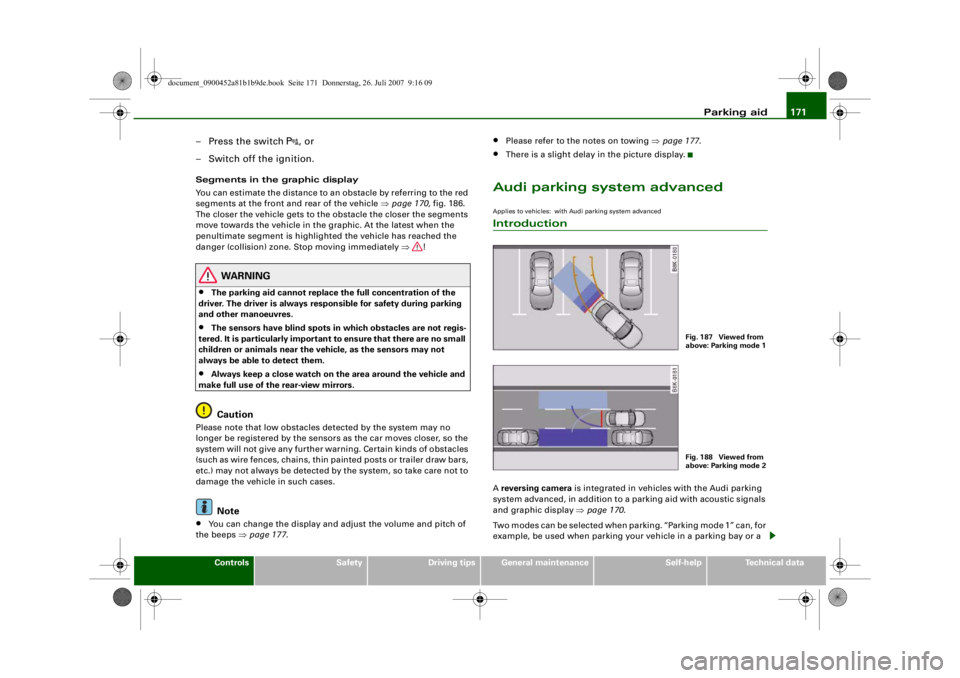
Two modes can be selected when parking. “Parking mode 1” can, for
example, be used when parking your vehicle in a parking bay or a
Fig. 187 Viewed from
above: Parking mode 1Fig. 188 Viewed from
above: Parking mode 2
document_0900452a81b1b9de.book Seite 171 Donnerstag, 26. Juli 2007 9:16 09
--4 -
-T
•
-+ +-
CD
Page 177 of 342
Parking aid175
Controls
Safety
Driving tips
General maintenance
Self-help
Technical data
– Reverse into the space and adapt the steering angle to
the parking space, using the orange lines to assist you
⇒ . indicates the rear bumper. You should stop
reversing, at the latest, when the red orientation line
is bordering on an object ⇒!
– Align your vehicle according to the blue area marking ⇒fig. 193. The blue marking is an extension of the
vehicle outline and reaches about five metres to the rear
of the vehicle. The shade of blue changes at a distance of
approx. 1m, 2m and 5m to the vehicle.
WARNING
•
The reversing camera does not show the complete area behind
the vehicle. It is part icularly important to ensure that there are no
small children or animals near the vehicle, as the reversing camera
may not always be able to detect them (accident risk).
•
Please note that objects whi ch are not touching the ground
may appear to be further away th an they actually are (e.g. the
bumper of a parked ve hicle, a towing bracket or the rear end of a
truck). In this case you should not use the orientation lines as a
guide when parking the car - accident risk!Caution
The MMI display shows the path of th e rear end of the vehicle if you
were to reverse using the current steering angle. NB: The front end
of the vehicle swings out further th an the rear. Please make sure you
keep a sufficient distance between the vehicle and any obstacles to
make sure that the exterior mirror or edge of the vehicle do not
collide with the obstacle (accident risk).
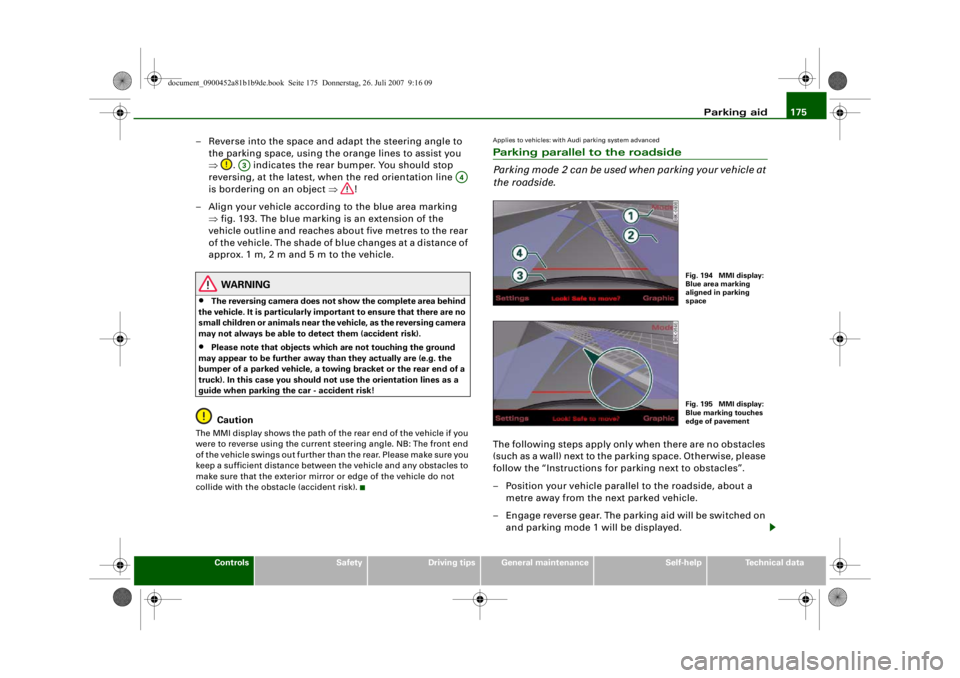
Applies to vehicles: with Audi parking system advancedParking parallel to the roadside
Parking mode 2 can be used when parking your vehicle at
the roadside.The following steps apply only when there are no obstacles
(such as a wall) next to the parking space. Otherwise, please
follow the “Instructions for parking next to obstacles”.
– Position your vehicle parallel to the roadside, about a metre away from the next parked vehicle.
– Engage reverse gear. The parking aid will be switched on and parking mode 1 will be displayed.
A3
A4
Fig. 194 MMI display:
Blue area marking
aligned in parking
spaceFig. 195 MMI display:
Blue marking touches
edge of pavement
document_0900452a81b1b9de.book Seite 175 Donnerstag, 26. Juli 2007 9:16 09
--4 -
-T
CD
-+ +-
0
•
Page 178 of 342

Parking aid
176
– Press the control button for Mode ⇒ fig. 194 on the
MMI control console. Park ing mode 2 is displayed.
– Reverse and align your vehicle in such a way that the blue
area marking borders onto the vehicle behind or onto
the parking space line marking. The blue marking is an
extension of the vehicle outline and reaches about five
metres to the rear of the vehicle. The long side of the blue
marking should border onto the kerb. The complete blue
area marking must fit into the parking space.
– When the vehicle is stationary turn the steering wheel to the left as far as it will go.
– Reverse into the parking space.
– Stop the vehicle as soon as the blue curve touches the kerb ⇒page 175, fig. 195.
– When the vehicle is stationary turn the steering wheel to the right as far as it will go.
– Continue to reverse into the parking space until the vehicle is standing parallel to the kerb. indicates the
rear bumper. You should stop reversing, at the latest,
when the red orientation line is bordering on an
object ⇒! Keep a close watch on the front of your
vehicle ⇒.Parking next to obstacles
If an obstacle (such as a wall) is located next to the parking space,
the clearance at the side of the vehicle must be larger. Position the
long side of the blue marking so that there is sufficient clearance
from the kerb. The marking must not touch the kerb. You must also
start turning the steering wheel much earlier. The blue curve
⇒page 175, fig. 195 must not touch the kerb - make sure there is
sufficient clearance from the kerb.
WARNING
•
The reversing camera does not show the complete area behind
the vehicle. It is part icularly important to ensure that there are no
small children or animals near the vehicle, as the reversing camera
may not always be able to detect them (accident risk).
•
Please note that objects which are not touching the ground
may appear to be further away th an they actually are (e.g. the
bumper of a parked vehicle, a towi ng bracket or the rear end of a
truck). In this case you should not use the orientation lines as a
guide when parking th e car - accident risk!Caution
The MMI display shows the path of the rear end of the vehicle if you
were to reverse using the current steering angle. NB: The front end
of the vehicle swings out further th an the rear. Please make sure you
keep a sufficient distance between the vehicle and any obstacles to
make sure that the exterior mirror or edge of the vehicle do not
collide with the obstacle (accident risk).
Note
The orientation lines and markings ap pear on the left or right side,
depending on which turn signals are on.
A1
A2
A3
A4
document_0900452a81b1b9de.book Seite 176 Donnerstag, 26. Juli 2007 9:16 09
--4 -
-T
CD
-+ +-
[I]
&
•
CD
Page 179 of 342

Parking aid177
Controls
Safety
Driving tips
General maintenance
Self-help
Technical data
Applies to vehicles: with Audi parking system/plus/advancedSwitching display and acoustic signals on and offThe settings for the graphic display* and acoustic signals
are controlled via the sound system or MMI*.– Select: Function selector button > Audi parking
system .Display*•
off - The parking aid gives only acoustic warning signals when it
is activated.
•
Graphic - The graphic display ap pears when reversing and
driving forwards.
•
Rear View * - The picture from the reversing camera is shown
when reversing and driving forwards.
•
Automatic * - The picture from the reversing camera is shown
when reversing and the graphic display is shown when driving
forwards.
Warning beeps
•
Rear volume - Volume of the rear sensors
•
Rear frequency - Pitch of the rear sensors
•
Front volume* - Volume of the front sensors
•
Front frequency * - Pitch of the front sensors
You will hear a short test tone each time you make a new setting.Note
•
You can also change the warning beep settings directly from the
graphic display* or reversing camera* picture. Simply press the
control button for *.
•
New settings are not activated until you switch on the parking
aid again.
•
The settings will be automatically stored and assigned to the
remote control key.
Applies to vehicles: with Audi parking system/plus/advanced and towing bracketTo w i n g b r a c k e tIn towing mode, the rear parking sensors are NOT activated when
you select reverse gear or press the switch
. This may not apply if
the power socket was NOT factory-fitted. This results in the
following restrictions:
Audi parking system*
There is no distance warning.
Audi parking system plus*
There is no rear distance warning. However, the system will still give
a warning when obstacles are detected while driving forwards. The
proximity graphic will switch over to towing mode.
Audi parking system advanced*
There is no rear distance warning. However, the system will still give
a warning when obstacles are detected while driving forwards. The
proximity graphic will switch over to towing mode. The image of the
Fig. 196 Display:
Settings for parking
aid
CAR
Settings
document_0900452a81b1b9de.book Seite 177 Donnerstag, 26. Juli 2007 9:16 09
--4 -
-T
[1J
I I •
-+ +-