2008 AUDI S4 ron
[x] Cancel search: ronPage 139 of 342

adaptive cruise control (ACC)137
Controls
Safety
Driving tips
General maintenance
Self-help
Technical data
•
The control lever has been pushed up / down to increase / reduce
the speed, but the resulting speed would be outside the range of 30
to 200 km/h.
ACC deactivation
The message ACC deactivation sometimes appears on vehicles with
a manual gearbox. If you press the clutch pedal for longer than
about 20 seconds, the adaptive crui se control will be automatically
deactivated and a warning tone will sound.
ACC not available
The text message ACC not available will appear if, for example, the
brakes are overheated. The adaptive cruise control will then tempo-
rarily not be available. This is indicated by a warning tone.
ACC not available!
The text message ACC not available! appears if a malfunction
should occur. The adaptive cruise control will then be switched off.
This is indicated by a warning tone. Have the system checked by a
qualified workshop.
ACC sensor blocked!
The text message ACC sensor blocked! appears if the ACC system
can no longer detect objects reli ably. The adaptive cruise control
will then be switched off. This is indicated by a warning tone.
The ACC sensor is obstructed by dirt or foreign objects (e.g. leaves
or snow). Clean the sensor to restore the function ⇒page 128,
fig. 136.
Engine speed !
On vehicles with manual gearbox, the text message Engine speed !
will appear if the driver does not change gear in time when the
adaptive cruise control accelerates or brakes the vehicle. The adap-
tive cruise control will automatically be deactivated if the engine
speed is not maintained within the permissible range. This is indi-
cated by a warning tone. ESP activation
The text message
ESP activation appears if the Electronic Stabilisa-
tion Programme (ESP) has intervened. In this case, the adaptive
cruise control will automatically be switched off. This is indicated by
a warning tone.
Speed (in km/h)
The target speed (in km/h) will appear in the display whenever it is
stored or changed ⇒page 131, “Setting the speed” and
⇒ page 131, “Setting a new speed”.
Speed range
The text message speed range appears if the current speed is too
low to set or to maintain the target speed.
To set a target speed, the speed of the vehicle must be at least
30 km/h. The cruise control system switches off if the speed falls
below 20 km/h.
If the speed exceeds 200 km/h (OVE RRIDE), the system will remain
active and will reduce the speed to 200 km/h once the driver stops
accelerating.
ACC functionality limited
The text message ACC functionality limited appears if the ACC
system does not detect any objects for an extended period. The
distance to vehicles in front is not being controlled while the
message is displayed. The ACC system is not deactivated, and so
extra care should be taken! The text message ACC functionality
limited can appear for the following reasons:
•
The ACC sensor is dirty. The ACC system is not responding or is
not responding correctly to the vehicles in front!
•
You may be driving on a country road with no traffic and no clear
roadside demarcation (e.g. safety barriers, traffic signs, trees). As
soon as the system detects a vehicle, distance control is resumed
and the text message disappears.
document_0900452a81b1b9de.book Seite 137 Donnerstag, 26. Juli 2007 9:16 09
--4 -
-T
-+ +-
Page 140 of 342
adaptive cruise control (ACC)
138The ACC sensor is located inside the trim grille (front right)
⇒ page 128, fig. 136. If the sensor is no longer functioning due to
dirt or obstruction in this area, it should be cleaned.
Parking brake !
The text message Parking brake ! appears if the parking brake is
operated. The adaptive cruise control will then be switched off. This
is indicated by a warning tone.
Gear lever position !
On vehicles with manual gearbox the text message Gear lever
position ! appears when no valid forward gear is selected, i.e.
reverse gear or 1st gear is engaged or the gear lever is in the neutral
position. Adaptive cruise control is not available when the lever is in
these positions.
Shift lever position!
On vehicles with automatic gearbox the text message Shift lever
position ! appears if the shift lever is moved to position N. Adaptive
cruise control is not available when the lever is in this position.
Applies to vehicles: with adaptive cruise controlDriver intervention prompt
The driver intervention prompt is a warning for the driver
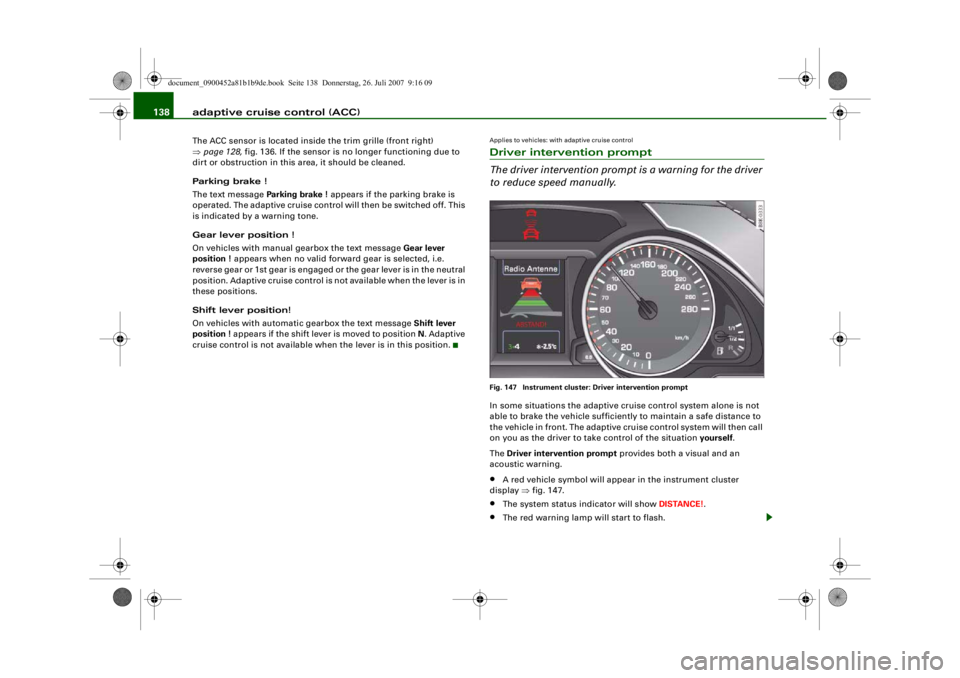
to reduce speed manually.Fig. 147 Instrument cluster: Driver intervention promptIn some situations the adaptive cruise control system alone is not
able to brake the vehicle sufficiently to maintain a safe distance to
the vehicle in front. The adaptive cruise control system will then call
on you as the driver to ta ke control of the situation yourself.
The Driver intervention prompt provides both a visual and an
acoustic warning.•
A red vehicle symbol will appear in the instrument cluster
display ⇒fig. 147.
•
The system status indicator will show DISTANCE!.
•
The red warning lamp will start to flash.
document_0900452a81b1b9de.book Seite 138 Donnerstag, 26. Juli 2007 9:16 09
--4 -
-T
-+
•
+-
Page 141 of 342

adaptive cruise control (ACC)139
Controls
Safety
Driving tips
General maintenance
Self-help
Technical data
•
An acoustic warning will also sound (unless it has been deacti-
vated in the sound syst em or MMI* settings).Note
•
Pressing the brake pedal will switch off the adaptive cruise
control system. The speed set at that point will, however, remain
stored until the adaptive cruise control is activated again.
•
To resume the programmed cruising speed, release the brake
pedal and pull the control lever towards you ⇒page 132,
“Switching off the system (with speed memory function) and reacti-
vating it”.
•
If you exceed the target speed by pressing the accelerator, the
driver intervention prompt will not be accompanied by a warning
tone. The indicator lamp shown in the display will also switch off
when the target speed is exceeded.
•
If the adaptive cruise control triggers a braking operation the
hydraulic brake system is under pressure. This is why brake pedal
travel will be shorter and the pedal will feel “harder”.
Applies to vehicles: with adaptive cruise controlSetting the warning tone volume and driving program
You can change the adaptive cruise control settings on
the sound system or MMI* to suit your individual driving
style.– Select: Function selector button > adaptive cruise
control .Setting the volume of the warning tone
If the adaptive cruise control syst em switches off (e.g. when the ESP
intervenes) or a driver intervention prompt appears, a warning tone
will sound.
You can set the volume of the warning tone to low, medium , or high .
The new volume will sound briefly after making any adjustment. If
you do not want a tone to sound, select off.
Adjusting the basic settings
You can set the distance (time interv al) you want the adaptive cruise
control system to keep to the vehicle in front by selecting distance
1 , distance 2 , distance 3 or distance 4 .
Fig. 148 Display: adap-
tive cruise control
CAR
document_0900452a81b1b9de.book Seite 139 Donnerstag, 26. Juli 2007 9:16 09
--4 -
-T
[I]
-+
•
+-
Page 142 of 342

adaptive cruise control (ACC)
140Setting the driving program
In the Driving program menu you can select either dynamic,
standard or comfort according to your personal preferences.
Note
•
We recommend you to leave the warning tone switched on. Even
when the warning tone is switched off, not every warning tone will
be deactivated.
•
When you pass the key on to somebody else please remember to
make the other driver aware of the ACC settings.
•
We recommend a minimum distance setting of DISTANCE 3
(factory default setting).
•
When the ignition is switched off, the distance setting reverts to
the factory default DISTANCE 3. A qualified workshop can cancel
this function. In this case a defa ult distance setting defined on the
sound system or MMI* is applied each time the engine is started.
System limitationsApplies to vehicles: with adaptive cruise controlGeneral notes
The following situations coul d impair the function of the
radar sensor.The adaptive cruise control is subject to given physical limits and
also has certain limits determined by the system itself. Under
certain circumstances the driver may feel that the ACC system is
responding unexpectedly or belatedly. For this reason, please
always give your full attention to road traffic and if necessary take
action yourself:•
When driving through bends ⇒page 140 .
•
When vehicles in front are not in line with your vehicle
⇒ page 141 .
•
When other vehicles change lanes ⇒page 141 .
•
When other vehicles are not clearly discernible ⇒page 141
•
When vehicles are stationary ⇒page 142 .
WARNING
The radar sensor's "field of vision" can be impaired by rain, snow
or a lot of water on the road. This results in vehicles in front not
being properly recognised or, in some circumstances, not being
detected at all. If necessary, take action yourself!Applies to vehicles: with adaptive cruise controlWhen driving through bends
Fig. 149 Driving into a
bendFig. 150 Driving out of
a bend
document_0900452a81b1b9de.book Seite 140 Donnerstag, 26. Juli 2007 9:16 09
--4 -
-T
[I)
. I
-+
•
+-
Page 143 of 342

adaptive cruise control (ACC)141
Controls
Safety
Driving tips
General maintenance
Self-help
Technical data
Driving into a bend
When you are driving into a bend
, the ACC system may react to a
vehicle travelling in the other lane and therefore brake the vehicle
⇒ page 140, fig. 149. You can override the braking effect by pressing
the accelerator.
Driving out of a bend
When you are driving out of a long bend, the ACC system may - in
the course of its calculation of th e lane ahead - react to a vehicle
travelling in the other lane and therefore brake the vehicle
⇒ page 140, fig. 150. You can override the braking effect by pressing
the accelerator.
Applies to vehicles: with adaptive cruise controlVehicles in front travelling out of lineVehicles in front which are not in line with your vehicle cannot be
detected by the ACC system until they are within the range of the
sensor.
Applies to vehicles: with adaptive cruise controlOther vehicles changing lanesVehicles which are very close to you when they move onto your lane
cannot be detected by the radar sensor until they move into its
range.Applies to vehicles: with adaptive cruise controlNot clearly discernible vehiclesVehicles that are not clearly discernible, e.g. a motorcycle travelling
in front of you and vehicles with a large amount of ground clearance
or protruding freight, are often identified late or may not be
detected at all.
Fig. 151 The vehicle in
front is outside the
range of the radar
sensor
Fig. 152 A vehicle is
changing lanesFig. 153 Motorcycle in
front
document_0900452a81b1b9de.book Seite 141 Donnerstag, 26. Juli 2007 9:16 09
--4 -
-T
•
-+
•
+-
•
Page 144 of 342
adaptive cruise control (ACC)
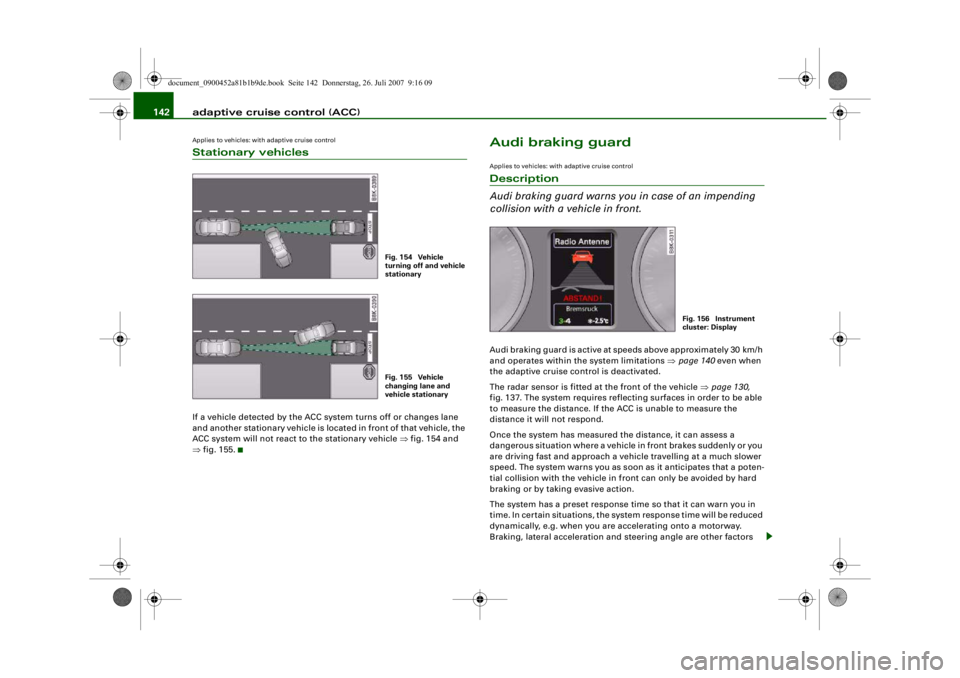
142Applies to vehicles: with adaptive cruise controlStationary vehiclesIf a vehicle detected by the ACC system turns off or changes lane
and another stationary vehicle is loca ted in front of that vehicle, the
ACC system will not react to the stationary vehicle ⇒fig. 154 and
⇒ fig. 155.
Audi braking guardApplies to vehicles: with adaptive cruise controlDescription
Audi braking guard warns you in case of an impending
collision with a vehicle in front.Audi braking guard is active at speeds above appr oximately 30 km/h
and operates within the system limitations ⇒ page 140 even when
the adaptive cruise control is deactivated.
The radar sensor is fitted at the front of the vehicle ⇒page 130,
fig. 137. The system requires reflecting surfaces in order to be able
to measure the distance. If the ACC is unable to measure the
distance it will not respond.
Once the system has measured the distance, it can assess a
dangerous situation where a vehicle in front brakes suddenly or you
are driving fast and approach a vehicle travelling at a much slower
speed. The system warns you as soon as it anticipates that a poten-
tial collision with the vehicle in front can only be avoided by hard
braking or by taking evasive action.
The system has a preset response time so that it can warn you in
time. In certain situations, the system response time will be reduced
dynamically, e.g. when you are accelerating onto a motorway.
Braking, lateral acceleration and steering angle are other factors
Fig. 154 Vehicle
turning off and vehicle
stationaryFig. 155 Vehicle
changing lane and
vehicle stationary
Fig. 156 Instrument
cluster: Display
document_0900452a81b1b9de.book Seite 142 Donnerstag, 26. Juli 2007 9:16 09
--4 -
-T
-+ +-
•
Page 145 of 342

adaptive cruise control (ACC)143
Controls
Safety
Driving tips
General maintenance
Self-help
Technical data
which can shorten the system response time. The warning will be
deactivated if you press the accelerator pedal right down in order to
overtake.
The system draws the driver's attention to two different hazardous
situations:
Distance !
A distance warning will be given if you travel too close to the vehicle
in front for longer than 5 seconds. For example, if the distance is
less than 9 m at 80 km/h, a message
will appear in the instrument
cluster display ⇒page 142, fig. 156.
If the vehicle in front were to brake hard, a collision would no longer
be avoidable, even if you reacted immediately. In this case, you
should leave more room between yo ur car and the vehicle in front.
Speed
If the vehicle in front of you is travelling in the same lane at a much
slower speed or if it brakes hard, the Audi braking guard will calcu-
late the time at which a collision can be avoided only by emergency
braking or evasive action. When the system warns you, it is possible
to avoid a potential collision with the vehicle in front by braking or
changing lane. There are two warning levels:
•
Early warning: A message will appear in the instrument cluster
display and you will also hear a warning tone.
•
Acute warning: The second (acute) warning will be triggered if
you do not react to the advance warning. There will automatically be
a short dab of the brakes to remind you to concentrate on the traffic.
If you brake hard, the brake assist system ⇒page 222 helps you to
achieve the optimum braking effect.
WARNING
Please always direct your full attention to the road, even when the
Audi braking guard is activated. It is always you who is responsible for determining your speed and for
keeping a safe distance to the
other vehicles on the road.
•
Always maintain the statutory mi nimum safety distance to the
vehicle in front (risk of accident).
•
Due to the system limi tations, the Audi braking guard will not
react in certain situations, fo r example when approaching a
stationary obstacle (such as the end of a traffic jam or a broken-
down vehicle).
•
Please note that the Audi braking guard is subject to limita-
tions in tight bends on account of the radar sensor's field of vision.
This means that obstacles may not be detected in certain situa-
tions.
•
The radar sensor's "field of vision" can be impaired by rain,
snow or a lot of water on the road. This results in vehicles not
being reliably recognised or, in some circumstances, not being
detected at all. Always keep the ro ad ahead within your field of
vision.
•
Reflecting objects, such as crash barriers or the entrance to a
tunnel, could impair the function of the radar sensor.
Applies to vehicles: with adaptive cruise controlStatus messages in the instrument cluster displaybraking guard brake jolt
This driver message appears when the brakes are dabbed due to an
acute warning.
braking guard off
This driver message appears when the system is switched off in the
MMI. The message also appears briefly after you begin driving if the
system is switched off.
WARNING (continued)
document_0900452a81b1b9de.book Seite 143 Donnerstag, 26. Juli 2007 9:16 09
--4 -
-T
-+ +-
•
Page 147 of 342
Audi lane assist145
Controls
Safety
Driving tips
General maintenance
Self-help
Technical data
Audi lane assistAudi lane assistApplies to vehicles: with lane assistDescription
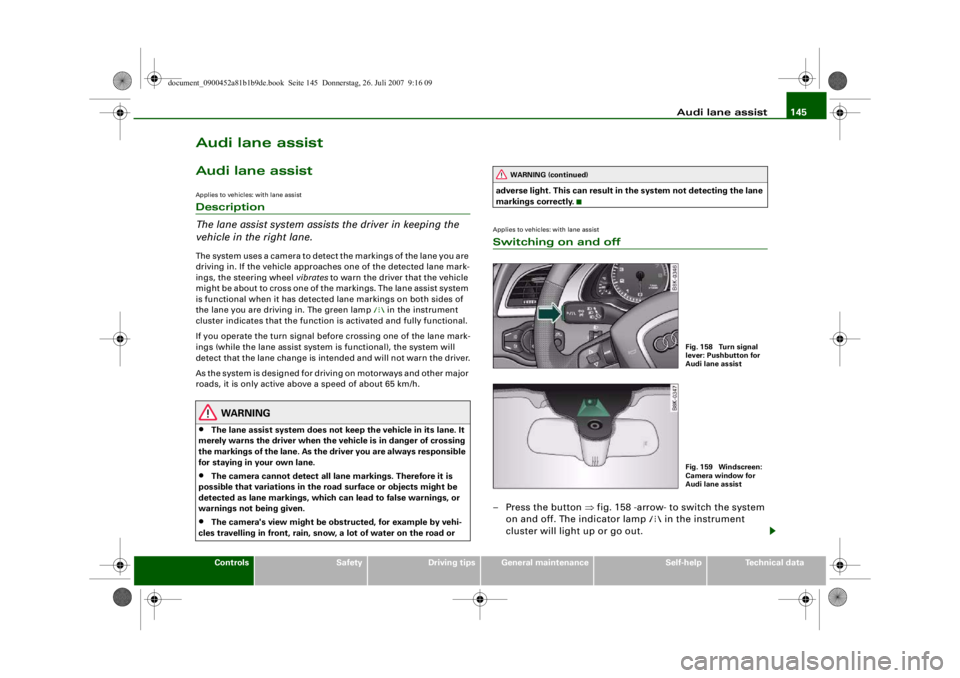
The lane assist system assist s the driver in keeping the
vehicle in the right lane.The system uses a camera to detect the markings of the lane you are
driving in. If the vehicle approaches one of the detected lane mark-
ings, the steering wheel vibrates to warn the driver that the vehicle
might be about to cross one of the markings. The lane assist system
is functional when it has detected lane markings on both sides of
the lane you are driving in. The green lamp
in the instrument
cluster indicates that the function is activated and fully functional.
If you operate the turn signal before crossing one of the lane mark-
ings (while the lane assist system is functional), the system will
detect that the lane change is in tended and will not warn the driver.
As the system is designed for driving on motorways and other major
roads, it is only active above a speed of about 65 km/h.
WARNING
•
The lane assist system does not keep the vehicle in its lane. It
merely warns the driver when the vehicle is in danger of crossing
the markings of the lane. As the driver you are always responsible
for staying in your own lane.
•
The camera cannot det ect all lane markings. Therefore it is
possible that variations in the road surface or objects might be
detected as lane markings, which can lead to false warnings, or
warnings not being given.
•
The camera's view might be obst ructed, for example by vehi-
cles travelling in front, rain, snow, a lot of water on the road or adverse light. This can result in
the system not detecting the lane
markings correctly.
Applies to vehicles: with lane assistSwitching on and off– Press the button ⇒fig. 158 -arrow- to switch the system
on and off. The indicator lamp
in the instrument
cluster will light up or go out.
WARNING (continued)
Fig. 158 Turn signal
lever: Pushbutton for
Audi lane assistFig. 159 Windscreen:
Camera window for
Audi lane assist
document_0900452a81b1b9de.book Seite 145 Donnerstag, 26. Juli 2007 9:16 09
--4 -
-T
•
-+ +-