Page 217 of 268

2007 Volvo XC90
18. -
19. Engine control module feed, engine relay 5
20. Parking lights 15
21. -
pg. 203 Maintenance
Fuses
Fuses in the passenger compartment
Fuses are located inside the access panel on the edge of the dashboard, \
on the driver's side. There are
also a number of spare fuses. When replacing a blown fuse, be sure to re\
place it with a new one of the
same color and amperage (written on the fuse).
No. Amperage
1. Blower - climate system 30
2. Audio amplifier 30
3. Power driver's seat (option) 25
4. Power passenger's seat (option) 25
5. Driver's door - central locking, power windows, door mirror 25
6. Front passenger's door - central locking, power windows, door mirror \
25
7. -
8. Radio, CD player, Rear Seat Entertainment (RSE) 15
9. Volvo Navigation System (option), Sirius satellite radio (option)\
10
10. On-board diagnostics, headlight switch, steering wheel angle sensor,\
steering wheel
module 5
file:///K|/ownersdocs/2007/2007_XC90/07xc90_09.htm (31 of 37)12/30/200\
6 5:53:51 PM
Page 230 of 268

2007 Volvo XC90
Fuel tank 21.1 US gals. (80 liters) Minimum octane requirement - AKI 87 (RON
91) - unleaded fuel (See also page 117)
Transmission oil
1
TF-80SC 7.4 US qts. (7.0 liters)
Miscellaneous
Power steering 1.1 US qts. (1.0 liters)
Windshield washer
reservoir 6.9 US qts. (6.5 liters)
Brake fluid 0.63 US qts. (0.6 liters)
Air conditioning system Front - 2.2 lb. (1 kg), Rear (option) 2.9 lb. (1.3 kg) R 134a (HF\
C134a)
Coolant Volvo original coolant/antifreeze (Thermostat begins to open at 194°\
F
(90° C)).
3.2 6-cyl. 7.9 US qts. (7.5 liters)
V8 10.7 US qts. (10.2 liters)
1. The transmission oil does not normally need to be changed during the \
service life of the vehicle. However, it
may be necessary to replace the oil if the vehicle is often driven in ar\
eas of sustained temperature extremes (hot
or cold), when towing a trailer over long distances, for prolonged driv\
ing in mountainous areas, or if the vehicle
is often driven short distances in temperatures under 40°F (5°C)\
.
Transmission
Oil grade:
Type: JWS 3309
Different types of oil should never be mixed.
Power steering
Grade: Volvo synthetic power steering fluid (Pentosin CHF 11S) P/N 1161529 o\
r equivalent.
Brake fluid
Fluid type: DOT 4+ boiling point >536° F (280° C), P/N 9437433
Rear suspension
Individual rear wheel suspension with longitudinal support arms, double \
link arms and track rods.
Front suspension
Spring strut suspension with integrated shock absorbers and control arms\
linked to
file:///K|/ownersdocs/2007/2007_XC90/07xc90_10.htm (7 of 10)12/30/2006\
5:53:52 PM
Page 236 of 268
2007 Volvo XC90
Steering wheel keypad (option)
The four buttons on the steering wheel keypad can be used to control the\
audio system. The steering
wheel keypad can be used to adjust volume, shift between preset stations\
and change CD tracks.
l Press the buttons briefly to search for a radio station, or to go to the next/pre\
vious track
on a CD
l Press and hold down these buttons to search within a track.
Display
The display (1) shows the currently selected function, menu selections\
, etc.
Clean the display with a dry, soft, lint-free cloth. Do not use cleaning\
agents.
Accessing and using menus
In menu mode, you can change settings and program new functions in the a\
udio system. The various
menu alternatives are shown in the display, and the current level in the\
menu structure is shown at the
upper right corner of the display.
Press the menu button (2) to enter menu mode.
file:///K|/ownersdocs/2007/2007_XC90/07xc90_11.htm (3 of 26)12/30/2006\
5:53:54 PM
Page 240 of 268
2007 Volvo XC90
pg. 224 Audio
Radio functions
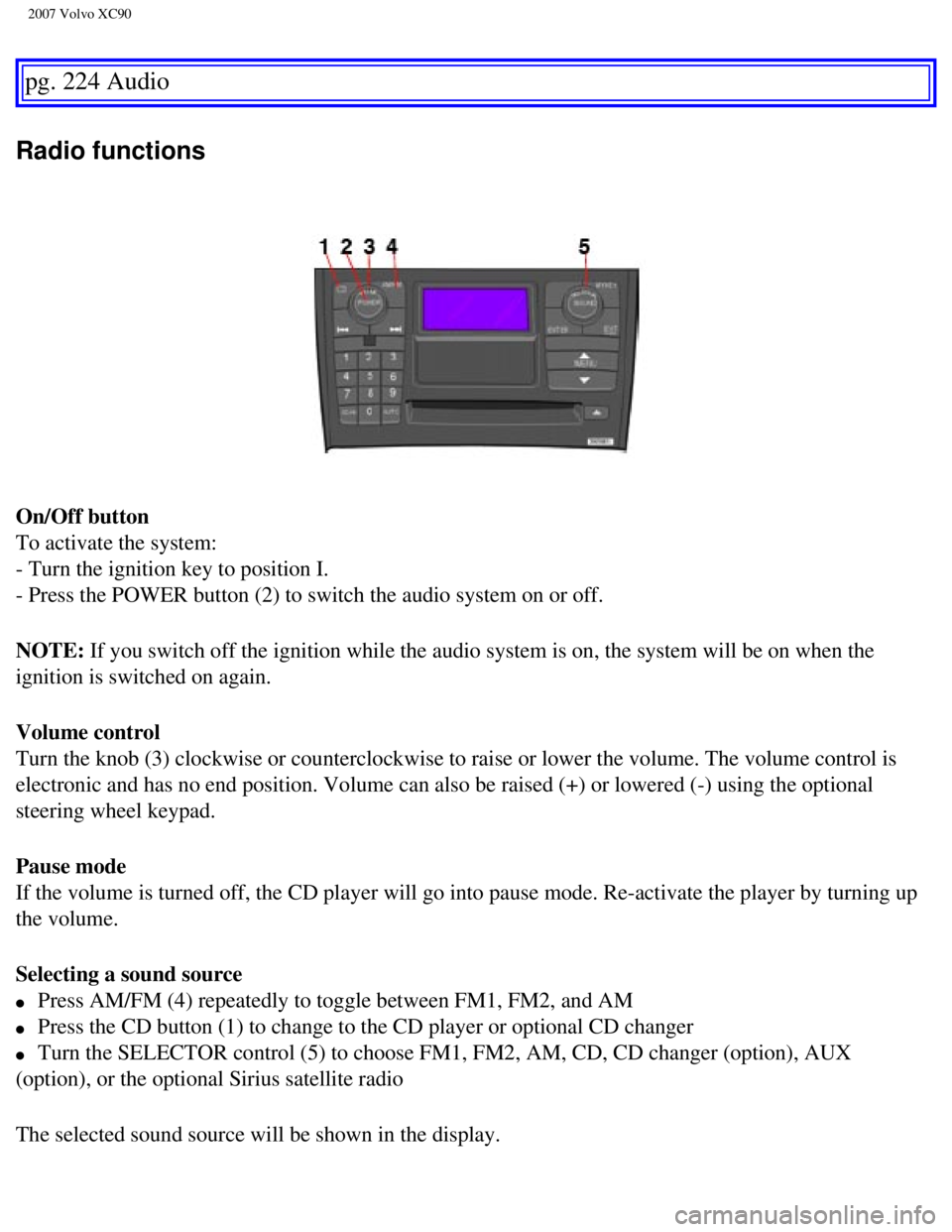
On/Off button
To activate the system:
- Turn the ignition key to position I.
- Press the POWER button (2) to switch the audio system on or off.
NOTE: If you switch off the ignition while the audio system is on, the system \
will be on when the
ignition is switched on again.
Volume control
Turn the knob (3) clockwise or counterclockwise to raise or lower the \
volume. The volume control is
electronic and has no end position. Volume can also be raised (+) or l\
owered (-) using the optional
steering wheel keypad.
Pause mode
If the volume is turned off, the CD player will go into pause mode. Re-a\
ctivate the player by turning up
the volume.
Selecting a sound source
l Press AM/FM (4) repeatedly to toggle between FM1, FM2, and AM
l Press the CD button (1) to change to the CD player or optional CD chan\
ger
l Turn the SELECTOR control (5) to choose FM1, FM2, AM, CD, CD changer (\
option), AUX
(option), or the optional Sirius satellite radio
The selected sound source will be shown in the display.
file:///K|/ownersdocs/2007/2007_XC90/07xc90_11.htm (7 of 26)12/30/2006\
5:53:54 PM
Page 243 of 268

2007 Volvo XC90
- Select AUDIO SETTINGS in the menu and press ENTER.
- Select Equalizer FR and press ENTER.
- Use the menu selection buttons to set the level or use the SELECTOR co\
ntrol.
- Press ENTER to select the next frequency. You can select five frequenc\
ies.
- Press ENTER until you come to the menu mode to save the changes you ha\
ve made.
Equalizer RR
EQ - REAR (certain audio systems)
This function is used to fine-tune the sound from the rear speakers.
- Select AUDIO SETTINGS in the menu and press ENTER.
- Select EQ- REAR and press ENTER.
Use the menu selection buttons to set the level or use the SELECTOR cont\
rol.
- Press ENTER to select the next frequency. You can select five frequenc\
ies
Press ENTER until you come to the menu mode to save the changes you have\
made.
pg. 227 Audio
Radio functions
Station search
- Choose radio mode AM/FM1/FM2 using the SELECTOR control (3) or the A\
M/FM button (1).
- Press briefly on
to search for the next strong station. The radio will search for the ne\
xt
audible station and then stop.
- Press one of the buttons again to start a new search.
Manually search for a known frequency
- Press and hold the
button (or the corresponding buttons on the steering wheel keypad).
MAN will be shown in the display. The radio will slowly scroll in the de\
sired direction and then increase
file:///K|/ownersdocs/2007/2007_XC90/07xc90_11.htm (10 of 26)12/30/200\
6 5:53:54 PM
Page 251 of 268
2007 Volvo XC90
quality may be impaired.
The volume of the external sound source AUX may be different from the vo\
lume of the internal sound
sources such as the CD player or the radio.
Auxiliary sound level
If the external sound source's volume is too high, the quality of the so\
und may be impaired.
This can be prevented by adjusting the external sound source's input vol\
ume.
- Select AUX VOLUME in the menu and press ENTER.
- Adjust the volume with SELECTOR (1) or with the up/down arrows (2)\
and press ENTER.
NOTE:
l This cannot be done with the optional steering wheel keypad.
l The cover over the cup holders should be open when an auxiliary device i\
s connected.
pg. 233 Audio
CD functions
Playing a CD
file:///K|/ownersdocs/2007/2007_XC90/07xc90_11.htm (18 of 26)12/30/200\
6 5:53:54 PM
Page 253 of 268

2007 Volvo XC90
To pause CD playback, turn the volume all the way down. "CD paused" will\
be displayed. This will not
occur if someone in the rear seat is listening to the CD through the opt\
ional headphones. Play will
resume when the volume is turned up again.
Audio files
In addition to playing normal music CDs, the CD player/changer can also \
play discs containing files in
mp3 or wma format.
pg. 234 Audio
CD functions
NOTE: Certain discs that are copy protected cannot be read by the player. Whe\
n a disc with audio files
is inserted in the player, the player scans the disc's folders before it\
begins playing the files. The length
of time that this takes depends on the quality of the disc.
Navigating the disc and playing tracks
If a disc with audio files is in the CD player, press ENTER to display a\
list of folders on the disc.
Use the up and down arrows to move among the folders on the disc. Audio \
files have the
symbol and
folders containing these files have the
symbol.
Press ENTER to play a selected folder or a file.
When the music file has been played, the player will continue to play th\
e rest of the files in the current
folder. When all of the files in the folder have been played, the player\
will automatically go to the next
folder and play the files in it.
NOTE: Press
if the entire name of the current track does not fit in the display.
Changing tracks
CD player/CD changer
l Briefly press to go to the next/ previous track or file. The optional steering wheel \
keypad can be used in the same way.
l Press and hold down to search within a track/file. The search continues as long as the
buttons are depressed. The optional steering wheel keypad can be used in\
the same way.
SCAN
This function plays the first ten seconds of each track or file
1.
- Press SCAN to begin scanning the tracks or files on the currently sele\
cted CD.
- Press EXIT/CLEAR or SCAN to interrupt the scan function and listen to \
an entire track or file.
Random play
file:///K|/ownersdocs/2007/2007_XC90/07xc90_11.htm (20 of 26)12/30/200\
6 5:53:54 PM
Page 264 of 268
2007 Volvo XC90
HomeLink® Universal Transceiver 237
I
Ignition switch
121
Immobilizer (start inhibitor)
104
Indicator and warning symbols
46, 47
Inflation pressure table
US models
154
Inflation pressure tables
154
Inflation pressure, checking
153
Inspection, preparing for
182
Integrated booster cushion
40
Interior lighting
91
Introduction
1
J
Jacking your vehicle
166
K
Keylock
2, 119
L
Label information
208
Locking steering wheel
121
Locking the car
108
Long distance trips
144
Low beam headlights
58
M
Maintenance services
180
Maintenance, periodic
181
Malfunction indicator light
48
Mirrors - sideview, folding
52
Moonroof
73
MP3 player, connecting
232
Multifilter with air quality sensor
82
O
file:///K|/ownersdocs/2007/2007_XC90/07xc90_12.htm (5 of 9)12/30/2006 \
5:53:56 PM

The four buttons on the steering wheel keypad can be used to control the\
audio system. The steering
wheel keypad can be used to adjust volume, shif")

