2007 VOLVO S80 light
[x] Cancel search: lightPage 38 of 251
In the event of a collision while the integrated booster cushion was occupied, the entire booster cushion and seat
belt must be replaced. The booster cushion should also be replaced if it is badly worn or damaged in any way. This
work should be performed by a trained and qualified Volvo service technician only
45 01 Safety
Child safety locks
Child safety locks
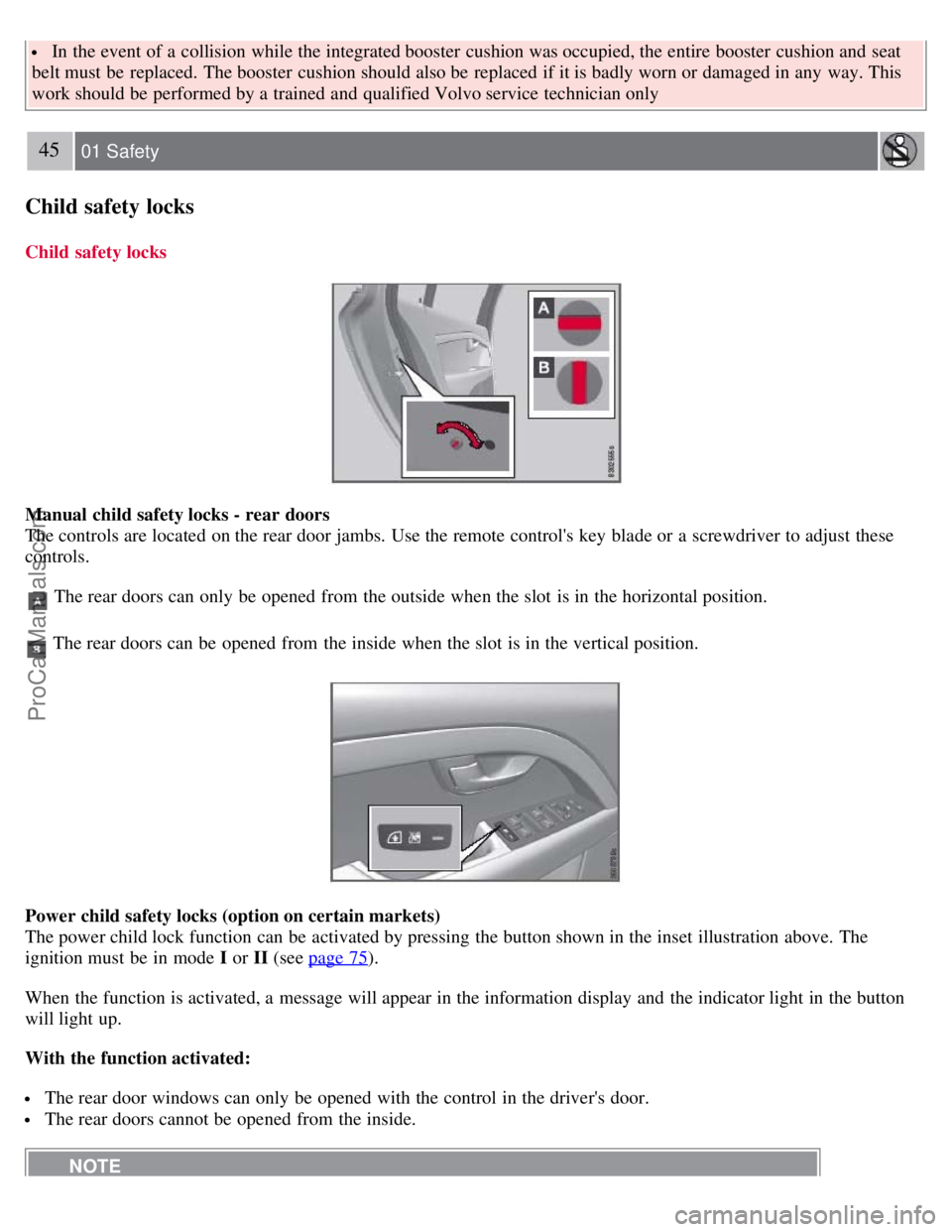
Manual child safety locks - rear doors
The controls are located on the rear door jambs. Use the remote control's key blade or a screwdriver to adjust these
controls.
The rear doors can only be opened from the outside when the slot is in the horizontal position.
The rear doors can be opened from the inside when the slot is in the vertical position.
Power child safety locks (option on certain markets)
The power child lock function can be activated by pressing the button shown in the inset illustration above. The
ignition must be in mode I or II (see page 75
).
When the function is activated, a message will appear in the information display and the indicator light in the button
will light up.
With the function activated:
The rear door windows can only be opened with the control in the driver's door.
The rear doors cannot be opened from the inside.
NOTE
ProCarManuals.com
Page 42 of 251
closed.
NOTE
If you do not receive confirmation when locking the vehicle, check whether a door or the trunk is ajar, or if this
feature has been turned off in the menu.
This function can be activated or deactivated under Car settings
Light settings Lock confirmation, light , or Car
settings
Light settings Unlock confirmation, light . See page 115 for a description of the menu system.
Immobilizer (start inhibitor)
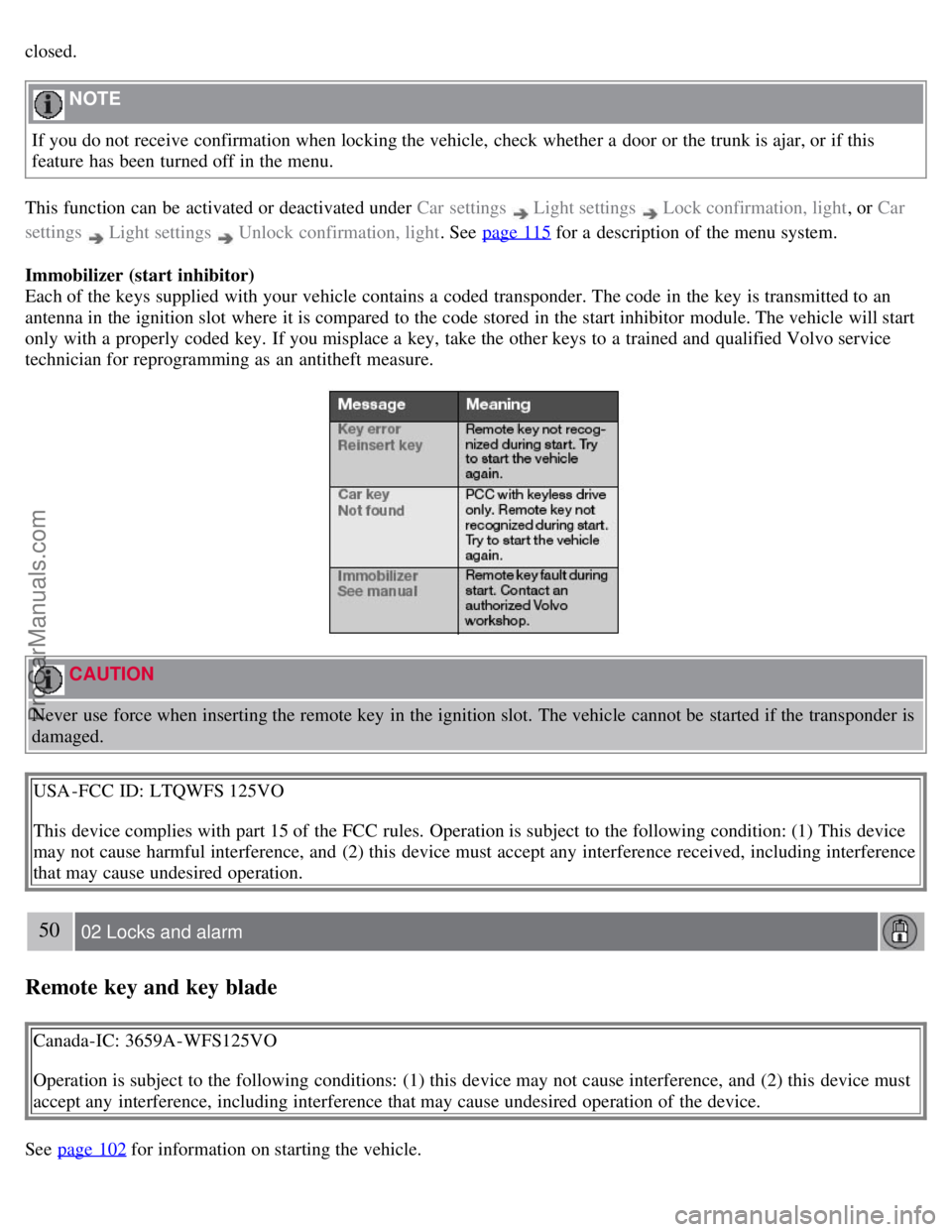
Each of the keys supplied with your vehicle contains a coded transponder. The code in the key is transmitted to an
antenna in the ignition slot where it is compared to the code stored in the start inhibitor module. The vehicle will start
only with a properly coded key. If you misplace a key, take the other keys to a trained and qualified Volvo service
technician for reprogramming as an antitheft measure.
CAUTION
Never use force when inserting the remote key in the ignition slot. The vehicle cannot be started if the transponder is
damaged.
USA -FCC ID: LTQWFS 125VO
This device complies with part 15 of the FCC rules. Operation is subject to the following condition: (1) This device
may not cause harmful interference, and (2) this device must accept any interference received, including interference
that may cause undesired operation.
50 02 Locks and alarm
Remote key and key blade
Canada-IC: 3659A-WFS125VO
Operation is subject to the following conditions: (1) this device may not cause interference, and (2) this device must
accept any interference, including interference that may cause undesired operation of the device.
See page 102
for information on starting the vehicle.
ProCarManuals.com
Page 43 of 251
Replacing the battery in the remote key
The batteries should be replaced if:
The information symbol illuminates and Replace car key battery is shown in the display and/or
if the locks do not react after several attempts to unlock or lock the vehicle.
NOTE
The remote key's range is normally approximately 60 ft (20 m) from the vehicle.
See page 55
for information on replacing the battery.
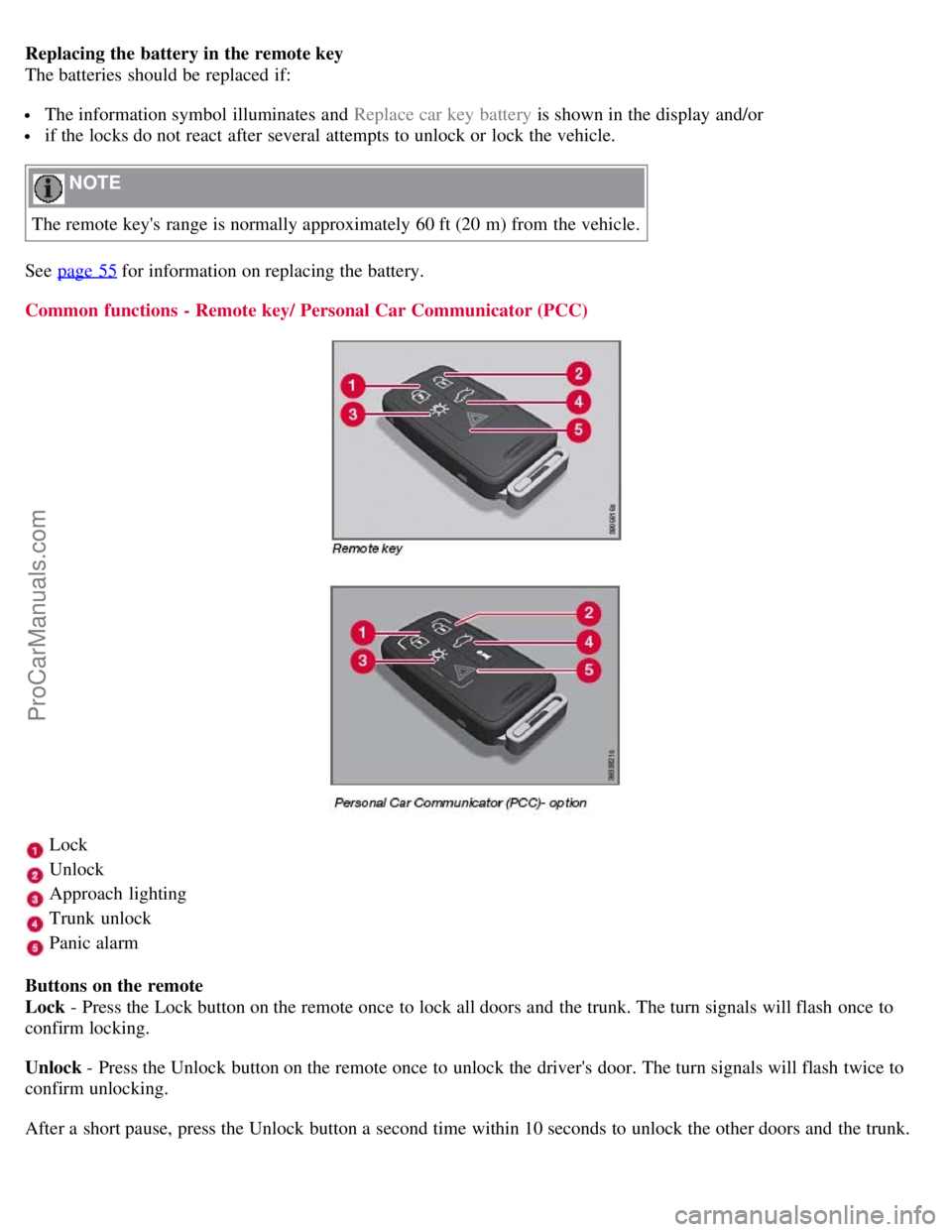
Common functions - Remote key/ Personal Car Communicator (PCC)
Lock
Unlock
Approach lighting
Trunk unlock
Panic alarm
Buttons on the remote
Lock - Press the Lock button on the remote once to lock all doors and the trunk. The turn signals will flash once to
confirm locking.
Unlock - Press the Unlock button on the remote once to unlock the driver's door. The turn signals will flash twice to
confirm unlocking.
After a short pause, press the Unlock button a second time within 10 seconds to unlock the other doors and the trunk.
ProCarManuals.com
Page 44 of 251

This function can be changed so that all doors unlock at the same time under Car settings lock settings Doors,
unlock. See page 115 for a description of the menu system.
Approach lighting - As you approach the vehicle, press button
on the remote control to light the interior lighting,
parking lights, license plate lighting and the lights in the door mirrors (option).
51 02 Locks and alarm
Remote key and key blade
These lights will switch off automatically after 30, 60 or 90 seconds. See page 115 for more information.
Unlock trunk- Press the button once to disarm the alarm system and optional movement sensor (the alarm indicator
light on the dashboard will go out), and unlock only the trunk. See also page 61
for information on opening the trunk
from the inside.
NOTE
This function will not open the trunk.
As an added safety precaution, the parking lights will come on automatically for a short period when the trunk has
been opened.
After closing, the trunk will not automatically relock. Press Lock to relock it and rearm the alarm.
Panic alarm - This button can be used to attract attention during emergency situations.
To activate the panic alarm, press and hold button
for at least 3 seconds or press it twice within 3 seconds. The turn
signals and horn will be activated. The panic alarm will stop automatically after 2 minutes and 45 seconds. To
deactivate, wait approximately 5 seconds and press the button again.
Range
The remote key has a range of approximately 60 ft. (20 m) from the vehicle.
NOTE
This button will not unlock the vehicle.
Buildings or other obstacles may interfere with the function of the remote key. The vehicle can also be locked or
unlocked with the key blade, see page 53
.
Unique functions - PCC
ProCarManuals.com
Page 45 of 251

Information button
Indicator lights
Pressing the information button
provides certain information about the vehicle with the help of the indicator lights
.
Using the information button
1. Press the information button
.
2. All of the indicator lights
will flash sequentially for approximately 7 seconds to indicate that the PCC is receiving
information from the vehicle. If any of the buttons are pressed during this 7-second period, transmission of
52 02 Locks and alarm
Remote key and key blade
information to the PCC will be interrupted.
NOTE
If none of the indicator lights flash when the information button has been pressed several times from different places
in relation to the vehicle, contact an authorized Volvo service technician.
The indicator lights
provide information according to the illustration below.
Steady green light: the vehicle is correctly locked.
Steady yellow light: the vehicle is not locked.
Steady red light: the alarm has been triggered.
Flashing red lights (Heartbeat sensor): if the two heartbeat sensor lights flash, this indicates that someone may be
inside the vehicle. These lights are only activated if the alarm has been triggered.
Range
The PCC's lock and unlock functions have a range of approximately 60 ft. (20 m) from the vehicle.
NOTE
The approach lighting, panic alarm, and the functions controlled by the information button have a range of
ProCarManuals.com
Page 46 of 251

approximately 300 ft (100 m) from the vehicle.
Buildings or other obstacles may interfere with the function of the PCC.
Outside of the PCC's range
If the PCC is more than approximately 300 ft (100 m) from the vehicle when the information button is pressed, no new
information will be received. The PCC most recently used to lock or unlock the vehicle will show the vehicle's most
recently received status. The indicator lights will not flash when the information button is pressed while the PCC is out
of range.
NOTE
If none of the indicator lights illuminate when the information button is pressed, this may be because the most recent
transmission between the vehicle and the PCC was interrupted or impeded by buildings or other objects.
Heartbeat Sensor
The heartbeat sensor function
is a complement to the vehicle's standard alarm, and indicates at a distance of up to
300 ft (100 m) that someone may be in the vehicle. The heartbeat sensor only functions if the alarm has been triggered.
NOTE
The heartbeat sensor registers a person's heartbeat in the form of vibrations in the vehicle's chassis. For this reason,
the sensor's function may be impaired in areas with high levels of noise or vibrations.
Keyless drive
Vehicles equipped with the optional Personal Car Communicator have the keyless drive function. See page 56
for
detailed information.
53 02 Locks and alarm
Remote key and key blade
Detachable key blade
The key blade can be removed from the remote control. When removed, the key blade can be used as follows:
To lock/unlock the driver's door
To lock/unlock the trunk (see page 61)
To lock/unlock the glove compartment (see page 60)
To enable/disable the valet locking function (see page 54)
Unlocking the doors with the detached key blade
Insert the key blade as far as possible in the driver's door lock. Turn the key blade clockwise approximately one -
quarter turn to unlock the driver's door only.
NOTE
After unlocking the driver's door with the key blade, opening the door will trigger the alarm.
To disable the alarm:
Insert the remote key in the ignition slot.
ProCarManuals.com
Page 54 of 251
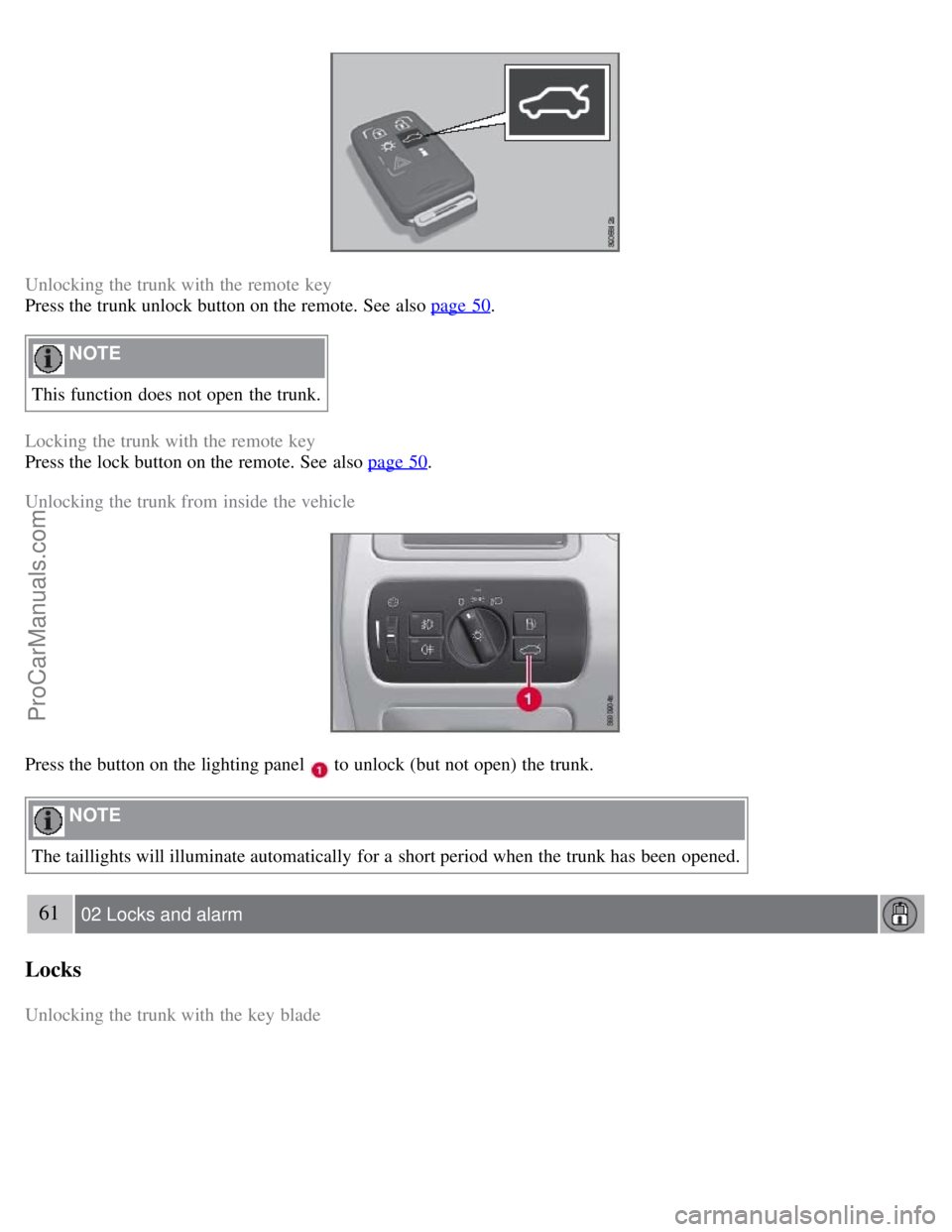
Unlocking the trunk with the remote key
Press the trunk unlock button on the remote. See also page 50
.
NOTE
This function does not open the trunk.
Locking the trunk with the remote key
Press the lock button on the remote. See also page 50
.
Unlocking the trunk from inside the vehicle
Press the button on the lighting panel to unlock (but not open) the trunk.
NOTE
The taillights will illuminate automatically for a short period when the trunk has been opened.
61 02 Locks and alarm
Locks
Unlocking the trunk with the key blade
ProCarManuals.com
Page 56 of 251

Alarm
The alarm system
The alarm is automatically armed whenever the vehicle is locked with the remote key or optional Personal Car
Communicator.
When armed, the alarm continuously monitors a number of points on the vehicle. The following conditions will trigger
the alarm:
The hood is forced open.
The trunk is forced open.
A door is forced open.
The ignition slot is tampered with
An attempt is made to start the vehicle with a non-approved key (a key not coded to the car's ignition).
If there is movement in the passenger compartment (if the vehicle is equipped with the accessory movement sensor).
The vehicle is lifted or towed (if the vehicle is equipped with the accessory inclination sensor)
The battery is disconnected (while the alarm is armed).
The siren is disconnected when the alarm is disarmed.
A message will appear in the information display if a fault should occur in the alarm system. Contact an authorized
Volvo service technician.
NOTE
Do not attempt to repair any of the components in the alarm system yourself. This could affect the insurance policy
on the vehicle.
The alarm indicator light
The status of the alarm system is indicated by the indicator light on the dashboard (see illustration):
Indicator light off - the alarm is not armed
The indicator light flashes at one -second intervals - the alarm is armed
The indicator light flashes rapidly before the remote key is inserted in the ignition slot - the alarm has been
triggered.
Arming the alarm
Press the Lock button on the remote key. One long flash of the turn signals will confirm that the alarm is armed.
Alarm confirmation settings can be changed under Car settings
Lock settings Keyless entry . See page 115 for a
ProCarManuals.com