2007 VOLVO S80 fog light
[x] Cancel search: fog lightPage 63 of 251

technician as soon as possible.
A malfunction indicator (CHECK ENGINE) light may have many causes. Sometimes, you may not notice a change in
your car's behavior. Even so, an uncorrected condition could hurt fuel economy, emission controls, and drivability.
Extended driving without correcting the cause could even damage other components in your vehicle.
Canadian models are equipped with this symbol:
Anti-lock Brake System (ABS) warning light
If the warning light comes on, there may be a malfunction in the ABS system (the standard braking system will still
function). Check the system by:
1. Stopping in a safe place and switching off the ignition.
72 03 Your driving environment
Instruments and controls
2. Restart the engine.
3. If the warning light goes off, no further action is required.
If the warning light remains on, the vehicle should be driven to a trained and qualified Volvo service technician for
inspection. See page 107
for additional information.
Canadian models are equipped with this symbol:
Rear fog light
This symbol indicates that the rear fog light (located in the driver's side tail light cluster) is on.
Stability system
This indicator symbol flashes when the DSTC (Dynamic Stability and Traction Control system) is actively working to
stabilize the vehicle. See page 139
for more detailed information.
Tire pressure monitoring system (TPMS) - option
This symbol illuminates to indicate that tire pressure in one or more tires is low. See page 223
for detailed information.
Low fuel level
When this light comes on, there are approximately 2.1 US gallons (8 liters) of fuel remaining in the tank.
Information symbol
The information symbol illuminates and a text message is displayed if a fault is detected in one of the vehicle's
systems. The message can be erased and the symbol can be turned off by pressing the READ button (see page 116
for
information) or this will take place automatically after a short time (the length of time varies, depending on the
function affected).
The information symbol may also illuminate together with other symbols.
High beam indicator
This symbol illuminates when the high beam headlights are on, or if the high beam flash function is used.
ProCarManuals.com
Page 76 of 251
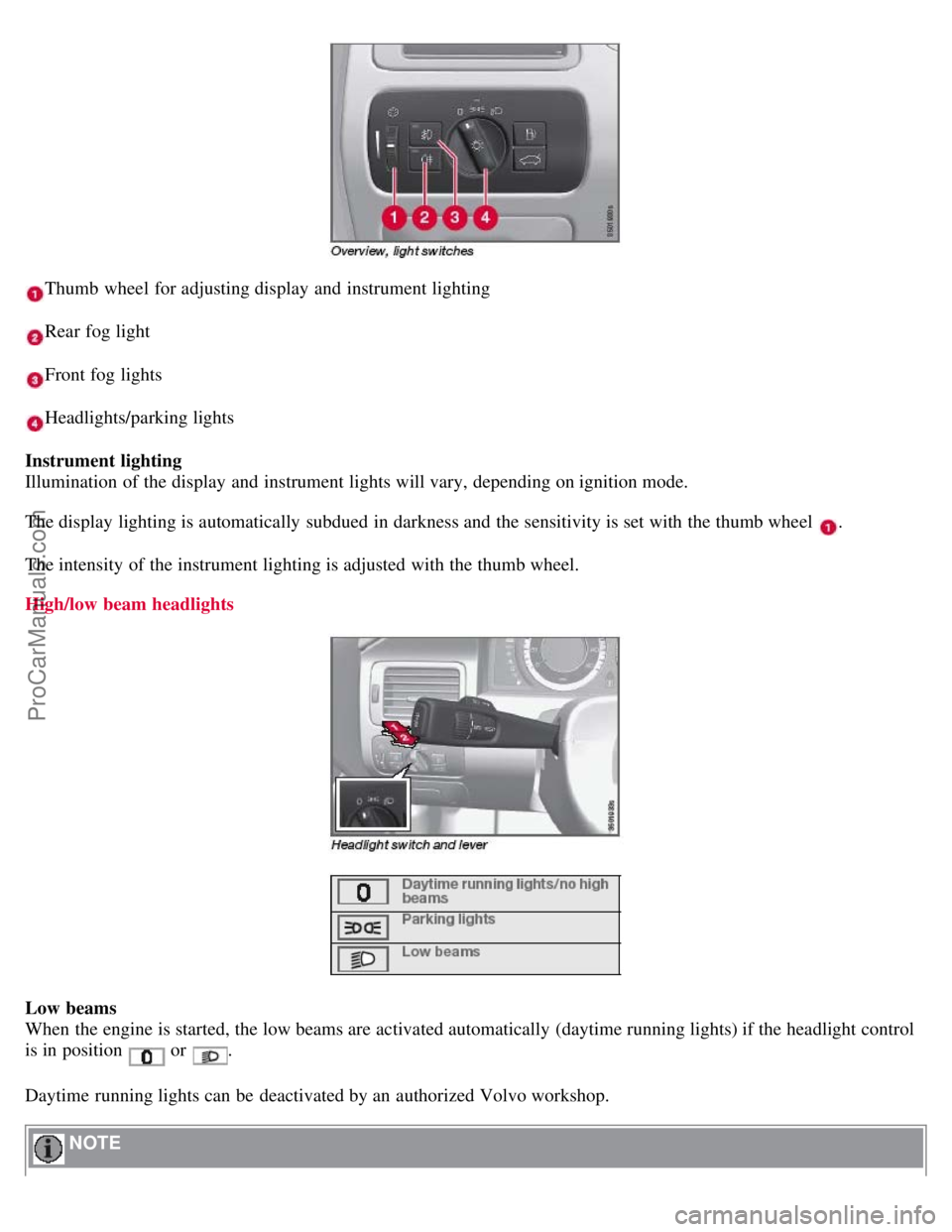
Thumb wheel for adjusting display and instrument lighting
Rear fog light
Front fog lights
Headlights/parking lights
Instrument lighting
Illumination of the display and instrument lights will vary, depending on ignition mode.
The display lighting is automatically subdued in darkness and the sensitivity is set with the thumb wheel
.
The intensity of the instrument lighting is adjusted with the thumb wheel.
High/low beam headlights
Low beams
When the engine is started, the low beams are activated automatically (daytime running lights) if the headlight control
is in position
or .
Daytime running lights can be deactivated by an authorized Volvo workshop.
NOTE
ProCarManuals.com
Page 78 of 251
Parking lights
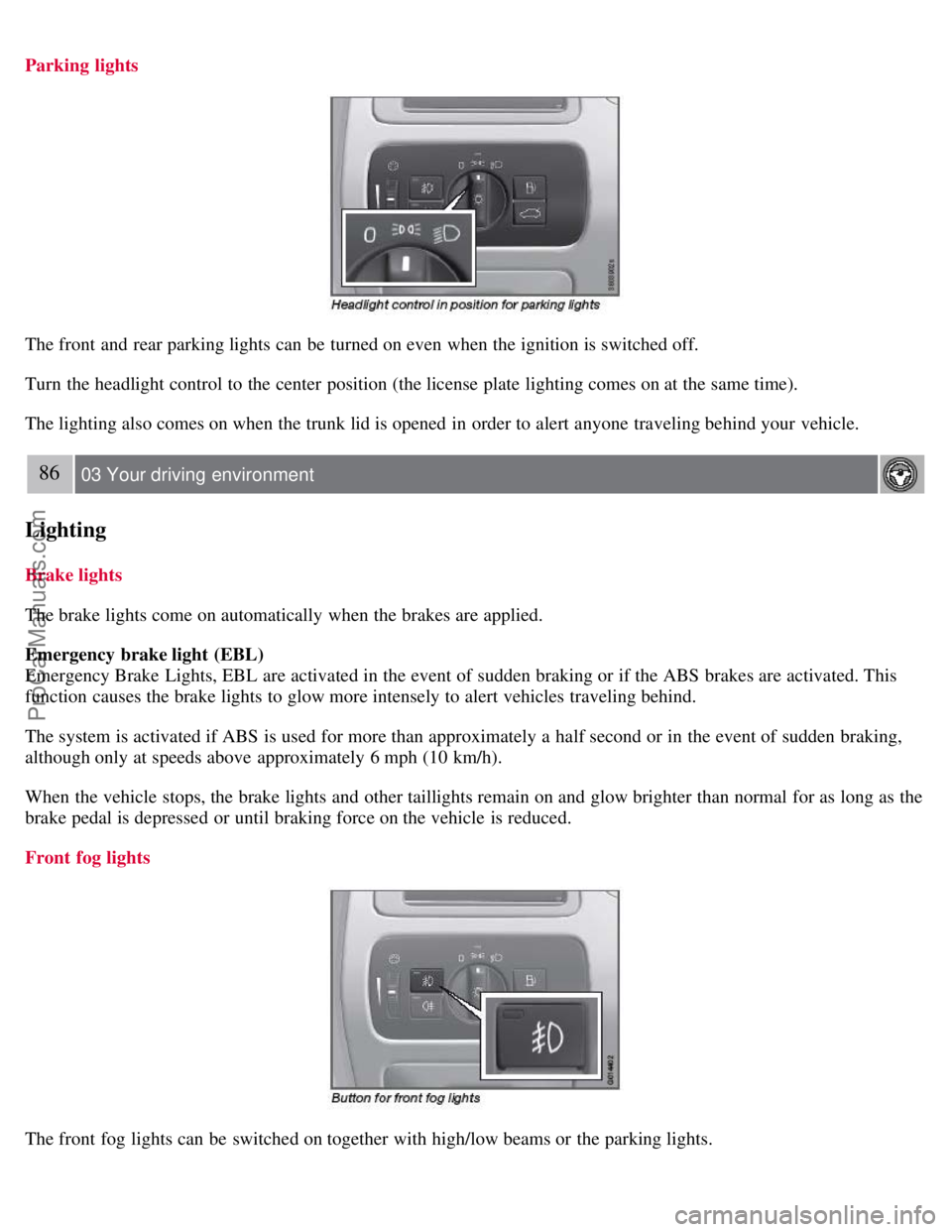
The front and rear parking lights can be turned on even when the ignition is switched off.
Turn the headlight control to the center position (the license plate lighting comes on at the same time).
The lighting also comes on when the trunk lid is opened in order to alert anyone traveling behind your vehicle.
86 03 Your driving environment
Lighting
Brake lights
The brake lights come on automatically when the brakes are applied.
Emergency brake light (EBL)
Emergency Brake Lights, EBL are activated in the event of sudden braking or if the ABS brakes are activated. This
function causes the brake lights to glow more intensely to alert vehicles traveling behind.
The system is activated if ABS is used for more than approximately a half second or in the event of sudden braking,
although only at speeds above approximately 6 mph (10 km/h).
When the vehicle stops, the brake lights and other taillights remain on and glow brighter than normal for as long as the
brake pedal is depressed or until braking force on the vehicle is reduced.
Front fog lights
The front fog lights can be switched on together with high/low beams or the parking lights.
ProCarManuals.com
Page 79 of 251

Press the button to switch the fog lights on/off. The light in the button comes on when the fog lights are on.
NOTE
Regulations regarding the use of the front fog lights may vary, depending on where you drive.
Rear fog light
The single rear fog light is located in the driver's side taillight cluster.
The rear fog light will only function in combination with the high/low beam headlights or the optional front fog lights.
Press the button to switch the rear fog light on/off. The rear fog light indicator symbol
on the instrument panel
and the light in the button come on when the rear fog light is switched on.
87 03 Your driving environment
Lighting
NOTE
The rear fog light is considerably brighter than the normal tail lights and should be used only when conditions such
as fog, rain, snow, smoke or dust reduce visibility for other vehicles to less than 500 ft. (150 meters).
Hazard warning flashers
The hazard warning flasher should be used to indicate that the vehicle has become a traffic hazard. To activate the
flashers, press the button in the center dash. Press the button again to turn off the flashers.
ProCarManuals.com
Page 117 of 251

Press the button once for the highest heat level - three indicator lights come on.
Press the button twice for a lower heat level - two indicator lights come on.
Press the button three times for the lowest heat level - one indicator light comes on.
Press the button four times to switch off the heat - no indicator lights come on.
Heated rear seats
1
Heat control for the outboard seating positions takes place in the same way as for the front seat.
Air distribution
The figure consists of three buttons. When the buttons are pressed, an indicator light in front of the respective part of
the figure illuminates and shows which air distribution is selected, see page 124
.
1Option on Canadian models only.
122 04 Comfort and driving pleasure
Climate system
Auto
The function automatically regulates cooling, heating, blower speed, recirculation, and air distribution to maintain the
chosen temperature. If you select one or more manual functions, the other functions continue to be controlled
automatically. The air quality sensor is engaged and all manual settings are switched off when AUTO is pressed. The
display shows AUTO CLIMATE .
Blower speed in automatic mode can be set under Climate settings
Automatic blower adjust . Choose between Low,
Normal or High.
NOTE
Selecting the lowest blower speed may increases the risk of fog forming on the windows.
ProCarManuals.com
Page 119 of 251

123 04 Comfort and driving pleasure
Climate system
If the air in the car recirculates for too long, there is a risk of condensation forming on the insides of the windows,
especially in winter.
Timer
The timer function minimizes the risk of fogging, or stale air when the recirculation function is selected by
automatically switching off the function after a certain length of time, depending on the ambient temperature.
Activate/deactivate the function under Climate control settings
Recirculation timer. For a description of the menu
system, see page 115
.
NOTE
When Defroster is selected, recirculation is always deactivated.
Interior Air Quality System -IAQS (option)
This system consists of a multifilter and an air quality sensor. The filter helps remove gases and particles from the
incoming air, thereby reducing the amounts of odors and contaminants entering the vehicle. The air quality sensor
detects increased levels of contaminants in the outside air. When the air quality sensor detects contaminated outside
air, the air intake closes and the air inside the passenger compartment is recirculated, i.e., no outside air enters the
vehicle. The filter also cleans recirculated passenger compartment air. When the AUTO button is depressed the air
quality sensor is always engaged.
Activating the air quality sensor
Switch between the three functions by pressing the button repeatedly.
The left orange light comes on - the air quality sensor is disengaged.
The center green light comes on - recirculation not engaged, providing it is not required for cooling in hot weather.
The right orange light comes on - recirculation is engaged.
NOTE
The air quality sensor should always be engaged in order to obtain the best air in the passenger compartment.
Recirculation is limited in cold weather to avoid fogging.
If the insides of the windows start fogging, disengage the air quality sensor. Use the defroster function to increase
airflow to the front, side, and rear windows.
124 04 Comfort and driving pleasure
ProCarManuals.com
Page 155 of 251
cameras were obscured.
In both of the above mentioned conditions, a message will appear in the information display.
When driving in such conditions, the system's function will be limited or it may be temporarily switched off. See
page 157
for instructions.
When the message is no longer displayed, BLIS will return to normal function.
The BLIS cameras have the same limitation as the human eye. In other words, their "vision is impaired" by
adverse weather conditions such as heavy snowfall, dense fog, etc.
157 04 Comfort and driving pleasure
Blind Spot Information System (option)
Cleaning the BLIS camera lenses
In order to function optimally, the BLIS camera lenses must be kept clean. They can be wiped clean with a soft cloth
or wet sponge.
CAUTION
Clean the lenses carefully to avoid scratching.
The lenses are electrically heated to help melt ice or snow. If necessary, gently brush away snow from the lenses.
Switching BLIS on and off
BLIS is automatically activated when the ignition is switched on. The indicator lights will provide confirmation by
flashing 3 times.
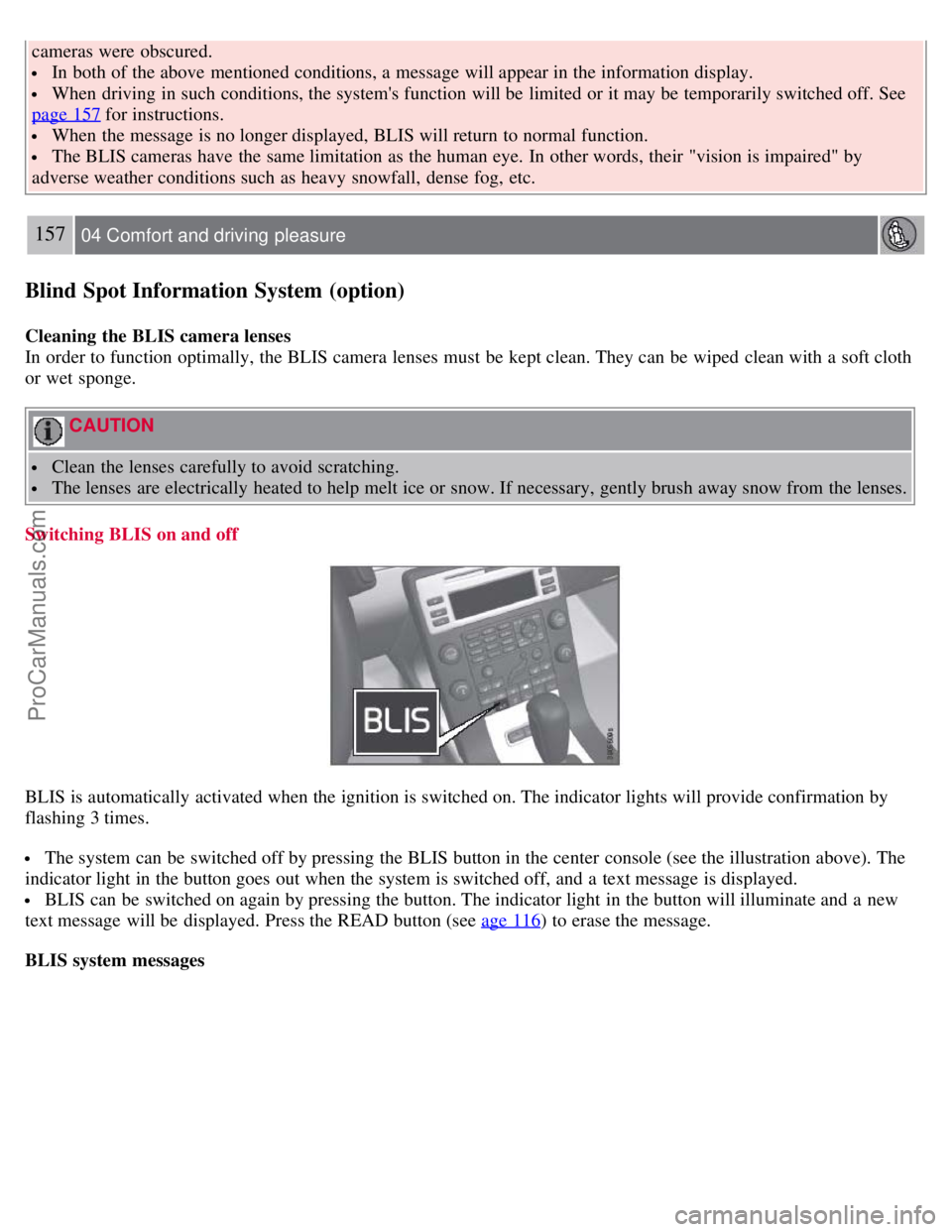
The system can be switched off by pressing the BLIS button in the center console (see the illustration above). The
indicator light in the button goes out when the system is switched off, and a text message is displayed.
BLIS can be switched on again by pressing the button. The indicator light in the button will illuminate and a new
text message will be displayed. Press the READ button (see age 116
) to erase the message.
BLIS system messages
ProCarManuals.com
Page 191 of 251
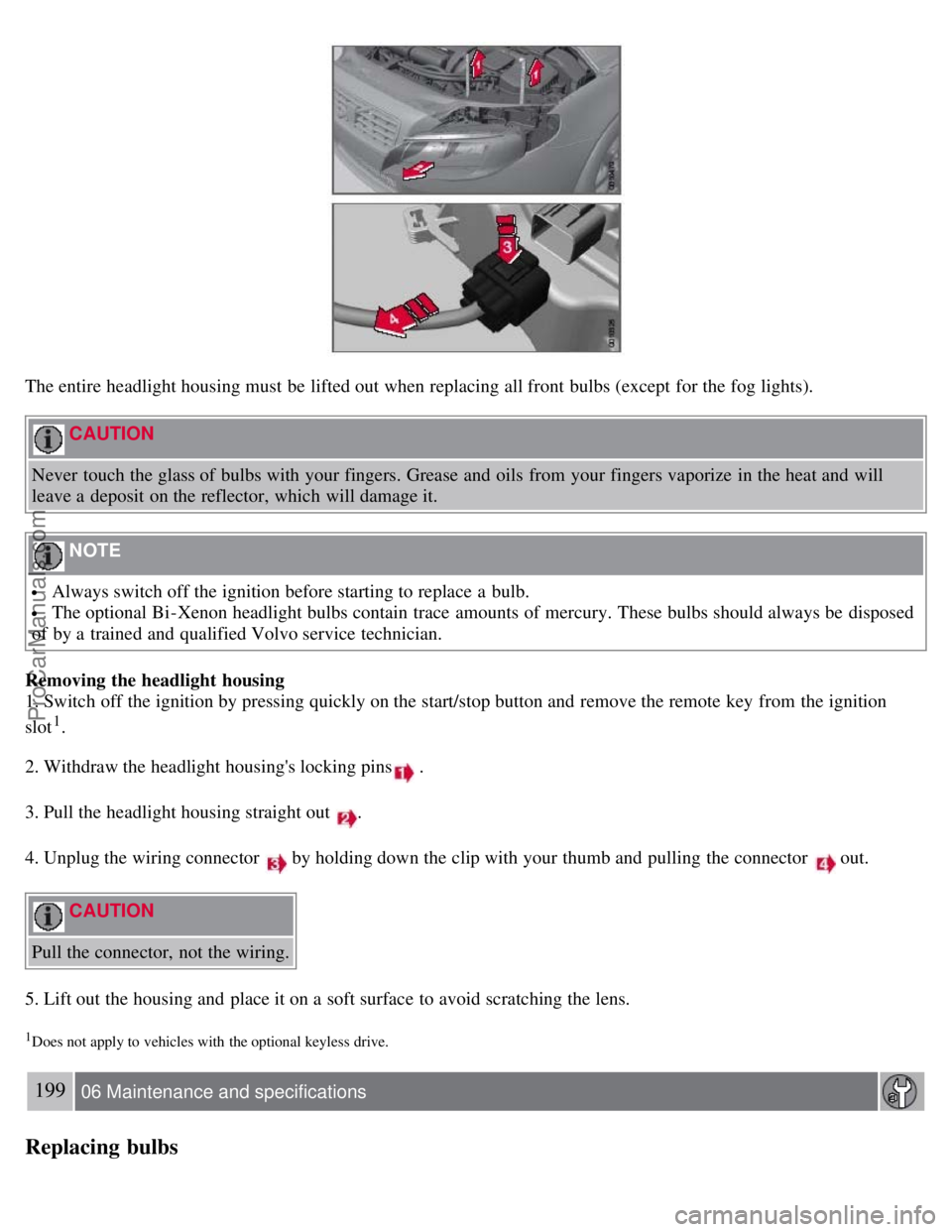
The entire headlight housing must be lifted out when replacing all front bulbs (except for the fog lights).
CAUTION
Never touch the glass of bulbs with your fingers. Grease and oils from your fingers vaporize in the heat and will
leave a deposit on the reflector, which will damage it.
NOTE
Always switch off the ignition before starting to replace a bulb.
The optional Bi -Xenon headlight bulbs contain trace amounts of mercury. These bulbs should always be disposed
of by a trained and qualified Volvo service technician.
Removing the headlight housing
1. Switch off the ignition by pressing quickly on the start/stop button and remove the remote key from the ignition
slot
1.
2. Withdraw the headlight housing's locking pins
.
3. Pull the headlight housing straight out
.
4. Unplug the wiring connector
by holding down the clip with your thumb and pulling the connector out.
CAUTION
Pull the connector, not the wiring.
5. Lift out the housing and place it on a soft surface to avoid scratching the lens.
1Does not apply to vehicles with the optional keyless drive.
199 06 Maintenance and specifications
Replacing bulbs
ProCarManuals.com