Page 289 of 458
289
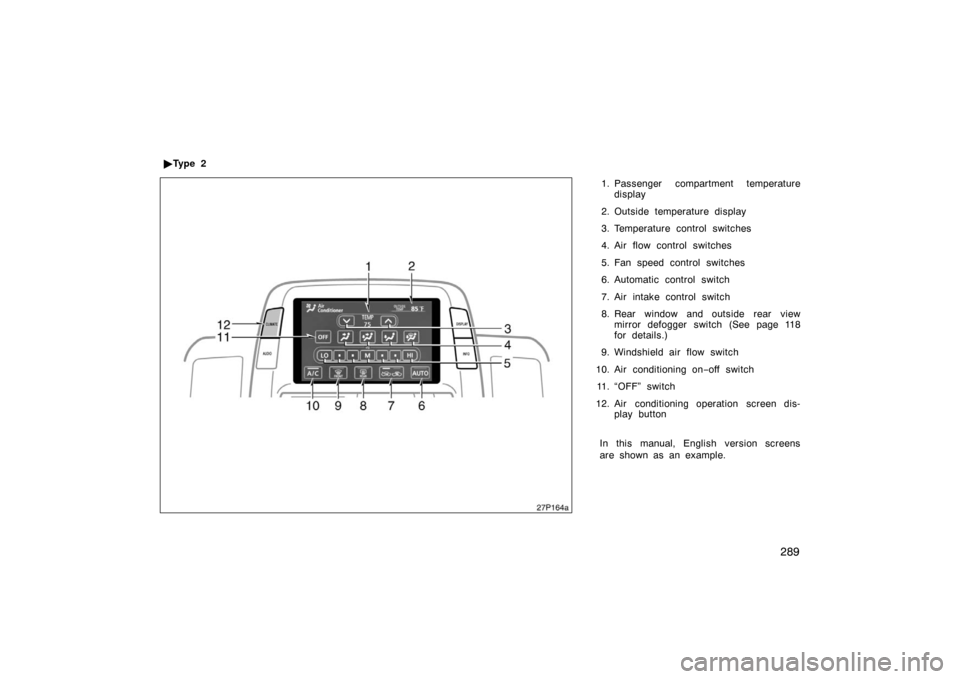
1. Passenger compartment temperaturedisplay
2. Outside temperature display
3. Temperature control switches
4. Air flow control switches
5. Fan speed control switches
6. Automatic control switch
7. Air intake control switch
8. Rear window and outside rear view mirror defogger switch (See page 118
for details.)
9. Windshield air flow switch
10. Air conditioning on −off switch
11. “OFF” switch
12. Air conditioning operation screen dis- play button
In this manual, English version screens
are shown as an example.
�
Ty p e 2
27p164a
Page 290 of 458
290
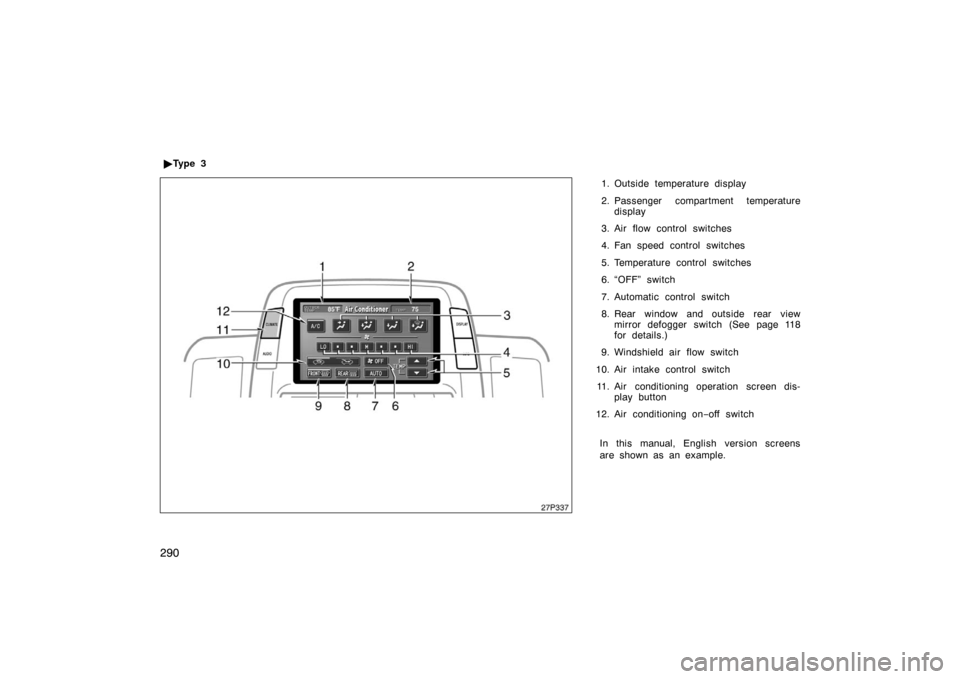
1. Outside temperature display
2. Passenger compartment temperaturedisplay
3. Air flow control switches
4. Fan speed control switches
5. Temperature control switches
6. “OFF” switch
7. Automatic control switch
8. Rear window and outside rear view mirror defogger switch (See page 118
for details.)
9. Windshield air flow switch
10. Air intake control switch 11. Air conditioning operation screen dis- play button
12. Air conditioning on −off switch
In this manual, English version screens
are shown as an example.
�
Ty p e 3
27p337
Page 296 of 458
296
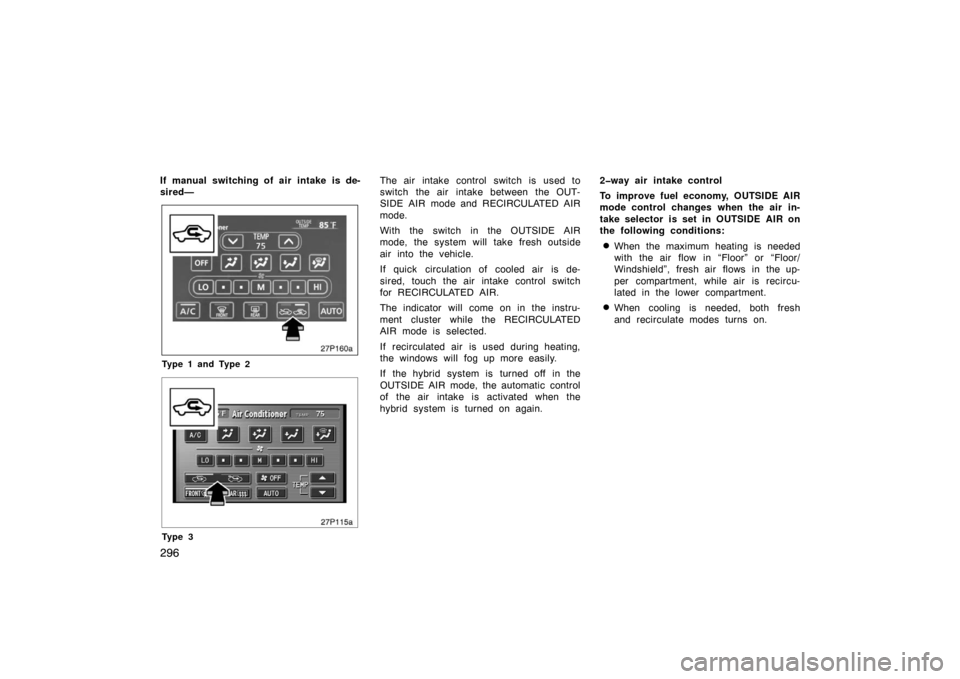
If manual switching of air intake is de-
sired—
27p160a
Type 1 and Type 2
27p115a
Ty p e 3
The air intake control switch is used to
switch the air intake between the OUT-
SIDE AIR mode and RECIRCULATED AIR
mode.
With the switch in the OUTSIDE AIR
mode, the system will take fresh outside
air into the vehicle.
If quick circulation of cooled air is de-
sired, touch the air intake control switch
for RECIRCULATED AIR.
The indicator will come on in the instru-
ment cluster while the RECIRCULATED
AIR mode is selected.
If recirculated air is used during heating,
the windows will fog up more easily.
If the hybrid system is turned off in the
OUTSIDE AIR mode, the automatic control
of the air intake is activated when the
hybrid system is turned on again.2way air intake control
To improve fuel economy, OUTSIDE AIR
mode control changes when the air in-
take selector is set in OUTSIDE AIR on
the following conditions:
�When the maximum heating is needed
with the air flow in “Floor” or “Floor/
Windshield”, fresh air flows in the up-
per compartment, while air is recircu-
lated in the lower compartment.
�When cooling is needed, both fresh
and recirculate modes turns on.
Page 297 of 458
297
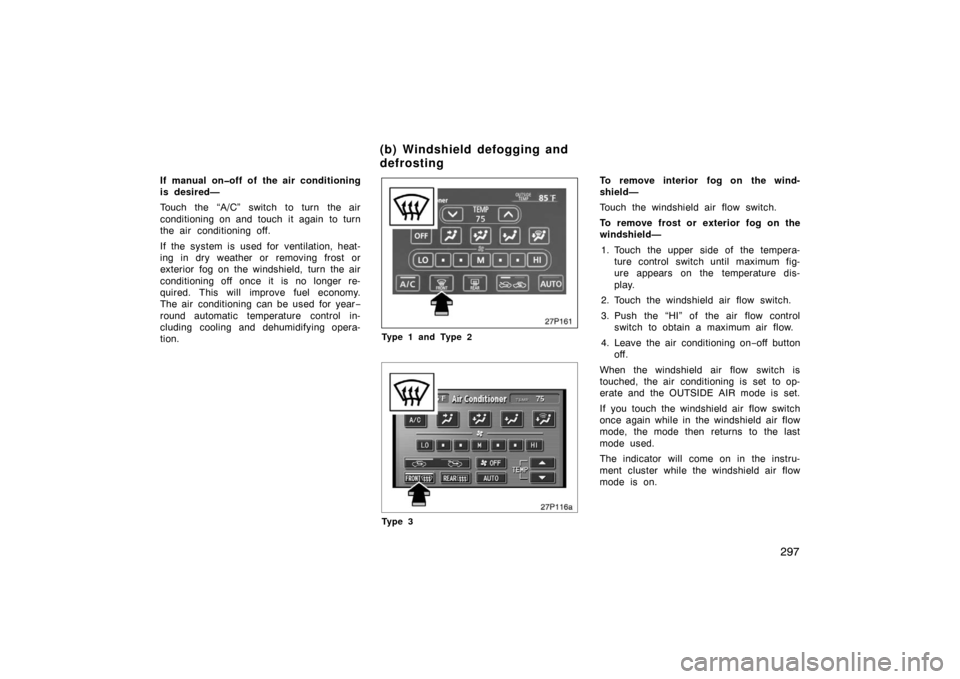
If manual onoff of the air conditioning
is desired—
Touch the “A/C” switch to turn the air
conditioning on and touch it again to turn
the air conditioning off.
If the system is used for ventilation, heat-
ing in dry weather or removing frost or
exterior fog on the windshield, turn the air
conditioning off once it is no longer re-
quired. This will improve fuel economy.
The air conditioning can be used for year−
round automatic temperature control in-
cluding cooling and dehumidifying opera-
tion.
27p161
Type 1 and Type 2
27p116a
Ty p e 3
To remove interior fog on the wind-
shield—
Touch the windshield air flow switch.
To remove frost or exterior fog on the
windshield— 1. Touch the upper side of the tempera- ture control switch until maximum fig-
ure appears on the temperature dis-
play.
2. Touch the windshield air flow switch.
3. Push the “HI” of the air flow control switch to obtain a maximum air flow.
4. Leave the air conditioning on −off button
off.
When the windshield air flow switch is
touched, the air conditioning is set to op-
erate and the OUTSIDE AIR mode is set.
If you touch the windshield air flow switch
once again while in the windshield air flow
mode, the mode then returns to the last
mode used.
The indicator will come on in the instru-
ment cluster while the windshield air flow
mode is on.
(b) Windshield defogging and
defrosting
Page 298 of 458

298
CAUTION
Do not use the windshield air flow
switch during cooled air operation in
extremely humid weather. The differ-
ence between the temperature of the
outside air and that of the windshield
could cause the outer surface of the
windshield to fog up blocking your
vision.
27p126
�The light sensor is located on the driv-
er ’s side edge of the instrument panel.
If you put anything on this area or
cover the area, the sensor function
may be adversely affected.
�To cool off your Toyota after it has
been parked in the hot sun, drive with
the windows open for a few minutes.
This vents the hot air, allowing the air
conditioning to cool the interior more
quickly.
�Make sure the air intake grilles in front
of the windshield are not blocked (by
leaves or snow, for example).
�On humid days, do not blow cold air
on the windshield. The windshield could
fog up because of the difference in air
temperature on the inside and outside
of the windshield.
�Keep the area under the front seats
clear to allow air to circulate through-
out the vehicle.
�On cold days, set the fan speed to
high for a minute to help clear the
intake ducts of snow or moisture. This
can reduce the amount of fogging on
the windows.
�When driving on dusty roads, close all
windows. If dust thrown up by the ve-
hicle is still drawn into the vehicle after
closing the windows, it is recommended
that the air intake selector be set to
OUTSIDE AIR and the fan speed se-
lector to any setting except “OFF”.
�If following another vehicle on a dusty
road, or driving in windy and dusty
conditions, it is recommended that the
air intake selector be temporarily set to
RECIRCULATE, which will close off the
outside passage and prevent outside
air and dust from entering the vehicle
interior.
(c) Operating tips
Page 299 of 458
299
27p104
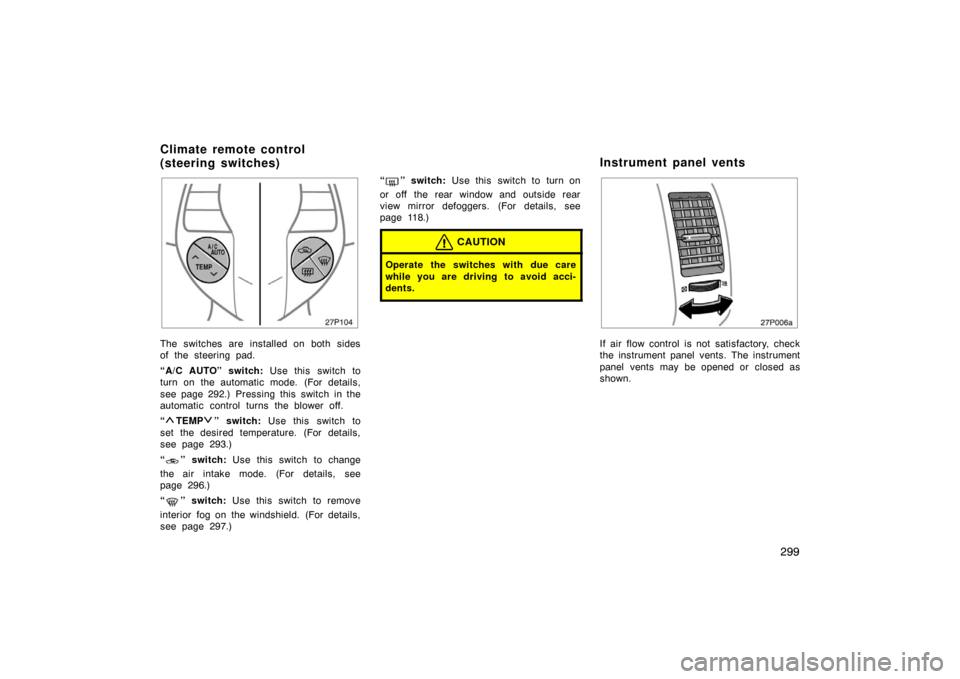
The switches are installed on both sides
of the steering pad.
“A/C AUTO” switch: Use this switch to
turn on the automatic mode. (For details,
see page 292.) Pressing this switch in the
automatic control turns the blower off.
“
TEMP” switch: Use this switch to
set the desired temperature. (For details,
see page 293.)
“
” switch: Use this switch to change
the air intake mode. (For details, see
page 296.)
“
” switch: Use this switch to remove
interior fog on the windshield. (For details,
see page 297.) “
” switch:
Use this switch to turn on
or off the rear window and outside rear
view mirror defoggers. (For details, see
page 118.)
CAUTION
Operate the switches with due care
while you are driving to avoid acci-
dents.
27p006a
If air flow control is not satisfactory, check
the instrument panel vents. The instrument
panel vents may be opened or closed as
shown.
Climate remote control
(steering switches) Instrument panel vents
Page 300 of 458
300
82p109
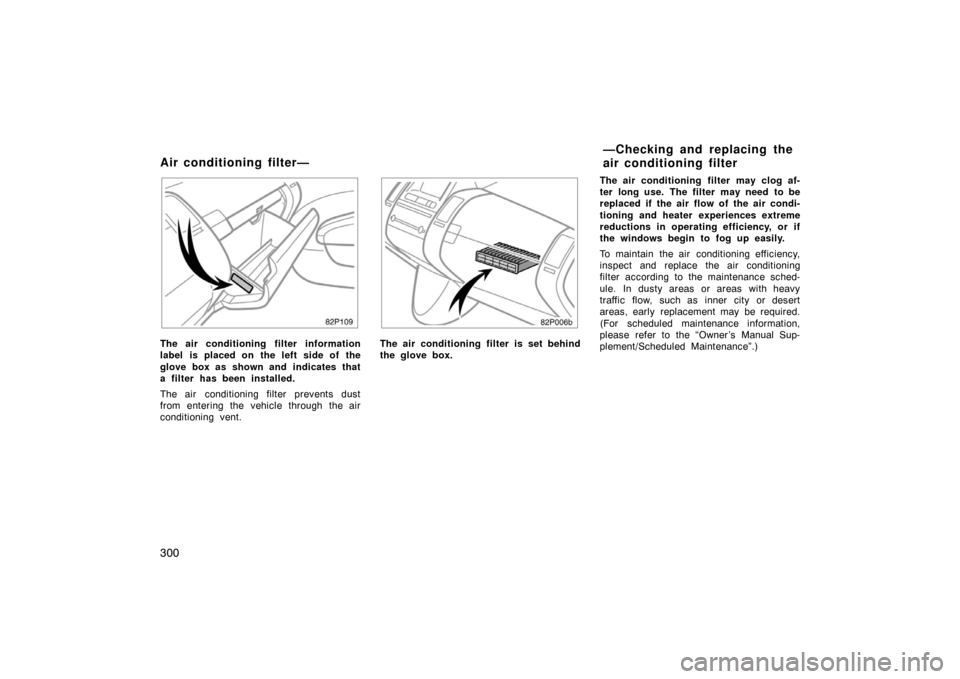
The air conditioning filter information
label is placed on the left side of the
glove box as shown and indicates that
a filter has been installed.
The air conditioning filter prevents dust
from entering the vehicle through the air
conditioning vent.
82p006b
The air conditioning filter is set behind
the glove box.The air conditioning filter may clog af-
ter long use. The filter may need to be
replaced if the air flow of the air condi-
tioning and heater experiences extreme
reductions in operating efficiency, or if
the windows begin to fog up easily.
To maintain the air conditioning efficiency,
inspect and replace the air conditioning
filter according to the maintenance sched-
ule. In dusty areas or areas with heavy
traffic flow, such as inner city or desert
areas, early replacement may be required.
(For scheduled maintenance information,
please refer to the “Owner ’s Manual Sup-
plement/Scheduled Maintenance”.)
Air conditioning filter—
—Checking and replacing the
air conditioning filter
Page 353 of 458
353
CAUTION
�Before driving off, make sure the
parking brake is fully released and
the parking brake reminder light is
off.
�Do not leave your vehicle unat-
tended with the “READY” light on.
�Do not rest your foot on the brake
pedal while driving. It can cause
dangerous overheating, needless
wear, and poor fuel economy.
�To drive down a long or steep hill,
reduce your speed and downshift.
Remember, if you ride the brakes
excessively, they may overheat and
not work properly.
�Be careful when accelerating or
braking on a slippery surface. Sud-
den acceleration or engine braking,
could cause the vehicle to skid or
spin.
�Do not drive in excess of the speed
limit. Even if the legal speed limit
permits it, do not drive over 140
km/h (85 mph) unless your vehicle
has highspeed capability tires.
Driving over 140 km/h (85 mph)
may result in tire failure, loss of
control and possible injury. Be sure
to consult a tire dealer to determine
whether the tires on your vehicle
are highspeed capability tires or
not before driving at such speeds.
�Do not continue normal driving
when the brakes are wet. If they are
wet, your vehicle will require a lon-
ger stopping distance, and it may
pull to one side when the brakes
are applied. Also, the parking brake
will not hold the vehicle securely.
Driving on a slippery road surface
Drive carefully when it is raining, because
visibility will be reduced, the windows may
become fogged−up, and the road will be
slippery.
�Drive carefully when it starts to rain,
because the road surface will be espe-
cially slippery.
�Refrain from high speeds when driving
on an expressway in the rain, because
there may be a layer of water between
the tires and the road surface, prevent-
ing the steering and brakes from oper-
ating properly.
Driving in the rain