2007 SUZUKI GRAND VITARA lock
[x] Cancel search: lockPage 75 of 211
Downloaded from www.Manualslib.com manuals search engine 4-13 INSTRUMENT PANEL
66J21-03E
meter brightness becomes dimmest and
the other instrument panel lights are turned
off.
To brighten the instrument panel lights,
turn the knob (3) clockwise.
To cancel the automatic dimming feature
and maintain full brightness, turn the knob
(3) clockwise to position (5).
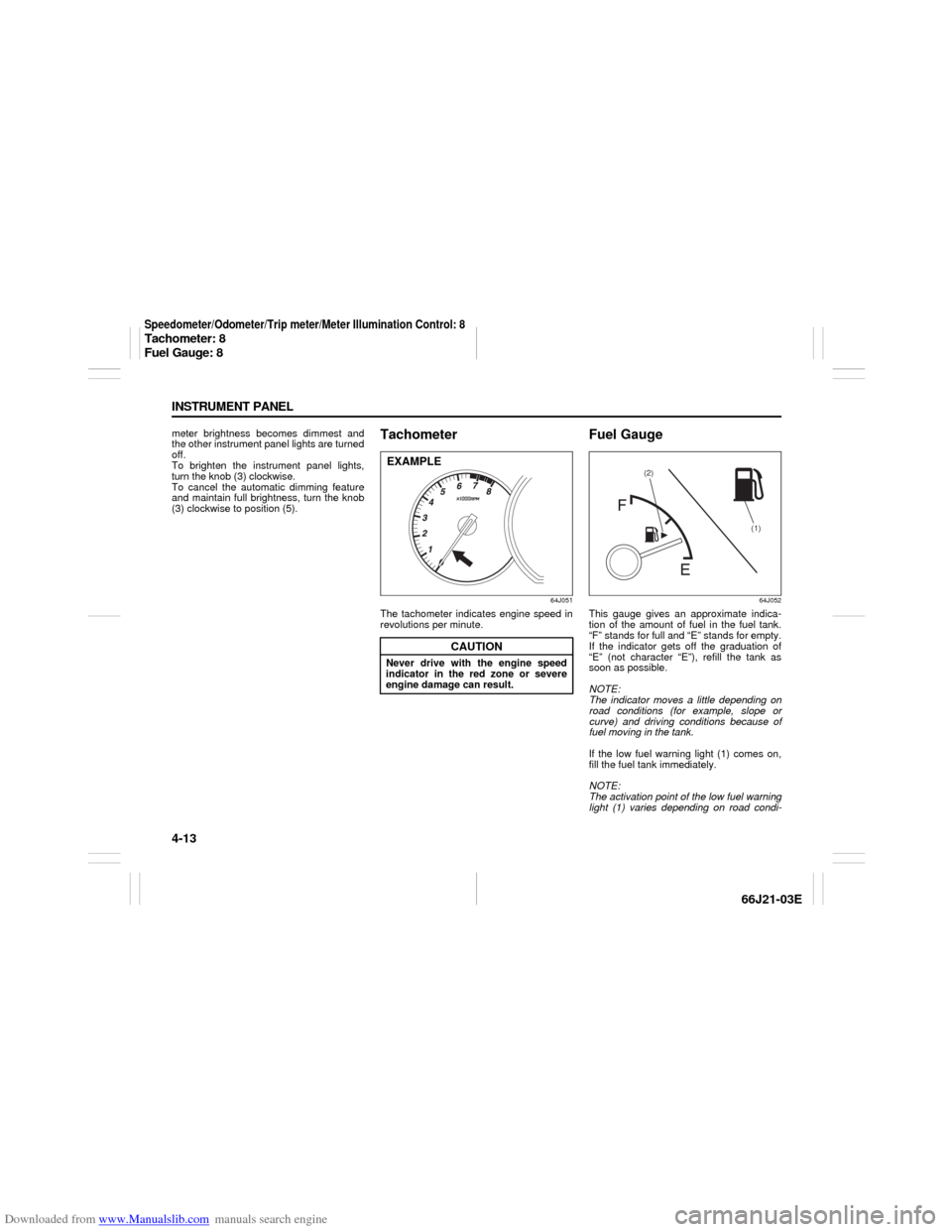
Tachometer
64J051
The tachometer indicates engine speed in
revolutions per minute.
Fuel Gauge
64J052
This gauge gives an approximate indica-
tion of the amount of fuel in the fuel tank.
“F” stands for full and “E” stands for empty.
If the indicator gets off the graduation of
“E” (not character “E”), refill the tank as
soon as possible.
NOTE:
The indicator moves a little depending on
road conditions (for example, slope or
curve) and driving conditions because of
fuel moving in the tank.
If the low fuel warning light (1) comes on,
fill the fuel tank immediately.
NOTE:
The activation point of the low fuel warning
light (1) varies depending on road condi-
CAUTION
Never drive with the engine speed
indicator in the red zone or severe
engine damage can result.EXAMPLE
(1) (2)
Speedometer/Odometer/Trip meter/Meter Illumination Control: 8Tachometer: 8
Fuel Gauge: 8
Page 78 of 211

Downloaded from www.Manualslib.com manuals search engine 4-16 INSTRUMENT PANEL
66J21-03E
Front Fog Light Switch
(if equipped)
64J058
The front fog light comes on when the fog
light switch is pushed in with:
the lighting switch turned to the third
position and the beams set to the low
beam position, or
the auto-on headlight system on and the
beams set to the low beam position.
“ESP OFF” Switch
66J039
ESP
® is a registered trademark of
DaimlerChrysler AG.
The “ESP OFF” switch is located on the
center of the instrument panel. You can
turn the ESP
® systems (other than ABS)
on or off using this switch.
To turn off the ESP
® systems (other than
ABS), push and hold the “ESP OFF”
switch until the “ESP OFF” indicator light
comes on.
To turn on all of the ESP
® systems, push
the “ESP OFF” switch again. The “ESP
OFF” indicator light will go out.
NOTE:
If the vehicle speed is greater than
approximately 30 km/h (19 mph), theESP
® systems (other than ABS) will turn
on automatically.
If the transfer switch (if equipped) is
turned to the “4L LOCK” position, the
ESP® systems (other than ABS) will be
canceled automatically.
If the ESP
® systems operates continu-
ously, such as when driving on slippery
roads, the traction control functions of
the ESP
® systems may be canceled
temporarily to avoid overheating the
brake pads. After a short period of time,
the ESP® systems (other than ABS) will
turn on automatically and the “ESP OFF”
indicator light will go out.
For details of the ESP
® systems, refer to
“Electronic Stability Program (ESP
®)” in
the “OPERATING YOUR VEHICLE” sec-
tion.
Rear Window Defroster and Outside Rearview Mirrors Defroster Switch: 8Front Fog Light Switch: 8
“ESP OFF” Switch:
Page 79 of 211
Downloaded from www.Manualslib.com manuals search engine 4-17 INSTRUMENT PANEL
66J21-03E
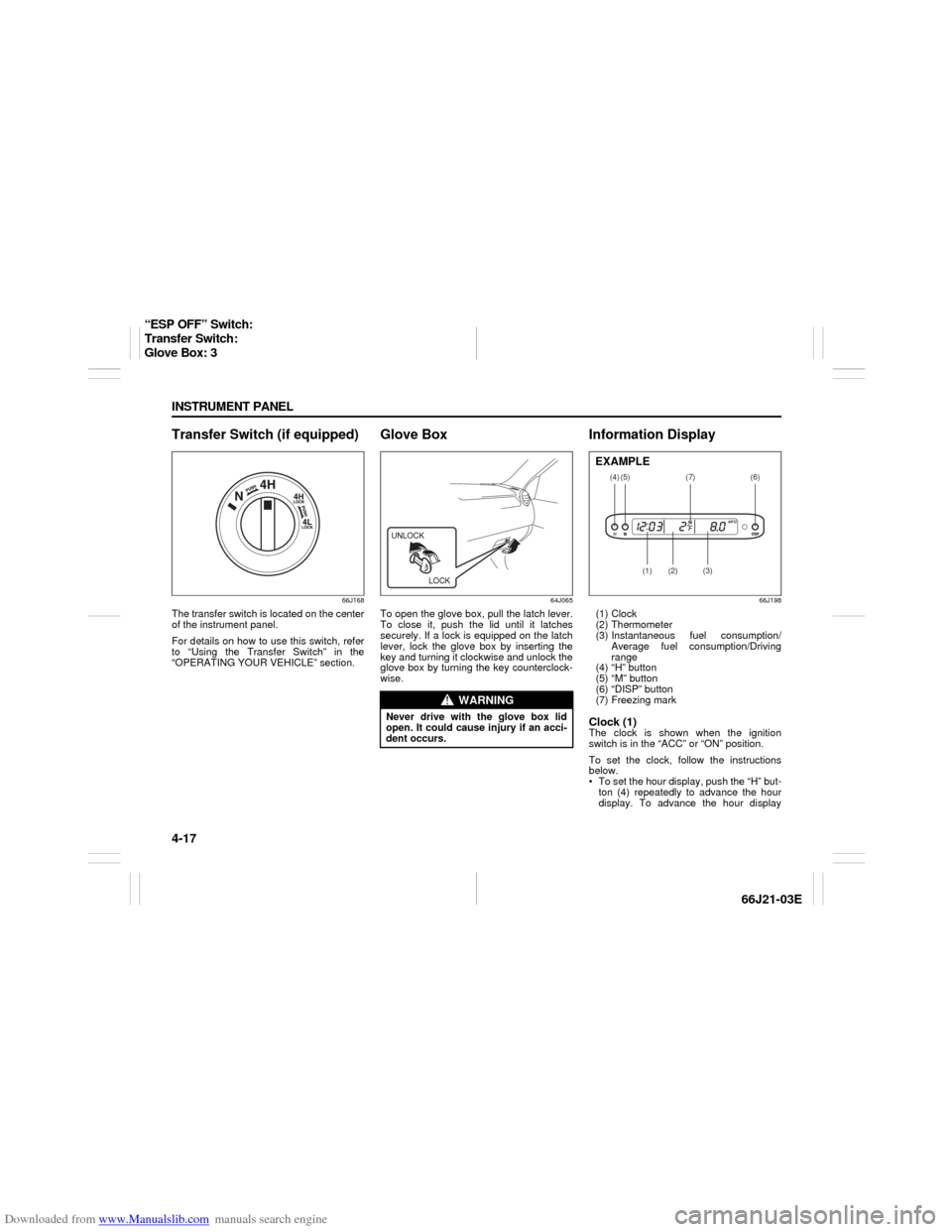
Transfer Switch (if equipped)
66J168
The transfer switch is located on the center
of the instrument panel.
For details on how to use this switch, refer
to “Using the Transfer Switch” in the
“OPERATING YOUR VEHICLE” section.
Glove Box
64J065
To open the glove box, pull the latch lever.
To close it, push the lid until it latches
securely. If a lock is equipped on the latch
lever, lock the glove box by inserting the
key and turning it clockwise and unlock the
glove box by turning the key counterclock-
wise.
Information Display
66J198
(1) Clock
(2) Thermometer
(3) Instantaneous fuel consumption/
Average fuel consumption/Driving
range
(4) “H” button
(5) “M” button
(6) “DISP” button
(7) Freezing markClock (1)The clock is shown when the ignition
switch is in the “ACC” or “ON” position.
To set the clock, follow the instructions
below.
To set the hour display, push the “H” but-
ton (4) repeatedly to advance the hour
display. To advance the hour display
WARNING
Never drive with the glove box lid
open. It could cause injury if an acci-
dent occurs.UNLOCK
LOCK
(4)
(2)
(1)
(3)
(5)
(6)
(7)
EXAMPLE
“ESP OFF” Switch:
Transfer Switch:
Glove Box: 3
Page 95 of 211
Downloaded from www.Manualslib.com manuals search engine 4-33 INSTRUMENT PANEL
66J21-03E
Turning power on/off
Press the power on/off knob (1).
The unit starts in the function mode it was
in when the power was turned off last.
Adjusting the volume
Turn the volume control knob (1).
Turning it clockwise increases the volume;
turning it counterclockwise decreases the
volume.
NOTE:
While driving, adjust the volume to an
extent that sound and/or noise coming
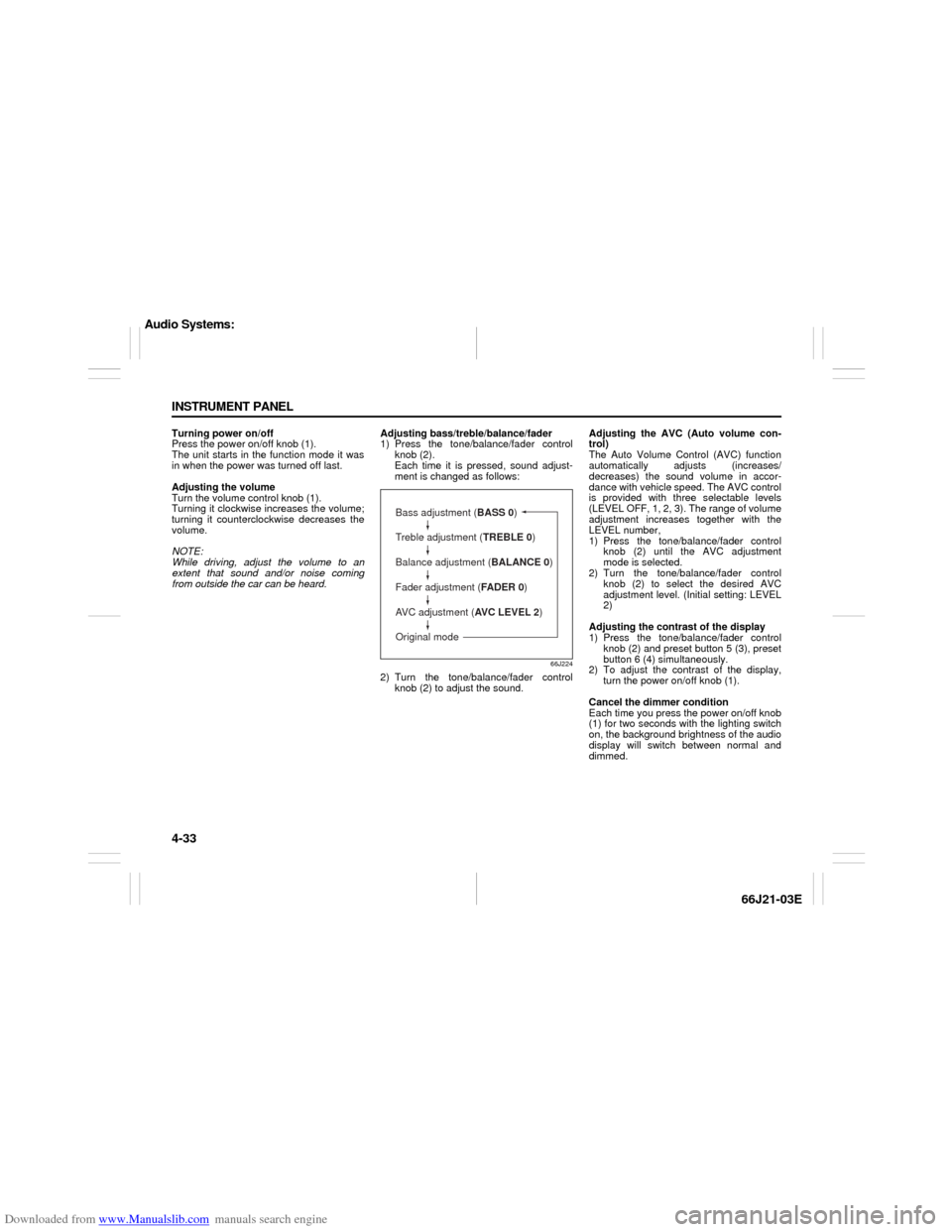
from outside the car can be heard.Adjusting bass/treble/balance/fader
1) Press the tone/balance/fader control
knob (2).
Each time it is pressed, sound adjust-
ment is changed as follows:
66J224
2) Turn the tone/balance/fader control
knob (2) to adjust the sound.Adjusting the AVC (Auto volume con-
trol)
The Auto Volume Control (AVC) function
automatically adjusts (increases/
decreases) the sound volume in accor-
dance with vehicle speed. The AVC control
is provided with three selectable levels
(LEVEL OFF, 1, 2, 3). The range of volume
adjustment increases together with the
LEVEL number,
1) Press the tone/balance/fader control
knob (2) until the AVC adjustment
mode is selected.
2) Turn the tone/balance/fader control
knob (2) to select the desired AVC
adjustment level. (Initial setting: LEVEL
2)
Adjusting the contrast of the display
1) Press the tone/balance/fader control
knob (2) and preset button 5 (3), preset
button 6 (4) simultaneously.
2) To adjust the contrast of the display,
turn the power on/off knob (1).
Cancel the dimmer condition
Each time you press the power on/off knob
(1) for two seconds with the lighting switch
on, the background brightness of the audio
display will switch between normal and
dimmed.
Bass adjustment (BASS 0)
Treble adjustment (TREBLE 0)
Balance adjustment (BALANCE 0)
Fader adjustment (FADER 0)
AVC adjustment (AVC LEVEL 2)
Original mode
Audio Systems:
Page 98 of 211
Downloaded from www.Manualslib.com manuals search engine 4-36 INSTRUMENT PANEL
66J21-03E
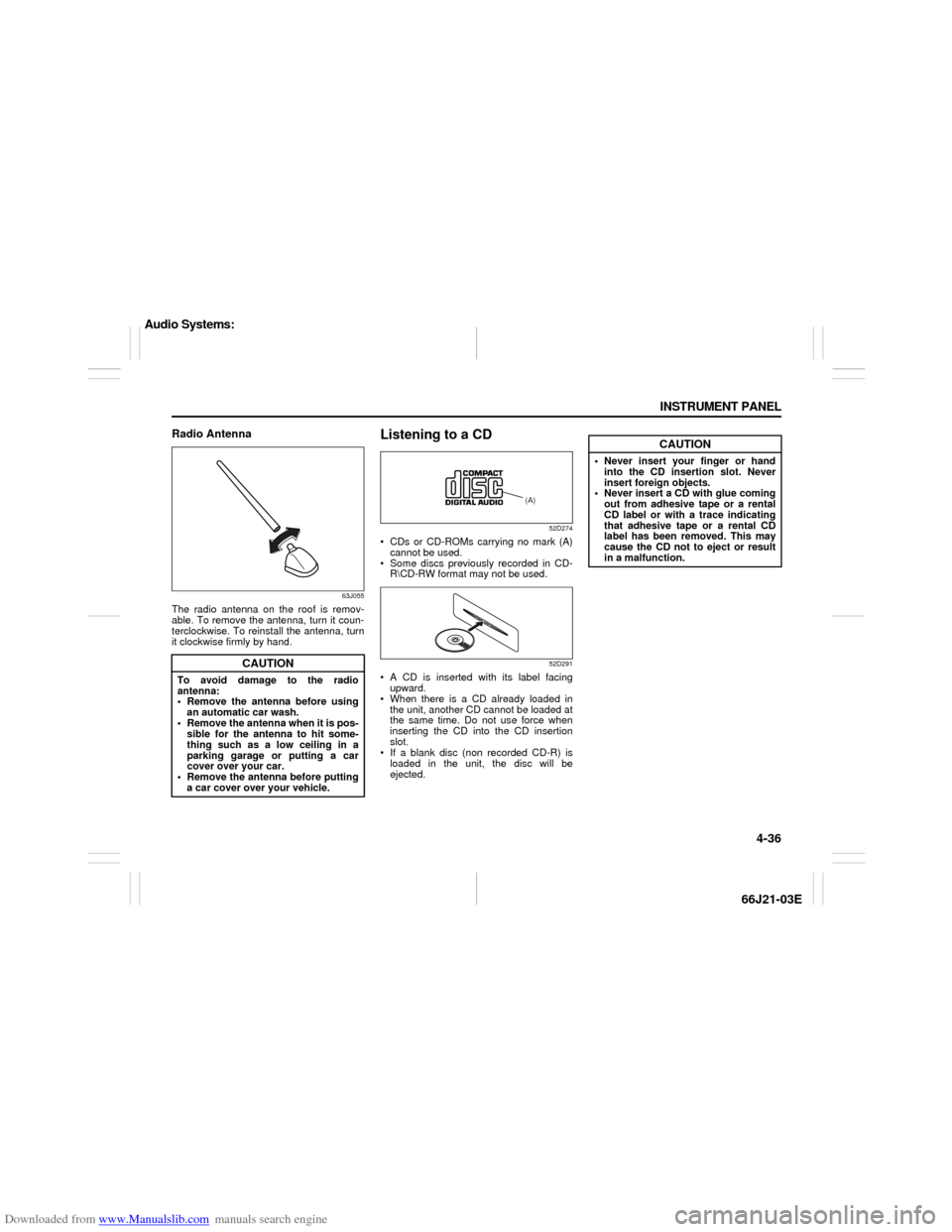
Radio Antenna
63J055
The radio antenna on the roof is remov-
able. To remove the antenna, turn it coun-
terclockwise. To reinstall the antenna, turn
it clockwise firmly by hand.
Listening to a CD
52D274
CDs or CD-ROMs carrying no mark (A)
cannot be used.
Some discs previously recorded in CD-
R\CD-RW format may not be used.
52D291
A CD is inserted with its label facing
upward.
When there is a CD already loaded in
the unit, another CD cannot be loaded at
the same time. Do not use force when
inserting the CD into the CD insertion
slot.
If a blank disc (non recorded CD-R) is
loaded in the unit, the disc will be
ejected.
CAUTION
To avoid damage to the radio
antenna:
Remove the antenna before using
an automatic car wash.
Remove the antenna when it is pos-
sible for the antenna to hit some-
thing such as a low ceiling in a
parking garage or putting a car
cover over your car.
Remove the antenna before putting
a car cover over your vehicle.
(A)
CAUTION
Never insert your finger or hand
into the CD insertion slot. Never
insert foreign objects.
Never insert a CD with glue coming
out from adhesive tape or a rental
CD label or with a trace indicating
that adhesive tape or a rental CD
label has been removed. This may
cause the CD not to eject or result
in a malfunction.
Audio Systems:
Page 115 of 211
Downloaded from www.Manualslib.com manuals search engine 4-53 INSTRUMENT PANEL
66J21-03E
66J124
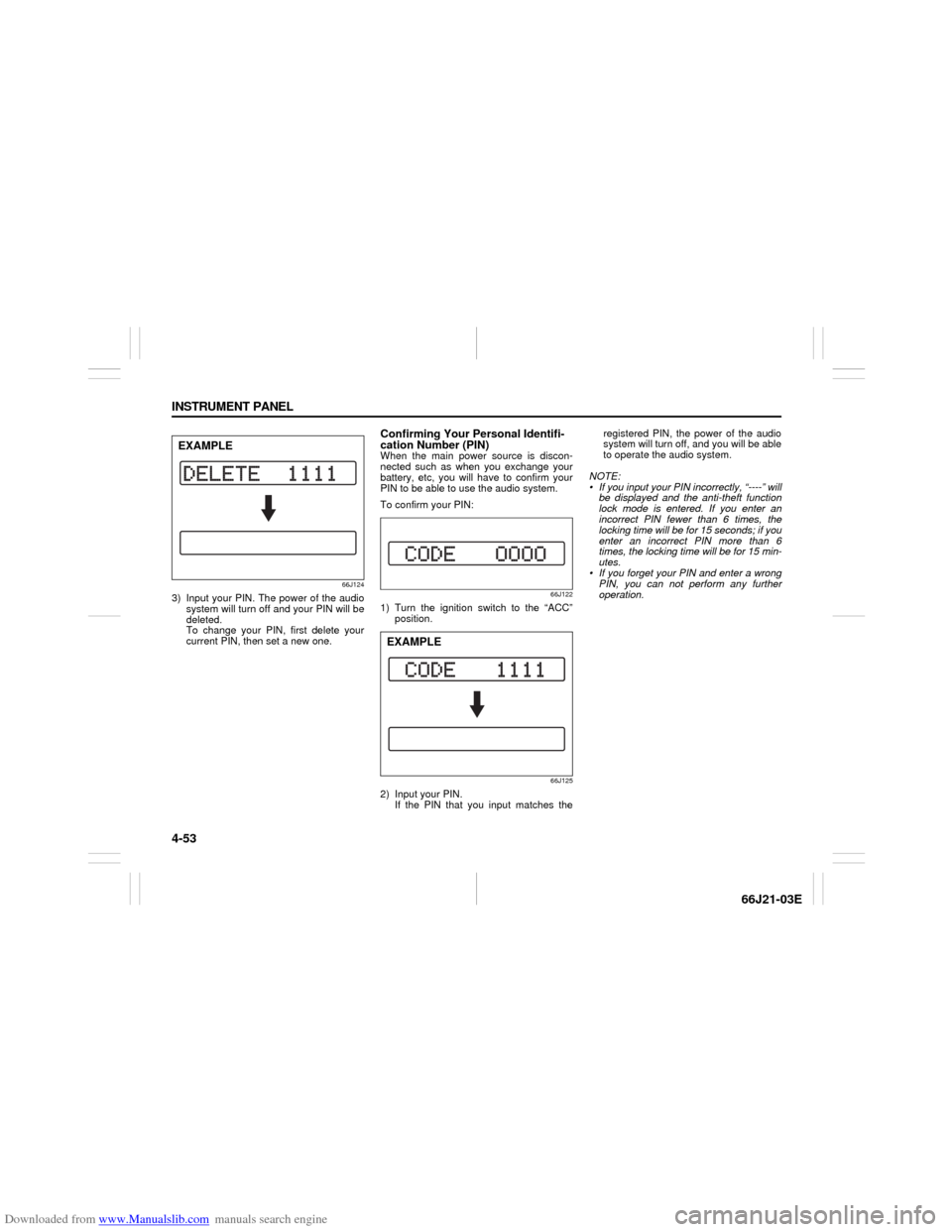
3) Input your PIN. The power of the audio
system will turn off and your PIN will be
deleted.
To change your PIN, first delete your
current PIN, then set a new one.
Confirming Your Personal Identifi-
cation Number (PIN)When the main power source is discon-
nected such as when you exchange your
battery, etc, you will have to confirm your
PIN to be able to use the audio system.
To confirm your PIN:
66J122
1) Turn the ignition switch to the “ACC”
position.
66J125
2) Input your PIN.
If the PIN that you input matches theregistered PIN, the power of the audio
system will turn off, and you will be able
to operate the audio system.
NOTE:
If you input your PIN incorrectly, “----” will
be displayed and the anti-theft function
lock mode is entered. If you enter an
incorrect PIN fewer than 6 times, the
locking time will be for 15 seconds; if you
enter an incorrect PIN more than 6
times, the locking time will be for 15 min-
utes.
If you forget your PIN and enter a wrong
PIN, you can not perform any further
operation.
EXAMPLE
EXAMPLE
Page 121 of 211

Downloaded from www.Manualslib.com manuals search engine 7-3 DRIVING TIPS
66J21-03E
Don’t Make Sharp Turns
As mentioned before, small multipurpose
vehicles have specific design characteris-
tics that allow them to perform in a wide
variety of applications. These characteris-
tics also change the cornering behavior
relative to conventional passenger cars.
Remember, small multipurpose vehicles
have more responsive steering and a
higher center of gravity than conventional
passenger cars. If at all possible, avoid
making sharp turns in your vehicle.
Slow Down on Curves
Learn to approach curves cautiously and
at a conservative speed. Do not attempt to
take curves at the same speeds that you
would in a vehicle with a lower center of
gravity. Just as you would not drive a
sports car on a trail, you should not
attempt to drive your vehicle around curves
like a sports car.
Slow Down and Use Caution on Slip-
pery Roads
Under wet road conditions you should
drive at a lower speed than on dry roads
due to possible slippage of tires during
braking. When driving on icy, snowcovered
or muddy roads, reduce your speed and
avoid sudden acceleration, abrupt braking
or sharp steering movements. Use 4-wheel
drive high range (4H) (if equipped) for bet-
ter traction.NOTE:
Avoid operating your vehicle in “4H LOCK”
or “4L LOCK” on wet pavement as much
as possible. Operating your vehicle in “4H
LOCK” or “4L LOCK” on wet pavement
may cause severe damage to the drive
train.
NOTE:
Operating your vehicle in “4H” on dry and
tight corner may cause some vibration on
your vehicle. This is not caused by the
vehicle malfunction, but caused by working
of the limited slip differential gear in the
center differential.
CAUTION
Do not operate your vehicle in “4H
LOCK” or “4L LOCK” on dry, hard
surfaces. Operating your vehicle in
“4H LOCK” or “4L LOCK” on dry,
hard surfaces puts severe stress to
the drive train, especially during tight
cornering, and can damage it. Also,
you may have some difficulty steer-
ing.
CAUTION
Unevenly worn tires can cause prob-
lems in the operation of the transfer
switch. Be sure to rotate the tires
according to the maintenance sched-
ule. Refer to “Tires” and “Mainte-
nance Schedule” in the
“INSPECTION AND MAINTENANCE”
section for proper tire rotation proce-
dures.
On-Pavement Driving: NO
Off-Road Driving: NO
Page 122 of 211

Downloaded from www.Manualslib.com manuals search engine 7-4 DRIVING TIPS
66J21-03E
Off-Road DrivingYour vehicle has specific design character-
istics for off-road driving. When you leave
the pavement, you will encounter driving
surfaces of all kinds which may change
continually as you drive. In most cases, off-
road driving requires the use of 4-wheel
drive. If your vehicle is a 2-wheel drive
vehicle, you should limit your off-road driv-
ing only to hard, flat, nonslippery surfaces.
2-wheel drive vehicles have far less trac-
tion on off-road surfaces than 4-wheel
drive vehicles. It is important when driving
off-road to follow the guidelines below.
Use Caution on Steep Inclines
Always inspect hills before you attempt to
drive up them. Know what is on the other
side and how you will get back down. If you
have any doubt that it is safe, do not
attempt to drive over a hill. Never drive
your vehicle up an extremely steep incline.
Coming down a steep hill can be trickier
than getting up one. Keep the vehicle
heading straight down the hill and use low
gear. Do not lock the brakes. If the vehicle
begins to slide, accelerate slightly to regain
steering control.Do Not Turn on or Drive Across the Side
of Hills
Turning on or driving across the side of a
hill can be extremely hazardous. Most of
the vehicle’s weight will be transferred to
the downhill tires, which could result in the
vehicle rolling sideways. Whenever possi-
ble, avoid this potential hazard. Also, if you
have to exit your vehicle on a side-hill,
always get out on the uphill side.
Wear Your Seat Belts at All Times
You and your passengers should use the
seat belts at all times when driving off-
road. For proper seat belt use, refer to the
“Seat Belts and Child Restraint Systems”
section in this manual.
Avoid Sudden Reactions in Mud, Ice or
Snow
Be careful when off-road conditions are
slick. Reduce your speed and avoid sud-
den movements of the vehicle. If your vehi-
cle is a 2-wheel drive vehicle, do not drive
in deep snow or mud. If your vehicle is a 4-
wheel drive vehicle, be aware that driving
in deep snow or mud can cause a loss of
traction and an increase in the resistance
to the vehicle’s forward motion. Use 4WD
low gear (4L) and maintain a steady but
moderate speed with a light touch on the
steering wheel and brakes.Do not drive in the field covered with
grown grass
If you drive in the field covered with grass,
it may cause unexpected accident or vehi-
cle damage by getting caught in grown
grass.
If Your Vehicle Gets Stuck
If your vehicle gets stuck in snow, mud or
sand, follow the directions below:
1) (For vehicles equipped with transfer
switch) Turn the transfer switch to “4H
LOCK” or “4L LOCK”.
2) Shift the transmission back and forth
between a forward range (or first gear
for manual transmission) and reverse.
This will create a rocking motion which
may give you enough momentum to
free the vehicle. Press gently on the
accelerator to keep wheel spin to a min-
imum. Remove your foot from the
accelerator while shifting.
Do not race the engine. Excessive
wheel spin will cause the tires to dig
deeper, making it more difficult to free
the vehicle.
3) If your vehicle remains stuck after a few
minutes of rocking, get another vehicle
to pull you out.
Off-Road Driving: NO