2007 SATURN SKY transmission
[x] Cancel search: transmissionPage 103 of 384
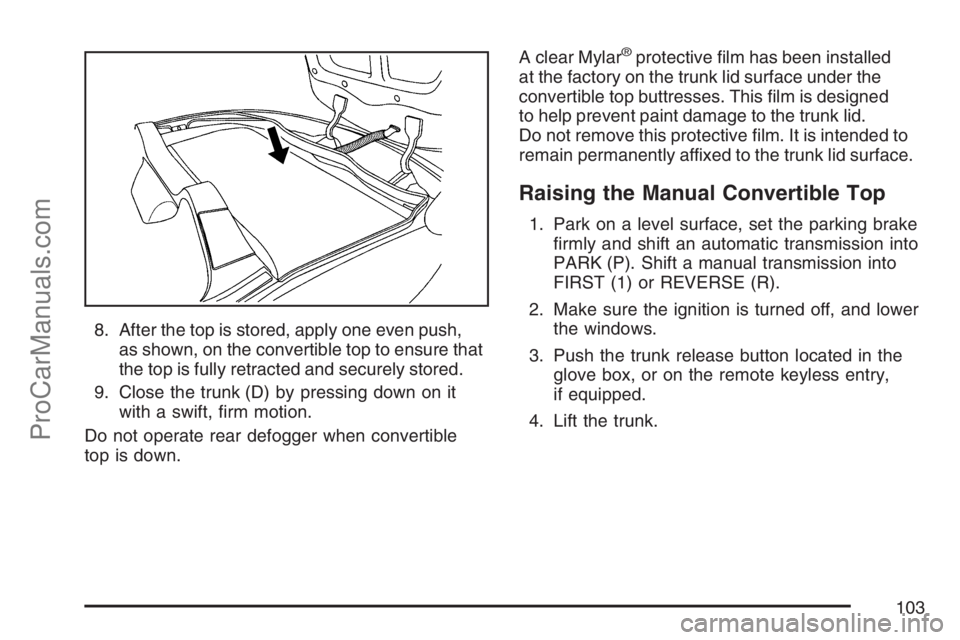
8. After the top is stored, apply one even push,
as shown, on the convertible top to ensure that
the top is fully retracted and securely stored.
9. Close the trunk (D) by pressing down on it
with a swift, rm motion.
Do not operate rear defogger when convertible
top is down.A clear Mylar
®protective lm has been installed
at the factory on the trunk lid surface under the
convertible top buttresses. This lm is designed
to help prevent paint damage to the trunk lid.
Do not remove this protective lm. It is intended to
remain permanently affixed to the trunk lid surface.
Raising the Manual Convertible Top
1. Park on a level surface, set the parking brake
rmly and shift an automatic transmission into
PARK (P). Shift a manual transmission into
FIRST (1) or REVERSE (R).
2. Make sure the ignition is turned off, and lower
the windows.
3. Push the trunk release button located in the
glove box, or on the remote keyless entry,
if equipped.
4. Lift the trunk.
103
ProCarManuals.com
Page 109 of 384

The main components of your instrument panel are the following:
A. Side Window Outlets. SeeClimate Control
System on page 122.
B. Air Outlets. SeeOutlet Adjustment on page 126.
C. Turn Signal/Multifunction Lever. SeeTurn
Signal/Multifunction Lever on page 111.
D. Cruise Control Buttons (If Equipped).
SeeCruise Control on page 115.
E. Instrument Panel Cluster. SeeInstrument
Panel Cluster on page 128.
F. Audio Steering Wheel Controls (If Equipped).
SeeAudio Steering Wheel Controls on
page 188.
G. Hazard Warning Flashers Button. SeeHazard
Warning Flashers on page 110.
H. Fog Lamp Button. SeeFog Lamps on page 120.
I. Instrument Panel Brightness Control. See
Instrument Panel Brightness on page 120.
J. Driver Information Center (DIC) Controls. See
Driver Information Center (DIC) on page 144.
K. Horn. SeeHorn on page 110.
L. Windshield Wiper/Washer Controls. See
Windshield Wipers on page 113and
Windshield Washer on page 114.M. Climate Controls. SeeClimate Control System
on page 122.
N. Passenger Air Bag Status Indicator. See
Passenger Airbag Status Indicator on page 131.
O. Shift Lever. SeeManual Transmission
Operation on page 85. SeeAutomatic
Transmission Operation on page 82
(If Equipped).
P. Parking Brake Lever. SeeParking Brake
on page 86.
Q. Audio System. SeeAudio System(s) on
page 158.
R. Electronic Stability Control/Traction Control
System Button. SeeElectronic Stability Control
on page 201.
S. Cigarette Lighter (If Equipped). Accessory
Power Outlet (If Equipped). SeeAshtray(s) and
Cigarette Lighter on page 122andAccessory
Power Outlet(s) on page 121.
T. Cupholder. SeeCupholder(s) on page 99.
U. Trunk Release. SeeTrunk on page 68.
V. Glove Box. SeeGlove Box on page 99.
109
ProCarManuals.com
Page 117 of 384
Passing Another Vehicle While Using
Cruise Control
Use the accelerator pedal to increase your speed.
When you take your foot off the pedal, your
vehicle will slow down to the cruise control speed
you set earlier.
Using Cruise Control on Hills
How well your cruise control will work on hills
depends upon your speed, load and the steepness
of the hills. When going up steep hills, you may
have to step on the accelerator pedal to maintain
your speed. When going downhill, you may
have to brake or shift to a lower gear to keep your
speed down. Of course, applying the brake
takes you out of cruise control. Many drivers nd
this to be too much trouble and do not use
cruise control on steep hills.
Ending Cruise Control
To end cruise control, step lightly on the brake
pedal or the clutch pedal if your vehicle has
a manual transmission.
Stepping on the brake pedal or clutch pedal
will only end the current cruise control session.
Press the cruise control on/off button to turn
the system completely off.
Erasing Speed Memory
When you turn off the cruise control or the
ignition, your cruise control set speed memory
is erased.
117
ProCarManuals.com
Page 118 of 384

Headlamps
The lever on the left side of the steering column
operates the exterior lamps.
The exterior lamp switch has the following
four positions:
2(Headlamps):This position turns on the
headlamps, parking lamps, and taillamps.
;(Parking Lamps):This position turns on the
parking lamps and taillamps only.
AUTO (Automatic Headlamp System):This
position automatically turns on the Daytime
Running Lamps during daytime, and the
headlamps, parking lamps, and taillamps at night.
P(Off/On):This position is an Off/On switch for
the Automatic Headlamp System. In Canada, this
applies to vehicles with an automatic transmission
set to PARK (P) and manual transmission vehicles
with the parking brake engaged.
When operating in AUTO, a brief turn of the switch
to off/on will turn off the Automatic Headlamp
System. An AUTO LIGHTS OFF message will
display on the Driver Information Center (DIC) and
a chime will sound. Turning the switch to off/on
again will turn the Automatic Headlamp System
back on. An AUTO LIGHTS ON message will
display on the Driver Information Center (DIC).
The Automatic Headlamp System is always turned
on at the beginning of an ignition cycle for vehicles
with manual transmission. When the parking brake
is engaged, the automatic headlamps will turn off.
For vehicles with an automatic transmission, when
the shift lever is shifted out of PARK (P), the
Automatic Headlamp System will turn on. Shifting
the lever back to PARK (P) will turn off the
automatic headlamp system for vehicles with an
automatic transmission.
118
ProCarManuals.com
Page 119 of 384

Headlamps on Reminder
If you open the driver’s door with the ignition off
and the lamps on, you will hear a warning chime.
Daytime Running Lamps (DRL)
Daytime Running Lamps (DRL) can make it easier
for others to see the front of your vehicle during
the day. DRL can be helpful in many different
driving conditions, but they can be especially
helpful in the short periods after dawn and before
sunset. Fully functional daytime running lamps
are required on all vehicles rst sold in Canada.
Your vehicle has a light sensor on top of the
instrument panel that helps control the DRL.
Make sure it is not covered or the headlamps
will come on when they are not needed.
The DRL system makes both low beam headlamps
turn on at reduced intensity when the following
conditions are met:
The ignition is on.
The exterior lamp control is turned to AUTO.
The light sensor detects daytime light.
The shift lever is not in PARK (P).While the DRL system is on, the taillamps,
sidemarker lamps, and instrument panel lights
will not be on.
The DRL system turns off on U.S. vehicles by
using the on/off switch for one ignition cycle,
if the vehicle is in the PARK (P) position, or if the
vehicle speed is less than 5 mph (8 km h)
after the vehicle is started.
For vehicles rst sold in Canada the DRL system
will turn off when a automatic transmission
vehicle is in the PARK (P) position or the park
brake is set on a manual transmission vehicle and
the vehicle speed is less than 8 mph (13 km h).
As with any vehicle, you should turn on the regular
headlamp system when it is needed.
119
ProCarManuals.com
Page 138 of 384

Malfunction Indicator Lamp
Check Engine Light
Your vehicle has a
computer which
monitors operation of
the fuel, ignition,
and emission control
systems.
This system is called OBD II (On-Board
Diagnostics-Second Generation) and is intended to
assure that emissions are at acceptable levels for
the life of the vehicle, helping to produce a cleaner
environment. The check engine light comes on to
indicate that there is a problem and service is
required. Malfunctions often will be indicated by the
system before any problem is apparent. This may
prevent more serious damage to your vehicle. This
system is also designed to assist your service
technician in correctly diagnosing any malfunction.Notice:If you keep driving your vehicle with
this light on, after awhile, your emission
controls may not work as well, your fuel
economy may not be as good, and your engine
may not run as smoothly. This could lead to
costly repairs that may not be covered by your
warranty.
Notice:Modications made to the engine,
transmission, exhaust, intake, or fuel system
of your vehicle or the replacement of the
original tires with other than those of the same
Tire Performance Criteria (TPC) can affect
your vehicle’s emission controls and may
cause this light to come on. Modications to
these systems could lead to costly repairs not
covered by your warranty. This may also
result in a failure to pass a required Emission
Inspection/Maintenance test. SeeAccessories
and Modifications on page 233.
138
ProCarManuals.com
Page 155 of 384

DELAY LOCK
This feature, which delays the actual locking of
the vehicle, can be enabled or disabled. When
DELAY LOCK appears on the display, press and
hold the reset button for at least one second
to scroll through the available settings:
ON (default):The doors will not lock until
ve seconds after the last door is closed. You can
temporarily override delayed locking by pressing
the lock button on the Remote Keyless Entry (RKE)
transmitter a second time.
OFF:The doors will lock immediately when
pressing the lock button on the RKE transmitter.
SeeDelayed Locking on page 67andRemote
Keyless Entry (RKE) System Operation on page 63
for more information.
Choose one of the available settings and press
the information button to select it and move on
to the next feature.
AUTO UNLK (Unlock)
This feature, which allows the vehicle to
automatically unlock certain doors, can be enabled
or disabled. When AUTO UNLK appears on the
display, press and hold the reset button for at least
one second to scroll through the available settings:
ALL (default):All of the doors will automatically
unlock.
DRIVER:The driver’s door will automatically
unlock.
NONE:None of the doors will automatically unlock.
You will need to manually unlock the doors.
If you have a manual transmission vehicle, the
door(s) will automatically unlock when the key is
turned off.
155
ProCarManuals.com
Page 156 of 384

If you have an automatic transmission vehicle, you
can select when the automatic unlocking will occur.
See “UNLK (Unlock) (Automatic Transmission
Only)” following.
SeeAutomatic Door Unlock on page 68for more
information.
Choose one of the available settings and press
the information button to select it and move on
to the next feature.
UNLK (Unlock)
(Automatic Transmission Only)
This screen displays only if your vehicle has an
automatic transmission and DRIVER or ALL is
selected for the AUTO UNLK feature. This feature
determines when the automatic door unlocking will
occur. When UNLK appears on the display, press
and hold the reset button for at least one second to
scroll through the available settings:
KEY OFF:The door(s) will unlock when the key
is turned off.SHIFT TO P (Park) (default):The door(s) will
unlock when the vehicle is shifted into PARK (P).
SeeAutomatic Door Unlock on page 68for
more information.
Choose one of the available settings and press
the information button to select it and move on
to the next feature.
EXT (Exterior) LIGHTS
If your vehicle has Remote Keyless Entry (RKE),
this feature, which allows the vehicle’s exterior
perimeter lighting to turn on each time the unlock
button on the RKE transmitter is pressed, can
be enabled or disabled. When EXT LIGHTS
appears on the display, press and hold the reset
button for at least one second to scroll through
the available settings:
OFF:The exterior perimeter lighting will not
turn on when the unlock button on the RKE
transmitter is pressed.
156
ProCarManuals.com