2007 PONTIAC VIBE instrument panel
[x] Cancel search: instrument panelPage 144 of 432

Setting Cruise Control
{CAUTION:
If you leave your cruise control on when
you are not using cruise, you might hit a
button and go into cruise when you do
not want to. You could be startled and
even lose control. Keep the cruise control
switch off until you want to use cruise
control.
1. Press the ON-OFF button at the end of the
cruise control lever. The CRUISE light on the
instrument panel cluster comes on. See
Cruise Control Light on page 174for more
information.
2. Get up to the desired speed.
3. Move the lever down to−SET and release it.
4. Take your foot off the accelerator pedal.
Resuming a Set Speed
Suppose the cruise control is set at a desired
speed and then you apply the brake. This shuts
off cruise control. But you do not need to reset it.
If the vehicle speed is 25 mph (40 km/h) or
greater, push the lever up to +RES
(Resume/Accelerate). The vehicle returns to the
previously set speed and stays there.
Increasing Speed While Using Cruise
Control
There are three ways to go to a higher speed:
Use the accelerator pedal to get to the higher
speed. Move the lever down to−SET.
Release the lever and the accelerator pedal.
You will now cruise at the higher speed.
Move the cruise lever up to +RES. Hold it
there until you get up to the speed desired,
and then release the lever.
To increase the vehicle speed in very small
amounts, move the lever to +RES briey
and then release it. Each time this is done,
the vehicle goes about 1 mph (1.6 km/h)
faster.
144
Page 146 of 432

Exterior Lamps
The lever on the left side of the steering column
operates the exterior lamps.
O(Exterior Lamps):Turn the outside part of the
lever with the symbol on it, to operate the lamps.
For vehicles sold in the U. S., this symbol will
appear on the instrument panel cluster when your
exterior lamps are on.
The exterior lamp switch has three positions:
OFF:Turning the switch to this position turns off
all lamps, except the Daytime Running
Lamps (DRL).
O(Parking Lamps):Turning the switch to this
position turns on the parking lamps together
with the following:
Sidemarker Lamps
Taillamps
License Plate Lamp
Instrument Panel Lights
A symbol will appear on the instrument panel
cluster when your parking lamps are on.
SeeLights On Reminder on page 174and
Taillamp Indicator Light on page 174for additional
information.
3(Headlamps):Turning the switch to this
position turns on the headlamps, together with the
previously listed lamps and lights.
Headlamps on Reminder
If you turn the ignition to LOCK or ACC and leave
the lamps on, you will hear a tone when you
open the driver’s door.
146
Page 147 of 432

Daytime Running Lamps (DRL)
Daytime Running Lamps (DRL) can make it easier
for others to see the front of your vehicle during
the day. DRL can be helpful in many different
driving conditions, but they can be especially
helpful in the short periods after dawn and before
sunset. Fully functional daytime running lamps
are required on all vehicles rst sold in Canada.
The DRL system will make the headlamps
come on at a reduced brightness when the
following conditions are met:
The ignition is on with the engine running.
The exterior lamps switch is off.
The parking brake is released.
When the DRL are on, only the headlamps will be
on at a reduced brightness. The taillamps,
sidemarker and other lamps will not be on. The
instrument panel will not be lit up either.
When you turn the exterior lamp switch to the
headlamp position, the DRL will go off and
the headlamps will come on. The other lamps that
come on with the headlamps will also come on.When it begins to get dark, the headlamps will
automatically switch from DRL to the regular
headlamps. See “Automatic Headlamp System”
following.
When you turn the exterior lamp switch off, the
regular lamps will go off and the headlamps
will change to the reduced brightness of DRL
provided it is not dark outside. DRL also comes on
if only the parking lamps are being used.
Automatic Headlamp System
Your vehicle has an automatic light sensor on the
top left corner of the instrument panel, so be
sure it is not covered or the headlamps will be on
continuously.
When it is dark enough outside, the automatic
headlamp system will turn on the low-beam
headlamps at the normal brightness along with
other lamps such as the taillamps, sidemarker,
parking lamps and instrument panel lights. This is
indicated by the headlamp symbol on your
instrument panel cluster. SeeInstrument Panel
Cluster on page 159.
147
Page 148 of 432

If you are driving through a parking garage,
overcast weather, or a tunnel, the automatic
headlamp system may turn on the low-beam
headlamps at a normal brightness along with the
taillamps, sidemarker, parking lamps and the
instrument panel lights. The radio lights will be
dimmer, and the instrument panel cluster
lights may dim. There will be a delay before the
lights will turn on when starting the car at night.
Fog Lamps
-(Fog Lamps):Turn the band on the turn
signal/multifunction lever to the fog lamp symbol to
turn the fog lamps on. They will come on only
when the headlamps are on low beam.
Some localities have laws that require the
headlamps to be on along with the fog lamps.
Instrument Panel Brightness
The instrument panel
brightness control is
located to the left of the
steering wheel on the
instrument panel.
Turn the wheel on the
left of the control
up or down to increase
or decrease brightness.
Turn the wheel all the way up for the maximum
setting. It is recommended that the brightness level
be kept at the maximum setting for all daytime
driving to ensure proper visibility.
The brightness of the instrument panel lights will
decrease when the headlamps are on.
148
Page 151 of 432
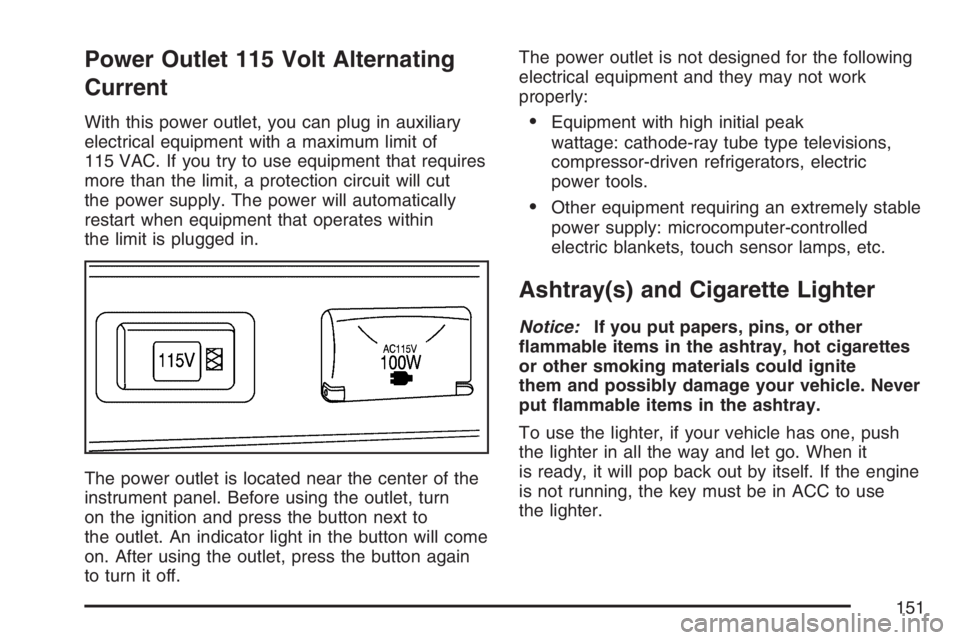
Power Outlet 115 Volt Alternating
Current
With this power outlet, you can plug in auxiliary
electrical equipment with a maximum limit of
115 VAC. If you try to use equipment that requires
more than the limit, a protection circuit will cut
the power supply. The power will automatically
restart when equipment that operates within
the limit is plugged in.
The power outlet is located near the center of the
instrument panel. Before using the outlet, turn
on the ignition and press the button next to
the outlet. An indicator light in the button will come
on. After using the outlet, press the button again
to turn it off.The power outlet is not designed for the following
electrical equipment and they may not work
properly:Equipment with high initial peak
wattage: cathode-ray tube type televisions,
compressor-driven refrigerators, electric
power tools.
Other equipment requiring an extremely stable
power supply: microcomputer-controlled
electric blankets, touch sensor lamps, etc.
Ashtray(s) and Cigarette Lighter
Notice:If you put papers, pins, or other
ammable items in the ashtray, hot cigarettes
or other smoking materials could ignite
them and possibly damage your vehicle. Never
put ammable items in the ashtray.
To use the lighter, if your vehicle has one, push
the lighter in all the way and let go. When it
is ready, it will pop back out by itself. If the engine
is not running, the key must be in ACC to use
the lighter.
151
Page 153 of 432

To change the current mode, select one of the
following:
H(Vent):Air is directed to the upper instrument
panel outlets.
)(Bi-Level):Air is directed to the upper
instrument panel outlets, and to the oor outlets.
6(Floor):Air is directed to the oor outlets
and to the outboard outlets (for the side windows).
?(Recirculation):Press this button, located
in the center of the instrument panel to the
left of the audio system, to turn the recirculation
mode on or off. This mode recirculates the
air inside the vehicle. It can be used to prevent
outside air and odors from entering your vehicle or
to help heat or cool the air inside your vehicle
more quickly. When the button is pressed,
an indicator light in the button comes on. Press
the button again to turn off recirculate and to
circulate outside air through the system.
The indicator light will go off. Recirculate is
automatically turned off when the climate control
system mode knob is turned to defog or defrost or
is between modes.Temperature Control:Turn the right knob
clockwise or counterclockwise to increase or
decrease the temperature inside the vehicle.
A/C (Air Conditioning):Press this button, located
in the center of the instrument panel to the left
of the audio system, to turn the air-conditioning
system on or off. When A/C is pressed, an
indicator light in the button comes on to let you
know that the air conditioning is activated.
MAX A/C (Maximum Air Conditioning):Press
the A/C and recirculation buttons at the same time
to select MAX A/C.
On hot days, open the windows to let hot inside
air escape; then close them. This helps to reduce
the time it takes for the vehicle to cool down. It
also helps the system to operate more efficiently.
The air-conditioning system removes moisture
from the air, so you might notice a small amount
of water dripping underneath your vehicle
while idling or after turning off the engine.
This is normal.
153
Page 154 of 432

Defogging and Defrosting
Fog on the inside of windows is a result of high
humidity (moisture) condensing on the cool window
glass. This can be minimized if the climate control
system is used properly. There are two modes to
clear fog or frost from the windshield. Use the defog
mode to clear the inside of the windshield of fog or
moisture and warm the passengers. Use the defrost
mode to remove fog or frost from the outside of the
windshield more quickly.
-(Defog):Air is directed between the
windshield, side windows, instrument panel outlets
and the oor outlets. The air-conditioning
compressor will run automatically in this setting
without pressing A/C, unless the outside
temperature is at or below 32°F (0°C).
1(Defrost):Air is directed to the windshield,
instrument panel outlets and the side windows.
The air-conditioning compressor will run
automatically in this setting without pressing A/C,
unless the outside temperature is at or below
32°F (0°C).
Do not drive the vehicle until all the windows
are clear.
Rear Window Defogger
The rear window defogger uses a warming grid to
clear fog from the rear window.
The rear window
defogger button is
located on the center of
the instrument panel,
above the audio system.
The defogger does
not operate with the rear
liftglass opened.
The rear window defogger will only work when the
ignition is in the ON position.
=(Rear Defogger):Press the defogger button
to turn the rear window defogger on or off. An
indicator light in the button comes on to let
you know that the rear window defogger is
activated. Be sure to clear as much snow from
the rear window as possible.
154
Page 155 of 432

The rear window defogger will turn off
automatically approximately 15 minutes after the
button is pressed. The defogger can also be turned
off by pressing the button again or by turning off
the engine.
Notice:Do not use a razor blade or sharp
object to clear the inside rear window. Do not
adhere anything to the defogger grid lines
in the rear glass. These actions may damage
the rear defogger. Repairs would not be
covered by your warranty.
Outlet Adjustment
Use the air outlets located in the center and
outboard sides of the instrument panel, to change
the direction of the air owing through the vents.
Operation Tips
Clear away any ice, snow or leaves from the
air inlets at the base of the windshield that
may block the ow of air into your vehicle.
Use of non-GM approved hood deectors may
adversely affect the performance of the system.
Keep the path under the front seats clear of
objects to help circulate the air inside of your
vehicle more effectively.
If the airow seems low when the fan is at the
highest setting, the passenger compartment air
lter may need to be replaced. For more
information, see “Passenger Compartment Air
Filter” following andScheduled Maintenance on
page 377.
155