2007 NISSAN VERSA ECO mode
[x] Cancel search: ECO modePage 79 of 304
cMalfunction indicator light blinking — An en-
gine misfire has been detected which may
damage the emission control system. To re-
duce or avoid emission control system dam-
age:
– do not drive at speeds above 45 MPH
(72 km/h) .
– avoid hard acceleration or deceleration.
– avoid steep uphill grades.
– if possible, reduce the amount of cargo
being hauled or towed.
The malfunction indicator light may stop blinking
and come on steady. Have the vehicle inspected
by a NISSAN dealer. You do not need to have
your vehicle towed to the dealer.
CAUTION
Continued vehicle operation without hav-
ing the emission control system checked
and repaired as necessary could lead to
poor driveability, reduced fuel economy,
and possible damage to the emission con-
trol system.
Overdrive off indicator light
(A/T / CVT models)
The overdrive off indicator light illuminates when
the overdrive off mode is selected.
For additional information, see “Continuous Vari-
able Transmission (CVT)” or “Automatic Trans-
mission (A/T) in the “Starting and driving” section
of this manual.
Security indicator light
For vehicles without Intelligent Key: This light
blinks whenever the ignition switch is in the
LOCK, OFF or ACC position.
For vehicles with Intelligent Key: This light blinks
when the ignition switch is in the LOCK position
with the key removed from the ignition switch.
The blinking security indicator light indicates that
the security systems equipped on the vehicle are
operational.
For additional information, see “Security sys-
tems” later in this section.
Turn signal/hazard indicator
lights
The appropriate light flashes when the turn signal
switch is activated.Both lights flash when the hazard switch is turned
on.
AUDIBLE REMINDERS
Brake pad wear warning
The disc brake pads have audible wear warnings.
When a disc brake pad requires replacement, it
makes a high pitched scraping sound when the
vehicle is in motion, whether or not the brake
pedal is depressed. Have the brakes checked as
soon as possible if the warning sound is heard.
Key reminder chime
A chime sounds if the driver’s door is opened
while the key is left in the ignition switch. Remove
the key and take it with you when leaving the
vehicle.
Intelligent Key door buzzer (if so
equipped)
The Intelligent Key door buzzer sounds if any one
of the following improper operations is found.
cThe ignition switch is not returned to the
LOCK position when locking the doors.
cThe Intelligent Key is left inside the vehicle
when locking the doors.
cThe Intelligent Key is taken outside the ve-
hicle when operating the vehicle.
Instruments and controls2-13
ZREVIEW COPYÐ2007 Versa(vrs)
Owners ManualÐUSA_English(nna)
10/05/06Ðdebbie
X
Page 81 of 304

cany request switch (Intelligent Key mod-
els) .
cthe keyfob or Intelligent Key.
Keyfob and Intelligent Key operation:
cPush the
button. All doors lock.
The hazard lights flash twice and the horn
beeps once to indicate all doors are
locked.
cWhen the
button is pushed with
all doors locked, the hazard lights flash
twice and the horn beeps once as a re-
minder that the doors are already locked.
The horn may or may not beep. Refer to
“Silencing the horn beep feature” in the
“Pre-driving checks and adjustments” sec-
tion later in this manual.
4. Confirm that the
indicator light comes
on. Thelight stays on for about 30
seconds. The vehicle security system is now
pre-armed. After about 30 seconds the ve-
hicle security system automatically shifts
into the armed phase. The
light begins
to flash once every 3 seconds. If, during the
30-second pre-arm time period, the driver’s
door is unlocked by the key, a request
switch, the keyfob or Intelligent Key, or if the
ignition switch is turned to ACC or ON, the
system will not arm.cIf the key is turned slowly when locking
the driver’s door, the system may not
arm. Furthermore, if the key is turned
beyond the vertical position toward the
unlock position to remove the key, the
system may be disarmed when the key
is removed. If the indicator light fails to
glow for 30 seconds, unlock the door
once and lock it again.
cEven when the driver and/or passen-
gers are in the vehicle, the system will
arm with all doors closed and locked
with the ignition key in the OFF posi-
tion.
Vehicle security system activation
The vehicle security system will give the following
alarm:
cThe headlights blink and the horn sounds
intermittently.
cThe alarm automatically turns off after ap-
proximately 50 seconds. However, the alarm
reactivates if the vehicle is tampered with
again. The alarm can be shut off by unlocking
the driver’s door with the key, a request
switch or by pressing the
button on
the keyfob or Intelligent Key.The alarm is activated by:
copening a door without using the key, a
request switch, keyfob or Intelligent Key
(even if the door is unlocked by using the
inside lock knob or the power door lock
switch) .
How to stop an activated alarm
The alarm stops only by unlocking the driver’s
door with the key, pressing thebutton on
the keyfob or Intelligent Key, or by unlocking all
doors with any request switch (Intelligent Key
models) .
NISSAN VEHICLE IMMOBILIZER
SYSTEM
The NISSAN Vehicle Immobilizer System will not
allow the engine to start without the use of a
registered key.
If the engine fails to start using a registered key (for
example, when interference is caused by another
registered key, an automated toll road device or
automatic payment device on the key ring) , restart
the engine using the following procedures:
1. Leave the ignition switch in the ON position
for approximately 5 seconds.
2.
Turn the ignition switch to the OFF or LOCK
position, and wait approximately 10 seconds.
Instruments and controls2-15
ZREVIEW COPYÐ2007 Versa(vrs)
Owners ManualÐUSA_English(nna)
10/05/06Ðdebbie
X
Page 107 of 304
It is possible to lock/unlock all doors, turn the
interior lights on, and activate the panic alarm by
using the keyfob from outside the vehicle.
Be sure to remove the key from the vehicle
before locking the doors.
The keyfob can operate at a distance of approxi-
mately 33 ft (10 m) from the vehicle. The effective
distance depends on the conditions around the
vehicle.
As many as 5 keyfobs can be used with one
vehicle. For information concerning the purchase
and use of additional keyfobs, contact a NISSAN
dealer.
The keyfob will not function when:
cthe battery is discharged
cthe distance between the vehicle and the
keyfob is over 33 ft (10 m)
The panic alarm will not activate when the
key is in the ignition switch.
CAUTION
Listed below are conditions or occur-
rences which will damage the keyfob:
cDo not allow the keyfob to become wet.
cDo not drop the keyfob.cDo not strike the keyfob sharply against
another object.
cDo not place the keyfob for an extended
period in an area where temperatures
exceed 140°F (60°C) .
If a keyfob is lost or stolen, NISSAN rec-
ommends erasing the ID code of that key-
fob. This will prevent the keyfob from un-
authorized use to unlock the vehicle. For
information regarding the erasing proce-
dure, please contact a NISSAN dealer.
HOW TO USE REMOTE KEYLESS
ENTRY SYSTEM
Locking doors
1. Close all windows.
2. Remove the key from the ignition switch.
3. Close the hood and all doors.
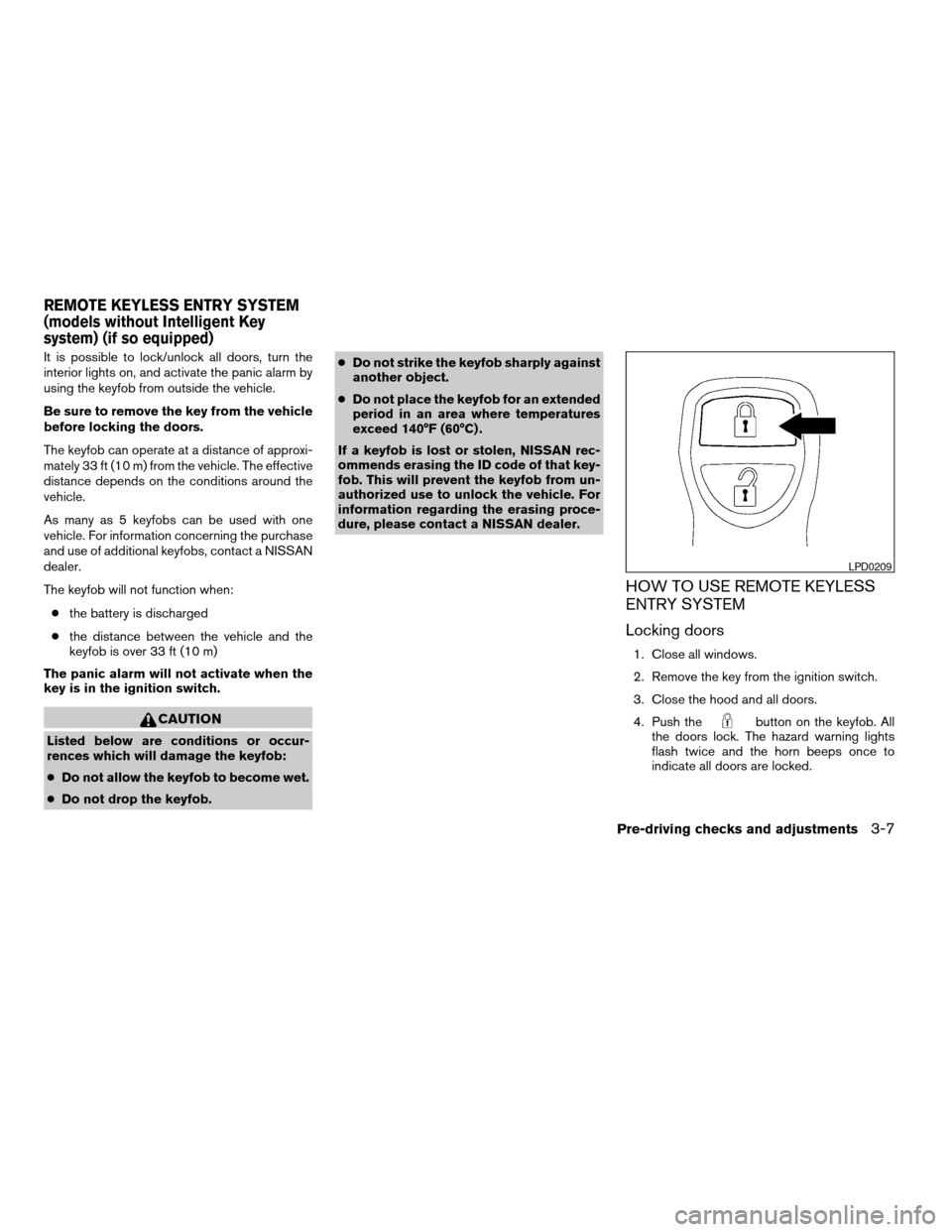
4. Push the
button on the keyfob. All
the doors lock. The hazard warning lights
flash twice and the horn beeps once to
indicate all doors are locked.
LPD0209
REMOTE KEYLESS ENTRY SYSTEM
(models without Intelligent Key
system) (if so equipped)
Pre-driving checks and adjustments3-7
ZREVIEW COPYÐ2007 Versa(vrs)
Owners ManualÐUSA_English(nna)
10/05/06Ðdebbie
X
Page 119 of 304

Silencing the horn beep feature
If desired, the horn beep feature can be deacti-
vated using the Intelligent Key.
To deactivate:Press and hold the
andbuttonsfor at least 2 seconds.
The hazard warning lights will flash three times to
confirm that the horn beep feature has been
deactivated.
To activate:Press and hold the
andbuttonsfor at least 2 seconds
once more.The hazard warning lights will flash once and the
horn will sound once to confirm that the horn
beep feature has been reactivated.
Deactivating the horn beep feature does not si-
lence the horn if the alarm is triggered.
s1Intelligent Key lock warning light (M/T
models) or P position selecting warning
light (CVT models)
s2Intelligent Key system warning light
WARNING LIGHTS AND AUDIBLE
REMINDERS
The Intelligent Key system is equipped with a
function that is designed to minimize improper
operations and to help prevent the vehicle from
being stolen. The warning buzzer sounds and the
warning light illuminates when improper opera-
tions are detected.
WPD0362WPD0370
Pre-driving checks and adjustments3-19
ZREVIEW COPYÐ2007 Versa(vrs)
Owners ManualÐUSA_English(nna)
10/05/06Ðdebbie
X
Page 120 of 304

CAUTION
When the buzzer sounds and the warning
light illuminates, be sure to check both
the vehicle and the Intelligent Key.
WARNING SIGNALS
To help prevent the vehicle from moving unex-
pectedly by erroneous operation of the Intelligent
Key or to help prevent the vehicle from being
stolen, a chime or buzzer sounds from inside and
outside the vehicle and a warning light comes on
in the instrument panel.
When a chime or beep sounds or the warning
light comes on, be sure to check the vehicle and
the Intelligent Key.
Audible reminder and warning when
locking the doors
When the chime or buzzer sounds from inside
and outside the vehicle, check for the following:
cThe ignition switch is turned to the LOCK
position.
cThe Intelligent Key is not left inside the ve-
hicle.
cThe selector lever is in the P position.
Audible reminder and warning when
the engine stops
When the P position selecting warning light
() (CVT models) in the instrument panel
blinks in red:
cMake sure the selector lever is in the P
position.
When the chime sounds intermittently:
cMake sure the selector lever is in the P
position and the ignition switch is turned to
the LOCK position.
If the chime sounds continuously when the driv-
er’s door is opened, check the following:
cThe selector lever is in the P position and the
ignition switch is turned to the LOCK posi-
tion.
cThe mechanical key is not inserted into the
ignition switch.
cThe warning chime may stop when one of
the following is performed.
– Returning the ignition switch to the LOCK
position.
– Removing the mechanical key.
– Closing the doors.When the Intelligent Key lock warning light
(
) (M/T models) in the instrument panel
blinks:
cMake sure the selector lever is in the P
position.
cMake sure the ignition switch is in the LOCK
position.
Alarm and warning when the engine
starts
When the Intelligent Key system warning light
() blinks red and the outside buzzer
sounds, make sure the Intelligent Key is inside the
vehicle.
Warning for low battery power
When the Intelligent Key battery is low, the Intel-
ligent Key system warning light () will blink
green for about 30 seconds after the ignition
switch is turned to the ON position. This warning
is to let you know that the battery of the Intelligent
Key will run down soon. Replace it with a new
one. Refer to “Battery replacement” in the “Main-
tenance and do-it-yourself” section.
NISSAN recommends replacing the battery at a
NISSAN dealer.
3-20Pre-driving checks and adjustments
ZREVIEW COPYÐ2007 Versa(vrs)
Owners ManualÐUSA_English(nna)
10/05/06Ðdebbie
X
Page 135 of 304
WARNING
cThe air conditioner cooling function op-
erates only when the engine is running.
cDo not leave children or adults who
would normally require the assistance
of others alone in your vehicle. Pets
should also not be left alone. They
could accidentally injure themselves or
others through inadvertent operation of
the vehicle. Also, on hot, sunny days,
temperatures in a closed vehicle could
quickly become high enough to cause
severe or possibly fatal injuries to
people or animals.
cDo not use the recirculation mode for
long periods as it may cause the interior
air to become stale and the windows to
fog up.
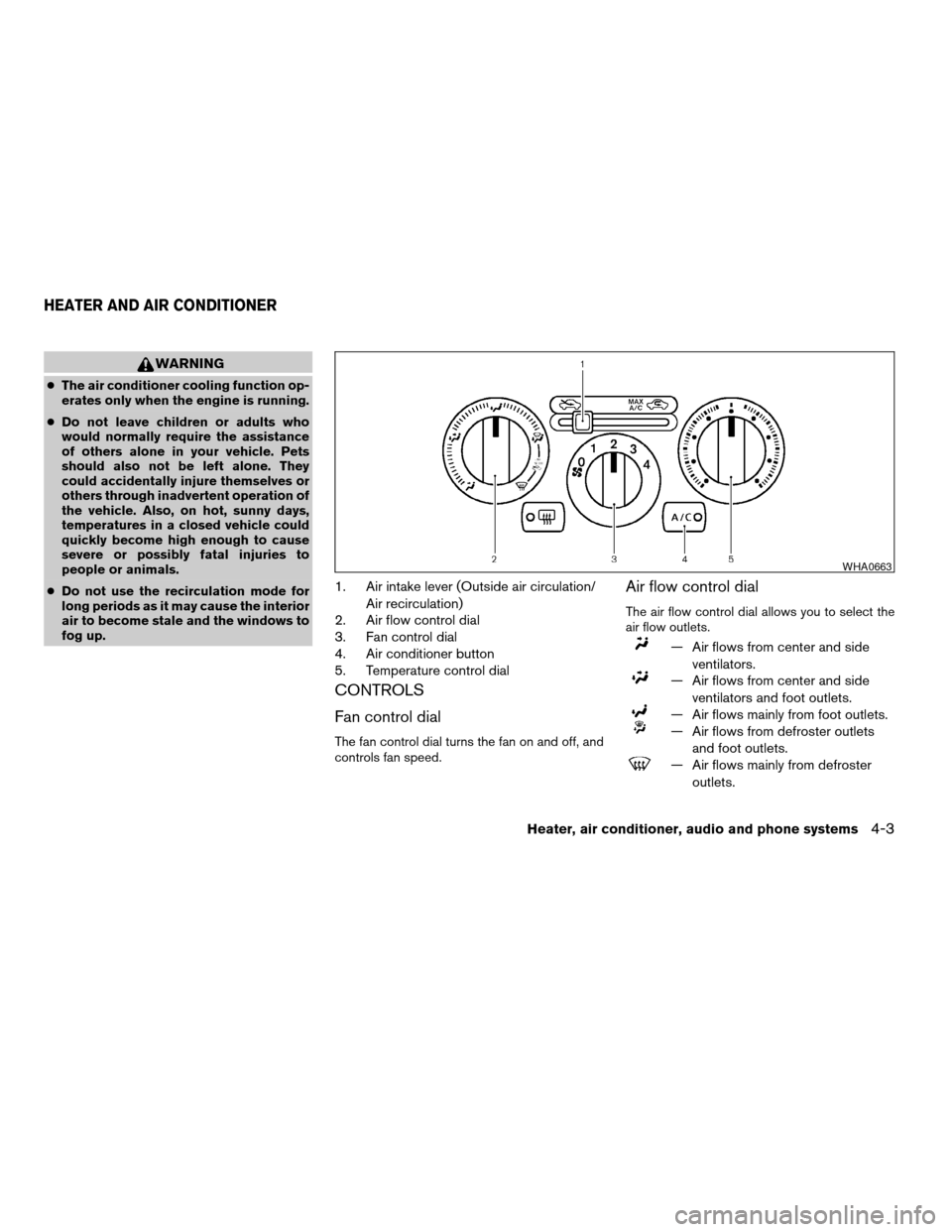
1. Air intake lever (Outside air circulation/
Air recirculation)
2. Air flow control dial
3. Fan control dial
4. Air conditioner button
5. Temperature control dial
CONTROLS
Fan control dial
The fan control dial turns the fan on and off, and
controls fan speed.
Air flow control dial
The air flow control dial allows you to select the
air flow outlets.
— Air flows from center and side
ventilators.
— Air flows from center and side
ventilators and foot outlets.
— Air flows mainly from foot outlets.
— Air flows from defroster outlets
and foot outlets.
— Air flows mainly from defroster
outlets.
WHA0663
HEATER AND AIR CONDITIONER
Heater, air conditioner, audio and phone systems4-3
ZREVIEW COPYÐ2007 Versa(vrs)
Owners ManualÐUSA_English(nna)
10/05/06Ðdebbie
X
Page 149 of 304

To adjust Bass, Treble, Fade and Balance, press
the MENU button until the desired mode appears
in the display. Press the TUNE/SEEK button to
adjust Bass and Treble to the desired level. You
can also use the TUNE/SEEK button to adjust
Fader and Balance modes. Fader adjusts the
sound level between the front and rear speakers
and Balance adjusts the sound between the right
and left speakers.
Once you have adjusted the sound quality to the
desired level, press the MENU button repeatedly
until the radio or CD display reappears. Other-
wise, the radio or CD display will automatically
reappear after about 10 seconds.
Clock operation
Press the MENU button until CLK-ON or CLK-
OFF is displayed, use the TUNE/SEEK button to
turn the clock display on or off.
Clock set
If the clock is not displayed with the ignition
switch in the ACC or ON position, you need to
select the CLK-ON mode. Press the MENU but-
ton repeatedly until CLK-OFF mode is displayed.
Use the TUNE/SEEK button to enable CLK-ON
mode.
1. Press the MENU button repeatedly until
CLK-ON mode appears.2. Press the MENU button again, the time will
start flashing.
3. Press the TUNE/SEEK button
orto adjust the hour.
4. Press the MENU button again; the display
will switch to the minute adjustment mode.
5. The minutes will start flashing. Press
TUNE/SEEK button
orto ad-
just the minutes.
6. Press the MENU button again to exit the
clock set mode.
The display will return to the regular clock display
after 10 seconds, or press the MENU button
again to return to the regular clock display.
Resetting the time
Hold the MENU button down and then press the
TUNE/SEEK button, the time will reset as fol-
lows:
cIf the displayed minutes before the reset are
in the range of :00 - :29, the hour displayed
before the reset will stay the same and the
minutes will be reset to :00.
cIf the displayed minutes before the reset are
in the range of :30 - :59, the hour displayed
before the reset will advance by one hour
and the minutes will be reset to :00.For example, if the MENU button and the
TUNE/SEEK button are pressed while the time
displayed is between 8:00 and 8:29, the display
will be reset to 8:00. If the buttons were pressed
while the time was between 8:30 and 8:59, the
display will be reset to 9:00. At the same time the
display will return to the audio.FM/AM radio operation
FM·AM button:
Press the FM·AM button to change from AMÃ!
FM reception.
The FM stereo indicator, ST, illuminates during
FM stereo reception. When the stereo broadcast
signal is weak, the radio automatically changes
from stereo to monaural reception.
TUNE/SEEK buttons:
Manual tuning
Press the
orbutton for less than 0.5
seconds for manual tuning.
SEEK tuning
Press the
orbutton for more than
1.5 seconds to seek through the frequencies.
Seek tuning begins from low to high frequencies,
or high to low frequencies depending on which
button is pressed, and stops at the next broad-
Heater, air conditioner, audio and phone systems4-17
ZREVIEW COPYÐ2007 Versa(vrs)
Owners ManualÐUSA_English(nna)
10/05/06Ðdebbie
X
Page 152 of 304

13. Station and CD select (1–6) buttons
14. VOL control knob
15. PUSH PWR button
16. AUX button
17. AUX IN jack
18. RPT/RDM button
19. TUNE/FF·REW/FOLDER button
*No satellite radio reception is available
when the RADIO button is pressed to
access satellite radio stations unless
optional satellite receiver and antenna
are installed and an XMTor SIRIUS™
satellite radio service subscription is
active. Satellite radio can only be in-
stalled in vehicles that were factory pre-
wired for satellite radio. Satellite radio is
not available in Alaska, Hawaii and
Guam.
FM/AM/SAT RADIO WITH
COMPACT DISC (CD) CHANGER
For all operation precautions, see9Audio opera-
tion precautions9earlier in this section.
No satellite radio reception is available when the
RADIO button is pressed to access satellite radio
stations unless optional satellite receiver and an-
tenna are installed and an XMTor SIRIUS™ sat-ellite radio service subscription is active. Satellite
radio can only be installed in vehicles that were
factory pre-wired for satellite radio. Satellite radio
is not available in Alaska, Hawaii and Guam.
Audio main operation
PWR and VOL control:
Turn the ignition key to ACC or ON, and then
press the PWR button while the system is off to
call up the mode (radio or CD) which was playing
immediately before the system was turned off.
To turn the system off, press the PWR button.
Turn the VOL control knob to adjust the volume.
This vehicle may be equipped with Speed Sen-
sitive Volume (SSV) for audio. The audio volume
changes as the driving speed changes.
AUDIO button (BASS, TREBLE, BALANCE,
FADE, SSV and BEEP):
Press the AUDIO button to change the mode as
follows:
Bass!Treble!Balance!Fade!SPD VOL
(SSV if so equipped)!Beep ON/OFF!Audio
or OFF!Bass
To adjust Bass, Treble, Balance and Fade, press
the AUDIO button until the desired mode ap-
pears in the display. Press the
TUNE/FF·REW/FOLDER button to adjust Bassand Treble to the desired level. You can also use
the TUNE/FF·REW/FOLDER button to adjust
Balance and Fade modes. Balance adjusts the
sound between the right and left speakers and
Fade adjusts the sound level between the front
and rear speakers.
To change the SSV mode to OFF, LOW, MID or
HIGH, press the TUNE/FF·REW/FOLDER but-
ton up or down.
To change the Beep to ON or OFF, press the
TUNE/FF·REW/FOLDER button up or down.
This will enable or disable the beep sound heard
during menu selection.
Once you have adjusted the sound quality to the
desired level, press the AUDIO button repeatedly
until the radio or CD display reappears. Other-
wise, the radio or CD display will automatically
reappear after about 10 seconds.
Clock operation
Pressing the CLOCK button displays the clock
with the radio on or off. Press the CLOCK button
again to turn off the clock display.
Clock set
1. Press and hold the CLOCK button until it
beeps for more than 1.5 seconds to enter
the clock set mode.
4-20Heater, air conditioner, audio and phone systems
ZREVIEW COPYÐ2007 Versa(vrs)
Owners ManualÐUSA_English(nna)
10/05/06Ðdebbie
X