2007 NISSAN QUEST start stop button
[x] Cancel search: start stop buttonPage 117 of 384
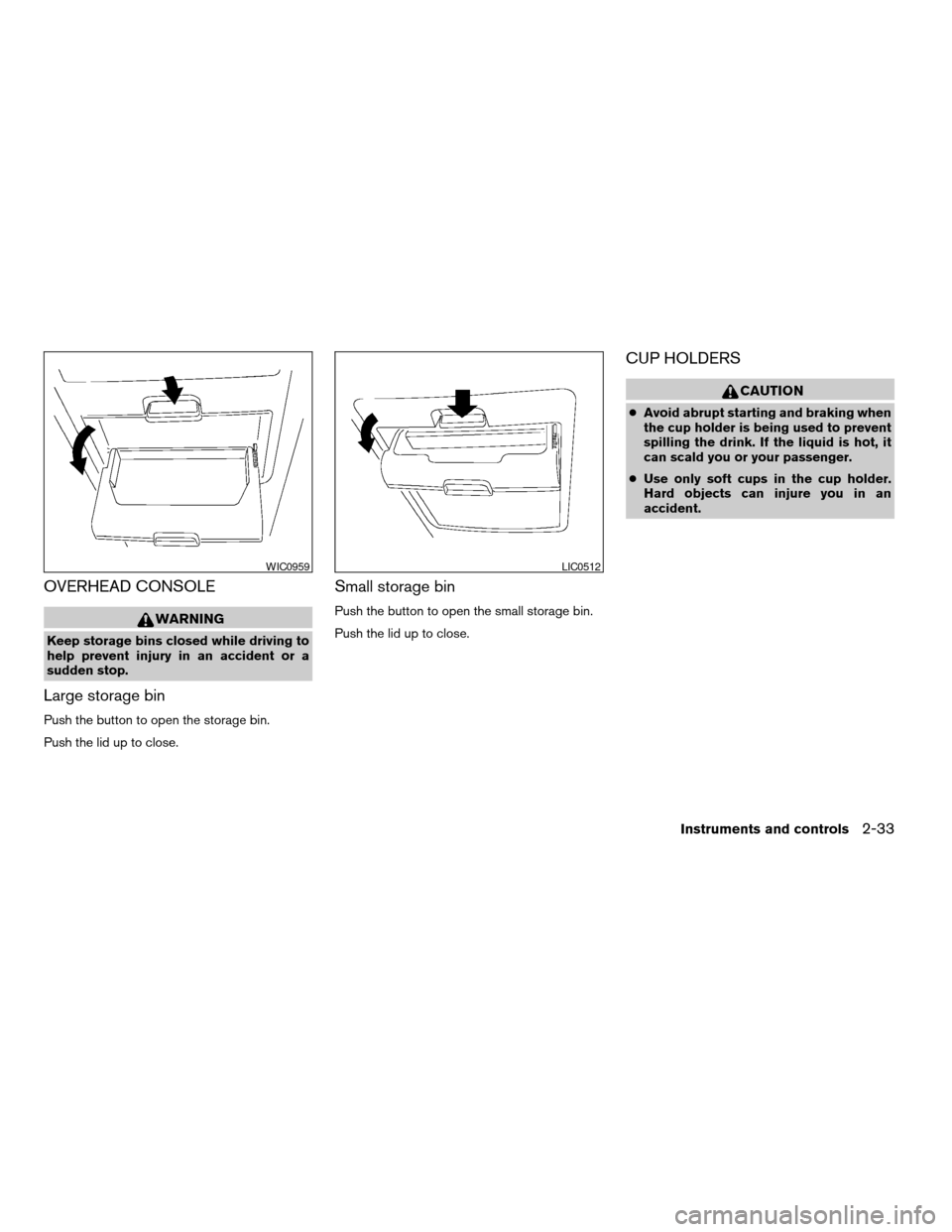
OVERHEAD CONSOLE
WARNING
Keep storage bins closed while driving to
help prevent injury in an accident or a
sudden stop.
Large storage bin
Push the button to open the storage bin.
Push the lid up to close.
Small storage bin
Push the button to open the small storage bin.
Push the lid up to close.
CUP HOLDERS
CAUTION
cAvoid abrupt starting and braking when
the cup holder is being used to prevent
spilling the drink. If the liquid is hot, it
can scald you or your passenger.
cUse only soft cups in the cup holder.
Hard objects can injure you in an
accident.
WIC0959LIC0512
Instruments and controls2-33
ZREVIEW COPYÐ2007 Quest(van)
Owners ManualÐUSA_English(nna)
02/27/06Ðdebbie
X
Page 146 of 384

Operating the power sliding door (if so
equipped)
Push and hold the button on the keyfob for about
0.5 second to open or close the power sliding
door.
The door will reverse direction immediately dur-
ing power open or power close if the keyfob
button is pressed. A chime will sound to an-
nounce the reversal.
For more information, see “Operating the power
sliding door” earlier in this section.
Operating the power lift gate (if so
equipped)
Push and hold the button on the keyfob for about
0.5 second to open or close the lift gate. The
hazard warning lights flash and a chime sounds
to indicate the power open or power close se-
quence has started.
The lift gate will reverse direction immediately
during power open or power close if the keyfob
button is pressed. A chime will sound to an-
nounce the reversal.
For more information, see “Lift gate” later in this
section.
Using the panic alarm
If you are near your vehicle and feel threatened,
you may activate the panic alarm to call attention
by pushing and holding the
button on the
keyfob forlonger than 0.5 second.
The panic alarm and headlights will stay on for 25
seconds.
The panic alarm stops when:
cit has run for 25 seconds, or
cany button is pushed on the keyfob.
WPD0336WPD0337LPD0211
3-12Pre-driving checks and adjustments
ZREVIEW COPYÐ2007 Quest(van)
Owners ManualÐUSA_English(nna)
02/27/06Ðdebbie
X
Page 166 of 384
WARNING
cDo not disassemble or modify this sys-
tem. If you do, it may result in accidents,
fire, or electrical shock.
cDo not use this system if you notice any
abnormality, such as a frozen screen or
lack of sound. Continued use of the
system may result in accident, fire or
electric shock.
cIn case you notice any foreign object in
the system hardware, spill liquid on it,
or notice smoke or smell coming from
it, stop using the system immediately
and contact your nearest NISSAN
dealer. Ignoring such conditions may
lead to accidents, fire or electrical
shock.
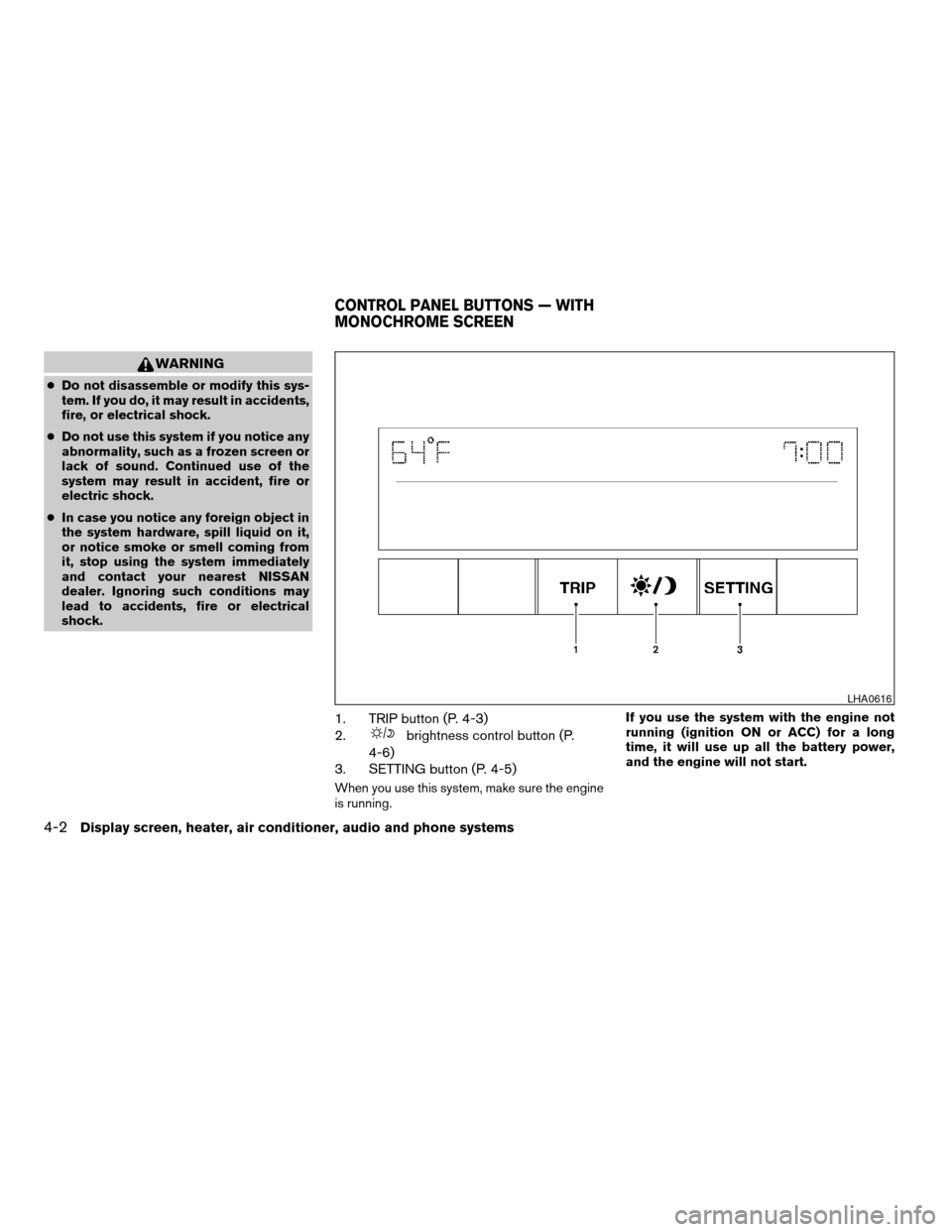
1. TRIP button (P. 4-3)
2.
brightness control button (P.
4-6)
3. SETTING button (P. 4-5)
When you use this system, make sure the engine
is running.If you use the system with the engine not
running (ignition ON or ACC) for a long
time, it will use up all the battery power,
and the engine will not start.
LHA0616
CONTROL PANEL BUTTONS — WITH
MONOCHROME SCREEN
4-2Display screen, heater, air conditioner, audio and phone systems
ZREVIEW COPYÐ2007 Quest(van)
Owners ManualÐUSA_English(nna)
02/27/06Ðdebbie
X
Page 230 of 384

Pressing thebutton on the front controls
turns the rear speakers on and off.
It is possible to operate the DVD player by remote
control.
Headphones are a wireless type and no cables
are necessary. You can use them in almost all the
ranges in the rear seat. (It is not possible to use
the headphones in the front seat.)
POWER on/off button:
With the ignition switch turned to the ACC or ON
position, press the POWER button to turn the
DVD player on or off.
Insert the DVD into the slot with the label side
facing up. The DVD will be guided automatically
into the slot.
If the DVD player is off and a DVD is inserted, the
DVD player will automatically turn on.
CAUTION
Do not force the compact disc into the
slot. This could damage the player.MODE select button:
Press the MODE button to select Audio/Video
source between DVD and AUX input (input jacks
on the faceplate, Red = right channel audio input,
White = left channel audio input, and Yellow =
Video input) .
The display will show the “AUX” in the upper left
corner of the display for 4 seconds once the
Mode is changed to AUX.
To use the input jacks, refer to “Auxiliary input
jacks” in this section.
orPLAY:
When the PLAY/PAUSE button on the player or
the PLAY button on the remote control is
pressed, the player will play.
In play mode, the display will briefly show
on the upper left corner of the display.
FF (Fast Forward) , REW
(Remote control only):
Press FAST FORWARD/FAST REVERSE but-
tons to carry out the fast forward or fast reverse
presentation at 5 times normal play speed.
Press FAST FORWARD/FAST REVERSE but-
tons again or PLAY button to resume the normal
play speed.
NEXT CHAPTER/
PREVIOUS CHAPTER
(Remote control only):
When the
(NEXT CHAPTER) button is
pressed while the DVD is being played, the pro-
gram next to the present one will start to play from
its beginning. Press several times to skip through
programs. The DVD will advance the number of
times the button is pressed. When the
(PREVIOUS CHAPTER) button is pressed, the
program being played returns to its beginning.
Press several times to skip back through pro-
grams. The DVD will go back the number of times
the button is pressed.
orPAUSE:
When the PLAY/PAUSE button on the player or
the PAUSE button on the remote control is
pressed, the player will pause playing of the
media. In pause mode, the player will show
on the upper left corner of the display until the
player is changed to another mode.
STOP:
Press the STOP button once to stop playing the
media. The display will show
in the upper
left corner of the display for 4 seconds, and the
last disc position will be stored. When the PLAY
button is pressed again, it will resume at the
stored disc track and time position.
4-66Display screen, heater, air conditioner, audio and phone systems
ZREVIEW COPYÐ2007 Quest(van)
Owners ManualÐUSA_English(nna)
02/27/06Ðdebbie
X
Page 248 of 384

11. The system will announce that speaker ad-
aptation has been completed and the sys-
tem is ready.
The SA mode will stop if:
cThe
button is pressed for more than 5
seconds in SA mode.
cThe vehicle begins moving during SA mode.
cThe ignition switch is turned to the OFF or
LOCK position.
Training phrases
During the SA mode, the system instructs the
trainer to say the following phrases. (The system
will prompt you for each phrase.)
cphone book new entry
cdial three oh four two nine
cdelete call back number
csetup pair phone
cmemo pad play
ceight pause nine three two pause seven
cdelete all entries
ccall seven two four zero ninecphone book delete entry
cmemo pad record
cdial star two one seven oh
cYe s
cNo
cselect ring tone
cdial eight five six nine two
cBluetooth on
csetup change priority
ccall three one nine oh two
cnine seven pause pause three oh eight
cCancel
ccall back number
ccall star two zero nine five
cdelete phone
cdial eight three zero five one
cHome
cfour three pause two nine pause zero
cdelete redial numbercphone book list names
ccall eight oh five four one
cCorrection
csetup change ring tone
cdial seven four oh one eight
csetup main menu
cDelete
cdial nine seven two six six
cmemo pad delete
ccall seven six three oh one
cgo back
ccall five six two eight zero
cdial six six four three seven
TROUBLESHOOTING GUIDE
The system should respond correctly to all voice
commands without difficulty. If problems are en-
countered, try the following solutions.
Where the solutions are listed by number, try
each solution in turn, starting with number 1, until
the problem is resolved.
4-84Display screen, heater, air conditioner, audio and phone systems
ZREVIEW COPYÐ2007 Quest(van)
Owners ManualÐUSA_English(nna)
02/27/06Ðdebbie
X
Page 261 of 384
The recommended operating procedures for this
transmission are shown on the following pages.
Follow these procedures for maximum vehicle
performance and driving enjoyment.
Starting the vehicle
1. After starting the engine, fully depress the
foot brake pedal before attempting to move
the shift selector lever out of the P (Park)
position.
2. Keep the foot brake pedal depressed and
move the shift selector lever into a driving
gear.
3. Release the foot brake, then gradually start
the vehicle in motion.
The automatic transmission is designed so
the foot brake pedal MUST be depressed
before shifting from P (Park) to any drive
position while the ignition switch is in the
ON position.
The shift selector lever cannot be moved
out of P (Park) and into any of the other
gear positions if the ignition key is turned
to the LOCK, OFF or ACC position or if the
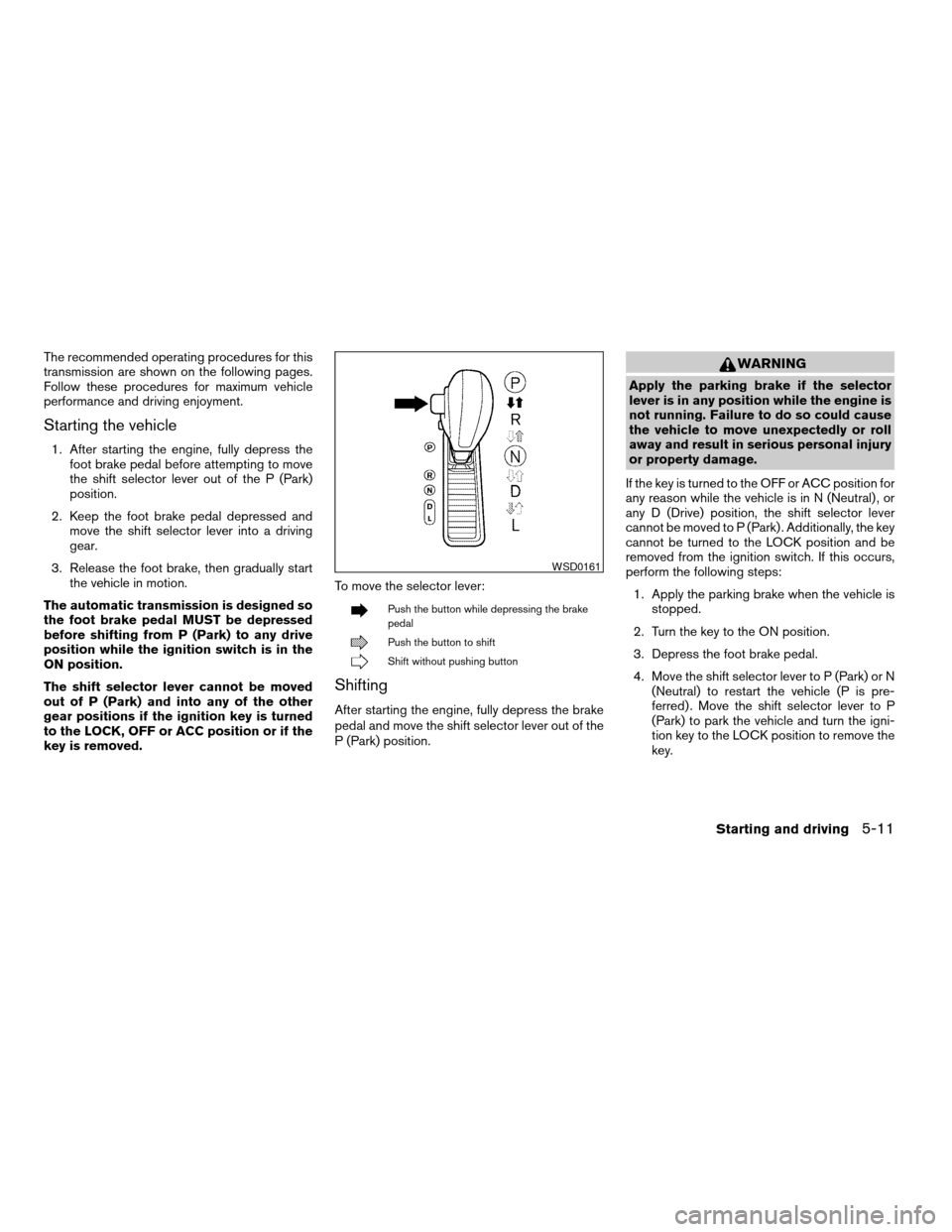
key is removed.To move the selector lever:
Push the button while depressing the brake
pedal
Push the button to shift
Shift without pushing button
Shifting
After starting the engine, fully depress the brake
pedal and move the shift selector lever out of the
P (Park) position.
WARNING
Apply the parking brake if the selector
lever is in any position while the engine is
not running. Failure to do so could cause
the vehicle to move unexpectedly or roll
away and result in serious personal injury
or property damage.
If the key is turned to the OFF or ACC position for
any reason while the vehicle is in N (Neutral) , or
any D (Drive) position, the shift selector lever
cannot be moved to P (Park) . Additionally, the key
cannot be turned to the LOCK position and be
removed from the ignition switch. If this occurs,
perform the following steps:
1. Apply the parking brake when the vehicle is
stopped.
2. Turn the key to the ON position.
3. Depress the foot brake pedal.
4. Move the shift selector lever to P (Park) or N
(Neutral) to restart the vehicle (P is pre-
ferred) . Move the shift selector lever to P
(Park) to park the vehicle and turn the igni-
tion key to the LOCK position to remove the
key.
WSD0161
Starting and driving5-11
ZREVIEW COPYÐ2007 Quest(van)
Owners ManualÐUSA_English(nna)
02/27/06Ðdebbie
X
Page 369 of 384

10 Index
A
Active head restraint...............1-7
Adjusting pedal position............3-21
Air bag (See supplemental restraint
system).....................1-51
Air bag system
Front (See supplemental front impact
air bag system)...............1-58
Side and curtain (See supplemental side
air bag and curtain side-impact air bag
system)...................1-62
Air bag warning labels.............1-65
Air bag warning light...........1-65, 2-11
Air cleaner housing filter............8-16
Air conditioner
Air conditioner operation..........4-34
Air conditioner service...........4-43
Air conditioner specification label.....9-11
Air conditioner system refrigerant and
oil recommendations.............9-6
Heater and air conditioner
controls................4-31, 4-40
Rear seat air conditioner..........4-42
Servicing air conditioner..........4-43
Air flow charts..................4-35
Alarm system
(See vehicle security system).........2-14
Anchor point locations.............1-30
Antenna.....................4-61
Anti-lock brake warning light..........2-8Anti-lock braking system (ABS)........5-20
Audible reminders................2-14
Audio system..................4-43
AM-FM-SAT radio with compact disc
(CD) changer................4-51
AM-FM-SAT radio with compact disc
(CD) player.................4-51
Compact Disc (CD) changer.......4-56
Compact disc (CD) player.........4-55
MP3 display..................4-6
Radio....................4-43
Rear audio controls.............4-60
Steering wheel audio control switch. . . .4-59
Autolight switch.................2-20
Automatic
Automatic drive positioner.........3-25
Automatic power window switch.....2-40
Automatic transmission position indicator
light.....................2-11
Driving with automatic transmission. . . .5-10
Transmission selector lever lock
release....................5-12
Automatic anti-glare inside mirror.......3-23
Average speed..................4-4
B
Back button................4-7, 4-18
Battery......................8-13
Charge warning light.............2-8
Before starting the engine............5-9Belts (See drive belts).............8-15
Bench seat adjustment (3rd row). . . .1-7, 1-12
BluetoothThands-free phone system.....4-72
Booster seats..................1-47
Brake
Anti-lock braking system (ABS)......5-20
Brake fluid..................8-12
Brake light (See stop light).........8-25
Brake system................5-19
Brake warning light..............2-8
Brake wear indicators........2-14, 8-20
Parking brake check............8-20
Parking brake operation..........5-14
Self-adjusting brakes............8-20
Brake pedal...................8-20
Break-in schedule................5-16
Brightness control
Instrument panel..............2-22
Brightness/contrast button. . . .4-6, 4-16, 4-28
Bulb check/instrument panel..........2-7
Bulb replacement................8-25
C
Capacities and recommended
fuel/lubricants...................9-2
Captain’s chair adjustment (2nd row)......1-6
Car phone or CB radio.............4-72
Cargo (See vehicle loading information) . . .9-12
CD care and cleaning.............4-58
CD changer (See audio system)........4-56
ZREVIEW COPYÐ2007 Quest(van)
Owners ManualÐUSA_English(nna)
02/27/06Ðdebbie
X
Page 374 of 384

Setting button...........4-5, 4-11, 4-22
Shift lock release................5-12
Shifting
Automatic transmission...........5-11
Shoulder belt height adjustment........1-24
Side air bag system (See supplemental side
air bag and curtain side-impact air
bag system)...................1-62
SkyView™ roof.................2-41
Sliding door
Manual sliding door.............3-5
Power sliding door..............3-6
Sliding door locks
Child safety sliding door locks........3-9
Spark plug replacement............8-15
Speedometer...................2-4
SRS warning label...............1-65
Starting
Before starting the engine..........5-9
Jump starting.................6-8
Precautions when starting and driving . . .5-2
Push starting................6-10
Starting the engine.............5-10
Startup screen.................4-18
Steering
Power steering fluid.............8-11
Power steering system...........5-19
Tilting steering wheel............3-21
Steering wheel audio control switch......4-59
Stop light....................8-25
Storage.....................2-28
Storage bin............2-33, 2-36, 2-37
Storage tray...................2-29
Sun visors....................3-22
Sunglasses case................2-28
Sunglasses holder...............2-28Sunroof.....................2-42
Supplemental air bag warning labels.....1-65
Supplemental air bag warning light . . .1-65, 2-11
Supplemental front impact air bag system . .1-58
Supplemental restraint system
Information and warning labels.......1-65
Precautions on supplemental restraint
system....................1-51
Supplemental restraint system
(Supplemental air bag system).........1-51
Supplemental side and curtain side-impact air
bag system...................1-62
Switch
Autolight switch...............2-20
Automatic power window switch.....2-40
Fog light switch...............2-23
Hazard warning flasher switch.......2-24
Headlight and turn signal switch......2-19
Headlight control switch..........2-19
Ignition switch................5-8
Lights on demand switch..........2-43
Main ON/OFF switch
(for power doors)...........3-6, 3-15
Overdrive switch..............5-13
Power door lock switch...........3-5
Rear sonar system off switch.......2-27
Rear window and outside mirror defroster
switch....................2-18
Rear window wiper and washer
switches...................2-18
Traction control system (TCS) off
switch....................2-26
Turn signal switch..............2-23
Vehicle dynamic control (VDC) off
switch....................2-26
Windshield wiper and washer switch . . .2-17T
Tachometer....................2-4
Temperature gauge
Engine coolant temperature gauge.....2-5
Theft (NISSAN vehicle immobilizer system) ,
engine start..............2-16, 3-2, 5-9
Third row bench seat adjustment.....1-7, 1-12
Three-way catalyst................5-2
Tilting steering wheel..............3-21
Tire
Flat tire....................6-2
Spare tire................6-4, 8-42
Tire chains..................8-39
Tire placard.................9-11
Tire pressure................8-29
Tire rotation.................8-40
Types of tires................8-37
Uniform tire quality grading.........9-23
Wheels and tires..............8-29
Wheel/tire size................9-8
Tire pressure
Low tire pressure warning light.......2-9
Tire pressure display........4-4, 4-11, 4-21
Tire pressure monitoring system......5-3, 5-5
Tire rotation maintenance reminder . . .4-4, 4-11,
4-21
Top tether strap child restraint.........1-30
Towing
Flat towing..................9-22
Tow truck towing..............6-11
Towing load/specification.........9-19
Trailer towing................9-16
Traction control system (TCS) off switch . . .2-26
10-6
ZREVIEW COPYÐ2007 Quest(van)
Owners ManualÐUSA_English(nna)
02/27/06Ðdebbie
X