Page 79 of 172
TURN SIGNAL AND HAZARD WARNING LAMPS
LT-79
C
D
E
F
G
H
I
J
L
MA
B
LT
Revision: 2006 November2007 350Z
Preliminary CheckNKS004YB
CHECK POWER SUPPLY AND GROUND CIRCUIT
1. CHECK FUSES AND FUSIBLE LINK
Check for blown fuses and fusible link.
Refer to LT- 6 9 , "
Wiring Diagram — TURN —" .
OK or NG
OK >> GO TO 2.
NG >> If fuse is blown, be sure to eliminate cause of malfunction before installing new fuse. Refer to PG-
4, "POWER SUPPLY ROUTING CIRCUIT" .
2. CHECK POWER SUPPLY CIRCUIT
1. Turn ignition switch OFF.
2. Disconnect BCM connectors.
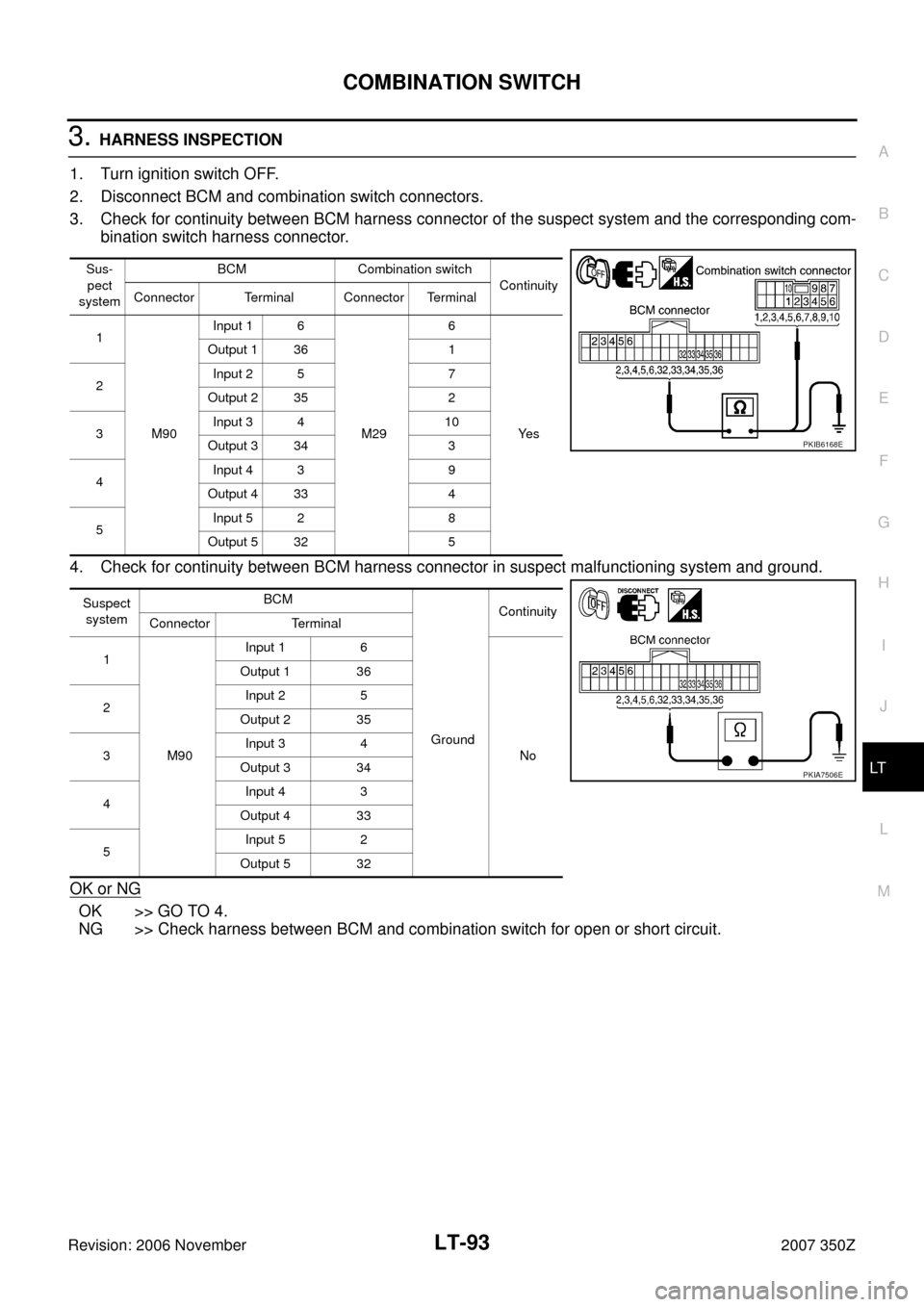
3. Check voltage between BCM harness connector terminals and
ground.
OK or NG
OK >> GO TO 3.
NG >> Repair harness or connector.
3. CHECK GROUND CIRCUIT
Check continuity between BCM harness connector terminal and
ground.
OK or NG
OK >> INSPECTION END
NG >> Repair harness or connector.
UNIT POWER SOURCE Fuse and fusible link No.
BCMBatteryF
18
Ignition switch ON or START position 1
Ignition switch ACC or ON position 6
Terminals Ignition switch position
(+)
(-) OFF ON
BCM
connectorTerminal
M90 38
GroundApprox. 0 V Battery voltage
M9142 Battery voltage Battery voltage
55 Battery voltage Battery voltage
PKIB5199E
BCM connector Terminal
GroundContinuity
M91 52 Yes
PKIB5198E
Page 81 of 172
TURN SIGNAL AND HAZARD WARNING LAMPS
LT-81
C
D
E
F
G
H
I
J
L
MA
B
LT
Revision: 2006 November2007 350Z
Turn Signal Lamp Does Not OperateNKS004YD
1. CHECK BULB
Check bulb standard of each turn signal lamp is correct.
OK or NG
OK >> GO TO 2.
NG >> Replace turn signal lamp bulb.
2. CHECK COMBINATION SWITCH INPUT SIGNAL
CONSULT-III DATA MONITOR
1. Select "TURN SIGNAL R" and "TURN SIGNAL L" of BCM data monitor item.
2. With operating the lighting switch, check the monitor status.
CHECK COMBINATION SWITCH
Refer to LT- 9 2 , "
Combination Switch Inspection" .
OK or NG
OK >> GO TO 3.
NG >> Check combination switch (lighting switch). Refer to LT- 9 2 , "
Combination Switch Inspection" .
3. ACTIVE TEST
CONSULT-III ACTIVE TEST
1. Select "FLASHER" of BCM active test item.
2. With operating the test item, check the turn signal lamp operation.
GO TO 4
OK or NG
OK >> Replace BCM. Refer to BCS-17, "Removal and Installation of BCM" .
NG >> GO TO 4.
4. CHECK SHORT CIRCUIT
1. Turn ignition switch OFF.
2. Disconnect BCM connector and all turn signal lamp connectors.
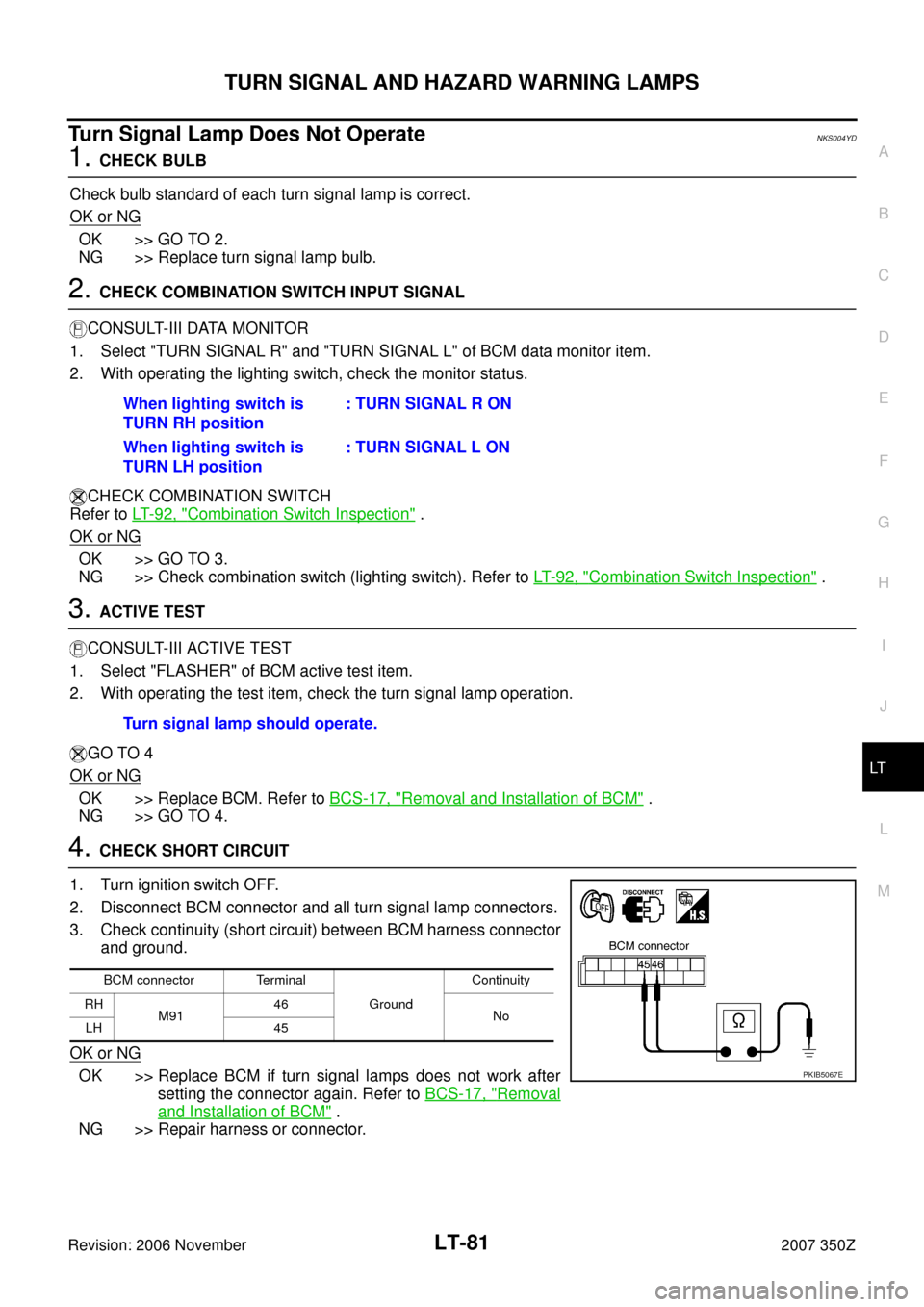
3. Check continuity (short circuit) between BCM harness connector
and ground.
OK or NG
OK >> Replace BCM if turn signal lamps does not work after
setting the connector again. Refer to BCS-17, "
Removal
and Installation of BCM" .
NG >> Repair harness or connector.When lighting switch is
TURN RH position: TURN SIGNAL R ON
When lighting switch is
TURN LH position: TURN SIGNAL L ON
Turn signal lamp should operate.
BCM connector Terminal
GroundContinuity
RH
M9146
No
LH 45
PKIB5067E
Page 82 of 172
LT-82
TURN SIGNAL AND HAZARD WARNING LAMPS
Revision: 2006 November2007 350Z
Hazard Warning Lamp Does Not Operate But Turn Signal Lamp OperateNKS004YE
1. CHECK BULB
Make sure bulb standard of each turn signal lamp is correct.
OK or NG
OK >> GO TO 2.
NG >> Replace bulb.
2. CHECK HAZARD SWITCH INPUT SIGNAL
With CONSULT-III
1. Select "HAZARD SW" of BCM data monitor item.
2. With operating the hazard switch, check the monitor status.
Without CONSULT-III
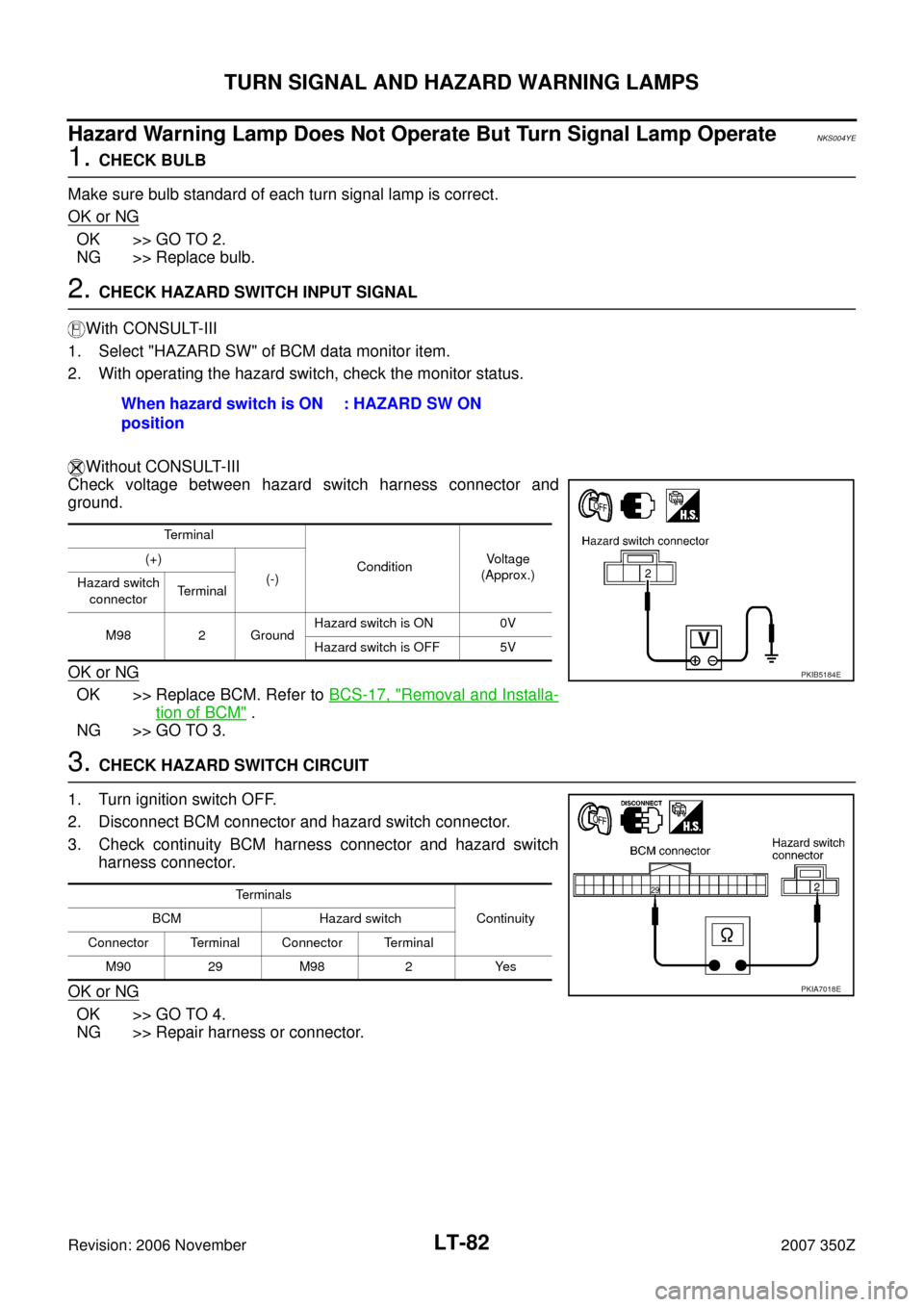
Check voltage between hazard switch harness connector and
ground.
OK or NG
OK >> Replace BCM. Refer to BCS-17, "Removal and Installa-
tion of BCM" .
NG >> GO TO 3.
3. CHECK HAZARD SWITCH CIRCUIT
1. Turn ignition switch OFF.
2. Disconnect BCM connector and hazard switch connector.
3. Check continuity BCM harness connector and hazard switch
harness connector.
OK or NG
OK >> GO TO 4.
NG >> Repair harness or connector.When hazard switch is ON
position : HAZARD SW ON
Terminal
ConditionVo l ta g e
(Approx.) (+)
(-)
Hazard switch
connectorTerminal
M98 2 GroundHazard switch is ON 0V
Hazard switch is OFF 5V
PKIB5184E
Terminals
Continuity BCM Hazard switch
Connector Terminal Connector Terminal
M90 29 M98 2 Yes
PKIA7018E
Page 83 of 172
TURN SIGNAL AND HAZARD WARNING LAMPS
LT-83
C
D
E
F
G
H
I
J
L
MA
B
LT
Revision: 2006 November2007 350Z
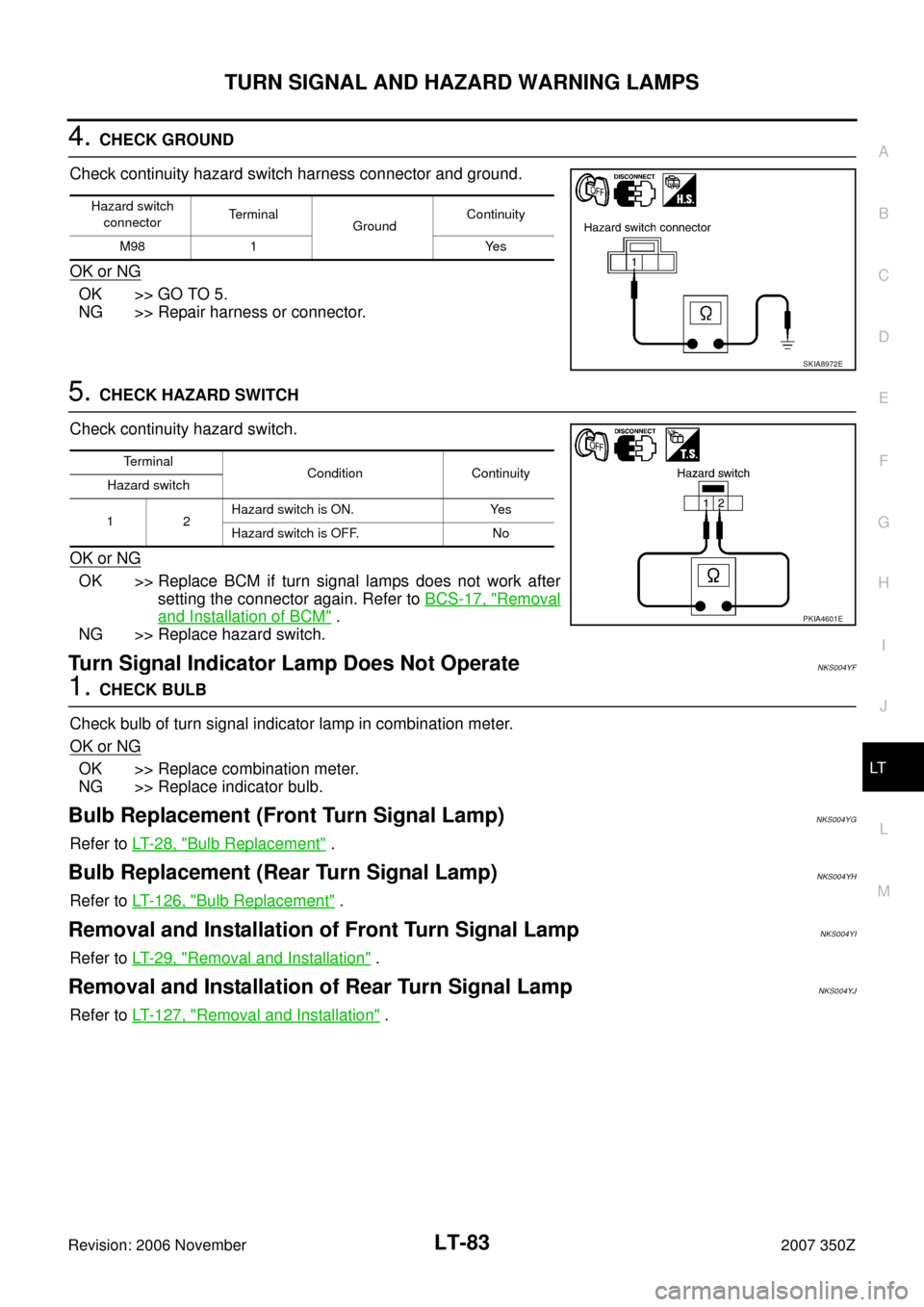
4. CHECK GROUND
Check continuity hazard switch harness connector and ground.
OK or NG
OK >> GO TO 5.
NG >> Repair harness or connector.
5. CHECK HAZARD SWITCH
Check continuity hazard switch.
OK or NG
OK >> Replace BCM if turn signal lamps does not work after
setting the connector again. Refer to BCS-17, "
Removal
and Installation of BCM" .
NG >> Replace hazard switch.
Turn Signal Indicator Lamp Does Not OperateNKS004YF
1. CHECK BULB
Check bulb of turn signal indicator lamp in combination meter.
OK or NG
OK >> Replace combination meter.
NG >> Replace indicator bulb.
Bulb Replacement (Front Turn Signal Lamp)NKS004YG
Refer to LT- 2 8 , "Bulb Replacement" .
Bulb Replacement (Rear Turn Signal Lamp)NKS004YH
Refer to LT- 1 2 6 , "Bulb Replacement" .
Removal and Installation of Front Turn Signal LampNKS004YI
Refer to LT- 2 9 , "Removal and Installation" .
Removal and Installation of Rear Turn Signal Lamp NKS004YJ
Refer to LT- 1 2 7 , "Removal and Installation" .
Hazard switch
connectorTerminal
Ground Continuity
M98 1 Yes
SKIA8972E
Terminal
Condition Continuity
Hazard switch
12Hazard switch is ON. Yes
Hazard switch is OFF. No
PKIA4601E
Page 87 of 172
COMBINATION SWITCH
LT-87
C
D
E
F
G
H
I
J
L
MA
B
LT
Revision: 2006 November2007 350Z
Combination Switch Reading FunctionNKS004YN
Refer to BCS-3, "COMBINATION SWITCH READING FUNCTION" .
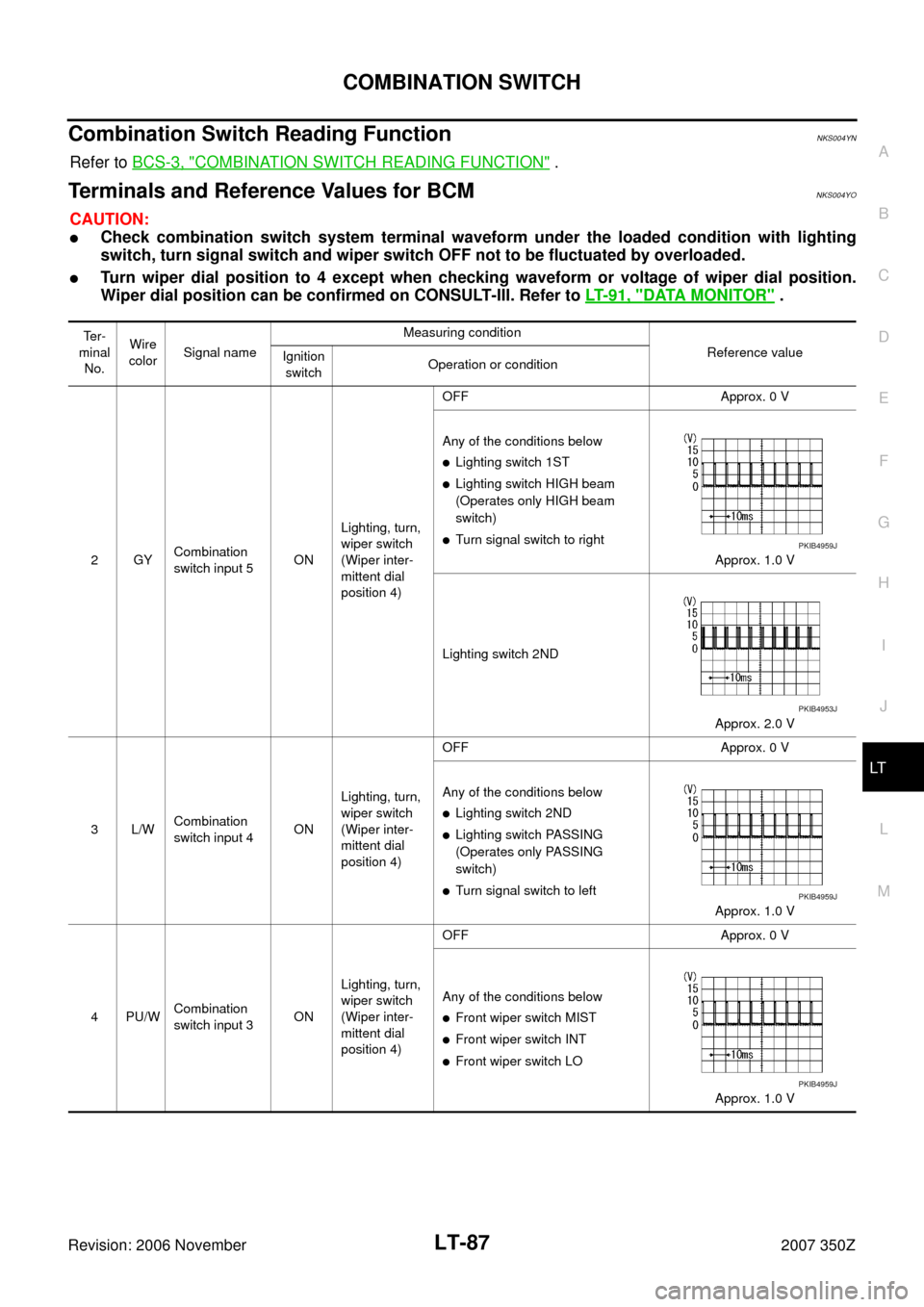
Terminals and Reference Values for BCMNKS004YO
CAUTION:
�Check combination switch system terminal waveform under the loaded condition with lighting
switch, turn signal switch and wiper switch OFF not to be fluctuated by overloaded.
�Turn wiper dial position to 4 except when checking waveform or voltage of wiper dial position.
Wiper dial position can be confirmed on CONSULT-III. Refer to LT- 9 1 , "
DATA MONITOR" .
Te r -
minal
No.Wire
colorSignal nameMeasuring condition
Reference value
Ignition
switchOperation or condition
2GYCombination
switch input 5ONLighting, turn,
wiper switch
(Wiper inter-
mittent dial
position 4)OFF Approx. 0 V
Any of the conditions below
�Lighting switch 1ST
�Lighting switch HIGH beam
(Operates only HIGH beam
switch)
�Turn signal switch to right
Approx. 1.0 V
Lighting switch 2ND
Approx. 2.0 V
3L/WCombination
switch input 4ONLighting, turn,
wiper switch
(Wiper inter-
mittent dial
position 4)OFF Approx. 0 V
Any of the conditions below
�Lighting switch 2ND
�Lighting switch PASSING
(Operates only PASSING
switch)
�Turn signal switch to left
Approx. 1.0 V
4PU/WCombination
switch input 3ONLighting, turn,
wiper switch
(Wiper inter-
mittent dial
position 4)OFF Approx. 0 V
Any of the conditions below
�Front wiper switch MIST
�Front wiper switch INT
�Front wiper switch LO
Approx. 1.0 V
PKIB4959J
PKIB4953J
PKIB4959J
PKIB4959J
Page 93 of 172
COMBINATION SWITCH
LT-93
C
D
E
F
G
H
I
J
L
MA
B
LT
Revision: 2006 November2007 350Z
3. HARNESS INSPECTION
1. Turn ignition switch OFF.
2. Disconnect BCM and combination switch connectors.
3. Check for continuity between BCM harness connector of the suspect system and the corresponding com-
bination switch harness connector.
4. Check for continuity between BCM harness connector in suspect malfunctioning system and ground.
OK or NG
OK >> GO TO 4.
NG >> Check harness between BCM and combination switch for open or short circuit.
Sus-
pect
systemBCM Combination switch
Continuity
Connector Terminal Connector Terminal
1
M90Input 1 6
M296
Ye s Output 1 36 1
2Input 2 5 7
Output 2 35 2
3Input 3 4 10
Output 3 34 3
4Input 4 3 9
Output 4 33 4
5Input 5 2 8
Output 5 32 5
Suspect
systemBCM
GroundContinuity
Connector Terminal
1
M90Input 1 6
No Output 1 36
2Input 2 5
Output 2 35
3Input 3 4
Output 3 34
4Input 4 3
Output 4 33
5Input 5 2
Output 5 32
PKIB6168E
PKIA7506E
Page 94 of 172
LT-94
COMBINATION SWITCH
Revision: 2006 November2007 350Z
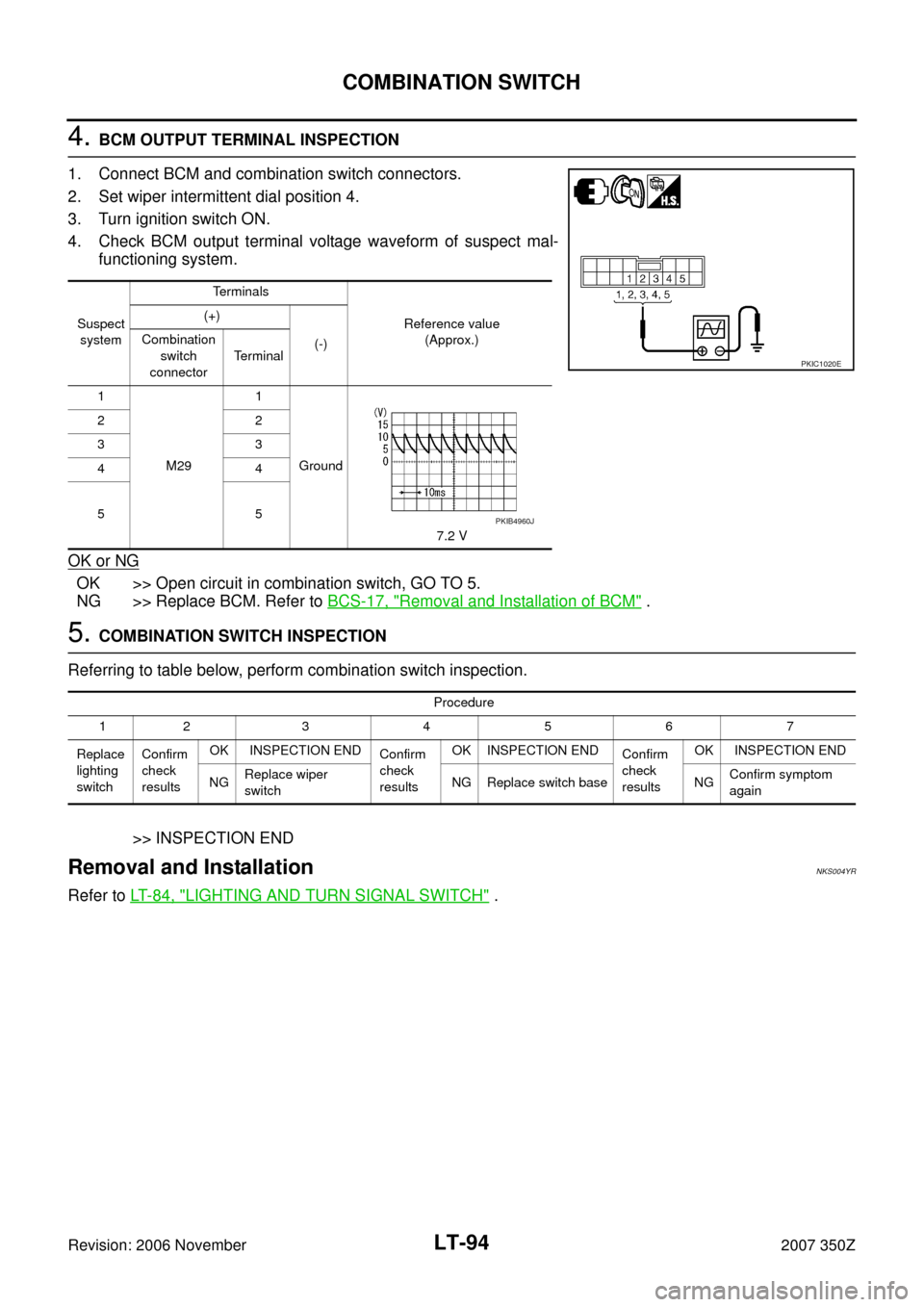
4. BCM OUTPUT TERMINAL INSPECTION
1. Connect BCM and combination switch connectors.
2. Set wiper intermittent dial position 4.
3. Turn ignition switch ON.
4. Check BCM output terminal voltage waveform of suspect mal-
functioning system.
OK or NG
OK >> Open circuit in combination switch, GO TO 5.
NG >> Replace BCM. Refer to BCS-17, "
Removal and Installation of BCM" .
5. COMBINATION SWITCH INSPECTION
Referring to table below, perform combination switch inspection.
>> INSPECTION END
Removal and InstallationNKS004YR
Refer to LT- 8 4 , "LIGHTING AND TURN SIGNAL SWITCH" .
Suspect
systemTerminals
Reference value
(Approx.) (+)
(-) Combination
switch
connectorTerminal
1
M291
Ground
7.2 V 22
33
44
55
PKIC1020E
PKIB4960J
Procedure
1234567
Replace
lighting
switchConfirm
check
resultsOK INSPECTION END
Confirm
check
resultsOK INSPECTION END
Confirm
check
resultsOK INSPECTION END
NGReplace wiper
switchNG Replace switch base NGConfirm symptom
again
Page 103 of 172
PARKING, LICENSE PLATE AND TAIL LAMPS
LT-103
C
D
E
F
G
H
I
J
L
MA
B
LT
Revision: 2006 November2007 350Z
PARKING, LICENSE PLATE AND TAIL LAMPSPFP:26550
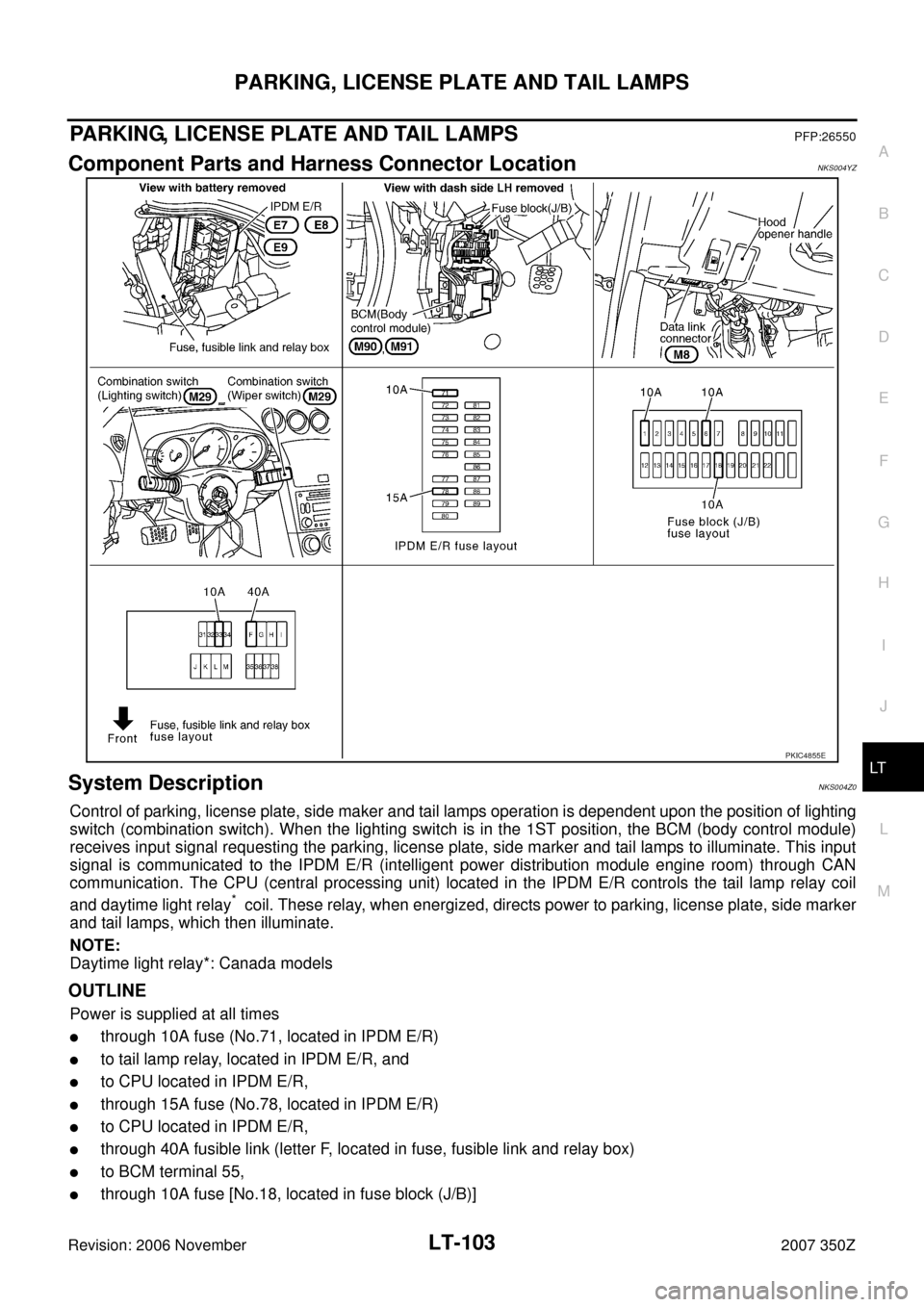
Component Parts and Harness Connector LocationNKS004YZ
System DescriptionNKS004Z0
Control of parking, license plate, side maker and tail lamps operation is dependent upon the position of lighting
switch (combination switch). When the lighting switch is in the 1ST position, the BCM (body control module)
receives input signal requesting the parking, license plate, side marker and tail lamps to illuminate. This input
signal is communicated to the IPDM E/R (intelligent power distribution module engine room) through CAN
communication. The CPU (central processing unit) located in the IPDM E/R controls the tail lamp relay coil
and daytime light relay
* coil. These relay, when energized, directs power to parking, license plate, side marker
and tail lamps, which then illuminate.
NOTE:
Daytime light relay*: Canada models
OUTLINE
Power is supplied at all times
�through 10A fuse (No.71, located in IPDM E/R)
�to tail lamp relay, located in IPDM E/R, and
�to CPU located in IPDM E/R,
�through 15A fuse (No.78, located in IPDM E/R)
�to CPU located in IPDM E/R,
�through 40A fusible link (letter F, located in fuse, fusible link and relay box)
�to BCM terminal 55,
�through 10A fuse [No.18, located in fuse block (J/B)]
PKIC4855E