Page 3 of 116

PRECAUTIONS
AV-3
C
D
E
F
G
H
I
J
L
MA
B
AV
Revision: 2006 November2007 350Z
PRECAUTIONSPFP:00001
Precautions for Supplemental Restraint System (SRS) “AIR BAG” and “SEAT
BELT PRE-TENSIONER”
NKS000C3
The Supplemental Restraint System such as “AIR BAG” and “SEAT BELT PRE-TENSIONER”, used along
with a front seat belt, helps to reduce the risk or severity of injury to the driver and front passenger for certain
types of collision. This system includes seat belt switch inputs and dual stage front air bag modules. The SRS
system uses the seat belt switches to determine the front air bag deployment, and may only deploy one front
air bag, depending on the severity of a collision and whether the front occupants are belted or unbelted.
Information necessary to service the system safely is included in the SRS and SB section of this Service Man-
ual.
WARNING:
�To avoid rendering the SRS inoperative, which could increase the risk of personal injury or death
in the event of a collision which would result in air bag inflation, all maintenance must be per-
formed by an authorized NISSAN/INFINITI dealer.
�Improper maintenance, including incorrect removal and installation of the SRS, can lead to per-
sonal injury caused by unintentional activation of the system. For removal of Spiral Cable and Air
Bag Module, see the SRS section.
�Do not use electrical test equipment on any circuit related to the SRS unless instructed to in this
Service Manual. SRS wiring harnesses can be identified by yellow and/or orange harnesses or
harness connectors.
Precautions for Battery ServiceNKS000C4
Before disconnecting the battery, lower both the driver and passenger windows. This will prevent any interfer-
ence between the window edge and the vehicle when the door is opened/closed. During normal operation, the
window slightly raises and lowers automatically to prevent any window to vehicle interference. The automatic
window function will not work with the battery disconnected.
Page 42 of 116
AV-42
AUDIO
Revision: 2006 November2007 350Z
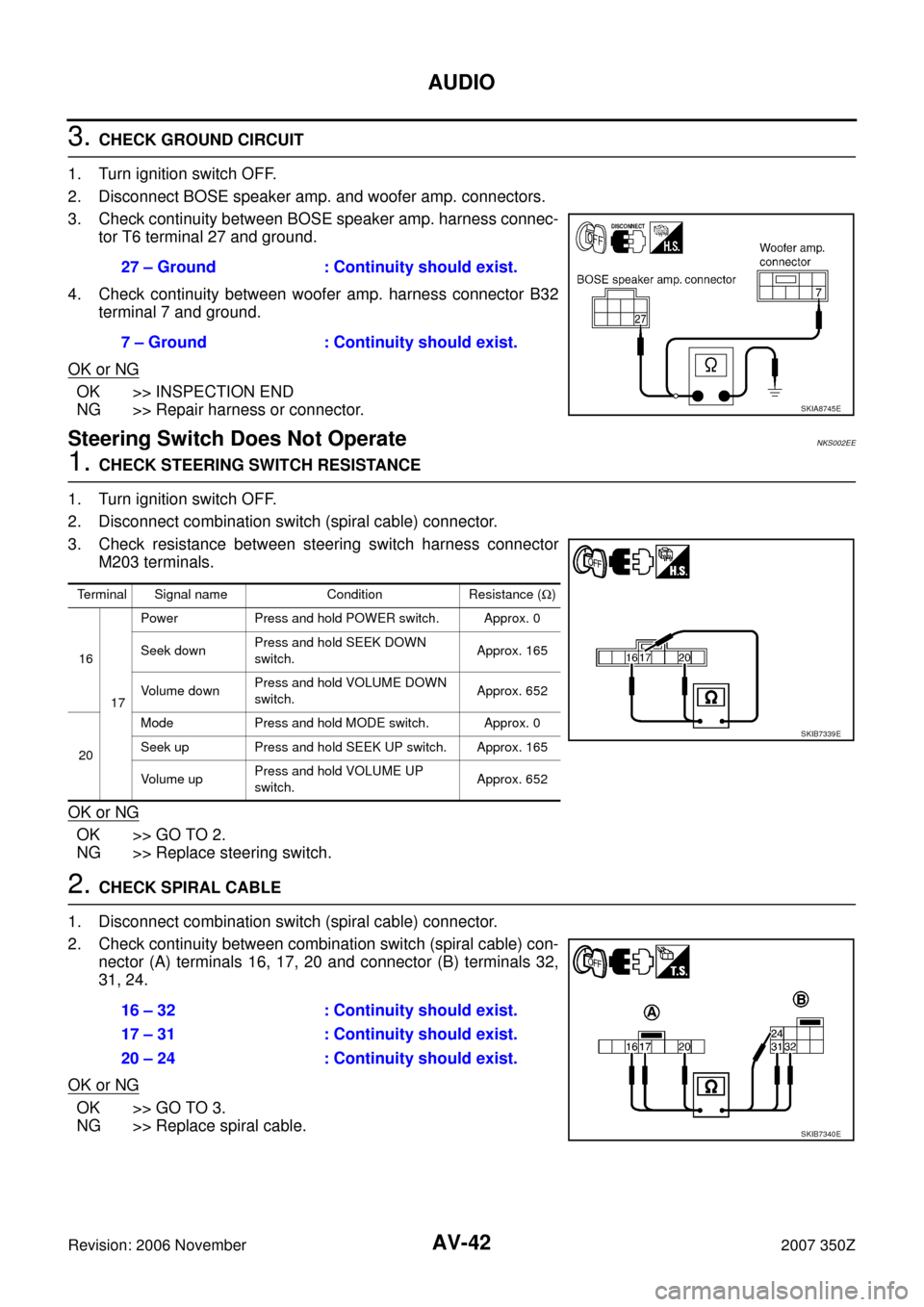
3. CHECK GROUND CIRCUIT
1. Turn ignition switch OFF.
2. Disconnect BOSE speaker amp. and woofer amp. connectors.
3. Check continuity between BOSE speaker amp. harness connec-
tor T6 terminal 27 and ground.
4. Check continuity between woofer amp. harness connector B32
terminal 7 and ground.
OK or NG
OK >> INSPECTION END
NG >> Repair harness or connector.
Steering Switch Does Not OperateNKS002EE
1. CHECK STEERING SWITCH RESISTANCE
1. Turn ignition switch OFF.
2. Disconnect combination switch (spiral cable) connector.
3. Check resistance between steering switch harness connector
M203 terminals.
OK or NG
OK >> GO TO 2.
NG >> Replace steering switch.
2. CHECK SPIRAL CABLE
1. Disconnect combination switch (spiral cable) connector.
2. Check continuity between combination switch (spiral cable) con-
nector (A) terminals 16, 17, 20 and connector (B) terminals 32,
31, 24.
OK or NG
OK >> GO TO 3.
NG >> Replace spiral cable.27 – Ground : Continuity should exist.
7 – Ground : Continuity should exist.
SKIA8745E
Terminal Signal name Condition Resistance (Ω)
16
17Power Press and hold POWER switch. Approx. 0
Seek downPress and hold SEEK DOWN
switch.Approx. 165
Vo l u m e d o wnPress and hold VOLUME DOWN
switch.Approx. 652
20Mode Press and hold MODE switch. Approx. 0
Seek up Press and hold SEEK UP switch. Approx. 165
Vo l u m e u pPress and hold VOLUME UP
switch.Approx. 652
SKIB7339E
16 – 32 : Continuity should exist.
17 – 31 : Continuity should exist.
20 – 24 : Continuity should exist.
SKIB7340E
Page 43 of 116
AUDIO
AV-43
C
D
E
F
G
H
I
J
L
MA
B
AV
Revision: 2006 November2007 350Z
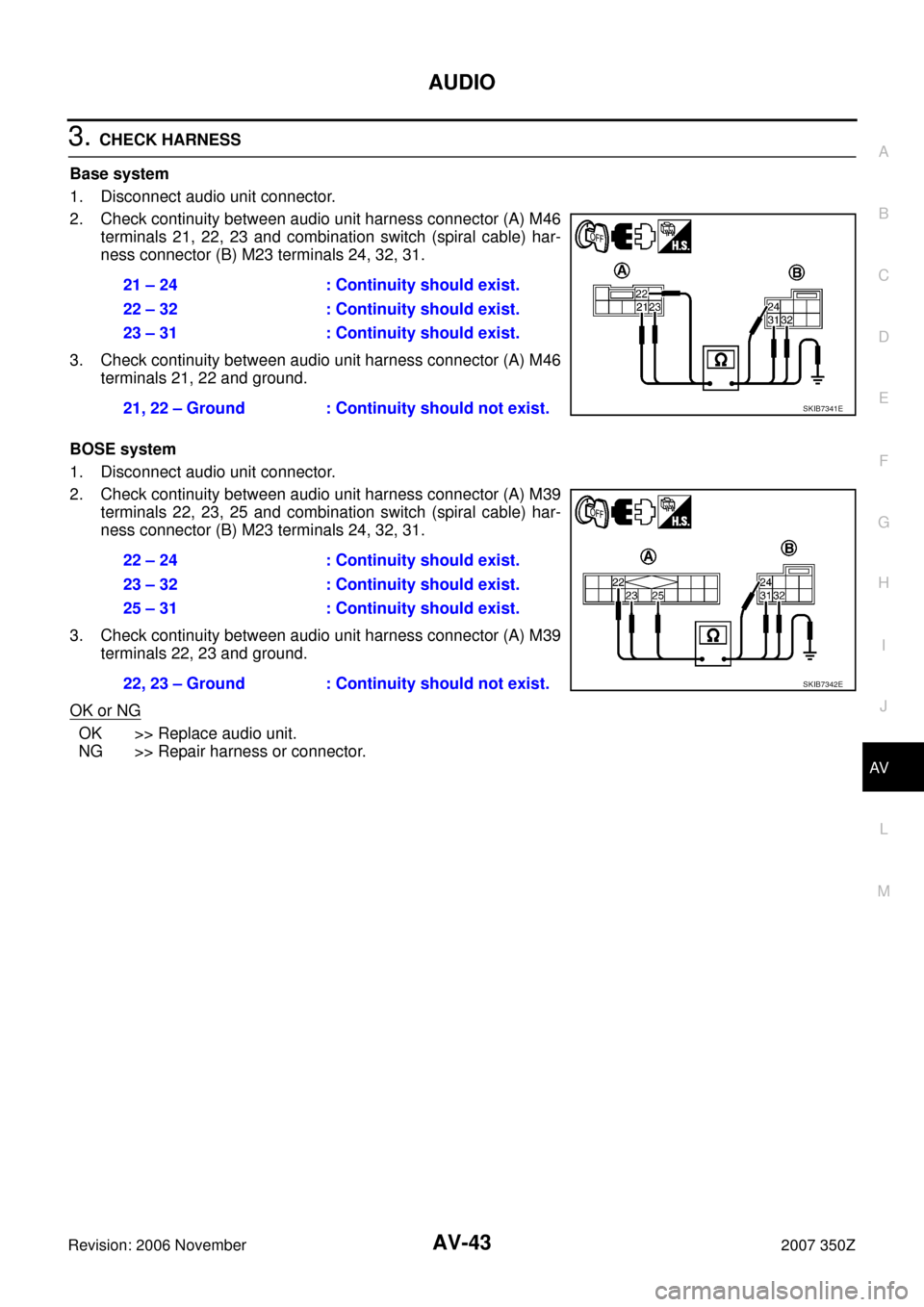
3. CHECK HARNESS
Base system
1. Disconnect audio unit connector.
2. Check continuity between audio unit harness connector (A) M46
terminals 21, 22, 23 and combination switch (spiral cable) har-
ness connector (B) M23 terminals 24, 32, 31.
3. Check continuity between audio unit harness connector (A) M46
terminals 21, 22 and ground.
BOSE system
1. Disconnect audio unit connector.
2. Check continuity between audio unit harness connector (A) M39
terminals 22, 23, 25 and combination switch (spiral cable) har-
ness connector (B) M23 terminals 24, 32, 31.
3. Check continuity between audio unit harness connector (A) M39
terminals 22, 23 and ground.
OK or NG
OK >> Replace audio unit.
NG >> Repair harness or connector.21 – 24 : Continuity should exist.
22 – 32 : Continuity should exist.
23 – 31 : Continuity should exist.
21, 22 – Ground : Continuity should not exist.
SKIB7341E
22 – 24 : Continuity should exist.
23 – 32 : Continuity should exist.
25 – 31 : Continuity should exist.
22, 23 – Ground : Continuity should not exist.
SKIB7342E