Page 190 of 242
188 Navigation*
During route guidance
This function allows you to select an
intermediate destination while route
guidance is active. A stopover destination
may be a gas station or a restaurant or any
other place. When the route to the
stopover destination is calculated, the
system calculates the route from the
stopover destination to the main
destination.
Entering a stopover destination
�Activate the soft key display
(
�page 184).
�Press the Stopovr soft key.
The map is displayed in full view.
or
The Stopover still active menu will
appear (
�page 190) if a stopover
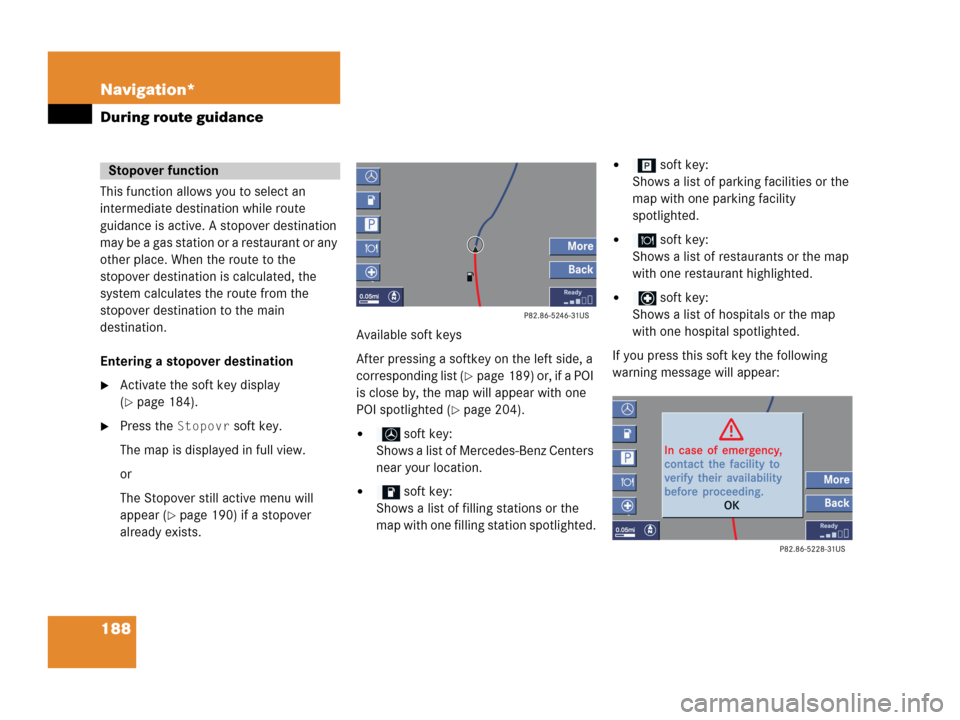
already exists.Available soft keys
After pressing a softkey on the left side, a
corresponding list (
�page 189) or, if a POI
is close by, the map will appear with one
POI spotlighted (
�page 204).
� soft key:
Shows a list of Mercedes-Benz Centers
near your location.
� soft key:
Shows a list of filling stations or the
map with one filling station spotlighted.
� soft key:
Shows a list of parking facilities or the
map with one parking facility
spotlighted.
� soft key:
Shows a list of restaurants or the map
with one restaurant highlighted.
� soft key:
Shows a list of hospitals or the map
with one hospital spotlighted.
If you press this soft key the following
warning message will appear:
Stopover function
Page 191 of 242
189 Navigation*
During route guidance
�More soft key:
If you press this soft key, the
Navigation main menu (
�page 152)
will appear.
Enter stopover will
appear on the status bar.
You can now enter an stopover
destination by
�selecting one from the destination
memory (
�page 198)
�typing one in the Enter street menu
(
�page 156)
�selecting one in the Last
destinations
memory
(
�page 197)
�selecting a Point of interest
(
�page 201)
�entering a POI by phone number
(
�page 205)
�selecting one in the Today’s
plan
memory (�page 207)
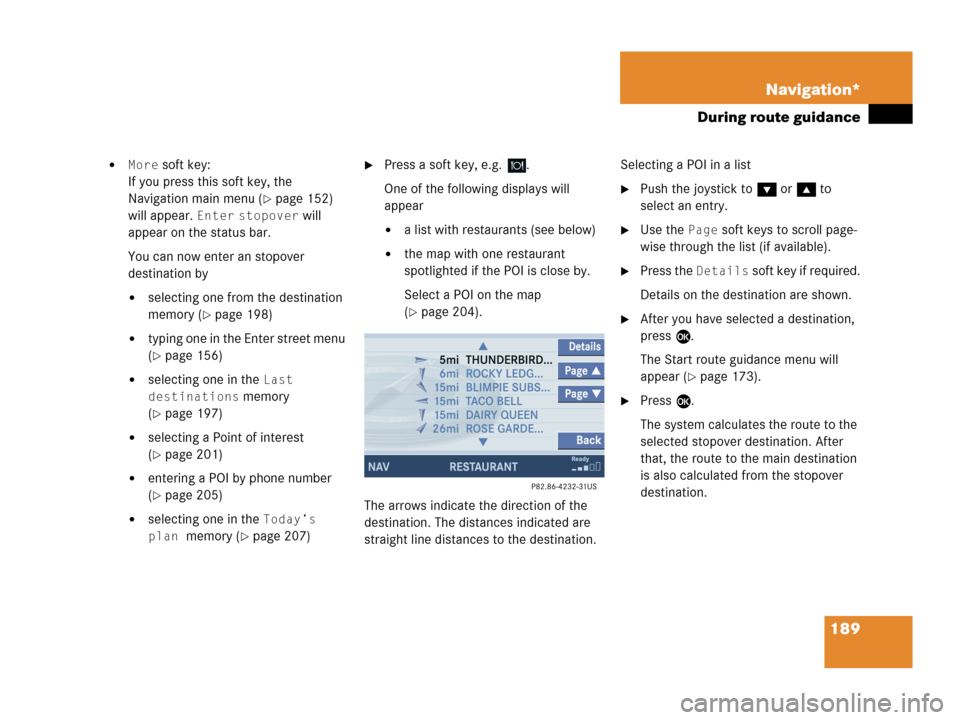
�Press a soft key, e.g. .
One of the following displays will
appear
�a list with restaurants (see below)
�the map with one restaurant
spotlighted if the POI is close by.
Select a POI on the map
(
�page 204).
The arrows indicate the direction of the
destination. The distances indicated are
straight line distances to the destination.Selecting a POI in a list
�Push the joystick to G or g to
select an entry.
�Use the Page soft keys to scroll page-
wise through the list (if available).
�Press the Details soft key if required.
Details on the destination are shown.
�After you have selected a destination,
press E.
The Start route guidance menu will
appear (
�page 173).
�Press E.
The system calculates the route to the
selected stopover destination. After
that, the route to the main destination
is also calculated from the stopover
destination.
Page 203 of 242
201 Navigation*
POIs (Points of Interest)
� POIs (Points of Interest)
This function allows you to select Points of
Interest such as gas stations, parking
facilities or shopping centers.
�Activating the Navigation main menu
(
�page 152).
�Push the joystick to G to select menu
item
Points of interest.
�Press E.
The Select POI category menu will
appear.Selecting a POI category
Select POI category menu
i
You can also select a POI
�in the Start route guidance menu
(
�page 165) or during route
guidance (
�page 184)
�on the map (�page 204)
�by entering a phone number
(
�page 205).
Entering POIs
Page 204 of 242
202 Navigation*
POIs (Points of Interest)
Available soft keys
�Name soft key:
Brings you to the Enter POI menu
(
�page 203).
�Details soft key:
Shows all information about the POI
category.
�Page V and Page v soft keys:
Use the
Page V and Page v soft keys
to display the next or previous page.
�Back soft key:
Returns you to the previous menu.
�Push the joystick to G or g to
select the desired POI category.
�Press E.
The Find menu will appear.
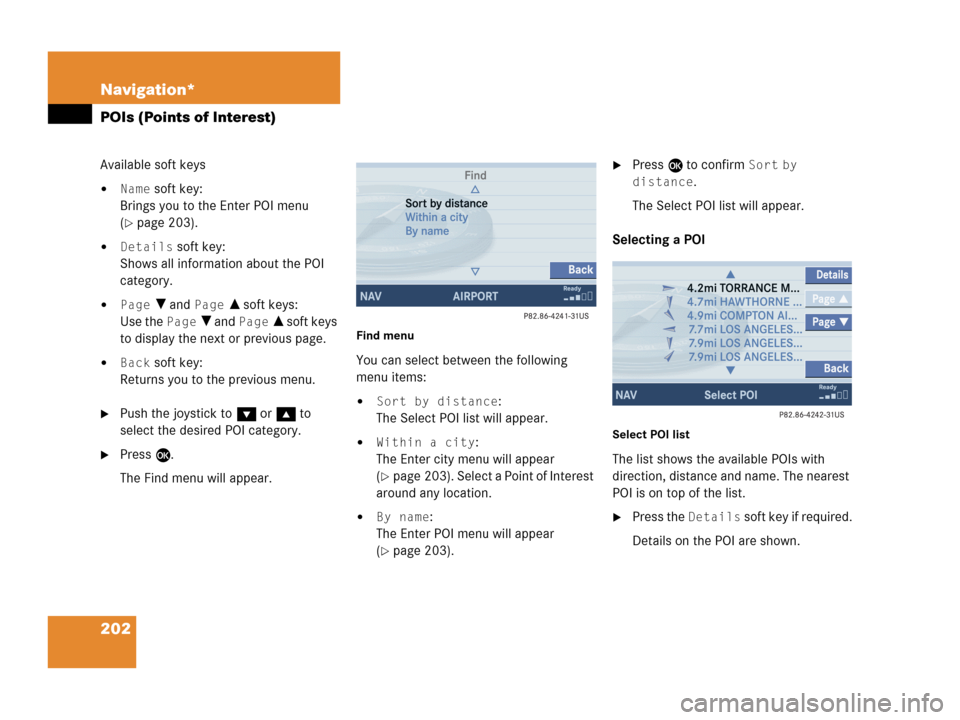
Find menu
You can select between the following
menu items:
�Sort by distance:
The Select POI list will appear.
�Within a city:
The Enter city menu will appear
(
�page 203). Select a Point of Interest
around any location.
�By name:
The Enter POI menu will appear
(
�page 203).
�Press E to confirm Sort by
distance
.
The Select POI list will appear.
Selecting a POI
Select POI list
The list shows the available POIs with
direction, distance and name. The nearest
POI is on top of the list.
�Press the Details soft key if required.
Details on the POI are shown.
Page 205 of 242

203 Navigation*
POIs (Points of Interest)
�Push the joystick to G or g to
select the desired POI.
�Press E.
The Start route guidance menu will
appear (
�page 173).
Entering a city
�In the Find menu, push the joystick to
G to select menu item
Within a
city
.
�Press E.
The Enter city menu will appear
(
�page 163).
�Enter the city and press E to confirm.
A list showing the available POIs within
the entered city will appear.
�Select the desired POI from the list and
press E to confirm.
The Start route guidance menu will
appear (
�page 173).Entering a POI by name
�In the Select POI category menu, press
the
Name softkey.
or
�In the Find menu, push the joystick to
G to select menu item
By name.
The Enter POI menu will appear.
Enter POI menu
�Enter the POI name and press E to
confirm.
A list showing the entered POI name
will appear.
�Press E.
The Start route guidance menu will
appear (
�page 173).
i
If menu item By name is chosen, the
corresponding category symbol will
appear in first line.
Page 206 of 242
204 Navigation*
POIs (Points of Interest)
�Press c.
The full view of the map will appear.
Your current position and the special
destinations are indicated by symbols.
�Press any soft key.
The soft key displays will appear.
�If required, move the map pushing the
joystick to H, h, g, G,F or
f.
�Press the POIs soft key.
One of the POI is spotlighted. The name
belonging to it is shown on the status
bar.
�Use the Next or Prev. soft key
to select the desired POI.
�Press the Details soft key if required.
Details on the POI selected are shown.
�Press E.
The Start route guidance menu will
appear (
�page 173).
Selecting a POI on the map
i
You can define which symbols will be
shown on the map (
�page 192).
Page 207 of 242
205 Navigation*
POIs (Points of Interest)
If a phone number is associated with a POI,
the number can be used to select a
destination and making a call. The
database uses phone numbers in the USA
and Canada.
�Activating the Navigation main menu
(
�page 152).
�Push the joystick to G to select menu
item
Phone number.
�Press E.
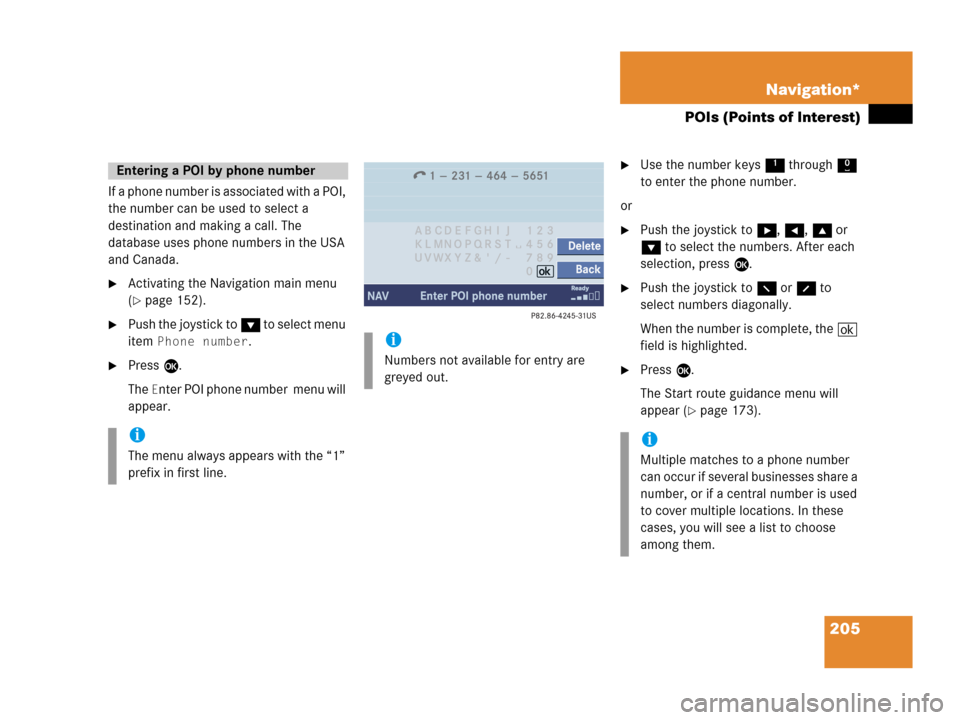
The
Enter POI phone number menu will
appear.
�Use the number keys 1 through 0
to enter the phone number.
or
�Push the joystick to h, H, g or
G to select the numbers. After each
selection, press E.
�Push the joystick to F or f to
select numbers diagonally.
When the number is complete, the (
field is highlighted.
�Press E.
The Start route guidance menu will
appear (
�page 173).
Entering a POI by phone number
i
The menu always appears with the “1”
prefix in first line.
i
Numbers not available for entry are
greyed out.
i
Multiple matches to a phone number
can occur if several businesses share a
number, or if a central number is used
to cover multiple locations. In these
cases, you will see a list to choose
among them.
Page 208 of 242
206 Navigation*
POIs (Points of Interest)
Dialing the POI phone number*
�Press the Call soft key in the Route
guidance menu.
Dialing will begin. In the status bar, the
off-hook symbol will appear. If the
person called answers the call, the call
is active. You talk over the hands-free
set.
�Press K to end the call.
i
The Call soft key is visible if vehicle is
equipped for phone operation and
Mercedes-Benz specified mobile
telephone* is inserted in phone
cradle*.


