Page 50 of 94
49
Navigation Set UP
select
.
h you are
urrent
omplete.
Set Clock
The current time is set using this function. Since time notification is \
provided by
a GPS satellite.
select
Open the [SET CLOCK] screen
Select if you prefer 24-hour display;
for 12-hour display.
Select to move the setting ahead by one hour,
and similarly, select to move it back by one
hour.
How to exit .
Map Version
The map and software version numbers can be confirmed using this function.
select
Map and software versions are now displayed.
%:��A'#�DQQM��2CIG�����6JWTUFC[��/CTEJ����������������2/
Page 51 of 94
![MAZDA MODEL CX-7 2007 Navigation Manual (in English) 50
RoutingAddress
Book
Navigation Set UP
Navigation Set Up
This function replaces all the settings in the mobile navigation system with the initial default
settings.
[Default List]
Restore System Def](/manual-img/28/13911/w960_13911-50.png "MAZDA MODEL CX-7 2007 Navigation Manual (in English) 50
RoutingAddress
Book
Navigation Set UP
Navigation Set Up
This function replaces all the settings in the mobile navigation system with the initial default
settings.
[Default List]
Restore System Def")
50
RoutingAddress
Book
Navigation Set UP
Navigation Set Up
This function replaces all the settings in the mobile navigation system with the initial default
settings.
[Default List]
Restore System Defaults
Before Steps
select
select
MENU
Open the [SYSTEM DEFAULTS] screen
Select .
If you execute Restore System Defaults, all of your stored setting data will be deleted.
ItemInitial condition
Menu names
Map Orientation North up
Map display mode Single-screen display
Map Display scale/Map scale for Dual-screen is not object of backup.Single-screen: 10,000 map (1/16 mi)Display guidance language English
Quick-POI map display All Off
Quick-POI Selection A : Gas station
B : ATM
C : Police Station
D : Grocery store
E : All Restaurant
F : Hotel
Search Area US9 (including Washington DC)
Map Color 1
Day/Night/Auto Setting Auto
Distance Units (Miles/KM) (Global setting) Miles
Volume Presets 4
Time display change (12h/24h)24h
Keyboard layout ABC
Arrival Time Time
Navigation Setup (Clock) Off
Navigation Setup (Beep) On
Map Configuration
Freeway Infor m ation O ff
Guidance Screen ON
Map screen Single
Turn Guidance Screen Turn List
%:��A'#�DQQM��2CIG�����6JWTUFC[��/CTEJ����������������2/
Page 52 of 94
51
Navigation Set UP
Navigation Set Up
You can change the language of the menu and the voice guidance.
Before Steps
select
select
Language
MENU
Open the [LANGUAGE] screen
Select your preferred language from the list.
%:��A'#�DQQM��2CIG�����6JWTUFC[��/CTEJ����������������2/
Page 53 of 94
![MAZDA MODEL CX-7 2007 Navigation Manual (in English) 52
RoutingAddress
Book
Navigation Set UP
Navigation Set Up
Before Steps
select
select
Map Configuration
MENU
Open the
[MAP
CONFIGURATION]
screen
nMap Screen
Select single or dual map dis](/manual-img/28/13911/w960_13911-52.png "MAZDA MODEL CX-7 2007 Navigation Manual (in English) 52
RoutingAddress
Book
Navigation Set UP
Navigation Set Up
Before Steps
select
select
Map Configuration
MENU
Open the
[MAP
CONFIGURATION]
screen
nMap Screen
Select single or dual map dis")
52
RoutingAddress
Book
Navigation Set UP
Navigation Set Up
Before Steps
select
select
Map Configuration
MENU
Open the
[MAP
CONFIGURATION]
screen
nMap Screen
Select single or dual map display.
nTurn Guidance
Enlarged Junction Diagram
Before a fork in the road , an enlarged diagram of the junction automatically
appears in a second screen.This is to make route guidance even clearer.
Turn List
While using route guidance, the
directions for the next junction where
you have to turn are shown as Turn
List.
Turn Arrow
While using route guidance, the
directions for the next junction where
you have to turn are shown as Turn
Arrow.
nJunction Detail
Select whether the Enlarged Junction diagram screen is
displayed automatically.
nFreeway Information
Allows selection of whether the guidance screen is to be
displayed while driving on a freeway.
Single map Dual map
During route guidance, an enlarged
diagram of an approaching fork or junction
appears. When you drive past the junction,
the enlarged diagram disappears.During route guidance, an enlarged diagram of
the freeway automatically appears in a second
screen as you approach a fork on the freeway.
This is to make route guidance even clearer.
%:��A'#�DQQM��2CIG�����6JWTUFC[��/CTEJ����������������2/
Page 54 of 94
53
If necessary
Precautions/System Performance
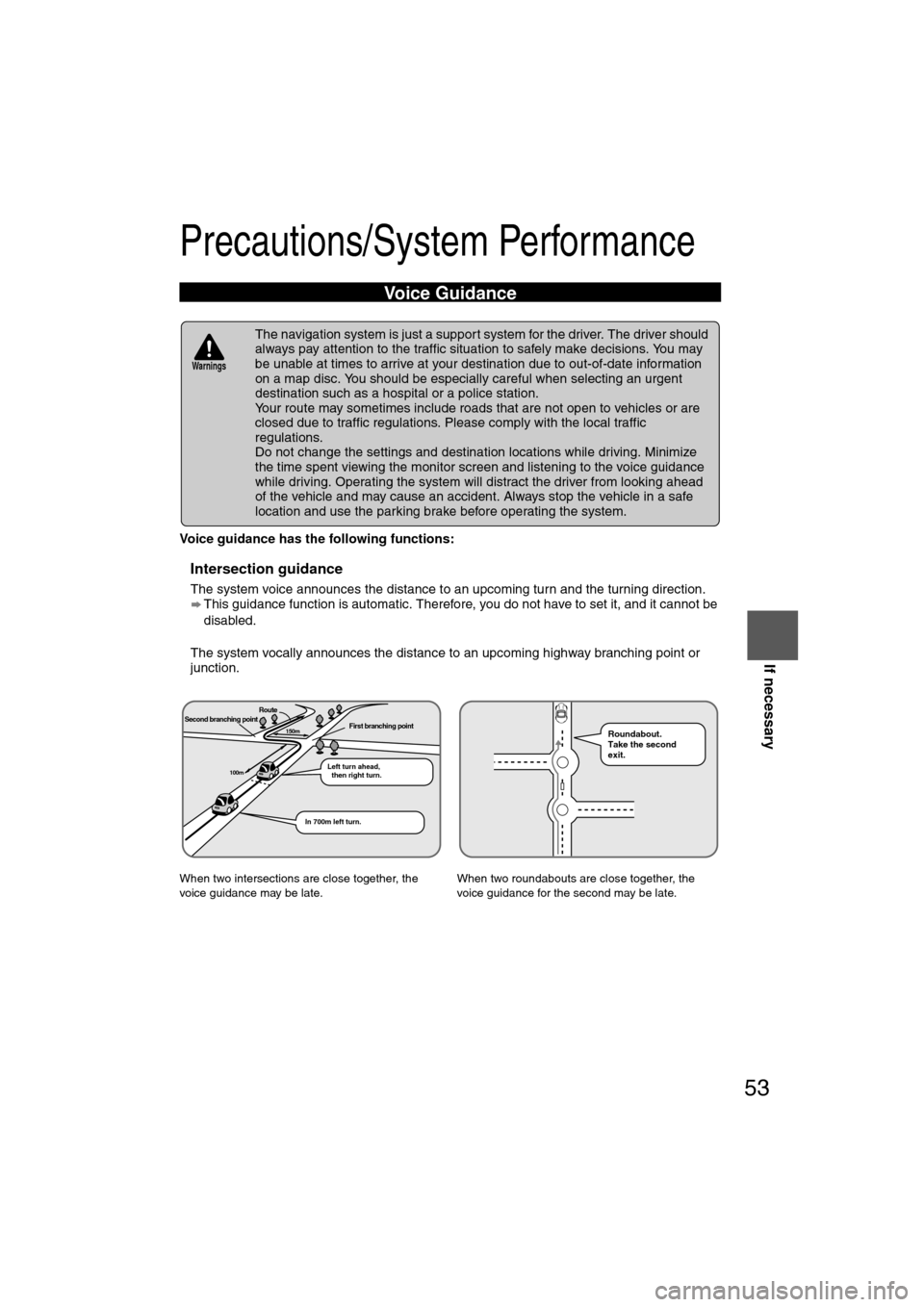
Voice guidance has the following functions:
nIntersection guidance
lThe system voice announces the distance to an upcoming turn and the turning direction.
This guidance function is automatic. Therefore, you do not have to set it, and it cannot be
disabled.
l The system vocally announces the distance to an upcoming highway branching point or
junction.
Voice Guidance
l The navigation system is just a support system for the driver. The driver should
always pay attention to the traffic situation to safely make decisions. You may
be unable at times to arrive at your destination due to out-of-date information
on a map disc. You should be especially careful when selecting an urgent
destination such as a hospital or a police station.
l Your route may sometimes include roads that are not open to vehicles or are
closed due to traffic regulations. Please comply with the local traffic
regulations.
l Do not change the settings and destination locations while driving. Minimize
the time spent viewing the monitor screen and listening to the voice guidance
while driving. Operating the system will distract the driver from looking ahead
of the vehicle and may cause an accident. Always stop the vehicle in a safe
location and use the parking brake before operating the system.
When two intersections are close together, the
voice guidance may be late. When two roundabouts are close together, the
voice guidance for the second may be late.
Warnings
Second branching pointFirst branching point150m
100m
Route
In 700m left turn. Left turn ahead,
then right turn.
Roundabout.
Take the second
exit.
%:��A'#�DQQM��2CIG�����6JWTUFC[��/CTEJ����������������2/
Page 65 of 94

64
Before
UseGetting
started
RoutingAddress
Book
Vo i c e Recognition
Navigation
Set Up
RDM-TMC
Audio Operation
Navigation
Set Up
nAudio sound adjustment
1.Press the desired button corresponding to one of the following modes.
• Audio button (AUDIO): Audio mode
• CD button (CD): CD mode
• MEDIA button (MEDIA): Image and Sound playback is possible using a portable video player connected to an external input terminal.
*
2.Select the (SOUND) on -screen button to display the sound adjustment screen.
nSound quality adjustment
TREB (treble sound)
Select the on-screen button to increase treble, and to decrease.
BASS (low pitch sound)
Select the on-screen button to increase bass, and to decrease.
nVolume balance adjustment
Front/back volume balance
Select the FRONT on-screen button to increase the volume at the front, and REAR
to increase the volume to the back.
Left/right volume balance
Select the RIGHT on-screen button to increase the volume to the right, and LEFT to
increase the volume to the left.
*The external input terminal is not equipped on your vehicle because it is not standard equip-ment.
%:��A'#�DQQM��2CIG�����6JWTUFC[��/CTEJ����������������2/
Page 67 of 94

66
Before
UseGetting
started
RoutingAddress
Book
Vo i c e Recognition
Navigation
Set Up
RDM-TMC
Audio Operation
Navigation
Set Up
nRadio ON
Press a band selector button (FM/AM) to turn the radio on.
nBand selection
Successively pressing the band selector button (FM/AM) switches the bands as follows:
FM1 FM2 AM.
The selected mode will be indicated. If FM stereo is being received, STEREO will be dis-
played.
nTuning
The radio has the following tuning methods: Manual, Seek, Scan, Preset channel, and Auto
memory tuning. The easiest way to tune stations is to set them on preset channels.
Note
l
If the FM broadcast signal becomes weak, reception automatically changes from STEREO
to MONO for reduced noise, and the STEREO indicator will go out.
l To clear the information, press the NAVI button.
l If the power supply is interrupted (fuse blows or the battery is disconnected), the preset
channels will be canceled.
Operating the Radio
Band selector button
Satellite button
Channel preset
on-screen button on-screen button
Seek tuning
button
Scan button
%:��A'#�DQQM��2CIG�����6JWTUFC[��/CTEJ����������������2/
Page 71 of 94

70
Before
UseGetting
started
RoutingAddress
Book
Vo i c e Recognition
Navigation
Set Up
RDM-TMC
Audio Operation
Navigation
Set Up
nNormal insertion
1.Press the (LOAD/EJECT) button.
2.Press the
on-screen button lightly.
The display opens and "WAIT" is displayed.
3.Lightly insert the CD after "IN" is displayed. The CD will be inserted and played automatically after the display is closed.
Note
lA CD cannot be inserted while "WAIT" is displayed. Wait until "IN" is displayed.
l The CD loading operation cancels 15 seconds after "IN" is displayed or if the (LOAD/
EJECT) button is pressed again.
nInserting CDs into desired tray number
1.Press the (LOAD/EJECT) button.
2.Press the desired tray number, then press the on-screen button lightly.
The display opens and "WAIT" is displayed.
Note
The CD loading operation cancels if no button is pressed for about 30 seconds after the
desired tray number is pressed, or if the (LOAD/EJECT) button is pressed again.
3.Lightly insert the CD after "IN" is displayed. The CD will be inserted and played automatically after the display is closed
Note
lThe CD loading operation cancels 15 seconds after the on-screen button is
pressed or the (LOAD/EJECT) button is pressed again.
l The CD cannot be inserted to the desired tray number if it is already occupied.
nMultiple insertion
1.Press the (LOAD/EJECT) button.
2.Press the on-screen button for 1.5 seconds or more.
The display opens and "WAIT" is displayed.
3.Lightly insert the CD after "IN" is displayed.
4.When "IN" is displayed again, insert the next CD. Repeat this procedure for the number of CDs to be inserted (maximum of 6 including the
CD in the tray).
The CD will begin playback automatically after insertion and the display closes.
Note
The CD loading operation cancels 15 seconds after "IN" is displayed, or the (LOAD/EJECT)
button is pressed again.
%:��A'#�DQQM��2CIG�����6JWTUFC[��/CTEJ����������������2/
 49
Navigation Set UP
select
.
h you are
urrent
omplete.
Set Clock
The current time is set using this function. Since time notification is \
provided by
a GPS satellite.
select
Open the [S")
![MAZDA MODEL CX-7 2007 Navigation Manual (in English) 51
Navigation Set UP
Navigation Set Up
You can change the language of the menu and the voice guidance.
Before Steps
select
select
Language
MENU
Open the [LANGUAGE] screen
Select your preferr](/manual-img/28/13911/w960_13911-51.png "MAZDA MODEL CX-7 2007 Navigation Manual (in English) 51
Navigation Set UP
Navigation Set Up
You can change the language of the menu and the voice guidance.
Before Steps
select
select
Language
MENU
Open the [LANGUAGE] screen
Select your preferr")