2007 KIA Sorento check
[x] Cancel search: checkPage 133 of 325

43
Driving your vehicle
START
Turn the ignition key to the START posi-
tion to start the engine. The engine will
crank until you release the key; then it
returns to the ON position. The brake
warning lamp can be checked in this
position.✽ ✽NOTICEIf difficulty is experienced in turning the
ignition key, turn the steering wheel
right and left to release the tension and
then turn the key.
Automatic transmissionWhen turning the ignition switch to the
LOCK position, the shift lever must be in
the P (Park) position.
WARNING
- Ignition key
• Never turn the ignition switch to
LOCK or ACC while the vehicle is
moving. This would result in loss
of directional control and braking
function, which could cause an
immediate accident.
Before leaving the driver’s seat, always make sure the shift lever
is engaged in 1
stgear for manual
transmission or P (Park) for auto-
matic transmission, set the park-
ing brake fully and shut the
engine off. Unexpected and sud-
den vehicle movement may occur
if these precautions are not
taken.
(Continued)
(Continued)
Never reach for the ignitionswitch, or any other controls
through the steering wheel while
the vehicle is in motion. The pres-
ence of your hand or arm in this
area could cause a loss of vehicle
control, an accident and serious
bodily injury or death.
Do not place any movable objects around the driver’s seat as they
may move while driving, interfere
with the driver and lead to an
accident.
Page 141 of 325

411
Driving your vehicle
Always hold the steering wheel firmlywhen you are driving off-road.
Make sure all passengers are wearing seat belts.
Do not drive in water if the level is high- er than the bottom of the vehicle.
Check your brake condition once you are out of mud or water. Press the
brake pedal several times as you move
slowly until you feel normal braking
forces return.
Shorten your scheduled maintenance interval if you drive in off-road condi-
tions such as sand, mud or water (see
“Scheduled Maintenance” in the Index).
Always wash your car thoroughly.
Full-time 4WD operation
(if equipped)When 4WD is selected with the transfer
shift knob, the vehicle will switch to 4WD
operation after a few seconds.
WARNING
If you are driving too fast in water,
the water spray can get into the
engine compartment and wet the
ignition system, causing your vehi-
cle a sudden stop. If this happens
and your vehicle is in a tilted posi-
tion, your vehicle may roll over.
WARNING
If you are driving in heavy wind, the
vehicle's higher center of gravity
decreases your steering control
capacity and requires you to drive
more slowly.
LO WAU TO
E2BLA411B
Page 147 of 325

417
Driving your vehicle
If you need to drive in water, stop yourvehicle, set your transfer knob to 4LO
or LOW and drive at less than 8 km/h
(5 mph). Do not drive in water if the level is high-
er than the bottom of the wheel hubs.
Check your brake condition once you are out of mud or water. Press the
brake pedal several times as you move
slowly until you feel normal braking
forces return.
Shorten your scheduled maintenance interval if you drive off-road in condi-
tions such as sand, mud or water (see
“Scheduled Maintenance’’ in the
Index). Always wash your car thor-
oughly.
The full time four wheel drive vehicle cannot be towed by an ordinarily tow
truck. Make sure that the vehicle is
towed with its four wheels raised off the
ground.
Since the driving torque is always applied to the 4 wheels the perform-
ance of the 4WD vehicle is greatly
affected by the condition of the tires.
Be sure to equip them with all four tires
with same size and type.
WARNING
If you are driving in heavy wind, the
vehicle’s higher center of gravity
decreases your steering control.
Drive more slowly than you would
in calm conditions.
WARNING
- Drivingthrough water
If you are driving too fast in water,
the water spray can get into the
engine compartment and wet the
ignition system, causing your vehi-
cle to suddenly stop. If this hap-
pens and your vehicle is in a tilted
position, your vehicle may roll over.
WARNING
Your vehicle is equipped with tires
designed to provide for safe ride
and handling capability.
Do not use a size and type of tire
and wheel that is different from the
one that is originally installed on
your vehicle. It can affect the safety
and performance of your vehicle,
which could lead to handling failure
or rollover and serious injury.
When replacing the tires, be sure to
equip all four tires with the tire and
wheel of the same size, type, tread,
brand and load-carrying capacity. If
you nevertheless decide to equip
your vehicle with any tire/wheel
combination not recommended by
Kia for off road driving, you should
not use these tires for highway driv-
ing.
Page 148 of 325

Driving your vehicle18
4 For speedometer test or inspection/
maintenance (I/M) program of full-time
4WD vehicle, use a four wheel chassis
dynamometer. A 4WD vehicle should not be tested on
a 2WD drive roll tester. If a 2WD roll
tester must be used, perform the fol-
lowing:
1. Check the tire pressures recommend- ed for your vehicle.
2. Place the rear wheels on the roll tester for speedometer test as shown in the
illustration.
3. Release the parking brake.
4. Place the front wheels on the tempo- rary free roller as shown in the illustra-
tion.
E5BLA401
Roll tester (speedometer) Temporary free roller
CAUTION
Never engage the parking brake
while performing these tests.
CAUTION
While the full-time 4WD vehicle isbeing raised on a jack, never start the engine or cause the tires torotate.
There is the danger that rotatingtires touching the ground couldcause the vehicle to go off the jack and to jump forward.
If one of the front or rear wheelsbegins to spin in mud, snow, etc.the vehicle can sometimes be driv-en out by depressing the accelera- tor pedal further; however avoidrunning the engine continuously at high rpm because doing so coulddamage the 4WD system.
WARNING
Keep away from the front of the
vehicle while inspecting. This is
very dangerous as the vehicle can
jump forward and cause serious
injury or death.
Page 152 of 325

Driving your vehicle22
4To release the parking brake, pull the
handle up slightly and push the release
button, then lower the handle to the
released position while holding the but-
ton in. Check the brake warning light by turning
the ignition switch ON (do not start the
engine). This light will be illuminated
when the parking brake is applied with
the ignition switch in the START or ON
position.
Before driving, be sure the parking brake
is fully released and the brake warning
light is off.
If the brake warning light remains on
after the parking brake is released, there
may be a malfunction in the brake sys-
tem. Immediate attention is necessary.
If at all possible, cease driving the vehi-
cle immediately. If that is not possible,
use extreme caution while operating the
vehicle and only continue to drive the
vehicle until you can reach a safe loca-
tion or repair shop.
WARNING
- Parking brake
To prevent unintentional move-
ment when stopped, do not use
just the gear shift lever to hold
the vehicle in position. Set the
parking brake AND make sure the
gearshift lever is securely posi-
tioned in 1st (First) gear or R
(Reverse) for manual transmis-
sion equipped vehicles and in P
(Park) for automatic transmission
equipped vehicles.
Never allow a person who is unfa- miliar with the vehicle or children
to touch the parking brake. If the
parking brake is released unin-
tentionally, serious injury may
occur.
E2BLA417
W-75
Page 155 of 325

425
Driving your vehicle
Power steeringPower Steering uses energy from the
engine to assist you in steering the vehi-
cle. If the engine is off or if the power
steering system becomes inoperative,
the vehicle may still be steered, but it will
require increased steering effort.
Should you notice any change in the
effort required to steer during normal
vehicle operation, have the power steer-
ing checked by an Authorized Kia Dealer.
✽ ✽
NOTICEIf the power steering drive belt breaks
or if the power steering pump malfunc-
tions, the steering effort will greatly
increase.
✽ ✽
NOTICEIf the vehicle is parked for extended
periods outside in cold weather (below -
10°C/14°F), the power steering may
require increased effort when the engine
is first started. This is caused by
increased fluid viscosity due to the cold
weather and does not indicate a mal-
function.
When this happens, increase the engine
RPM by depressing accelerator until the
RPM reaches 1,500 rpm then release or
let the engine idle for two or three min-
utes to warm up the fluid.
STEERING WHEEL
CAUTION
Never hold the steering wheel
against a stop (extreme right or leftturn) for more than 5 seconds with the engine running. Holding thesteering wheel for more than 5 sec-onds in either position may causedamage to the power steering pump.
Page 156 of 325
Driving your vehicle26
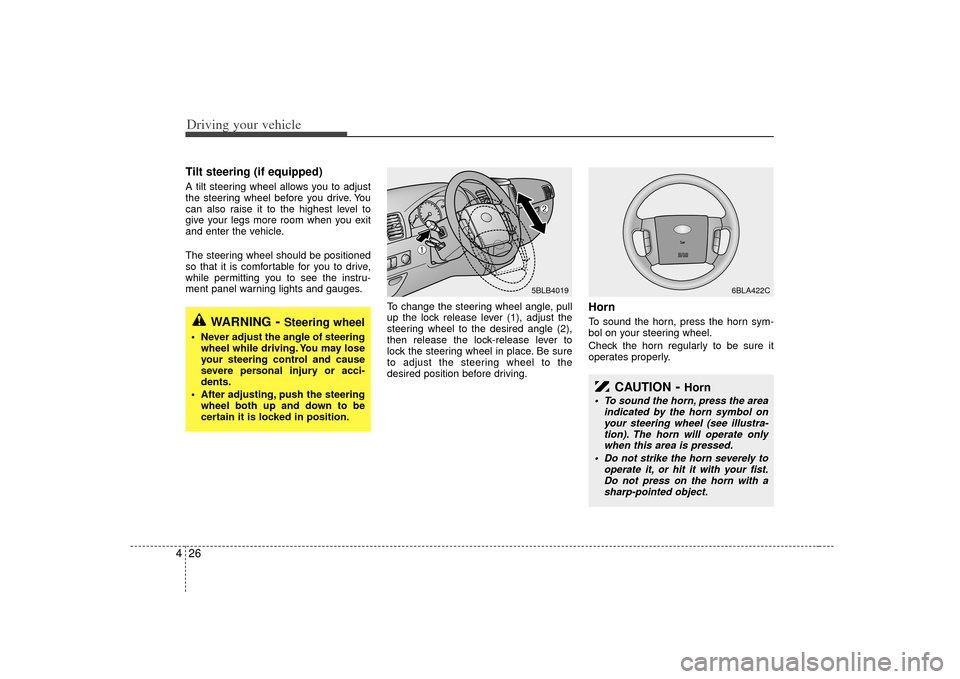
4Tilt steering (if equipped)A tilt steering wheel allows you to adjust
the steering wheel before you drive. You
can also raise it to the highest level to
give your legs more room when you exit
and enter the vehicle.
The steering wheel should be positioned
so that it is comfortable for you to drive,
while permitting you to see the instru-
ment panel warning lights and gauges.
To change the steering wheel angle, pull
up the lock release lever (1), adjust the
steering wheel to the desired angle (2),
then release the lock-release lever to
lock the steering wheel in place. Be sure
to adjust the steering wheel to the
desired position before driving.
HornTo sound the horn, press the horn sym-
bol on your steering wheel.
Check the horn regularly to be sure it
operates properly.
WARNING
- Steering wheel
Never adjust the angle of steeringwheel while driving. You may lose
your steering control and cause
severe personal injury or acci-
dents.
After adjusting, push the steering wheel both up and down to be
certain it is locked in position.
5BLB4019
6BLA422C
➀
➁
CAUTION
- Horn
To sound the horn, press the area indicated by the horn symbol onyour steering wheel (see illustra-tion). The horn will operate only when this area is pressed.
Do not strike the horn severely to operate it, or hit it with your fist.Do not press on the horn with asharp-pointed object.
Page 160 of 325

Driving your vehicle30
4The Electronic Stability Control (ESC)
monitors information from various vehicle
sensors and then compares the driver's
commands with the actual behavior of the
vehicle. If an unstable condition occurs - a
sudden evasive movement for example -
ESC intervenes within fractions of a
second via the engine computer and
brake system and attempts to stabilize
the vehicle.
ESC operationESC ON condition
ON, ESC and ESC OFF indi-
cator lights illuminate for
approximately 3 seconds,
then ESC is turned on.
for at least half a second after
turning the ignition ON to turn
ESC off. (ESC OFF indicator
will illuminate). To turn the
ESC on, press the ESC OFF
button (ESC OFF indicator
light will go off).
you may hear a slight ticking
sound. This is the ESC per-
forming an automatic system
self-check and does not indi-
cate a problem.
When operating
When the ESC is in operation,
ESC indicator light blinks.
Control is oper ating properly,
you can feel a slight pulsation
in the vehicle. This is only the
effect of brake control and
indicates nothing unusual.
or slippery road, pressing the
accelerator pedal may not
cause the engine rpm (revo-
lutions per minute) to
increase.
ELECTRONIC STABILITY CONTROL (IF EQUIPPED)
-
ESC
ESC
OBL036902N