2007 KIA Sorento check
[x] Cancel search: checkPage 81 of 325

Knowing your vehicle72
3
WARNING -
Refueling dan-
gers
Automotive fuels are flammable
materials. When refueling, please
note the following guidelines care-
fully. Failure to follow these guide-
lines may result in severe personal
injury, severe burns or death by fire
or explosion.
Before refueling note the location
of the Emergency Gasoline Shut-
Off, if available, at the gas station
facility.
Always heed any warnings or
cautions posted at the fueling
station.
Before touching the fuel nozzle, you should eliminate potentially
dangerous static electricity dis-
charge by touching another metal
part of the vehicle, a safe distance
away from the fuel filler neck, noz-
zle, or other gas source.
(Continued)
(Continued)
Do not get back into a vehicleonce you have begun refueling
since you can generate static
electricity by touching, rubbing or
sliding against any item or fabric
(polyester, satin, nylon, etc.)
capable of producing static elec-
tricity. Static electricity discharge
can ignite fuel vapors resulting in
rapid burning. If you must re-
enter the vehicle, you should
once again eliminate potentially
dangerous static electricity dis-
charge by touching a metal part
of the vehicle, away from the fuel
filler neck, nozzle or other gaso-
line source.
When using a portable fuel con- tainer be sure to place the con-
tainer on the ground prior to refu-
eling. Static electricity discharge
from the container can ignite fuel
vapors causing a fire. Once refu-
eling has begun, contact with the
vehicle should be maintained
until the filling is complete.
(Continued)
(Continued)Use only portable plastic fuel
containers designed to carry and
store gasoline.
Do not use cellular phones while refueling. Electric current and/or
electronic interference from cellu-
lar phones can potentially ignite
fuel vapors causing a fire.
When refueling, always shut the engine off. Sparks produced by
electrical components related to
the engine can ignite fuel vapors
causing a fire. Once refueling is
complete, check to make sure the
filler cap and filler door are
securely closed, before starting
the engine.
(Continued)
Page 82 of 325

373
Knowing your vehicle
✽
✽NOTICEIf the fuel filler lid will not open in cold
weather because the area around it is
frozen, push or lightly tap the lid.
Manual fuel filler lid release
(if equipped)If the fuel filler lid is not open by using the
remote button, open it by pulling out the
emergency handle which is located in the
right side storage in a cargo area.
(Continued)
DO NOT use matches or a lighter
and DO NOT SMOKE or leave a lit
cigarette in your vehicle while at a
gas station especially during
refueling. Automotive fuel is high-
ly flammable and can, when ignit-
ed, result in fire.
If a fire breaks out during refuel- ing, leave the vicinity of the vehi-
cle, and immediately contact the
manager of the gas station and
then contact the local fire depart-
ment or 911.
CAUTION
Make sure to refuel with unleaded fuel only.
Check to make sure the fuel filler cap is securely closed after refu-eling. A loose fuel filler cap may cause the "Check Engine"(Malfunction Indicator) light in the instrument panel to illuminateunnecessarily.
If the fuel filler cap requires replacement, use only a genuineKia cap or the equivalent speci-fied for your vehicle. An incorrect fuel filler cap can result in a seri-ous malfunction of the fuel sys- tem or emission control system.
Do not spill fuel on the exterior surfaces of the vehicle. Any typeof fuel spilled on painted surfacesmay damage the paint.
E2BLA614D
Page 83 of 325

Knowing your vehicle74
3The auto fuel cutoff switch is located on
the passenger’s side of the engine com-
partment. In the event of a collision or
sudden impact, the auto fuel cutoff
device cuts off the fuel supply. If this
device is activated, it must be reset by
pressing in on the top of the switch
before the engine can be restarted.
MIRRORS Outside rearview mirror Be sure to adjust mirror angles before
driving.
Your vehicle is equipped with both left-
hand and right-hand outside rearview
mirrors. The mirrors can be adjusted
remotely with the control levers or remote
switch, depending on the type of mirror
control installed. The mirror heads can be
folded back to prevent damage during an
automatic car wash or when passing in a
narrow street.
AUTO FUEL CUTOFF SWITCH
OBL036392N
WARNING
Before resetting the auto fuel cutoff
switch, the fuel line should be
checked for fuel leaks.
WARNING-
Rearview mir-
rors
The right outside rearview mirror
is convex. Objects seen in the
mirror are closer than they
appear.
Use your interior rearview mirror or direct observation to deter-
mine the actual distance of fol-
lowing vehicles when changing
lanes.
CAUTION
Do not scrape ice off the mirrorface; this may damage the surface of the glass. If ice should restrictmovement of the mirror, do notforce the mirror for adjustment. Toremove ice, use a deicer spray, or a sponge or soft cloth with very warmwater.
Page 106 of 325

397
Knowing your vehicle
WARNING
The following specification is themaximum weight that can be
loaded onto the roof rack.
Distribute the load as evenly as
possible across the crossbars
and roof rack and secure the load
firmly.
The vehicle center of gravity will be higher when items are loaded
onto the roof rack. Avoid sudden
starts, braking, sharp turns,
abrupt maneuvers or high speeds
that may result in loss of vehicle
control or rollover causing an
accident.
(Continued)
(Continued)
Always drive slowly and turn cor-ners carefully when carrying
items on the roof rack. Severe
wind updrafts, caused by passing
vehicles or natural causes, can
cause sudden upward pressure
on items loaded on the roof rack.
This is especially true when car-
rying large, flat items such as
wood panels or mattresses. This
could cause the items to fall off
the roof rack and cause damage
to your vehicle or those around
you.
To prevent damage or loss of cargo while driving, check fre-
quently before or while driving to
make sure the items on the roof
rack are securely fastened.
CAUTION
If the vehicle has a sunroof, do not position the roof rack loadsso that they could interfere withthe sunroof.
Loading cargo or luggage above specification on the roof rack maydamage your vehicle.
ROOF 45 kg (100 lbs.)
RACK EVENLY DISTRIBUTED
Page 114 of 325

3 105
Knowing your vehicle
1. Power ON-OFF / Volume ControlknobPower
To operate your audio system, your igni-
tion key must be in the "ACC" or "ON"
position.
Press the knob to switch on the audio
system. The audio system resumes oper-
ation in either the Radio or CD mode.
Press the knob again to switch off the
audio system.
Volume Control Knob
Rotate the knob clockwise to increase
the volume and rotate the knob counter-
clockwise to reduce the volume.
2. Loading CDsModel D446:
Only one CD can be loaded at any one
time. If there is already a disc inserted in
the CD player, eject the disc before load-
ing a new CD.
To load a CD, gently insert the CD into
the CD slot. The CD will be automatically
loaded. The CD player then starts to play
the CD.✽ ✽NOTICE• Do not force-load the CD as it will
damage the loading mechanism and
cause your disc to jam in the player.
• If a CD cannot be loaded, check if there is already a disc in the player
and eject it first.
Model D465:
Press the LOAD button to automatically
switch the audio system on in CD player
mode.
Follow the instructions on the LCD
screen to load and play your CDs.✽ ✽ NOTICETo load more than 1 CD (maximum of
6), press and hold the load button for
more than 2 seconds. The disc number
indicator will flash to indicate how
many CDs you can still load.
Page 122 of 325

3 113
Knowing your vehicle
6. File Search KnobRotate the knob clockwise or counter-
clockwise to manually advance up or
down the track list of the CD currently
played. This function allows you to quick-
ly scroll to a specific track number. It is
especially useful if you are playing a MP3
or WMA CD which contains many direc-
tories and tracks. The LCD screen dis-
plays the track number you have scrolled
to.
Once the track number you want is dis-
played, press the File Search knob to
ENTER your selection and begin play-
back of the selected track.✽ ✽ NOTICEYou must push the File Search knob to
select the track for playback. Otherwise,
the CD player will not jump to the track
number displayed in the number count-
er.
Use the File Search knob and the DIR
and buttons in together to quick-
ly search for a track you want on a MP3
CD with many directories and tracks.
7. RPT, RDM, MARK & INFO buttons These buttons correspond to the Repeat,
Random Playback, Marklist and Disc
Information functions.
Turn to the next section of your handbook
for detailed instructions.
Playing CDs, MP3 and WMA discs1. Loading CDsModel D446:
Only one CD can be loaded at any one
time. If there is already a disc inserted in
the CD player, eject the disc before load-
ing a new CD.
To load a CD, gently insert the CD into
the CD slot. The CD will be automatically
loaded. The CD player then starts to play
the CD.✽ ✽ NOTICE• Do not force-load the CD as it will
damage the loading mechanism and
cause your disc to jam in the player.
• If a CD cannot be loaded, check if there is already a disc in the player
and eject it first.
Only one CD can be loaded at any one
time.
Page 127 of 325
Knowing your vehicle118
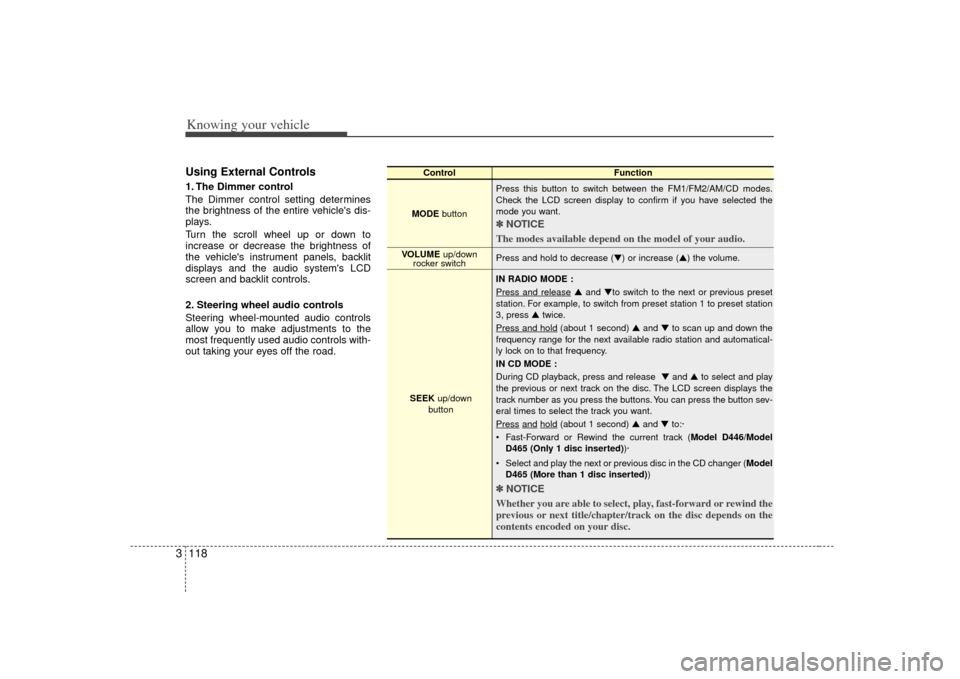
3Using External Controls1. The Dimmer control
The Dimmer control setting determines
the brightness of the entire vehicle's dis-
plays.
Turn the scroll wheel up or down to
increase or decrease the brightness of
the vehicle's instrument panels, backlit
displays and the audio system's LCD
screen and backlit controls.
2. Steering wheel audio controls
Steering wheel-mounted audio controls
allow you to make adjustments to the
most frequently used audio controls with-
out taking your eyes off the road.
Control Function
MODE button Press this button to switch between the FM1/FM2/AM/CD modes.
Check the LCD screen display to confirm if you have selected the
mode you want.
✽ ✽
NOTICE
The modes available depend on the model of your audio. Press and hold to decrease (▼) or increase (▲) the volume.
IN RADIO MODE :
Press and release
▲ and ▼to switch to the next or previous preset
station. For example, to switch from preset station 1 to preset station
3, press ▲ twice.
Press and hold
(about 1 second) ▲ and ▼to scan up and down the
frequency range for the next available radio station and automatical-
ly lock on to that frequency.
IN CD MODE :
During CD playback, press and release ▼ and ▲to select and play
the previous or next track on the disc. The LCD screen displays the
track number as you press the buttons. You can press the button sev-
eral times to select the track you want.
Press
and
hold
(about 1 second) ▲ and ▼to:·
Fast-Forward or Rewind the current track ( Model D446/Model
D465 (Only 1 disc inserted) )·
Select and play the next or previous disc in the CD changer (Model D465 (More than 1 disc inserted) )
✽ ✽
NOTICE
Whether you are able to select, play, fast-forward or rewind the
previous or next title/chapter/track on the disc depends on the
contents encoded on your disc.
VOLUME up/down
rocker switch
SEEK up/down
button
Page 132 of 325

Driving your vehicle24Illuminated ignition switch
(if equipped)Whenever a door is opened, the ignition
switch will be illuminated for your con-
venience, provided the ignition switch is
not in the ON position. The light will go off
approximately 30 seconds after closing
the door or when the ignition switch is
turned on.
Ignition switch and anti-theft
steering column lock
Ignition switch positionLOCKThe steering wheel locks to protect
against theft. The ignition key can be
removed only in the LOCK position.
When turning the ignition switch to the
LOCK position, push the key inward at
the ACC position (Type A) and turn the
key toward the LOCK position.
ACC (Accessory)
The steering wheel is unlocked and elec-
trical accessories are operative.
ON
The warning lights can be checked
before the engine is started. This is the
normal running position after the engine
is started.Do not leave the ignition switch ON if theengine is not running to prevent batterydischarge.
IGNITION SWITCH
PUSH
LOCKACCONSTART
E2BLA401A
1KMA30131KMB3013
Type AType B