2007 KIA Sorento ECO mode
[x] Cancel search: ECO modePage 179 of 325

449
Driving your vehicle
Distance to empty (km or MI)This mode indicates the estimated dis-
tance to empty from the current fuel in
the fuel tank. When the remaining dis-
tance is below 50 km (30 miles), a blink-
ing “---” symbol will be displayed.
Trip computer recognizes only the
amount of fuel consumed to the engine.
Therefore if the vehicle happens to
abnormal oil leakage, the trip computer
fails to sense causing the amount of fuel
more than it really is.
If you press the “DOWN” switch for more
than 5 seconds, the distance unit would
transfer to “Km” from “Ml (mile) or “MI” from
“Km”.
✽ ✽NOTICE• If the vehicle is not on level ground or
the battery power has been interrupt-
ed, the “DISTANCE TO EMPTY”
function may not operate correctly.
The trip computer may not register
additional fuel if less than 6 liters of
fuel are added to the vehicle.
• Trip computer provides a driver with supplemental information about the
current operating status of your vehi-
cle. So the estimated distance to empty
can be changed according to operat-
ing status of your vehicle, average fuel
consumption and previously driving
style. Therefore the values approved
or displayed on LCD for the first time
can be different with your vehicles.
• The figure of distance to empty is esti- mated driving distance, so it can be
different from the driving distance
really is.
Average vehicle speed
(km/h or MPH)This mode indicates the average speed
from the starting of the vehicle to the igni-
tion key “OFF”. When the “MODE/SET”
switch is pushed (more than 1.5 sec-
onds), it will initialize to “---”.
If you press the “DOWN” switch for more
than 5 seconds, the speed unit would
transfer to “Km/h” from “MPH” or “MPH”
from “Km/h” .
RANGEOBL046905N
AVG
OBL046902N
Page 180 of 325

Driving your vehicle50
4Driving timeThis mode indicates the total time from
the starting of the vehicle to the ignition
key “OFF” after resetting. When the
“MODE/SET” switch is pushed, it will ini-
tialize to 0:00.
Reset
Push “MODE/SET” for more than 1.5
seconds to initialize the displayed infor-
mation such as average speed and driv-
ing time.
Ambient temperature (°C or °F )
(if equipped)This mode indicates the current ambient
temperature. The meter’s working range -
30°C(-30°F) to 65°C (149°F)
If you press the “DOWN” switch for more
than 5 seconds, the temperature unit
would transfer “°C” from “°F” or to “°F”
from “°C”.
E/T
OBL046903N
6BLA433
Page 195 of 325

465
Driving your vehicle
Air conditioning system opera-
tion tips If the vehicle has been parked in directsunlight during hot weather, open the
windows for a short time to let the hot
air inside the vehicle escape.
To help reduce moisture inside of win- dows on rainy humid days, decrease
the humidity inside the vehicle by oper-
ating the air conditioning system.
During air conditioning system opera- tion, you may occasionally notice a
slight change in engine speed at idle as
the air conditioning compressor cycles
on. This is a normal system operation
characteristics.
Use the air conditioning system every month if only for a few minutes to
ensure maximum system performance.
When using the air conditioning sys- tem, you may notice clear water drip-
ping (or even puddling) on the ground
under the passenger side of the vehi-
cle. This is a normal system operation
characteristics.
Operating the air conditioning system in the recirculated air position does
provide maximum cooling, however,
continual operation in this mode may
cause the air inside the vehicle to
become stale.
Checking the amount of air con-
ditioner refrigerant and compres-
sor lubricantWhen the amount of refrigerant is low,
the performance of the air conditioning is
reduced. Overfilling also has a bad influ-
ence on the air conditioning system.
Therefore, if abnormal operation is
found, have the system inspected by an
authorized Kia dealer.
CAUTION
When using the air conditioning system, monitor the temperaturegauge closely while driving up hills or in heavy traffic when out-side temperatures are high. Airconditioning system operationmay cause engine overheating. Continue to use the blower fanbut turn the air conditioning sys-tem off if the temperature gauge indicates engine overheating.
When opening the windows in humid weather air conditioningmay create water droplets insidethe vehicle. Since excessive water droplets may cause dam-age to electrical equipment, airconditioning should only be run with the windows closed.
CAUTION
The air conditioner refrigerant con-tainer is highly pressurized.Therefore it should be serviced by an authorized Kia dealer. Improperservice may cause serious injury.
CAUTION
When the performance of the air conditioning system is reduced it isimportant that the correct type andamount of oil and refrigerant isused. Otherwise, damage to the compressor and abnormal systemoperation may occur.
Page 198 of 325
Driving your vehicle68
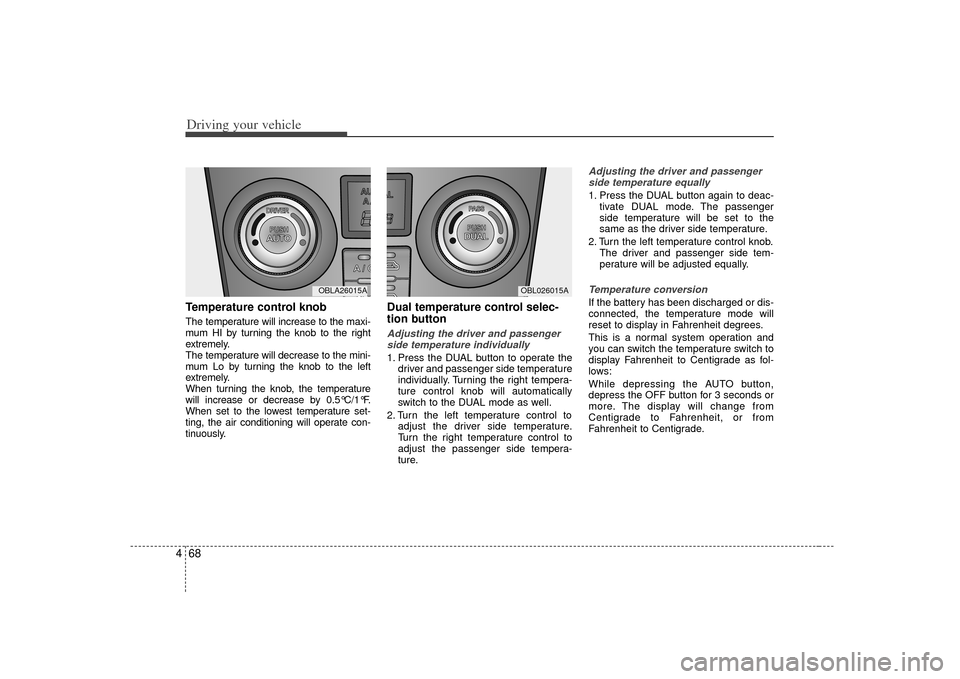
4Temperature control knobThe temperature will increase to the maxi-
mum HI by turning the knob to the right
extremely.
The temperature will decrease to the mini-
mum Lo by turning the knob to the left
extremely.
When turning the knob, the temperature
will increase or decrease by 0.5°C/1°F.
When set to the lowest temperature set-
ting, the air conditioning will operate con-
tinuously.
Dual temperature control selec-
tion buttonAdjusting the driver and passenger
side temperature individually 1. Press the DUAL button to operate the driver and passenger side temperature
individually. Turning the right tempera-
ture control knob will automatically
switch to the DUAL mode as well.
2. Turn the left temperature control to adjust the driver side temperature.
Turn the right temperature control to
adjust the passenger side tempera-
ture.
Adjusting the driver and passengerside temperature equally1. Press the DUAL button again to deac- tivate DUAL mode. The passenger
side temperature will be set to the
same as the driver side temperature.
2. Turn the left temperature control knob. The driver and passenger side tem-
perature will be adjusted equally.Temperature conversionIf the battery has been discharged or dis-
connected, the temperature mode will
reset to display in Fahrenheit degrees.
This is a normal system operation and
you can switch the temperature switch to
display Fahrenheit to Centigrade as fol-
lows:
While depressing the AUTO button,
depress the OFF button for 3 seconds or
more. The display will change from
Centigrade to Fahrenheit, or from
Fahrenheit to Centigrade.
MODE
OBL026015A
MODE
OBLA26015A
Page 204 of 325

Driving your vehicle74
4
Air conditioning system opera-
tion tips If the vehicle has been parked in direct
sunlight during hot weather, open the
windows for a short time to let the hot
air inside the vehicle escape.
To help reduce moisture inside of win- dows on rainy humid days, decrease
the humidity inside the vehicle by oper-
ating the air conditioning system.
During air conditioning system opera- tion, you may occasionally notice a
slight change in engine speed at idle
as the air conditioning compressor
cycles on. This is a normal system
operating characteristic.
Use the air conditioning system every month if only for a few minutes to
ensure maximum system perform-
ance.
When using the air conditioning sys- tem, you may notice clear water drip-
ping (or even puddling) on the ground
under the passenger side of the vehi-
cle. This is a normal system operating
characteristic.
Operating the air conditioning system in the recirculated air position does
provide maximum cooling, however,
continual operation in this mode may
cause the air inside the vehicle to
become stale.
Checking the amount of air con-
ditioner refrigerant and compres-
sor lubricantWhen the amount of refrigerant is low,
the performance of the air conditioning is
reduced. Overfilling also has a bad influ-
ence on the air conditioning system.
Therefore, if abnormal operation is
found, have the system inspected by an
authorized Kia dealer.
CAUTION
When using the air conditioningsystem, monitor the temperature gauge closely while driving up hillsor in heavy traffic when outside tem-peratures are high. Air conditioningsystem operation may cause engine overheating. Continue to use theblower fan but turn the air condi-tioning system off if the temperature gauge indicates engine overheat-ing.
CAUTION
The air conditioner refrigerant con-tainer is highly pressurized.Therefore it should be serviced by an authorized Kia dealer. Improperservice may cause serious injury.
CAUTION
When the performance of the airconditioning system is reduced it is important that the correct type andamount of oil and refrigerant is used. Otherwise, damage to thecompressor and abnormal systemoperation may occur.
Page 207 of 325
477
Driving your vehicle
Defogging logicManual climate control systemTo reduce the probability of fogging up
the inside of the windshield, the air intake
control is set to the outside (fresh) air
position automatically if any of following
occur.
The mode is selected to the orwhile the system is activated.
The ignition switch is turned on while the mode is selected to the
*,
or .
The ignition switch is turned off.
The fan is off.
The fan begins to be operated.
Press the air intake control button to
select the recirculated air position while
the ignition switch is on.
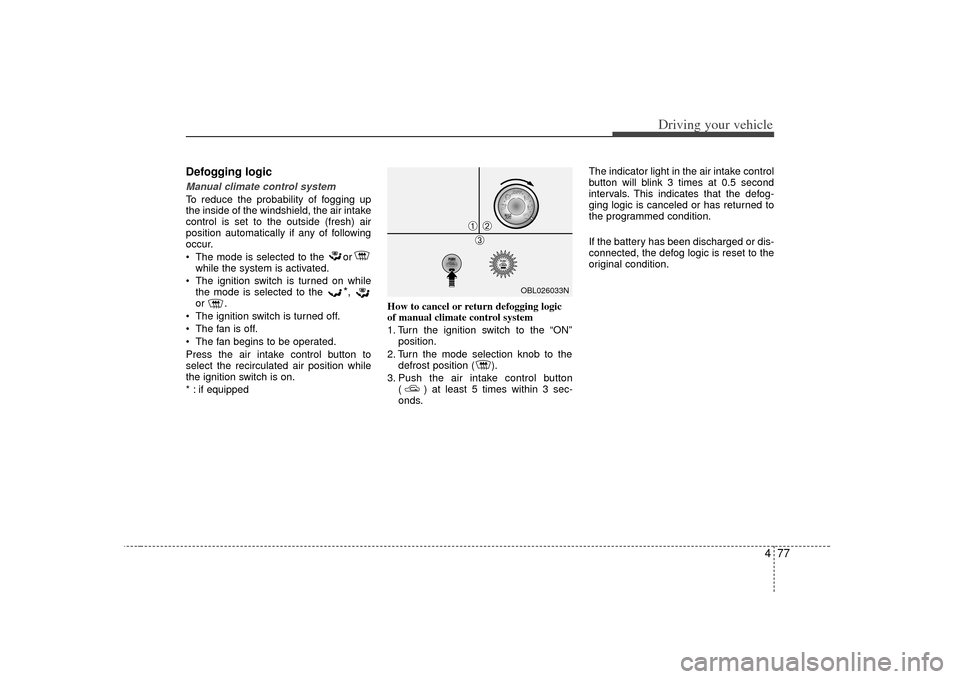
* : if equipped How to cancel or return defogging logic
of manual climate control system
1. Turn the ignition switch to the “ON”
position.
2. Turn the mode selection knob to the defrost position ( ).
3. Push the air intake control button ( ) at least 5 times within 3 sec-
onds. The indicator light in the air intake control
button will blink 3 times at 0.5 second
intervals. This indicates that the defog-
ging logic is canceled or has returned to
the programmed condition.
If the battery has been discharged or dis-
connected, the defog logic is reset to the
original condition.
OBL026033N
➀
➁\b
Page 208 of 325
Driving your vehicle78
4Automatic climate control systemTo reduce the probability of fogging up
inside of the windshield, the air intake
control is set to outside (fresh) air posi-
tion automatically if any of following
occur.
The ignition switch is turned on while
the mode is selected to the
*,
or
.
The OFF button is pushed.
The mode is selected to the
*,
or position.
In the or mode, it is impossible to
select the recirculated air position while
the ignition switch is on.
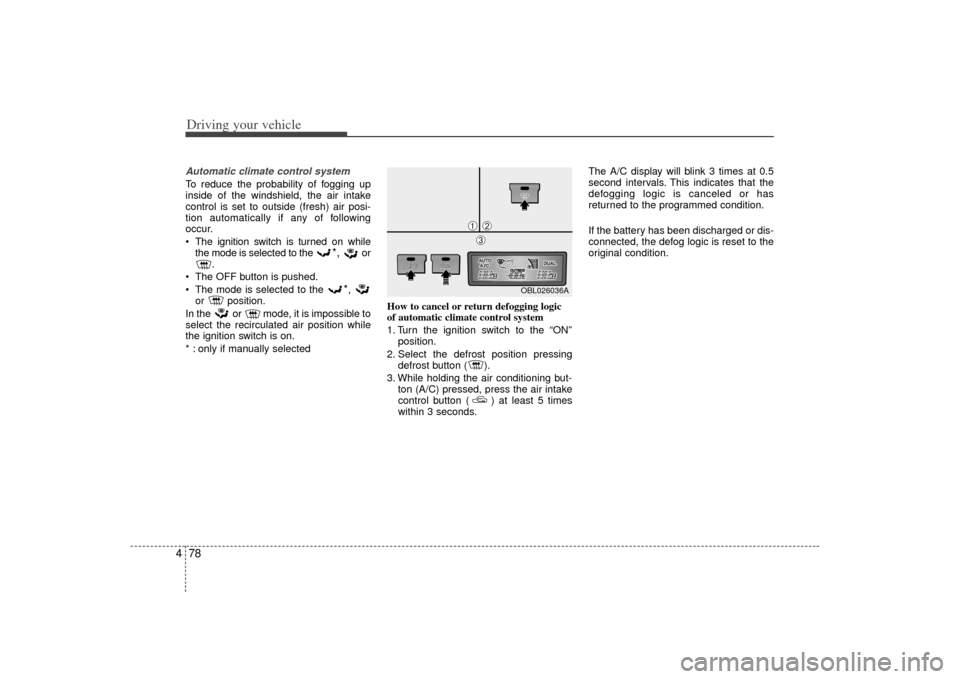
* : only if manually selected How to cancel or return defogging logic
of automatic climate control system
1. Turn the ignition switch to the “ON”
position.
2. Select the defrost position pressing defrost button ( ).
3. While holding the air conditioning but- ton (A/C) pressed, press the air intake
control button ( ) at least 5 times
within 3 seconds. The A/C display will blink 3 times at 0.5
second intervals. This indicates that the
defogging logic is canceled or has
returned to the programmed condition.
If the battery has been discharged or dis-
connected, the defog logic is reset to the
original condition.
OBL026036A
➀
➁\b
Page 240 of 325
Driving tips32
5Remember that trailering is different than
just driving your vehicle by itself.
Trailering causes major changes in han-
dling, durability, and fuel economy.
Successful, safe trailering requires cor-
rect equipment, and cautious driving.
This section contains many time-tested,
important trailering tips and safety rules.
Many of these are important for your
safety and that of your passengers.
Please read this section carefully before
you pull a trailer.
Load-pulling components such as the
engine, transmission, wheel assemblies,
and tires are forced to work harder
against the load of the added weight. The
engine is required to operate at relatively
higher speeds and under greater loads.
This additional burden generates extra
heat. The trailer also adds considerably
to wind resistance, increasing the pulling
requirements.
If you do decide to pull a trailerHere are some important points if you
decide to pull a trailer:
State, provincial, county and municipal
government have varying trailering
laws. Make sure your hitch, mirrors,
lights and wiring arrangements are
legal, not only where you live, but also
where you’ll be driving. A good source
for this information is state or local law
enforcement agencies.
Consider using a sway control. You can
ask a hitch dealer about sway control.
After your odometer indicates 800 km
(500 miles) or more, you can tow a
trailer. For the first 800 km (500 miles)
that you tow a trailer, don ’t drive over
80 km/h (50 mph) and don’t make
starts at full throttle. This helps your
engine and other parts of your vehicle
“wear” in at the heavier loads.
Always drive your vehicle at a moder-
ate speed (less than 100 km/h (60
mph)).
On a long uphill grade, do not exceed
70 km/h (45 mph) or the posted towing
speed limit, whichever is lower.
The important considerations have to
do with weight:
Weight of the trailerHow heavy can a trailer safely be? It
should never weigh more than the maxi-
mum trailer weight with trailer brakes. But
even that can be too heavy.
It depends on how you plan to use your
trailer. For example, speed, altitude, road
grades, outside temperature and how
much your vehicle is used to pull a trailer
are all important. The ideal trailer weight
can also depend on any special equip-
ment that you have on your vehicle.