2007 KIA Sorento ECO mode
[x] Cancel search: ECO modePage 143 of 325

413
Driving your vehicle
Part-time 4WD operation
(if equipped) You can send your engine's driving
power to all front and rear wheels for
maximum power.
Four-wheel drive is useful when you
drive in snow, mud, ice or sand where
good traction is required, or when your
wheels lose traction using two-wheel
drive.When 4WD is selected with the transfer
shift knob, the vehicle will switch to 4WD
operation after a few seconds.
✽ ✽
NOTICEWhen the vehicle shifts into 4WD mode,
a slight mechanical sound and vibration
may be felt and does not indicate a prob-
lem with the system.To avoid shift shock, when the vehicle is
stopped and you make a transfer case
shift using the transfer shift knob, wait
until the corresponding indicator light in
the instrument cluster illuminates before
driving.
✽ ✽NOTICE• Do not select four wheel drive on flat
and normal roads.
• Four-wheel driving on flat roads for a long period causes poor fuel economy
and noise and it also causes tires to
wear faster.
• Four-wheel driving on flat and nor- mal roads can result in a severe bind-
ing and chattering condition when
turning the steering wheel.
• Four-wheel driving on flat roads for a long period can also cause the differ-
ential oil temperature to increase,
resulting in damage to parts in the
power train.
OBL046901N
Page 144 of 325

Driving your vehicle14
4Knob positionThis is used to set different positions.
2HI (Rear-wheel drive)
This mode is used, when driving on nor-
mal roads and highway.
4HI (High-range 4-wheel drive)
This mode is used, when driving off-
roads, wet or snow covered roads with
normal speed.
The 4WD indicator light
()
will be
turned on to remind you that you are in
the 4HI mode.
4LO (Low-range 4-wheel drive)
Use 4LO for climbing or descending hills,
off-roads driving and towing the vehicle,
especially when increased power is
required.
The 4WD LOW indicator light
( )
will
be turned on to remind you that you are
in the 4LO mode.
Transfer shift knob operationBy turning the transfer knob (4HI, 4LO),
both front and rear axles are engaged.
This improves the traction characteristic.
2HI ➝ ➝
4HI
Turn the transfer knob from the 2HI mode
to 4HI mode at speed below 80 km/h (50
mph).
It is not necessary to depress the clutch
pedal or put the shift lever into N
(Neutral) position (Manual transmission)
or put the shift lever into N (Neutral) posi-
tion (Automatic transmission).
Perform this operation when driving
straight. There will be a few seconds of
time delay before come into 4HI mode
when you shift the knob to 4 HI from 2HI. 4HI
➝ ➝
2HI
Turn the transfer knob from the 4HI mode
to the 2HI mode at speed below 80 km/h
(50 mph). It is not necessary to depress
the clutch pedal (Manual transmission) or
put the shift lever into N (Neutral)
(Automatic transmission). Perform this
operation when driving straight.
If the transfer mode does not shift into
2HI mode when you turn the transfer
knob to 2HI, drive straight ahead with
accelerating or decelerating, or drive in
reverse.
4WD
LOW
Page 145 of 325

415
Driving your vehicle
4HI ↔
↔
4LO
1. Stop the vehicle.
2. Depress the clutch pedal for the man- ual transmission or put the shift lever
into N (Neutral) for the automatic
transmission.
3. 4HI ➝ ➝
4LO
: Select the 4LO mode.
4LO ➝ ➝
4HI
: Select the 4HI mode.
4. Before releasing the clutch pedal (Manual transmission) or shifting to
other ranges from N range (Automatic
transmission), wait for corresponding
indicator light turns on or off in the
cluster.
For safe four-wheel drive opera-
tion Your vehicle allows you to drive in on-road and off-road conditions.
However, do not try to drive in deep standing water, mud, or over steep
hills.
When you are driving up or down hills,drive as close to straight up and down
the hills as possible. Use extreme cau-
tion in going up or down steep hills,
since you can flip your vehicle over
depending on the grade, terrain and
water/mud conditions.
Drive off-road carefully because your vehicle may be damaged by rocks or
roots of trees. Become familiar with the
off-road conditions you are going to
drive before you start.
CAUTION
If the vehicle moves while the trans-fer shift is in process, the gearboxmay be damaged.
WARNING
- Four-wheel driving
The conditions on-road or off-road
that demand four-wheel drive mean
all functions of your vehicle are
exposed to more extreme stress
than under highway conditions.
Slow down, look ahead, and be
ready for sudden changes in the
composition and traction of the sur-
face under your tires. If you have
any doubt about the safety of the
conditions you are facing, stop and
consider the best way to proceed.
Do not exceed the ability of yourself
or your vehicle to operate safely.
HILL1/HILL2
Approach Hill Straight
Up/Down Do not Approach at
Angle
Page 167 of 325
437
Driving your vehicle
Speedometer The speedometer indicates the forward
speed of the vehicle.Odometer/Trip odometerYou can choose the odometer, trip
odometer A or trip odometer B by press-
ing the tripmeter mode button.OdometerThe odometer indicates the total dis-
tance the vehicle has been driven.Trip odometerTRIP A: Trip odometer A
TRIP B: Trip odometer B
The trip odometer indicates the distance
of individual trips selected by the driver.
Trip odometer A and B can be reset to 0
by pressing the reset button for 1 second
or more, and then releasing.
Tachometer The tachometer indicates the approxi-
mate number of engine revolutions per
minute (rpm).
Use the tachometer to select the correct
shift points and to prevent lugging and/or
over-revving the engine.
The tachometer pointer may move slight-
ly when the ignition switch is in ACC or
ON position with the engine OFF. This
movement is normal and will not affect
the accuracy of the tachometer once the
engine is running.
Engine temperature gauge This gauge shows the temperature of the
engine coolant when the ignition switch
is ON.
Do not continue driving with an overheat-
ed engine. If your vehicle overheats, refer
to “Overheating” in the Index.
GAUGES
CAUTION
Do not operate the engine withinthe tachometer's RED ZONE.
This may cause severe engine dam-age.
CAUTION
If the gauge pointer moves beyond the normal range area toward the“H” position, it indicates overheat-ing that may damage the engine.
Page 173 of 325

443
Driving your vehicle
Air bag warning
(if equipped) This warning light will illuminate for
approximately 6 seconds each time you
turn the ignition switch to the ON posi-
tion.
If this indicator does not go out, or if it illu-
minates while the vehicle is being driven,
see an authorized Kia Dealer for immedi-
ate service.
Auto cruise indicator
(if equipped)CRUISE indicator
The indicator light illuminates when the
cruise control system is enabled.
SET indicator
The indicator light illuminates when the
cruise function switch (COAST/SET or
RES/ACCEL) is ON.
ESC indicator
(Electronic Stability
Control) (if equipped) The ESC indicator will illuminate when
the ignition switch is turned ON, but
should go off after approximately 3 sec-
onds. When the ESC is on, it monitors
the driving conditions and under normal
driving conditions, the ESC light will
remain off. When a slippery or low trac-
tion condition is encountered, the ESC
will operate, and the ESC indicator will
blink to indicate the ESC is operating.ESC OFF indicator
(if equipped)The ESC OFF indicator will illuminate
when the ignition switch is turned ON,
but should go off after approximately 3
seconds. To switch to ESC OFF mode,
press the ESC OFF button. The ESC
OFF indicator will illuminate indicating
the ESC is deactivated. If this indicator
stays on in the ESC ON mode, the ESC
may have a malfunction. Take your car to
the authorized Kia dealer and have the
system checked.
AIR
BAG
CRUISESET
ESCESC OFF
Page 175 of 325
445
Driving your vehicle
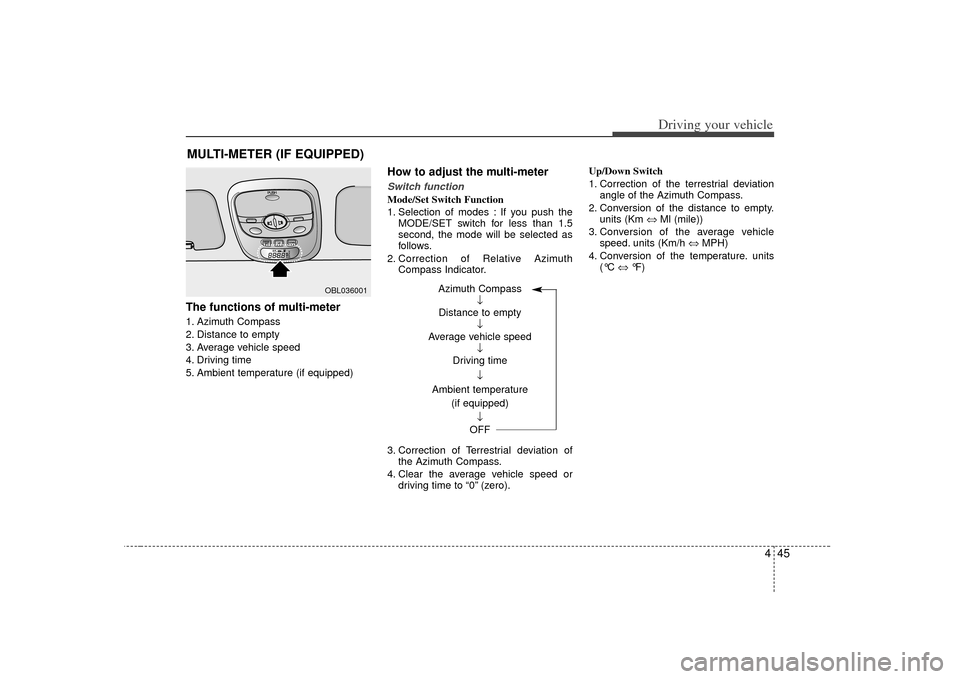
The functions of multi-meter1. Azimuth Compass
2. Distance to empty
3. Average vehicle speed
4. Driving time
5. Ambient temperature (if equipped)
How to adjust the multi-meterSwitch functionMode/Set Switch Function
1. Selection of modes : If you push theMODE/SET switch for less than 1.5
second, the mode will be selected as
follows.
2. Correction of Relative Azimuth Compass Indicator.
3. Correction of Terrestrial deviation of the Azimuth Compass.
4. Clear the average vehicle speed or driving time to “0” (zero). Up/Down Switch
1. Correction of the terrestrial deviation
angle of the Azimuth Compass.
2. Conversion of the distance to empty. units (Km ⇔ Ml (mile))
3. Conversion of the average vehicle speed. units (Km/h ⇔ MPH)
4. Conversion of the temperature. units (°C ⇔ °F)
MULTI-METER (IF EQUIPPED)
OBL036001
Azimuth Compass
↓
Distance to empty ↓
Average vehicle speed ↓
Driving time
↓
Ambient temperature (if equipped)
↓
OFF
Page 176 of 325

Driving your vehicle46
4Electric azimuth compassIt displays azimuth according to the vehi-
cle’s driving direction.
The indication is displayed only when the
vehicle is in motion.✽ ✽
NOTICEIf new vehicle is first driven or if the
battery has been disconnected, correct
the azimuth indicator before driving.
Correcting azimuth indicator It is needed to correct the error between
a current azimuth to terrestrial magnet-
ism sensor and the displayed azimuth in
the vehicle position.How to correct azimuth indicator1. If you push the MODE/SET switch and
hold for more than 1 second and less
than 4.5 seconds, the azimuth indica-
tor (DIR) will start blinking with the
vehicle's present direction.
2. Slowly (about 5 km/h, 3 mph) rotate the vehicle one turn (360 degree) with-
in 128 seconds.
The rotation could be made at anydirection(left or right) in an open
space.
3. When the rotation is finished, the azimuth compass indicator (DIR) will
stop blinking and the error correction is
completed.
If the indicator continues to blink,
rotate the vehicle a bit more until the
blinking stops.
The azimuth compass indicator cor- rection will be cancelled:1. If you press MODE/SET switch for more than 0.1 second.
2. When the vehicle is not rotated within 128 seconds after the blinking of the
indicator.✽ ✽NOTICEThe azimuth may display abnormally in
specific places (tunnel, parking lot in
building, underground parking lot, near
transformer substation, etc.). It is nor-
mal and the azimuth is displayed nor-
mally when escaping above mentioned
places.
DIR
6BLA432
Page 177 of 325
447
Driving your vehicle
How to correct terrestrial deviation.
1. Press MODE/SET switch for morethan 4.5 seconds, then the present ter-
restrial deviation angle value will be
displayed after DIR blinking for 4.5
seconds.
2. Press UP or DOWN switch for more than 0.1 second to correct the Azimuth
Compass within 30 seconds. If you
press UP switch, the Azimuth com-
pass will move 5 degree to the East
and it will move 5 degree to West if you
press DOWN switch.
For the correct terrestrial deviation
angle value for your location, refer to
the contour line map included.
If your place is located in between the
terrestrial deviation contour line, you
can apply any value (up or down
value) for your location in the contour
line map.
The initial deviation angle is set to 5°W.
Terrestrial Correction Range: West 30° ~ East 30°. 3. To finish the correction, press
MODE/SET switch for more than 1
second.
✽ ✽NOTICEThe terrestrial deviation setting will be
remembered even if the battery has
been disconnected.
The terrestrial deviation angle correc-
tion will be cancelled:1.If you press MODE/SET switch for less than 1 second.
2.If you don't correct the terrestrial devia- tion angle within 30 seconds.✽ ✽ NOTICE1. Do not install a ski rack, antenna, etc.
that is attached to the vehicle using a
magnet as anything attached to the
roof of the vehicle with a magnet will
effect compass operation.
2. If the compass deviates from the cor- rect indication after repeated adjust-
ment, have the compass checked at an
authorized dealer.
3. The compass may not indicate the correct compass point in tunnels or
while driving up or down a steep hill.
(The compass returns to the correct
compass point when the vehicle moves
to an area where the geomagnetism is
stabilized.)