2007 JEEP PATRIOT engine
[x] Cancel search: enginePage 127 of 440
(counterclockwise) to increase the delay time. The delay
can be regulated from a maximum of approximately 18
seconds between cycles, to a cycle every second.
Adding Washer Fluid
The fluid reservoir for the windshield washers and the
rear window washer (If Equipped) is shared. It is located
in the front of the engine compartment on the passenger
side and should be checked for fluid level at regular
intervals. Fill the reservoir with windshield washer sol-
vent (not radiator antifreeze) and operate the system for
a few seconds to flush out the residual water.
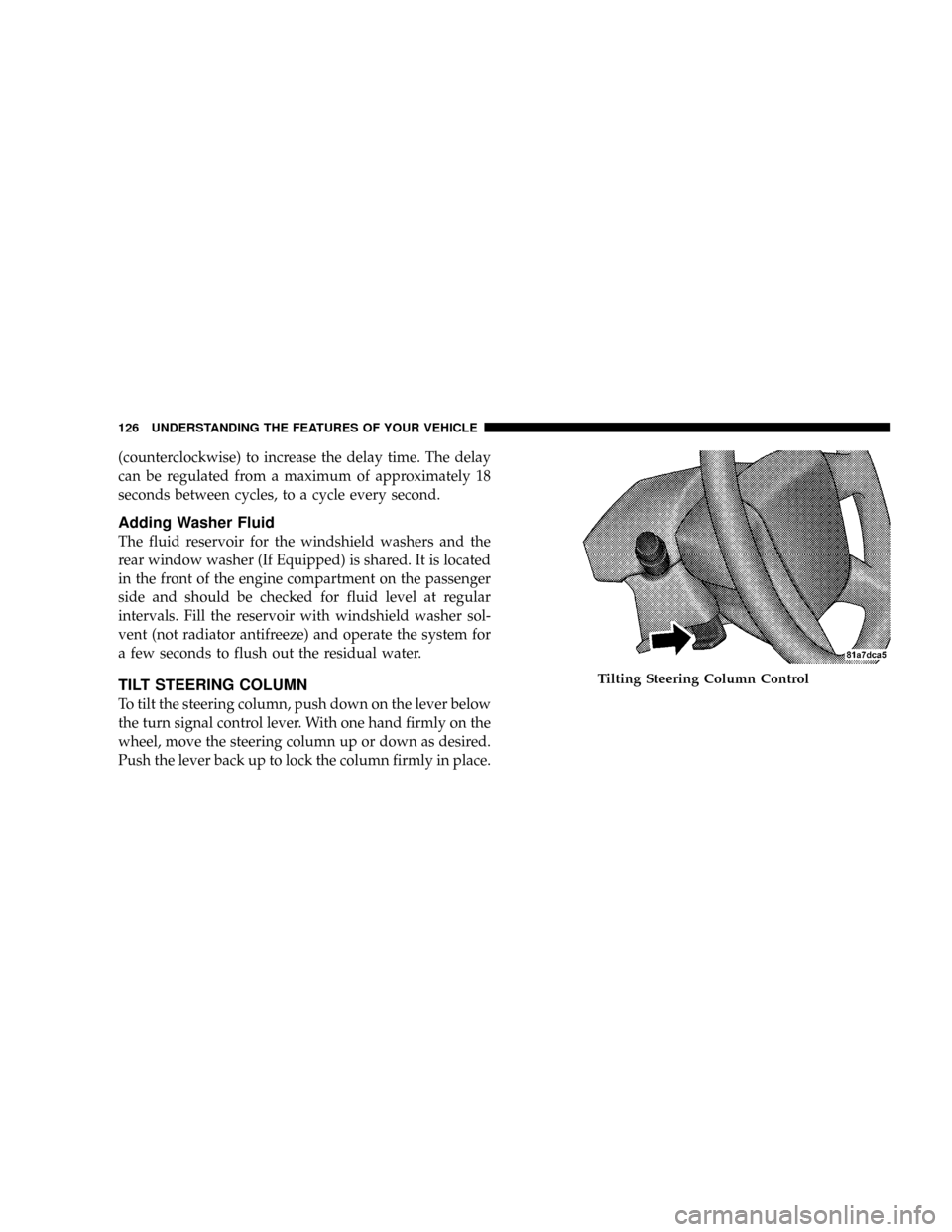
TILT STEERING COLUMN
To tilt the steering column, push down on the lever below
the turn signal control lever. With one hand firmly on the
wheel, move the steering column up or down as desired.
Push the lever back up to lock the column firmly in place.
Tilting Steering Column Control
126 UNDERSTANDING THE FEATURES OF YOUR VEHICLE
Page 130 of 440
Tapping ªRESUME ACCELº once will result ina1mph
(1.6 km/h) speed increase. Each time the lever is tapped,
speed increases so that tapping the lever three times will
increase speed by 3 mph (4.8 km/h), etc.
To decrease speed while speed control is ON, push down
and hold ªSET DECELº. Release the lever when the
desired speed is reached, and the new speed will be set.
Tapping the ªSET DECELº button once will result in a 1
mph (1.6 km/h) speed decrease. Each time the button is
tapped, speed decreases.
Manual Transaxle:
Depressing the clutch pedal will disengage the speed
control. A slight increase in engine RPM before the speed
control disengages is normal.
Vehicles equipped with manual transaxles may need to
be shifted into a lower gear to climb hills without speed
loss.
WARNING!
Speed Control can be dangerous where the system
can't maintain a constant speed. Your vehicle could
go too fast for the conditions, and you could lose
control. An accident could be the result. Don't use
Speed Control in heavy traffic or on roads that are
winding, icy, snow-covered, or slippery.
To Accelerate For Passing:
Depress the accelerator as you would normally. When the
pedal is released, the vehicle will return to the set speed.
Using Speed Control On Hills
NOTE:The speed control system maintains speed up
and down hills. A slight speed change on moderate hills
is normal.
UNDERSTANDING THE FEATURES OF YOUR VEHICLE 129
3
Page 132 of 440

WARNING!
A moving garage door can cause injury to people and
pets in the path of the door. People or pets could be
seriously or fatally injured. Only use this transceiver
with a garage door opener that has a ªstop and
reverseº feature as required by federal safety stan-
dards. This includes most garage door opener models
manufactured after 1982. Do not use a garage door
opener without these safety features it could cause
injury or death. Call toll-free 1±800±355±3515 or, on
the Internet at www.homelink.com for safety infor-
mation or assistance.
Programming The Universal Transceiver
For best results, install a new battery in the hand held
transmitter before programming. If your garage door
opener (located in the garage) is equipped with an
antenna, make sure that the antenna is hanging straight
down.
1. Turn off the engine.
WARNING!
Vehicle exhaust contains carbon monoxide, a danger-
ous gas. Do not run the vehicle's exhaust while
training the transceiver. Exhaust gas can cause seri-
ous injury or death.
UNDERSTANDING THE FEATURES OF YOUR VEHICLE 131
3
Page 139 of 440

Traction Control System (TCS)
This system monitors the amount of wheel spin of each of
the driven wheels. If wheel spin is detected, brake
pressure is applied to the slipping wheel(s) and engine
power is reduced to provide enhanced acceleration and
stability. A feature of the TCS system functions similar to
a limited slip differential and controls the wheel spin
across a driven axle. If one wheel on a driven axle is
spinning faster than the other, the system will apply the
brake of the spinning wheel. This will allow more engine
torque to be applied to the wheel that is not spinning.
This feature remains active even if TCS and ESP are in
either the ªPartial Offº or ªESP Offº modes. Refer to
ªElectronic Stability Program (ESP)º in this Section of this
manual.
Brake Assist System (BAS)
The BAS is designed to optimize the vehicle's braking
capability during emergency braking maneuvers. The
system detects an emergency braking situation by sens-
ing the rate and amount of brake application and then
applies optimum pressure to the brakes. This can help
reduce braking distances. The BAS complements the
Anti-Lock Brake System (ABS). Applying the brakes very
quickly results in the best BAS assistance. To receive the
benefit of the system, you must apply continuous brak-
ing pressure during the stopping sequence. Do not
reduce brake pedal pressure unless braking is no longer
desired. Once the brake pedal is released, the BAS is
deactivated.
138 UNDERSTANDING THE FEATURES OF YOUR VEHICLE
Page 140 of 440
WARNING!
²BAS cannot prevent the natural laws of physics
from acting on the vehicle, nor can it increase
braking efficiency beyond that afforded by the
condition of the vehicle brakes and tires or the
traction afforded.
²The BAS cannot prevent accidents, including
those resulting from excessive speed in turns,
following another vehicle too closely, or hydro-
planing. Only a safe, attentive, and skillful driver
can prevent accidents.
²The capabilities of a BAS-equipped vehicle must
never be exploited in a reckless or dangerous
manner which could jeopardize the user 's safety
or the safety of others.
Electronic Roll Mitigation (ERM)
This system anticipates the potential for wheel lift by
monitoring the driver 's steering wheel input and the
speed of the vehicle. When ERM determines that the rate
of change of the steering wheel angle and vehicles speed
are sufficient to potentially cause wheel lift, it applies the
appropriate brake and may reduce engine power to
lessen the chance that wheel lift will occur. ERM will only
intervene during very severe or evasive driving maneu-
vers.
ERM can only reduce the chance of wheel lift occurring
during severe or evasive driving maneuvers. It can not
prevent wheel lift due to other factors such as road
conditions, leaving the roadway or striking objects or
other vehicles.
UNDERSTANDING THE FEATURES OF YOUR VEHICLE 139
3
Page 142 of 440

the accelerator pedal will increase vehicle speed like
normal. When either the brake or the accelerator is
released, HDC will control the vehicle back to the origi-
nal set speed.
HDC is only intended for low speed off-road driving. At
vehicle speeds above 31 mph (50 km/h) HDC will no
longer function. If the HDC indicator lamp begins to
flash it means that the brakes are getting too hot and the
vehicle should be stopped to allow the brakes to cool.
ESP (Electronic Stability Program)
This system enhances directional control and stability of
the vehicle under various driving conditions. ESP cor-
rects for over/under steering of the vehicle by applying
the brake of the appropriate wheel to assist in counter-
acting the over/under steer condition. Engine power
may also be reduced to help the vehicle maintain the
desired path. ESP uses sensors in the vehicle to determine
the vehicle path intended by the driver and compares itto the actual path of the vehicle. When the actual path
does not match the intended path, ESP applies the brake
of the appropriate wheel to assist in counteracting the
oversteer or understeer condition
²Oversteer - when the vehicle is turning more than
appropriate for the steering wheel position.
²Understeer - when the vehicle is turning less than
appropriate for the steering wheel position.
ESP/TCS Indicator Light
The ªESP/TCS Indicator Lightº located in the instrument
cluster, starts to flash as soon as the tires lose traction and
the ESP system becomes active. The ªESP/TCS Indicator
Lightº also flashes when TCS is active. If the ªESP/TCS
Indicator Lightº begins to flash during acceleration, ease
up on the accelerator and apply as little throttle as
possible. Be sure to adapt your speed and driving to the
prevailing road conditions.
UNDERSTANDING THE FEATURES OF YOUR VEHICLE 141
3
Page 143 of 440
WARNING!
²Electronic Stability Program (ESP) cannot prevent
the natural laws of physics from acting on the
vehicle, nor can it increase the traction afforded by
prevailing road conditions.
²ESP cannot prevent accidents, including those
resulting from excessive speed in turns, driving on
very slippery surfaces, or hydroplaning. Only a
safe, attentive, and skillful driver can prevent
accidents.
²The capabilities of an ESP-equipped vehicle must
never be exploited in a reckless or dangerous
manner which could jeopardize the user's safety
or the safety of others.
ESP 2WD Operating Modes
All 2WD vehicles can choose the following ESP operating
modes:
ESP ON
This is the normal operating mode for ESP. Whenever the
vehicle is started the ESP system will be in this mode.
This mode should be used for almost all driving situa-
tions. ESP should only be turned to ªPartial Offº or ªESP
Offº for specific reasons as noted below.
PARTIAL ESP
This mode is entered by momentarily depressing the
ªESP Control Switchº. When in ªPartial Offº mode, the
TCS portion of ESP, except for the ªlimited slipº feature
described in the TCS section, has been disabled and the
ªESP/TCS Indicator Lightº will be illuminated. All other
stability features of ESP function normally, with the
exception of engine power reduction. This mode is
intended to be used if the vehicle is in deep snow, sand or
142 UNDERSTANDING THE FEATURES OF YOUR VEHICLE
Page 144 of 440
gravel conditions and more wheel spin than ESP would
normally allow is required to gain traction.
To turn ESP on again, momentarily depress the ªESP
Control Switchº. This will restore the normal ªESP Onº
mode of operation.
WARNING!
In the Partial ESP mode, the engine torque reduction
and stability features are desensitized. Therefore, the
enhanced vehicle stability offered by ESP is
unavailable.
NOTE:To improve the vehicle's traction when driving
with snow chains, or starting off in deep snow, sand or
gravel, it may be desirable to switch to the ªPartial Offº
mode by pressing the ESP switch. Once the situation
requiring ESP to be switched to the ªPartial Offº mode isovercome, turn ESP back on by momentarily depressing
the ªESP Control Switchº. This may be done while the
vehicle is in motion.
ESP 4WD Operating Modes
In addition to ESP ON and Partial ESP (described above
in ªESP 2WD Operating Modesº), all 4WD equipped
vehicles can also choose the following ESP operating
mode:
ESP OFF
This mode is intended for off-highway or off-road use
when ESP stability features could inhibit vehicle maneu-
verability due to trail conditions. This mode is entered by
depressing and holding the ªESP Control Switchº for 5
seconds when the vehicle is stopped and the engine is
running. After 5 seconds, the ªESP/TCS Indicator Lightº
will illuminate and the ªESP Offº message will appear in
the odometer. Press and release the trip odometer button
located on the instrument cluster to clear this message.
UNDERSTANDING THE FEATURES OF YOUR VEHICLE 143
3