Page 94 of 4366
AT-10
PREPARATION
Revision: 2006 July 2007 FX35/FX45
PREPARATIONPFP:00002
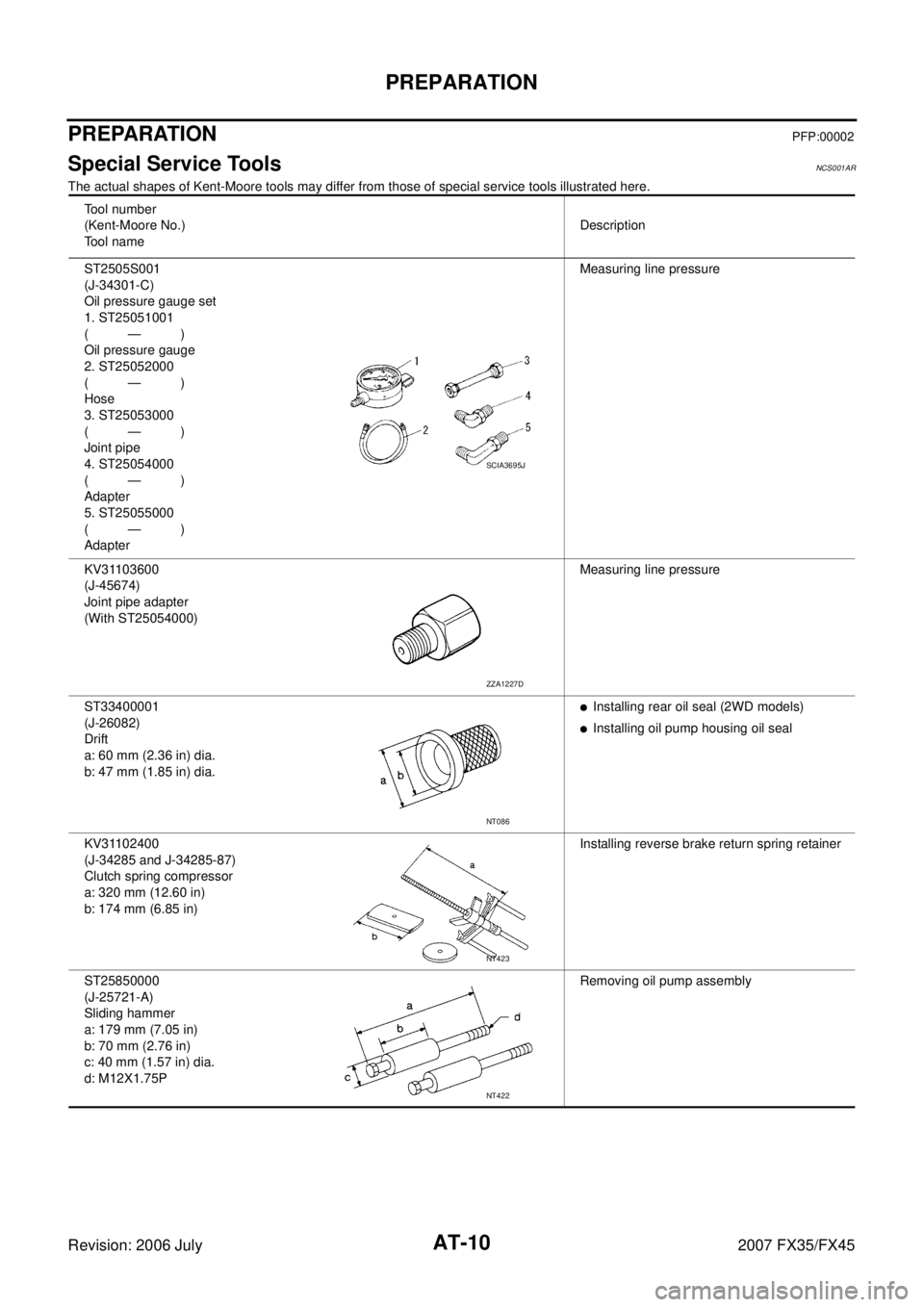
Special Service ToolsNCS001AR
The actual shapes of Kent-Moore tools may differ from those of special service tools illustrated here.
Tool number
(Kent-Moore No.)
Tool name Description
ST2505S001
(J-34301-C)
Oil pressure gauge set
1. ST25051001
(—)
Oil pressure gauge
2. ST25052000
(—)
Hose
3. ST25053000
(—)
Joint pipe
4. ST25054000
(—)
Adapter
5. ST25055000
(—)
Adapter Measuring line pressure
KV31103600
(J-45674)
Joint pipe adapter
(With ST25054000) Measuring line pressure
ST33400001
(J-26082)
Drift
a: 60 mm (2.36 in) dia.
b: 47 mm (1.85 in) dia.
�Installing rear oil seal (2WD models)
�Installing oil pump housing oil seal
KV31102400
(J-34285 and J-34285-87)
Clutch spring compressor
a: 320 mm (12.60 in)
b: 174 mm (6.85 in) Installing reverse brake return spring retainer
ST25850000
(J-25721-A)
Sliding hammer
a: 179 mm (7.05 in)
b: 70 mm (2.76 in)
c: 40 mm (1.57 in) dia.
d: M12X1.75P Removing oil pump assembly
SCIA3695J
ZZA1227D
NT086
NT423
NT422
Page 529 of 4366
TROUBLE DIAGNOSIS ATC-83
C
D E
F
G H
I
K L
M A
B
AT C
Revision: 2006 July 2007 FX35/FX45
SYSTEM DESCRIPTION
Unified meter and A/C amp. controls compressor operation by ambient temperature, intake air temperature
and signal from ECM.
Low Temperature Protection Control
Unified meter and A/C amp. will turn the compressor ON or OFF as determined by a signal detected by ambi-
ent sensor and intake sensor.
When ambient temperature is higher than −2 °C (28 °F), the compres-
sor turns ON. The compressor turns OFF when ambient temperature
is lower than −5 °C (23 °F).
When intake air temperature is higher than 1 °C (34 °F), the compres-
sor turns ON. The compressor turns OFF when intake air tempera-
ture is lower than −5°C (23 °F).
DIAGNOSIS PROCEDURE FOR MAGNET CLUTCH
SYMPTOM: Magnet clutch does not engage when A/C switch is ON.
RHA094GB
SJIA0267E
SJIA1608E
Page 689 of 4366
INTEGRATED DISPLAY SYSTEM AV-83
C
D E
F
G H
I
J
L
M A
B
AV
Revision: 2006 July 2007 FX35/FX45
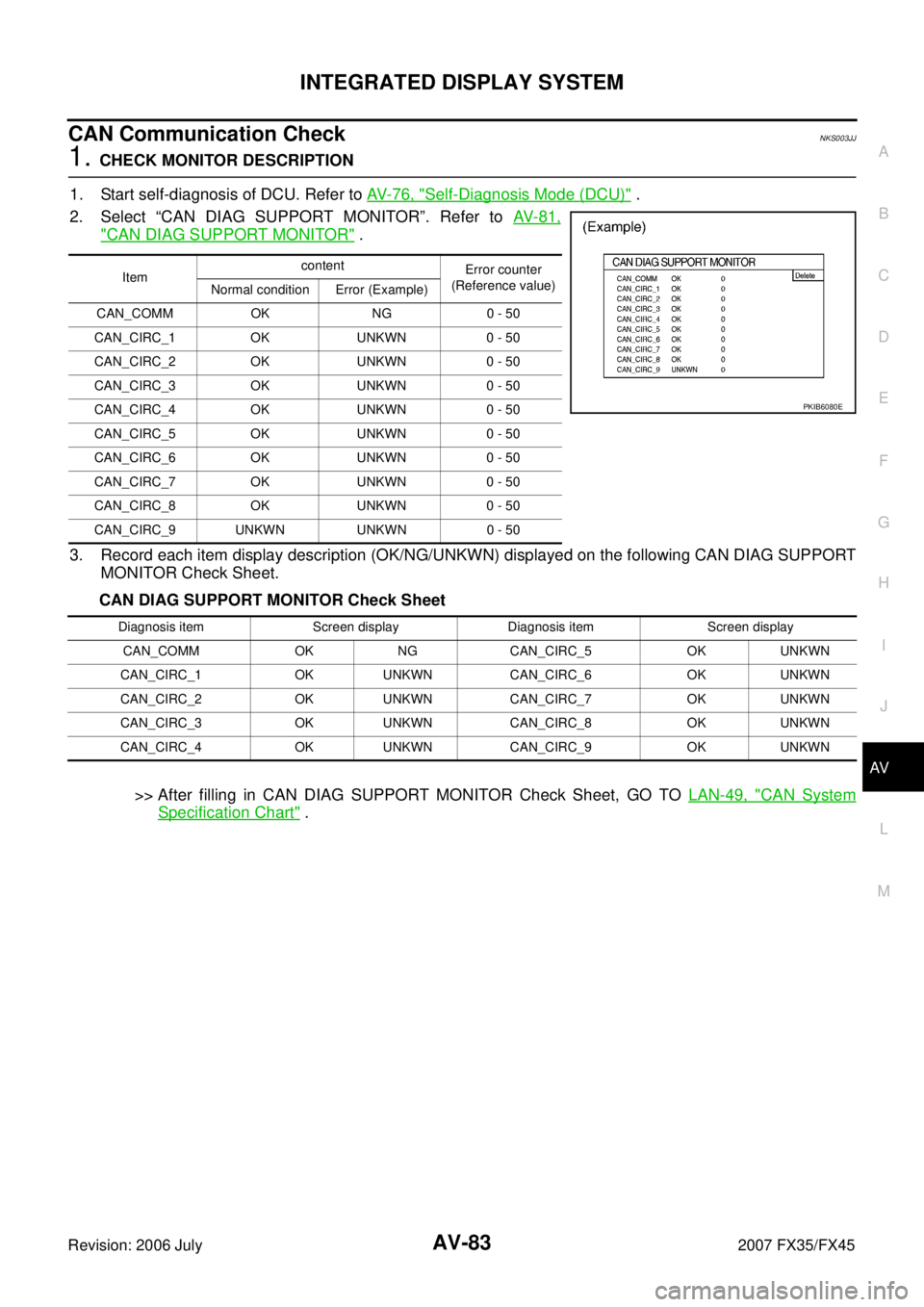
CAN Communication CheckNKS003JJ
1. CHECK MONITOR DESCRIPTION
1. Start self-diagnosis of DCU. Refer to AV- 7 6 , "
Self-Diagnosis Mode (DCU)" .
2. Select “CAN DIAG SUPPORT MONITOR”. Refer to AV- 8 1 ,
"CAN DIAG SUPPORT MONITOR" .
3. Record each item display description (OK/NG/UNKWN) displayed on the following CAN DIAG SUPPORT MONITOR Check Sheet.
CAN DIAG SUPPORT MONITOR Check Sheet
>> After filling in CAN DIAG SUPPORT MONITOR Check Sheet, GO TO LAN-49, "
CAN System
Specification Chart" .
Item content
Error counter
(Reference value)
Normal condition Error (Example)
CAN_COMM OK NG 0 - 50
CAN_CIRC_1 OK UNKWN 0 - 50
CAN_CIRC_2 OK UNKWN 0 - 50
CAN_CIRC_3 OK UNKWN 0 - 50
CAN_CIRC_4 OK UNKWN 0 - 50
CAN_CIRC_5 OK UNKWN 0 - 50
CAN_CIRC_6 OK UNKWN 0 - 50
CAN_CIRC_7 OK UNKWN 0 - 50
CAN_CIRC_8 OK UNKWN 0 - 50
CAN_CIRC_9 UNKWN UNKWN 0 - 50
PKIB6080E
Diagnosis item Screen display Diagnosis item Screen display CAN_COMM OK NG CAN_CIRC_5 OK UNKWN
CAN_CIRC_1 OK UNKWN CAN_CIRC_6 OK UNKWN
CAN_CIRC_2 OK UNKWN CAN_CIRC_7 OK UNKWN
CAN_CIRC_3 OK UNKWN CAN_CIRC_8 OK UNKWN
CAN_CIRC_4 OK UNKWN CAN_CIRC_9 OK UNKWN
Page 744 of 4366

AV-138
NAVIGATION SYSTEM
Revision: 2006 July 2007 FX35/FX45
CAN Communication CheckNKS003KM
1. CHECK MONITOR DESCRIPTION
1. Start self-diagnosis of DCU. Refer to AV- 1 2 3 , "
Self-Diagnosis Mode (DCU)" .
2. Select “CAN DIAG SUPPORT MONITOR”. Refer to AV- 1 3 6 ,
"CAN DIAG SUPPORT MONITOR" .
3. Record each item display description (OK/NG/UNKWN) displayed on the following CAN DIAG SUPPORT MONITOR Check Sheet.
CAN DIAG SUPPORT MONITOR Check Sheet
>> After filling in CAN DIAG SUPPORT MONITOR Check Sheet, GO TO LAN-49, "
CAN System
Specification Chart" .
Item content
Error counter
(Reference value)
Normal condition Error (Example)
CAN_COMM OK NG 0 - 50
CAN_CIRC_1 OK UNKWN 0 - 50
CAN_CIRC_2 OK UNKWN 0 - 50
CAN_CIRC_3 OK UNKWN 0 - 50
CAN_CIRC_4 OK UNKWN 0 - 50
CAN_CIRC_5 OK UNKWN 0 - 50
CAN_CIRC_6 OK UNKWN 0 - 50
CAN_CIRC_7 OK UNKWN 0 - 50
CAN_CIRC_8 OK UNKWN 0 - 50
CAN_CIRC_9 UNKWN UNKWN 0 - 50
PKIB6080E
Diagnosis item Screen display Diagnosis item Screen display CAN_COMM OK NG CAN_CIRC_5 OK UNKWN
CAN_CIRC_1 OK UNKWN CAN_CIRC_6 OK UNKWN
CAN_CIRC_2 OK UNKWN CAN_CIRC_7 OK UNKWN
CAN_CIRC_3 OK UNKWN CAN_CIRC_8 OK UNKWN
CAN_CIRC_4 OK UNKWN CAN_CIRC_9 OK UNKWN
Page 975 of 4366
BACK DOOR LOCK ASSEMBLY BL-163
C
D E
F
G H
J
K L
M A
B
BL
Revision: 2006 July 2007 FX35/FX45
NOTE:
Through hole is as shown in the figure.
5. Disconnect back door opener switch harness connector (and rear view camera if equipped).
6. Remove opener switch from back door through hole.
INSTALLATION
Install in the reverse order of removal.
CAUTION:
After installing, check operation.
Disassembly and AssemblyNIS001OL
BACK DOOR LOCK & CLOSURE ASSEMBLY
CAUTION:
Be sure to remove or install the back door closure motor with the back door lock & closure assembly.
1. Remove the back door closure motor.
PIIB1645E
PIIB1647E
PIIA6080E
Page 1596 of 4366
EC-220
[VQ35DE]
DTC P0122, P0123 TP SENSOR
Revision: 2006 July 2007 FX35/FX45
Component InspectionNBS003O4
THROTTLE POSITION SENSOR
1. Reconnect all harness connectors disconnected.
2. Perform EC-83, "
Throttle Valve Closed Position Learning" .
3. Turn ignition switch ON.
4. Set selector lever to D position.
5. Check voltage between ECM terminals 50 (TP sensor 1signal), 69 (TP sensor 2signal) and body ground under the following
conditions.
6. If NG, replace electric throttle control actuator and go to the next step.
7. Perform EC-83, "
Throttle Valve Closed Position Learning" .
8. Perform EC-83, "
Idle Air Volume Learning" .
Removal and InstallationNBS003O5
ELECTRIC THROTTLE CONTROL ACTUATOR
Refer to EM-19, "INTAKE MANIFOLD COLLECTOR" .
Terminal Accelerator pedal Voltage
50
(Throttle position sensor 1) Fully released More than 0.36V
Fully depressed Less than 4.75V
69
(Throttle position sensor 2) Fully released Less than 4.75V
Fully depressed More than 0.36V
PBIB1608E
Page 1720 of 4366
EC-344
[VQ35DE]
DTC P0222, P0223 TP SENSOR
Revision: 2006 July 2007 FX35/FX45
Component InspectionNBS003PW
THROTTLE POSITION SENSOR
1. Reconnect all harness connectors disconnected.
2. Perform EC-83, "
Throttle Valve Closed Position Learning" .
3. Turn ignition switch ON.
4. Set selector lever to D position.
5. Check voltage between ECM terminals 50 (TP sensor 1 signal), 69 (TP sensor 2 signal) and body ground under the following
conditions.
6. If NG, replace electric throttle control actuator and go to the next step.
7. Perform EC-83, "
Throttle Valve Closed Position Learning" .
8. Perform EC-83, "
Idle Air Volume Learning" .
Removal and InstallationNBS003PX
ELECTRIC THROTTLE CONTROL ACTUATOR
Refer to EM-24, "INTAKE MANIFOLD" .
Terminal Accelerator pedal Voltage
50
(Throttle position sensor 1) Fully released More than 0.36V
Fully depressed Less than 4.75V
69
(Throttle position sensor 2) Fully released Less than 4.75V
Fully depressed More than 0.36V
PBIB1608E
Page 1972 of 4366
EC-596
[VQ35DE]
DTC P2135 TP SENSOR
Revision: 2006 July 2007 FX35/FX45
Component InspectionNBS003YZ
THROTTLE POSITION SENSOR
1. Reconnect all harness connectors disconnected.
2. Perform EC-83, "
Throttle Valve Closed Position Learning" .
3. Turn ignition switch ON.
4. Set selector lever to D.
5. Check voltage between ECM terminals 50 (TP sensor 1signal), 69 (TP sensor 2signal) and ground under the following condi-
tions.
6. If NG, replace electric throttle control actuator and go to the next step.
7. Perform EC-83, "
Throttle Valve Closed Position Learning" .
8. Perform EC-83, "
Idle Air Volume Learning" .
Removal and InstallationNBS003Z0
ELECTRIC THROTTLE CONTROL ACTUATOR
Refer to EM-19, "INTAKE MANIFOLD COLLECTOR" .
Terminal Accelerator pedal Voltage
50
(Throttle position sensor 1) Fully released More than 0.36V
Fully depressed Less than 4.75V
69
(Throttle position sensor 2) Fully released Less than 4.75V
Fully depressed More than 0.36V
PBIB1608E


![INFINITI FX35 2007 Service Manual EC-220
[VQ35DE]
DTC P0122, P0123 TP SENSOR
Revision: 2006 July 2007 FX35/FX45
Component InspectionNBS003O4
THROTTLE POSITION SENSOR
1. Reconnect all harness connectors disconnected.
2. Perform EC-8](/manual-img/42/57018/w960_57018-1595.png "INFINITI FX35 2007 Service Manual EC-220
[VQ35DE]
DTC P0122, P0123 TP SENSOR
Revision: 2006 July 2007 FX35/FX45
Component InspectionNBS003O4
THROTTLE POSITION SENSOR
1. Reconnect all harness connectors disconnected.
2. Perform EC-8")
![INFINITI FX35 2007 Service Manual EC-344
[VQ35DE]
DTC P0222, P0223 TP SENSOR
Revision: 2006 July 2007 FX35/FX45
Component InspectionNBS003PW
THROTTLE POSITION SENSOR
1. Reconnect all harness connectors disconnected.
2. Perform EC-8](/manual-img/42/57018/w960_57018-1719.png "INFINITI FX35 2007 Service Manual EC-344
[VQ35DE]
DTC P0222, P0223 TP SENSOR
Revision: 2006 July 2007 FX35/FX45
Component InspectionNBS003PW
THROTTLE POSITION SENSOR
1. Reconnect all harness connectors disconnected.
2. Perform EC-8")
![INFINITI FX35 2007 Service Manual EC-596
[VQ35DE]
DTC P2135 TP SENSOR
Revision: 2006 July 2007 FX35/FX45
Component InspectionNBS003YZ
THROTTLE POSITION SENSOR
1. Reconnect all harness connectors disconnected.
2. Perform EC-83, "
Th](/manual-img/42/57018/w960_57018-1971.png "INFINITI FX35 2007 Service Manual EC-596
[VQ35DE]
DTC P2135 TP SENSOR
Revision: 2006 July 2007 FX35/FX45
Component InspectionNBS003YZ
THROTTLE POSITION SENSOR
1. Reconnect all harness connectors disconnected.
2. Perform EC-83, \"
Th")