2007 Hyundai Accent Flash
[x] Cancel search: FlashPage 71 of 282

1
FEATURES OF YOUR HYUNDAI
59
B260F01A-AAT High Beam Indicator Light
The high beam indicator light comes on whenever the headlights are switched to the high beam or flash position.
B260D01A-AAT Turn Signal Indicator Lights
The blinking green arrows on the instru- ment panel show the direction indicated by the turn signals. If the arrow comeson but does not blink, blinks more rapidly than normal, or does not illumi- nate at all, a malfunction in the turnsignal system is indicated. Your dealer should be consulted for repairs.
!
B260P02Y-GAT ABS Service Reminder Indicator (SRI) Light(If Installed)
When the key is turned to the "ON" position, the Anti-Lock Brake System SRI will come on and then go off in a fewseconds. If the ABS SRI remains on, comes on while driving, or does not come on when the key is turned to the"ON" position, this indicates that there may be a problem with the ABS. If this occurs, have your vehiclechecked by your Hyundai dealer as soon as possible. The normal braking system will still be operational, butwithout the assistance of the anti-lock brake system. B260C01A-AAT
O/D OFF Indicator (Automatic transaxleonly)
When the overdrive switch is turned on, the overdrive off indicator will go out. This amber indicator will be illuminatedwhen the overdrive switch is turned off. WARNING:
If both ABS SRI and Parking Brake/Brake fluid level warning lights re- main "ON" or come on while driving, there may be a problem with E.B.D(Electronic Brake Force Distribution). If this occurs, avoid sudden stops and have your vehicle checked byyour Hyundai dealer as soon as pos- sible.
Page 74 of 282

1FEATURES OF YOUR HYUNDAI
62
B290A01MC-GAT
Engine Coolant Tempera-
ture Indicator Light
(If Installed)
WARNING:
Never remove the radiator cap when the engine is hot. The engine coolant is under pressure and could erupt and cause severe burns. Wait untilthe engine is cool before removing the radiator cap.
!
These indicator lights show the tem- perature of the engine coolant when the ignition switch is ON. Red indicator light illuminates if the temperature of theengine coolant is above 123±3°C (253.4±37.4°F). Blue indicator light Illu- minates if the temperature of the enginecoolant is below 55±3°C (131±37.4°F). If the red indicator light illuminates, pull over and stop as soon as possible andturn off the engine. Then open the hood and check the coolant level (See "If the engine overheats" on the page 3-4.) andthe water pump drive belt. If you sus- pect cooling system trouble, have your cooling system checked by a Hyundaidealer as soon as possible.
If the Emission Control SystemMalfunction Indicator Light beginsto flash ON and OFF, potential catalytic converter damage is pos- sible which could result in loss ofengine power. Have the Engine Control System inspected as soon as possible by an authorizedHyundai dealer (Gasoline Engine).
o In case the injection quantity ad-
justment related error occurred,the Emission Control System Mal- function Indicator Light begins to flash ON and OFF. Continuousdriving with this status could re- sult in abnormal engine power loss (or power increase), combus-tion noise and poor emission. If this occurs, have your vehicle checked by an authorized Hyundaidealer (Diesel Engine).
B260N01MC-GAT Malfunction Indicator Light (If Installed)
This light illuminates when there is a malfunction of an exhaust gas relatedcomponent, and the system is not func- tioning properly so that the exha ust gas
regulation values are not satisfied. This light will also illuminate when the ignition
key is turned to the "ON" position, and then it will go out in a few seconds after
the engine is started. If it illuminates
while driving, or does not illuminate whenthe ignition key is turned to the "ON"position, take your car to your nearest authorized Hyundai dealer and have the system checked.
CAUTION:
o Prolonged driving with the Emis- sion Control System Malfunction Indicator Light illuminated may cause damage to the emission control systems which could ef-fect drivability or fuel economy.!
Page 77 of 282

1
FEATURES OF YOUR HYUNDAI
65
B265A01MC-GAT Fuel Filter Warning Light (Diesel Engine)
This warning light illuminates for 6 sec- onds after the ignition switch is set tothe "ON" position or after the engine is started, it will go out. If it lights up while the engine is running, it indicates thatwater has accumulated inside the fuel filter. If this happens, remove the water from the fuel filter. (Refer to "6-25 page")
B260S01MC-GAT
Diesel Preheat Indicator Light
The indicator light illuminates amber when the ignition switch is placed at the"ON" position. The engine can be started after the preheat indicator light goes off. The illuminating time varies with thewater temperature, air temperature and battery condition. NOTE: If the engine were not started within 10 seconds after the preheating is completed, turn the ignition key once more to the "LOCK" position, andthen to the "ON" position, in order to preheat again.
! CAUTION:
If the preheat indicator light contin- ues to illuminate or flash on and off after the engine has warmed up orwhile driving, check the system by an authorized Hyundai dealer as soon as possible.
! CAUTION:
When the fuel filter warning light is illuminated, engine power (vehicle speed & idle speed) may decrease. If you keep driving with the warninglight on, you can damage your vehicle's engine parts and injection system of the Common Rail. If thisoccurs, have your vehicle checked by an authorized Hyundai dealer as soon as possible. B900A01A-GAT ACOUSTIC WARNING SOUND (If Installed) The acoustic warning chime sounds when the tail lights are on and the door in driver side is open. This prevents thebattery from discharging when the car is left with the tail lights on. The chime sounds until the tail lights are turned off.
SB210U1-G OVER SPEED WARNING BUZZER (If Installed) When the car speed is in excess of 120 km/h (75 mph), a buzzer will sound to warn you.
SB215U1-G
Overspeed warning light (If Installed)
If you drive with the speed of 120 km/h or more, the overspeed warning lightwill blink. This is to prevent you from driving your vehicle with overspeed.
120
km/h
Page 84 of 282

1FEATURES OF YOUR HYUNDAI
72
B340A01A-AAT Combination Turn Signal, Head- light And High-beam SwitchTurn Signal Operation Pulling down on the lever causes the turn signals on the left side of the car to blink. Pushing upwards on the levercauses the turn signals on the right side of the car to blink. As the turn is com- pleted, the lever will automatically re-turn to the center position and turn off the turn signals at the same time. If either turn signal indicator light blinksmore rapidly than usual, goes on but does not blink, or does not go on at all, there is a malfunction in the system.Check for a burned-out fuse or bulb or see your Hyundai dealer. B340B01A-AAT Lane Change Signal To indicate a lane change, move the lever up or down to a point where it begins flashing.The lever will automatically return to the center position when released.
B340B01MC
B340C04FC-GAT Headlight Switch
To operate the headlights, turn the bar- rel on the end of the multi-function switch. The first position turns on theparking lights, sidelights, tail lights and instrument panel lights. The second position turns on the headlights. NOTE: The ignition must be in the "ON" position to turn on the headlights. Parking Light Auto Cut
o The purpose of this feature is to prevent the battery from being dis- charged.B340C02MC
MULTI-FUNCTION LIGHT SWITCH
Page 85 of 282
1
FEATURES OF YOUR HYUNDAI
73
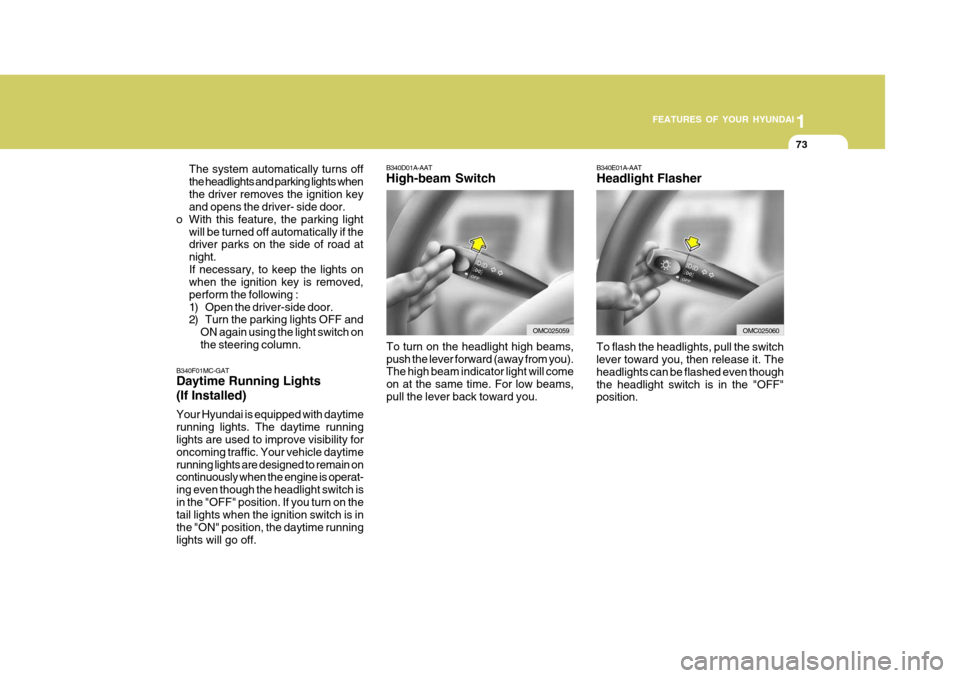
B340E01A-AAT Headlight Flasher
To flash the headlights, pull the switch lever toward you, then release it. The headlights can be flashed even thoughthe headlight switch is in the "OFF" position.
B340D01A-AAT High-beam Switch
B340F01MC-GAT Daytime Running Lights (If Installed) Your Hyundai is equipped with daytime running lights. The daytime running lights are used to improve visibility for oncoming traffic. Your vehicle daytimerunning lights are designed to remain on continuously when the engine is operat- ing even though the headlight switch isin the "OFF" position. If you turn on the tail lights when the ignition switch is in the "ON" position, the daytime runninglights will go off. The system automatically turns offthe headlights and parking lights whenthe driver removes the ignition key and opens the driver- side door.
o With this feature, the parking light
will be turned off automatically if thedriver parks on the side of road at night.If necessary, to keep the lights on when the ignition key is removed, perform the following :
1) Open the driver-side door.
2) Turn the parking lights OFF andON again using the light switch on the steering column.
OMC025060
To turn on the headlight high beams, push the lever forward (away from you). The high beam indicator light will come on at the same time. For low beams,pull the lever back toward you.OMC025059
Page 132 of 282

1FEATURES OF YOUR HYUNDAI
120
5. Best Station Memory (BSM)Button
When the BSM button is pressed, the six channels from the highest field in-tensity are selected next and stored in memory. The stations selected are stored in the sequence of frequencyfrom the first preset key.
6. PRESET STATION Select Buttons
Six stations for AM(MW, LW), FM1 and FM2 respectively can be preset in the electronic memory circuit. HOW TO PRESET STATIONS Six AM(MW, LW) and twelve FM sta- tions may be programmed into thememory of the radio. Then, by simply pressing the AM(MW, LW) / FM select button and/or one of the six stationselect buttons, you may recall any of these stations instantly. To program the stations, follow these steps: o Press AM(MW, LW)/FM selector to
set the band for AM(MW, LW), FM1and FM2.
o Select the desired station to be stored
by seek or manual tuning.
o Determine the preset station select button you wish to use to access thatstation.
o Press the station select button for more than two seconds. A selectbutton indicator will show in the dis-play indicating which select button you have depressed. The frequency display will flash after it has beenstored into the memory. You should then release the button, and proceed to program the next desired station.A total of 24 stations can be pro- grammed by selecting one AM(MW, LW) and two FM station per button.
o When completed, any preset station may be recalled by selecting AM(MW,LW), FM1 or FM2 band and theappropriate station button.
! CAUTION:
o Do not place beverages close to the audio system. The audio sys- tem mechanism may be damaged if you spill them.
o Do not strike or allow anything to impact the audio system, damageto the system mechanisms could occur.
Page 137 of 282

1
FEATURES OF YOUR HYUNDAI
125
1
FEATURES OF YOUR HYUNDAI
125
1
FEATURES OF YOUR HYUNDAI
125
1
FEATURES OF YOUR HYUNDAI
125
4. AUTO SEEK Select Button (Automatic Channel Selection)
Press the AUTO SEEK select button. When the side is pressed, the unitwill automatically tune to the next higher frequency and when the side is pressed, it will automatically tune to thenext lower frequency.
5. Best Station Memory (BSM) Button
When the BSM button is pressed, the six channels from the highest field intensity are selected next and stored in memory. The stations selected arestored in the sequence frequency from the first preset key. 6. EQ Button Press the EQ button to select the CLASSIC, POPS, ROCK, JAZZ and OFF MODE for the desired tone qual-ity. Each press of the button changes the display as follows; 7. PRESET STATION Select
Buttons
Six stations for AM(MW, LW), FM1 and FM2 respectively can be preset in theelectronic memory circuit. HOW TO PRESET STATIONS Six AM(MW, LW) and twelve FM sta- tions may be programmed into the memory of the radio. Then, by simply pressing the AM(MW, LW) / FM selectbuttons and/or one of the six station select buttons, you may recall any of these stations instantly. To programthe stations, follow these steps:
o Press AM(MW, LW)/FM selector to set the band for AM(MW, LW), FM1 and FM2.
o Select the desired station to be stored by seek or manual tuning.
o Determine the preset station select
button you wish to use to access that station. o Press the station select button for
more than two seconds. A selectbutton indicator will show in the dis- play indicating which select button you have depressed. The frequencydisplay will flash after it has been stored into the memory. You should then release the button, and proceedto program the next desired station. A total of 24 stations can be pro- grammed by selecting one AM(MW,LW) and two FM station per button.
o When completed, any preset station
may be recalled by selecting AM(MW,LW), FM1 or FM2 band and the appropriate station button.
! CAUTION:
o Do not place beverages close to the audio system. The audio sys- tem mechanism may be damagedif you spill them.
o Do not strike or allow anything to
impact the audio system, damageto the system mechanisms could occur.
CLASSIC POPS ROCK JAZZ DEFEAT
Page 153 of 282

1
FEATURES OF YOUR HYUNDAI
141
1
FEATURES OF YOUR HYUNDAI
141
1
FEATURES OF YOUR HYUNDAI
141
1
FEATURES OF YOUR HYUNDAI
141
5. Best Station Memory (BSM) Button
When the BSM button is pressed, the six channels from the highest field in-tensity are selected next and stored in memory. The stations selected are stored in the sequence frequency fromthe first preset key. 6. EQ Button Press the EQ button to select the CLAS- SIC, POPS, ROCK, JAZZ and OFF MODE for the desired tone quality. Each press of the button changes thedisplay as follows;
7. PRESET STATION Select Buttons
Six stations for AM(MW, LW), FM1 and FM2 respectively can be preset in theelectronic memory circuit. HOW TO PRESET STATIONS Six AM(MW, LW) and twelve FM sta- tions may be programmed into thememory of the radio. Then, by simply pressing the AM(MW, LW) / FM select button and/or one of the six stationselect buttons, you may recall any of these stations instantly. To program the stations, follow these steps:
o Press AM(MW, LW)/FM selector to
set the band for AM(MW, LW), FM1 and FM2.
o Select the desired station to be stored
by seek or manual tuning.
o Determine the preset station select button you wish to use to accessthat station.
o Press the station select button for more than two seconds. A selectbutton indicator will show in the dis-play indicating which select button you have depressed. The frequency display will flash after it has beenstored into the memory. You should then release the button, and proceed to program the next desired station.A total of 24 stations can be pro- grammed by selecting one AM(MW, LW) and two FM station per button. o When completed, any preset station
may be recalled by selecting AM(MW, LW), FM1 or FM2 band and the appropriate station button.
! CAUTION:
o Do not place beverages close to the audio system. The audio sys- tem mechanism may be damagedif you spill them.
o Do not strike or allow anything to
impact the audio system, damageto the system mechanisms could occur.
CLASSIC POPS ROCK JAZZ DEFEAT