2007 Hyundai Accent lock
[x] Cancel search: lockPage 176 of 282
2
DRIVING YOUR HYUNDAI
13
2
DRIVING YOUR HYUNDAI
13
!WARNING:
ABS (ESP) will not prevent accidents due to improper or dangerous driv- ing maneuvers. Even though vehiclecontrol is improved during emer- gency braking, always maintain a safe distance between you and ob-jects ahead. Vehicle speeds should always be reduced during extreme road conditions. The braking distance for cars equipped with an anti-lock braking system (Electronic Stability Program)may be longer than for those without it in the following road conditions. During these conditions, the ve-hicle should be driven at reduced speeds.
o Rough, gravel or snow-covered roads.
o With tire chains installed.
o On roads where the road surface
is pitted or has different surface height. The safety features of an ABS (ESP) equipped vehicle should not be testedby high speed driving or cornering. This could endanger the safety of yourself or others.
ANTI-LOCK BRAKE SYSTEM
C120A01FC-GAT (If Installed) The Anti-Lock Brake System (ABS) is designed to prevent wheel lock-upduring sudden braking or on hazard- ous road surfaces. The ABS control module monitors the wheel speed andcontrols the pressure applied to each brake. Thus, in emergency situations or on slick roads, ABS will increasevehicle control during braking. NOTE:
o A click sound may be heard in the engine compartment when the ve- hicle begins to move after the en- gine is started. These conditionsare normal and indicate that the anti-lock brake system (Electronic Stability Program) is functioningproperly.
o During ABS (ESP) operation, a
slight pulsation may be felt in thebrake pedal when the brakes are applied. Also, a noise may be heard in the engine compartment whilebraking. These conditions are normal and indicate that the anti- lock brake system (Electronic Sta-bility Program) is functioning prop- erly.
Page 179 of 282

2 DRIVING YOUR HYUNDAI
16
Types of warning sound
o When an object is 120 cm to 81 cm(47 in. to 32 in.) from the rear bumper : Buzzer beeps intermittently
o When an object is 80 cm to 41 cm (31
in. to 16 in.) from the rear bumper :Buzzer beeps more frequently
o When an object is within 40 cm (15 in.) of the rear bumper : Buzzersounds continuously.
Non-operational conditions of back warning system The back warning system may not operate properly when: 1. Moisture is frozen to the sensor. (It will operate normally when the mois- ture has been cleared.)
2. The sensor is covered with foreign
matter, such as snow or water, or thesensor cover is blocked. (It will oper- ate normally when the material isremoved or the sensor is no longer blocked.)
3. Driving on uneven road surfaces
(unpaved roads, gravel, bumps, gra-dient).
4. Objects generating excessive noise
(vehicle horns, loud motorcycle en-gines, or truck air brakes) are within range of the sensor. 5. Heavy rain or water spray exists.
6. Wireless transmitters or mobile
phones are within range of the sen- sor.
7. The sensor is covered with snow. 8. Trailer towing The detecting range may decrease when: 1. The sensor is stained with foreign matter such as snow or water. (The sensing range will return to normal when removed.)
2. Outside air temperature is extremely hot or cold.
The following objects may not be recognized by the sensor: 1. Sharp or slim objects such as ropes, chains or small poles.
2. Objects which tend to absorb the sensor frequency such as clothes, spongy material or snow.
3. Undetectable objects smaller than 1 m (40 in.) and narrower than 14 cm (6in.) in diameter. CAUTION:
1. The back warning may not sound sequentially depending on the speed and shapes of the objects detected.
2. The back warning system may malfunction if the vehicle bumperheight or sensor installation hasbeen modified or damaged. Any non-factory installed equipment or accessories may also interferewith the sensor performance.
3. The sensor may not recognize
objects less than 15 in. (40 cm)from the sensor, or it may sense an incorrect distance. Use cau- tion.
4. When the sensor is frozen or stained with snow, dirt, or water,the sensor may be inoperative untilthe stains are removed using a soft cloth.
5. Do not push, scratch or strike the
sensor. Sensor damage couldoccur.
!
Page 181 of 282

2 DRIVING YOUR HYUNDAI
18
o Don't coast down hills with the carout of gear. This is extremely haz- ardous. Keep the car in gear at all times, use the brakes to slow down, then shift to a lower gear so thatengine braking will help you main- tain a safe speed.
o Don't "ride" the brake pedal. Rest- ing your foot on the brake pedalwhile driving can be dangerous be- cause it can result in the brakesoverheating and losing their effec- tiveness. It also increases the wear of the brake components.
o If a tire goes flat while you are driving, apply the brakes gently and
keep the car pointed straight aheadwhile you slow down. When you are moving slowly enough for it to be safe to do so, pull off the road andstop in a safe place.
o If your car is equipped with an auto-
matic transaxle, don't let your carcreep forward. To avoid creeping forward, keep your foot firmly on the
brake pedal when the car is stopped.
o Use caution when parking on a hill. Engage the parking brake and placethe gear selector lever in "P" (auto-matic transaxle) or in first or reverse gear (manual transaxle). If your caris facing downhill, turn the frontwheels into the curb to help keep the car from rolling. If your car is facing
uphill, turn the front wheels awayfrom the curb to help keep the car from rolling. If there is no curb or if it is requiredby other conditions to keep the car from rolling, block the wheels.
o Under some conditions your park- ing brake can freeze in the engagedposition. This is most likely to hap- pen when there is an accumulationof snow or ice around or near the rear brakes or if the brakes are wet. If there is a risk that the parkingbrake may freeze, apply it only tem- porarily while you put the gear se- lector lever in "P" (automatic) or infirst or reverse gear (manual transaxle) and block the rear wheels so the car cannot roll. Then releasethe parking brake.
o Do not hold the vehicle on the up-
grade with the accelerator pedal.This can cause the transmission to overheat. Always use the brake pedal or parking brake.DRIVING FOR ECONOMY
C140A01A-GAT You can save fuel and get more kilo- meters from your car if you follow these suggestions:
o Drive smoothly. Accelerate at a moderate rate. Don't make "jack- rabbit" starts or full-throttle shiftsand maintain a steady cruising speed. Don't race between stop- lights. Try to adjust your speed tothat of the other traffic so you don't have to change speeds unneces- sarily. Avoid heavy traffic wheneverpossible. Always maintain a safe distance from other vehicles so you can avoidunnecessary braking. This also re- duces brake wear.
o Drive at a moderate speed. The faster you drive, the more fuel yourcar uses. Driving at a moderate speed, especially on the highway, isone of the most effective ways to reduce fuel consumption.
Page 184 of 282

2
DRIVING YOUR HYUNDAI
21
2
DRIVING YOUR HYUNDAI
21
C160H01A-AAT Use Approved Anti-Freeze in Window Washer System To keep the water in the window washer system from freezing, add an approvedanti-freeze solution in accordance with instructions on the container. Window washer anti-freeze is available fromHyundai dealers and most auto parts outlets. Do not use engine coolant or other types of anti-freeze as thesemay damage the finish. C160I01A-AAT Don't Let Your Parking Brake Freeze Under some conditions your parking brake can freeze in the engaged posi- tion. This is most likely to happen when there is an accumulation of snowor ice around or near the rear brakes or if the brakes are wet. If there is a risk the parking brake may freeze, apply itonly temporarily while you put the gear selector lever in "P" (automatic) or in first or reverse gear (manual transaxle)and block the rear wheels so the car cannot roll. Then release the parking brake.
C160G01A-GAT To Keep Locks from Freezing To keep the locks from freezing, squirt an approved de-icer fluid or glycerine into the key opening. If a lock is cov- ered with ice, squirt it with an approvedde-icing fluid to remove the ice. If the lock is frozen internally, you may be able to thaw it out by using a heatedkey. Handle the heated key with care to avoid injury. NOTE: The proper temperature for using the immobilizer key is from -40°C (-40°F) to 80°C(176°F). If you heat the immobilizer key over 80°C(176°F) to open the frozen lock, it may cause damage to the transpon- der in its head.
C160F01A-AAT Check Spark Plugs and Ignition System Inspect your spark plugs as described in Section 6 and replace them if neces-sary. Also check all ignition wiring and components to be sure they are not cracked, worn or damaged in any way.
C160D01A-AAT Check Battery and Cables Winter puts additional burdens on the battery system. Visually inspect thebattery and cables as described in Section 6. The level of charge in your battery can be checked by your Hyun-dai dealer or a service station. C160E01A-AAT Change to "Winter Weight" Oil if Necessary In some climates it is recommended that a lower viscosity "winter weight"oil be used during cold weather. See Section 9 for recommendations. If you aren't sure what weight oil you shoulduse, consult your Hyundai dealer.
Page 197 of 282
3 WHAT TO DO IN AN EMERGENCY
8
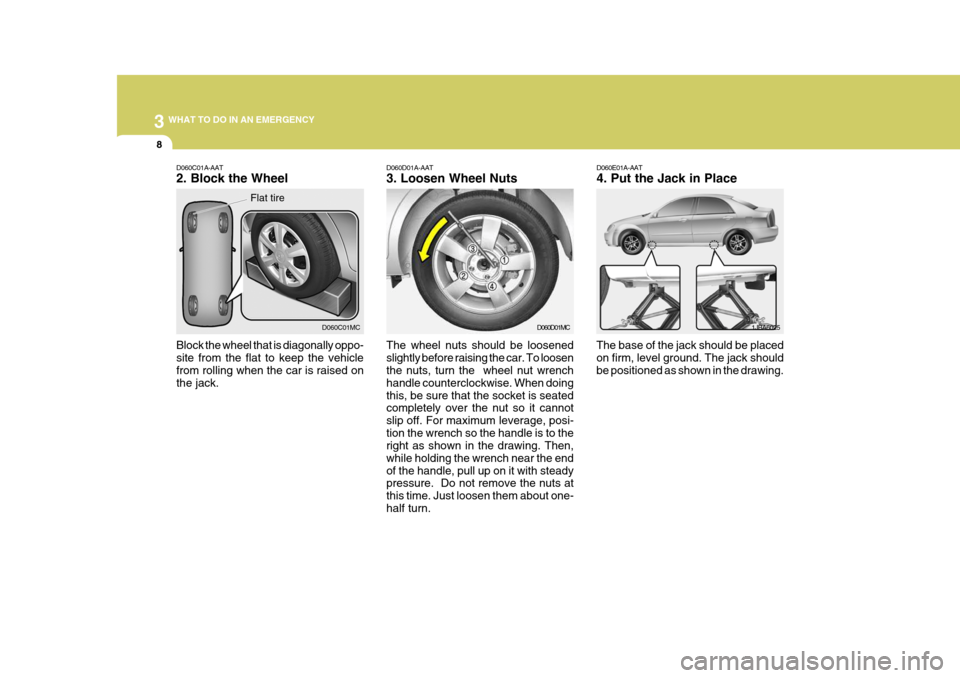
D060D01A-AAT 3. Loosen Wheel Nuts The wheel nuts should be loosened slightly before raising the car. To loosen the nuts, turn the wheel nut wrench handle counterclockwise. When doingthis, be sure that the socket is seated completely over the nut so it cannot slip off. For maximum leverage, posi-tion the wrench so the handle is to the right as shown in the drawing. Then, while holding the wrench near the endof the handle, pull up on it with steady pressure. Do not remove the nuts at this time. Just loosen them about one-half turn. D060E01A-AAT 4. Put the Jack in Place
The base of the jack should be placed on firm, level ground. The jack should be positioned as shown in the drawing. 1JBA6025
D060D01MC
D060C01A-AAT 2. Block the Wheel Block the wheel that is diagonally oppo- site from the flat to keep the vehicle from rolling when the car is raised on the jack.D060C01MC
Flat tire
Page 198 of 282

3
WHAT TO DO IN AN EMERGENCY
9
!
D060G02Y-AAT 6. Changing Wheels Loosen the wheel nuts and remove them with your fingers. Slide the wheel off the studs and lay it flat so it cannotroll away. To put the wheel on the hub, pick up the spare tire, line up the holes
D060F02E-AAT 5. Raising the Car After inserting a wrench bar into the wheel nut wrench, install the wrench bar into the jack as shown in the draw- ing. To raise the vehicle, turn the wheelnut wrench clockwise. As the jack be- gins to raise the vehicle, double check that it is properly positioned and willnot slip. If the jack is on soft ground or sand, place a board, brick, flat stone or other object under the base of the jackto keep it from sinking. Raise the car high enough so that the fully inflated spare tire can be installed.To do this, you will need more ground clearance than is required to remove the flat tire.
Wrench bar
Wheel nut wrench WARNING:
Do not get under the car when it is supported by the jack! This is very dangerous as the vehicle could falland cause serious injury or death. No one should stay in the car while the jack is being used.
D060F01MC with the studs and slide the wheel ontothem. If this is difficult, tip the wheelslightly and get the top hole in the wheel lined up with the top stud. Then jiggle the wheel back and forth until thewheel can be slid over the other studs.
D060G02MC
D060G03MC
Page 199 of 282
3 WHAT TO DO IN AN EMERGENCY
10
!
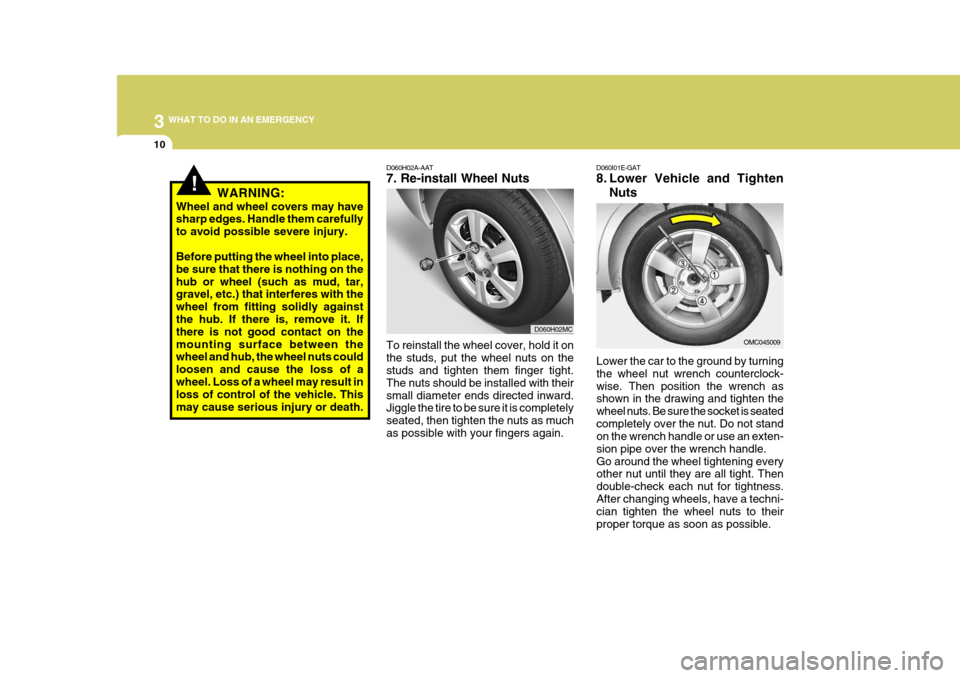
D060H02A-AAT 7. Re-install Wheel Nuts
Lower the car to the ground by turning the wheel nut wrench counterclock-wise. Then position the wrench as shown in the drawing and tighten the wheel nuts. Be sure the socket is seatedcompletely over the nut. Do not stand on the wrench handle or use an exten- sion pipe over the wrench handle.Go around the wheel tightening every other nut until they are all tight. Then double-check each nut for tightness.After changing wheels, have a techni- cian tighten the wheel nuts to their proper torque as soon as possible.
D060I01E-GAT
8. Lower Vehicle and Tighten
Nuts
To reinstall the wheel cover, hold it on the studs, put the wheel nuts on the studs and tighten them finger tight. The nuts should be installed with theirsmall diameter ends directed inward. Jiggle the tire to be sure it is completely seated, then tighten the nuts as muchas possible with your fingers again. OMC045009
WARNING:
Wheel and wheel covers may have sharp edges. Handle them carefully to avoid possible severe injury. Before putting the wheel into place, be sure that there is nothing on thehub or wheel (such as mud, tar, gravel, etc.) that interferes with the wheel from fitting solidly againstthe hub. If there is, remove it. If there is not good contact on the mounting surface between the wheel and hub, the wheel nuts could loosen and cause the loss of awheel. Loss of a wheel may result in loss of control of the vehicle. This may cause serious injury or death.
D060H02MC
Page 202 of 282
3
WHAT TO DO IN AN EMERGENCY
13
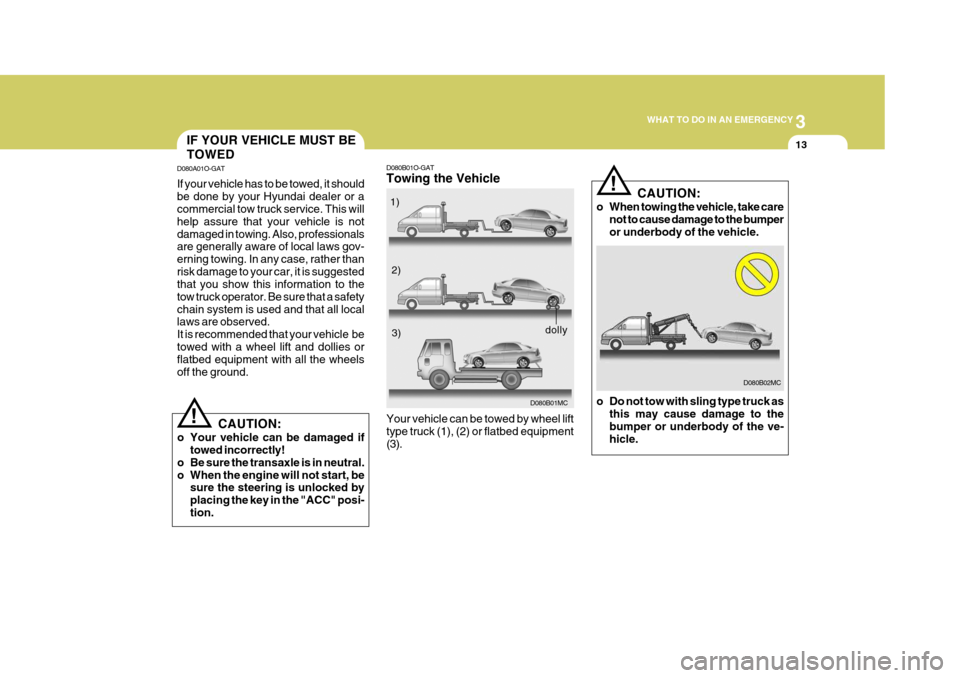
D080B01O-GAT Towing the Vehicle
D080B01MC
Your vehicle can be towed by wheel lift type truck (1), (2) or flatbed equipment(3). 1)
2)3)
dolly
D080B02MC
CAUTION:
o When towing the vehicle, take care not to cause damage to the bumper or underbody of the vehicle.
o Do not tow with sling type truck as this may cause damage to thebumper or underbody of the ve- hicle.
!
IF YOUR VEHICLE MUST BE TOWED
D080A01O-GAT If your vehicle has to be towed, it should be done by your Hyundai dealer or a commercial tow truck service. This will help assure that your vehicle is notdamaged in towing. Also, professionals are generally aware of local laws gov- erning towing. In any case, rather thanrisk damage to your car, it is suggested that you show this information to the tow truck operator. Be sure that a safetychain system is used and that all local laws are observed. It is recommended that your vehicle betowed with a wheel lift and dollies or flatbed equipment with all the wheels off the ground.
! CAUTION:
o Your vehicle can be damaged if towed incorrectly!
o Be sure the transaxle is in neutral.
o When the engine will not start, be sure the steering is unlocked byplacing the key in the "ACC" posi-tion.